

Your AI pair programmer for LeetCode — a senior engineer in your terminal.




Quickstart · Modes · Playbook · Under the Hood · FAQ
Stop grinding alone. LeetVibe puts a senior engineer in your terminal who can teach, coach, or interview you — depending on how much help you want today.
🧠 Three Modes
| 🎓 Learn | 🤝 Pair Programming | 🎤 Interview | |
|---|---|---|---|
| Who codes first | Vibe | You | — (verbal only) |
| What happens | Vibe solves it live in a strict 7-step workflow — reasoning out loud, running real code, measuring complexity | Vibe tests your attempt, diagnoses exact lines, and coaches you with Socratic hints | Alex, a senior engineer, runs a realistic mock interview — with voice via ElevenLabs |
| Reveals optimal | ✅ always | ✅ after coaching | ❌ never |
Every session is a live conversation: ask follow-up questions, push back, or go deeper at any point. The AI executes your code against real test cases, measures Big-O complexity from the AST, and explains algorithm patterns step by step.
📖 Playbook
An in-terminal algorithm reference covering 52 patterns — from Arrays and Binary Search to Network Flow, Segment Tree, and Digit DP. Every topic page breaks down:
- 🧠 The intuition behind the technique, and how to recognise when to use it
- 📐 Annotated code templates and their variants
- ⚠️ Pitfalls, edge cases, and the pattern it's most often confused with
- 🎤 The follow-up questions an interviewer would ask next
Ask AI about any pattern without leaving the guide, keep per-topic notes, and export it all to DOCX.
✨ More Features
- 📚 Problem browser — filter by difficulty, topic, or solved status; free-text search across 2,800+ LeetCode problems
- 💡 Built-in solutions — 1,900+ problems ship with a written solution and explanation; a "Has Solution" filter surfaces them
- ✏️ Inline code editor — write Python in the terminal and run it against the problem's test cases without leaving the app
- 📋 Live test results — pass/fail output per test case, run in an isolated subprocess with a timeout so an infinite loop can't hang the session
- 📊 Statistics screen — session counts, solved problem tracking, progress over time
- ☁️ Cloud sync — optional account to persist progress across machines
- 🧙 Onboarding wizard — first-run setup collects API keys interactively; nothing to configure by hand
🛣️ Coming Next
Practice mode — a fourth, AI-free mode for using LeetVibe as a plain terminal LeetCode client: write code, run tests, check hints, and read the built-in solutions with no agent in the loop. The Mistral API key becomes optional alongside it. Requested by users — more feedback welcome.
🚀 Getting Started
Requires Python 3.11+.
# with uv (recommended)
uv tool install leetvibe

# with pip
pip install leetvibe
leetvibe
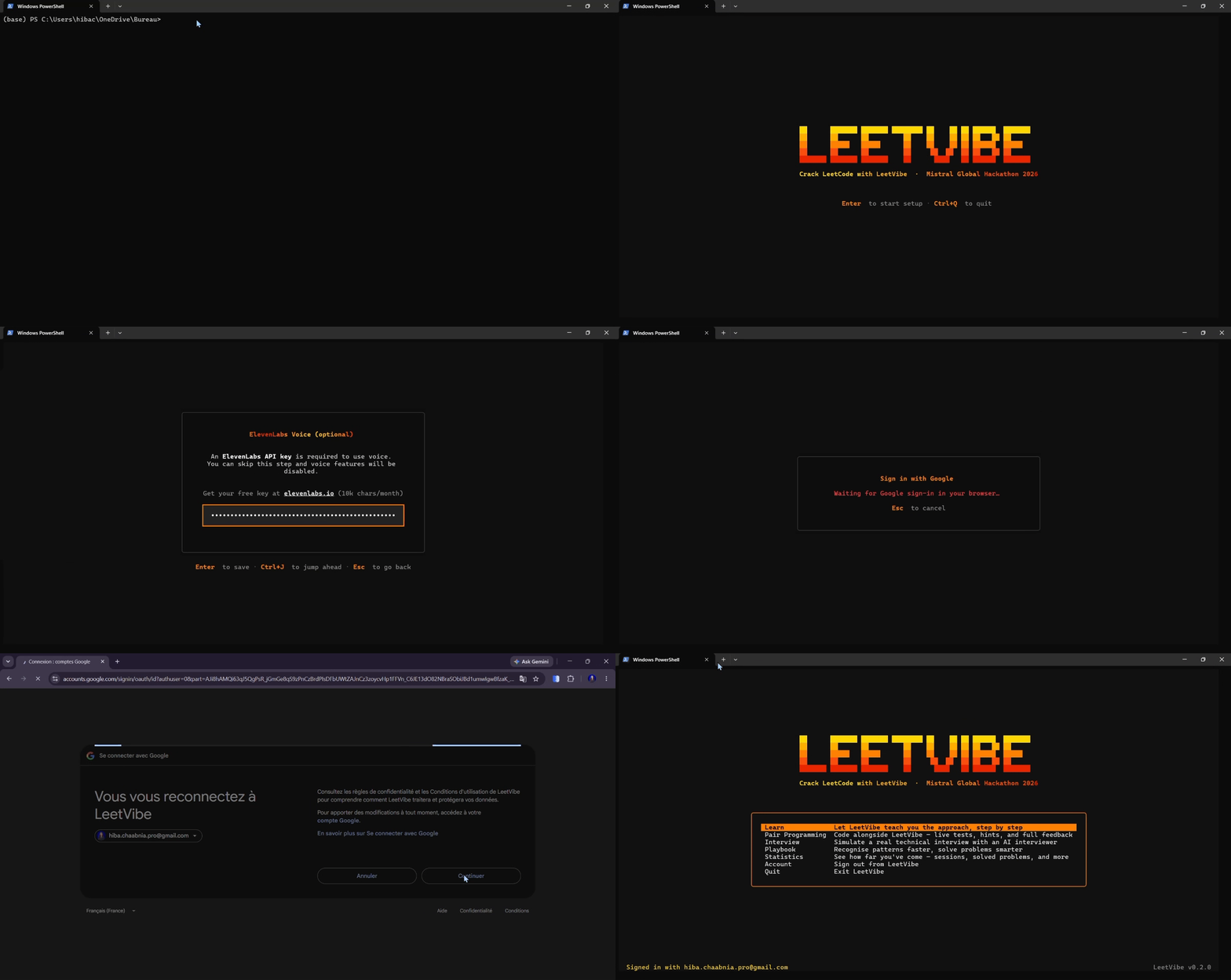
The onboarding wizard opens automatically on first launch. It will ask for your Mistral API key (required) and optionally your ElevenLabs key for voice narration. Keys are saved to ~/.leetvibe/.env and never touched again.
- 🔑 Get a Mistral key: https://console.mistral.ai
- 🔊 Get an ElevenLabs key: https://elevenlabs.io (optional)
📚 Full Documentation
Architecture diagrams, the agent loop, keyboard shortcuts, and the full mode walkthroughs live in the GitHub README. Contributions are welcome — see the Contribution Guide.
💬 Feedback
Found a wrong solution, an unclear explanation, or have a feature idea? Sign in and hit the Feedback button on any problem screen — it arrives tagged with the problem you were on. Or open an issue on GitHub.
📄 License
MIT © 2026 Hiba Chaabnia — see LICENSE for the full text.
1 maintainer

Download files
Download the file for your platform. If you're not sure which to choose, learn more about installing packages.
Source Distribution
Built Distribution
Filter files by name, interpreter, ABI, and platform.
If you're not sure about the file name format, learn more about wheel file names.
Copy a direct link to the current filters
File details
Details for the file leetvibe-0.2.1.tar.gz.
File metadata
- Download URL: leetvibe-0.2.1.tar.gz
- Upload date:
- Size: 2.5 MB
- Tags: Source
- Uploaded using Trusted Publishing? No
- Uploaded via:
uv/0.9.26 {"installer":{"name":"uv","version":"0.9.26","subcommand":["publish"]},"python":null,"implementation":{"name":null,"version":null},"distro":null,"system":{"name":null,"release":null},"cpu":null,"openssl_version":null,"setuptools_version":null,"rustc_version":null,"ci":null}
File hashes
| Algorithm | Hash digest | |
|---|---|---|
| SHA256 |
3d3ad4f726bfdb9271406c0105a7a978dd2a2812f3f966f18b5ca9549d91878e
|
|
| MD5 |
7fb07fce1dc4ae0d3890d4bfe608e012
|
|
| BLAKE2b-256 |
3a46daa6f94f7ef7cab1bb4e69b01c80846bbe840c3ecd36bc9956e751cb6ecd
|
File details
Details for the file leetvibe-0.2.1-py3-none-any.whl.
File metadata
- Download URL: leetvibe-0.2.1-py3-none-any.whl
- Upload date:
- Size: 4.5 MB
- Tags: Python 3
- Uploaded using Trusted Publishing? No
- Uploaded via:
uv/0.9.26 {"installer":{"name":"uv","version":"0.9.26","subcommand":["publish"]},"python":null,"implementation":{"name":null,"version":null},"distro":null,"system":{"name":null,"release":null},"cpu":null,"openssl_version":null,"setuptools_version":null,"rustc_version":null,"ci":null}
File hashes
| Algorithm | Hash digest | |
|---|---|---|
| SHA256 |
e99c43897f102a4df8f40cdef836f603f176a8685e5bbe1a94e222e92e8c3c3c
|
|
| MD5 |
575a8cd9ddb7a7a204cbc79618d682ce
|
|
| BLAKE2b-256 |
82ce5d12dfe29c7527806f075d5426cd07c6c5b2293a23fb6f725d2a177bc971
|







