
leo-cub
leo-cub is an experimental Rust library and command-line tool for reading,
validating, browsing, and modifying Leo Editor
outlines.
The installed command is cub; the Rust library namespace is leo.
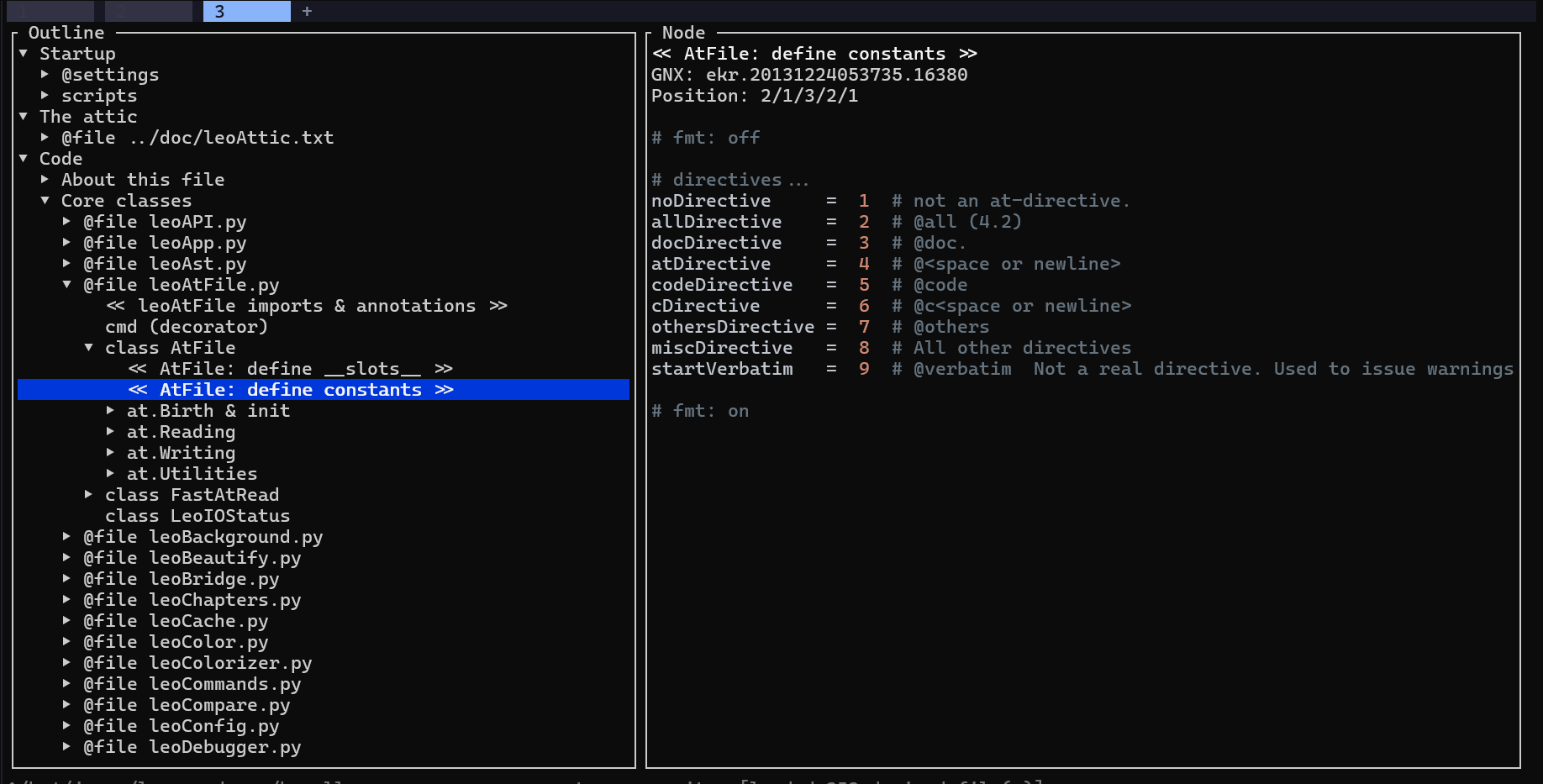
Screenshot
Why
Leo outlines are not ordinary XML trees. A GNX identifies shared vnode content,
while an outline position identifies one occurrence of that vnode. Cloned nodes
can therefore appear in several places. leo-cub keeps those concepts separate
and exposes transactional operations intended for scripts and AI tools.
Current features
- Parse and validate
.leoXML outlines. - Preserve XML outside the rewritten
<vnodes>and<tnodes>sections. - Represent clone identity separately from outline positions.
- Apply atomic JSON operation batches with optional text preconditions.
- Parse Leo 5 thin derived-file sentinels.
- Reconstruct
@file,@thin, and@file-thinhierarchies and bodies. - Resolve ancestor
@pathdirectives in the TUI. - Browse outlines with a small Ratatui interface.
- Highlight node bodies with Syntect, using
@language,@rstancestors, or source extensions, including bundled reStructuredText syntax support. - Open a derived node's full source file at its sentinel line using
$VISUALor$EDITOR.
Install
The recommended installation method is uv:
uv tool install leo-cub
This installs the cub command. You can also use pip install leo-cub,
or download the appropriate archive
from the latest GitHub release.
Termux
The PyPI release includes an Android API 24 ARM64 wheel suitable for current 64-bit Termux installations:
uv tool install leo-cub
To build the command locally in Termux instead, install the native toolchain and build from a repository checkout:
pkg install rust clang git
git clone https://github.com/vivainio/leo-cub.git
cd leo-cub
cargo install --path . --locked
Installation from source
From the repository root, install the cub command with Cargo:
cargo install --path .
Install the bundled local agent skill after installing the command:
cub install-skills
This writes ~/.claude/skills/leo-cub/SKILL.md and overwrites an existing
copy, so it is safe to rerun after upgrading.
TUI
cub tui outline.leo
The browser resolves external thin files in memory. Outline headlines highlight
Leo directives, external-file names, and section-reference markers. A red *
marks each node changed since the outline was loaded or last saved; saving or
reloading clears the markers.
TUI keybindings
Browsing and display
| Key | Action |
|---|---|
↓ / ↑ |
Select next/previous node |
→, Enter |
Expand selected node |
← |
Collapse selected node |
Home / End |
Select the first/last visible node |
PageUp / PageDown |
Scroll the selected node's body by one page |
f |
Toggle a full-width body pane |
Shift-F |
Toggle a full-width outline pane |
↑ / ↓ in full-width mode |
Scroll the body vertically by one line |
← / → in full-width mode |
Scroll the body horizontally |
Ctrl-P |
Find a headline incrementally; use ↑/↓ to cycle matches |
o |
Edit the node body in $VISUAL/$EDITOR; for derived nodes, open the real source at its sentinel |
y |
Toggle syntax highlighting |
? |
Show command help |
Outline editing
| Key | Action |
|---|---|
Ctrl-I or Tab |
Insert a new sibling and enter headline editing |
Ctrl-H or Backspace |
Edit the selected headline |
Ctrl-↑, Ctrl-↓ |
Move among siblings |
Ctrl-←, Ctrl-→ |
Promote or demote the selected node |
Ctrl-R |
Reload from disk; press twice to discard unsaved changes |
Ctrl-S |
Save outline changes |
q or Esc |
Quit; press twice to discard unsaved changes |
Headline editing
| Key | Action |
|---|---|
| Printable characters | Append to the headline |
Backspace |
Delete the previous character |
Enter |
Accept the headline |
Esc |
Cancel editing; a newly inserted node is removed |
Use --no-derived to display only the hierarchy physically present in the
.leo XML file.
For source navigation, cub recognizes common position arguments for Vim,
Neovim, Nano, Emacs, VS Code, Microsoft Edit, Helix, and Kakoune. Other editors
receive the file path without a line argument.
Demo flow
Starting in a project containing README.md and a src/ directory, create a
new outline with destinations for source code, documentation, and tasks:
cub new project.leo --headline "Project"
cub add project.leo \
  "Project/Source" \
  "Project/Documentation" \
  "Project/Tasks/Backlog"
Import the source tree below Project/Source, preserving its directory
structure, then import the README as an editable node below the documentation
branch:
cub import project.leo src \
  --recursive --mode auto --paths \
  --parent "Project/Source"
cub import project.leo README.md \
  --mode edit \
  --parent "Project/Documentation"
Finally, inspect the resulting tree and validate the file:
cub inspect project.leo
cub validate project.leo
@auto source nodes are reconstructed from their files when inspected or
opened, while the @edit README node stores its text in the outline.
Headless commands
cub new outline.leo
cub new notes.leo --headline "Notes"
cub add outline.leo "Project/Tasks/First task" "Project/Notes"
cub inspect outline.leo
cub inspect outline.leo src/main.rs
cub inspect outline.leo --gnx ekr.20260811210000.1
cub inspect outline.leo --position 0/2/1
cub inspect outline.leo --search 'render_(compact|json)'
cub inspect outline.leo --search TODO --search FIXME
cub inspect outline.leo src/main.rs --format json
cub validate outline.leo
cub import outline.leo src --recursive --mode auto --paths
cub import outline.leo README.md --mode edit --no-paths
cub import outline.leo README.md --parent "Project/Notes"
cub sync outline.leo
cub sync outline.leo src/main.rs --dry-run
cub sync outline.leo --gnx ekr.20260811210000.1
cub diff before.leo after.leo
cub inspect-derived path/to/derived.py --summary
cub apply outline.leo operations.json --dry-run
new creates a valid outline with one empty root node. It refuses to overwrite
an existing file.
add creates nodes from slash-separated headline paths and reuses shared or
existing prefixes. import --parent accepts either an exact GNX or a unique
slash-separated headline path. Paths with duplicate matching siblings are
rejected as ambiguous.
import creates Leo external-file nodes in auto, edit, or clean mode.
Markdown, Python, Rust, C#, Go, JavaScript/JSX, and TypeScript/TSX @auto files
are expanded transiently with Tree-sitter when they are loaded by inspect or
the TUI; the generated tree is not stored in the .leo file. Unsupported
source types remain available as a plain root node. Markdown also supports
Leo's @auto-md and @auto-markdown headlines and leo-noheader markers.
Directory imports are recursive only with --recursive and preserve their
layout with @path nodes by default. Use --no-paths to put all imported
files directly below the destination, --parent GNX_OR_PATH to choose that
destination, and --dry-run to validate without saving.
inspect uses a compact text format containing position paths, GNXs,
headlines, and bodies. Repeated clone content is shown as =GNX. Use
--format json for structured output in scripts.
--search accepts a Rust regular expression and searches headlines and body
lines. Search results include line-numbered excerpts with two surrounding lines
instead of printing entire matching bodies. Repeat --search to match any of
several expressions. Thin external files are scanned first and reconstructed
only when they may contain a search or GNX match.
An operation batch is a JSON object:
{
  "operations": [
    {
      "op": "set-body",
      "node": "ekr.20260811210000.1",
      "expected": "old body",
      "body": "new body"
    }
  ]
}
Operations are applied to a copy and committed only if the complete batch is
valid. expected provides optimistic conflict detection for headline and body
edits.
Status and safety
This project is early and the file format support is incomplete. In particular,
it does not yet write thin derived files, dynamically interpret every
@comment/@delims change, or fully reconstruct all doc-part forms. Keep
backups and use --dry-run when testing write operations on important outlines.
The TUI overlays derived files without modifying either the outline or external
source files. Derived descendants are read-only in the outline editor; use o
to edit their full external source. Unsaved outline changes require a second
q before they are discarded.
License
MIT
1 maintainer

Download files
Download the file for your platform. If you're not sure which to choose, learn more about installing packages.
Source Distributions
Built Distributions
Filter files by name, interpreter, ABI, and platform.
If you're not sure about the file name format, learn more about wheel file names.
Copy a direct link to the current filters
File details
Details for the file leo_cub-0.2.2-py3-none-win_amd64.whl.
File metadata
- Download URL: leo_cub-0.2.2-py3-none-win_amd64.whl
- Upload date:
- Size: 3.3 MB
- Tags: Python 3, Windows x86-64
- Uploaded using Trusted Publishing? Yes
- Uploaded via:
twine/7.0.0 CPython/3.13.14
File hashes
| Algorithm | Hash digest | |
|---|---|---|
| SHA256 |
0406c2e72d771c717a14a1e922489c5b8c3fb102dbe76ca67ccfdb6d3981580d
|
|
| MD5 |
1b6e27f80700372f9d27b6eb6e2a3ef6
|
|
| BLAKE2b-256 |
1ce6d73ac4a162cd5496af1b3f31405ef40d0d6f81b0841193f4df3605eeacf0
|
Provenance
The following attestation bundles were made for leo_cub-0.2.2-py3-none-win_amd64.whl:
Publisher:
release.yml on vivainio/leo-cub
-
Statement:
-
Statement type:
https://in-toto.io/Statement/v1 -
Predicate type:
https://docs.pypi.org/attestations/publish/v1 -
Subject name:
leo_cub-0.2.2-py3-none-win_amd64.whl -
Subject digest:
0406c2e72d771c717a14a1e922489c5b8c3fb102dbe76ca67ccfdb6d3981580d - Sigstore transparency entry: 2476373172
- Sigstore integration time:
-
Permalink:
vivainio/leo-cub@10c404277e8c3cccba7db3d620b84358d2107d18 -
Branch / Tag:
refs/tags/v0.2.2 - Owner: https://github.com/vivainio
-
Access:
public
-
Token Issuer:
https://token.actions.githubusercontent.com -
Runner Environment:
github-hosted -
Publication workflow:
release.yml@10c404277e8c3cccba7db3d620b84358d2107d18 -
Trigger Event:
push
-
Statement type:
File details
Details for the file leo_cub-0.2.2-py3-none-manylinux_2_17_x86_64.manylinux2014_x86_64.whl.
File metadata
- Download URL: leo_cub-0.2.2-py3-none-manylinux_2_17_x86_64.manylinux2014_x86_64.whl
- Upload date:
- Size: 3.7 MB
- Tags: Python 3, manylinux: glibc 2.17+ x86-64
- Uploaded using Trusted Publishing? Yes
- Uploaded via:
twine/7.0.0 CPython/3.13.14
File hashes
| Algorithm | Hash digest | |
|---|---|---|
| SHA256 |
74ef3ec8bc593d8d49cbed339bf608024e77bb2a375fd184dc0787391fe8c512
|
|
| MD5 |
c8921fdf8d5b63f31c443ceaa39af332
|
|
| BLAKE2b-256 |
a055a4c4e37dfd3240719e2e32373802f226ac7406199ef1e67e7443fee4c8bd
|
Provenance
The following attestation bundles were made for leo_cub-0.2.2-py3-none-manylinux_2_17_x86_64.manylinux2014_x86_64.whl:
Publisher:
release.yml on vivainio/leo-cub
-
Statement:
-
Statement type:
https://in-toto.io/Statement/v1 -
Predicate type:
https://docs.pypi.org/attestations/publish/v1 -
Subject name:
leo_cub-0.2.2-py3-none-manylinux_2_17_x86_64.manylinux2014_x86_64.whl -
Subject digest:
74ef3ec8bc593d8d49cbed339bf608024e77bb2a375fd184dc0787391fe8c512 - Sigstore transparency entry: 2476373132
- Sigstore integration time:
-
Permalink:
vivainio/leo-cub@10c404277e8c3cccba7db3d620b84358d2107d18 -
Branch / Tag:
refs/tags/v0.2.2 - Owner: https://github.com/vivainio
-
Access:
public
-
Token Issuer:
https://token.actions.githubusercontent.com -
Runner Environment:
github-hosted -
Publication workflow:
release.yml@10c404277e8c3cccba7db3d620b84358d2107d18 -
Trigger Event:
push
-
Statement type:
File details
Details for the file leo_cub-0.2.2-py3-none-macosx_11_0_arm64.whl.
File metadata
- Download URL: leo_cub-0.2.2-py3-none-macosx_11_0_arm64.whl
- Upload date:
- Size: 3.5 MB
- Tags: Python 3, macOS 11.0+ ARM64
- Uploaded using Trusted Publishing? Yes
- Uploaded via:
twine/7.0.0 CPython/3.13.14
File hashes
| Algorithm | Hash digest | |
|---|---|---|
| SHA256 |
ef7760059b835c4e4c23f93afcb6afffb00db050b516f1b825b27de3f05cb052
|
|
| MD5 |
71ae48b1a758e70991ecc1a0394e50fa
|
|
| BLAKE2b-256 |
6ad5eb2b18603a505909fa6d474e29513b5acaf5312823bbfafc8c439bbaeacc
|
Provenance
The following attestation bundles were made for leo_cub-0.2.2-py3-none-macosx_11_0_arm64.whl:
Publisher:
release.yml on vivainio/leo-cub
-
Statement:
-
Statement type:
https://in-toto.io/Statement/v1 -
Predicate type:
https://docs.pypi.org/attestations/publish/v1 -
Subject name:
leo_cub-0.2.2-py3-none-macosx_11_0_arm64.whl -
Subject digest:
ef7760059b835c4e4c23f93afcb6afffb00db050b516f1b825b27de3f05cb052 - Sigstore transparency entry: 2476373144
- Sigstore integration time:
-
Permalink:
vivainio/leo-cub@10c404277e8c3cccba7db3d620b84358d2107d18 -
Branch / Tag:
refs/tags/v0.2.2 - Owner: https://github.com/vivainio
-
Access:
public
-
Token Issuer:
https://token.actions.githubusercontent.com -
Runner Environment:
github-hosted -
Publication workflow:
release.yml@10c404277e8c3cccba7db3d620b84358d2107d18 -
Trigger Event:
push
-
Statement type:
File details
Details for the file leo_cub-0.2.2-py3-none-macosx_10_12_x86_64.whl.
File metadata
- Download URL: leo_cub-0.2.2-py3-none-macosx_10_12_x86_64.whl
- Upload date:
- Size: 3.6 MB
- Tags: Python 3, macOS 10.12+ x86-64
- Uploaded using Trusted Publishing? Yes
- Uploaded via:
twine/7.0.0 CPython/3.13.14
File hashes
| Algorithm | Hash digest | |
|---|---|---|
| SHA256 |
089ab4d45a8bc0a767f9eb3d9c5a1d155e81335f5cb334ee919176756f4a407b
|
|
| MD5 |
d658e8e982f022a36eae3a3568f582fa
|
|
| BLAKE2b-256 |
e2641048479df8f24fb439462c9d50dd2ddf85a1ca534f52dabda422c99fb026
|
Provenance
The following attestation bundles were made for leo_cub-0.2.2-py3-none-macosx_10_12_x86_64.whl:
Publisher:
release.yml on vivainio/leo-cub
-
Statement:
-
Statement type:
https://in-toto.io/Statement/v1 -
Predicate type:
https://docs.pypi.org/attestations/publish/v1 -
Subject name:
leo_cub-0.2.2-py3-none-macosx_10_12_x86_64.whl -
Subject digest:
089ab4d45a8bc0a767f9eb3d9c5a1d155e81335f5cb334ee919176756f4a407b - Sigstore transparency entry: 2476373156
- Sigstore integration time:
-
Permalink:
vivainio/leo-cub@10c404277e8c3cccba7db3d620b84358d2107d18 -
Branch / Tag:
refs/tags/v0.2.2 - Owner: https://github.com/vivainio
-
Access:
public
-
Token Issuer:
https://token.actions.githubusercontent.com -
Runner Environment:
github-hosted -
Publication workflow:
release.yml@10c404277e8c3cccba7db3d620b84358d2107d18 -
Trigger Event:
push
-
Statement type:
File details
Details for the file leo_cub-0.2.2-py3-none-android_24_arm64_v8a.whl.
File metadata
- Download URL: leo_cub-0.2.2-py3-none-android_24_arm64_v8a.whl
- Upload date:
- Size: 3.7 MB
- Tags: Android API level 24+ ARM64 v8a, Python 3
- Uploaded using Trusted Publishing? Yes
- Uploaded via:
twine/7.0.0 CPython/3.13.14
File hashes
| Algorithm | Hash digest | |
|---|---|---|
| SHA256 |
a47399edfdd86a35c41bf7cbc08e030f76a98d3ed592733fcf286bc46f30de20
|
|
| MD5 |
dd4eeabe2edd3098747a67a9275203e9
|
|
| BLAKE2b-256 |
fc7626874dc3bdefd11d559feb6f29ac1deb96cc45a335633db201c961595ed8
|
Provenance
The following attestation bundles were made for leo_cub-0.2.2-py3-none-android_24_arm64_v8a.whl:
Publisher:
release.yml on vivainio/leo-cub
-
Statement:
-
Statement type:
https://in-toto.io/Statement/v1 -
Predicate type:
https://docs.pypi.org/attestations/publish/v1 -
Subject name:
leo_cub-0.2.2-py3-none-android_24_arm64_v8a.whl -
Subject digest:
a47399edfdd86a35c41bf7cbc08e030f76a98d3ed592733fcf286bc46f30de20 - Sigstore transparency entry: 2476373115
- Sigstore integration time:
-
Permalink:
vivainio/leo-cub@10c404277e8c3cccba7db3d620b84358d2107d18 -
Branch / Tag:
refs/tags/v0.2.2 - Owner: https://github.com/vivainio
-
Access:
public
-
Token Issuer:
https://token.actions.githubusercontent.com -
Runner Environment:
github-hosted -
Publication workflow:
release.yml@10c404277e8c3cccba7db3d620b84358d2107d18 -
Trigger Event:
push
-
Statement type:







