
lerobot_robot_lekiwi_pincopen


My LeKiwi runs STS3250 servos on the big arm joints and a PincOpen gripper. This plugin lets the original, unmodified LeRobot (0.6.1 or newer) drive that hardware, zero source edits.
I wrote up the hardware build in Mobile Manipulation with LeKiwi + PincOpen. This package is that integration as installable code.
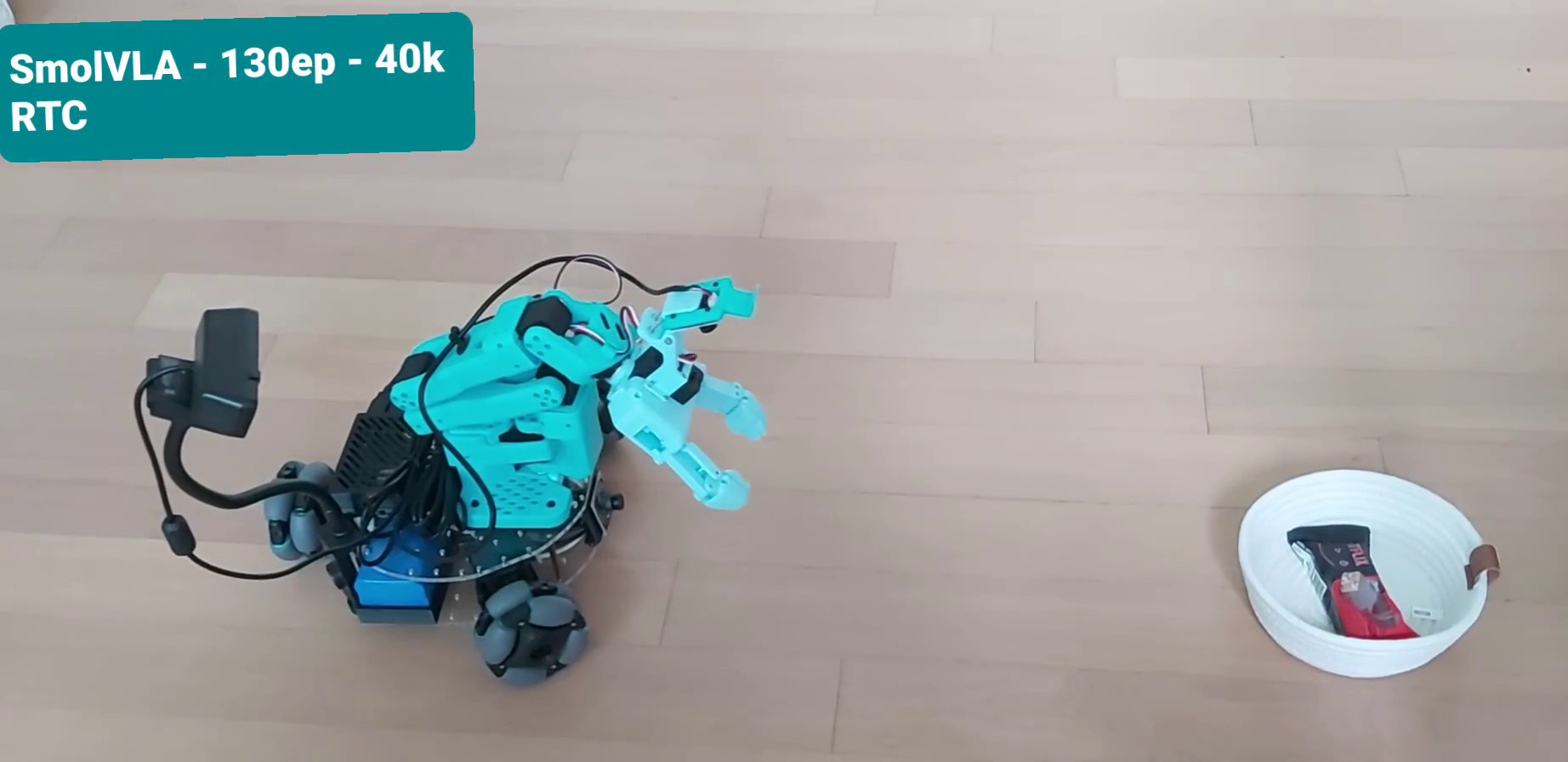
▶ click for the clip: autonomous SmolVLA rollout, pick up the chocolate bar from the basket and place it on the ground
vs the original lekiwi robot:
- STS3250 on the heavy arm joints, set by
sts3250_joints(default: joints 2-4; shoulder_pan, wrist_roll and gripper are STS3215) - load-based tuning via
heavy_joints, independent of which servo is fitted - PincOpen gripper: fixed EPROM calibration, skipped during interactive calibration
- tuned servo params written on every connect, all exposed as config fields:
tuning is a yaml/CLI edit (
--robot.heavy_p_coefficient=10), never a code change - camera capture pinned to MJPG — without a
fourcc, OpenCV auto-negotiates uncompressed YUYV (~147 Mbps/camera) and saturates the Pi's USB2 bus; MJPG is ~16× lighter for identical frames. Upstream has set MJPG on the LeKiwi defaults since 0.6.1, so this now re-asserts rather than fixes it - an opt-in per-tick motion cap for
max_relative_target, see Safety
Install
pip install lerobot_robot_lekiwi_pincopen
That pulls lerobot[lekiwi] with it, which brings the Feetech servo SDK the bus needs
and pyzmq for the host. Requires Python 3.12 or newer, as lerobot does.
Nothing else to wire up: every lerobot CLI calls register_third_party_plugins(), which
imports installed distributions named lerobot_robot_*, so the robot and teleoperator
types below appear in --robot.type / --teleop.type as soon as the package is present.
To hack on it instead, from a clone:
pip install -e ".[dev]"
Use
LeRobot auto-discovers the plugin by its package name (the official third-party conventions):
# calibrate (gripper is skipped, its EPROM calibration is applied)
lerobot-calibrate --robot.type=lekiwi_pincopen --robot.id=my_lekiwi

# host (the original lekiwi_host skips plugin discovery, hence the wrapper; same CLI, same yaml)
python -m lerobot_robot_lekiwi_pincopen.lekiwi_host --config_path=host.yaml
The client side (teleop/record/eval) needs nothing from this package:
lekiwi_client never touches motors.
Calibration files live under
~/.cache/huggingface/lerobot/calibration/robots/lekiwi_pincopen/.
Driving LeKiwi from the record / teleoperate CLIs
LeKiwi is a mobile manipulator, so it takes two devices to drive: a leader arm for
the arm and a keyboard for the holonomic base. Stock lerobot-teleoperate cannot
express that, and stock lerobot-record cannot talk to a LeKiwi client at all. The
package ships two laptop-side types that close both gaps without patching lerobot:
--robot.type=lekiwi_pincopen_client— the ZMQ client. Stock lerobot never registerslekiwi_clientin the record/teleoperate scripts, so it is not a selectable choice there; andLeKiwiClientexposes no.cameras, so recording dies onlen(robot.cameras)while sizing its image writer. This registers the client and reports the configured cameras.--teleop.type=lekiwi_pincopen_leader— one teleoperator wrapping the sprung SO-101 leader plus a keyboard for the base, the waybi_so_leaderwraps two arms. The CLIs see a single ordinary teleoperator. WASD moves, Z/X rotate, R/F change speed.
robot:
  type: lekiwi_pincopen_client
  remote_ip: 192.168.0.42
  id: my_kiwi

teleop:
  type: lekiwi_pincopen_leader
  id: my_leader
  # See the note below: use an ABSOLUTE path.
  calibration_dir: /home/<you>/.cache/huggingface/lerobot/calibration/teleoperators/so101_leader
  arm_config:
    port: /dev/ttyACM0
  # Optional; these are the defaults.
  # teleop_keys: {forward: w, backward: s, left: a, right: d, rotate_left: z, rotate_right: x, speed_up: r, speed_down: f, quit: q}
  # speed_levels: [{xy: 0.1, theta: 30}, {xy: 0.2, theta: 60}, {xy: 0.3, theta: 90}]
Notes:
- Nothing changes on the robot/host side, so there is no need to redeploy the Pi.
- The arm keeps the teleoperator's own
idunsuffixed, so an existing leader calibration keeps resolving. Migrating from--teleop.type=so101_leader_sprungis a type swap plus movingportunderarm_config. - The keyboard is best effort.
pynputcannot capture keys on Wayland or on a headless machine; there the base holds still and the arm stays teleoperable rather than the session failing. - Both were proposed upstream in
huggingface/lerobot#3741. Part of it
landed: 0.6.1's
lerobot-recordhas a multi-teleop branch, but it is gated onrobot.name == "lekiwi_client"andlerobot-teleoperatestill has none, so both types here are still needed.
Optional: sprung gripper trigger for the SO-101 leader
The package also ships --teleop.type=so101_leader_sprung: a stock SO-101
leader whose gripper trigger pushes back progressively when squeezed and
springs back to fully open when released — the SO-arm analogue of the Koch
leader's current-based-position trigger, emulated in the STS3215's position
mode (soft P gain + low torque cap). Works with any SO-101/SO-100 leader, not
just PincOpen setups.
teleop:
  type: so101_leader_sprung
  port: /dev/ttyACM0
  id: my_leader
  # calibration files are stored per teleoperator type; reuse an existing
  # so101_leader calibration instead of recalibrating. Use an ABSOLUTE path:
  # lerobot does not expand `~` in calibration_dir.
  calibration_dir: /home/<you>/.cache/huggingface/lerobot/calibration/teleoperators/so101_leader
Notes:
- Position reads are unchanged — recorded gripper actions are identical apart from a consistent open rest position between grasps.
- The spring's
P_Coefficientwrite persists in the servo's EPROM (harmless; the servo behaves identically when used as a stock passive leader, since torque is off outside this teleoperator). - Hand-tuned on real hardware; holding the trigger fully squeezed for 8 continuous minutes raised the servo temperature by 1 °C, and the factory overload protection stays armed above the configured torque cap.
Safety: bounding per-tick motion
LeRobot's max_relative_target caps how far a single control tick may command a joint
from where it currently is, so one bad action — a policy that emits garbage, an
out-of-distribution observation, a replayed action from the wrong dataset — is spread
over several ticks instead of arriving as a slam. It is inherited from LeKiwiConfig and
defaults to None; this package exports a vetted set of values to fill it with:
from lerobot_robot_lekiwi_pincopen import PINCOPEN_MAX_RELATIVE_TARGET
The clamp runs in LeKiwi.send_action, which executes on the robot, so it goes in the
host yaml — setting it on the client side does nothing:
robot:
  max_relative_target:
    arm_shoulder_pan.pos: 40.0
    arm_shoulder_lift.pos: 40.0
    arm_elbow_flex.pos: 40.0
    arm_wrist_flex.pos: 40.0
    arm_wrist_roll.pos: 40.0
    arm_gripper.pos: 100.0
Left opt-in rather than defaulted on, because enabling it adds a Present_Position read to
every send_action, on a bus that already needs num_read_retries when several joints move
at once. Notes on the values:
- Units follow each joint's norm mode: degrees for the five body joints (
use_degrees=True), percent of travel for the gripper. - One value across the body joints on purpose — a backstop against a command no human or
policy should issue, not a per-joint tuning. For load-dependent protection use
joint_torque_limits, which bounds how hard a joint pulls rather than how far it is asked to jump. - The gripper is effectively uncapped, because the sprung trigger's release is a one-tick full-range move by design.
- Every arm joint must appear or
ensure_safe_goal_positionraises. Note the keys carry the.possuffix here, unlike SO-101 follower configs. - To fit another setup, or after retuning P-gains or changing fps, take
|action - observation.state|per joint across a recorded dataset and allow roughly twice its p99.9. If the host starts loggingRelative goal position magnitude had to be clampedduring normal work, the cap is too tight.
Tuning
| Field | Default |
|---|---|
arm_p_coefficient |
14 |
heavy_p_coefficient |
10 |
heavy_acceleration |
200 |
gripper_acceleration |
200 |
gripper_overload_torque |
65 (percent) |
gripper_protective_torque |
5 (percent) |
gripper_protection_time |
7 (x10 ms) |
P=10 on the big joints is the load-bearing fix. The original writes P=16, which gave me jitter and servo overload shutdowns on this hardware.
Tests
pip install -e .[dev]
python -m pytest tests
No hardware needed, everything stops short of bus.connect().
Related
- Mobile Manipulation with LeKiwi + PincOpen: the hardware story
- lekiwi-tui: my terminal control center, ships and drives this plugin automatically
License
Apache-2.0. calibrate()/configure() derive from LeRobot (Apache-2.0,
The HuggingFace Inc. team); see the file headers.
1 maintainer

Metadata
1 maintainer
Release files for lerobot-robot-lekiwi-pincopen 0.1.2
For a detailed explanation of source distributions (sdists) and built distributions (wheels), please see the package formats documentation.
Source distribution (sdist)
| File | Size | Uploaded | Provenance | Actions |
|---|---|---|---|---|
| lerobot_robot_lekiwi_pincopen-0.1.2.tar.gz | 29.3 kB | With provenance | Details for lerobot_robot_lekiwi_pincopen-0.1.2.tar.gz |
Built distribution (wheel)
| File | Interpreter | ABI | Platform | Actions Reset |
|---|---|---|---|---|
| lerobot_robot_lekiwi_pincopen-0.1.2-py3-none-any.whl | Python 3 | none | any | Details for lerobot_robot_lekiwi_pincopen-0.1.2-py3-none-any.whl |
Total release size: 59.0 kB
Release files / lerobot_robot_lekiwi_pincopen-0.1.2.tar.gz
| Download URL | lerobot_robot_lekiwi_pincopen-0.1.2.tar.gz |
|---|---|
| Size | 29.3 kB |
| Tags | Source |
|
SHA-256 checksum How to use checksums |
e58d6ede7f84b3f349e7d6d9113addcb9bee19bc356a249ecd15ba548d993acf
|
|
BLAKE2b-256 checksum How to use checksums |
260d24ded918b4dfda2b1b573cec1da16101f42db80453897d9677f1526f4d5e
|
| Upload date | |
|
Uploaded using Trusted Publishing? What is trusted publishing? |
Yes |
| Uploaded via |
twine/7.0.0 CPython/3.13.14
|
Provenance
Provenance describes where a file came from. On PyPI, provenance is shared via attestations, which provide a verifiable record of the build or publishing details. View details, limitations and caveats.


PyPI Publish Attestation
PyPI verified that this artifact, at this checksum, originated from the publisher listed below.
Signed by GitHub Actions, verified by PyPI on Aug 17, 2026.
Transparency logRelease files / lerobot_robot_lekiwi_pincopen-0.1.2-py3-none-any.whl
| Download URL | lerobot_robot_lekiwi_pincopen-0.1.2-py3-none-any.whl |
|---|---|
| Size | 29.7 kB |
| Tags | Python 3 |
|
SHA-256 checksum How to use checksums |
a4a03cd3ef440581fadcd5cb486502de900ed39d50d8dc7a4520ad679b78bf6b
|
|
BLAKE2b-256 checksum How to use checksums |
de7e392af7893cf7b33b9457f7b0e4f9e4a877f1c58a64c0a88f4f990cf41fb8
|
| Upload date | |
|
Uploaded using Trusted Publishing? What is trusted publishing? |
Yes |
| Uploaded via |
twine/7.0.0 CPython/3.13.14
|
Provenance
Provenance describes where a file came from. On PyPI, provenance is shared via attestations, which provide a verifiable record of the build or publishing details. View details, limitations and caveats.
PyPI Publish Attestation
PyPI verified that this artifact, at this checksum, originated from the publisher listed below.
Signed by GitHub Actions, verified by PyPI on Aug 17, 2026.
Transparency logSecurity for lerobot-robot-lekiwi-pincopen 0.1.2
Provenance
Provenance describes where a file came from. On PyPI, provenance is shared via attestations, which provide a verifiable record of the build or publishing details. View details, limitations and caveats.
Full provenance
Both files in this release have been uploaded with provenance metadata.
Attestation for lerobot_robot_lekiwi_pincopen-0.1.2.tar.gz
PyPI Publish Attestation
PyPI verified that this artifact, at this checksum, originated from the publisher listed below.
Signed by GitHub Actions, verified by PyPI on Aug 17, 2026.
Transparency logA note on package security
PyPI is a repository for distributing packages, not a service for auditing them. While third-party security researchers and our staff do their best to detect and remove malicious packages, PyPI cannot guarantee the quality, security or suitability of any given package.
To learn more about protecting yourself from malicious actors, visit our package security documentation.














