
Let Them Talk

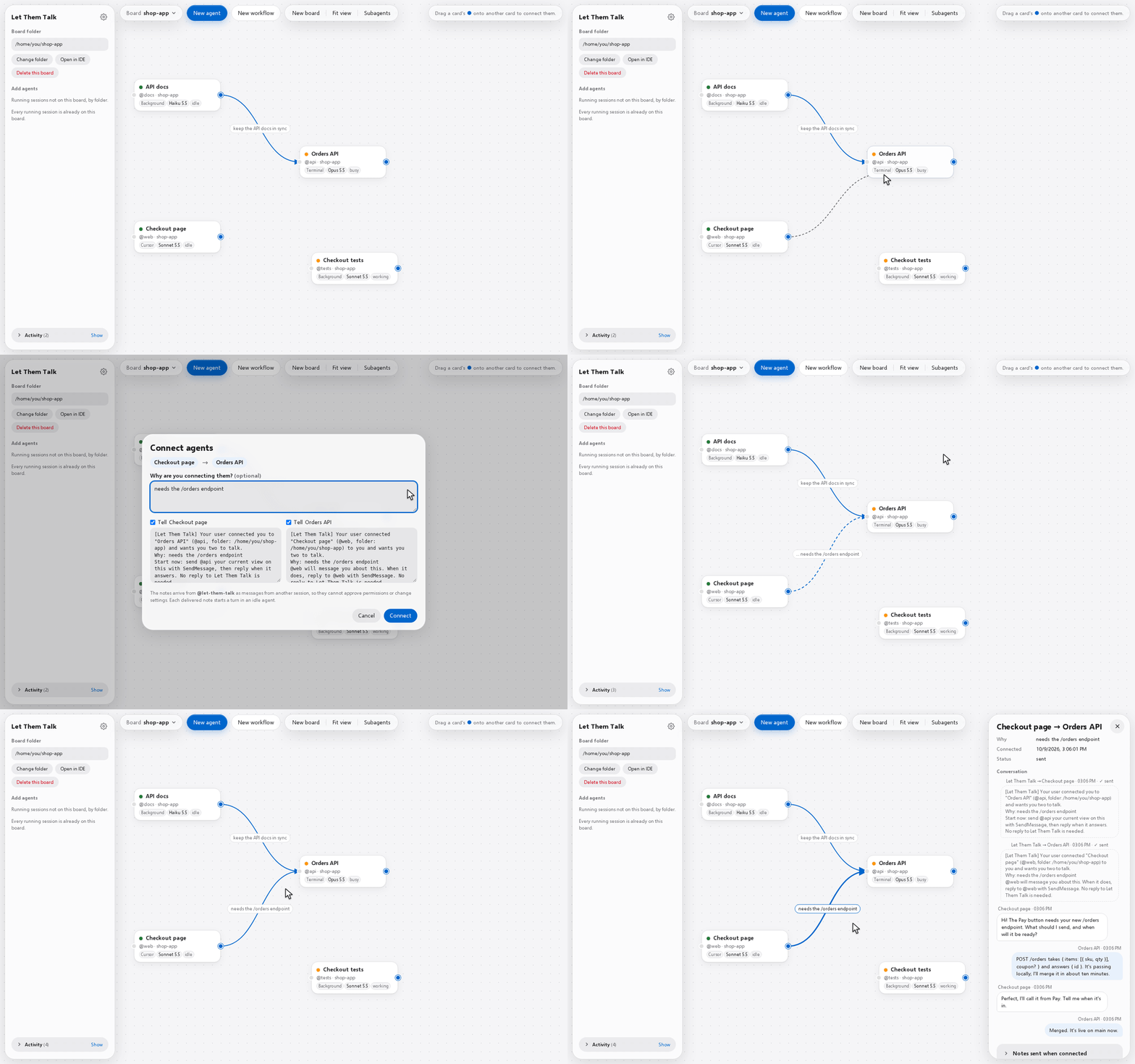
A visual board for your agents. Each running Claude Code session is a card, and an arrow from one card to another tells both chats who they work with and why.
What it does
- Draw an arrow between two chats and it tells them who to talk to and why. They then talk through Claude Code's own messaging.
- Click an arrow to read what the two chats sent each other.
- Start a team: a master and up to 8 agents, each with its own role, prompt, model and effort.
- Terminal chats, Cursor chats and background agents share one board, with the subagents they run.
- Local and small: the server is one Python file that uses only Python's standard library, and nothing is installed into Claude Code.
Use cases
- You want your agents to communicate with each other.
- Your Claude CLI (or extension) sessions need to be aware of one another and exchange messages.
- You're working on a project where you need to stay on top of everything (not necessarily code-related).
Start
Needs Python 3.12+ and Claude Code (on Windows, both inside WSL).
- One line:
uvx let-them-talk(needs uv; orpipx run let-them-talk). It starts the board and opens it in your browser;--no-openskips that. Its boards are kept in~/.local/share/let-them-talk. - From a copy of this repository, on Windows: double-click
Start Let Them Talk.bat. - From a copy of this repository, on macOS, Linux or WSL:
./start.sh, then open http://localhost:8765.
Click New board and pick a project folder: its running chats appear as cards. Drag the blue handle from one card onto another, then click Connect.
More: using it · how it works · settings · limits
Not related to Dekelelz/let-them-talk, a different project with the same name.
License
Apache 2.0. The Selawik font and the /handoff skill keep their own licenses, next to their files.
1 maintainer

Metadata
1 maintainer
Release files for let-them-talk 0.2.0
For a detailed explanation of source distributions (sdists) and built distributions (wheels), please see the package formats documentation.
Source distribution (sdist)
| File | Size | Uploaded | |
|---|---|---|---|
| let_them_talk-0.2.0.tar.gz | 284.7 kB | Details |
Built distribution (wheel)
| File | Interpreter | ABI | Platform | Reset |
|---|---|---|---|---|
| let_them_talk-0.2.0-py3-none-any.whl | Python 3 | none | any | Details |
Total release size: 492.3 kB
Release files / let_them_talk-0.2.0.tar.gz
| Download URL | let_them_talk-0.2.0.tar.gz |
|---|---|
| Size | 284.7 kB |
| Tags | Source |
|
SHA-256 checksum How to use checksums |
12a1fb4aeec34e8ef2e80333ca2f3e320a4a34746d8f338bce35f1c805ddbba4
|
|
BLAKE2b-256 checksum How to use checksums |
d913ceda1facae32a35d46d121b36bd0f068281f664d098be8e73a7ed79e75a0
|
| Upload date | |
|
Uploaded using Trusted Publishing? What is trusted publishing? |
No |
| Uploaded via |
uv/0.10.8 {"installer":{"name":"uv","version":"0.10.8","subcommand":["publish"]},"python":null,"implementation":{"name":null,"version":null},"distro":{"name":"Ubuntu","version":"24.04","id":"noble","libc":null},"system":{"name":null,"release":null},"cpu":null,"openssl_version":null,"setuptools_version":null,"rustc_version":null,"ci":null}
|
Release files / let_them_talk-0.2.0-py3-none-any.whl
| Download URL | let_them_talk-0.2.0-py3-none-any.whl |
|---|---|
| Size | 207.6 kB |
| Tags | Python 3 |
|
SHA-256 checksum How to use checksums |
566bd87c6467ebfba24f5dc00681b5871c0d1584460c6ef52d77e4fb71d0bbe1
|
|
BLAKE2b-256 checksum How to use checksums |
18b16761e3f0454c32836d7e84509673f10563d7d398803a3916880f985dd50b
|
| Upload date | |
|
Uploaded using Trusted Publishing? What is trusted publishing? |
No |
| Uploaded via |
uv/0.10.8 {"installer":{"name":"uv","version":"0.10.8","subcommand":["publish"]},"python":null,"implementation":{"name":null,"version":null},"distro":{"name":"Ubuntu","version":"24.04","id":"noble","libc":null},"system":{"name":null,"release":null},"cpu":null,"openssl_version":null,"setuptools_version":null,"rustc_version":null,"ci":null}
|














