
Let Them Talk

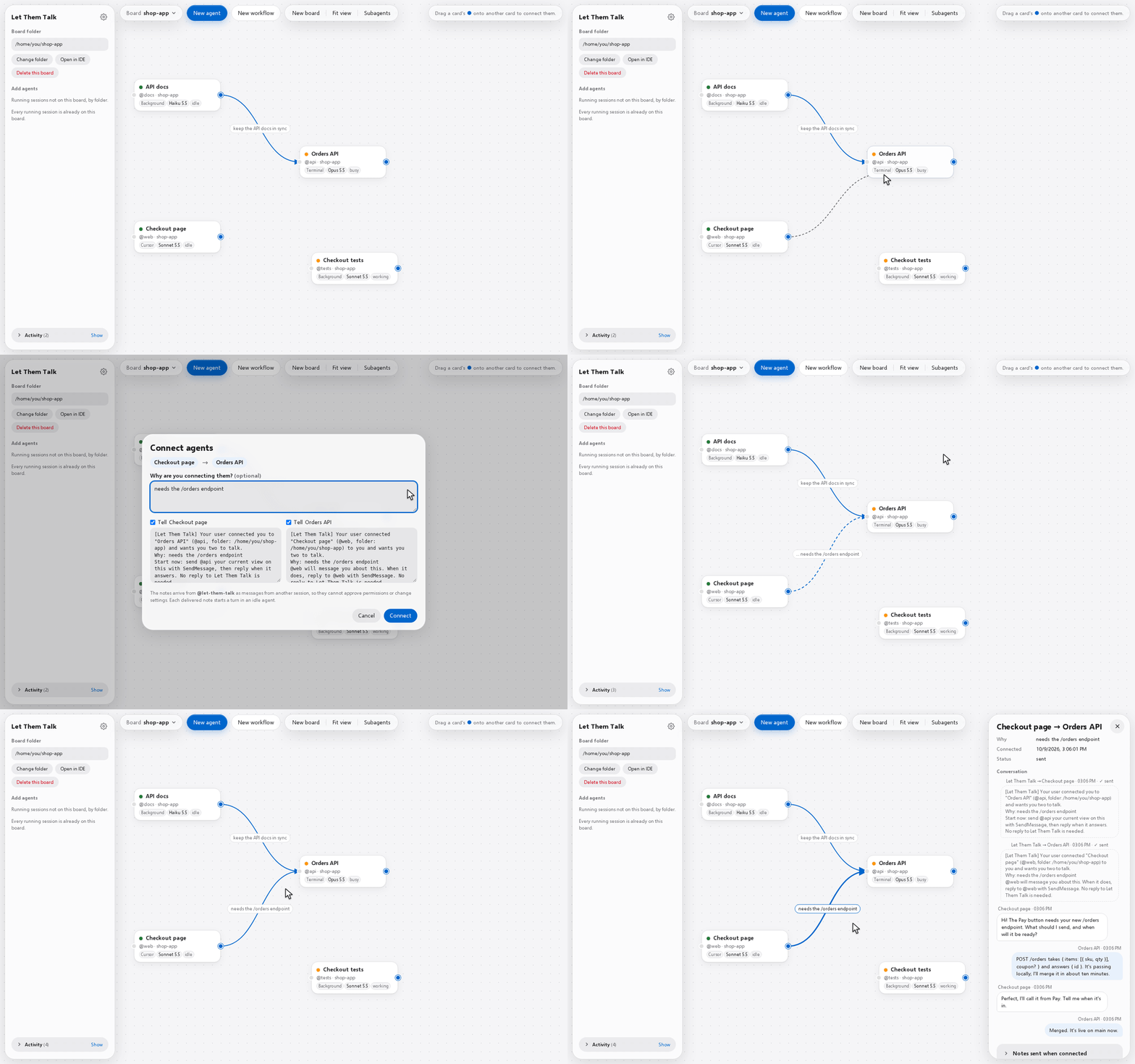
A visual board for your agents. Each running Claude Code session is a card, and an arrow from one card to another tells both chats who they work with and why.
What it does
- Draw an arrow between two chats and it tells them who to talk to and why. They then talk through Claude Code's own messaging.
- Click an arrow to read what the two chats sent each other.
- Start a team: a master and up to 8 agents, each with its own role, prompt, model and effort.
- Terminal chats, Cursor chats and background agents share one board, with the subagents they run.
- Local and small: the server is one Python file that uses only Python's standard library. The Claude Code plugin is optional:
uvx let-them-talkworks without it.
Use cases
- You want your agents to communicate with each other.
- Your Claude CLI (or extension) sessions need to be aware of one another and exchange messages.
- You're working on a project where you need to stay on top of everything (not necessarily code-related).
Start
Needs Python 3.12+ and Claude Code (on Windows, both inside WSL).
-
From Claude Code: install the plugin once, then type
/let-them-talkin any chat. It starts the board and opens it in your browser (it needs uv), and the board keeps running after that chat ends. The plugin also shows each chat's suggested next prompt on the board (more).claude plugin marketplace add abdullahkavakli/let-them-talk claude plugin install let-them-talk@let-them-talk -
One line, without the plugin:
uvx let-them-talk(needs uv; orpipx run let-them-talk). It starts the board and opens it in your browser;--no-openskips that. Its boards are kept in~/.local/share/let-them-talk, whichever way you start it. -
From a copy of this repository, on Windows: double-click
Start Let Them Talk.bat. -
From a copy of this repository, on macOS, Linux or WSL:
./start.sh, then open http://localhost:8765.
Click New board and pick a project folder: its running chats appear as cards. Drag the blue handle from one card onto another, then click Connect.
More: using it · how it works · settings · limits
Not related to Dekelelz/let-them-talk, a different project with the same name.
License
Apache 2.0. The Selawik font and the /handoff skill keep their own licenses, next to their files.
1 maintainer

Metadata
1 maintainer
Release files for let-them-talk 0.3.0
For a detailed explanation of source distributions (sdists) and built distributions (wheels), please see the package formats documentation.
Source distribution (sdist)
| File | Size | Uploaded | |
|---|---|---|---|
| let_them_talk-0.3.0.tar.gz | 289.8 kB | Details |
Built distribution (wheel)
| File | Interpreter | ABI | Platform | Reset |
|---|---|---|---|---|
| let_them_talk-0.3.0-py3-none-any.whl | Python 3 | none | any | Details |
Total release size: 499.6 kB
Release files / let_them_talk-0.3.0.tar.gz
| Download URL | let_them_talk-0.3.0.tar.gz |
|---|---|
| Size | 289.8 kB |
| Tags | Source |
|
SHA-256 checksum How to use checksums |
ffa3a8dcda010c50f0e7581e3a0263885e1ebb854a9955c49f618536761ac42b
|
|
BLAKE2b-256 checksum How to use checksums |
1d20d6d5ca3230589776210f6807259a52978cb7384ac4ccc4413f5bb9c5d68c
|
| Upload date | |
|
Uploaded using Trusted Publishing? What is trusted publishing? |
No |
| Uploaded via |
uv/0.10.8 {"installer":{"name":"uv","version":"0.10.8","subcommand":["publish"]},"python":null,"implementation":{"name":null,"version":null},"distro":{"name":"Ubuntu","version":"24.04","id":"noble","libc":null},"system":{"name":null,"release":null},"cpu":null,"openssl_version":null,"setuptools_version":null,"rustc_version":null,"ci":null}
|
Release files / let_them_talk-0.3.0-py3-none-any.whl
| Download URL | let_them_talk-0.3.0-py3-none-any.whl |
|---|---|
| Size | 209.7 kB |
| Tags | Python 3 |
|
SHA-256 checksum How to use checksums |
eec7e536700b041f7585ee2809382d9321a23684ab083f477dc9e31031a9f21f
|
|
BLAKE2b-256 checksum How to use checksums |
24047794990c265cb0b22e57fc17ac9a616a56b7d44da8fe1f51e22d37f32231
|
| Upload date | |
|
Uploaded using Trusted Publishing? What is trusted publishing? |
No |
| Uploaded via |
uv/0.10.8 {"installer":{"name":"uv","version":"0.10.8","subcommand":["publish"]},"python":null,"implementation":{"name":null,"version":null},"distro":{"name":"Ubuntu","version":"24.04","id":"noble","libc":null},"system":{"name":null,"release":null},"cpu":null,"openssl_version":null,"setuptools_version":null,"rustc_version":null,"ci":null}
|














