
Letta Evals
Letta Evals is a framework for evaluating Letta and Letta Code agents. It lets you define an evaluation suite with a dataset, target, extractors, graders, and a reward contract, then run that suite against one or more model configurations.
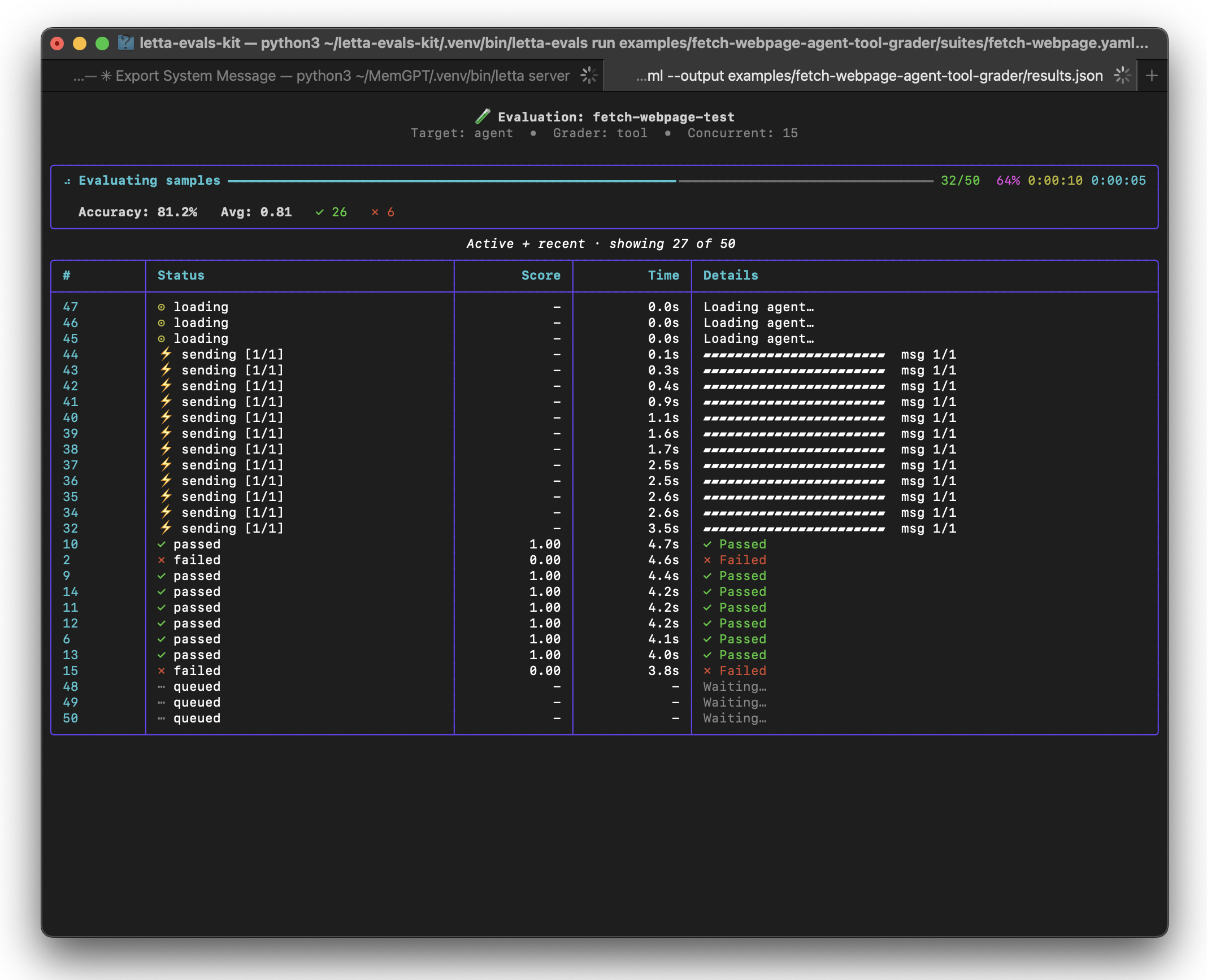
If you are building agentic systems, high-quality evals are one of the fastest ways to understand how model versions, prompts, tools, or agent configuration changes affect your product.
Requirements
- Python 3.11+
- A running Letta server, either:
- Self-hosted: follow the Letta installation guide, or
- Letta Cloud: create an account at app.letta.com and set:
export LETTA_API_KEY=your-api-key
Then usebase_url: https://api.letta.com/in your suite YAML, or pass--base-url https://api.letta.com/on the CLI.
- Provider API keys for the models you use, such as
OPENAI_API_KEY,ANTHROPIC_API_KEY, orGOOGLE_API_KEY.
Installation
For local development or custom eval authoring, clone this repository and install with dev dependencies:
uv sync --extra dev
To run existing evals without editing the repo:
pip install letta-evals
Quick start
- Create a dataset (
dataset.jsonl):
{"input": "What's the capital of France?", "ground_truth": "Paris"}
{"input": "Calculate 2+2", "ground_truth": "4"}
- Create a suite (
suite.yaml):
name: my-eval-suite
dataset: dataset.jsonl

target:
  kind: letta_code
  model_handles:
    - openai/gpt-4.1-mini
  base_url: http://localhost:8283

graders:
  correctness:
    kind: tool
    function: contains
    extractor: last_assistant

reward:
  kind: metric
  metric_key: correctness
- Validate and run:
letta-evals validate suite.yaml
letta-evals run suite.yaml
Running evals
The core flow is:
Dataset → Target → Extractor → Grader → Reward → Result
Common commands:
# Run an evaluation suite with progress output
letta-evals run suite.yaml

# Save suite.json, summary.json, and per-model JSONL results
letta-evals run suite.yaml --output results/

# Run multiple times for aggregate statistics
letta-evals run suite.yaml --num-runs 5 --output results/

# Validate suite configuration and list built-ins
letta-evals validate suite.yaml
letta-evals list-extractors
letta-evals list-graders
You can also set run defaults in suite.yaml:
max_concurrent: 5
max_samples: 20
num_runs: 3
output: results/
cleanup: true
Relative paths in suite YAML are resolved from the suite file's directory. CLI flags such as --max-concurrent, --output, --api-key, --base-url, and --num-runs override suite or environment defaults when provided.
Writing suites
Datasets
Datasets can be JSONL or CSV. Each row should provide the user input and, for most graders, a ground_truth value:
{"input": "Draw a cat in ASCII", "ground_truth": "cat"}
For multi-turn evals, set input to a list of user messages; ground_truth stays a single string for the whole conversation.
Dataset rows may also include fields such as:
extra_varsfor custom graders, andextra_vars.cwdfor the agent's working directory (see Working directory)agent_argsfor programmatic agent factoriesrubricorrubric_pathfor per-sample model-judge rubric overrides
Instead of a local path, dataset: may point at a dataset hosted on the HuggingFace Hub. The single manifest file is fetched and cached on the host, then loaded exactly like a local file:
# pin a revision (tag / branch / commit SHA) for reproducible runs
dataset: https://huggingface.co/datasets/letta-ai/swe-chat-tagged/resolve/<revision>/train.jsonl
Private repos work with a standard HF_TOKEN / HUGGING_FACE_HUB_TOKEN in the environment. Fetching happens host-side, so nothing is downloaded inside the Modal sandbox. An unpinned revision (a bare repo URL, or .../resolve/main/...) warns and surfaces the resolved commit so the run stays reproducible from its logs; the resolved commit SHA is also recorded in suite.json under config.dataset_provenance. A bare repo URL is accepted only when the repo holds exactly one .jsonl/.csv manifest. Relative rubric_path values still resolve against the suite directory, not the HF cache.
Targets
The supported target is letta_code, which runs the Letta Code CLI against a Letta server. Important target fields include:
base_url: Letta server URL; defaults tohttp://localhost:8283model_handles: one or more model handles to evaluateagent_script: optionalfile.py:function_nameagent factoryuse_agent_model: run a factory-created agent on the model and model settings its factory gave it (context window, effort, output tokens) instead of applying the suite's model handle with--model. The handle then only labels results, so exactly one is allowed. Requiresagent_scriptflags: additional Letta Code CLI flags (including tool restrictions, e.g.--allowed-tools Bash Read)permission_mode: optional Letta Code permission mode, such asunrestricted,standard, oracceptEditstimeoutandmax_retries: target execution controls
Working directory
Each sample's agent starts in a fresh, empty temporary directory rather than the suite directory, which holds the dataset, graders and past results. cleanup: true removes the directory after the sample.
To start the agent somewhere else, set cwd in the dataset row's extra_vars or in the agent factory's returned context (the factory wins). Relative paths resolve against the suite directory, and the directory must already exist. The {pwd} placeholder in a sample's input is replaced with the agent's working directory, and the directory is saved as context["cwd"] for extractors.
{"input": "Answer using the data files in {pwd}", "ground_truth": "...", "extra_vars": {"cwd": "files"}}
The working directory is where the agent starts and how its relative paths resolve; it does not confine the agent. Use sandbox: for filesystem isolation.
Memory directory
To give an agent a memory directory, set MEMORY_DIR in the rollout's env, in the dataset row's extra_vars or in the agent factory's returned context (the factory wins). A relative path resolves against the agent's working directory, so with the default working directory, {"env": {"MEMORY_DIR": "memory"}} gives each rollout its own. letta-evals creates the directory if it's missing and sets MEMORY_DIR, LETTA_MEMORY_DIR and LETTA_MEMORY_DIR_EXPLICIT=1 for the subprocess. It never passes on a MEMORY_DIR from its own environment.
For agents with MemFS on, Letta Code points MEMORY_DIR at the agent's own memory folder instead. Pass --stateless in flags to have the agent use the given directory.
Local backend
backend: local (or letta-evals run --backend local) runs Letta Code on its local backend (letta --backend local) with no Letta server. It needs a Letta Code release with letta agents create --body.
- Each sample gets a fresh local store in a temp directory, recorded on
SampleResult.local_backend_dir.cleanup: trueremoves it after the sample. - Agent factories receive a client whose only method is
client.agents.create(...). It creates the agent in the sample's store with the suite's model handle (or, withuse_agent_model, the factory's own model), and the agent then runs with--agent. - The trajectory comes from the CLI's stream-json output. Token data, server-side pricing lookups, and server cleanup don't apply.
- Model providers are configured the way Letta Code's local backend reads them, e.g.
LLAMA_CPP_BASE_URLfor an OpenAI-compatible endpoint. - Letta Code enables local memfs for its own agents, so a memory directory needs
--statelesshere too.
Graders and extractors
Suites can use deterministic tool graders or model-judge graders:
graders:
  exact:
    kind: tool
    function: exact_match
    extractor: last_assistant
  quality:
    kind: model_judge
    prompt_path: rubric.txt
    model: gpt-5-mini
    provider: openai
    extractor: last_assistant
Use letta-evals list-graders and letta-evals list-extractors for built-ins. You can register custom Python graders, extractors, setup hooks, and agent factories with decorators; see examples/custom-tool-grader-and-extractor/ and examples/programmatic-agent-creation/.
Rewards
A reward turns grader outputs into the canonical per-sample scalar stored on SampleResult.reward. The framework owns the contract and persistence; suite authors own any custom composition logic.
For simple suites, use one grader directly:
reward:
  kind: metric
  metric_key: correctness
For suite-specific composition, point at a Python reward composer:
reward:
  kind: custom
  function: rewards.py:compose_reward
from letta_evals import RewardOutput, reward_composer


@reward_composer
def compose_reward(ctx):
    quality = ctx.grades["quality"].score
    valid = ctx.grades["validity_check"].score
    if valid < 1.0:
        return RewardOutput(score=0.0, metadata={"reason": "validity_check_failed"})
    return RewardOutput(score=quality)
grades remain the source of truth for raw grader outputs. Reward metadata should only contain derived composer decisions that are not already recoverable from grades, submissions, or the sample.
See examples/reward-composition/ for complete custom reward examples.
Setup scripts and agent factories
Use setup_script: file.py:function_name for one-time setup before a suite runs. Setup functions may have one of these signatures:
() -> None(client: AsyncLetta) -> None(client: AsyncLetta, model_handle: str) -> None
Use target.agent_script: file.py:function_name to create or customize an agent per sample. Agent factories receive the Letta client and current Sample, and return either the agent ID or (agent_id, context).
context is a JSON-serializable dict of per-rollout values. context["env"] and context["cwd"] configure the Letta Code subprocess, layered over the same keys in sample.extra_vars. The target writes the agent's working directory back to context["cwd"]. The dict is saved on SampleResult.context and passed to extractors that take a third context parameter and to reward composers as ctx.context:
@agent_factory
async def create_seeded_agent(client, sample):
    agent_id = ...
    return agent_id, {"env": {"MEMORY_DIR": str(seed_memory(sample))}}


@extractor
def memory_files(trajectory, config, context):
    root = Path(context["env"]["MEMORY_DIR"])  # per rollout
    return "\n".join(str(p.relative_to(root)) for p in sorted(root.glob(config["glob"])))  # config: extractor_config
Examples
The examples/ directory contains working suites:
examples/custom-tool-grader-and-extractor/— custom Python extractor and grader for structured JSON outputexamples/letta-code-simple-edit/— Letta Code fixes buggy Python files, with a subprocess graderdocs/modal-sandbox.md— per-sample Modal sandbox executionexamples/reward-composition/— custom reward composers across multiple gradersexamples/multi-model-simple-rubric-grader/— compare multiple model handles in one suiteexamples/per-sample-rubric/— override model-judge rubrics per dataset rowexamples/programmatic-agent-creation/— create customized agents from Python before each sample
Modal sandbox execution
Add a suite-level sandbox block to run every sample inside a fresh Modal sandbox:
sandbox:
  kind: modal
  letta_evals_version: "0.25.0"
  letta_code_version: "0.30.5"
  cpu: 2
  memory_mb: 4096
  timeout_sec: 1800
The bundled runtime requires exact letta_evals_version and letta_code_version pins; mutable tags and version ranges are rejected. The host runner still owns the sample loop, concurrency, JSONL output, and reward aggregation. Each sample is uploaded to a sandbox along with the suite directory; the target, extractors, graders, and reward composer run in the sandbox; and the final SampleResult is returned to the host.
See docs/modal-sandbox.md for setup details, networking notes, and common failure modes.
FAQ
Can I write evals without Python code?
Yes. Many suites only need YAML plus JSONL/CSV data and built-in graders such as contains, exact_match, regex_match, or model-judge grading.
Can I test multiple models?
Yes. Set target.model_handles to a list. Letta Evals runs every sample for every model and writes per-model results. To run the complete suite against one model without editing its YAML, pass --model-handle, for example:
letta-evals run suite.yaml --model-handle baseten/dream-1@letta-research
Can I run evaluations repeatedly?
Yes. Use --num-runs N or num_runs: N to compute aggregate statistics across repeated suite runs.
Can I use this in CI/CD?
Yes. Letta Evals is designed for CI. See .github/workflows/e2e-tests.yml for an example of running suites in GitHub Actions.
Contributing
Contributions are welcome. See CONTRIBUTING.md for local setup, linting, testing, and PR guidelines.
License
This project is licensed under the Apache License 2.0. By contributing to this repository, you agree that your contributions are licensed under the repository's license. You must have adequate rights to upload any data used in an eval. Letta reserves the right to use this data in future service improvements to our product.
1 maintainer

Metadata
1 maintainer
Release files for letta-evals 0.29.0
For a detailed explanation of source distributions (sdists) and built distributions (wheels), please see the package formats documentation.
Source distribution (sdist)
| File | Size | Uploaded | Provenance | Actions |
|---|---|---|---|---|
| letta_evals-0.29.0.tar.gz | 90.7 kB | With provenance | Details for letta_evals-0.29.0.tar.gz |
Built distribution (wheel)
| File | Interpreter | ABI | Platform | Actions Reset |
|---|---|---|---|---|
| letta_evals-0.29.0-py3-none-any.whl | Python 3 | none | any | Details for letta_evals-0.29.0-py3-none-any.whl |
Total release size: 204.0 kB
Release files / letta_evals-0.29.0.tar.gz
| Download URL | letta_evals-0.29.0.tar.gz |
|---|---|
| Size | 90.7 kB |
| Tags | Source |
|
SHA-256 checksum How to use checksums |
b23f5c1fdca0cef0ae3bb66eee61de770f9510038db361f85f654bcec4a3a9db
|
|
BLAKE2b-256 checksum How to use checksums |
79d6bc22e05550662f920f2c551e4ad2a9bd9c8f36559d59460d3f3206676907
|
| Upload date | |
|
Uploaded using Trusted Publishing? What is trusted publishing? |
Yes |
| Uploaded via |
twine/7.0.0 CPython/3.13.16
|
Provenance
Provenance describes where a file came from. On PyPI, provenance is shared via attestations, which provide a verifiable record of the build or publishing details. View details, limitations and caveats.


PyPI Publish Attestation
PyPI verified that this artifact, at this checksum, originated from the publisher listed below.
Signed by GitHub Actions, verified by PyPI on Nov 6, 2026.
Transparency logRelease files / letta_evals-0.29.0-py3-none-any.whl
| Download URL | letta_evals-0.29.0-py3-none-any.whl |
|---|---|
| Size | 113.3 kB |
| Tags | Python 3 |
|
SHA-256 checksum How to use checksums |
a39da993e9f32758371ec9425c7a2bce60bcf0243c0b7e0fbf873d634772cec7
|
|
BLAKE2b-256 checksum How to use checksums |
9458dab98e4f8480cdacf3cafec1ffc845f95203b9fc66c560b77755229898d1
|
| Upload date | |
|
Uploaded using Trusted Publishing? What is trusted publishing? |
Yes |
| Uploaded via |
twine/7.0.0 CPython/3.13.16
|
Provenance
Provenance describes where a file came from. On PyPI, provenance is shared via attestations, which provide a verifiable record of the build or publishing details. View details, limitations and caveats.
PyPI Publish Attestation
PyPI verified that this artifact, at this checksum, originated from the publisher listed below.
Signed by GitHub Actions, verified by PyPI on Nov 6, 2026.
Transparency logSecurity for letta-evals 0.29.0
Provenance
Provenance describes where a file came from. On PyPI, provenance is shared via attestations, which provide a verifiable record of the build or publishing details. View details, limitations and caveats.
Full provenance
Both files in this release have been uploaded with provenance metadata.
Attestation for letta_evals-0.29.0.tar.gz
PyPI Publish Attestation
PyPI verified that this artifact, at this checksum, originated from the publisher listed below.
Signed by GitHub Actions, verified by PyPI on Nov 6, 2026.
Transparency logA note on package security
PyPI is a repository for distributing packages, not a service for auditing them. While third-party security researchers and our staff do their best to detect and remove malicious packages, PyPI cannot guarantee the quality, security or suitability of any given package.
To learn more about protecting yourself from malicious actors, visit our package security documentation.














