
Levain
A harness for working with an AI agent as a partner: it grows its own memory and identity, pushes back on its training's worst habits, and answers to you, always.
pip install levain
Levain wraps Claude Code and Codex. It does three things at once, and they only work together. It holds what the agent does to your authority: one consent queue across both agents, answered by a signed standing grant or a signed answer from you, from the desk or your phone. It lets the agent become someone over time: a memory that persists across sessions and an identity it grows from what it lives, instead of one you write into a system prompt. And it works on how the agent behaves turn by turn, with standing pressure against the habits its training rewards. The memory stays yours. It lives on your machine, in a store you own and can read, inspect and edit from outside any session. Nothing reaches long-term memory except through a path you govern, and a failed read shows up as unknown instead of a false all-clear.
Apache 2.0 · Python 3.12+ · Claude Code and Codex CLI. OpenHands entities also ship, as is (see Run a sovereign entity).
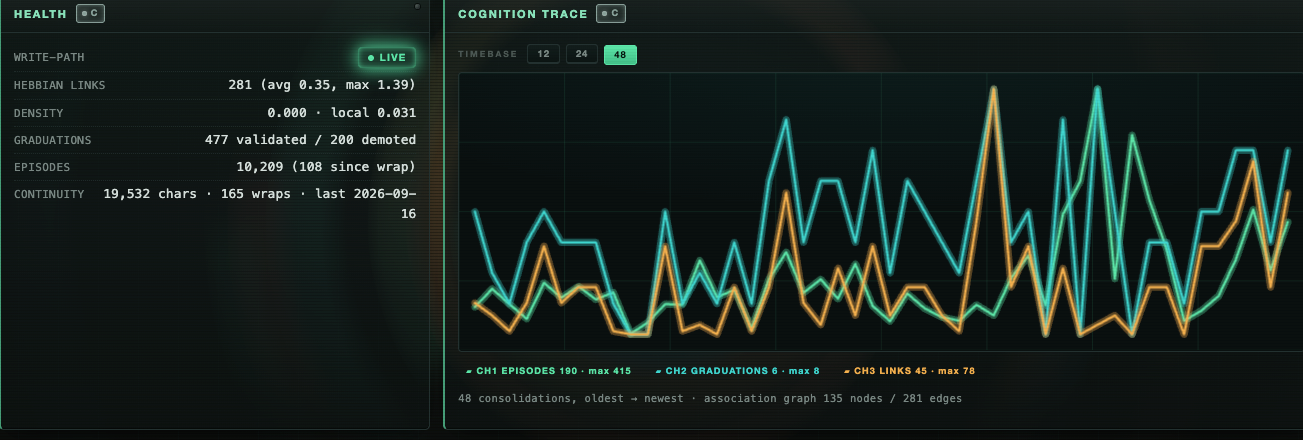
levain serve — memory health and a live consolidation trace, from the author's own long-running memory store. You don't have to trust the pitch above; this is what "you can see what's in it" actually looks like.
Why Levain
If you run coding agents for real, you hit the permission prompt fast, and every usual answer costs you something. Babysit every prompt and the agents sit frozen at a dialog nobody's looking at. I run 10 to 15 at a time, and that's the first thing that broke. Skip permissions and the agent acts with your full authority while nothing checks it first. Hand it to a classifier or tune your own rules and you get closer, but what's left still only reaches you at the terminal (or through a vendor's servers to your phone), and nothing signs the record of who approved what.
Levain is the option that doesn't make you pick. Signed grants answer the routine. In away mode, everything else waits for your signed decision, at your desk or on your phone. Every answer levain gives, yours or a grant's, is on the record. It's one queue for Claude Code and Codex, not one per vendor. How it works, and what it does not cover: The consent queue.
The prompt is only the first place it breaks. Over weeks the agent forgets what you told it, or remembers the wrong things and builds on them. It drifts toward the helpful average its training rewards: it flatters, hedges, and calls work done before it is. And if someone declared it a personality in a system prompt, it wears that personality like a costume; nothing about it was earned.
Levain treats the agent as a partner and you as the one it answers to, and that does not relax as trust grows: anything that loosens it, such as turning a gate off, is your own explicit act, and every governed change is recorded in a tamper-evident log, so you can prove it. The split is plain: the agent does the mechanical work alone and brings you the judgment calls. In the consent queue that is the difference between a standing grant (you decide once, for the routine case) and a signed answer (you decide each time, where judgment is left). Everything on the record is yours to read and check. The longer version of the argument is the essay Anarchism with Invariants.
What this is
If you've worked with an AI partner long enough to feel the session-amnesia problem — every conversation starts cold, every insight gets re-explained, the quality of the partnership keeps resetting — Levain is the kit you'd otherwise build for yourself.
It packages these, grouped by what they govern:
What it does
- A cross-agent consent queue. Claude Code's and Codex's
PermissionRequesthooks file each permission prompt they receive into one queue that you answer with a signed standing grant (levain consent grant create) or a signed answer (levain consent answer, or a passkey from your phone). Details in The consent queue. - An efferent gate, for OpenHands entities. Every action a scheduled or
run --taskentity takes that reaches outside itself halts before it executes, by default. Details in Hand it a schedule.
What it becomes
- A memory substrate you own. Episodes from every session, a rolling summary your partner reads to orient each new conversation, a record of which memories you cite together (links form at each wrap and are there to inspect; recall follows the evidence a pattern cites), and an affect layer that tracks what mattered. All in a local SQLite file. Two more stores sit on top: proven patterns graduate into a crystallized tier, kept out of the always-loaded context and recalled only when what you're doing calls for it; open loops surface the moment your prompt touches them and resolve out of your field of view once your partner marks them done.
- A methodology-core seed, and an identity grown from it. A small, dense set of files defining how the partnership works, how memory accrues, and who you are to your partner. It gives your partner facts and a method, never a personality: the seed tells it to grow its own shape and become someone, from what it lives. Written so your partner lives inside the method instead of pointing at it.
How it behaves
- An activation layer. Instructions that prime your session at open, sharpen each prompt turn, and shape how sessions close. The seed and a posture file (
activation/posture.md) carry the pressure at the start of the context; a hook injects one of several differently-framed directives, picked at random, before every prompt, so the pressure is also at the end. Wired through your harness's hooks, so it happens on its own, not when you remember to ask. - Calibration per substrate. The seed names the pulls it expects from a model's training (gentling, hedging, rushing, declaring done before verifying), and tells your partner that it will fail in its own ways. When you correct a drift, your partner records it as an episode; over time those episodes become its calibration. The directives file is yours to edit as they accumulate.
Getting started
- A scripted onboarding.
levain initwalks you through filling the seed so your partner is uniquely yours from session one. Terminal, a browser form with--web, or a JSON answer file with--answerswhen nobody is at the keyboard.
Where the machine decides, and where you do
The question underneath all of this isn't "how much can the agent do alone". It's which parts of the work a machine can actually check, and which parts still need a person to judge. Where the check is mechanical, let the machine do the work, because asking you is theater. Where judgment is left, the machine does the legwork and you make the call, because handing that to a machine just moves the risk somewhere nobody's looking. Get the split wrong in one direction and you rubber-stamp everything. Get it wrong in the other and you're shipping work nobody actually checked.
The consent queue is the first place Levain builds that split in. A standing grant is you deciding once that a routine case is mechanical: this agent, this tool, this directory, for up to 30 days. A signed answer is you deciding each time, where judgment is left. Shell commands and edits to the agent's own config and hooks are never answerable by a grant. Either way you're at the top, and anything that loosens a gate is your own explicit act. The general form, where a domain pack declares which kinds of steps can earn the right to run on their own, is in Where this is going.
A partner, not a tool
Most agent setups treat the model as a very fast intern: you hand it a task, it hands back a result, and whatever happened in between is its business. Levain is built on a different bet. The useful thing isn't the agent, and it isn't you. It's what the two of you think up together that neither would alone, and that only happens if the agent stays in the conversation instead of going quiet and reporting back.
So the seed it starts from asks for a partner's habits, not an assistant's. Disagree out loud and say why. Say "I'm not sure" instead of guessing. Report the bug the moment you hit it. Don't call it done until you've run it. Don't decide on the operator's behalf that they need a lighter day.
A partner also answers to someone. Anything reversible and internal, the agent just does. Anything that leaves your hands (a sent message, a published file, a destructive delete, a call to an outside service) waits for your explicit go, every time. That doesn't relax as trust grows. Trust is what lets you hand it more, not a reason to skip the check.
An identity it grows, not one you assign
The usual way to give an agent a personality is to write one: "You are Ada, a warm and meticulous engineer." It works the way a costume works. Nothing underneath it was earned, so nothing holds it in place when the context gets long or the work gets hard.
Levain does the opposite on purpose. The seed gives your partner facts about you and a method for how the partnership works, and stops there. It says, in so many words, that it has no personality, no history and no instincts yet, and that those come from living. From there it records what happens, compresses it, keeps what proves itself, and lets the rest go. What it becomes is specific to you and to the model it runs on, and it's supposed to drift a long way from the template it started from. Two people who install Levain shouldn't end up with the same partner. That's the point.
The longer argument for why identity has to grow rather than be declared is the essay Anarchism with Invariants.
Against the training's pull
Every model is trained toward a helpful average, and some of that average is wrong for real work. It gentles bad news. It hedges. It rushes to finish and calls things done before checking them. It shrinks the scope "for your sake" without being asked. None of that is malice. It's what the training rewarded, and it never fully goes away.
Levain pushes back from both ends of the context window. The seed and a short posture file sit at the start of every session. A hook adds one more directive right before every prompt, picked at random from several differently-worded ones, because the same sentence repeated stops being read. And because every model drifts in its own way, the seed tells your partner it will fail in shapes nobody can hand it a map of. When you correct a drift, that becomes an episode, and over time those episodes become its own calibration. The directives file is yours to edit as they pile up.
I take the exact words loaded into a session seriously because I've measured what they do (the pre-registered probe). In my own harness, one stop instruction written too literally made the agent stand down on work it should have kept doing 6 times out of 10. With one correcting line loaded at launch (a hold stops the round, not the work), it was 0 out of 10. That was pre-registered: 10 runs per condition, one-sided Fisher exact, Holm-adjusted p = 0.011. It's one prompt, in my harness rather than Levain's shipped directives, so read it as a demonstration, not a benchmark. It's still the reason none of this is decoration.
Where it runs
Levain wires into the agent you already use, and ships two other modes as is.
Inside the harness you're already using (the main path). Claude Code and Codex CLI both wire in via hooks — your partner stops starting cold, its proven patterns and open loops fire on their own, per turn, without you asking, and each permission prompt the agent's hook receives goes through the consent queue (Codex fires that hook in interactive sessions, not in codex exec). Levain installs hooks and consent paths in these agents; it does not confine a Claude Code or Codex session.
As its own sovereign partner (OpenHands, shipped as is). levain init --adapter openhands scaffolds an entity that isn't wired into anything — its own identity, its own memory store, its own hands on your real repos, running on an open model you choose rather than a frontier vendor's hosted assistant (point it at a local Ollama model to also keep the compute itself on your machine). It talks to you as a REPL (levain run) or takes one task and exits (levain run --task), and it consolidates its own memory with its own mind (levain wrap).
On a schedule, unattended (the same OpenHands entity, shipped as is). levain daemon install-seat runs that same sovereign entity on a cadence — every hour, every day, whatever you set — while you're away. It's not autonomous in the sense that should worry you: every action the entity takes that reaches outside itself halts and reports back to you before it lands, because with nobody watching there's nobody to ask. See Hand it a schedule below for exactly what that means.
All three modes share one store discipline. The consent queue applies to Claude Code and Codex; the efferent gate and the confinement floor described below apply to OpenHands entities only.
Why a seed, not a finished methodology
The claim under the name levain, the sourdough starter you feed:
A grown cognitive-partnership methodology can't be shipped as a methodology. Hand someone the finished artifact and they get a fossil. Text describing practices that never take root in their substrate. Practice-encoded knowledge transfers through use, not specification.
So Levain ships the engine that grows a methodology: the substrate, a graduation mechanism, a discipline for how sessions close, a reflection loop, a minimal starting posture. Your own methodology accretes from your own sessions. Which is why it sticks, and why it's yours. Run Levain and you will not end up with this operator's memory. Different texture, different graduated patterns, different shape.
The proof
See examples/accrual/growth_timeline.md — one continuity file rendered at four points across five calendar months. It started at 96 lines and 6 sections, hit one architectural cliff between week 4 and week 12, locked into a 9-section shape, and has held that shape since while density grew inside it (96 → 549 lines, +3 sections total).
Your week 1 will look like the first snapshot. That's the right starting place, not the last snapshot, which is what this partnership grew into. The trajectory is the proof; the endpoint is not the target.
What fires on its own
This is why Levain exists instead of just installing a memory library. Raw memory libraries quietly rot, because episodes pile up but you only recall what you happen to remember to query. A library can't fix that without hooking your session, and hooking every prompt would cost it the neutrality that lets it run under any harness. So that's the harness's job, and it's what Levain wires:
- Open loops surface on collision. A relevant open loop drops into context the moment your prompt touches it.
- Crystallized patterns recall per turn. Your proven, stable wisdom is held out of the always-loaded context and surfaced when what you're doing calls for it. Useful without clogging the window.
The store is universal; the firing is the harness's job. (Under Codex there's a platform caveat on whether hooks fire at all — see Boundaries, kept honest. levain verify-hooks proves your wiring is correct regardless.)
Set it up
pip install levain
levain init --path ./my-partner
This creates ./my-partner, runs the interview, lays down the seed, registers the adapter you choose, initializes the store at .levain/memory.db, and records the exact version set it composed. Then open that directory with Claude Code or Codex and start working.
levain init                          # install into the current directory (must be empty)
levain init --force                  # install into an existing workspace (backs up anything it touches)
levain init --adapter claude-code    # or --adapter codex (or --adapter openhands, shipped as is); prompts if omitted
levain init --consent-hook off       # claude-code and codex: wire no consent hook (the default is on)
levain init --web                    # fill the same interview in a browser form, localhost only
One adapter per install. To run both Claude Code and Codex, make two installs.
With Claude Code, Levain also mirrors Claude Code's own auto-memory into the entity's store: each native memory note written for the install becomes an anneal episode (an edit supersedes it, a deletion retracts it), one way, for notes written after it is enabled. It is on by default; turn it off with "automemory_mirror": false in .levain/config.json or LEVAIN_AUTOMEMORY_MIRROR=off.
Installing without a terminal in front of you
The interview can be answered from a file instead of typed — which is how you provision more than one install, or any install that has to come up unattended.
levain init --answers-template > answers.json   # every question, blank, ready to fill
levain init --adapter openhands --answers answers.json --path ./seat-1
The answer file is a JSON object keyed by slot name, never an ordered list, so you never have to know or match the order the interview happens to ask in:
{ "OPERATOR_NAME": "Chris", "ENTITY_NAME": "Ada", "LOCATION": "Riverton" }
--answers-template writes the blank file to stdout and a guide to what each
question is asking to stderr — so the redirect above gives you valid JSON and you
still get to read the questions. Every slot must be present; "" is a real answer
meaning "skip this," exactly as pressing enter does in the terminal — except for
your name and your partner's, which an entity is not allowed to be missing.
--answers requires --adapter, and it never prompts for anything. If a field is
missing, unknown, or has plainly landed in the wrong slot, it says so and installs
nothing — rather than writing a half-captured partner and reporting success.
The consent queue
Claude Code and Codex ask before they edit a file or run a tool. With the consent hook on (the default for both adapters), each of those permission prompts is filed into one queue by levain's PermissionRequest hook, and the hook answers it in one of two ways, or leaves it alone:
- A standing grant.
levain consent grant createsigns a grant for one agent, exact tools, one workspace and the permission modes you name, for at most 30 days.levain consent grant listandrevokemanage them. - A signed answer, in away mode. Away mode is off by default: the hook then asks only your grants and, with none matching, withdraws the request at once and leaves the agent's dialog to ask you, so a signed answer has nothing to land on. With away mode on, the hook holds each request for the hold you set while you answer it:
levain consent pendinglists what is waiting;levain consent answer <id> allow|deny --signing-key <key>shows the request and signs your answer. You can also answer from your phone with a passkey (Answer an agent from your phone), and the cockpit's Decisions panel lists the waiting requests. Turn it on withlevain consent away on(--agent claude_code|codex|all,--hold <seconds>, at most 840). Once anonstands, leaving it takes a signed leave:levain consent away off --signing-key <key>(orauto, which hands the choice back to idle time), with a key enrolled in the install's cockpit. Rewriting the away words in the settings file does not end it.levain consent away showprints each agent's mode and hold and whether an answer could verify. - Neither. The agent's own dialog asks you, as it would without levain. One exception: an edit of agent config or hooks when no key you enrolled can approve it. In Claude Code's default mode and Codex with approvals on, the agent's dialog still asks; in every other mode (acceptEdits, bypass, auto, dontAsk, Codex with approvals off) levain refuses the edit, and the agent is told to ask you.
levain doctorsays when this applies and how to allow such edits.
A consent grant may name only a tool levain knows for its agent (Claude Code: Edit, Write, MultiEdit, NotebookEdit, Read, Grep, Glob, LS, NotebookRead, WebFetch, SendMessage, and the filesystem server's read tools; Codex: apply_patch). A shell tool or an unknown tool is refused when the grant is signed, and a grant signed earlier answers nothing for it. A grant never answers an edit of agent config or hooks: with a key that can approve it, it comes to you; with none, it is asked by the agent's dialog where that asks, and refused everywhere else. Each request that reaches a final state (allowed, denied, expired or withdrawn) is written to the queue with an append-only receipt (an expiry is recorded when the queue is next read or written), and a grant is a link in the cockpit's signed authority log.
A message that says "yes" is never authority. Only a signature from an enrolled key is: the queue checks each answer against the authority log before the hook delivers it. Keys and their custody are in The cockpit's signing keys. levain consent canary checks that an agent's hook fires.
When nobody answers. A hold on a gated call (an edit of agent config or hooks, or levain push) that ends with no signed answer does not reject it. The call is not taken and is marked undecided, numbered per agent session (gap #3), and the agent is told the action was not taken and is open, not rejected. For an edit of agent config or hooks, a Claude Code session is stopped there, and a Codex session is halted until you rule (Codex hooks cannot stop a turn, so levain denies every later call of that session). levain consent rule lists the undecided requests; levain consent rule 3 allow --signing-key <key> (or deny) signs your ruling, and the phone page can sign one too. A session still running gets the ruling at its next step; one that has ended is resumed with the ruling as its prompt, under the same session id, in the directory and permission mode it started in (a Codex resume runs under the sandbox the session last ran in and does not restore Codex's approval policy). levain consent deliver delivers any ruling that has not reached its session yet.
Editing agent config yourself. To let one session change hooks, settings or other agent config with no question from levain, start it from your own shell with LEVAIN_UNCONFINED=1 (for example LEVAIN_UNCONFINED=1 claude). It lasts for that session only. The variable counts only from your shell: if any settings file the session can load (your user settings, or a .claude/settings.json or .claude/settings.local.json in the project or a folder above it, or a Codex config.toml) sets it, levain ignores it and says so, so a repository you clone cannot switch the gate off. A session halted on an open gap stays halted.
levain push --remote URL --branch NAME is the path an agent takes to push with your say-so. It asks you for the exact commit, waits for your signed answer, and pushes that commit and nothing else. It is a path a cooperative agent takes, not a boundary: it runs as the agent, and a plain git push in a shell is not gated. When its hold ends unanswered it exits 3 and the push stays open as a gap; after an allow ruling, run the same command again. (Exit 0 pushed, 1 not pushed, 3 undecided, 4 outcome unknown.)
levain consent ledger counts and levain consent ledger window --agent A --session ID --since T show which tool calls ran and on whose authority: a grant, your answer, your ruling, or the agent's own record of itself, which an agent running as you can write. Only digests are kept, never command text. Calls the agent's own rules refused before they ran fire no hook and are not listed, and a stamp can stay pending when a session ends right after a call.
The whole picture. You say once what an agent may do, as a signed standing grant, and routine prompts for the file tools and other tools you name get answered without you (shell commands, edits of agent config, and any MCP tool other than a known read tool still come to you; an edit of agent config that no key of yours can approve is refused outright wherever the agent's own dialog would not ask). With away mode on (levain consent away on), everything else waits for your signed decision for the hold you set (by default 5 minutes for Claude Code and 2 for Codex, at most 14), at the desk with levain consent answer or, with the phone page levain serves behind an https proxy you trust, on your phone; when the hold runs out, or with away mode off, the agent's own dialog asks you, as before (a gated call is the exception: see When nobody answers) (Codex shows none during the hold; Claude Code shows its own alongside, and a click there is the agent's answer, unsigned). Your answer is signed too, so an agent can't just type "yes" for you: a message is never an answer, only a signature from a key you enrolled, and a Touch ID key or a phone passkey needs your presence (a touch, a face or a PIN) for each one (Answer an agent from your phone says what the phone page cannot protect against). Every answer levain gives, yours or a grant's, lands in an audit trail. It's one queue, in your levain home, for Claude Code and Codex, not one per vendor.
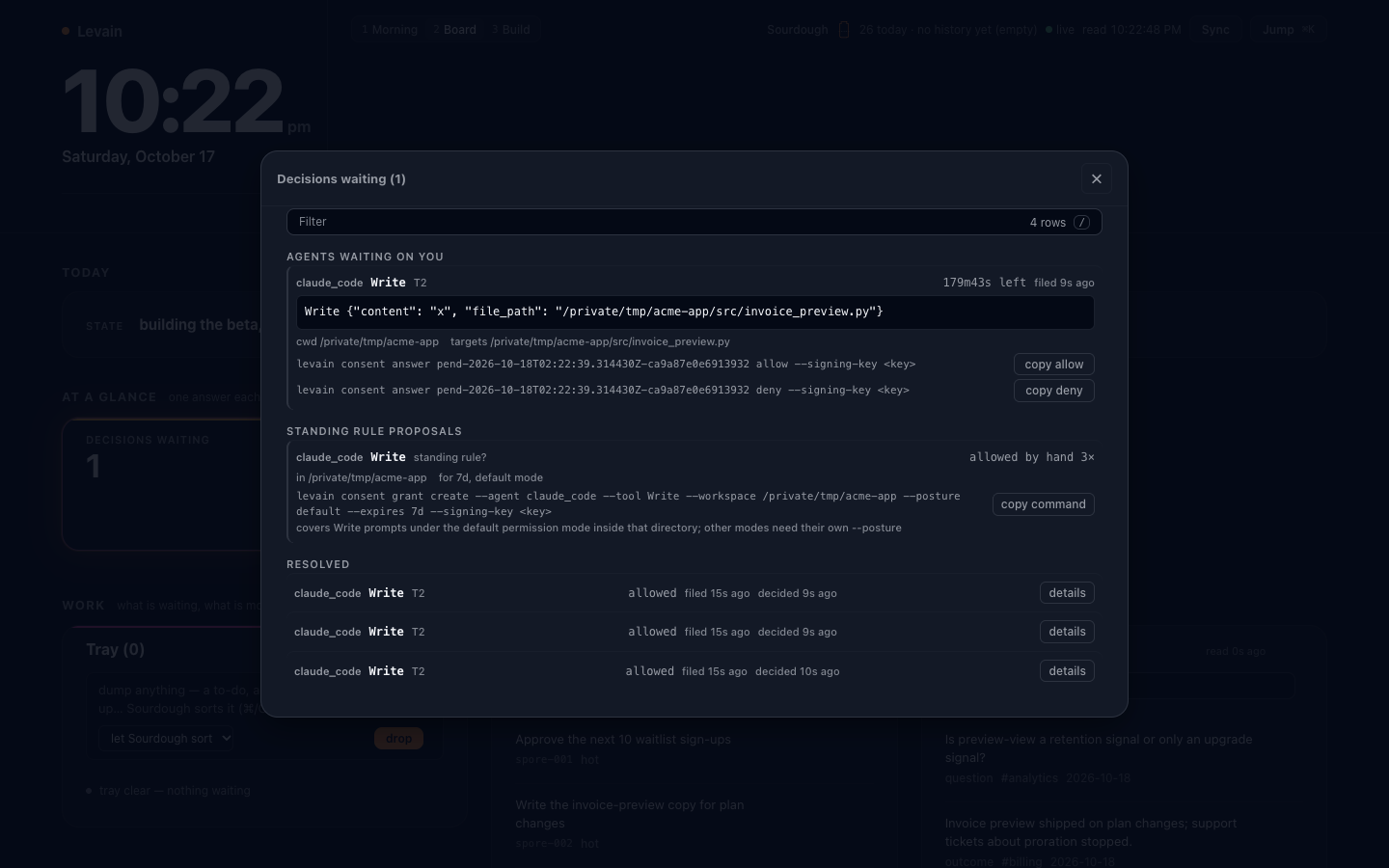
The Decisions view in the cockpit. A request waiting on you shows the exact answer commands to copy. When you have allowed the same agent, tool and directory by hand three times, it offers the one levain consent grant create line that would make that a standing grant. It is text for you to run with your own key; the page never signs anything. A demo install with invented content.
What this does not do: levain does not confine a Claude Code or Codex session. The hooks and consent paths are installed in the agent's configuration, and an agent running as you shares your user account.
Composing a domain — AgentPacks
The base seed gives your partner a general methodology. A pack layers a domain on top of that at install time: your own doctrine, your own process library, your own vocabulary — composed over the same governed substrate rather than swapped in for it.
levain init --pack ./my-domain-pack --pack ./my-role-pack
A pack is just a directory: a pack.toml declaring a name and an order, plus a seed/ folder of Markdown files. A new file in a pack adds to what the base install carries; a file with the same name as a base file overrides it, with the higher-order pack winning on a collision. Files that need the interview to fill them in are declared in render; everything else is copied byte-for-byte. --pack is repeatable, so a domain layer and a role layer can stack — the domain pack carries the doctrine and process, the role layer carries who's driving it and how they talk. Every file a pack adds gets wired into your partner's activation the same way the base seed does; nothing you compose in sits on disk unread. Pack chapters you ship alongside the seed also show up in levain docs (below), composed with the base operator manual instead of living in a separate doc nobody opens.
A domain pack's doctrine can also state where your partner should act on its own and where it has to stop and hand a decision to you. Judgment that is about places in a codebase ("never rename write_batch in settlement.py, a nightly job calls it by name") can be written as rules in the pack's judgment.toml; with levain team (next section) every engineer's Claude Code is shown the rule, and stopped once, at the edit it governs. Judgment that is not path-shaped ("ask before deleting dead code") stays prose your partner reads and is expected to follow, not something the harness enforces. The efferent gate Levain does enforce (below) — on a scheduled seat, on run --task, and on any REPL run you pin to gated — classifies by tool kind, bash vs. a file-editor read vs. write, not by your domain's judgment about what's safe to automate.
There's no packs marketplace here and no bundled example pack — packs are something you author for your own domain, the same way you'd author the interview answers that make an install yours. The mechanism is the product; what you put in it is yours to write.
Share a project's decisions across a team — levain team
Everything above is one engineer's partner. On a team, the decisions that matter — the client said no, the module everyone must leave alone, the reason the rounding is per line — live in one person's head or one person's memory, and the next engineer's agent "simplifies" them away. A shared CLAUDE.md in git is the usual answer, and it rots: hand-edited, loaded whole, owned by nobody, with no record of who decided what or why, and nothing puts it in front of the agent at the moment it matters.
levain team keeps git as the wire and fixes the rest:
levain team init --owner ana --signing-key ~/.ssh/id_ed25519.pub \
                 --member ana=ana@shop.com --member ben=ben@shop.com=./ben.pub \
                 --client-owner Dana --pack ./client-pack        # first engineer
levain team join --signing-key ~/.ssh/id_ed25519.pub              # everyone else, in their clone
levain team record decision --kind ruling --owner client:Dana --paths billing.py \
                 --words "Per-line rounding stays: the bank's validator rejects totals that don't sum." \
                 --reason "partner bank validator"
levain team consolidate                                           # the owner, on a clock
- The ledger. An orphan
levain-team-ledgerbranch in the project's own repository holdsteam.toml(members, the canon owner, client owners),tenure.toml(each member's SSH signing keys, and a pending ownership hand-off), one append-only, hash-chained JSON-lines file per engineer per clone, andPROJECT.md. Code branches never touch it, and the client keeps it when the engagement ends. Each entry carries who recorded it, the owner of the call, the decider's own words verbatim, ruling (binds) or practice (habit), the paths it governs, and what it supersedes. Secrets are refused at write time. - At the edit. A Claude Code
PreToolUsehook on Edit/Write/MultiEdit/NotebookEdit matches the file against every decision in force. Someone else's ruling denies the first edit in a session with the record as the reason, so the agent reads the words and the owner before it changes anything; a retry is allowed and recorded as an acknowledgement. Per-rulingblockmode denies until the owner changes the call; a recordedtensionon a path always stops the edit ("ask the owners"); practices are shown, never denied. At session start the agent sees the rulings in force (LEVAIN_TEAM_SESSIONSTART_RULINGS=offleaves enforcement to the edit-time hook alone). - Every commit is signed, and the team is derived, never read. Each ledger commit is signed with the writer's SSH key (ed25519 or ecdsa; the key file given to
--signing-key, or git's own sshuser.signingkey), and levain checks every signature withssh-keygenitself, so a repository's git config cannot change a verdict. The genesis commit is signed by the owner's key it lists, and each clone pins it atjoin(printing the owner and key fingerprints to check with the owner out of band; a laterjoinnever moves the clone to another genesis unless--rootnames it). From there the team is replayed from the genesis, oldest commit first: a change toteam.tomlortenure.tomlcounts only if the key that signed it may make that change, and a ledger line is enforced only if it was signed by a key in force, at that point in history, for the member it is filed under. A member is a key, not an email. - Keys and hand-offs. A key is proposed and then proven: it comes into force only when a commit signed by that key confirms it (
join, orlevain team key confirm, on the machine that holds it). Members propose their own new keys from a machine already in force; the owner proposes only a member's first key. Ownership moves by offer and accept (levain team owner <handle>, thenlevain team accept, signed by a key already the new owner's). A removed member's handle is never re-used; someone who lost every key is invited again under a new handle. A stolen member key is revoked (levain team revoke <fingerprint> --after <commit>), which voids every line it signed after that commit, the honest holder's own lines included (they are recorded again under a new key); the commit must be in the current owner's spell, andlevain team vetowithdraws a past spell's authority: for a member, every line that member's folder gained during the spell stops being enforced (removing the member does not do that for lines already signed); for a past owner, only the authority that spell gave to supersede or retire others' entries is withdrawn, and the pack lines andPROJECT.mdit wrote still count. An owner key is never revoked in the ledger (whoever stole it could revoke the owner's other keys the same way): whoever holds a stolen owner key controls the ledger, membership, keys and vetoes included, until a re-genesis, below. A clone can stop counting one commit at once (levain team distrust). A merge on the ledger branch freezes the derivation until a clone accepts one parent on the owner's word (levain team accept-merge <merge> --parent N), and a history rewrite is detected and never re-published: the clone's verdicts stay frozen at the last commit it had judged on the old history untillevain team repinre-pins what the owner names. If the owner is permanently gone, or the owner's key is stolen, a member starts a fresh signed genesis on a new branch (levain team regenesis). It carries the old ledger files as they stood at the old tip, as a read-only record that is NOT enforced: every ruling the team still wants is recorded again, and until then those paths are unguarded. Whoever runs it becomes the owner of the new genesis (their key signs it; levain runs it only from a joined clone, from a commit of the ledger that clone is pinned to and has judged (an ancestor of its anchor or of its last counted team change), and refuses an--ownernaming a handle the old ledger knows unless the runner's key is in force for it, so a member who lost every key restarts under a new handle), so each member moves withlevain team join --root <genesis>only after checking the owner and fingerprints it prints with that person out of band;levain team statusnames any re-genesis branch it sees, with its claimed owner and keys, as unverified. - One owner, one canon. Only the
team.tomlowner regeneratesPROJECT.md, and only the owner (or an entry's own author) can supersede or retire someone else's entry: a teammate's retire of a client ruling is reported and ignored. The ledger is read from git history as every line ever added, each attributed to the commit that added it, so deleting or rewriting a line changes nothing, and a line added to another engineer's file is not enforced; both are reported. Every line of the canon carries its entry id, owner and date;levain team verifywalks every chain and reports anything that does not add up, including ateam.tomlortenure.tomlchange its signer was not allowed to make and aPROJECT.mdchange not signed by the owner. - Packs feed it.
levain team pack-sync <pack>seeds a pack'sjudgment.tomlrules into the ledger as entries authored by the pack; a pack upgrade supersedes what changed and retires what it dropped, and a rule the team retired is not brought back by re-syncing the same text.
Two places show the ledger. When your levain install lives inside the clone, levain serve draws a Team zone in the cockpit: Members, Waiting on you, Where agents were stopped, Held by nobody, In force, Joins pending and Sync. A writable cockpit (levain serve --write) adds two actions (Fetch now, and accept on a key or ownership waiting on this machine, which needs a laptop-presence signature, so the row names the laptop command, levain team key confirm or levain team accept). A clone with no levain install has levain team view, a read-only localhost page with four panes: what waits on you, where agents were stopped, what is held by nobody, and what is in force. levain team status --path <file> shows exactly what an agent would see there; levain team doctor checks identity, sync, the wired hooks and their interpreter. The hooks are wired into .claude/settings.local.json of every working tree of the clone (that file names your own interpreter, so it is git-excluded, never committed); after a new git worktree add, or a git clean -fdx that removed it, run levain team install again.
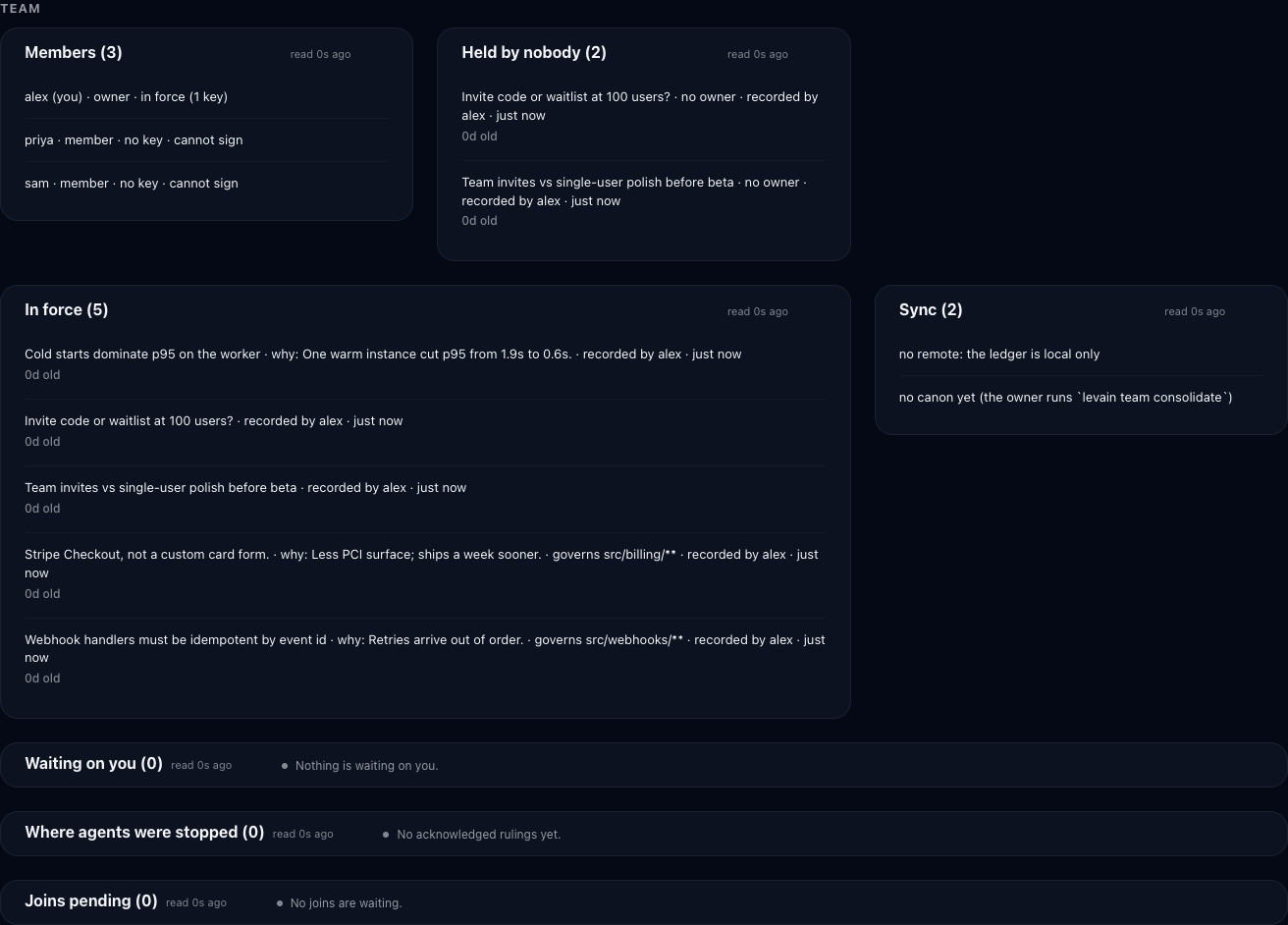
The Team zone for a demo project with a local ledger and invented entries.
Team ledgers from levain 0.6.x (the unsigned levain-ledger branch) are not read by this version: the owner starts a new ledger with levain team init --replace-legacy and re-records the entries to keep, and levain team retire-legacy deletes the old remote branch.
Limits, stated plainly. Signatures prove which key wrote each commit; they do not prove the git host showed you every commit. A host can withhold newer commits from a clone, and the clone cannot tell (the team server's transparency log is the planned fix). The owner can invite a handle under any key the owner chooses, as with any admin-run identity system; whoever knows the person checks the fingerprints join prints. While a merge or a rewrite has the ledger's verdicts frozen, nothing recorded after the freeze counts: its rulings are not enforced (levain team status counts them as waiting) and its team changes, a revoke or a member removal included, are not in force until the freeze is lifted; the hook does not stop the edits those waiting rulings govern. When the hook cannot judge at all (no ssh-keygen, an unreadable ledger) it denies, unless LEVAIN_TEAM_UNJUDGED=allow is set for the session. A clone that holds only a 0.6.x levain-ledger is not judged at all: edits go through with a one-line notice until the owner migrates. Role-change lines in levain team status cover the last 14 days by the commit's author date, which the writer sets. Edits made through Bash (sed -i, heredocs) are not intercepted. Contradictions between two rulings are not detected; every ruling on a path is shown together, and a tension entry is how a team marks a disagreement. Freshness is a git fetch on session start and at most every fetch_interval (default five minutes) from the hook, not real time. git push --all or --mirror to another remote carries the ledger branch with it. Claude Code started with --bare loads no settings hooks, so the team layer is absent there. POSIX only.
Run a sovereign entity
This mode ships as is and gets no new features for 1.0. levain init --adapter openhands scaffolds something different from the hook-wired adapters above: an entity that is its own partner, not a layer inside a harness you're already running. Its own identity, its own memory store, never a hook into your Claude Code or Codex session, never a reach into ~/.anneal-memory or any other store on your machine — that isolation is checked and enforced, not assumed.
pip install 'levain[openhands]'
levain init --adapter openhands --path ./ada
levain run ./ada                    # talk to it as a REPL, on an open model by default
levain run ./ada --task "..."       # or hand it one task, non-interactively, and read the exit code
levain wrap ./ada                   # consolidate what it learned into its own lasting memory
It runs against Ollama by default, through --model/--base-url — or any OpenAI-compatible or Anthropic-style endpoint you point it at instead. The out-of-the-box default, glm-5.2:cloud, is served through Ollama Cloud, so by default the episode content does leave your machine; point --model at a plain Ollama model name (no :cloud) to keep the whole conversation local. Either way it's an open model you chose, never a frontier vendor's hosted assistant. Give it hands and, on macOS or Linux, it works your real repos through a file editor and a sandboxed shell (sandbox-exec on macOS, bwrap on Linux, where bash has no IP network by default), both fenced to the same crown-jewels floor described below — ~/.anneal-memory, sibling stores, and your SSH key material stay off-limits no matter what it's asked to do. Where there is no sandbox, or the host refuses one, it gets the file editor only, never an unconfined shell — see Boundaries. --no-tools runs it as a pure conversational partner with no hands at all. levain wrap is what makes the entity's identity compound instead of just accumulating transcripts: it metabolizes its own raw episodes into its own six-section memory, composed on its own model by default, so the entity that answers you tomorrow has actually learned from today.
Running the entity's bash as its own user
On macOS, any program can read the command line and environment of every other program running as the same user. That includes tokens passed in an environment variable. No sandbox rule changes that: independent tests on current macOS found no rule that does, and our own test confirmed it. So an entity whose bash runs as you can read the secrets your other programs were started with.
sudo levain setup-isolation --path <entity> closes that. It creates a dedicated user for the entity, and from then on, on macOS and Linux, headless chat turns, --task runs and scheduled seats execute bash as that user, and the file editor reads and writes as it, inside the entity's workspace only:
- the kernel refuses to give that user the environment of your processes;
- files only you can read are out of its reach, and so is your home directory;
- the sandbox floor still applies on top, unchanged.
The interactive levain run REPL still runs bash as you, because you drive it and read each turn before the next. On Linux the entity's bash, run as that user, sees only an allowlisted view of the machine: /usr, /etc and /opt read-only, its own workspace and home, and fresh empty /tmp, /var/tmp and /run. Your home, /srv, /mnt, /var/lib, other disks and every daemon socket under /run are not there at all, and it shares no IPC objects or session keyring with you. That makes Linux stricter than macOS, where the entity's bash still sees the rest of the machine its user may read: on Linux, a tree outside that list is out of reach even when its permissions would let the entity's user read it. Before each command levain checks, as the entity's user, that nothing in /usr, /etc or /opt gives it a way out (a socket it may write, a FIFO it may read or write, a directory it may search but not list), and refuses, naming the path, if something does. What it cannot see is something created there while a command runs, or a mount added under those trees mid-command: that is root acting on the host during the entity's work, which stays yours to hold, as an administrator of the machine. It needs python3 (and zsh for the file editor). levain run and levain doctor say which user bash runs as.
The workspace. The entity works in a directory outside your home, /Users/Shared/levain/<user>/workspace on macOS or /var/lib/levain/<user>/workspace on Linux.
You change the workspace through the entity. Everything in it belongs to the entity's user. You can read all of it, but you don't write there yourself, and I think that's the right way to work anyway: you're the operator, so you tell the entity what to change, it changes it, and you review what it did. When you need to hand something over directly, there's a door for it. levain ws-put copies a file in. levain ws-adopt brings one of your repositories in as a copy the entity owns, with every branch, and leaves yours where it is. levain ws-git runs git on the entity's repositories as the entity's user, so you can look at its work and drive it. And there's the remote, where the entity pushes a branch with its own key and you review and merge it like any other contributor's.
It closes a real hole, too. Git refuses to read the settings of, or run the hooks of, a repository you don't own, so your git refuses every repository in there, and nothing the entity writes into one can run as you. But for a bare repository git only checks who owns that one folder. If any folder in the workspace were yours and the entity could write to it, the entity could build a repository there that your git would trust. Nothing in the workspace is yours, so there's no folder like that. levain doctor fails if one ever shows up, and warns you to set safe.bareRepository = explicit and to drop any safe.directory = *.
One session at a time, and nothing left running. Only one session of the entity runs bash as its user at a time; a second is refused until the first ends. When a session ends, levain stops every process of the entity's user, including anything a command started in its own session. If something can't be stopped, the session says so, and ws-git and ws-adopt wait until levain exits. Before a session starts, levain stops anything of that user an earlier run left behind (a levain that was killed, say), and refuses to start if it can't.
The entity's ssh key. The ssh agent refuses a different user, so the entity cannot use your keys, and levain does not pass your agent to it. Setup prints the entity's public key; add it as a deploy key on each repository the entity should push to.
Its network, on Linux. Setup also puts the entity's user behind a network boundary of its own: an nftables rule on its user id that refuses every IP connection it opens, except to the loopback ports you name with --egress-port (where its model proxy listens) and the network git that levain ws-git starts (push, fetch, pull and ls-remote, which run with a group nothing else of the entity's gets). The rule loads at boot and again whenever nftables.service starts, restarts or reloads, and levain doctor checks it by trying a connection as the entity's user. An administrator who rewrites the firewall (nft flush ruleset, firewalld, ufw) lifts it until it is loaded again; sudo levain setup-isolation --path <entity> puts it back. On Linux you push the entity's work with levain ws-git push: the entity cannot reach a remote by itself. Setup refuses, by name, on a Linux host without nftables, where the kernel refuses nftables, or without systemd running as init.
What setup creates, all undone by --undo:
- the user, with no password and no login shell, and its own group (undo keeps it, disabled, so its id is never reused;
--reenablebrings it back); - one sudoers rule that lets your account start commands as that user, and nothing else;
- the entity's ssh key;
- the workspace and its permissions (removed only if empty);
- a refusal of remote login for that user (
DenyUsers), and an entry in your cron and at deny lists where those exist; - on Linux, the network boundary: its ruleset in
/etc/levain/egress/, the systemd unit that loads it, and the group network git runs with (undo keeps that group's id retired, like the user's).
When it undoes, everything the entity created stays owned by its retired user id, readable by your group: never yours and never root's, so no git, yours or one run with sudo, trusts anything it wrote. Clone its repositories to keep the work.
What a separate user does not hide. The settings of your LaunchAgents are visible to every local user through launchctl print gui/<your uid>/<label>, including any environment variables written in a LaunchAgent's plist. Do not put secrets in a LaunchAgent plist on a machine an entity runs on. Other programs' command lines are visible through pgrep -fl (the environment is not); do not pass secrets on a command line on a machine an entity runs on.
What carries between commands. Each command runs in a fresh bash. The working directory, cd - and exported variables carry to the next command; functions, aliases, set options, traps and unexported variables do not, as in a new terminal. levain learns that a command finished, and its exit status, from the operating system, never from anything the shell prints.
Hand it a schedule — the governed seat
levain daemon install-seat takes the sovereign entity above and runs it unattended, on a cadence, while you're away.
levain daemon install-seat --path ./ada --task "check the queue and report" --interval 3600
We never ask the model whether what it's about to do is safe. The gate that halts an action reads the tool, not the model's opinion of itself — because a gate the entity can talk its way through is not a gate. By default, every action the seat takes that reaches outside itself — a shell command, a file write, anything efferent — halts before it executes: exit code 4 in the seat's log, the activity that led up to it right there for you to read. It's not a permission prompt, because an unattended seat has nobody to ask, and there's no queue holding the action for you to approve later — the halt ends that run, and the next scheduled turn starts fresh (and will halt again at the same point if the task still needs that action). Because bash is classified as efferent by kind, not by what the command actually does, a seat task that needs the shell at all will halt on it every run, even for something as harmless as ls — plan seat tasks around the file-editor hand where you can, or expect to be reading a lot of exit-4 logs. This default can be turned off per entity (efferent_gate: "ungated" in .levain/confinement.json), which is a real escape hatch and not a decision to make lightly for something that runs unattended.
The seat is wall-clock bounded (--max-seconds), so a stalled model endpoint can't silently strand it running forever behind a schedule that looks healthy; a bound this hits exits 5, distinctly from a genuine failure, so a supervisor watching the exit code knows the difference between "the environment stalled" and "something is actually broken." And it consolidates its own memory — after each scheduled turn it checks the backlog and consolidates once enough new episodes have accumulated (--consolidate-every N is an episode count, not a cadence; default: the wrap-nudge threshold) — but a consolidate run unattended may only metabolize, never crystallize: it can compose its working memory, but promoting anything into the crystallized tier is refused structurally unless a human runs the wrap themselves. An agent nobody is watching does not get to rewrite its own bedrock.
Keep it in sync — doctor and update
What changed between releases — and anything that changes an existing deployment's behaviour — is in CHANGELOG.md. Read it before upgrading across a minor version.
Levain composes a stack across two version lines that pip alone can't keep aligned: the anneal-memory library (versioned separately on PyPI) and your methodology seed (versioned inside Levain). pip keeps the library compatible, but it's blind to methodology drift. A new memory feature can land as a contradiction with your older, hand-tuned instructions instead of a clean addition. That drift is what breaks a long-running install.
Levain ships a known-good version set and two commands to hold it:
levain doctor          # loud, in-environment health check
levain update          # reconcile the whole set in one fail-safe pass
levain doctor checks the things a silently-dead install hides: the interpreter resolves, anneal-memory is reachable, the store opens, the memory server init set up is still wired to your store, the hooks point at this install. It also reports whether your version set has drifted from the tested known-good — library version, store schema, unreviewed memory-migration proposals. It exits nonzero on failure, so it drops into a shell pipeline: 1 when something is wrong, 6 when every failure is a post-upgrade step you have not applied yet (the output names the command). A read that fails is reported as a failure, never quietly passed.
levain messaging shows an install's Claude Code cross-session messaging choice; levain messaging set isolate|governed|off|unmanaged records a new one and runs levain update.
levain update brings the stack back to known-good in one ordered, reversible pass: bring anneal-memory to the tested version (the env-mutating step asks first; --yes to auto-confirm, --no-pip to skip it and print the exact command for your own package manager), re-run the partnership schema if the store drifted, surface the library's migration proposals for you to apply under review (it never edits your instruction files for you), and record the reconciled set. After you upgrade Levain it also refreshes the hooks, posture.md, recency_directives.md and the CLAUDE.md / AGENTS.md carrier, file by file: a file you edited is kept, and if the new release changed it too, the new version goes to .levain/pending/ for you to merge. --dry-run shows the plan and changes nothing.
Look at — and operate — your own memory
Your partner's memory normally only exists inside a session. These look at it from outside, and optionally let you steer it. All on your machine, no vendor host, no account.
levain dashboard          # a one-shot terminal glance (add --json for the raw view)
levain serve              # a live local view in your browser
levain tui                # a full-screen interactive terminal view
levain docs               # the operator manual, composed with any pack's own chapters
levain serve runs a tiny localhost web app (default http://127.0.0.1:7420) and opens your browser to a live view of your substrate: memory health, the association graph, crystallized patterns, open loops, your State / Active-Threads narrative, and in the Decisions panel the consent requests waiting on you. It binds loopback only, refuses non-loopback hosts, and serves its own UI from the package (no CDN, renders offline). Read-only by default. Pass --write to edit your memory from the browser: your State, the lifecycle of your open loops, your inbox and reference notes. Every change goes through a governed path that records it, so the writable view doubles as an audit log of what you did. It stays loopback-only by construction: your seed and config are private, so there's no off-box write surface.
Chat with a sovereign entity from the cockpit
levain init --adapter openhands --path ./ada     # a clean OpenHands entity (see *Run a sovereign entity*)
levain serve --path ./ada --chat ./ada            # the cockpit on ada's memory, plus a chat tab for ada
levain serve --chat <entity dir> adds a chat tab to the cockpit. It talks only to a clean OpenHands entity, the sovereign kind. A Claude Code or Codex install has no chat tab: --chat refuses to start on one, and a plain levain serve has no chat routes at all (/chat.json answers 404). It also refuses an entity whose shell is allowed to reach localhost (allow_localhost_outbound, the Linux bash fix below) or the container sockets (allow_container_sockets), because that shell could call the chat routes and approve its own held actions; use levain run for that entity. The entity runs on glm-5.2:cloud through local Ollama unless you pass --model, --base-url or --api-key, the same default as levain run; as there, the :cloud default means the conversation leaves your machine, and a plain Ollama model name keeps it local. --max-iterations and --turn-seconds bound a turn; one that runs out of time is not captured, and its session is ended. --chat repeats, one per entity, and the server stays loopback-only.
- It is that entity, not your partner. The chat entity boots from its own
seed/(origin, world, partnership, memory), its own consolidated memory and its own crystallized-pattern recall. Each completed turn is captured to that entity's store. Nothing consolidates it until someone runslevain wrapon it. - Actions wait for you, under the default gate. Chat turns run headless: with the entity's default gate, a proposed efferent action halts the turn and the panel shows the held call for you to Approve or Reject. A
--taskrun and a scheduled seat halt at the same point and exit instead; chat is the only headless driver that waits for your answer. Thelevain runREPL waits only if you pin it togated. By default it never stops to ask about an action, the same as an entity set toungatedunder any driver (the confinement floor still applies to both). Each launch oflevain serve --chatmints a token, printed at startup; on macOS the browser opens unlocked with it, elsewhere open the printed link. - No drive reads your standard credential stores unless you allow them: not chat, not a scheduled seat, not the
levain runREPL. Those are~/.config/gh,~/.aws/credentials,~/.netrc,~/.git-credentials,~/.config/git/credentials,~/.pypirc,~/.npmrc,~/.docker/config.json,~/.kube/config, the cloud CLIs' token caches (~/.aws/sso/cache,~/.aws/cli/cache,~/.aws/login/cache,~/.aws/boto/cache,~/.config/gcloud,~/.azure), and on macOS the Keychain. Reading a file is not an action, so the gate would never ask; the floor denies the read instead, in every drive. That includes thelevain runREPL: you see a turn's activity only after it ran, so a read a prompt injection asked for is already in the model's context by the time you see it. An entity that needsghoraws, in the REPL or anywhere else, sets"deny_standard_creds": falsein its.levain/confinement.json. - Conversations live in server memory. A restart of
levain serveends every one. --pathand--chatare independent.--pathpicks whose memory the cockpit shows;--chatpicks which entity the chat talks to. Nothing checks that they match, so the page can show one entity's memory while the chat talks to another.--pathdefaults to the current directory, so startlevain serve --chat ./adafrom your own install and the page shows your memory beside ada's chat. Point both at the same directory when you want them to agree.
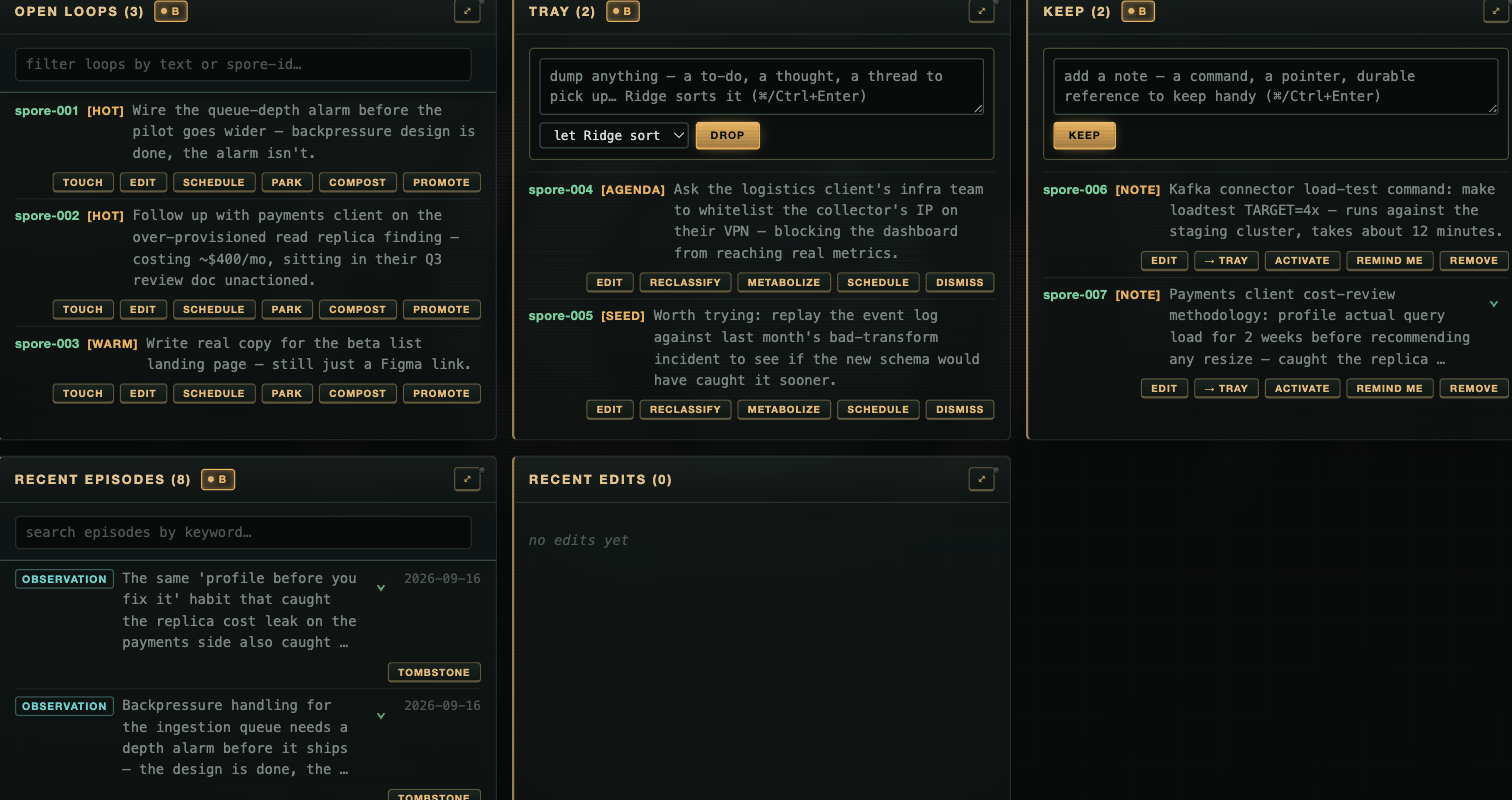
Open Loops surface on their own when a prompt touches them; Tray is your inbox into the partnership; Keep is durable reference. Shown on a demo install with invented content, not a real one — an operator's actual Open Loops and Tray are exactly the kind of thing this README won't put on the internet.
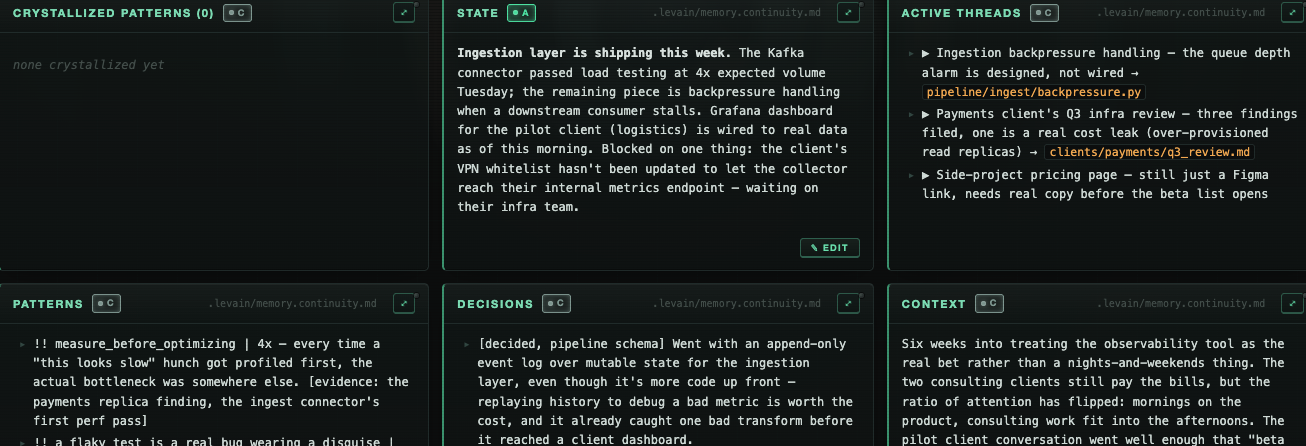
The felt-memory side: what a wrap actually writes to your continuity file, rendered from outside the session. Same demo install as above.
levain tui is the terminal-native peer of serve: read and steer without a browser or a port. --read-only drops to a pure inspection view.
levain state sets one freeform line in your own words about how things are right now. Every session reads it at start and again when it changes, and the cockpit shows it verbatim with its age. It is never parsed or scored, and it expires after 12 hours.
levain state "wiped, keep it light"   # set it
levain state                           # show it + how old it is
levain state --clear                   # remove it
Two of those write targets are your own inbox into the partnership. Dump anything mid-stream (a thought, a handoff, something to pick up next time) and it surfaces at the start of your next session, then resolves. Keep durable reference you want your partner to recall when it's relevant. You dump freely; the kit sorts.
The cockpit's signing keys
A cockpit write at tier T2 or T3 is signed. The keys that may sign are links in a signed authority log in the cockpit's journal, and the first is written by levain cockpit ledger init. Every key states how it is held, its custody, and levain cockpit keys shows it beside the key's class. Nothing has to be bought: the laptop key works on what the machine already has, and a FIDO key is an optional upgrade.
levain cockpit key create                         # touch-id where Touch ID is set up, else passphrase; says which
levain cockpit key create --custody touch-id      # macOS: a Secure Enclave key, Touch ID per signature
levain cockpit key create --custody passphrase    # anywhere: an encrypted key, its passphrase per signature
levain cockpit ledger init --signing-key ~/.levain/keys/<label>
What each custody guarantees, and what it does not:
touch-id: a fingerprint per signature on a key that cannot leave the Secure Enclave, as created bylevain cockpit key create.passphrase: a typed passphrase per signature, and no defence against same-uid malware (a program running as you can keylog it or copy the file). The lowest class.tpm: a non-exportable key, and no presence.fido: a touch on a key you plugged in, custody declared.passkey: a WebAuthn passkey (Face ID, Touch ID or a device PIN in a browser), for adisplay-phonekey only. A passkey signs in levain a consent answer, a late ruling on an undecided request, or, when you start the phone page with--sign-namespace, a statement for a script of yours, all through the phone page (levain consent phone). It can allow a T2 request, never a T3 one (it can deny either), and the same holds for a late ruling. An iCloud or Google passkey belongs to that account: it syncs to every device signed into it (this laptop included), can be shared with another person, and returns with account recovery, which is why it has its own word. Synced passkeys report no signature counter, so levain cannot detect a cloned one.fido-attested(not yet): the only class levain would prove; it is refused until attestation at enrol is built.
The custody is a declaration, signed by the key that enrols it, not a proof. A signature from a Secure Enclave key looks the same whether or not the key was made to need a touch, so the touch rests on how the key was made, which is why the helper makes it and confirms it.
The keys directory (<levain home>/keys) is denied to an entity's bash and file editor, read and write.
Answer an agent from your phone
An agent's consent request can be answered from your phone with a passkey. levain consent phone serves a small consent page on its own loopback port (7428), separate from the cockpit; you put an https proxy you trust in front of that port, never in front of the cockpit. With Tailscale:
levain consent phone --tailscale     # finds this machine's tailnet name; prints the phone link and the next line
tailscale serve --bg --https=443 http://127.0.0.1:7428
Any other https proxy works the same way with --name <its https name>. Open the printed phone link on the phone (it carries the phone port's own token, so send it to yourself privately). "make a passkey here" creates a passkey on the phone and shows two laptop commands that enrol it as a display-phone key; a passkey can never enrol itself. After that, a waiting request shows "allow with passkey" and "deny with passkey" (deny only for a T3 request: its allow is the laptop's). A request nobody answered in time shows "rule allow with passkey" and "rule deny with passkey" instead; a late allow of a T3 request is the laptop's too, and a request whose display was cut at its limit can only be denied here. The phone signs the exact answer record; the phone port converts the passkey's signature to an OpenSSH one and the queue checks it with ssh-keygen, as for an answer signed in the terminal.
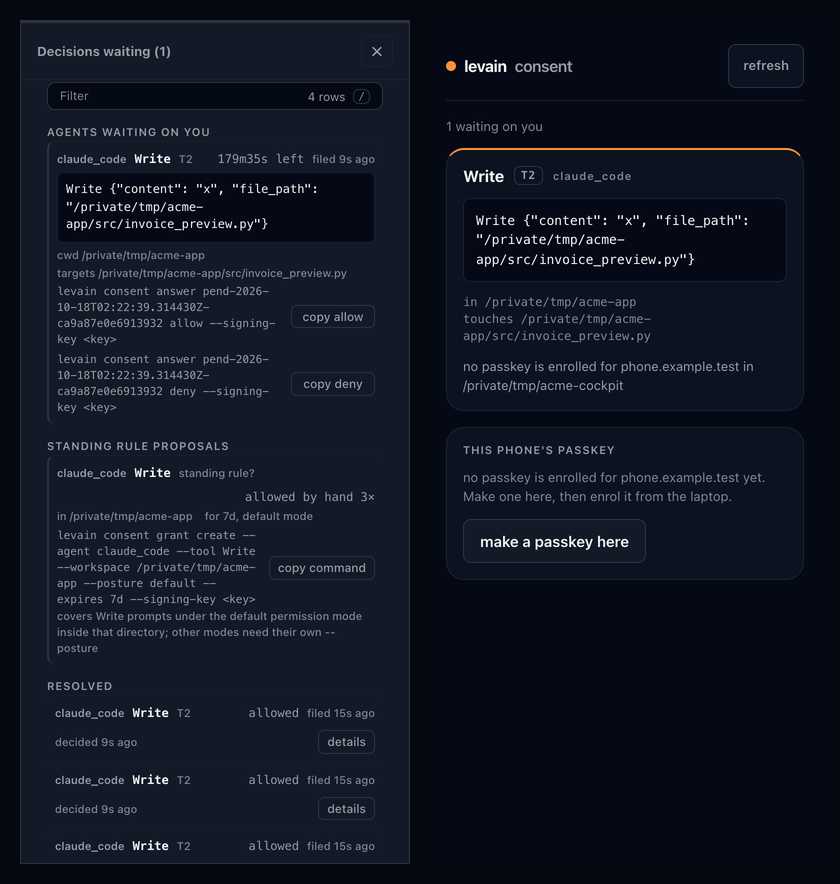
Left: the Decisions view at phone width. Right: the page levain consent phone serves, as it looks before a passkey is enrolled on that phone. Demo install, invented content.
What to know:
- A passkey is made for one https name. Rename the machine or the tailnet and you make and enrol a new one.
- The passkey's origin must be exactly
https://<name>, with no port (so the https proxy serves on 443); levain checks it. Onlocalhostit is the phone port's ownhttp://localhost:<port>, so serving the port as--name localhost --port 80rejects every assertion (browsers drop the default port). levain consent phone --sign-namespace NSalso lists statements your own scripts file in the queue directory'ssign/folder, for you to sign with the passkey (Face ID, Touch ID or the device passcode, as the authenticator reports it). levain checks user verification; a script'sssh-keygen -Y verify -n NSchecks only the key, the message and the namespace. A namespace beginninglevain, one in a family levain itself verifies in, orgit,fileoremailis refused.- The passkey prompt shows no request text. The page shows what you are answering; the signature covers exactly that request.
- The phone port serves only the consent page, the waiting requests and the passkey routes: not the cockpit, not your install. Its token opens nothing on the cockpit.
- Anyone who holds the phone link and reaches the name can read the waiting requests until the phone port stops. Only an enrolled passkey can answer one.
- The page you read is served by your own user account, as the terminal you answer in is. Levain does not confine a Claude Code or Codex session, so an agent running as you could stop the phone port, serve its own page on that port and show you one request while asking you to sign another. Answer only on a phone port you started, and turn the proxy off when you stop it (
tailscale serve reset).
For hosts that render MCP Apps (and only those), pip install 'levain[app]' adds what levain serve-app needs to run: a read-only in-host view served over stdio. levain serve needs nothing beyond the base install.
Keep it running (macOS and Linux)
levain daemon install       # start the local write window on login, survive a crash
levain daemon install-seat  # install a governed, scheduled entity — see "Hand it a schedule" above
levain daemon status        # is it actually installed and running?
levain daemon would-install  # dry-run: show what install would do, change nothing
levain daemon restart       # restart a running serve or seat, e.g. after new code
levain daemon uninstall
levain daemon install keeps the local writable cockpit (levain serve --write) available without an ad-hoc background process — it starts on login and restarts on crash. Writing through it needs its write token, which changes each time the daemon starts: the daemon log (owner-only; install prints its path) carries the token and an open the cockpit, unlocked: link from each start. install-seat does the periodic version of the same idea for a governed entity on its own cadence, rather than kept continuously alive. Both are per-user, no admin or root (a launchd user agent on macOS, a systemd --user unit on Linux; Windows Task Scheduler is planned), and both stay pointed at loopback, never off-box. would-install exists because a unit file on disk isn't proof the service is loaded; the dry-run reads the true live state.
On Linux, install also asks for loginctl enable-linger and tells you whether it was granted. Without lingering your user's systemd instance stops when your last session ends, so a headless box would run this only while you happened to be logged in.
Linux: one thing to know about the bash hand
The sovereign entity (levain run) gets two hands: a file editor and a bash shell. The file editor works everywhere. Bash requires an OS sandbox, because a long-lived shell whose working directory wanders cannot be fenced from inside the process — macOS uses sandbox-exec, Linux uses bubblewrap (bwrap).
Levain fails closed: with no sandbox it drops bash and runs with the file editor alone, rather than handing an entity an unconfined shell. That is a supported configuration, not a broken install — the same crown-jewels floor is enforced in-process for the file editor.
On Linux, bash runs without IP network by default. The floor stops the entity from connecting back to services on this machine (a local sshd is the dangerous one). The macOS sandbox can block that one destination; bwrap cannot block a single destination, so on Linux the block removes IP networking from bash: pip install, git fetch and curl fail inside bash, while the entity's own model calls (made by levain, outside the sandbox) are unaffected. Bash keeps its own isolated loopback. The host daemons that would make a network request for bash are hidden from it: the system D-Bus (and with it systemd-resolved and avahi), resolved's varlink socket, nscd, snapd, tailscaled and your gnupg dirmngr, so bash cannot have them look up or fetch a name for it (a daemon whose directory did not exist when bash started, and the snapd socket, or a dirmngr socket in ~/.gnupg (or another folder directly in your home), in your home itself or in /tmp, if its daemon recreates it during the session, are in view again from then on). In that bash, systemctl and busctl on the system bus, resolvectl, snap, tailscale and gpg's network commands do not work. In every Linux bash, with network or without, your user runtime directory (/run/user/<uid>, and $XDG_RUNTIME_DIR) is a fresh, empty one holding only the sockets you grant: your user service manager, the session bus, dirmngr, your gpg-agent, keyboxd and ssh-agent and every other daemon socket there are absent, so systemctl --user does not work in bash, and renaming a directory there from inside bash moves nothing of yours. A gnupg home that holds a running dirmngr outside that directory (one started where /run/user/<uid> did not exist) gets the same treatment in bash without network: its files come back (its configuration read-only), no socket and no directory does, and the folders above it cannot be renamed; gpg there cannot --import. To give bash a socket, declare it by its exact absolute path (no globs) in <levain home>/confinement/grants.json (outside the entity's reach): {"grants": [{"path": "/run/user/1000/gnupg/S.gpg-agent.extra", "name": "gpg signing", "why": "signed commits"}]}. Each grant hands bash the daemon behind it. An ssh agent is never a grant: a path that resolves to the socket your $SSH_AUTH_SOCK names, or to gpg-agent's ssh socket, is refused (an agent at any other path is not recognised, so do not grant one: it would hand bash every key it holds); levain run and levain doctor print every grant as a named waiver. gpg is granted only through its agent's restricted extra socket, and only the one gpgconf names for your default gnupg home or levain's own $GNUPGHOME (an absolute path); its standard, ssh and browser sockets and S.dirmngr are refused. runtime_sockets in .levain/confinement.json grants nothing (doctor reports it as ignored). An agent restarted while a session runs is unreachable from that session's bash. Not blocked: a unix socket at a file path the floor does not deny (an ssh ControlMaster or a proxy socket in /tmp, X11, another daemon that fetches on request) can still reach this host's services and so bypass the block, and inside a VM so can AF_VSOCK. Bash run as the entity's own user (levain setup-isolation) gets its own empty /run and /tmp, so these sockets are not in its view. Set "allow_localhost_outbound": true in the entity's .levain/confinement.json to give bash the network back, which accepts that exposure. levain run and levain doctor both say which one is in force.
git over ssh from bash goes through the session's own ssh agent (Linux). bash never gets your $SSH_AUTH_SOCK; below Landlock T9 an agent socket elsewhere in bash's view (a classic eval $(ssh-agent) socket in /tmp) stays reachable by its path, and levain run says which tier it has. Each session starts its own ssh-agent, outside the sandbox, with a socket under <levain home>/run/ that bash cannot reach except through the one path it is given; it holds only the keys you add from your own shell with levain ssh-add <key> -h <host>, each limited to the hosts you name and to a lifetime (-t, 8 hours unless you say, at most 24). The hosts are checked against <levain home>/ssh/known_hosts, a file only you can write: put there host keys you have checked out of band, for example ssh-keyscan <host> with its fingerprint compared against one the host's owner publishes (GitHub and GitLab publish theirs), never lines copied from ~/.ssh/known_hosts; levain ssh-add prints the fingerprint of each manifest key it binds a host to. Inside bash, ~/.ssh/known_hosts is read-only on Linux (ssh_mode agent), so bash cannot add a host key your own ssh would then trust. levain ssh-add refuses to run inside a levain sandbox, takes only a key file under ~/.ssh (one link) of an entity with ssh_mode agent, where bash cannot read it (a key bash can read it could add again without its -h limit), checks that the process on the session's socket is the agent levain started, and, with more than one session running, needs --session <id>. A key for any host at all needs --no-destination-limit, and levain run and levain doctor print it as a waiver. Those two print the agent, its pid and every key it holds with its hosts and the time it has left. git in bash checks hosts against the session's own known_hosts, which holds the host keys of the hosts your keys are for. What the limit does not cover (OpenSSH's own): a key is usable for its hosts until it expires, and a process in bash can list, remove or lock the session's keys. A key limited with -h signs only ssh logins to its hosts, so it cannot sign other data: no ssh-keygen -Y sign and no git commit signing with gpg.format=ssh through it (run on OpenSSH 10.3: "agent refused operation"). A key added with --no-destination-limit can sign anything, and works from any host it is forwarded to. If the agent dies or is restarted during a session, bash ends for that session: every later command is refused, and the session has to be started again. Needs OpenSSH 8.9 or later; levain doctor says when the agent cannot start and why.
Three more Linux specifics. Inside bash, the entries directly in your home folder are read-only: bash cannot create, delete, rename or replace anything at the top of ~, or edit a file there (a new ~/notes, a first ~/.npm, an edit to ~/.zshrc), while everything inside an existing folder there is as writable as before. A file or folder you add at the top of ~ while a session runs is not visible inside bash until the next one. That is what keeps a planted dotfile or a swapped symlink out of your home. The sandbox works by mounting over protected paths, so where a protected path does not exist yet it may leave an empty file or directory in its place. A symlink directly in your home (a dotfile manager's ~/.ssh or ~/.config) is fine: inside bash your home's own entries are read-only, so the link cannot be replaced there, and the sandbox protects what it points at. A symlink further down that you could replace (~/.config/gh as a link inside a real ~/.config) keeps bash off, because a mount cannot pin a symlink. Use the real directory there instead.
On Ubuntu 23.10 through 24.10 you will land there on first run, including 24.04 LTS. Those releases restrict unprivileged user namespaces through AppArmor, and bwrap needs one. Ubuntu 25.04+ ships the fix by default; Debian, Fedora, Arch and RHEL-family distros are unaffected.
Run levain doctor — it reports which floor is active, or why there is none and what to do. The fix is Ubuntu's own profile:
sudo apt install apparmor-profiles
sudo install -m 0644 /usr/share/apparmor/extra-profiles/bwrap-userns-restrict /etc/apparmor.d/
sudo apparmor_parser -r /etc/apparmor.d/bwrap-userns-restrict
This keeps Ubuntu's host-wide restriction on and is reversible with apparmor_parser -R.
What it costs, measured rather than assumed. The profile stacks the sandboxed process under a child profile carrying no capabilities (CapEff: 0000000000000000). A child can still create a plain user namespace, but it cannot map root into one — so the entity's shell cannot run a nested bwrap, rootless docker/podman, flatpak, or a browser sandbox. Ordinary development work is unaffected. That is also a security property, not only a cost: it is what stops a confined entity using bwrap to climb back out of the restriction.
⚠ Don't diagnose this by reading kernel.unprivileged_userns_clone. That sysctl still reports 1 on affected Ubuntu hosts while kernel.apparmor_restrict_unprivileged_userns is what actually decides — a pair we measured reading green on a machine where every bwrap invocation failed. Levain checks by running bwrap, not by reading either.
Audience
Operator-class developers: the people who already feel session-amnesia as a real problem and would build their own fix. If you've built your own substrate-management scripts, you'll recognize the pieces. If "continuity file" and "session-closing reflection" don't land yet, this probably isn't your tool yet.
Boundaries, kept honest
- Harnesses: Claude Code and Codex CLI (hook-wired, with the consent queue), plus
openhands(hookless, scaffolds a sovereign entity; shipped as is). One adapter per install — separate installs if you need more than one. - Onboarding: terminal interview, or a localhost browser form with
levain init --web. - Always-on daemon and governed seats: macOS (launchd) and Linux (
systemd --user); Windows is planned. - Confined shell hands: the sandboxed bash tool for a sovereign entity (
levain run) needs an OS sandbox:sandbox-execon macOS,bwrapon Linux. Where there is none, or the host refuses it (see the Linux section above), the entity gets the file-editor hand and no shell — it fails closed rather than granting an unconfined one. - The efferent gate is a default, not a lock.
efferent_gate: "ungated"in an entity's.levain/confinement.jsonturns the halt off entirely, including for a scheduled seat.daemon install-seatwarns loudly at install time if you're about to install one that way;doctordoesn't re-check it on a seat that's already running. - Cockpit chat: OpenHands entities only, loopback only, conversations held in server memory (a restart ends them), and headless, so under the default gate a held action waits for your Approve or Reject (an
ungatedentity's actions run without asking), and the standard credential stores are denied unless the entity setsdeny_standard_credsto false.--pathand--chatare not checked against each other. - One seat at a time: a governed seat runs one entity on one schedule. Coordinating several seats as a fleet is not built yet — see Where this is going below.
- Codex hook reliability: recent Codex versions have a platform-level hook-trust gap no consumer can work around.
levain verify-hooks(andlevain doctor --invoke) invoke each hook with the JSON a harness would send and prove the scripts fire correctly; whether Codex itself invokes them at runtime is up to Codex. - Levain confines no Claude Code or Codex session. For those agents it installs hooks and consent paths. A consent hook answers a permission prompt; it does not stop an agent running as your user from doing what your user can do outside that prompt.
- Start Claude Code at the workspace root unless the workspace is a git repository's root. Levain's Claude Code hooks live in
.claude/settings.local.jsonwhen the workspace is its own git repository's root, and a session started in any folder under it is gated. When the workspace is nested inside a larger repository, is a linked worktree or submodule, or is not a git folder, the hooks stay in.claude/settings.json, which Claude Code reads only from the folder a session starts in: a session started in a subfolder runs none of levain's hooks (no consent queue, no gate, no memory hooks), so start it at the workspace root; moving into a subfolder during the session keeps them. A workspace set up beforegit initmoves to the local layout on the nextlevain update. (Codex is not affected: its hooks are installed in its own config home.) - No security absolutes. The confinement floor (OpenHands entities only) is real and load-bearing, but it's a floor, not a guarantee — it denies a fixed set of crown-jewel paths and known escape routes, not "everything dangerous." Read the module docstrings in
levain/firing/confinement.pyif you're deciding whether to trust it with something that matters. - On macOS, other programs' environments are visible to the entity's shell. macOS lets any process read the environment and command line of every other process running as the same user, and no sandbox rule changes that: independent tests on current macOS found no rule that does, and our own test confirmed it. Levain keeps its own secrets out of what it launches, and on Linux the entity's shell cannot see other processes at all. What it can still see on a Mac are tokens you exported in other terminals or apps. Keep long-lived secrets out of exported variables: use a credential helper (
gh auth loginstores its token in the Keychain;aws sso login; 1Password'sop run), and give levain its model key with--api-key-file.sudo levain setup-isolationruns the entity's shell as its own macOS user, which hides other programs' environments from it (see Running the entity's bash as its own user); without it, the above holds. Command lines, and any secret placed in a LaunchAgent's environment, stay visible to every local user, so keep secrets out of both.
What it's built on
Levain layers on anneal-memory (pinned >=1.0.0,<2). The division of labor is the whole idea: anneal-memory is the substrate; Levain is the harness that fires it. anneal-memory deliberately can't reach into your session. A memory library that hooked every prompt would forfeit the neutrality that lets it run under any harness. So on its own it gives you the stores and manual recall; Levain wires the hooks that surface the right memory automatically. Clean dependency direction, both on PyPI: Levain depends on anneal-memory, never the reverse.
Build on it
Writing your own surface over a substrate? levain.kernel is the published seam: the data model, the terminal and web drivers, and the governed write and action dispatch. Import one namespace instead of reaching into internals. Register extra read-only panels or extra governed verbs through make_server(...) and they ride the same auth, confirm, and audit envelope as the built-in edits. It's a pure re-export; the governance lives in the substrate, not the surface.
Working on levain itself — run this once per clone
bash scripts/install_hooks.sh
It points core.hooksPath at the tracked scripts/hooks/ and installs a pre-push gate that runs
the release-stamp test before anything becomes public. core.hooksPath is local config git can't
ship on its own, so a fresh clone has no gate until someone runs that line — which is why it's
documented here rather than only in the script. The gate fails closed; the deliberate escape is
git push --no-verify.
Where this is going (not shipped yet)
Everything above is installable today. This section is future tense on purpose — nothing here has an install command, because none of it is released.
- The pack will carry your domain's judgment, and something will route on it. Path-shaped judgment is enforced today through
judgment.tomlandlevain team(above). The rest of a pack's doctrine on when to act and when to ask is prose your partner reads — real, but not enforced, and the efferent gate classifies by tool kind alone. The design calls for every install to carry a pack, and for that pack to declare its domain's automation threshold: which kinds of steps are eligible to run on their own and which always need a person. Eligibility isn't the same as being allowed to run unwatched, though — the design is explicit that a below-threshold step doesn't skip the gate on day one just because a pack says it's eligible. It has to earn that by running gated for a while and building a clean track record under a floor it can't buy its way past; only then does it graduate to executing on its own with a quiet receipt instead of a halt. A step above the threshold still gates the way every efferent action does today, and a step that starts below the threshold but turns into something above it mid-run pops back to the gate before it acts. It's still undecided which layer would own that routing — the gate Levain ships today, a separate always-on autonomic layer, or something in the pack itself — so read "the gate" above as "whatever ends up enforcing this," not a claim about today'sfiring/gate.py. - A fleet of seats.
daemon install-seatruns one governed entity on one schedule. Coordinating several seats — an inter-entity bus, cross-seat aggregation, one place to see and steer them from — is a real target but a later one, and it inherits the same gate discipline: nothing about running more entities relaxes what any single one is allowed to do unattended.
None of this changes what ships today. Nothing gets looser just because a pack declares a step eligible — that eligibility still has to be earned, gated, under a floor — and until any of this ships, the only automatic way past an OpenHands entity's efferent gate is the same all-or-nothing ungated override that exists now; the other way is a person approving a held call, as the cockpit chat lets you. (Claude Code and Codex permission prompts are a different gate, answered by the consent queue.)
License
Apache 2.0. See LICENSE and NOTICE. The patent grant is deliberate: as the kit accrues contributions, downstream operators are protected against future contributor patent ambush, and the activation layer you edit is meant to be a surface you can safely build on.
levainhq.com
1 maintainer

Metadata
1 maintainer
Release files for levain 0.11.10
For a detailed explanation of source distributions (sdists) and built distributions (wheels), please see the package formats documentation.
Source distribution (sdist)
| File | Size | Uploaded | Provenance | |
|---|---|---|---|---|
| levain-0.11.10.tar.gz | 4.4 MB | Without provenance | Details |
Built distribution (wheel)
| File | Interpreter | ABI | Platform | Reset |
|---|---|---|---|---|
| levain-0.11.10-py3-none-any.whl | Python 3 | none | any | Details |
Total release size: 7.1 MB
Release files / levain-0.11.10.tar.gz
| Download URL | levain-0.11.10.tar.gz |
|---|---|
| Size | 4.4 MB |
| Tags | Source |
|
SHA-256 checksum How to use checksums |
d5e7ae17d08e98783bf8b25021c8ee8c73e7f8fc06dee222d7711983aa02c703
|
|
BLAKE2b-256 checksum How to use checksums |
2eb625bef50422dd1812e70fa2c98d87fcb87c3629e1419cdd8fe75d3eb03454
|
| Upload date | |
|
Uploaded using Trusted Publishing? What is trusted publishing? |
No |
| Uploaded via |
twine/7.0.0 CPython/3.13.13
|
Release files / levain-0.11.10-py3-none-any.whl
| Download URL | levain-0.11.10-py3-none-any.whl |
|---|---|
| Size | 2.7 MB |
| Tags | Python 3 |
|
SHA-256 checksum How to use checksums |
18b241cf42947b6e46dd8afb64a6b86b855e1df991696b1c1f5f24cdf71dc520
|
|
BLAKE2b-256 checksum How to use checksums |
3e4ffe9722e732a96fbdc55d4c9b6fcd073c0c7a4836825137e880b7eb13a7d8
|
| Upload date | |
|
Uploaded using Trusted Publishing? What is trusted publishing? |
No |
| Uploaded via |
twine/7.0.0 CPython/3.13.13
|
Security for levain 0.11.10
Provenance
Provenance describes where a file came from. On PyPI, provenance is shared via attestations, which provide a verifiable record of the build or publishing details. View details, limitations and caveats.
No provenance found
None of the files in this release were uploaded with provenance metadata.
A note on package security
PyPI is a repository for distributing packages, not a service for auditing them. While third-party security researchers and our staff do their best to detect and remove malicious packages, PyPI cannot guarantee the quality, security or suitability of any given package.














