
Motivational Image Caption Generator - Create inspiring social media content with AI-generated captions

Project description
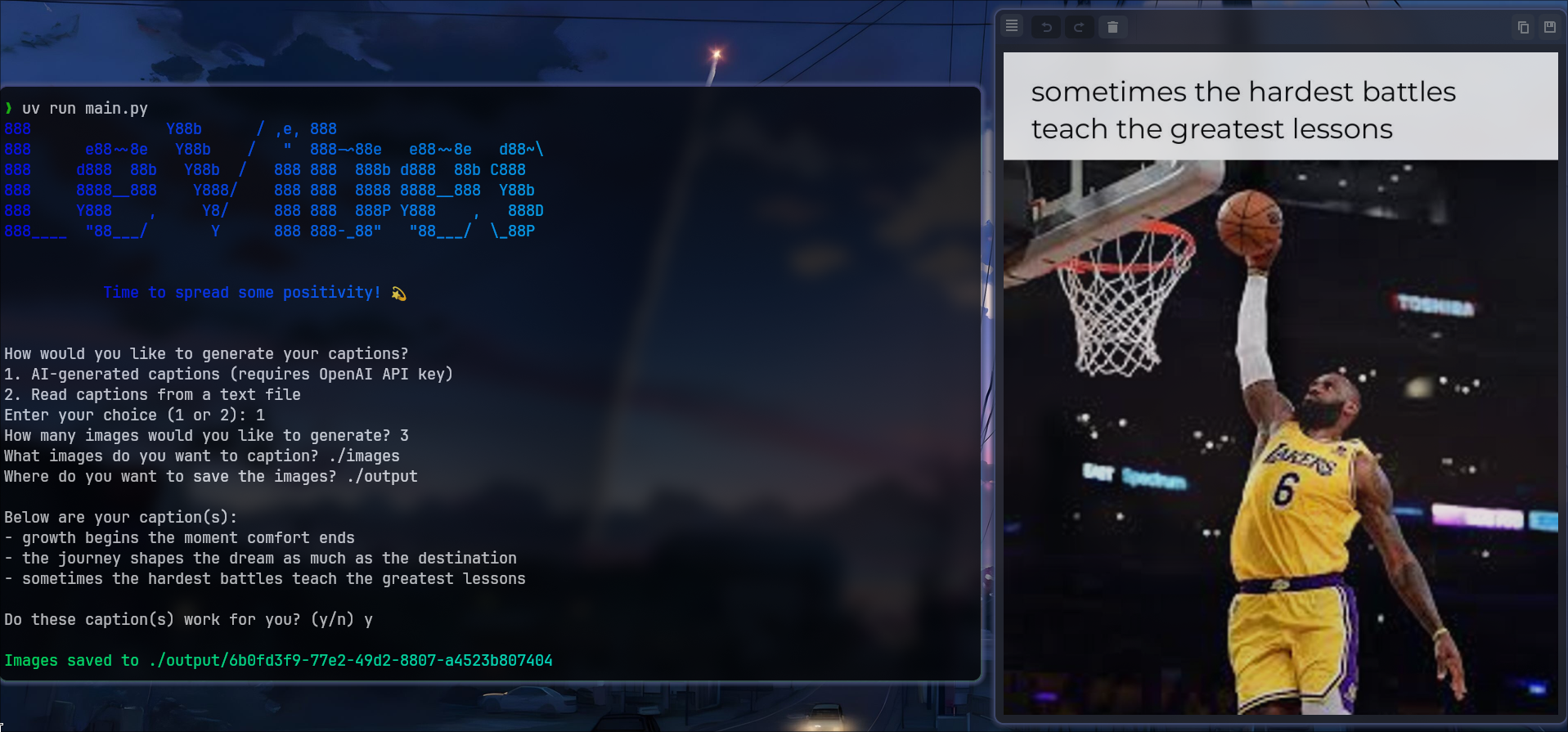
LeVibes
Generate motivational social media posts with AI and LeBron James


Features
- Generate beautiful motivational images with AI-powered captions
- Upload images as draft slideshows to TikTok
- Cloudflare R2 integration for image hosting
- Interactive CLI interface
Installation
# Clone the repository
git clone https://github.com/makors/levibes
cd levibes

# Install dependencies using uv
uv sync

# Or with pip
pip install -e .
Configuration
Create a .env file in the project root with the following variables:
Complete Example .env File
# OpenAI Configuration
OPENAI_API_KEY=your_openai_api_key_here

# TikTok API Configuration
TIKTOK_CLIENT_ID=your_tiktok_client_id
TIKTOK_CLIENT_SECRET=your_tiktok_client_secret

# Cloudflare R2 Configuration
CLOUDFLARE_R2_ENDPOINT_URL=https://abc123def456.r2.cloudflarestorage.com
CLOUDFLARE_R2_ACCESS_KEY_ID=your_r2_access_key_id
CLOUDFLARE_R2_SECRET_ACCESS_KEY=your_r2_secret_access_key
CLOUDFLARE_R2_BUCKET_NAME=my-levibes-bucket

# R2 Public URL (r2.dev subdomain - recommended)
CLOUDFLARE_R2_PUBLIC_URL_BASE=https://my-levibes-bucket.r2.dev
Environment Variables Breakdown
OpenAI Configuration
OPENAI_API_KEY=your_openai_api_key_here
TikTok API Configuration
TIKTOK_CLIENT_ID=your_tiktok_client_id
TIKTOK_CLIENT_SECRET=your_tiktok_client_secret
Cloudflare R2 Configuration
# Required R2 variables
CLOUDFLARE_R2_ENDPOINT_URL=https://your-account-id.r2.cloudflarestorage.com
CLOUDFLARE_R2_ACCESS_KEY_ID=your_r2_access_key_id
CLOUDFLARE_R2_SECRET_ACCESS_KEY=your_r2_secret_access_key
CLOUDFLARE_R2_BUCKET_NAME=your_r2_bucket_name

# Optional: Public URL base for accessing files
# Use r2.dev subdomain: https://your-bucket-name.r2.dev
# Or custom domain: https://your-custom-domain.com
CLOUDFLARE_R2_PUBLIC_URL_BASE=https://your-bucket-name.r2.dev
Setting up Cloudflare R2
-
Create a Cloudflare R2 Bucket:
- Go to Cloudflare Dashboard
- Navigate to R2 Object Storage
- Create a new bucket with a unique name
- Note the bucket name for your
.envfile
-
Create R2 API Token:
- Go to "Manage R2 API Tokens"
- Create a new API token with read/write permissions
- Note the Access Key ID and Secret Access Key
-
Configure Public Access:
- In your bucket settings, enable public access
- This will give you an r2.dev subdomain:
https://your-bucket-name.r2.dev - Set
CLOUDFLARE_R2_PUBLIC_URL_BASE=https://your-bucket-name.r2.dev - Alternatively, configure a custom domain if desired
💡 Using r2.dev Subdomain
If you're using an r2.dev subdomain (like
https://my-bucket.r2.dev), this is the recommended and simplest approach:
- Enable public access on your R2 bucket
- Use the provided r2.dev URL as your
CLOUDFLARE_R2_PUBLIC_URL_BASE- The app will upload via the R2 API and serve files via the r2.dev subdomain
Example configuration:
CLOUDFLARE_R2_PUBLIC_URL_BASE=https://my-levibes-bucket.r2.dev
- Set R2 Endpoint URL:
- Format:
https://your-account-id.r2.cloudflarestorage.com - Replace
your-account-idwith your actual Cloudflare account ID - This is used for uploads via API, not for public access
- Format:
Setting up TikTok API
-
Create TikTok Developer Account:
- Go to TikTok for Developers
- Create a developer account
- Create a new app
-
Configure App Settings:
- Set redirect URI to:
https://tiktoklocal.com:8080/callback - Enable the following scopes:
user.info.basicuser.info.profilevideo.upload
- Note the Client ID and Client Secret
- Set redirect URI to:
-
Domain Configuration:
- Add
tiktoklocal.comto your hosts file pointing to127.0.0.1 - On macOS/Linux:
echo "127.0.0.1 tiktoklocal.com" | sudo tee -a /etc/hosts - On Windows: Add to
C:\Windows\System32\drivers\etc\hosts
- Add
Usage
Basic Usage
# Run the application
python main.py

# Or use the CLI directly
levibes
Command Line Options
# Generate images only
python main.py --no-upload

# Upload existing images
python main.py --upload-only

# Specify custom output directory
python main.py --output-dir ./my-images

# Set custom caption
python main.py --caption "Follow for more motivation!"
TikTok Upload Process
-
Authentication:
- The app will open a browser for TikTok OAuth
- You may see a security warning (SSL certificate)
- Click "Advanced" and "Proceed to tiktoklocal.com"
- Authorize the app
-
Image Upload:
- Images are first uploaded to Cloudflare R2
- R2 URLs are then used to create TikTok draft
- Draft appears in your TikTok app inbox
-
Publishing:
- Open TikTok app on your phone
- Go to inbox and find the draft
- Edit and publish as desired
File Structure
levibes/
├── src/levibes/
│   ├── caption_generation.py  # AI caption generation
│   ├── generate_images.py     # Image creation
│   ├── upload.py             # TikTok/R2 upload
│   ├── cli.py                # Command line interface
│   └── config.py             # Configuration management
├── output/                   # Generated images
├── main.py                   # Entry point
└── .env                      # Environment variables
API Limits
- TikTok API: 6 requests per minute per user
- R2 Storage: Check your Cloudflare plan limits
- OpenAI API: Based on your plan and usage
Troubleshooting
Common Issues
-
"Missing required environment variables"
- Ensure all required variables are set in
.env - Check for typos in variable names
- Ensure all required variables are set in
-
"Authorization failed"
- Verify TikTok Client ID and Secret
- Check that redirect URI is correctly configured
- Ensure
tiktoklocal.comis in your hosts file
-
"Failed to upload to R2"
- Verify R2 credentials and bucket name
- Check bucket permissions
- Ensure endpoint URL is correct
- If using r2.dev subdomain, make sure public access is enabled on the bucket
-
SSL Certificate Warning
- This is normal for local development
- Click "Advanced" and "Proceed to tiktoklocal.com"
Debug Mode
Set DEBUG=1 in your .env file for detailed logging:
DEBUG=1
Contributing
- Fork the repository
- Create a feature branch
- Make your changes
- Test thoroughly
- Submit a pull request
License
MIT License - see LICENSE file for details.
Release history Release notifications | RSS feed


Download files
Download the file for your platform. If you're not sure which to choose, learn more about installing packages.
Source Distribution
Built Distribution
Filter files by name, interpreter, ABI, and platform.
If you're not sure about the file name format, learn more about wheel file names.
Copy a direct link to the current filters
File details
Details for the file levibes-0.1.1.tar.gz.
File metadata
- Download URL: levibes-0.1.1.tar.gz
- Upload date:
- Size: 22.6 kB
- Tags: Source
- Uploaded using Trusted Publishing? No
- Uploaded via: uv/0.7.19
File hashes
| Algorithm | Hash digest | |
|---|---|---|
| SHA256 |
e0a7d0993784ac963a94d062df3f3051ede059b0ac2a227e3ac24520b5c5e2d3
|
|
| MD5 |
25f0b26426f60e6a467d42e2e5635ce1
|
|
| BLAKE2b-256 |
f59167f2c59b7af6fd5a8b9fe76f45259da4341e32332771472539c73bf5a194
|
File details
Details for the file levibes-0.1.1-py3-none-any.whl.
File metadata
- Download URL: levibes-0.1.1-py3-none-any.whl
- Upload date:
- Size: 23.6 kB
- Tags: Python 3
- Uploaded using Trusted Publishing? No
- Uploaded via: uv/0.7.19
File hashes
| Algorithm | Hash digest | |
|---|---|---|
| SHA256 |
7b66a8378950104337ae62ff7757dec3a1b1bf129d41ffbd666ac435ead8fa8a
|
|
| MD5 |
ff6f3d09973f151a8988ed2747f502de
|
|
| BLAKE2b-256 |
1ad49d08b86c6b235326ac126e4cff2ba32d38c52af82c05163550b5a39a5bbe
|






