
No project description provided

Project description


✍️ 🦜 Collaborative Plugin for Lexical with Loro CRDT
A collaborative editing plugin for Lexical Rich Editor built with Loro CRDT, providing real-time collaborative editing capabilities with conflict-free synchronization.
Core Components
This package provides three main components for building collaborative text editors:
LoroCollaborativePlugin.tsx- A Lexical plugin that integrates Loro CRDT for real-time collaborative editingLexicalModelPython Library - A standalone document model for Lexical content with CRDT capabilitieslexical-loroWebSocket Server - A Python server using loro-py for real-time collaboration
Quick Start
Using the Lexical Plugin
import { LoroCollaborativePlugin } from './src/LoroCollaborativePlugin';

function MyEditor() {
  return (
    <LexicalComposer initialConfig={editorConfig}>
      <RichTextPlugin />
      <LoroCollaborativePlugin
        websocketUrl="ws://localhost:8081"
        docId="my-document"
        username="user1"
      />
    </LexicalComposer>
  );
}
Using the LexicalModel Library
from lexical_loro import LexicalModel

# Create a new document
model = LexicalModel.create_document("my-document")

# Add content
model.add_block({
    "text": "My Document",
    "format": 0,
    "style": ""
}, "heading1")

model.add_block({
    "text": "This is a paragraph.",
    "format": 0,
    "style": ""
}, "paragraph")

# Save to file
model.save_to_file("document.json")

# Load from file
loaded_model = LexicalModel.load_from_file("document.json")
Using the Python Server
# Install the Python package
pip install -e .

# Start the server
lexical-loro-server --port 8081
Examples
For complete working examples, see the src/examples/ directory which contains:
- Full React application with dual editor support
- Server selection interface
- Connection status indicators
- Rich text formatting examples
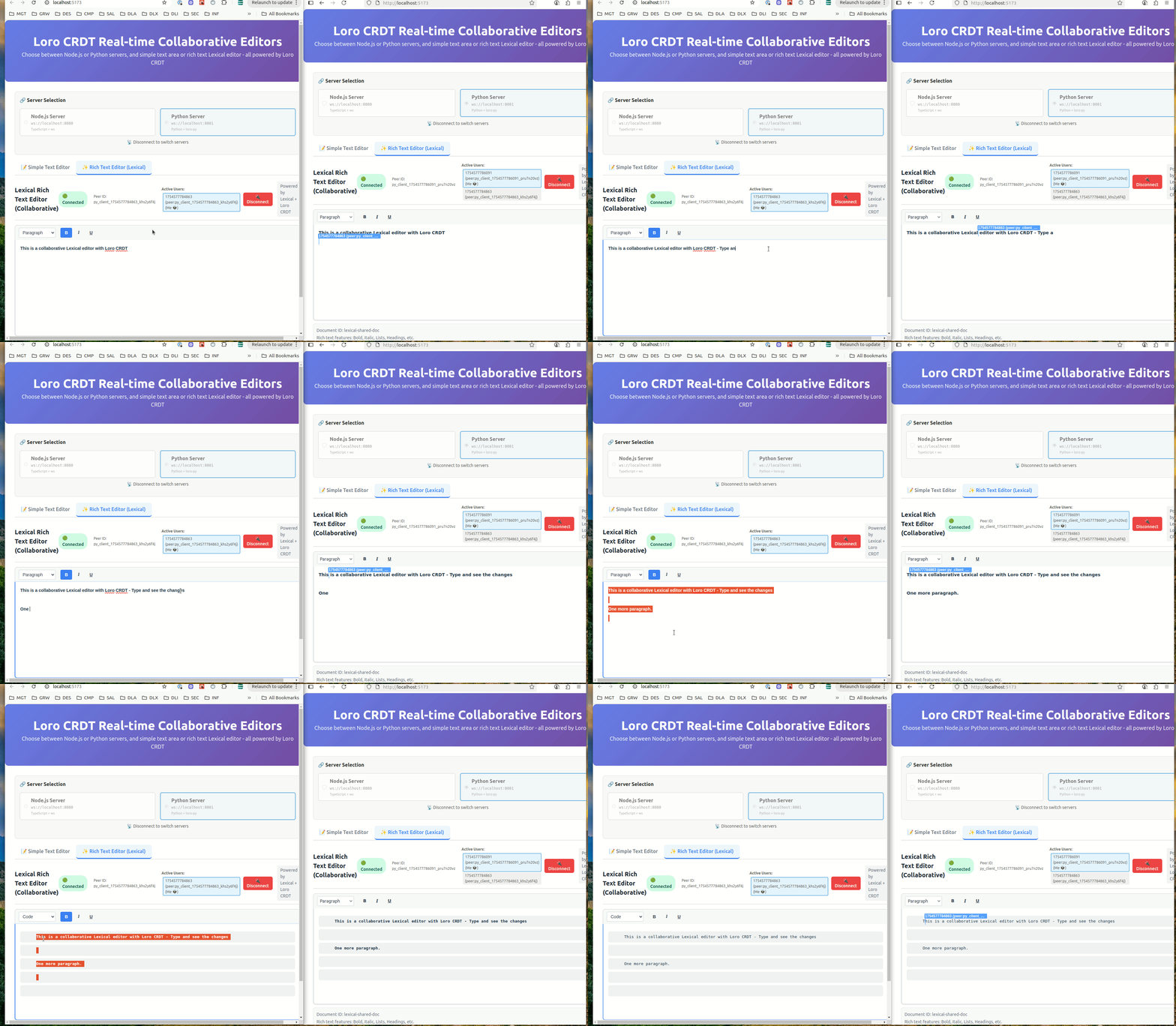
DISCLAIMER Collaborative Cursors still need fixes, see this issue.
Core Features
- 🔄 Real-time Collaboration: Multiple users can edit the same document simultaneously
- 🚀 Conflict-free: Uses Loro CRDT to automatically resolve conflicts
- 📝 Lexical Integration: Seamless integration with Lexical rich text editor
- 📚 Standalone Library: Use LexicalModel independently for document management
- 🌐 WebSocket Server: Python server for maintaining document state
- 📡 Connection Management: Robust WebSocket connection handling
- ✨ Rich Text Support: Preserves formatting during collaborative editing
- 💾 Serialization: JSON export/import and file persistence
- 🔧 Extensible: Plugin-based architecture for easy customization
Technology Stack
Core Dependencies:
- Lexical: v0.33.1 (Facebook's extensible text editor framework)
- Loro CRDT: v1.5.10 (Conflict-free replicated data types)
- React: 18/19 (for plugin hooks and components)
- Python: 3.8+ with loro-py and websockets
Development Dependencies:
- TypeScript: For type safety
- Vite: For building and development (examples only)
- pytest: Python testing
- ESLint: Code linting
Installation
Core Plugin
The Lexical plugin is a single TypeScript/React component that you can copy into your project:
# Copy the plugin file
cp src/LoroCollaborativePlugin.tsx your-project/src/
Dependencies required:
npm install lexical @lexical/react @lexical/selection loro-crdt react react-dom
Python Server
Install the Python WebSocket server:
# Install from this repository
pip install -e .

# Or install specific dependencies
pip install websockets click loro
Usage
1. Lexical Plugin Integration
Add the plugin to your Lexical editor:
import { LexicalComposer } from '@lexical/react/LexicalComposer';
import { RichTextPlugin } from '@lexical/react/LexicalRichTextPlugin';
import { ContentEditable } from '@lexical/react/LexicalContentEditable';
import { LoroCollaborativePlugin } from './LoroCollaborativePlugin';

const editorConfig = {
  namespace: 'MyEditor',
  theme: {},
  onError: console.error,
};

function CollaborativeEditor() {
  return (
    <LexicalComposer initialConfig={editorConfig}>
      <div className="editor-container">
        <RichTextPlugin
          contentEditable={<ContentEditable className="editor-input" />}
          placeholder={<div className="editor-placeholder">Start typing...</div>}
          ErrorBoundary={() => <div>Error occurred</div>}
        />
        <LoroCollaborativePlugin
          websocketUrl="ws://localhost:8081"
          docId="shared-document"
          username="user123"
        />
      </div>
    </LexicalComposer>
  );
}
2. Standalone LexicalModel Library
Use the LexicalModel library independently for document management:
from lexical_loro import LexicalModel

# Create a new document
model = LexicalModel.create_document("my-document")

# Add different types of content
model.add_block({
    "text": "My Document",
    "format": 0,
    "style": ""
}, "heading1")

model.add_block({
    "text": "This is a paragraph with **bold** text.",
    "format": 0,
    "style": ""
}, "paragraph")

model.add_block({
    "text": "",
    "format": 0,
    "style": ""
}, "list")

# Serialize to JSON
json_data = model.to_json()

# Save to file
model.save_to_file("document.json")

# Load from file
loaded_model = LexicalModel.load_from_file("document.json")

# Access blocks
for block in loaded_model.get_blocks():
    print(f"{block['type']}: {block.get('text', '')}")
For more examples, see:
examples/memory_only_example.py- Basic document creation and manipulationexamples/file_sync_example.py- File persistence and batch operationsexamples/collaboration_example.py- Simulating collaborative editingdocs/LEXICAL_MODEL_GUIDE.md- Comprehensive documentation
3. Python Server Setup
Start the WebSocket server:
# Default port (8081)
lexical-loro-server

# Custom port
lexical-loro-server --port 8082

# With debug logging
lexical-loro-server --port 8081 --log-level DEBUG
4. Programmatic Server Usage
import asyncio
from lexical_loro import LoroWebSocketServer

async def main():
    server = LoroWebSocketServer(port=8081)
    await server.start()
    print("Server running on ws://localhost:8081")

if __name__ == "__main__":
    asyncio.run(main())
Plugin API
For detailed API documentation, see docs/API.md.
Quick Reference
interface LoroCollaborativePluginProps {
  websocketUrl: string;          // WebSocket server URL
  docId: string;                 // Unique document identifier
  username: string;              // User identifier
  userColor?: string;            // User cursor color (optional)
  debug?: boolean;               // Enable debug logging (optional)
}
Initialization Best Practices
⚠️ Important: Always wait for collaboration initialization before enabling other plugins.
See docs/INITIALIZATION_GUIDE.md for comprehensive guidance on:
- Proper plugin ordering
- Initialization callbacks
- Error handling
- Common anti-patterns to avoid
Examples
For complete working examples and demonstrations, see the src/examples/ directory:
# Run the example application
npm install
npm run example

# This starts both Node.js and Python servers plus a React demo app
# Open http://localhost:5173 to see dual editor interface
The examples include:
- Complete React App: Full collaborative editor with UI
- Server Selection: Switch between Node.js and Python backends
- Dual Editors: Simple text area and rich Lexical editor
- Real-time Demo: Multi-user collaboration testing
See src/examples/README.md for detailed example documentation.
Architecture
EDITOR 1                                           EDITOR 2

loro                                               loro
- node(data: root(1))                              - node(data: root(12))
  - node(data: element(2))                           - node(data: element(22))
    - node(data: text(3))                              - node(data: text(13))
  - node(data: counter(4))                           - node(data: counter(4))

                <---- loro updates via websocket ------>
                <---- loro node ids are the same ------>
             <---- lexical node keys are different ------>

lexical                                            lexical
- root(1)                                          - root(12)
  - element(2)                                       - element(22)
    - text(3)                                          - text(13)
  - counter(4)                                       - counter(49)
Examples
Loro examples
Y.js examples (for reference)
Release history Release notifications | RSS feed


Download files
Download the file for your platform. If you're not sure which to choose, learn more about installing packages.
Source Distributions
Built Distribution
Filter files by name, interpreter, ABI, and platform.
If you're not sure about the file name format, learn more about wheel file names.
Copy a direct link to the current filters
File details
Details for the file lexical_loro-0.2.1-py3-none-any.whl.
File metadata
- Download URL: lexical_loro-0.2.1-py3-none-any.whl
- Upload date:
- Size: 59.2 kB
- Tags: Python 3
- Uploaded using Trusted Publishing? No
- Uploaded via: twine/6.2.0 CPython/3.13.11
File hashes
| Algorithm | Hash digest | |
|---|---|---|
| SHA256 |
33e16902ef77823bf0422aa751387f2a418edcf4db980f5c39a830b365c039a8
|
|
| MD5 |
520756c7c0459dfe728cb56d239bf2f0
|
|
| BLAKE2b-256 |
1de3fde02f98003dad83861c8e6f7ca51f5f328990382e1346c9134575f5c141
|






