








eCalc™@
eCalc™ is a software tool for calculation of energy demand and greenhouse gas (GHG) emissions from oil and gas production and processing.
Note
eCalc™ is a work in progress and is by no means considered a finished and final product. We currently recommend to use the YAML API when using eCalc, and only fallback to the Python API when it is strictly needed.
Warning
The quality of the results produced by eCalc™ is highly dependent on the quality of the input data. Further, we do not make any guarantees and are not liable for the quality of results when using eCalc™.
Reference Links
Introduction
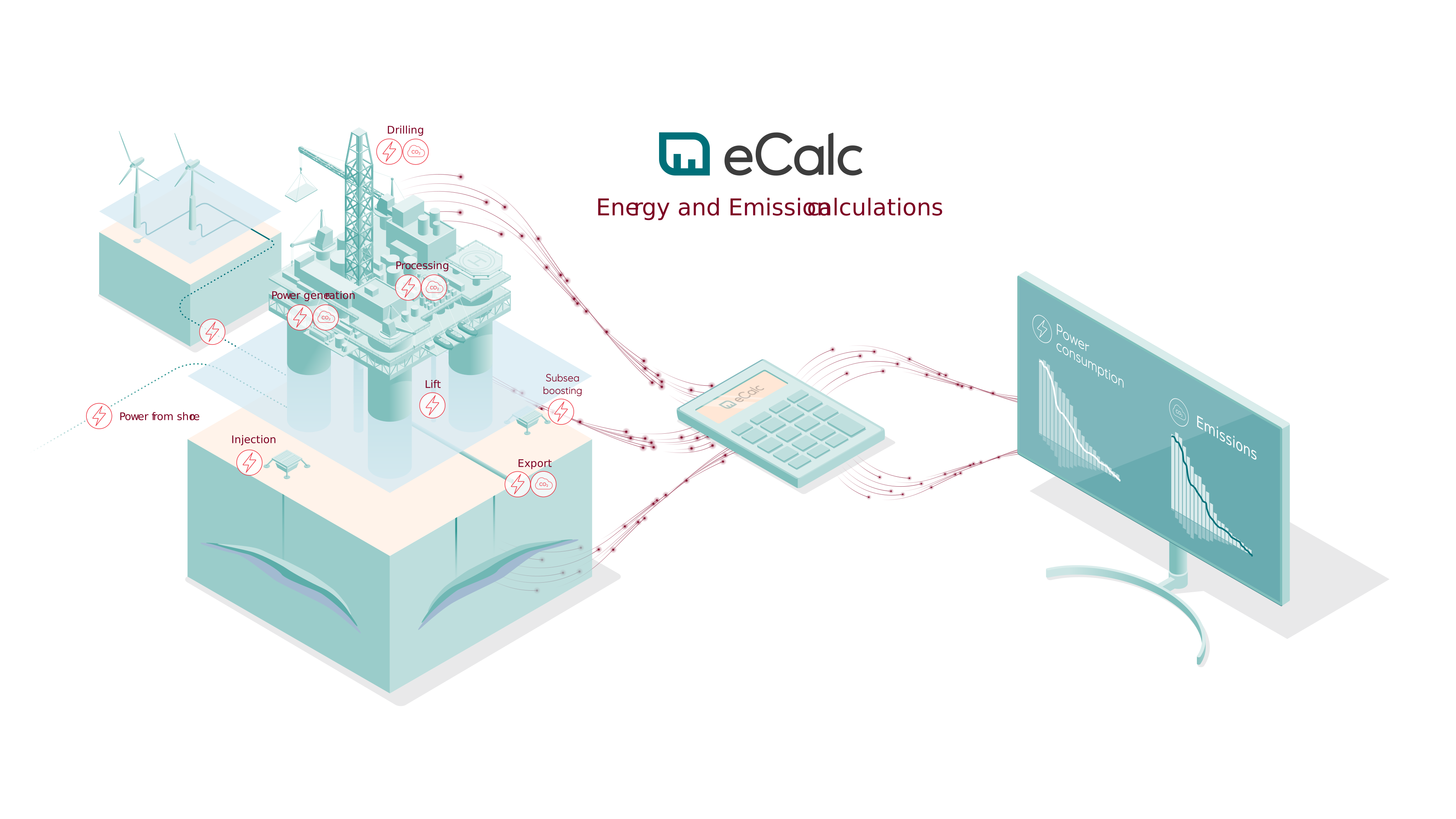
eCalc™ is a software tool for calculation of energy demand and GHG emissions from oil and gas production and processing. It enables the cross-disciplinary collaboration required to achieve high-quality and transparent energy and GHG emission prognosis and decision support.
eCalc™ performs energy and emission calculations by integrating data, knowledge and future plans from different disciplines. This could be production and injection profiles from the reservoir engineer, characteristics of energy consuming equipment units such as gas turbines, compressors and pumps from the facility engineer, and emission factors for different fuels from the sustainability engineer. The main idea is using physical or data-driven models to relate production rates and pressures to the required processing energy and resulting emissions. Integrated bookkeeping for all emission sources is offered.
eCalc™ uses a bottom-up approach to give high-quality installation and portfolio level forecasts at the same time as detailed insights about the energy drivers and processing capacities for the individual installation.
Getting started
eCalc™ is both a Python library and has a command line interface (CLI) to use with eCalc YAML Models. We currently recommend using eCalc™ from the command line with eCalc YAML Models, since the Python API is about to change soon, but the YAML will be more or less stable and backwards compatible.
To get started, please refer to the eCalc™ Docs - Getting Started, or follow the quick guide below:
Prerequisites
eCalc™ only supports Python 3, and will follow Komodo wrt. minimum requirement for Python, which currently is 3.12.
Installation
pip install libecalc
ecalc --version
ecalc selftest
Alternative using Docker:
docker build --target build -t ecalc .
docker run -it ecalc /bin/bash
Inside the docker container, run:
ecalc --version
ecalc selftest
Please refer to Docker Docs for details on how to use Docker.
Alternative using devcontainer:
In vscode:
- Install extension "Dev Containers" and open command palette (ctrl+p or cmd+p or F1) and click "reopen in container" then click the alternative "eCalc Python Dev Environment".
In github codespaces:
- In the repo click the "<> Code" button -> codespaces -> in the codespaces section click the ellipsis menu (three dots) -> click "New with options.." -> under "Dev container configuration" click and choose "eCalc Python Dev Environment" -> then click button "Create Codespace".

Create and run your first model
Please refer to the https://equinor.github.io/ecalc/docs/about/modelling/setup/ on how to set up your own model with the YAML API and https://equinor.github.io/ecalc/docs/about/getting_started/cli/ on how to run it.
See Examples below to use one of our predefined examples.
Development and Contribution
For package management during development, we use uv. Read more here https://docs.astral.sh/uv/. In short, it can replace several tools like pip, pip-tools, pipx, poetry, pyenv, twine, virtualenv, and more. While staying being performant.
See https://docs.astral.sh/uv/getting-started/installation/ to install uv.
We welcome all kinds of contributions, including code, bug reports, issues, feature requests, and documentation. The preferred way of submitting a contribution is to either make an issue on GitHub or by forking the project on GitHub and making a pull request.
See Contribution Document on how to contribute.
See the Developer Guide for details.
Running tests
We use pytest for our tests, to run all tests
uv run pytest
Alternative with multithread (if xdist is installed):
uv run pytest -n auto
To update inline snapshots
uv run pytest -m "inlinesnapshot" --inline-snapshot=fix
Running type checks
We use basedpyright for type checking, to run type checks
uv run basedpyright
to also update the baseline file
uv run basedpyright --writebaseline
Documentation
The documentation can be found at https://equinor.github.io/ecalc


Release files for libecalc 15.0.0
For a detailed explanation of source distributions (sdists) and built distributions (wheels), please see the package formats documentation.
Source distribution (sdist)
| File | Size | Uploaded | |
|---|---|---|---|
| libecalc-15.0.0.tar.gz | 51.6 MB | Details |
Built distribution (wheel)
| File | Interpreter | ABI | Platform | Reset |
|---|---|---|---|---|
| libecalc-15.0.0-py3-none-any.whl | Python 3 | none | any | Details |
Total release size: 103.5 MB
Release files / libecalc-15.0.0.tar.gz
| Download URL | libecalc-15.0.0.tar.gz |
|---|---|
| Size | 51.6 MB |
| Tags | Source |
|
SHA-256 checksum How to use checksums |
ef5c5e98ac147b0bc078d11fbf22a9e1e138d26148e4a4793fadeaa1ee735534
|
|
BLAKE2b-256 checksum How to use checksums |
5b264a9529eefaf471e17b72708b7b117af5bff8d54dc2eb98b7ea6c68437b29
|
| Upload date | |
|
Uploaded using Trusted Publishing? What is trusted publishing? |
Yes |
| Uploaded via |
twine/7.0.0 CPython/3.13.14
|
Provenance
Provenance describes where a file came from. On PyPI, provenance is shared via attestations, which provide a verifiable record of the build or publishing details. View details, limitations and caveats.


PyPI Publish Attestation
PyPI verified that this artifact, at this checksum, originated from the publisher listed below.
Signed by GitHub Actions, verified by PyPI on Sep 29, 2026.
Transparency logRelease files / libecalc-15.0.0-py3-none-any.whl
| Download URL | libecalc-15.0.0-py3-none-any.whl |
|---|---|
| Size | 51.9 MB |
| Tags | Python 3 |
|
SHA-256 checksum How to use checksums |
0d065ac0b7cbd29f26edbbc9ae8382483b1243ccfcb1505ba47c6bd8054504ec
|
|
BLAKE2b-256 checksum How to use checksums |
a69dc5fef03686c787659d3e6c45e4f7710672f77893c4cf74aaa6f92fd7af71
|
| Upload date | |
|
Uploaded using Trusted Publishing? What is trusted publishing? |
Yes |
| Uploaded via |
twine/7.0.0 CPython/3.13.14
|
Provenance
Provenance describes where a file came from. On PyPI, provenance is shared via attestations, which provide a verifiable record of the build or publishing details. View details, limitations and caveats.
PyPI Publish Attestation
PyPI verified that this artifact, at this checksum, originated from the publisher listed below.
Signed by GitHub Actions, verified by PyPI on Sep 29, 2026.
Transparency log













