

Fastest domain extractor library written in C++ with python binding.
First and complete library for parsing url in C++ and Python and Command Line










About The Project
liburlparser is a powerful domain extractor library written in C++ with Python bindings. It provides efficient URL parsing capabilities for both C++ and Python, making it a valuable tool for projects that involve working with web addresses.
Features
Here are some key features of liburlparser:
-
Multiple Language Support:
- liburlparser can be used in multiple programming languages, including
Python,C++, andShell. - It offers an intuitive interface that remains consistent across both C++ and Python.
- liburlparser can be used in multiple programming languages, including
-
Clean Code Design:
- The library provides separate classes for each concept:
Url, andHostname/IPv4/IPv6for whatever a URL's host actually is (RFC 3986 defines a host as either a domain name or an IP address, never both - liburlparser mirrors that directly instead of forcing IP addresses through domain-name-shaped fields). - This separation allows for cleaner and more organized code when dealing with URLs.
- The library provides separate classes for each concept:
-
Public Suffix List Support:
- liburlparser supports known combinatorial suffixes (e.g., "ac.ir") using the public_suffix_list.
- It can also handle unknown suffixes (e.g., "comm" in "google.comm").
-
Automatic Public Suffix List Updates:
- Before each build and deployment, liburlparser updates the public_suffix_list automatically.
-
Hostname Properties:
- The
Hostnameclass includes properties such as subdomain, domain, domain name, and suffix.
- The
-
IPv4 / IPv6 Support:
IPv4/IPv6addresses used as a URL's host are recognized and parsed as such - not run through domain-name logic. Both support integer conversion and arithmetic (+,-,+=,-=, increment/decrement).
-
URL Properties:
- The
Urlclass provides properties like protocol, userinfo, host (classified asHostname/IPv4/IPv6), port, path, query parameters, and fragment.
- The
Usage
Command Line
python -m liburlparser --help # show help section
python -m liburlparser --version # show version
python -m liburlparser --url "https://mail.google.com/about" | jq #return as json
python -m liburlparser --host "mail.google.com" | jq # return as json
Python
you can use liburlparser so intutively
all of classes has help section
import liburlparser
help(liburlparser)
print(liburlparser.__version__)

from liburlparser import Url, Hostname, IPv4, IPv6
help(Url)
help(Hostname)
parse url and host
from liburlparser import Url, Hostname, Host
## parse url:
url = Url("https://ee.aut.ac.ir/#id") # parse all part of url
print(url, url.host_text, url.fragment, url.host, url.to_dict(), url.to_json())
## url.host is a Hostname, IPv4, or IPv6 object - whichever this URL's host
## actually is (an IP address has no "domain"/"suffix", so it's simply not
## forced through Hostname at all)
host = url.host  # a Hostname, here: ee.aut.ac.ir
# or
host = Hostname("ee.aut.ac.ir")
# or
host = Hostname.from_url("https://ee.aut.ac.ir/#id") # the fastest way for parsing host from url
print(host, host.domain, host.suffix, host.to_dict(), host.to_json())

## for a host you don't know in advance is a domain or an IP, use Host():
host2 = Host("192.168.1.1")   # is_ipv4() -> True
host3 = Host("ee.aut.ac.ir")  # is_hostname() -> True
print(host2.is_ipv4(), host2, int(host2.get_ipv4()))          # True 192.168.1.1 3232235777
print(host3.is_hostname(), host3, host3.get_hostname().domain) # True ee.aut.ac.ir aut
IPv4/IPv6 addresses support integer conversion and arithmetic:
from liburlparser import IPv4, IPv6

ip = IPv4("192.168.1.1")
print(int(ip))          # 3232235777
print(ip + 1)            # 192.168.1.2
print(ip - IPv4("192.168.1.0"))  # 1 (distance between two addresses)

ip6 = IPv6("2001:db8::1")
print(ip6.high64, ip6.low64)
print(ip6 + 1)            # 2001:db8::2
Also there is some helping api to get better performance for some small tasks
# if you need to extract the host of url as a string without any parsing
host_str = Url.extract_host("https://ee.aut.ac.ir/about") # very fast
C++
there is some examples in examples folder
#include "urlparser.h"
...
/// for parsing url
urlparser::url url("https://ee.aut.ac.ir/about");
std::string_view host_text = url.host_text(); // the raw host text, unclassified

/// url.host() is a urlparser::host (hostname/ipv4/ipv6, whichever this
/// URL's host actually is)
if (auto* h = url.host().try_hostname()) {
    std::cout << h->domain() << "." << h->suffix();
}

/// for parsing a host you already have (or a full URL) directly:
urlparser::hostname host("ee.aut.ac.ir");
// or
urlparser::hostname host2 = urlparser::hostname::from_url("https://ee.aut.ac.ir/about");
// or, when you don't know in advance whether it's a domain or an IP:
urlparser::host classified = urlparser::host::from_url("http://192.168.1.1/about"); // -> is_ipv4() true
you can see all methods in python we can use in c++ very easily
Installation
C++
Requires a C++17 compiler and CMake >= 3.19. The library is a static library plus one header (urlparser.h),
and its CMake target is liburlparser::urlparser - the same name no matter how you get it:
1. FetchContent
include(FetchContent)
FetchContent_Declare(
  liburlparser
  GIT_REPOSITORY https://github.com/mohammadraziei/liburlparser.git
  GIT_TAG        master
)
FetchContent_MakeAvailable(liburlparser)

target_link_libraries(my_app PRIVATE liburlparser::urlparser)
2. From the pip package
The Python wheel also ships the compiled C++ library, its header and a CMake
package config (same idea as python -m nanobind --cmake_dir), so a C++
project can use a plain pip install liburlparser without building anything:
find_package(Python3 REQUIRED COMPONENTS Interpreter)
execute_process(
    COMMAND ${Python3_EXECUTABLE} -m liburlparser --cmake-dir
    OUTPUT_VARIABLE liburlparser_DIR
    OUTPUT_STRIP_TRAILING_WHITESPACE
    COMMAND_ERROR_IS_FATAL ANY)

find_package(liburlparser CONFIG REQUIRED)
target_link_libraries(my_app PRIVATE liburlparser::urlparser)
For build systems that prefer plain paths over the target, find_package also sets:
| Variable | Value |
|---|---|
urlparser_LIB_PATH |
full path of the compiled library (liburlparser.a, urlparser.lib, ...) |
urlparser_INCLUDE_PATH |
directory containing urlparser.h |
The same locations are available from the command line and from Python:
python -m liburlparser --cmake-dir     # directory with liburlparserConfig.cmake
python -m liburlparser --include-dir   # directory with urlparser.h
python -m liburlparser --lib-dir       # directory with the compiled library
import liburlparser
liburlparser.get_cmake_dir(), liburlparser.get_include_dir(), liburlparser.get_lib_dir()
A complete example project is in examples/find_liburlparser_via_python.
3. Build and install from source
git clone https://github.com/mohammadraziei/liburlparser
cd liburlparser

# configure and build (-B creates the 'build' directory)
cmake -B build -DCMAKE_BUILD_TYPE=Release
cmake --build build

# run the example (on Windows with multi-config generators: ./build/Release/example.exe)
./build/example

# install the library, header and CMake package (add --prefix <dir> to choose where)
cmake --install build
Then, in your project (add -DCMAKE_PREFIX_PATH=<prefix> if you used a custom prefix):
find_package(liburlparser CONFIG REQUIRED)
target_link_libraries(my_app PRIVATE liburlparser::urlparser)
Python and Command Line:
Be aware that it requires python>=3.10
Installation
from source
git clone https://github.com/mohammadraziei/liburlparser
cd liburlparser

pip install .

# Optional: If you want to see build logs
pip install . -v
pip by pypi
pip install liburlparser
Or
pip by git
pip install git+https://github.com/mohammadraziei/liburlparser
Or
manually
git clone https://github.com/mohammadraziei/liburlparser
pip install ./liburlparser
Performance
Up-to-date, reproducible results for both C++ and Python (compared against other libraries) are on the Benchmarks page. The report is generated locally and published with the documentation:
cmake -S benchmarks -B build-bench -DCMAKE_BUILD_TYPE=Release
cmake --build build-bench --target urlparser_benchmarks_report
# -> benchmarks/results/report.html
The two tables below are the original measurements from March 2022.
Extract From Host
Tests were run on a file containing 10 million random domains from various top-level domains (Mar. 13rd 2022)
| Library | Function | Time |
|---|---|---|
| liburlparser | liburlparser.Hostname | 1.12s |
| PyDomainExtractor | pydomainextractor.extract | 1.50s |
| publicsuffix2 | publicsuffix2.get_sld | 9.92s |
| tldextract | __call__ | 29.23s |
| tld | tld.parse_tld | 34.48s |
Extract From URL
The test was conducted on a file containing 1 million random urls (Mar. 13rd 2022)
| Library | Function | Time |
|---|---|---|
| liburlparser | liburlparser.Hostname.from_url | 2.10s |
| PyDomainExtractor | pydomainextractor.extract_from_url | 2.24s |
| publicsuffix2 | publicsuffix2.get_sld | 10.84s |
| tldextract | __call__ | 36.04s |
| tld | tld.parse_tld | 57.87s |
License
Distributed under the MIT License. See LICENSE for more information.
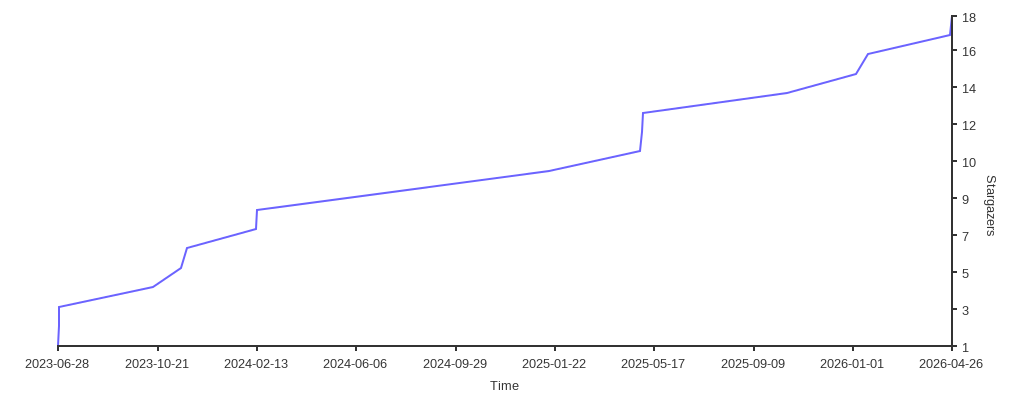
Stats
Contact
Project Link:
1 maintainer

Metadata
1 maintainer
Release files for liburlparser 2.2.0
For a detailed explanation of source distributions (sdists) and built distributions (wheels), please see the package formats documentation.
Source distribution (sdist)
| File | Size | Uploaded | Provenance | Actions |
|---|---|---|---|---|
| liburlparser-2.2.0.tar.gz | 430.8 kB | Without provenance | Details for liburlparser-2.2.0.tar.gz |
Built distributions (wheels)
Total release size: 11.5 MB
Release files / liburlparser-2.2.0.tar.gz
| Download URL | liburlparser-2.2.0.tar.gz |
|---|---|
| Size | 430.8 kB |
| Tags | Source |
|
SHA-256 checksum How to use checksums |
c02da796f647e9665f855b58e574a24377d8fc9cbbbdc04b8f0a441a79524ee9
|
|
BLAKE2b-256 checksum How to use checksums |
930786c6c781dcf813b4506c1148c5c81978968600e0bb62510645078be5bd54
|
| Upload date | |
|
Uploaded using Trusted Publishing? What is trusted publishing? |
No |
| Uploaded via |
twine/7.0.0 CPython/3.13.16
|
Release files / liburlparser-2.2.0-cp312-cp312-win_amd64.whl
| Download URL | liburlparser-2.2.0-cp312-cp312-win_amd64.whl |
|---|---|
| Size | 830.3 kB |
| Tags | CPython 3.12 Windows x86-64 |
|
SHA-256 checksum How to use checksums |
6cc5a37e77a09acc970881f01feb4f99d74ab45477d5c30897dd3eba9670596d
|
|
BLAKE2b-256 checksum How to use checksums |
b482b543c142302c4e4611fc27d7a5eb688c34e59afac9e3f3119a3a3cc00f9b
|
| Upload date | |
|
Uploaded using Trusted Publishing? What is trusted publishing? |
No |
| Uploaded via |
twine/7.0.0 CPython/3.13.16
|
Release files / liburlparser-2.2.0-cp312-cp312-win32.whl
| Download URL | liburlparser-2.2.0-cp312-cp312-win32.whl |
|---|---|
| Size | 737.4 kB |
| Tags | CPython 3.12 Windows x86-32 |
|
SHA-256 checksum How to use checksums |
5789e19cabfa140c687f8b9f9b35def178eb87f4f28ee93a65766b347fff833b
|
|
BLAKE2b-256 checksum How to use checksums |
93f55dfa5982d4f7358b6d645cad6b28a3ed742f1e8a939de52d8850bfc2f0df
|
| Upload date | |
|
Uploaded using Trusted Publishing? What is trusted publishing? |
No |
| Uploaded via |
twine/7.0.0 CPython/3.13.16
|
Release files / liburlparser-2.2.0-cp312-cp312-musllinux_1_2_x86_64.whl
| Download URL | liburlparser-2.2.0-cp312-cp312-musllinux_1_2_x86_64.whl |
|---|---|
| Size | 912.6 kB |
| Tags | CPython 3.12 Linux musl 1.2+ x86-64 |
|
SHA-256 checksum How to use checksums |
496ae786d794ea94bf82fa02787f5f20ed38180c8b2b6b5c0c0a27709b10670b
|
|
BLAKE2b-256 checksum How to use checksums |
591323ccc774df1ffed5402cafab17fc51c6159e59407a27cebd9c410ea1750e
|
| Upload date | |
|
Uploaded using Trusted Publishing? What is trusted publishing? |
No |
| Uploaded via |
twine/7.0.0 CPython/3.13.16
|
Release files / liburlparser-2.2.0-cp312-cp312-manylinux_2_27_x86_64.manylinux_2_28_x86_64.whl
| Download URL | liburlparser-2.2.0-cp312-cp312-manylinux_2_27_x86_64.manylinux_2_28_x86_64.whl |
|---|---|
| Size | 422.3 kB |
| Tags | CPython 3.12 Linux glibc 2.27+ x86-64 Linux glibc 2.28+ x86-64 |
|
SHA-256 checksum How to use checksums |
609d80c21c7ffdd30ee39d3b861c68b697625bd714d1fe9f5739396c57c4f750
|
|
BLAKE2b-256 checksum How to use checksums |
153dbec6ebe7e76941d23d2254f838bd896b1f82771a443e8e1c586b9a64466b
|
| Upload date | |
|
Uploaded using Trusted Publishing? What is trusted publishing? |
No |
| Uploaded via |
twine/7.0.0 CPython/3.13.16
|
Release files / liburlparser-2.2.0-cp312-cp312-macosx_10_13_universal2.whl
| Download URL | liburlparser-2.2.0-cp312-cp312-macosx_10_13_universal2.whl |
|---|---|
| Size | 778.5 kB |
| Tags | CPython 3.12 macOS 10.13+ universal2 (ARM64, x86-64) |
|
SHA-256 checksum How to use checksums |
3466c90897b094a072b7804d2a56e945c6a28f0aaa471bef981a1f68010c98c0
|
|
BLAKE2b-256 checksum How to use checksums |
abe80bf5997b40735780812bf92a99f2e542ac9ea7b06edfd4ab3ad139391a62
|
| Upload date | |
|
Uploaded using Trusted Publishing? What is trusted publishing? |
No |
| Uploaded via |
twine/7.0.0 CPython/3.13.16
|
Release files / liburlparser-2.2.0-cp311-cp311-win_amd64.whl
| Download URL | liburlparser-2.2.0-cp311-cp311-win_amd64.whl |
|---|---|
| Size | 830.8 kB |
| Tags | CPython 3.11 Windows x86-64 |
|
SHA-256 checksum How to use checksums |
83b27358ab121f6619a6f99a8b504dbf7626e9ff80effc3d65323fcd47a372f7
|
|
BLAKE2b-256 checksum How to use checksums |
e3211fd7ccc3b3d9a416d99c2e5b3b6c79325344bec9da52eb7f8c9d95e28815
|
| Upload date | |
|
Uploaded using Trusted Publishing? What is trusted publishing? |
No |
| Uploaded via |
twine/7.0.0 CPython/3.13.16
|
Release files / liburlparser-2.2.0-cp311-cp311-win32.whl
| Download URL | liburlparser-2.2.0-cp311-cp311-win32.whl |
|---|---|
| Size | 738.1 kB |
| Tags | CPython 3.11 Windows x86-32 |
|
SHA-256 checksum How to use checksums |
4285b68b7bde655f2ab2519b98dd4b4364987aab53bce38b31b2dfc0183fa370
|
|
BLAKE2b-256 checksum How to use checksums |
7e8a357ab4299f3170ff0eb5fa04466fdc7221a5896f14273db5bd3976d23ac5
|
| Upload date | |
|
Uploaded using Trusted Publishing? What is trusted publishing? |
No |
| Uploaded via |
twine/7.0.0 CPython/3.13.16
|
Release files / liburlparser-2.2.0-cp311-cp311-musllinux_1_2_x86_64.whl
| Download URL | liburlparser-2.2.0-cp311-cp311-musllinux_1_2_x86_64.whl |
|---|---|
| Size | 916.6 kB |
| Tags | CPython 3.11 Linux musl 1.2+ x86-64 |
|
SHA-256 checksum How to use checksums |
20bc556c6bda2c88a567ba31e76b39e3aebfd66a22bfc7bdf36278faae99f717
|
|
BLAKE2b-256 checksum How to use checksums |
96019b3ab26ad40f3c107241c2099c79948f625cd8470a4b229ba489f7926894
|
| Upload date | |
|
Uploaded using Trusted Publishing? What is trusted publishing? |
No |
| Uploaded via |
twine/7.0.0 CPython/3.13.16
|
Release files / liburlparser-2.2.0-cp311-cp311-manylinux_2_27_x86_64.manylinux_2_28_x86_64.whl
| Download URL | liburlparser-2.2.0-cp311-cp311-manylinux_2_27_x86_64.manylinux_2_28_x86_64.whl |
|---|---|
| Size | 426.4 kB |
| Tags | CPython 3.11 Linux glibc 2.27+ x86-64 Linux glibc 2.28+ x86-64 |
|
SHA-256 checksum How to use checksums |
2073f0fb8ab8c9a8c0cfc02566f40fbeefa353e5a8babcaf8893c31238697b14
|
|
BLAKE2b-256 checksum How to use checksums |
2610b6a16dd7c8c44b9e792e85686b0fedf5551e6d84f8958cbebe2b232f98a1
|
| Upload date | |
|
Uploaded using Trusted Publishing? What is trusted publishing? |
No |
| Uploaded via |
twine/7.0.0 CPython/3.13.16
|
Release files / liburlparser-2.2.0-cp311-cp311-macosx_10_13_universal2.whl
| Download URL | liburlparser-2.2.0-cp311-cp311-macosx_10_13_universal2.whl |
|---|---|
| Size | 779.3 kB |
| Tags | CPython 3.11 macOS 10.13+ universal2 (ARM64, x86-64) |
|
SHA-256 checksum How to use checksums |
3f1fd88266b083eda29d3de1aa4ebc0e4859bcb66790da429c92b95f49989b3e
|
|
BLAKE2b-256 checksum How to use checksums |
c8febfe27a12d7615c8aa3a101712b6204f60c18258b9aa7c99abc589b4bddf4
|
| Upload date | |
|
Uploaded using Trusted Publishing? What is trusted publishing? |
No |
| Uploaded via |
twine/7.0.0 CPython/3.13.16
|
Release files / liburlparser-2.2.0-cp310-cp310-win_amd64.whl
| Download URL | liburlparser-2.2.0-cp310-cp310-win_amd64.whl |
|---|---|
| Size | 830.3 kB |
| Tags | CPython 3.10 Windows x86-64 |
|
SHA-256 checksum How to use checksums |
a10ef6fc084d39406a0bbd3c6c11967aaa3792dbca43adf290849472d75e57eb
|
|
BLAKE2b-256 checksum How to use checksums |
b23fed0728449b4458f3ba27d64cdc7aea5262268925454258f504332d95b7ec
|
| Upload date | |
|
Uploaded using Trusted Publishing? What is trusted publishing? |
No |
| Uploaded via |
twine/7.0.0 CPython/3.13.16
|
Release files / liburlparser-2.2.0-cp310-cp310-win32.whl
| Download URL | liburlparser-2.2.0-cp310-cp310-win32.whl |
|---|---|
| Size | 738.0 kB |
| Tags | CPython 3.10 Windows x86-32 |
|
SHA-256 checksum How to use checksums |
353bd046909121599031fa36850ce382a05021e4e3e845e9c5e63140053cfd85
|
|
BLAKE2b-256 checksum How to use checksums |
25f17de78d17b00680253cee97a9629f95004229fafbfc3ea9e53d4586ffc5b7
|
| Upload date | |
|
Uploaded using Trusted Publishing? What is trusted publishing? |
No |
| Uploaded via |
twine/7.0.0 CPython/3.13.16
|
Release files / liburlparser-2.2.0-cp310-cp310-musllinux_1_2_x86_64.whl
| Download URL | liburlparser-2.2.0-cp310-cp310-musllinux_1_2_x86_64.whl |
|---|---|
| Size | 916.6 kB |
| Tags | CPython 3.10 Linux musl 1.2+ x86-64 |
|
SHA-256 checksum How to use checksums |
cd4d25f0582d53b4dfae0c1f01206d57eb3503c973a5ecff13208062e8fcdb07
|
|
BLAKE2b-256 checksum How to use checksums |
b93f905a7a03aa9ef1e59f90e69a1bb6f93e7ce7680b1a11f9b75f3409759b03
|
| Upload date | |
|
Uploaded using Trusted Publishing? What is trusted publishing? |
No |
| Uploaded via |
twine/7.0.0 CPython/3.13.16
|
Release files / liburlparser-2.2.0-cp310-cp310-manylinux_2_27_x86_64.manylinux_2_28_x86_64.whl
| Download URL | liburlparser-2.2.0-cp310-cp310-manylinux_2_27_x86_64.manylinux_2_28_x86_64.whl |
|---|---|
| Size | 426.7 kB |
| Tags | CPython 3.10 Linux glibc 2.27+ x86-64 Linux glibc 2.28+ x86-64 |
|
SHA-256 checksum How to use checksums |
e6133e109a96091f1f52d69a26b6b7d3310f32915b176ea64cd91a1b80a10267
|
|
BLAKE2b-256 checksum How to use checksums |
1e6813b22a68412444d6a4a91a37b87516641f70bf7099032f6917dc743d3438
|
| Upload date | |
|
Uploaded using Trusted Publishing? What is trusted publishing? |
No |
| Uploaded via |
twine/7.0.0 CPython/3.13.16
|
Release files / liburlparser-2.2.0-cp310-cp310-macosx_10_13_universal2.whl
| Download URL | liburlparser-2.2.0-cp310-cp310-macosx_10_13_universal2.whl |
|---|---|
| Size | 780.0 kB |
| Tags | CPython 3.10 macOS 10.13+ universal2 (ARM64, x86-64) |
|
SHA-256 checksum How to use checksums |
1c1945bfe8eb6e0c666039f2c18c214ec71a3fe04b86dd3f105cb92dfd301d46
|
|
BLAKE2b-256 checksum How to use checksums |
418718fb2ff8fb06b57b4537c44ddc08ce4f4c5a41e74c17571830b0878be685
|
| Upload date | |
|
Uploaded using Trusted Publishing? What is trusted publishing? |
No |
| Uploaded via |
twine/7.0.0 CPython/3.13.16
|
Security for liburlparser 2.2.0
Provenance
Provenance describes where a file came from. On PyPI, provenance is shared via attestations, which provide a verifiable record of the build or publishing details. View details, limitations and caveats.
No provenance found
None of the files in this release were uploaded with provenance metadata.
A note on package security
PyPI is a repository for distributing packages, not a service for auditing them. While third-party security researchers and our staff do their best to detect and remove malicious packages, PyPI cannot guarantee the quality, security or suitability of any given package.
To learn more about protecting yourself from malicious actors, visit our package security documentation.














