
Desktop version of the Lidl Plus mobile app using my own implementation of the Lidl Plus api.
Verified details
These details have been verified by PyPIProject links
GitHub Statistics
Maintainers

Project description
Lidl Plus on Desktop
A desktop UI for Lidl Plus, written in Python using GTK and libadwaita.
This is an unofficial project and is not affiliated with Lidl.
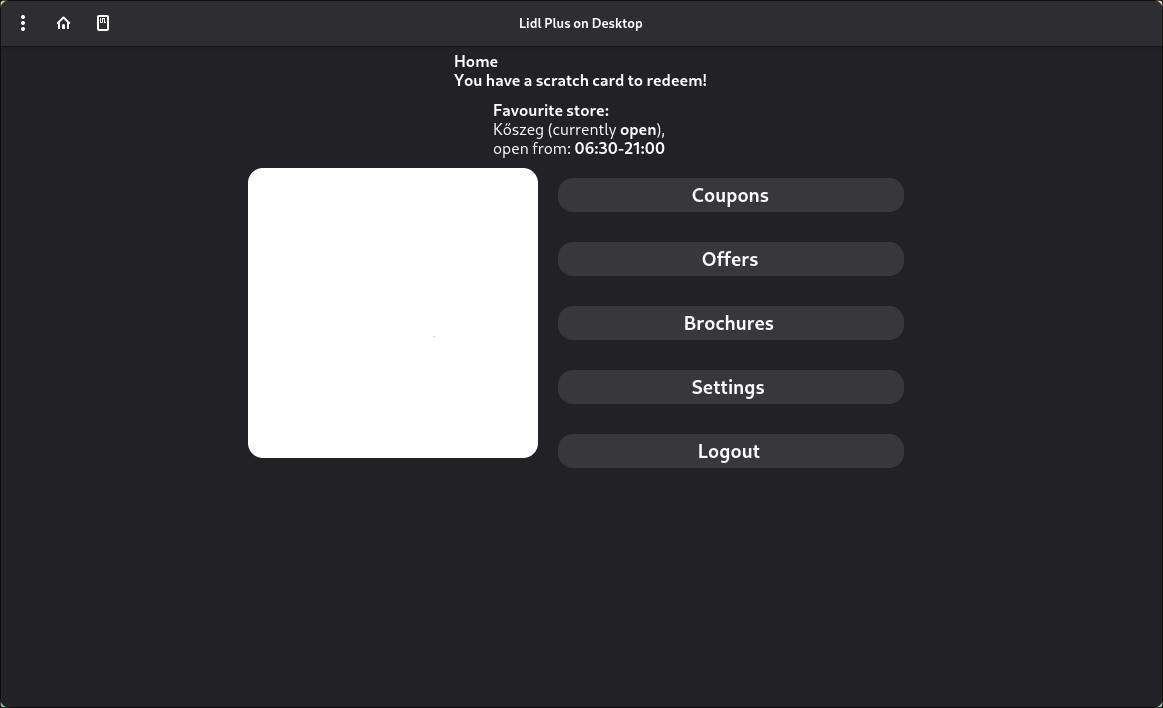
What you need
- Python 3 + pip
- Git
- Platform dependencies for GTK / libadwaita / PyGObject
- Playwright browser dependencies (macOS/Linux)
Installation
1) Clone the repository
Clone with submodules (required):
git clone --recurse-submodules --remote-submodules https://github.com/Zsobix/lidlplus-ui
cd lidlplus-ui
macOS / Linux setup
2) Install Python dependencies
pip install -r requirements.txt
3) Install Playwright browser(s)
playwright install
4) Install system packages
You must install PyGObject, GTK, and libadwaita for your distribution.
- See PyGObject’s official “Getting Started” guide: https://pygobject.gnome.org/getting_started.html
After that, you’re ready to run the app.
Windows setup (MSYS2)
2) Install GTK/libadwaita via pacman
Follow the Windows section of the PyGObject guide first: https://pygobject.gnome.org/getting_started.html
Then install libadwaita:
pacman -Sy mingw-w64-ucrt-x86_64-libadwaita
3) Install Python dependencies for Windows/MSYS2
pip install -r msys-requirements.txt
4) Playwright note (important)
Playwright does not work in MSYS2, so login works differently on Windows:
- Run this script to obtain a refresh token:
python getrefreshtoken.py - On the first login in the UI, enter the refresh token instead of email/password.
Running the app
python ui.py
Then:
- Launch the app
- Log in
- Use Lidl Plus on your desktop
Legal notice
This is an open source project written in Python that interacts with the Lidl Plus API, which is owned by Lidl Stiftung & Co. KG.
This project is provided for educational purposes. All trademarks and brand names belong to their respective owners.
Project details
Verified details
These details have been verified by PyPIProject links
GitHub Statistics
Maintainers
Release history Release notifications | RSS feed


Download files
Download the file for your platform. If you're not sure which to choose, learn more about installing packages.
Source Distribution
Built Distribution
Filter files by name, interpreter, ABI, and platform.
If you're not sure about the file name format, learn more about wheel file names.
Copy a direct link to the current filters
File details
Details for the file lidlplus_ui-0.0.1.tar.gz.
File metadata
- Download URL: lidlplus_ui-0.0.1.tar.gz
- Upload date:
- Size: 22.4 kB
- Tags: Source
- Uploaded using Trusted Publishing? Yes
- Uploaded via: twine/6.1.0 CPython/3.13.12
File hashes
| Algorithm | Hash digest | |
|---|---|---|
| SHA256 |
a601f9995c6585d9803cc9659095b9aef476726972ce598435c6ef093b8e8374
|
|
| MD5 |
91edc0f62db77908be060bc33b181947
|
|
| BLAKE2b-256 |
6bf8690295dab0228aabd260f618a78833ce46949995dee8d3f274a0f58ffc38
|
Provenance
The following attestation bundles were made for lidlplus_ui-0.0.1.tar.gz:
Publisher:
main.yml on zsobix/lidlplus-ui
-
Statement:
-
Statement type:
https://in-toto.io/Statement/v1 -
Predicate type:
https://docs.pypi.org/attestations/publish/v1 -
Subject name:
lidlplus_ui-0.0.1.tar.gz -
Subject digest:
a601f9995c6585d9803cc9659095b9aef476726972ce598435c6ef093b8e8374 - Sigstore transparency entry: 1272824875
- Sigstore integration time:
-
Permalink:
zsobix/lidlplus-ui@abd99b331caae972b021dde0c5dfaec7ef51c3e7 -
Branch / Tag:
refs/tags/0.0.1 - Owner: https://github.com/zsobix
-
Access:
public
-
Token Issuer:
https://token.actions.githubusercontent.com -
Runner Environment:
github-hosted -
Publication workflow:
main.yml@abd99b331caae972b021dde0c5dfaec7ef51c3e7 -
Trigger Event:
release
-
Statement type:
File details
Details for the file lidlplus_ui-0.0.1-py3-none-any.whl.
File metadata
- Download URL: lidlplus_ui-0.0.1-py3-none-any.whl
- Upload date:
- Size: 21.4 kB
- Tags: Python 3
- Uploaded using Trusted Publishing? Yes
- Uploaded via: twine/6.1.0 CPython/3.13.12
File hashes
| Algorithm | Hash digest | |
|---|---|---|
| SHA256 |
ddb1f8da8f1f7f12db833a577afaaaefcbeb4bd7e523426b3189159156466526
|
|
| MD5 |
4bd52380908f1a1ec0646d641f78b82a
|
|
| BLAKE2b-256 |
5fbccd27e2663f92ad4b84c7da852d012946011b20a9531f4f5c439360c6a1f1
|
Provenance
The following attestation bundles were made for lidlplus_ui-0.0.1-py3-none-any.whl:
Publisher:
main.yml on zsobix/lidlplus-ui
-
Statement:
-
Statement type:
https://in-toto.io/Statement/v1 -
Predicate type:
https://docs.pypi.org/attestations/publish/v1 -
Subject name:
lidlplus_ui-0.0.1-py3-none-any.whl -
Subject digest:
ddb1f8da8f1f7f12db833a577afaaaefcbeb4bd7e523426b3189159156466526 - Sigstore transparency entry: 1272824987
- Sigstore integration time:
-
Permalink:
zsobix/lidlplus-ui@abd99b331caae972b021dde0c5dfaec7ef51c3e7 -
Branch / Tag:
refs/tags/0.0.1 - Owner: https://github.com/zsobix
-
Access:
public
-
Token Issuer:
https://token.actions.githubusercontent.com -
Runner Environment:
github-hosted -
Publication workflow:
main.yml@abd99b331caae972b021dde0c5dfaec7ef51c3e7 -
Trigger Event:
release
-
Statement type:






