
TensorDataLoader - A faster dataloader for datasets that are fully loaded into memory.
On my laptop pytorch dataloader is 9 times slower at dataloading CIFAR10 preloaded into memory, with random shuffling, and tested with all batch sizes from 1 to 1000.
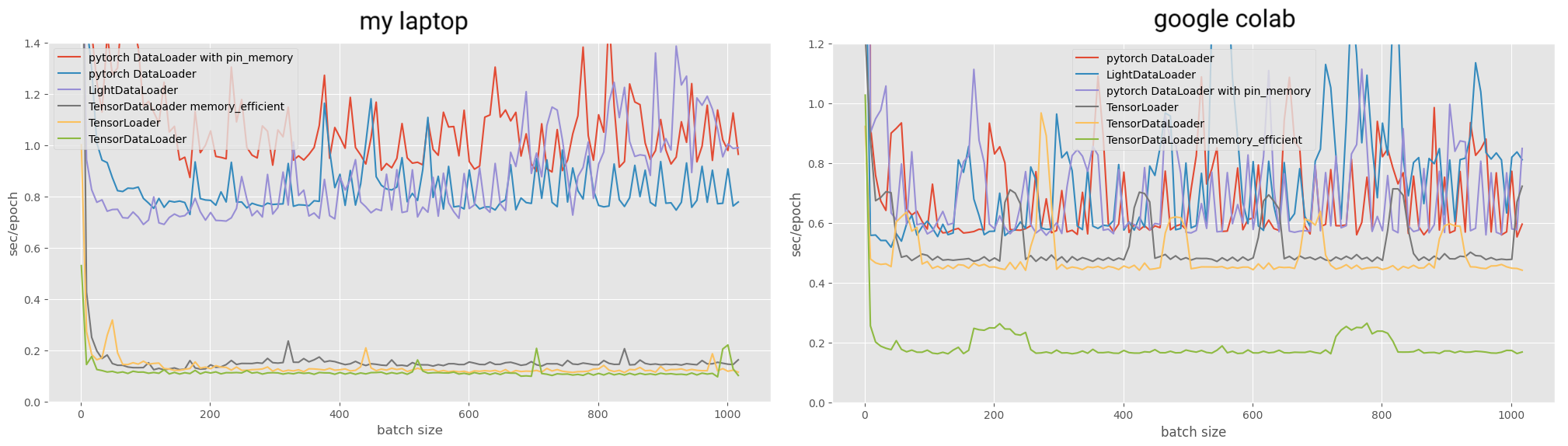
Here is how much time the whole benchmark took for different dataloaders:
my laptop:
  pytorch DataLoader with pin_memory       146.8673715000623 sec.
  pytorch DataLoader                       113.20603140027379 sec.
  LightDataLoader                          112.37881010014098 sec.
  TensorDataLoader memory_efficient        21.554916899913223 sec.
  TensorLoader                             17.700561700039543 sec.
  TensorDataLoader                         14.947468700091122 sec.

google colab:
  pytorch DataLoader                       97.84741502100019 sec.
  LightDataLoader                          97.33544923200111 sec.
  pytorch DataLoader with pin_memory       91.82473706000007 sec.
  TensorLoader                             67.40266070800055 sec.
  TensorDataLoader                         62.62979004000067 sec.
  TensorDataLoader memory_efficient        24.25830095599804 sec.
TensorLoader is another library that I just found that does the same thing :D https://github.com/zhb2000/tensorloader
I found that pytorch dataloader is slow when benchmarking stuff on mnist1d, and despite my dataset being fully loaded into memory, dataloading took most of the training time (mnist1d training is REALLY quick because it is small enough to be preloaded straight to GPU).
installation
pip install light-dataloader
TensorDataLoader
This dataloader is created similarly to torch.utils.data.TensorDataset.
Stack all of your samples into one or multiple tensors that have the same size of the first dimension.
For example:
cifar = torchvision.datasets.CIFAR10('cifar10', transform = loader, download=True)
stacked_images = torch.stack([i[0] for i in cifar])
stacked_labels = torch.tensor([i[1] for i in cifar])
If you pass a single tensor, the dataloader will yield tensors. If you pass a sequence of one or more tensors, the dataloader will yield lists of tensors.
# passing a list
from light_dataloader import TensorDataLoader
dataloader = TensorDataLoader([stacked_images, stacked_labels], batch_size = 128, shuffle = True)
for images, labels in dataloader:
  ...

# passing a tensor
dataloader = TensorDataLoader(stacked_images, batch_size = 128, shuffle = True)
for tensor in dataloader:
  ...
LightDataLoader
LightDataLoader is a very lightweight version of normal pytorch dataloader, it functions in the same way and collates the dataset. On a dataset that is fully preloaded into memory, compared to normal pytorch dataloader it is slightly faster with batch size under 64, but lacks many features. The reason you might consider this is when the dataset is just big enough to fit into memory, but too big to run torch.stack operations to use TensorDataLoader.
from light_dataloader import LightDataLoader

loader = v2.Compose([v2.ToImage(), v2.ToDtype(torch.float32), v2.Normalize(0.4914, 0.4822, 0.4465), (0.247, 0.243, 0.261)])
cifar = torchvision.datasets.CIFAR10('cifar10', transform = loader, download=True)

# usage is the same as torch.utils.data.DataLoader
# and like pytorch dataloader, it converts everything into tensors and collates the batch
dataloader = LightDataLoader(cifar, batch_size = 128, shuffle = True)
for images, labels in dataloader:
  ...
Other
memory_efficient option
During shuffling at the start of each epoch, TensorDataLoader has to use 2 times the memory of whatever tensors were passed to it. With memory_efficient=True it usually becomes slightly slower, but doesn't use any additional memory. However as I found out when benchmarking, memory_efficient=True is actually much faster then False when on google colab.
reproducibility
Both TensorDataLoader and LightDataLoader accept seed argument. It is None by default, but if you set it to any integer, that integer will be used as seed for random shuffling, ensuring reproducible results.
1 maintainer

Release files for light-dataloader 1.0.9
For a detailed explanation of source distributions (sdists) and built distributions (wheels), please see the package formats documentation.
Source distribution (sdist)
| File | Size | Uploaded | |
|---|---|---|---|
| light_dataloader-1.0.9.tar.gz | 5.9 kB | Details |
Built distribution (wheel)
| File | Interpreter | ABI | Platform | Reset |
|---|---|---|---|---|
| light_dataloader-1.0.9-py3-none-any.whl | Python 3 | none | any | Details |
Total release size: 12.8 kB
Release files / light_dataloader-1.0.9.tar.gz
| Download URL | light_dataloader-1.0.9.tar.gz |
|---|---|
| Size | 5.9 kB |
| Tags | Source |
|
SHA-256 checksum How to use checksums |
d149ef3d90e012cb9180bd0304c35432b1d4d6b19b921450e7935a2acbf0cc48
|
|
BLAKE2b-256 checksum How to use checksums |
718638c90746eed5560c42bda800937daa2589fd5c12347b9412de631e6aa3ce
|
| Upload date | |
|
Uploaded using Trusted Publishing? What is trusted publishing? |
Yes |
| Uploaded via |
twine/6.1.0 CPython/3.13.7
|
Provenance
Provenance describes where a file came from. On PyPI, provenance is shared via attestations, which provide a verifiable record of the build or publishing details. View details, limitations and caveats.


PyPI Publish Attestation
PyPI verified that this artifact, at this checksum, originated from the publisher listed below.
Signed by GitHub Actions, verified by PyPI on Oct 11, 2025.
Transparency logRelease files / light_dataloader-1.0.9-py3-none-any.whl
| Download URL | light_dataloader-1.0.9-py3-none-any.whl |
|---|---|
| Size | 6.8 kB |
| Tags | Python 3 |
|
SHA-256 checksum How to use checksums |
6f5fe6809e7212f2e9c78a789798629562ef7814f9f1c9d317fbe8af68bed233
|
|
BLAKE2b-256 checksum How to use checksums |
2c71ea71b78d0c567a12e9ee2c1e93b55a361d453dd8034f6b4e413910b86839
|
| Upload date | |
|
Uploaded using Trusted Publishing? What is trusted publishing? |
Yes |
| Uploaded via |
twine/6.1.0 CPython/3.13.7
|
Provenance
Provenance describes where a file came from. On PyPI, provenance is shared via attestations, which provide a verifiable record of the build or publishing details. View details, limitations and caveats.
PyPI Publish Attestation
PyPI verified that this artifact, at this checksum, originated from the publisher listed below.
Signed by GitHub Actions, verified by PyPI on Oct 11, 2025.
Transparency log













