
LineIntegralConvolution (Vegtamr; Odin's alias while wandering Hel)
Line Integral Convolutions (LICs) are an amazing way to visualise 2D vector fields, and are widely used in many different fields (e.g., weather modelling, plasma physics, etc.), however I couldn't find a simple, up-to-date implementation, so I wrote my own. I hope it can now also help you on your own vector field fueled journey!
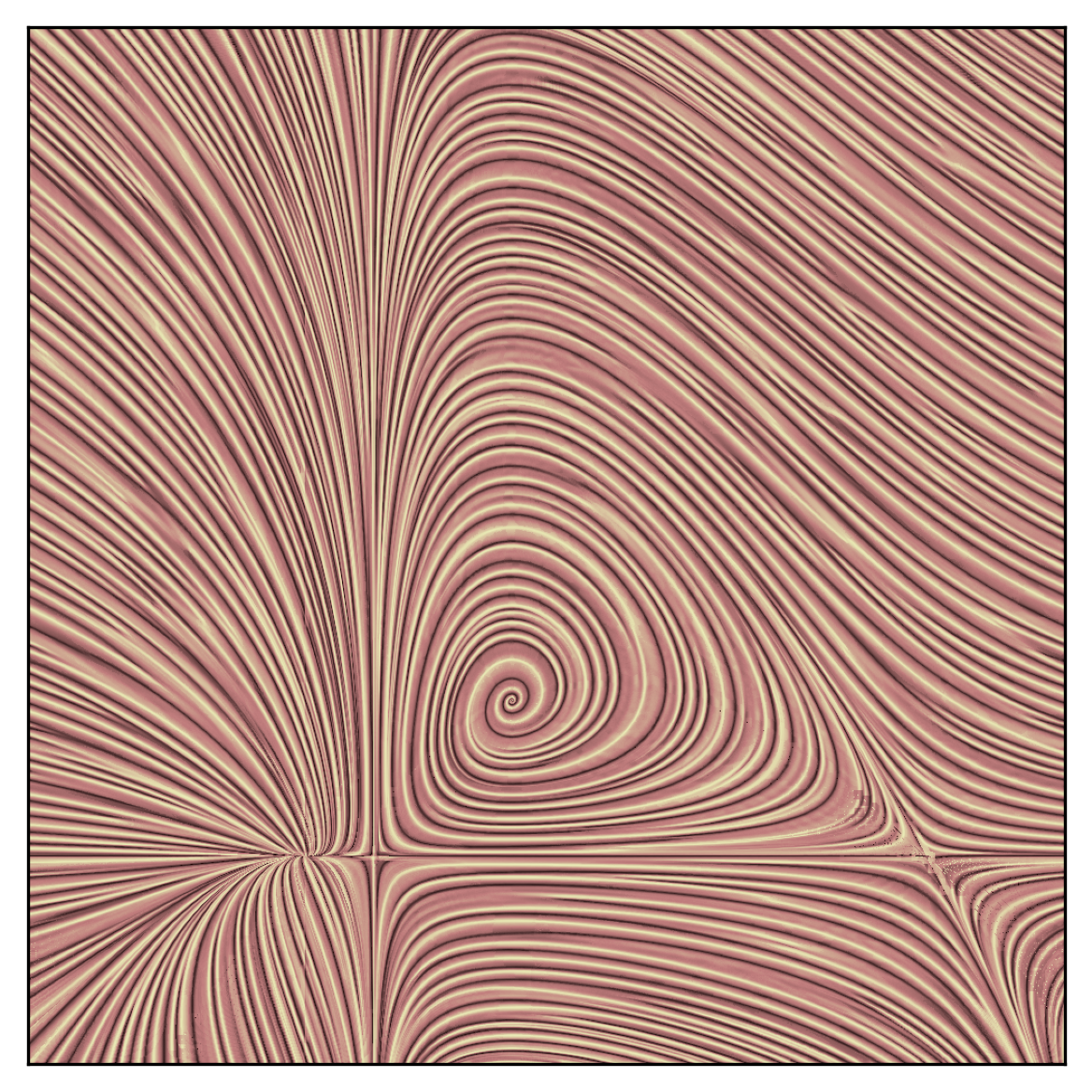
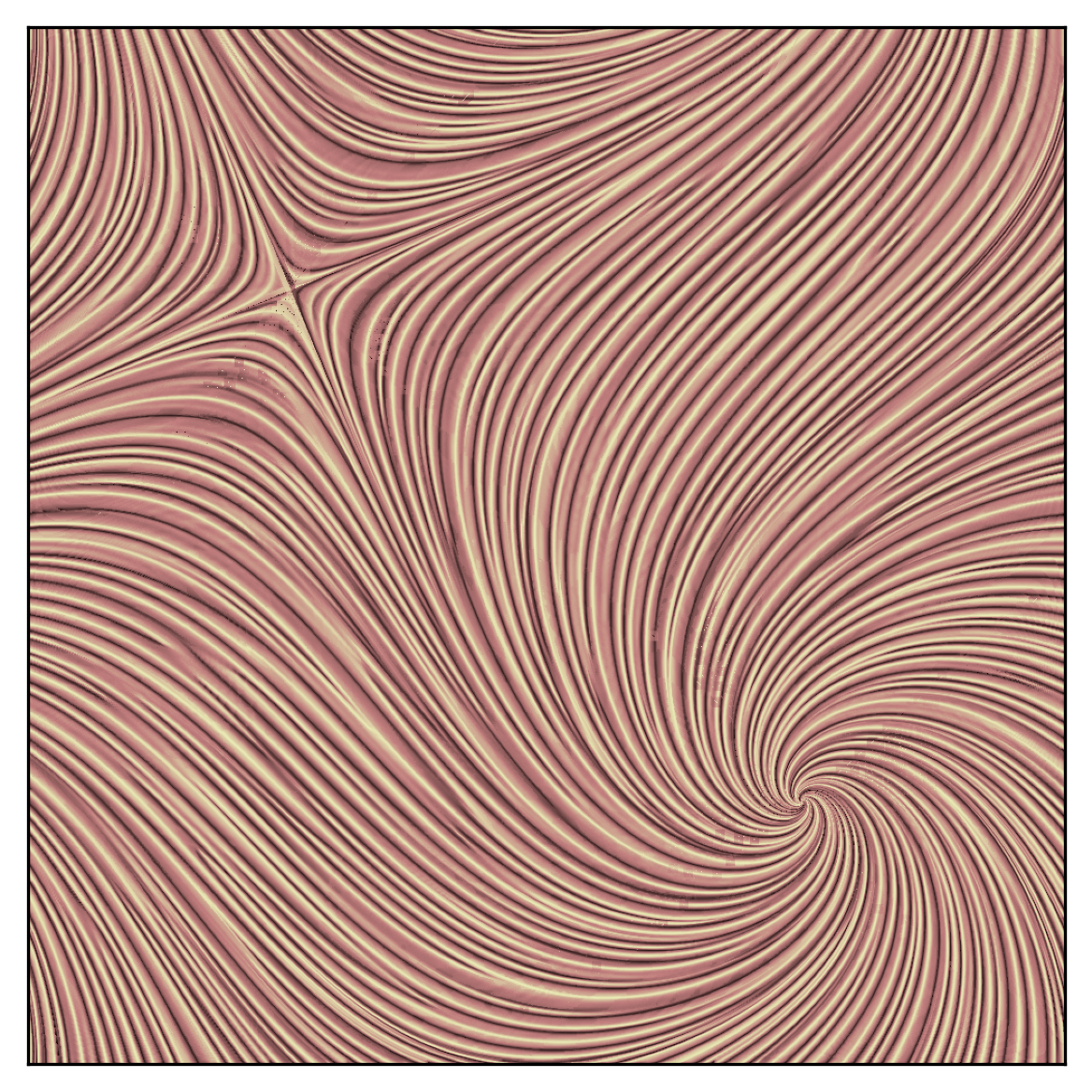
Here is the LIC code applied to a couple of example vector fields:
- Left: modified version of the Lotka-Volterra equations
- Right: a swirling pattern
Getting setup
You can now install the LIC package directly from PyPI or clone the Github repository if you'd like to play around with the source code.
Option 1: Install from PyPI (for general use)
If you only need to use the package, you can install it via pip:
pip install line-integral-convolutions
After installing, import the main LIC implementation as follows:
from vegtamr import lic
Inside this module, you will want to use the lic.compute_lic_with_postprocessing function. See below for details on how to get the most out of it.
Note: if you used this package before version 2.0.0 (as
line-integral-convolutionson PyPI, imported asline_integral_convolutions), the import path has changed:from line_integral_convolutions.lic import ...is nowfrom vegtamr import lic, and the package's internal layout moved from flat modules to nested subpackages (vegtamr.lic.*,vegtamr.utils.*).
Option 2: Clone the GitHub repository (for development)
1. Clone the repo:
git clone git@github.com:AstroKriel/LineIntegralConvolution.git
cd LineIntegralConvolution
2. Create a development environment with uv:
uv sync
This will install dependencies listed in pyproject.toml into a virtual environment managed by uv.
With uv you get clean package management and reproducibility, where the only trade-off is a few extra keystrokes when running scripts:
uv run demos/demo-lic.py
A small price to pay for sanity! Alternatively, you can activate the environment with source .venv/bin/activate and run python3 demos/demo-lic.py.
3. Use your local checkout from another project (optional):
uv sync (step 2) already gives you an editable install inside this repo's own .venv, so edits are picked up immediately when you work from here. No extra step is needed for that.
If you want a different project on your machine to import your local vegtamr checkout, with edits showing up there too, install it as an editable dependency from that project:
uv add --editable /path/to/vegtamr
or, in a plain virtual environment:
pip install -e /path/to/vegtamr
Either way, that other project always sees your latest local changes, with no reinstall and no waiting for a new PyPI release.
Quick start
compute_lic_with_postprocessing is the main entry point for generating LICs. It manages all the internal calls and offers optional postprocessing: filtering and intensity equalisation. In practice, this is the only function you’ll need to call!
Here’s a quick example:
import matplotlib.pyplot as mpl_plot
from vegtamr import lic
from vegtamr.utils import vfields, plots

## generate a sample vector field
num_cells = 500
vfield_config = vfields.vfield_swirls(num_cells)
vfield = vfield_config.vfield
streamlength = vfield_config.streamlength

## apply the lic
sfield = lic.compute_lic_with_postprocessing(
    vfield=vfield,
    streamlength=streamlength,  # brush stroke length
    num_lic_passes=3,  # number of brush strokes
    use_filter=True,
    filter_sigma=5e-2 * num_cells,  # tube thickness
    use_equalize=True,
    backend="rust",
)

## and now plot!
fig, ax = mpl_plot.subplots()
plots.plot_lic(
    ax=ax,
    sfield=sfield,
    vfield=vfield,
    cmap_name="pink",
)
mpl_plot.show()
There are a number of parameters for you to experiment with; the effect of some choices is demonstrated by demos/demo-params.py, which produces the following image:

In practice you will want to choose a streamlength close to the correlation length (in cells) of the structures you are trying to highlight. Depending on the effect you're aiming for, you can also play around with turning on the highpass filter (use_filter), changing its size (filter_sigma; controls the thickness of tubes), and turning on intensity equalization (use_equalize).
File structure
LineIntegralConvolution/  # project root
├── src/
│   └── vegtamr/  # package root (named after Odin's alias, "Wanderer")
│       ├── __init__.py
│       ├── py.typed  # marker for type checkers (PEP 561)
│       ├── lic/
│       │   ├── __init__.py
│       │   ├── _api.py  # public-facing API
│       │   ├── _core.py  # core algorithms
│       │   ├── _parallel_by_row.py  # parallel implementation
│       │   ├── _postprocess.py  # filtering + equalisation
│       │   └── _serial.py  # serial implementation
│       └── utils/
│           ├── __init__.py
│           ├── plots.py  # plotting helpers
│           └── vfields.py  # example vector fields
├── demos/  # example scripts
│   ├── demo-lic.py  # simple demo
│   └── demo-params.py  # demo of how parameters affect LIC output
├── gallery/  # reference images
├── pyproject.toml  # project metadata and dependencies
├── uv.lock  # lock file (used by uv to pin dependencies)
├── LICENSE  # terms of use and distribution
└── README.md  # this file
Acknowledgements
The fast (pre-compiled Rust) backend option, which this repo uses by default, was implemented by Dr. Clément Robert (@neutrinoceros; see rLIC). Special thanks also go to Dr. James Beattie (@AstroJames) for highlighting how iteration, high-pass filtering, and histogram normalisation improve the final result. Finally, Dr. Philip Mocz (@pmocz) provided lots of helpful suggestions in restructuring and improving the codebase.
License
This project is licensed under the MIT License; see the LICENSE file for details.
1 maintainer

Download files
Download the file for your platform. If you're not sure which to choose, learn more about installing packages.
Source Distribution
Built Distribution
Filter files by name, interpreter, ABI, and platform.
If you're not sure about the file name format, learn more about wheel file names.
Copy a direct link to the current filters
File details
Details for the file line_integral_convolutions-2.0.0.tar.gz.
File metadata
- Download URL: line_integral_convolutions-2.0.0.tar.gz
- Upload date:
- Size: 10.6 MB
- Tags: Source
- Uploaded using Trusted Publishing? No
- Uploaded via:
uv/0.12.13 {"installer":{"name":"uv","version":"0.12.13","subcommand":["publish"]},"python":null,"implementation":{"name":null,"version":null},"distro":{"name":"Arch Linux","version":null,"id":null,"libc":null},"system":{"name":null,"release":null},"cpu":null,"openssl_version":null,"setuptools_version":null,"rustc_version":null,"ci":null}
File hashes
| Algorithm | Hash digest | |
|---|---|---|
| SHA256 |
39d7b1391a5b576cebca6342297c1a12077e0103069b22fd9350f46a60414511
|
|
| MD5 |
d962ff913456d4d273e5cb297ae30dc5
|
|
| BLAKE2b-256 |
96520be3b3fcb0188323d1cdf4f5499624a35b4ae1e814fd1ec799bc5ef4d738
|
File details
Details for the file line_integral_convolutions-2.0.0-py3-none-any.whl.
File metadata
- Download URL: line_integral_convolutions-2.0.0-py3-none-any.whl
- Upload date:
- Size: 14.3 kB
- Tags: Python 3
- Uploaded using Trusted Publishing? No
- Uploaded via:
uv/0.12.13 {"installer":{"name":"uv","version":"0.12.13","subcommand":["publish"]},"python":null,"implementation":{"name":null,"version":null},"distro":{"name":"Arch Linux","version":null,"id":null,"libc":null},"system":{"name":null,"release":null},"cpu":null,"openssl_version":null,"setuptools_version":null,"rustc_version":null,"ci":null}
File hashes
| Algorithm | Hash digest | |
|---|---|---|
| SHA256 |
87967ac6fa3d498d39a002d46ca873f9dfe0e49e81a86a7b77fd99f20f06c9bc
|
|
| MD5 |
65671c1dd8c4750a5dd0d3cada9ea400
|
|
| BLAKE2b-256 |
0876dad9dccc7d7a31ad9c091fb851e260faa45ef1d8d28a62ab6ec358e9c29b
|














