
linexcel



Data lineage analysis for Excel workbooks.
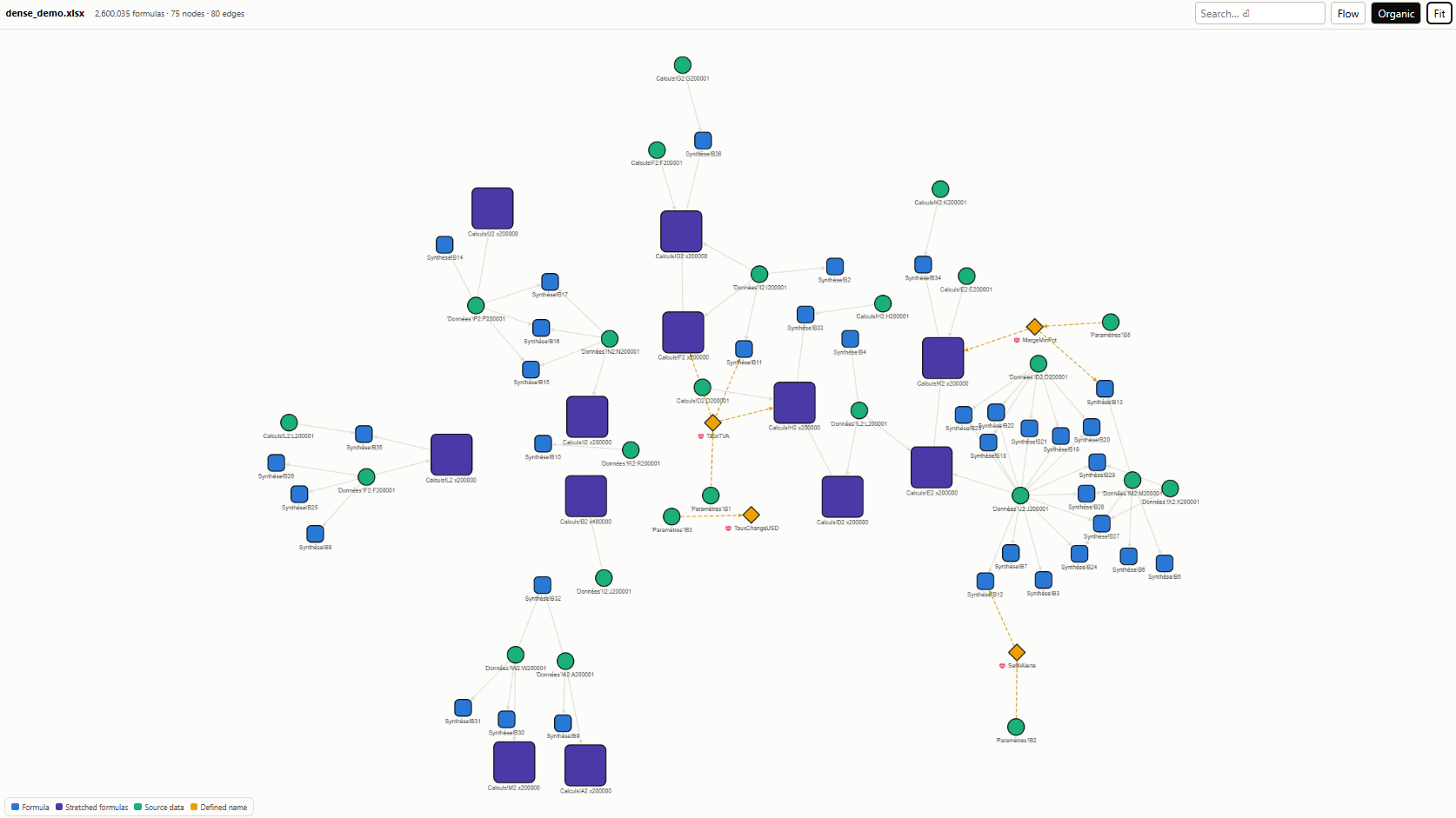
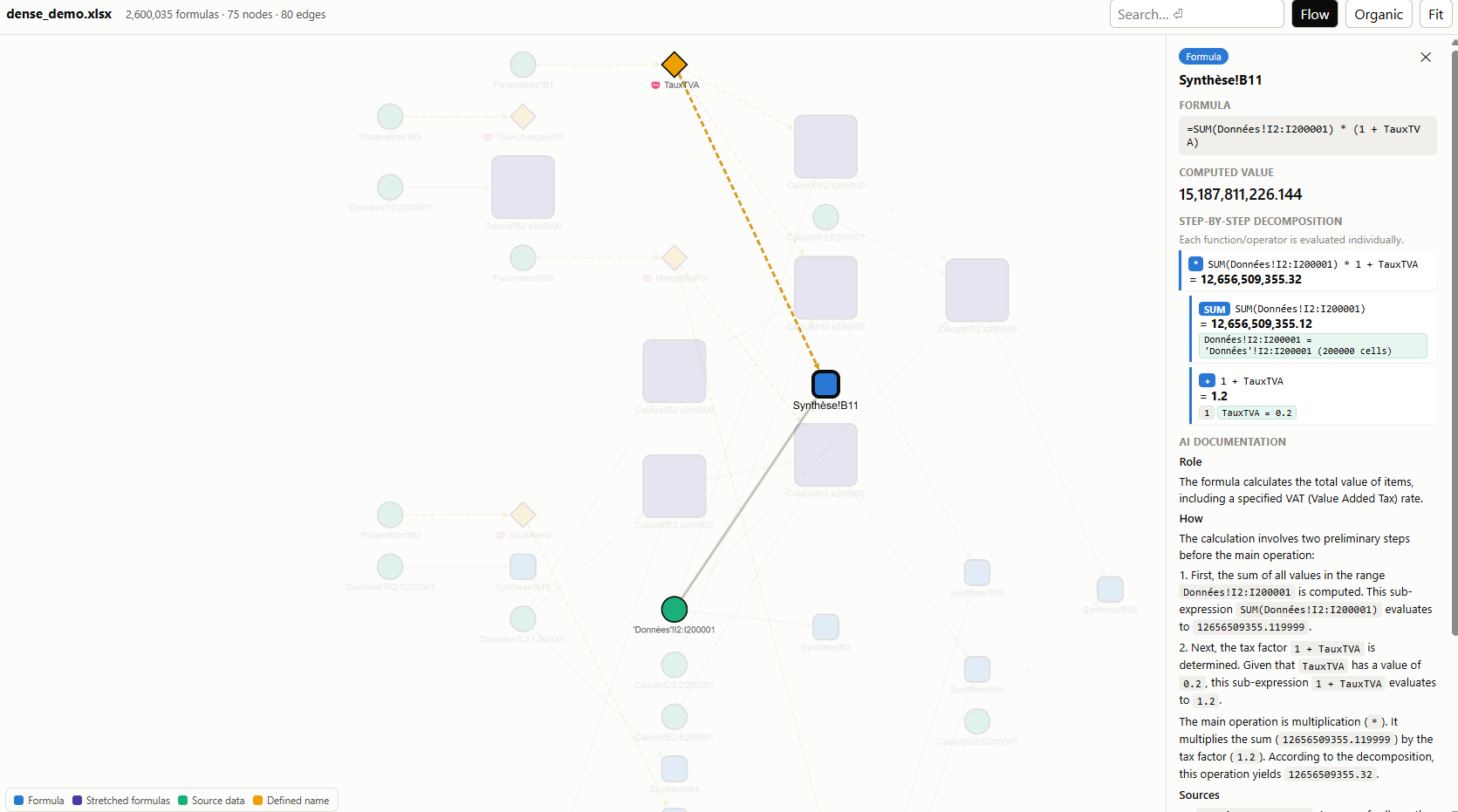
Extracts every formula, groups stretched patterns (R1C1 canonicalization), builds a dependency graph (cells, ranges, defined names, VBA), decomposes composite functions with step-by-step evaluation, and optionally documents calculations via AI.
Install
uv
uv add linexcel
# AI documentation (optional)
uv add linexcel[ai]
pip
pip install linexcel
# AI documentation (optional):
pip install "linexcel[ai]"
Note:
linexceldepends on formualizer, a Rust-based spreadsheet engine. Prebuilt wheels are available for Linux, macOS, and Windows. If no wheel matches your platform, a Rust toolchain is required to build from source.
Usage
from linexcel import analyze

result = analyze("workbook.xlsx")
result  # interactive graph in marimo / Jupyter
result.save_html("out.html")  # standalone offline HTML viewer
result.stats  # {totalFormulas, totalNodes, ...}
result.warnings  # list[str]

# AI documentation (optional, requires google-genai):
# language drives both the AI prompt and the viewer UI (see Languages below)
docs = result.document(api_key="...", language="en")
result.save_html("out.html", docs=docs, language="en")

# Workbook-level overview, shown in the separate overview tab:
workbook_doc = result.document_workbook(api_key="...", language="en")
result.save_html("out.html", docs=docs, workbook_doc=workbook_doc, language="en")
Workbook context and screenshots
result.workbook_context extracts bounded first rows and columns for every
sheet, without assuming a header row. It also exposes comments, merged cells,
frozen panes, hidden columns, and sheet visibility using openpyxl; Excel is
not launched.
These structural details are automatically rendered in a structured summary list within the Workbook overview tab of the HTML report.
You can also generate and embed high-resolution sheet screenshots using LibreOffice Calc:
# 1. Render one PNG per printed workbook page
screenshots = result.save_screenshots("screenshots/")

# 2. Map pages to sheet names to display them inline under each sheet card
sheets_screenshots = {
    "Ventes": screenshots[0:3],
    "Synthese": [screenshots[3]],
    "Params": [screenshots[4]],
}

# 3. Embed them directly inside the offline HTML report
result.save_html("out.html", screenshots=sheets_screenshots)
Screenshots require LibreOffice and Poppler's pdftoppm on the system:
| Platform | Install |
|---|---|
| Debian / Ubuntu | sudo apt install libreoffice-calc poppler-utils |
| Windows | winget install TheDocumentFoundation.LibreOffice then winget install oschwartz10612.Poppler |
| macOS | brew install --cask libreoffice && brew install poppler |
Both tools are located on PATH or in their standard install directory, so the
Windows and macOS installers — which do not extend PATH — need no extra setup.
Rendering runs via LibreOffice headless, without opening a desktop Excel
application, and uses a throwaway LibreOffice profile: it works while
LibreOffice is open on the desktop and leaves your own settings untouched.
AI documentation (optional, multi-provider)
AI documentation is opt-in and supports any LLM provider.
Google Gemini (default)
docs = result.document(api_key="...", language="en")
Requires google-genai (pip install linexcel[ai]).
OpenAI-compatible (Ollama, vLLM, LM Studio, OpenAI, …)
# Ollama (local)
docs = result.document(
    base_url="http://localhost:11434/v1",
    model="llama3.1",
    language="en",
)

# Or via env vars
# LINEXCEL_AI_BASE_URL=http://localhost:11434/v1
# LINEXCEL_AI_MODEL=llama3.1
Requires openai (pip install linexcel[openai]).
Custom provider (any callable)
def my_llm(system_prompt: str, user_prompt: str, *, temperature: float = 0.2) -> str:
    # call your model here
    return response_text


docs = result.document(provider=my_llm)
Any object exposing a generate method with that same signature works too.
Nodes are documented concurrently (max_workers=4 by default); a node that
fails is skipped with a warning rather than discarding the whole run.
Workbook-level overview
workbook_doc = result.document_workbook(language="en")
result.save_html("out.html", docs=docs, workbook_doc=workbook_doc, language="en")
Token usage
Every AI call is tallied on the result:
docs = result.document()
print(result.token_usage)
# 48,210 tokens (44,900 in + 3,310 out) over 4 request(s) [gemini/gemini-3.1-flash-lite]
Counts come from the provider when it reports them (Gemini and
OpenAI-compatible endpoints do), so the figure matches what you are billed on.
Otherwise they are approximated and result.token_usage.estimated is True.
No price is attached — rates differ per provider, model and region, so multiply
by your own.
Languages
language= sets both the AI prompt and the viewer interface:
| Code | Language | Code | Language | Code | Language |
|---|---|---|---|---|---|
en |
English (default) | it |
Italiano | nl |
Nederlands |
fr |
Français | pt |
Português | ja |
日本語 |
es |
Español | de |
Deutsch | zh |
简体中文 |
docs = result.document(language="de")
result.save_html("out.html", docs=docs, language="de")
The set is a closed allowlist, not free-form text: language selects a stored
system prompt and is interpolated into the generated viewer, so an arbitrary
string would let a caller steer the model's instructions. Anything else raises
ValueError. Reports embed only the requested language plus the English
fallback, so adding languages does not grow the exported file.
Note: English and French were written by hand. The other seven languages — both the interface strings and the AI system prompts — were produced with AI assistance and have not been reviewed by native speakers. Corrections are welcome: interface strings live in
linexcel.i18n, prompts inlinexcel.aidoc.
AI data handling
AI documentation is opt-in. Calling result.document() sends a deterministic
dossier for each requested node, while result.document_workbook() sends a
workbook-level dossier, to whichever provider you configure. The dossiers can
include formulas, computed values, precedent/dependent labels, formula
decomposition, sheet structure, defined names, and extracted VBA code.
Where that data goes depends on the provider you select:
| Configuration | Destination |
|---|---|
Default (no provider, no base_url) |
Google Gemini — see the Google Generative AI Terms of Service |
base_url=... / LINEXCEL_AI_BASE_URL |
The endpoint you point at — a local runtime such as Ollama or vLLM keeps the dossiers on your machine; a hosted OpenAI-compatible API does not |
provider=... |
Wherever your own callable sends them |
Do not enable this feature for a workbook whose contents must remain local unless the configured provider satisfies its data-sharing requirements.
Features
- Formula extraction via formualizer (Rust engine)
- Stretched pattern grouping — 1000 identical formulas → 1 node
- Dependency graph — cells, ranges, defined names, VBA procedures
- Step-by-step evaluation — each operator/function evaluated individually
- Standalone HTML viewer — Cytoscape.js embedded, fully offline
- AI documentation — Gemini generates provable docs from deterministic lineage
Sample output
Global overview
Security
Please report vulnerabilities privately according to SECURITY.md. Do not include sensitive workbooks or credentials in public issues.
Changelog
See CHANGELOG.md.
License
MIT — see LICENSE.
1 maintainer

Download files
Download the file for your platform. If you're not sure which to choose, learn more about installing packages.
Source Distribution
Built Distribution
Filter files by name, interpreter, ABI, and platform.
If you're not sure about the file name format, learn more about wheel file names.
Copy a direct link to the current filters
File details
Details for the file linexcel-0.7.0.tar.gz.
File metadata
- Download URL: linexcel-0.7.0.tar.gz
- Upload date:
- Size: 833.7 kB
- Tags: Source
- Uploaded using Trusted Publishing? Yes
- Uploaded via: uv/0.12.1 {"installer":{"name":"uv","version":"0.12.1","subcommand":["publish"]},"python":null,"implementation":{"name":null,"version":null},"distro":{"name":"Ubuntu","version":"24.04","id":"noble","libc":null},"system":{"name":null,"release":null},"cpu":null,"openssl_version":null,"setuptools_version":null,"rustc_version":null,"ci":true}
File hashes
| Algorithm | Hash digest | |
|---|---|---|
| SHA256 |
d15089e05361f2ed790a471e6b923f6d2f8e451c56660ed9e246d92d16b79491
|
|
| MD5 |
e5647aeddbae048d0f6e8e2f39786486
|
|
| BLAKE2b-256 |
7e5513ca7028ebc3ca29981a191e8e5ed9db30b8a1fa6221fe0a915885ec4909
|
File details
Details for the file linexcel-0.7.0-py3-none-any.whl.
File metadata
- Download URL: linexcel-0.7.0-py3-none-any.whl
- Upload date:
- Size: 286.0 kB
- Tags: Python 3
- Uploaded using Trusted Publishing? Yes
- Uploaded via: uv/0.12.1 {"installer":{"name":"uv","version":"0.12.1","subcommand":["publish"]},"python":null,"implementation":{"name":null,"version":null},"distro":{"name":"Ubuntu","version":"24.04","id":"noble","libc":null},"system":{"name":null,"release":null},"cpu":null,"openssl_version":null,"setuptools_version":null,"rustc_version":null,"ci":true}
File hashes
| Algorithm | Hash digest | |
|---|---|---|
| SHA256 |
869300941f66db12b5c978f214d5dd7b1dc4352a1ea537e9862129b2617bcbbb
|
|
| MD5 |
7e3a354818bfcc49606de9828d79cba8
|
|
| BLAKE2b-256 |
ee866db4e7100e2a345d72d664ead04c0474b6556a89d597180f8255090207cb
|







