
lingua-slim-en-es-fr-de-it-pt
Unofficial slim build of lingua by Peter M. Stahl.
Same library, same code, same lingua module — compiled with only the en, es, fr, de, it, pt language models
instead of all 75. That is a ~17 MB wheel instead of ~162 MB, and ~31 MB installed instead of
~293 MB.
Built from pemistahl/lingua-rs at tag v1.8.0,
which is upstream Python release 2.2.0. No source code is changed: only the set of
compiled-in language-model cargo features and the distribution name differ.
Read this before installing
- The import name is still
lingua. This package andlingua-language-detectortherefore cannot be installed in the same environment — whichever lands second wins, silently. Pick one. - Only
en,es,fr,de,it,ptexist in this build.Languagehas six members. Anything referring to a seventh language, includingLanguage.all()and the ISO-code lookups for other languages, sees only these six. If you need other languages, install upstreamlingua-language-detectorinstead. - Detection results are identical to upstream when the input is one of the six and the detector is built over the same six. A slim detector is not a worse detector; it is the same n-gram comparison over a smaller candidate set.
- Wheels only, no sdist.
pip install --no-binarycannot work: building from source means cloning the upstream Rust repository. Wheels are published for CPython 3.12 and 3.13 on manylinux2014 x86_64 and macOS arm64.
from lingua import Language, LanguageDetectorBuilder

detector = LanguageDetectorBuilder.from_all_languages().build()
detector.detect_language_of("languages are awesome")  # Language.ENGLISH
from_all_languages() means "all languages in this build" — the six.
Credit
All of the work in this library is Peter M. Stahl's. Licensed Apache-2.0, unchanged; see NOTICE
in the recipe repository for the
statement of modifications. Please file detection bugs
upstream — they are not ours — and packaging bugs
here.
Packaged by Grotto. Version 2.2.0 mirrors upstream
2.2.0.
The rest of this page is upstream's own documentation, unmodified. Everything in it applies to this build for the six languages above.







1. What does this library do?
Its task is simple: It tells you which language some text is written in. This is very useful as a preprocessing step for linguistic data in natural language processing applications such as text classification and spell checking. Other use cases, for instance, might include routing e-mails to the right geographically located customer service department, based on the e-mails' languages.
2. Why does this library exist?
Language detection is often done as part of large machine learning frameworks or natural language processing applications. In cases where you don't need the full-fledged functionality of those systems or don't want to learn the ropes of those, a small flexible library comes in handy.
Python is widely used in natural language processing, so there are a couple of comprehensive open source libraries for this task, such as Google's CLD 2 and CLD 3, Langid, Simplemma and Langdetect. Unfortunately, except for the last one they have two major drawbacks:
- Detection only works with quite lengthy text fragments. For very short text snippets such as Twitter messages, they do not provide adequate results.
- The more languages take part in the decision process, the less accurate are the detection results.
Lingua aims at eliminating these problems. She nearly does not need any configuration and yields pretty accurate results on both long and short text, even on single words and phrases. She draws on both rule-based and statistical Naive Bayes methods but does not use neural networks or any dictionaries of words. She does not need a connection to any external API or service either. Once the library has been downloaded, it can be used completely offline.
3. A short history of this library
This library started as a pure Python implementation. Python's quick prototyping capabilities made an important contribution to its improvements. Unfortunately, there was always a tradeoff between performance and memory consumption. At first, Lingua's language models were stored in dictionaries during runtime. This led to quick performance at the cost of large memory consumption (more than 3 GB). Because of that, the language models were then stored in NumPy arrays instead of dictionaries. Memory consumption reduced to approximately 800 MB but CPU performance dropped significantly. Both approaches were not satisfying.
Starting from version 2.0.0, the pure Python implementation was replaced with compiled Python bindings to the native Rust implementation of Lingua. This decision has led to both quick performance and a small memory footprint. The pure Python implementation is still available in a separate branch in this repository and will be kept up-to-date in subsequent 1.* releases. There are environments that do not support native Python extensions such as Juno, so a pure Python implementation is still useful. Both 1.* and 2.* versions will remain available on the Python package index (PyPI).
4. Which languages are supported?
Compared to other language detection libraries, Lingua's focus is on quality over quantity, that is, getting detection right for a small set of languages first before adding new ones. Currently, the following 75 languages are supported:
- A
- Afrikaans
- Albanian
- Arabic
- Armenian
- Azerbaijani
- B
- Basque
- Belarusian
- Bengali
- Norwegian Bokmal
- Bosnian
- Bulgarian
- C
- Catalan
- Chinese
- Croatian
- Czech
- D
- Danish
- Dutch
- E
- English
- Esperanto
- Estonian
- F
- Finnish
- French
- G
- Ganda
- Georgian
- German
- Greek
- Gujarati
- H
- Hebrew
- Hindi
- Hungarian
- I
- Icelandic
- Indonesian
- Irish
- Italian
- J
- Japanese
- K
- Kazakh
- Korean
- L
- Latin
- Latvian
- Lithuanian
- M
- Macedonian
- Malay
- Maori
- Marathi
- Mongolian
- N
- Norwegian Nynorsk
- P
- Persian
- Polish
- Portuguese
- Punjabi
- R
- Romanian
- Russian
- S
- Serbian
- Shona
- Slovak
- Slovene
- Somali
- Sotho
- Spanish
- Swahili
- Swedish
- T
- Tagalog
- Tamil
- Telugu
- Thai
- Tsonga
- Tswana
- Turkish
- U
- Ukrainian
- Urdu
- V
- Vietnamese
- W
- Welsh
- X
- Xhosa
- Y
- Yoruba
- Z
- Zulu
5. How accurate is it?
Lingua is able to report accuracy statistics for some bundled test data available for each supported language. The test data for each language is split into three parts:
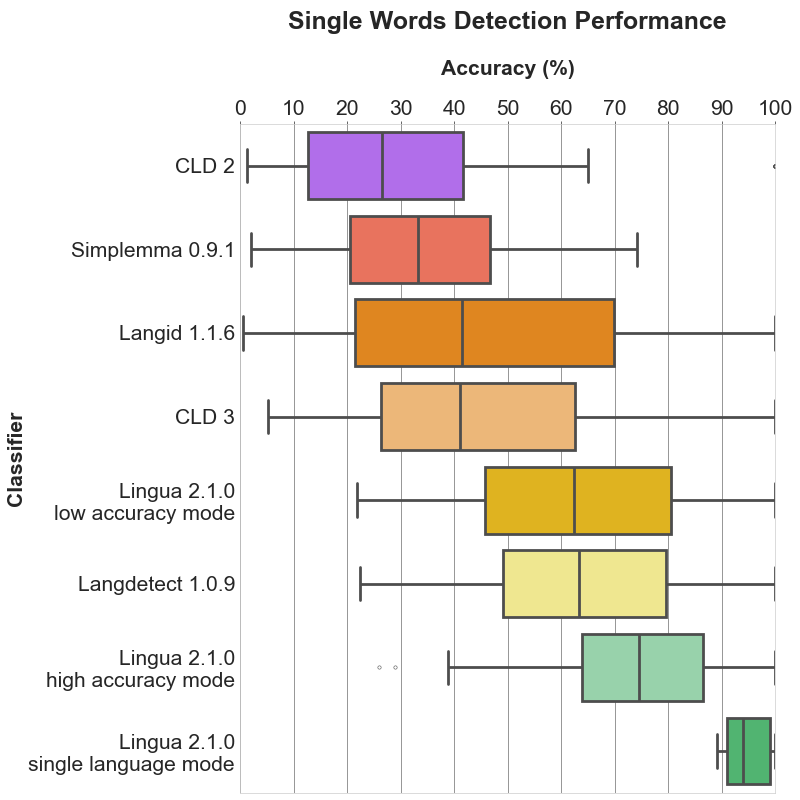
- a list of single words with a minimum length of 5 characters
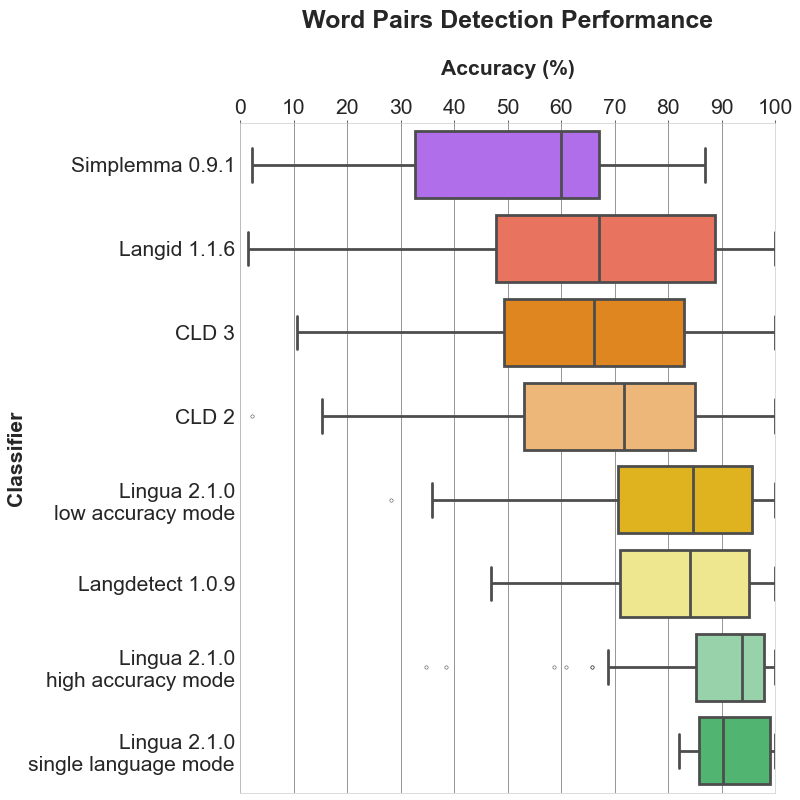
- a list of word pairs with a minimum length of 10 characters
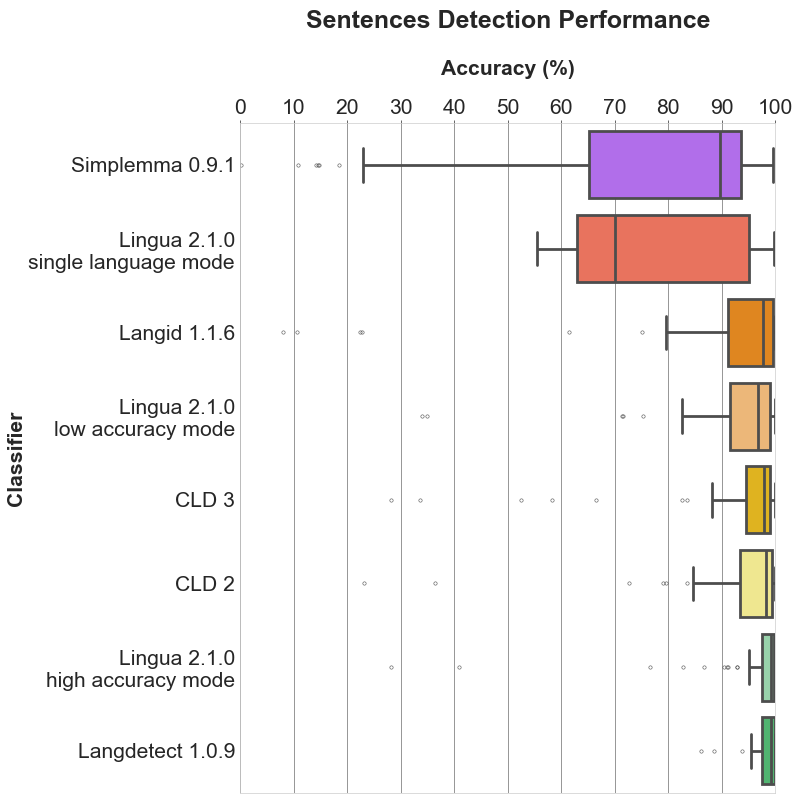
- a list of complete grammatical sentences of various lengths
Both the language models and the test data have been created from separate documents of the Wortschatz corpora offered by Leipzig University, Germany. Data crawled from various news websites have been used for training, each corpus comprising one million sentences. For testing, corpora made of arbitrarily chosen websites have been used, each comprising ten thousand sentences. From each test corpus, a random unsorted subset of 1000 single words, 1000 word pairs and 1000 sentences has been extracted, respectively.
Given the generated test data, I have compared the detection results of Lingua, Langdetect, Langid, Simplemma, CLD 2 and CLD 3 running over the data of Lingua's supported 75 languages. Languages that are not supported by the other detectors are simply ignored for them during the detection process.
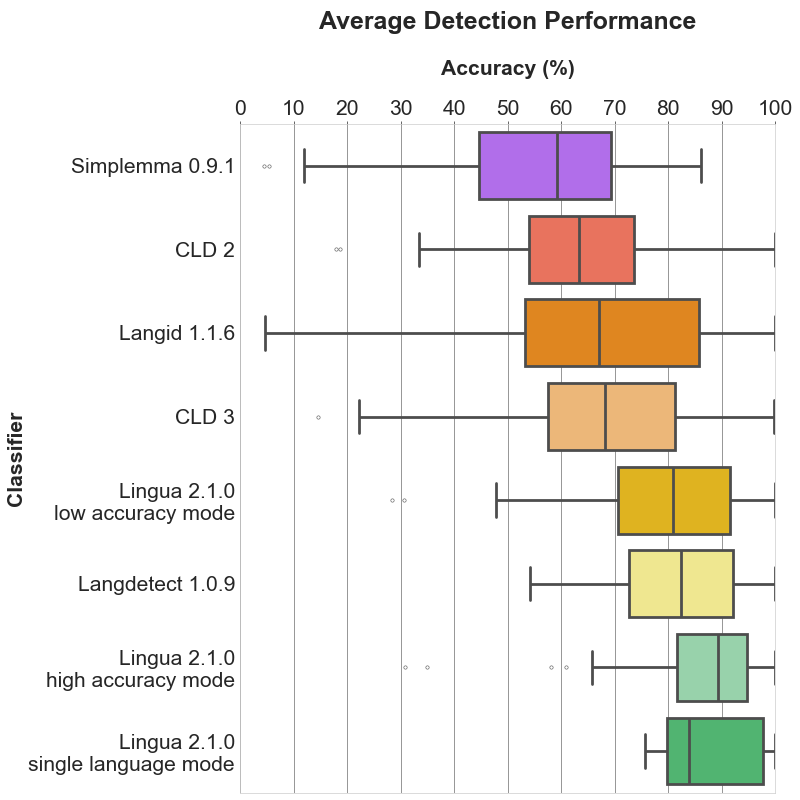
Each of the following sections contains three plots. The bar plot shows the detailed accuracy results for each supported language. The box plots illustrate the distributions of the accuracy values for each classifier. The boxes themselves represent the areas which the middle 50 % of data lie within. Within the colored boxes, the horizontal lines mark the median of the distributions.
5.1 Single word detection

Bar plot

5.2 Word pair detection

Bar plot

5.3 Sentence detection

Bar plot

5.4 Average detection

Bar plot

5.5 Mean, median and standard deviation
The tables found here show detailed statistics for each language and classifier including mean, median and standard deviation.
6. How fast is it?
The accuracy reporter script measures the time each language detector needs to classify 3000 input texts for each of the supported 75 languages. The results below have been produced on an iMac 3.6 Ghz 8-Core Intel Core i9 with 40 GB RAM.
Lingua in multi-threaded mode is one of the fastest algorithms in this comparison. CLD 2 and 3 are similarly fast as they have been implemented in C or C++. Pure Python libraries such as Simplemma, Langid or Langdetect are significantly slower.
| Detector | Time |
|---|---|
| CLD 2 | 8.65 sec |
| CLD 3 | 16.77 sec |
| Lingua (low accuracy mode, multi-threaded) | 11.81 sec |
| Lingua (high accuracy mode, multi-threaded) | 21.13 sec |
| Simplemma | 2 min 36.44 sec |
| Langid | 3 min 50.40 sec |
| Langdetect | 10 min 43.96 sec |
7. Why is it better than other libraries?
Every language detector uses a probabilistic n-gram model trained on the character distribution in some training corpus. Most libraries only use n-grams of size 3 (trigrams) which is satisfactory for detecting the language of longer text fragments consisting of multiple sentences. For short phrases or single words, however, trigrams are not enough. The shorter the input text is, the less n-grams are available. The probabilities estimated from such few n-grams are not reliable. This is why Lingua makes use of n-grams of sizes 1 up to 5 which results in much more accurate prediction of the correct language.
A second important difference is that Lingua does not only use such a statistical model, but also a rule-based engine. This engine first determines the alphabet of the input text and searches for characters which are unique in one or more languages. If exactly one language can be reliably chosen this way, the statistical model is not necessary anymore. In any case, the rule-based engine filters out languages that do not satisfy the conditions of the input text. Only then, in a second step, the probabilistic n-gram model is taken into consideration. This makes sense because loading less language models means less memory consumption and better runtime performance.
In general, it is always a good idea to restrict the set of languages to be considered in the classification process using the respective api methods. If you know beforehand that certain languages are never to occur in an input text, do not let those take part in the classification process. The filtering mechanism of the rule-based engine is quite good, however, filtering based on your own knowledge of the input text is always preferable.
Even when taking all language models into account, the library uses only a few dozen megabytes of memory during runtime. This is because the models are stored as finite-state transducers (FSTs). FSTs allow to be searched on disk without actually reading them entirely into memory, making the library suitable for low-resource environments.
8. Test report generation
If you want to reproduce the accuracy results above, you can generate the test reports yourself for all classifiers and languages by installing Poetry and executing:
poetry install --no-root --only script
poetry run python3 scripts/accuracy_reporter.py
Accuracy reports for only a subset of classifiers and / or languages can be created by passing command line arguments:
poetry run python3 scripts/accuracy_reporter.py --detectors cld2 lingua-high-accuracy --languages bulgarian german
For each detector and language, a test report file is then written into
/accuracy-reports.
As an example, here is the current output of the Lingua German report:
##### German #####

>>> Accuracy on average: 89.27%

>> Detection of 1000 single words (average length: 9 chars)
Accuracy: 74.20%
Erroneously classified as Dutch: 2.30%, Danish: 2.20%, English: 2.20%, Latin: 1.80%, Bokmal: 1.60%, Italian: 1.30%, Basque: 1.20%, Esperanto: 1.20%, French: 1.20%, Swedish: 0.90%, Afrikaans: 0.70%, Finnish: 0.60%, Nynorsk: 0.60%, Portuguese: 0.60%, Yoruba: 0.60%, Sotho: 0.50%, Tsonga: 0.50%, Welsh: 0.50%, Estonian: 0.40%, Irish: 0.40%, Polish: 0.40%, Spanish: 0.40%, Tswana: 0.40%, Albanian: 0.30%, Icelandic: 0.30%, Tagalog: 0.30%, Bosnian: 0.20%, Catalan: 0.20%, Croatian: 0.20%, Indonesian: 0.20%, Lithuanian: 0.20%, Romanian: 0.20%, Swahili: 0.20%, Zulu: 0.20%, Latvian: 0.10%, Malay: 0.10%, Maori: 0.10%, Slovak: 0.10%, Slovene: 0.10%, Somali: 0.10%, Turkish: 0.10%, Xhosa: 0.10%

>> Detection of 1000 word pairs (average length: 18 chars)
Accuracy: 93.90%
Erroneously classified as Dutch: 0.90%, Latin: 0.90%, English: 0.70%, Swedish: 0.60%, Danish: 0.50%, French: 0.40%, Bokmal: 0.30%, Irish: 0.20%, Tagalog: 0.20%, Tsonga: 0.20%, Afrikaans: 0.10%, Esperanto: 0.10%, Estonian: 0.10%, Finnish: 0.10%, Italian: 0.10%, Maori: 0.10%, Nynorsk: 0.10%, Somali: 0.10%, Swahili: 0.10%, Turkish: 0.10%, Welsh: 0.10%, Zulu: 0.10%

>> Detection of 1000 sentences (average length: 111 chars)
Accuracy: 99.70%
Erroneously classified as Dutch: 0.20%, Latin: 0.10%
9. How to add it to your project?
Lingua is available in the Python Package Index and can be installed with:
pip install lingua-language-detector
10. How to build?
Lingua requires Python >= 3.12.
First create a virtualenv and install the Python wheel for your platform with pip.
git clone https://github.com/pemistahl/lingua-py.git
cd lingua-py
python3 -m venv .venv
source .venv/bin/activate
pip install --find-links=lingua lingua-language-detector
In the scripts directory, there are Python scripts for writing accuracy reports, drawing plots and writing accuracy values in an HTML table. The dependencies for these scripts are managed by Poetry which you need to install if you have not done so yet. In order to install the script dependencies in your virtualenv, run
poetry install --no-root --only script
The project makes uses of type annotations which allow for static type checking with Mypy. Run the following commands for checking the types:
poetry install --no-root --only dev
poetry run mypy
The Python source code is formatted with Black:
poetry run black .
11. How to use?
11.1 Basic usage
>>> from lingua import Language, LanguageDetectorBuilder
>>> languages = [Language.ENGLISH, Language.FRENCH, Language.GERMAN, Language.SPANISH]
>>> detector = LanguageDetectorBuilder.from_languages(*languages).build()
>>> language = detector.detect_language_of("languages are awesome")
>>> language
Language.ENGLISH
>>> language.iso_code_639_1
IsoCode639_1.EN
>>> language.iso_code_639_1.name
'EN'
>>> language.iso_code_639_3
IsoCode639_3.ENG
>>> language.iso_code_639_3.name
'ENG'
The entire library is thread-safe, i.e. you can use a single LanguageDetector instance and
its methods in multiple threads. Multiple instances of LanguageDetector share thread-safe
access to the language models, so every language model is loaded into memory just once, no
matter how many instances of LanguageDetector have been created.
11.2 Minimum relative distance
By default, Lingua returns the most likely language for a given input text. However, there are certain words that are spelled the same in more than one language. The word prologue, for instance, is both a valid English and French word. Lingua would output either English or French which might be wrong in the given context. For cases like that, it is possible to specify a minimum relative distance that the logarithmized and summed up probabilities for each possible language have to satisfy. It can be stated in the following way:
>>> from lingua import Language, LanguageDetectorBuilder
>>> languages = [Language.ENGLISH, Language.FRENCH, Language.GERMAN, Language.SPANISH]
>>> detector = LanguageDetectorBuilder.from_languages(*languages)\
.with_minimum_relative_distance(0.9)\
.build()
>>> print(detector.detect_language_of("languages are awesome"))
None
Be aware that the distance between the language probabilities is dependent on
the length of the input text. The longer the input text, the larger the
distance between the languages. So if you want to classify very short text
phrases, do not set the minimum relative distance too high. Otherwise, None
will be returned most of the time as in the example above. This is the return
value for cases where language detection is not reliably possible.
11.3 Confidence values
Knowing about the most likely language is nice but how reliable is the computed likelihood? And how less likely are the other examined languages in comparison to the most likely one? These questions can be answered as well:
>>> from lingua import Language, LanguageDetectorBuilder
>>> languages = [Language.ENGLISH, Language.FRENCH, Language.GERMAN, Language.SPANISH]
>>> detector = LanguageDetectorBuilder.from_languages(*languages).build()
>>> confidence_values = detector.compute_language_confidence_values("languages are awesome")
>>> for confidence in confidence_values:
...     print(f"{confidence.language.name}: {confidence.value:.2f}")
ENGLISH: 0.93
FRENCH: 0.04
GERMAN: 0.02
SPANISH: 0.01
In the example above, a list is returned containing those languages which the calling instance of LanguageDetector has been built from, sorted by their confidence value in descending order. Each value is a probability between 0.0 and 1.0. The probabilities of all languages will sum to 1.0. If the language is unambiguously identified by the rule engine, the value 1.0 will always be returned for this language. The other languages will receive a value of 0.0.
There is also a method for returning the confidence value for one specific language only:
>>> from lingua import Language, LanguageDetectorBuilder
>>> languages = [Language.ENGLISH, Language.FRENCH, Language.GERMAN, Language.SPANISH]
>>> detector = LanguageDetectorBuilder.from_languages(*languages).build()
>>> confidence_value = detector.compute_language_confidence("languages are awesome", Language.FRENCH)
>>> print(f"{confidence_value:.2f}")
0.04
The value that this method computes is a number between 0.0 and 1.0. If the language is unambiguously identified by the rule engine, the value 1.0 will always be returned. If the given language is not supported by this detector instance, the value 0.0 will always be returned.
11.4 Eager loading versus lazy loading
By default, Lingua uses lazy-loading to load only those language models on demand which are considered relevant by the rule-based filter engine. For web services, for instance, it is rather beneficial to preload all language models into memory to avoid unexpected latency while waiting for the service response. If you want to enable the eager-loading mode, you can do it like this:
LanguageDetectorBuilder.from_all_languages().with_preloaded_language_models().build()
Multiple instances of LanguageDetector share the same language models in
memory which are accessed asynchronously by the instances.
11.5 Low accuracy mode versus high accuracy mode
Lingua's high detection accuracy comes at the cost of being noticeably slower than other language detectors. This requirement might not be feasible for systems running low on resources. If you want to classify mostly long texts or need to save resources, you can enable a low accuracy mode that loads only a small subset of the language models into memory:
LanguageDetectorBuilder.from_all_languages().with_low_accuracy_mode().build()
The downside of this approach is that detection accuracy for short texts consisting of less than 120 characters will drop significantly. However, detection accuracy for texts which are longer than 120 characters will remain mostly unaffected.
An alternative for a faster performance is to reduce the set of languages when building the language detector. In most cases, it is not advisable to build the detector from all supported languages. When you have knowledge about the texts you want to classify you can almost always rule out certain languages as impossible or unlikely to occur.
11.6 Single-language mode
If you build a LanguageDetector from one language only it will operate in single-language mode.
This means the detector will try to find out whether a given text has been written in the given language or not.
If not, then None will be returned, otherwise the given language. In single-language mode, the detector decides based on a set of unique and most common n-grams which
have been collected beforehand for every supported language.
11.7 Detection of multiple languages in mixed-language texts
In contrast to most other language detectors, Lingua is able to detect multiple languages in mixed-language texts. This feature can yield quite reasonable results but it is still in an experimental state and therefore the detection result is highly dependent on the input text. It works best in high-accuracy mode with multiple long words for each language. The shorter the phrases and their words are, the less accurate are the results. Reducing the set of languages when building the language detector can also improve accuracy for this task if the languages occurring in the text are equal to the languages supported by the respective language detector instance.
>>> from lingua import Language, LanguageDetectorBuilder
>>> languages = [Language.ENGLISH, Language.FRENCH, Language.GERMAN]
>>> detector = LanguageDetectorBuilder.from_languages(*languages).build()
>>> sentence = "Parlez-vous français? " + \
...            "Ich spreche Französisch nur ein bisschen. " + \
...            "A little bit is better than nothing."
>>> for result in detector.detect_multiple_languages_of(sentence):
...     print(f"{result.language.name}: '{sentence[result.start_index:result.end_index]}'")
FRENCH: 'Parlez-vous français? '
GERMAN: 'Ich spreche Französisch nur ein bisschen. '
ENGLISH: 'A little bit is better than nothing.'
In the example above, a list of
DetectionResult
is returned. Each entry in the list describes a contiguous single-language text section,
providing start and end indices of the respective substring.
11.8 Single-threaded versus multi-threaded language detection
The LanguageDetector methods explained above all operate in a single thread.
If you want to classify a very large set of texts, you will probably want to
use all available CPU cores efficiently in multiple threads for maximum performance.
Every single-threaded method has a multi-threaded equivalent that accepts a list of texts and returns a list of results.
| Single-threaded | Multi-threaded |
|---|---|
detect_language_of |
detect_languages_in_parallel_of |
detect_multiple_languages_of |
detect_multiple_languages_in_parallel_of |
compute_language_confidence_values |
compute_language_confidence_values_in_parallel |
compute_language_confidence |
compute_language_confidence_in_parallel |
11.9 Methods to build the LanguageDetector
There might be classification tasks where you know beforehand that your language data is definitely not written in Latin, for instance. The detection accuracy can become better in such cases if you exclude certain languages from the decision process or just explicitly include relevant languages:
from lingua import LanguageDetectorBuilder, Language, IsoCode639_1, IsoCode639_3

# Include all languages available in the library.
LanguageDetectorBuilder.from_all_languages()

# Include only languages that are not yet extinct (= currently excludes Latin).
LanguageDetectorBuilder.from_all_spoken_languages()

# Include only languages written with Cyrillic script.
LanguageDetectorBuilder.from_all_languages_with_cyrillic_script()

# Exclude only the Spanish language from the decision algorithm.
LanguageDetectorBuilder.from_all_languages_without(Language.SPANISH)

# Only decide between English and German.
LanguageDetectorBuilder.from_languages(Language.ENGLISH, Language.GERMAN)

# Select languages by ISO 639-1 code.
LanguageDetectorBuilder.from_iso_codes_639_1(IsoCode639_1.EN, IsoCode639_1.DE)

# Select languages by ISO 639-3 code.
LanguageDetectorBuilder.from_iso_codes_639_3(IsoCode639_3.ENG, IsoCode639_3.DEU)
11.10 Differences to native Python enums
As version >= 2.0 has been implemented in Rust with Python bindings implemented with PyO3, there are some limitations with regard to enums. PyO3 does not yet support meta classes, that's why Lingua's enums do not exactly behave like native Python enums.
If you want to iterate through all members of the Language enum, for instance,
you can do it like this:
# This won't work
# for language in Language:
#    print(language)

# But this will work
for language in sorted(Language.all()):
    print(language)
PyO3 enums are not subscriptable. If you want to get an enum member dynamically, you can do it like this:
# This won't work
# assert Language["GERMAN"] == Language.GERMAN

# But this will work
assert Language.from_str("GERMAN") == Language.GERMAN
assert Language.from_str("german") == Language.GERMAN
assert Language.from_str("GeRmAn") == Language.GERMAN
12. What's next for version 2.3.0?
Take a look at the planned issues.
1 maintainer

Download files
Download the file for your platform. If you're not sure which to choose, learn more about installing packages.
Source Distributions
Built Distributions
Filter files by name, interpreter, ABI, and platform.
If you're not sure about the file name format, learn more about wheel file names.
Copy a direct link to the current filters
File details
Details for the file lingua_slim_en_es_fr_de_it_pt-2.2.0-cp313-cp313-manylinux_2_17_x86_64.manylinux2014_x86_64.whl.
File metadata
- Download URL: lingua_slim_en_es_fr_de_it_pt-2.2.0-cp313-cp313-manylinux_2_17_x86_64.manylinux2014_x86_64.whl
- Upload date:
- Size: 17.3 MB
- Tags: CPython 3.13, manylinux: glibc 2.17+ x86-64
- Uploaded using Trusted Publishing? No
- Uploaded via:
uv/0.9.17 {"installer":{"name":"uv","version":"0.9.17","subcommand":["publish"]},"python":null,"implementation":{"name":null,"version":null},"distro":{"name":"macOS","version":null,"id":null,"libc":null},"system":{"name":null,"release":null},"cpu":null,"openssl_version":null,"setuptools_version":null,"rustc_version":null,"ci":null}
File hashes
| Algorithm | Hash digest | |
|---|---|---|
| SHA256 |
7bc0dbb55a3fac0b7059eed499d3524a66ec403b76a48362238f614811e81244
|
|
| MD5 |
79d5f417dbadb25376b3696658072d2a
|
|
| BLAKE2b-256 |
4c8ff9caae3fb3820a2dff4f746de557149959c7e751fdad65d122d4b67e39f1
|
File details
Details for the file lingua_slim_en_es_fr_de_it_pt-2.2.0-cp313-cp313-macosx_11_0_arm64.whl.
File metadata
- Download URL: lingua_slim_en_es_fr_de_it_pt-2.2.0-cp313-cp313-macosx_11_0_arm64.whl
- Upload date:
- Size: 17.4 MB
- Tags: CPython 3.13, macOS 11.0+ ARM64
- Uploaded using Trusted Publishing? No
- Uploaded via:
uv/0.9.17 {"installer":{"name":"uv","version":"0.9.17","subcommand":["publish"]},"python":null,"implementation":{"name":null,"version":null},"distro":{"name":"macOS","version":null,"id":null,"libc":null},"system":{"name":null,"release":null},"cpu":null,"openssl_version":null,"setuptools_version":null,"rustc_version":null,"ci":null}
File hashes
| Algorithm | Hash digest | |
|---|---|---|
| SHA256 |
b6dc4e07d3fea9d72e151f8eb4c05887c0e6cf3a65c4b868eb725f6e5ca6895b
|
|
| MD5 |
d1433c45be6521eca0207abaf3fe6e21
|
|
| BLAKE2b-256 |
fe6383182dddbdc78eddc0838a582801b4fbe3bcb83f74ed5fd48f5620ebac1e
|
File details
Details for the file lingua_slim_en_es_fr_de_it_pt-2.2.0-cp312-cp312-manylinux_2_17_x86_64.manylinux2014_x86_64.whl.
File metadata
- Download URL: lingua_slim_en_es_fr_de_it_pt-2.2.0-cp312-cp312-manylinux_2_17_x86_64.manylinux2014_x86_64.whl
- Upload date:
- Size: 17.3 MB
- Tags: CPython 3.12, manylinux: glibc 2.17+ x86-64
- Uploaded using Trusted Publishing? No
- Uploaded via:
uv/0.9.17 {"installer":{"name":"uv","version":"0.9.17","subcommand":["publish"]},"python":null,"implementation":{"name":null,"version":null},"distro":{"name":"macOS","version":null,"id":null,"libc":null},"system":{"name":null,"release":null},"cpu":null,"openssl_version":null,"setuptools_version":null,"rustc_version":null,"ci":null}
File hashes
| Algorithm | Hash digest | |
|---|---|---|
| SHA256 |
a85ed12c0de259aaa950c5b2f230d3afa9e2b03d48bbca3b0fb06eee896ae791
|
|
| MD5 |
d3859fbe0608acb03f99eb2cd3c8ac45
|
|
| BLAKE2b-256 |
d95fca4955df7d6debd3bbbbbad93ecf8ffc6d14df9d22bb90647d6de662d1db
|
File details
Details for the file lingua_slim_en_es_fr_de_it_pt-2.2.0-cp312-cp312-macosx_11_0_arm64.whl.
File metadata
- Download URL: lingua_slim_en_es_fr_de_it_pt-2.2.0-cp312-cp312-macosx_11_0_arm64.whl
- Upload date:
- Size: 17.4 MB
- Tags: CPython 3.12, macOS 11.0+ ARM64
- Uploaded using Trusted Publishing? No
- Uploaded via:
uv/0.9.17 {"installer":{"name":"uv","version":"0.9.17","subcommand":["publish"]},"python":null,"implementation":{"name":null,"version":null},"distro":{"name":"macOS","version":null,"id":null,"libc":null},"system":{"name":null,"release":null},"cpu":null,"openssl_version":null,"setuptools_version":null,"rustc_version":null,"ci":null}
File hashes
| Algorithm | Hash digest | |
|---|---|---|
| SHA256 |
d4f4ee9c44f90625820844f3d63d84d051e19079dee43bbbaaa551b732802bcf
|
|
| MD5 |
e2feff2659b4b0407494233a1c9c4d65
|
|
| BLAKE2b-256 |
362844c6f1fa9624287662a119fa9cdbb173fc2162dc02cef945bb79fd70ba3f
|














