
Linux Hardware Monitor
A comprehensive Python-based system monitoring tool for Linux that provides real-time hardware metrics similar to hwinfo64. Features both text-based and graphical interfaces for monitoring CPU, GPU, memory, disk, and network usage.
Features
Real-time Monitoring
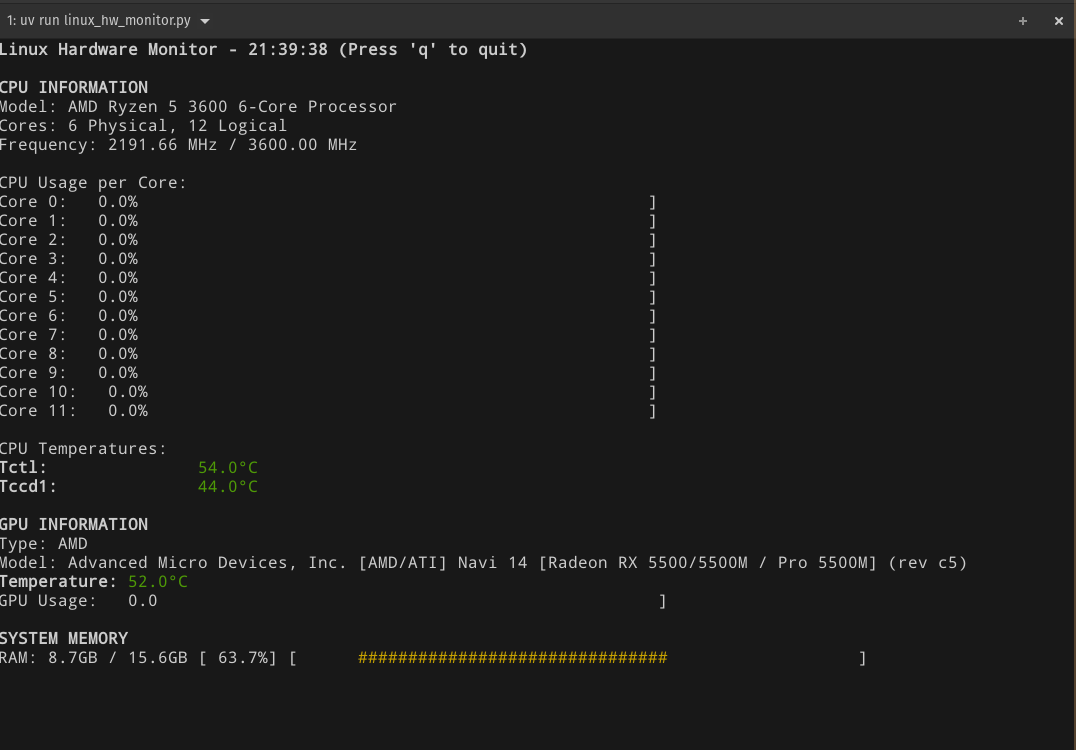
- CPU Information: Model name, core count, frequency, per-core usage, and temperature
- GPU Support: NVIDIA and AMD GPU detection with utilization, memory, temperature, and power draw
- Memory Monitoring: System RAM usage with detailed statistics
- Disk I/O: Real-time disk usage, I/O statistics, and filesystem information
- Network: Upload/download bandwidth, total and per interface (physical interfaces only, so docker/bridge/VPN traffic isn't double counted)
- Historical Data: 2-minute rolling history for all metrics
Display Modes
- Standard Mode: Detailed text-based display with color-coded usage bars
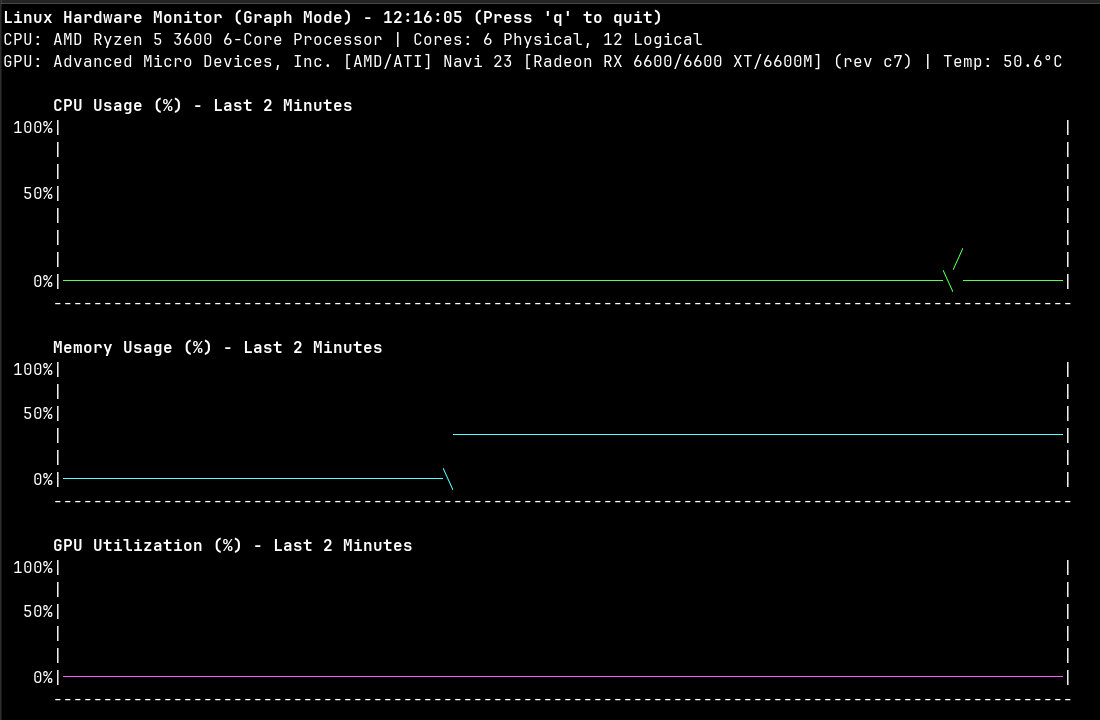
- Graph Mode: Real-time line graphs showing metric trends over time
- Neofetch Mode: System information display in neofetch-like format
- CSV Recording: Export metrics to CSV files for analysis
Advanced GPU Detection
- NVIDIA: Full support via nvidia-smi with temperature, utilization, memory, and power
- AMD: Multi-layer detection system:
- Vendor ID checking via
/sys/class/drm/card*/device/vendor - lspci fallback detection
- ROCm support for detailed metrics
- Sysfs fallback for basic utilization
- Vendor ID checking via
Installation
Install from PyPI as a standalone tool:
pipx install linux-hwinfo64     # or: uv tool install linux-hwinfo64
linux-hwinfo64 --graph
Requirements
Core Dependencies
- Python 3.10+ with psutil and distro
GPU Support (Optional)
- NVIDIA GPUs:
nvidia-smicommand-line tool - AMD GPUs:
rocm-smifor detailed metrics (basic support works without)
Usage
Running the Application
From an installed package, use the linux-hwinfo64 command with the same arguments. From a source checkout:
uv run main.py                   # Standard monitoring mode
uv run main.py --graph           # Graph mode with historical data
uv run main.py --neofetch        # Display system info in neofetch-like format
uv run main.py --record          # Record metrics to CSV
uv run main.py --output file.csv # Custom CSV output file
CLI Arguments
--graphor-g: Run in graph mode with historical charts--neofetchor-n: Display system information in neofetch-like format--recordor-r: Record metrics to CSV file for analysis--outputor-o: Specify output CSV filename (default: hw_metrics.csv)
Graph Mode Features
Real-time line graphs showing 2-minute historical data:
- CPU usage trends
- Memory usage patterns
- GPU utilization history (if available)
- GPU memory usage trends (if available)
- Disk usage monitoring
- Network upload and download bandwidth (MB/s, auto-scaled)
Technical Implementation
Architecture
- SystemMonitor Class: Core hardware detection and metrics collection
- Caching System: 60-second GPU detection cache to minimize system calls
- Graceful Degradation: Missing GPU tools don't crash the application
- Multi-source Data: Combines multiple system interfaces for comprehensive metrics
GPU Detection Logic
- NVIDIA Detection: Uses nvidia-smi for comprehensive metrics
- AMD Detection: Multi-layered approach:
- Primary: Vendor ID verification via sysfs
- Secondary: lspci parsing for device identification
- Metrics: ROCm tools for detailed info, sysfs fallback for basic usage
Performance Features
- Efficient Polling: 1-second refresh rate with minimal system impact
- Terminal Safety: Automatic bounds checking and resize handling
- Memory Efficient: Rolling deque for historical data storage
Development
Code Quality
uv sync                 # Install dependencies, including the dev group (ruff)
uv run ruff check .     # Lint code
uv run ruff format .    # Format code
Releasing
CI (.github/workflows/python-package.yml) lints, smoke-tests and build-checks every push and PR to main. Publishing to PyPI is handled by .github/workflows/python-publish.yml:
- Bump
versioninpyproject.tomland merge tomain - Create a GitHub Release with a tag matching that version (e.g.
v0.1.4) - The workflow builds the package, verifies it installs, and uploads it to PyPI via Trusted Publishing
Logging
The application logs GPU detection issues and errors to hw_monitor.log for debugging.
Compatibility Notes
AMD GPU Support
AMD GPU metrics availability depends on your specific hardware and drivers:
- Temperature: Varies by card model and hwmon support
- Memory Usage: Requires ROCm tools for detailed metrics
- GPU Utilization: May not be available on older cards/drivers
- Device Detection: Automatically handles multiple GPU cards
System Requirements
- Minimum Terminal: 80x25 for standard mode, 100x35 for graph mode. Standard mode cuts off sections that don't fit and shows how many lines are hidden (around 50 rows shows everything on a 12-thread CPU). Graph mode skips graphs that don't fit, so all of them (including network) need roughly 60-70 rows depending on which GPU metrics are available
- Permissions: Some GPU metrics may require elevated permissions
- Dependencies: Works with standard Linux utilities, enhanced with GPU tools
Links
1 maintainer

Metadata
1 maintainer
Release files for linux-hwinfo64 0.2.0
For a detailed explanation of source distributions (sdists) and built distributions (wheels), please see the package formats documentation.
Source distribution (sdist)
| File | Size | Uploaded | Provenance | |
|---|---|---|---|---|
| linux_hwinfo64-0.2.0.tar.gz | 28.0 kB | With provenance | Details |
Built distribution (wheel)
| File | Interpreter | ABI | Platform | Reset |
|---|---|---|---|---|
| linux_hwinfo64-0.2.0-py3-none-any.whl | Python 3 | none | any | Details |
Total release size: 57.7 kB
Release files / linux_hwinfo64-0.2.0.tar.gz
| Download URL | linux_hwinfo64-0.2.0.tar.gz |
|---|---|
| Size | 28.0 kB |
| Tags | Source |
|
SHA-256 checksum How to use checksums |
96d9bc83bd08421b486e72e48add7cb4d11563050c76eff9ebaaf2c329014062
|
|
BLAKE2b-256 checksum How to use checksums |
434cec028a553b913742d3c8cf848b935a810cb39ea2df9110b34b6df3807a98
|
| Upload date | |
|
Uploaded using Trusted Publishing? What is trusted publishing? |
Yes |
| Uploaded via |
twine/7.0.0 CPython/3.13.16
|
Provenance
Provenance describes where a file came from. On PyPI, provenance is shared via attestations, which provide a verifiable record of the build or publishing details. View details, limitations and caveats.


PyPI Publish Attestation
PyPI verified that this artifact, at this checksum, originated from the publisher listed below.
Signed by GitHub Actions, verified by PyPI on Oct 25, 2026.
Transparency logRelease files / linux_hwinfo64-0.2.0-py3-none-any.whl
| Download URL | linux_hwinfo64-0.2.0-py3-none-any.whl |
|---|---|
| Size | 29.7 kB |
| Tags | Python 3 |
|
SHA-256 checksum How to use checksums |
6d7509fdafed57ea6400bf13e915a900fa0a7b12e972ad4b0744072b4b52234a
|
|
BLAKE2b-256 checksum How to use checksums |
f9fb706f889102084a4dd48492bc7556183c658939bda65b3784d0101ee52f58
|
| Upload date | |
|
Uploaded using Trusted Publishing? What is trusted publishing? |
Yes |
| Uploaded via |
twine/7.0.0 CPython/3.13.16
|
Provenance
Provenance describes where a file came from. On PyPI, provenance is shared via attestations, which provide a verifiable record of the build or publishing details. View details, limitations and caveats.
PyPI Publish Attestation
PyPI verified that this artifact, at this checksum, originated from the publisher listed below.
Signed by GitHub Actions, verified by PyPI on Oct 25, 2026.
Transparency logSecurity for linux-hwinfo64 0.2.0
Provenance
Provenance describes where a file came from. On PyPI, provenance is shared via attestations, which provide a verifiable record of the build or publishing details. View details, limitations and caveats.
Full provenance
All 2 files in this release have been uploaded with provenance metadata.
Attestation for linux_hwinfo64-0.2.0.tar.gz
PyPI Publish Attestation
PyPI verified that this artifact, at this checksum, originated from the publisher listed below.
Signed by GitHub Actions, verified by PyPI on Oct 25, 2026.
Transparency logA note on package security
PyPI is a repository for distributing packages, not a service for auditing them. While third-party security researchers and our staff do their best to detect and remove malicious packages, PyPI cannot guarantee the quality, security or suitability of any given package.
To learn more about protecting yourself from malicious actors, visit our package security documentation.














