
Real-time AI upscaler for any Linux window
Verified details
These details have been verified by PyPIProject links
GitHub Statistics
Maintainers

Project description
Real‑Time Upscaler for Linux



A real‑time AI upscaler for any application window on GNU/Linux. It uses CuNNy neural networks to perform 2x (or 4x) upscaling, then scales the result to full screen while preserving aspect ratio. Mouse clicks and motion are automatically forwarded to the original window.
Now with full XWayland support – works seamlessly under Wayland compositors!
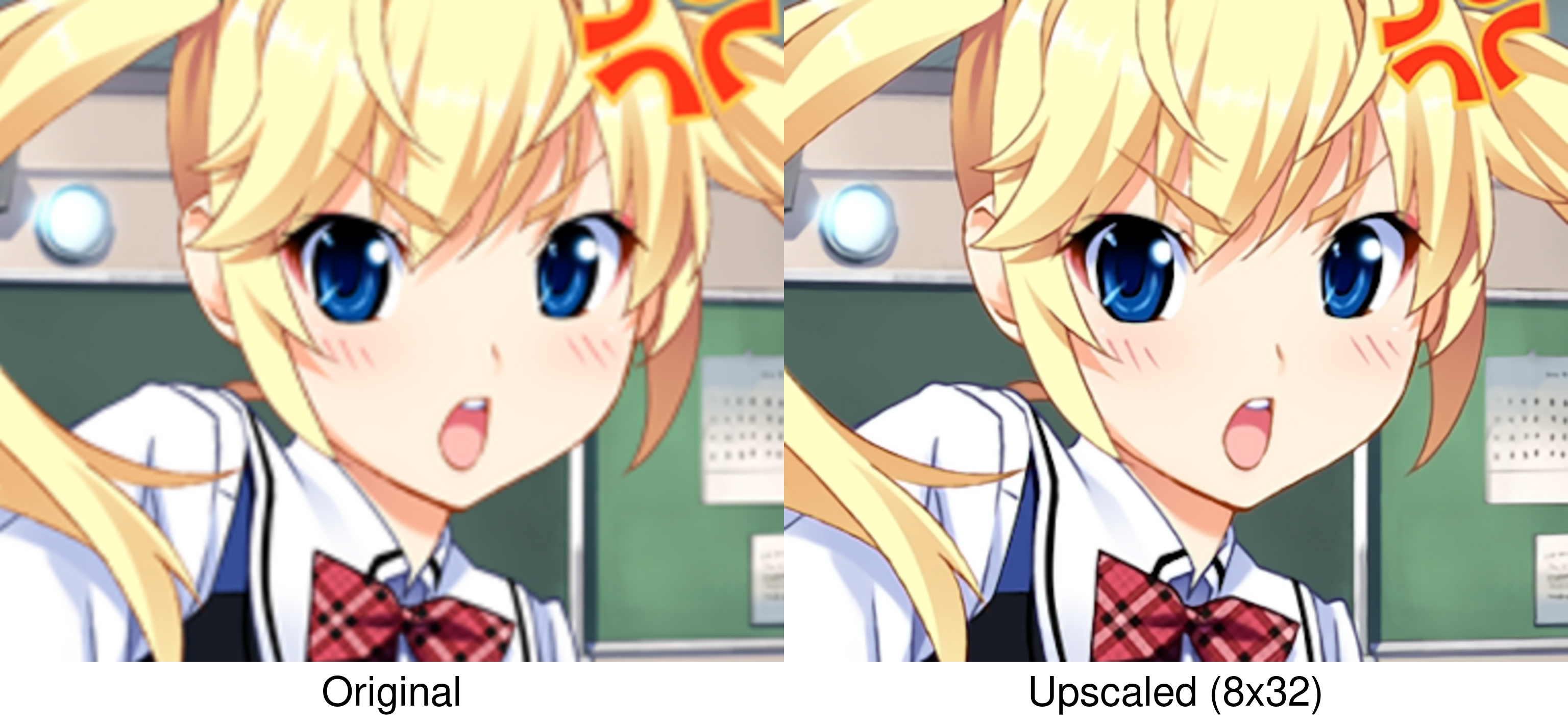
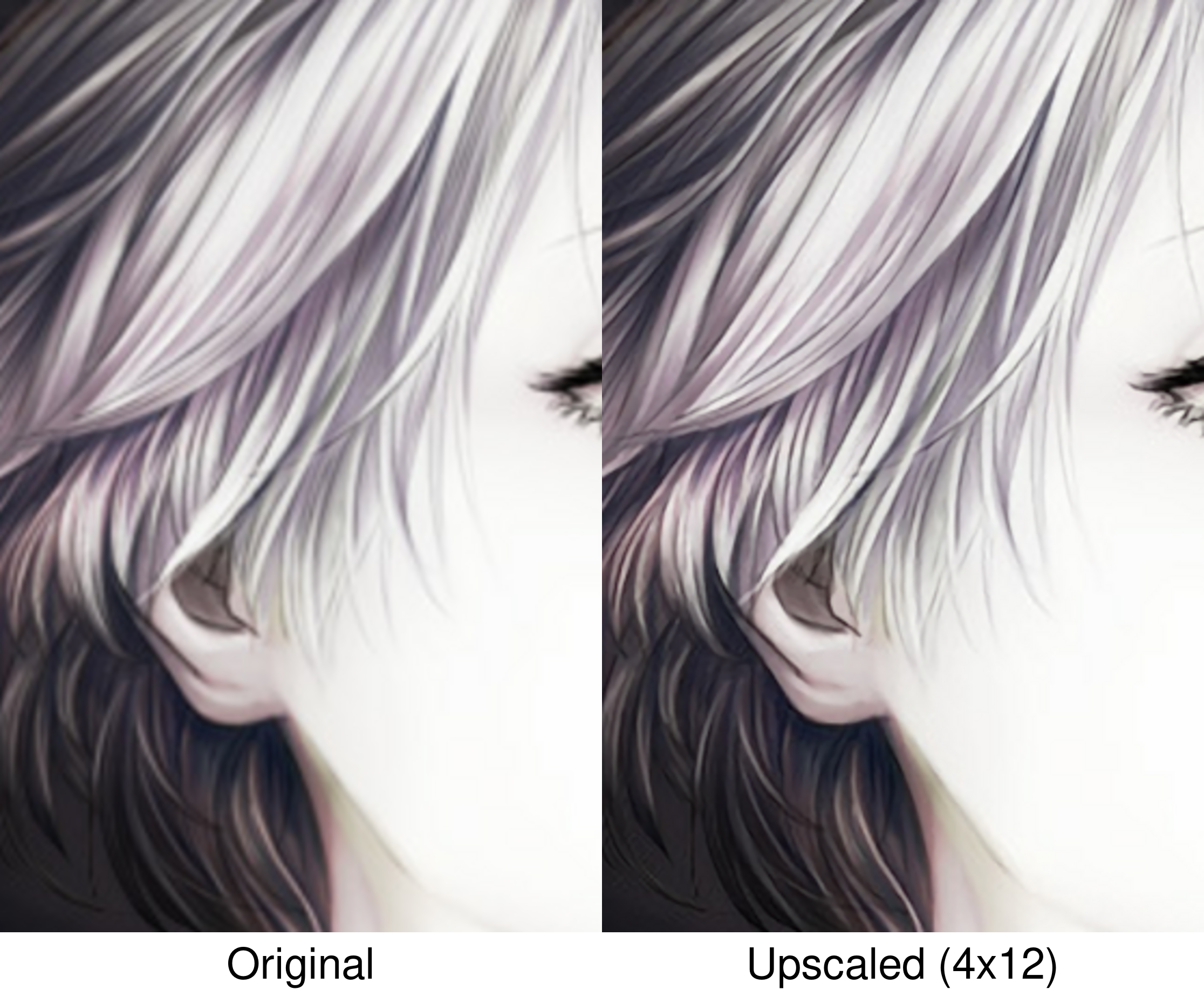
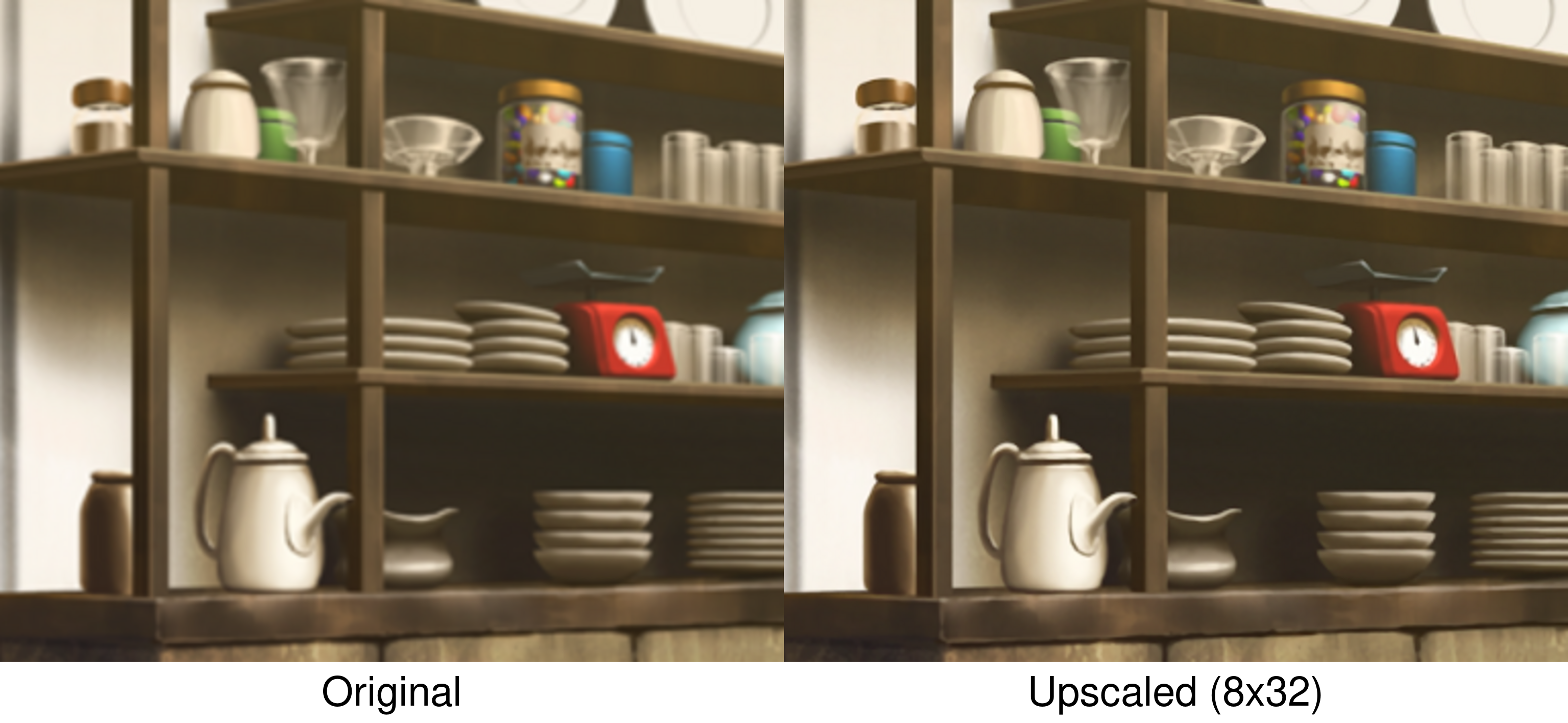
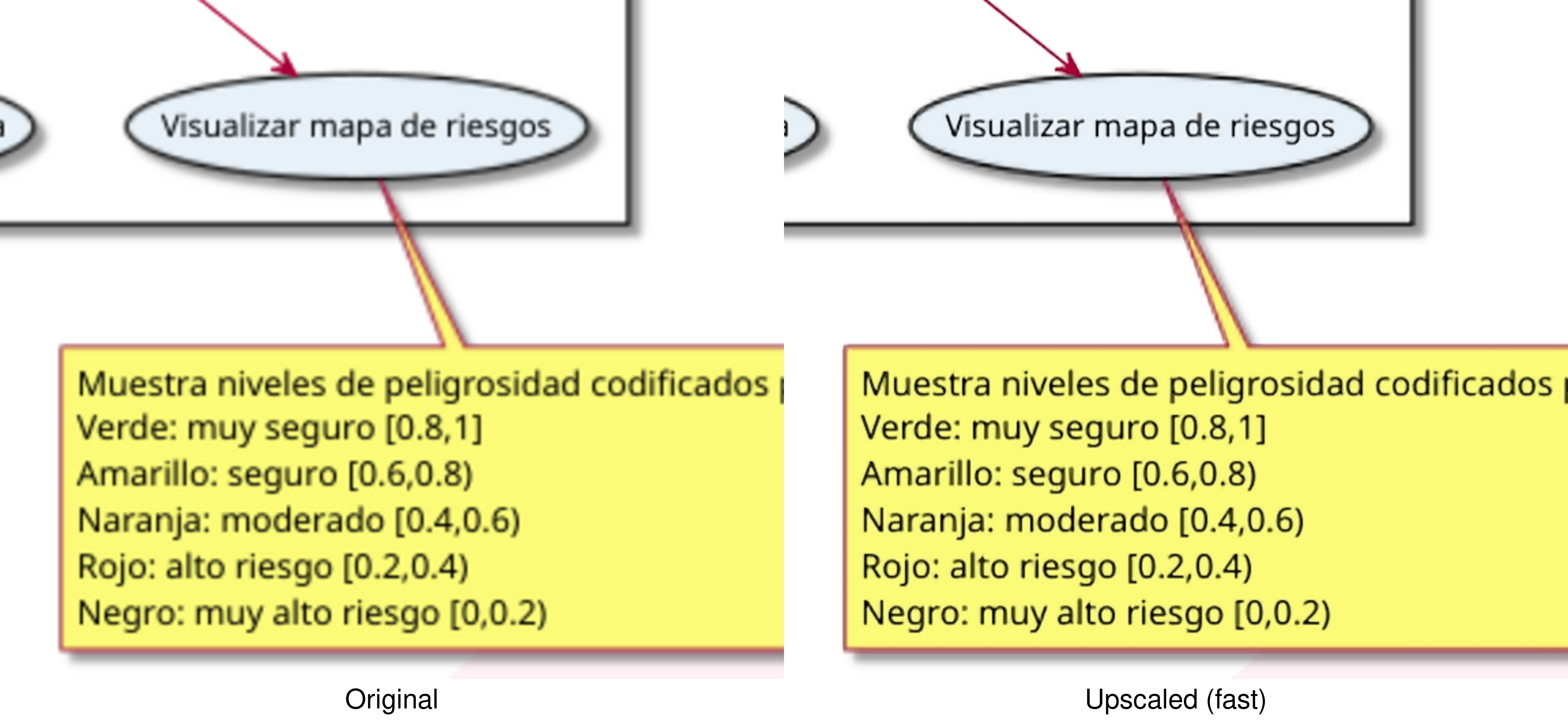
Results at 400% magnification
Features
- AI‑Powered Upscaling – Uses the CuNNy (Convolutional upscaling Neural Network) models, trained specifically for high‑quality 2x upscaling of visual novels and illustrations.
- Complete Model Selection – Choose from 9 variants, offering a range of quality/performance trade‑offs:
8x32– Highest quality, slowest.4x324x244x164x123x12fast– Default. Recommended for slow machines.fasterveryfast– Fastest option, lowest quality.
- Attach to Any Window – Either grab the currently active window, select from visible windows or launch a new program and capture its window automatically.
- Flexible Output Geometry – Control the overlay size, scaling mode, offset and borders.
- Input Forwarding – Click, move, and drag on the upscaled image as if interacting directly with the original window.
- Hardware Accelerated – Vulkan compute (Compushady) works on NVIDIA, AMD, and Intel GPUs.
- XWayland Compatible – Runs under Wayland compositors by automatically forcing X11 platform for Qt.
- Low Overhead – Final scaling pass uses hardware Lanczos2 filtering.
- Global Hotkeys & On‑Screen Display – Switch models, take lossless screenshots and more using keyboard shortcuts.
Requirements
- GNU/Linux (X11 or Wayland with XWayland)
- Vulkan-capable GPU (NVIDIA, AMD, Intel)
- Vulkan drivers (
libvulkan-dev) - X11 development libraries (
libx11-dev) - X C Binding headers (
libxcb-dev) - Python 3.10 or newer
[!NOTE] Python 3.14 compatibility
Previously, we advised against Python 3.14 due to a suspected Vulkan backend issue (#1). Recent testing shows it should now work without problems.
Python 3.14 is supported; however, our testing has been limited. If you encounter any issues, please report them.
For a safe fallback, you can still use Python 3.13:
pipx install --python=python3.13 --fetch-missing-python linux-rt-upscaler
Installation
1. System dependencies
Debian / Ubuntu / Linux Mint
sudo apt update
sudo apt install libvulkan-dev libx11-dev libxcb-render0-dev
Fedora / RHEL / CentOS
sudo dnf install vulkan-loader-devel libX11-devel libxcb-devel
Arch Linux
sudo pacman -S vulkan-devel libx11 libxcb
openSUSE
sudo zypper install vulkan-devel libX11-devel libxcb-devel
Alpine Linux
sudo apk add vulkan-headers libx11-dev libxcb-dev
2. Python package
Install with pipx (recommended)
pipx install linux-rt-upscaler
Or with regular pip (inside a virtual environment is advised)
pip install linux-rt-upscaler
Or install from source
# Install additional system dependencies for C compilation
sudo apt install gcc make

# Clone the repository
git clone https://github.com/baronsmv/linux-rt-upscaler.git
cd linux-rt-upscaler

# Install the dependencies and the package in development mode
pip install -e .
Usage
After installation, the upscale command will be available globally:
# Upscale the currently active window
upscale

# Interactively select from visible windows
upscale -s

# Run a command and upscale its window
upscale <command>

# Choose a specific model (examples)
upscale -m 8x32      # Highest quality, slowest
upscale -m 4x24      # A balanced option
upscale -m veryfast  # Maximum performance

# Perform 4x upscaling (two 2x passes)
upscale -2

# Set a custom overlay geometry (50% size, fitted)
upscale -o 50%

# Crop 100 pixels from top and left, then upscale
upscale --crop-top 100 --crop-left 100

# Shift the overlay 100 pixels right and 50 down
upscale --offset-x 100 --offset-y 50
For a full list of options and examples:
upscale --help
Controls
| Shortcut | Action |
|---|---|
Alt+Shift+S |
Toggle overlay visibility / pause processing |
Alt+Shift+M |
Switch to the next upscaling model |
Alt+Shift+G |
Cycle output geometry (fit → stretch → cover) |
Alt+Shift+P |
Take a lossless screenshot (--screenshot-dir DIR defines the location) |
All hotkeys can be customised in the configuration file.
- Exit:
Ctrl+Cin the terminal.
Profiles
You can define named configuration profiles in your YAML config file. Profiles let you quickly switch settings for different games or applications without typing long command lines each time.
Create a config file (e.g., ~/.config/linux-rt-upscaler/config.yaml) and add a top‑level profiles key. Each profile is a dictionary with an optional match section and an options section.
If no profile is selected manually, the program checks all profiles that have a match section against the title of the target window. If a profile matches (any match criterion is sufficient), its options are applied automatically.
# General defaults (lowest priority)
model: fast
select: false

profiles:
  game:
    match:
      title: "Danganronpa"     # Exact match (case-insensitive)
      title_contains: "ronp"   # Or substring match
      title_regex: "Dangan.*"  # Or regular expression
    options:
      model: 4x24
      double_upscale: true
A more detailed example is included here.
How It Works
- Window Selection – Uses X11 to find the target window by PID or WM_CLASS.
- Capture – Grabs the window's pixels using a fast custom C library.
- AI Upscaling – CuNNy compute shaders (written in HLSL, compiled via Compushady) produce a 2x (or 4x) larger image.
- Aspect‑Preserving Scaling – A lightweight Lanczos2 compute shader scales the upscaled image to fill the monitor, adding black bars to maintain the original aspect ratio.
- Display – The result is rendered in a transparent overlay window that bypasses the window manager (so it always stays on top).
- Input Forwarding – Mouse events are transformed using the scaling ratios and sent to the original window via
XSendEvent.
Future Plans
- Standalone GUI application – Create a windowed app interface for easier management.
- Addition of more models – Parse and include other models and shaders.
- Native Wayland support – Support pure Wayland windows without XWayland.
Known Issues
Mouse forwarding may not work with Wine, Proton <10 and other applications
Synthetic mouse events (clicks, motion, wheel) sent by the overlay are ignored by:
- Wine and Proton versions older than 10.0 (Proton 10 works correctly).
- Certain native applications like Firefox.
For more details, see issue #7.
Motivation
While real-time upscaling tools like Magpie and Lossless Scaling remain Windows-exclusive, projects such as lsfg-vk are successfully bringing their frame generation capabilities to Linux.
This project tackles the other half of the equation: AI-powered upscaling to deliver a native solution Linux has been missing, an experience similar to Gamescope that applies intelligent upscaling (similar to Anime4K) to any application.
Acknowledgments
This project stands on the shoulders of several open‑source works:
- L65536 – For the original RealTimeSuperResolutionScreenUpscalerforLinux, which demonstrated the feasibility of real‑time CuNNy upscaling on Linux. This project extends that foundation with full‑screen scaling, accurate input forwarding, and support for all CuNNy NVL models and GPU vendors.
- funnyplanter – For CuNNy, the neural network upscaling models, especially the Magpie NVL variants trained for visual novel content.
- Compushady – Python library for GPU compute (Vulkan backend).
- screeninfo – Python library to fetch location and size of physical screens.
- PySide6 – Qt bindings used for the overlay window.
- python‑xlib – X11 client library for window management and input forwarding.
- xcffib – XCB binding for Python.
- pyewmh – Query and control of window manager.
- psutil – Library for retrieving information on running processes.
- Pillow – The Python Imaging Library
Project details
Verified details
These details have been verified by PyPIProject links
GitHub Statistics
Maintainers
Release history Release notifications | RSS feed


Download files
Download the file for your platform. If you're not sure which to choose, learn more about installing packages.
Source Distributions
Built Distributions
Filter files by name, interpreter, ABI, and platform.
If you're not sure about the file name format, learn more about wheel file names.
Copy a direct link to the current filters
File details
Details for the file linux_rt_upscaler-0.2.9.post2-cp314-cp314-manylinux1_x86_64.manylinux_2_28_x86_64.manylinux_2_5_x86_64.whl.
File metadata
- Download URL: linux_rt_upscaler-0.2.9.post2-cp314-cp314-manylinux1_x86_64.manylinux_2_28_x86_64.manylinux_2_5_x86_64.whl
- Upload date:
- Size: 760.9 kB
- Tags: CPython 3.14, manylinux: glibc 2.28+ x86-64, manylinux: glibc 2.5+ x86-64
- Uploaded using Trusted Publishing? Yes
- Uploaded via: twine/6.1.0 CPython/3.13.12
File hashes
| Algorithm | Hash digest | |
|---|---|---|
| SHA256 |
8e2c39882faa364fdcd0478fef66ff22ed8ff2cf6882d8dc7f8b605785e2323b
|
|
| MD5 |
44583804b07bfb0fddde147fffc8a445
|
|
| BLAKE2b-256 |
24f4aa7c371d79549914b78ee226a3c7b550bad6930419db3bc5ae7b1547e478
|
Provenance
The following attestation bundles were made for linux_rt_upscaler-0.2.9.post2-cp314-cp314-manylinux1_x86_64.manylinux_2_28_x86_64.manylinux_2_5_x86_64.whl:
Publisher:
build_wheels.yml on baronsmv/linux-rt-upscaler
-
Statement:
-
Statement type:
https://in-toto.io/Statement/v1 -
Predicate type:
https://docs.pypi.org/attestations/publish/v1 -
Subject name:
linux_rt_upscaler-0.2.9.post2-cp314-cp314-manylinux1_x86_64.manylinux_2_28_x86_64.manylinux_2_5_x86_64.whl -
Subject digest:
8e2c39882faa364fdcd0478fef66ff22ed8ff2cf6882d8dc7f8b605785e2323b - Sigstore transparency entry: 1277410497
- Sigstore integration time:
-
Permalink:
baronsmv/linux-rt-upscaler@da585fbb17320d641ec367c6a35f761734c6526e -
Branch / Tag:
refs/tags/v0.2.9.post2 - Owner: https://github.com/baronsmv
-
Access:
public
-
Token Issuer:
https://token.actions.githubusercontent.com -
Runner Environment:
github-hosted -
Publication workflow:
build_wheels.yml@da585fbb17320d641ec367c6a35f761734c6526e -
Trigger Event:
push
-
Statement type:
File details
Details for the file linux_rt_upscaler-0.2.9.post2-cp313-cp313-manylinux1_x86_64.manylinux_2_28_x86_64.manylinux_2_5_x86_64.whl.
File metadata
- Download URL: linux_rt_upscaler-0.2.9.post2-cp313-cp313-manylinux1_x86_64.manylinux_2_28_x86_64.manylinux_2_5_x86_64.whl
- Upload date:
- Size: 760.9 kB
- Tags: CPython 3.13, manylinux: glibc 2.28+ x86-64, manylinux: glibc 2.5+ x86-64
- Uploaded using Trusted Publishing? Yes
- Uploaded via: twine/6.1.0 CPython/3.13.12
File hashes
| Algorithm | Hash digest | |
|---|---|---|
| SHA256 |
efafc88e83b9cbbf833bdef62f88a80de7d430d55a7de56a45deb3b35f8328c0
|
|
| MD5 |
2c246f9a3721c12d8865ad56d426c349
|
|
| BLAKE2b-256 |
3a472d975a1424d4fd570930674a85c787e89563bcf9a6842e01d16ef39ce9a0
|
Provenance
The following attestation bundles were made for linux_rt_upscaler-0.2.9.post2-cp313-cp313-manylinux1_x86_64.manylinux_2_28_x86_64.manylinux_2_5_x86_64.whl:
Publisher:
build_wheels.yml on baronsmv/linux-rt-upscaler
-
Statement:
-
Statement type:
https://in-toto.io/Statement/v1 -
Predicate type:
https://docs.pypi.org/attestations/publish/v1 -
Subject name:
linux_rt_upscaler-0.2.9.post2-cp313-cp313-manylinux1_x86_64.manylinux_2_28_x86_64.manylinux_2_5_x86_64.whl -
Subject digest:
efafc88e83b9cbbf833bdef62f88a80de7d430d55a7de56a45deb3b35f8328c0 - Sigstore transparency entry: 1277410525
- Sigstore integration time:
-
Permalink:
baronsmv/linux-rt-upscaler@da585fbb17320d641ec367c6a35f761734c6526e -
Branch / Tag:
refs/tags/v0.2.9.post2 - Owner: https://github.com/baronsmv
-
Access:
public
-
Token Issuer:
https://token.actions.githubusercontent.com -
Runner Environment:
github-hosted -
Publication workflow:
build_wheels.yml@da585fbb17320d641ec367c6a35f761734c6526e -
Trigger Event:
push
-
Statement type:
File details
Details for the file linux_rt_upscaler-0.2.9.post2-cp312-cp312-manylinux1_x86_64.manylinux_2_28_x86_64.manylinux_2_5_x86_64.whl.
File metadata
- Download URL: linux_rt_upscaler-0.2.9.post2-cp312-cp312-manylinux1_x86_64.manylinux_2_28_x86_64.manylinux_2_5_x86_64.whl
- Upload date:
- Size: 760.9 kB
- Tags: CPython 3.12, manylinux: glibc 2.28+ x86-64, manylinux: glibc 2.5+ x86-64
- Uploaded using Trusted Publishing? Yes
- Uploaded via: twine/6.1.0 CPython/3.13.12
File hashes
| Algorithm | Hash digest | |
|---|---|---|
| SHA256 |
cfb4a0abb7d25a0ec8072aa2f175ce13dfc349baefe0c1e42e61c7e534b8f7ac
|
|
| MD5 |
5f433d3b77c7230fe3c1165afabdc588
|
|
| BLAKE2b-256 |
0fc9547c9ea322a0fa9a49c08fb2ed0a181f1edf4b5b8cf349455a233e08fd50
|
Provenance
The following attestation bundles were made for linux_rt_upscaler-0.2.9.post2-cp312-cp312-manylinux1_x86_64.manylinux_2_28_x86_64.manylinux_2_5_x86_64.whl:
Publisher:
build_wheels.yml on baronsmv/linux-rt-upscaler
-
Statement:
-
Statement type:
https://in-toto.io/Statement/v1 -
Predicate type:
https://docs.pypi.org/attestations/publish/v1 -
Subject name:
linux_rt_upscaler-0.2.9.post2-cp312-cp312-manylinux1_x86_64.manylinux_2_28_x86_64.manylinux_2_5_x86_64.whl -
Subject digest:
cfb4a0abb7d25a0ec8072aa2f175ce13dfc349baefe0c1e42e61c7e534b8f7ac - Sigstore transparency entry: 1277410596
- Sigstore integration time:
-
Permalink:
baronsmv/linux-rt-upscaler@da585fbb17320d641ec367c6a35f761734c6526e -
Branch / Tag:
refs/tags/v0.2.9.post2 - Owner: https://github.com/baronsmv
-
Access:
public
-
Token Issuer:
https://token.actions.githubusercontent.com -
Runner Environment:
github-hosted -
Publication workflow:
build_wheels.yml@da585fbb17320d641ec367c6a35f761734c6526e -
Trigger Event:
push
-
Statement type:
File details
Details for the file linux_rt_upscaler-0.2.9.post2-cp311-cp311-manylinux1_x86_64.manylinux_2_28_x86_64.manylinux_2_5_x86_64.whl.
File metadata
- Download URL: linux_rt_upscaler-0.2.9.post2-cp311-cp311-manylinux1_x86_64.manylinux_2_28_x86_64.manylinux_2_5_x86_64.whl
- Upload date:
- Size: 760.9 kB
- Tags: CPython 3.11, manylinux: glibc 2.28+ x86-64, manylinux: glibc 2.5+ x86-64
- Uploaded using Trusted Publishing? Yes
- Uploaded via: twine/6.1.0 CPython/3.13.12
File hashes
| Algorithm | Hash digest | |
|---|---|---|
| SHA256 |
c1843dd3cc9ee4e8f85acafa0fca18ecf6e7ebd50bf6f03aa86757a126bd5a67
|
|
| MD5 |
ad4e072825146a72b4070e4ea9ccf15f
|
|
| BLAKE2b-256 |
3194fe51f52eedbb7a93ae9f678d5cde1f4eed835e08648f3c98ad34977f1018
|
Provenance
The following attestation bundles were made for linux_rt_upscaler-0.2.9.post2-cp311-cp311-manylinux1_x86_64.manylinux_2_28_x86_64.manylinux_2_5_x86_64.whl:
Publisher:
build_wheels.yml on baronsmv/linux-rt-upscaler
-
Statement:
-
Statement type:
https://in-toto.io/Statement/v1 -
Predicate type:
https://docs.pypi.org/attestations/publish/v1 -
Subject name:
linux_rt_upscaler-0.2.9.post2-cp311-cp311-manylinux1_x86_64.manylinux_2_28_x86_64.manylinux_2_5_x86_64.whl -
Subject digest:
c1843dd3cc9ee4e8f85acafa0fca18ecf6e7ebd50bf6f03aa86757a126bd5a67 - Sigstore transparency entry: 1277410455
- Sigstore integration time:
-
Permalink:
baronsmv/linux-rt-upscaler@da585fbb17320d641ec367c6a35f761734c6526e -
Branch / Tag:
refs/tags/v0.2.9.post2 - Owner: https://github.com/baronsmv
-
Access:
public
-
Token Issuer:
https://token.actions.githubusercontent.com -
Runner Environment:
github-hosted -
Publication workflow:
build_wheels.yml@da585fbb17320d641ec367c6a35f761734c6526e -
Trigger Event:
push
-
Statement type:
File details
Details for the file linux_rt_upscaler-0.2.9.post2-cp310-cp310-manylinux1_x86_64.manylinux_2_28_x86_64.manylinux_2_5_x86_64.whl.
File metadata
- Download URL: linux_rt_upscaler-0.2.9.post2-cp310-cp310-manylinux1_x86_64.manylinux_2_28_x86_64.manylinux_2_5_x86_64.whl
- Upload date:
- Size: 760.9 kB
- Tags: CPython 3.10, manylinux: glibc 2.28+ x86-64, manylinux: glibc 2.5+ x86-64
- Uploaded using Trusted Publishing? Yes
- Uploaded via: twine/6.1.0 CPython/3.13.12
File hashes
| Algorithm | Hash digest | |
|---|---|---|
| SHA256 |
c2f8bb69e4faf3f1015561b259c0201fb8abaac9168a4e4a045f7755b19b9ca5
|
|
| MD5 |
bf94243b86ec59477b6e764916faa187
|
|
| BLAKE2b-256 |
b40378c32533604d07924cacdca2ab5aa4621afda0ada9bc4e7d94b7dec871c6
|
Provenance
The following attestation bundles were made for linux_rt_upscaler-0.2.9.post2-cp310-cp310-manylinux1_x86_64.manylinux_2_28_x86_64.manylinux_2_5_x86_64.whl:
Publisher:
build_wheels.yml on baronsmv/linux-rt-upscaler
-
Statement:
-
Statement type:
https://in-toto.io/Statement/v1 -
Predicate type:
https://docs.pypi.org/attestations/publish/v1 -
Subject name:
linux_rt_upscaler-0.2.9.post2-cp310-cp310-manylinux1_x86_64.manylinux_2_28_x86_64.manylinux_2_5_x86_64.whl -
Subject digest:
c2f8bb69e4faf3f1015561b259c0201fb8abaac9168a4e4a045f7755b19b9ca5 - Sigstore transparency entry: 1277410563
- Sigstore integration time:
-
Permalink:
baronsmv/linux-rt-upscaler@da585fbb17320d641ec367c6a35f761734c6526e -
Branch / Tag:
refs/tags/v0.2.9.post2 - Owner: https://github.com/baronsmv
-
Access:
public
-
Token Issuer:
https://token.actions.githubusercontent.com -
Runner Environment:
github-hosted -
Publication workflow:
build_wheels.yml@da585fbb17320d641ec367c6a35f761734c6526e -
Trigger Event:
push
-
Statement type:






