

Real-Time Upscaler for Linux



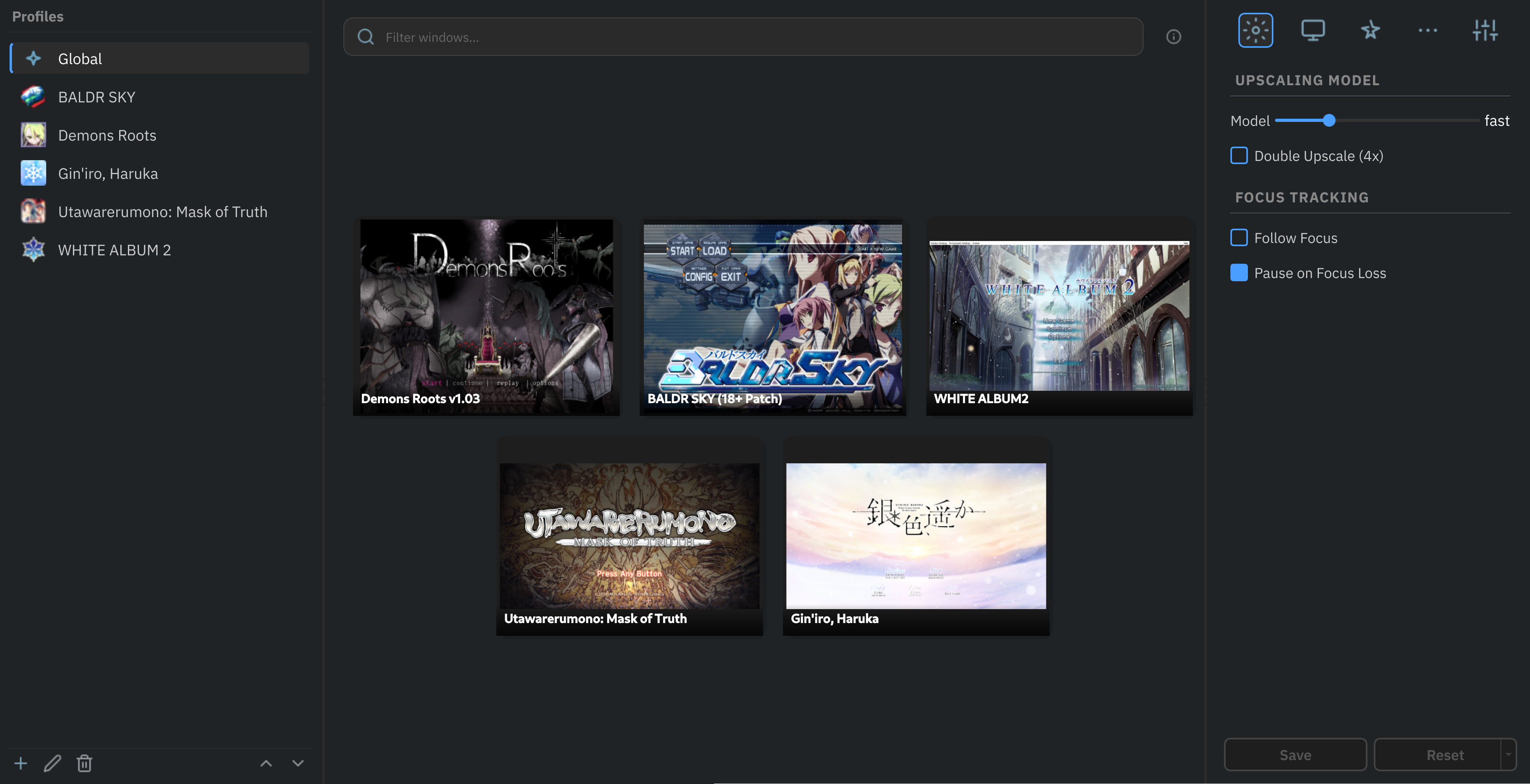
A real-time SRCNN upscaler for any X-Window (X11 or XWayland) on GNU/Linux. It uses CuNNy neural networks to perform 2x (or 4x) upscaling to full screen while preserving aspect ratio. Mouse clicks and motion are automatically forwarded to the original window.
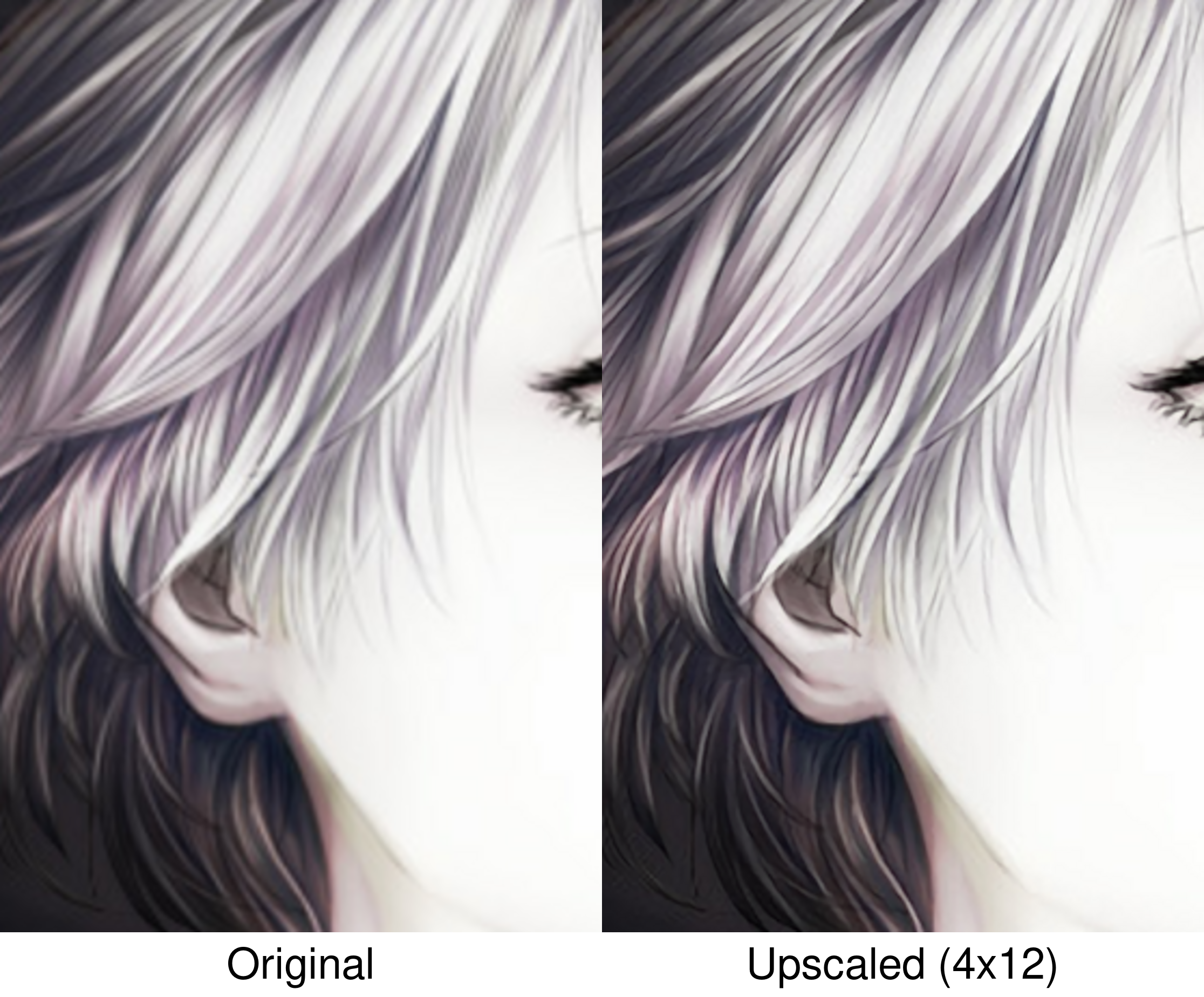
Results at 400% magnification

Features
- Neural-Network upscaling using SRCNNs trained for high-quality upscaling of visual novels and illustrations.
- Model selection from 9 variants with variable quality/performance trade-offs.
- Hardware accelerated using Vulkan compute.
- Tile-Based processing that upscales only the frame regions that change, reducing GPU load for mostly static content.
- Customizable output geometry: scaling mode (fit, stretch, cover), offset, crop and zoom.
- Input forwarding as if interacting directly with the original window.
Requirements
- OS: GNU/Linux
- Display server: X11, or Wayland with XWayland
- GPU: Vulkan-capable (NVIDIA, AMD, Intel)
- Python: 3.10 or newer
- Qt dependencies: see Dependencies
Installation
Install with pipx:
pipx install linux-rt-upscaler
For detailed installation instructions, including how to install pipx, see the Installation Guide.
After installation, the upscale and upscale-gui commands will be available globally. You can also create a desktop entry of the GUI for easy access.
Guides and Docs
Future plans
- Broader model support. The upscaler currently uses CuNNy models. Alternative SRCNN architectures are welcome if one offers a clear quality/performance advantage.
-
Native Wayland upscaling(not planned: see Architecture Limitations)
Acknowledgments
This project stands on the shoulders of several open-source works, mantained by amazing people:
- L65536, for the original RealTimeSuperResolutionScreenUpscalerforLinux, which demonstrated the feasibility of real-time SRCNN upscaling on Linux and served as a proof-of-concept for this project.
- funnyplanter, for the incredible CuNNy neural network upscaling models.
- Compushady, which served as an invaluable Vulkan foundation during early development.
- PySide6, the Qt binding that powers the entire graphical interface and overlay window.
- xcffib, the XCB binding used for window management, monitor querying and event forwarding.
- Pillow, the Python Imaging Library, used for saving screenshots and rendering OSD messages.
- PyYAML, the YAML parser used for configuration file operations.
1 maintainer

Metadata
1 maintainer
Release files for linux-rt-upscaler 1.1.4
For a detailed explanation of source distributions (sdists) and built distributions (wheels), please see the package formats documentation.
Built distributions (wheels)
| File | Reset | |||
|---|---|---|---|---|
| linux_rt_upscaler-1.1.4-cp314-cp314-manylinux_2_24_x86_64.manylinux_2_28_x86_64.whl | CPython 3.14 | CPython 3.14 | Linux glibc 2.24+ x86-64, Linux glibc 2.28+ x86-64 | Details |
| linux_rt_upscaler-1.1.4-cp313-cp313-manylinux_2_24_x86_64.manylinux_2_28_x86_64.whl | CPython 3.13 | CPython 3.13 | Linux glibc 2.24+ x86-64, Linux glibc 2.28+ x86-64 | Details |
| linux_rt_upscaler-1.1.4-cp312-cp312-manylinux_2_24_x86_64.manylinux_2_28_x86_64.whl | CPython 3.12 | CPython 3.12 | Linux glibc 2.24+ x86-64, Linux glibc 2.28+ x86-64 | Details |
| linux_rt_upscaler-1.1.4-cp311-cp311-manylinux_2_24_x86_64.manylinux_2_28_x86_64.whl | CPython 3.11 | CPython 3.11 | Linux glibc 2.24+ x86-64, Linux glibc 2.28+ x86-64 | Details |
| linux_rt_upscaler-1.1.4-cp310-cp310-manylinux_2_24_x86_64.manylinux_2_28_x86_64.whl | CPython 3.10 | CPython 3.10 | Linux glibc 2.28+ x86-64, Linux glibc 2.24+ x86-64 | Details |
Total release size: 24.1 MB
Release files / linux_rt_upscaler-1.1.4-cp314-cp314-manylinux_2_24_x86_64.manylinux_2_28_x86_64.whl
| Download URL | linux_rt_upscaler-1.1.4-cp314-cp314-manylinux_2_24_x86_64.manylinux_2_28_x86_64.whl |
|---|---|
| Size | 4.8 MB |
| Tags | CPython 3.14 Linux glibc 2.24+ x86-64 Linux glibc 2.28+ x86-64 |
|
SHA-256 checksum How to use checksums |
a4854528bc3277d7f299beadfbe05bd93054cafad6ed7f997e38ea803c6e514b
|
|
BLAKE2b-256 checksum How to use checksums |
09bf5047ca376fc928bcdf4506af0c506ad22324faac6f0297f9ade812927e39
|
| Upload date | |
|
Uploaded using Trusted Publishing? What is trusted publishing? |
Yes |
| Uploaded via |
twine/7.0.0 CPython/3.13.14
|
Provenance
Provenance describes where a file came from. On PyPI, provenance is shared via attestations, which provide a verifiable record of the build or publishing details. View details, limitations and caveats.


PyPI Publish Attestation
PyPI verified that this artifact, at this checksum, originated from the publisher listed below.
Signed by GitHub Actions, verified by PyPI on Sep 13, 2026.
Transparency logRelease files / linux_rt_upscaler-1.1.4-cp313-cp313-manylinux_2_24_x86_64.manylinux_2_28_x86_64.whl
| Download URL | linux_rt_upscaler-1.1.4-cp313-cp313-manylinux_2_24_x86_64.manylinux_2_28_x86_64.whl |
|---|---|
| Size | 4.8 MB |
| Tags | CPython 3.13 Linux glibc 2.24+ x86-64 Linux glibc 2.28+ x86-64 |
|
SHA-256 checksum How to use checksums |
0bb99f6ab1432c981cee2abeefa53f28a40c15273c16200f342a958595a7d87e
|
|
BLAKE2b-256 checksum How to use checksums |
2ec2678a8dbf2a30dbb6081aa356cee58a302acfd2d0c41d94c62fc132ecb468
|
| Upload date | |
|
Uploaded using Trusted Publishing? What is trusted publishing? |
Yes |
| Uploaded via |
twine/7.0.0 CPython/3.13.14
|
Provenance
Provenance describes where a file came from. On PyPI, provenance is shared via attestations, which provide a verifiable record of the build or publishing details. View details, limitations and caveats.
PyPI Publish Attestation
PyPI verified that this artifact, at this checksum, originated from the publisher listed below.
Signed by GitHub Actions, verified by PyPI on Sep 13, 2026.
Transparency logRelease files / linux_rt_upscaler-1.1.4-cp312-cp312-manylinux_2_24_x86_64.manylinux_2_28_x86_64.whl
| Download URL | linux_rt_upscaler-1.1.4-cp312-cp312-manylinux_2_24_x86_64.manylinux_2_28_x86_64.whl |
|---|---|
| Size | 4.8 MB |
| Tags | CPython 3.12 Linux glibc 2.24+ x86-64 Linux glibc 2.28+ x86-64 |
|
SHA-256 checksum How to use checksums |
33e397fd0c43076e72ae57436cd68b65ba25673ef75814a6c39fbbf2c8a3b9ae
|
|
BLAKE2b-256 checksum How to use checksums |
bb25940039729c72bd8d9beef5d0cb2b534fc05f20d8ae7939d17a175d171a61
|
| Upload date | |
|
Uploaded using Trusted Publishing? What is trusted publishing? |
Yes |
| Uploaded via |
twine/7.0.0 CPython/3.13.14
|
Provenance
Provenance describes where a file came from. On PyPI, provenance is shared via attestations, which provide a verifiable record of the build or publishing details. View details, limitations and caveats.
PyPI Publish Attestation
PyPI verified that this artifact, at this checksum, originated from the publisher listed below.
Signed by GitHub Actions, verified by PyPI on Sep 13, 2026.
Transparency logRelease files / linux_rt_upscaler-1.1.4-cp311-cp311-manylinux_2_24_x86_64.manylinux_2_28_x86_64.whl
| Download URL | linux_rt_upscaler-1.1.4-cp311-cp311-manylinux_2_24_x86_64.manylinux_2_28_x86_64.whl |
|---|---|
| Size | 4.8 MB |
| Tags | CPython 3.11 Linux glibc 2.24+ x86-64 Linux glibc 2.28+ x86-64 |
|
SHA-256 checksum How to use checksums |
b7aa1ac88cede940f9a9aac294e8a3db5e668e886c799aa756a90388937d17de
|
|
BLAKE2b-256 checksum How to use checksums |
d8cfcfec85571da5c40d62d63073b467315c2f36476867ebf196484df8ef795b
|
| Upload date | |
|
Uploaded using Trusted Publishing? What is trusted publishing? |
Yes |
| Uploaded via |
twine/7.0.0 CPython/3.13.14
|
Provenance
Provenance describes where a file came from. On PyPI, provenance is shared via attestations, which provide a verifiable record of the build or publishing details. View details, limitations and caveats.
PyPI Publish Attestation
PyPI verified that this artifact, at this checksum, originated from the publisher listed below.
Signed by GitHub Actions, verified by PyPI on Sep 13, 2026.
Transparency logRelease files / linux_rt_upscaler-1.1.4-cp310-cp310-manylinux_2_24_x86_64.manylinux_2_28_x86_64.whl
| Download URL | linux_rt_upscaler-1.1.4-cp310-cp310-manylinux_2_24_x86_64.manylinux_2_28_x86_64.whl |
|---|---|
| Size | 4.8 MB |
| Tags | CPython 3.10 Linux glibc 2.24+ x86-64 Linux glibc 2.28+ x86-64 |
|
SHA-256 checksum How to use checksums |
e77cd48970ee6a177c5418534949d61ca9426b839e0228772975721051f9cffb
|
|
BLAKE2b-256 checksum How to use checksums |
b8880c81ede67555f4fec9e40c49b0cadd8f0a780c441ce7faa0e8aafb74996e
|
| Upload date | |
|
Uploaded using Trusted Publishing? What is trusted publishing? |
Yes |
| Uploaded via |
twine/7.0.0 CPython/3.13.14
|
Provenance
Provenance describes where a file came from. On PyPI, provenance is shared via attestations, which provide a verifiable record of the build or publishing details. View details, limitations and caveats.
PyPI Publish Attestation
PyPI verified that this artifact, at this checksum, originated from the publisher listed below.
Signed by GitHub Actions, verified by PyPI on Sep 13, 2026.
Transparency log













