

Real-Time Upscaler for Linux



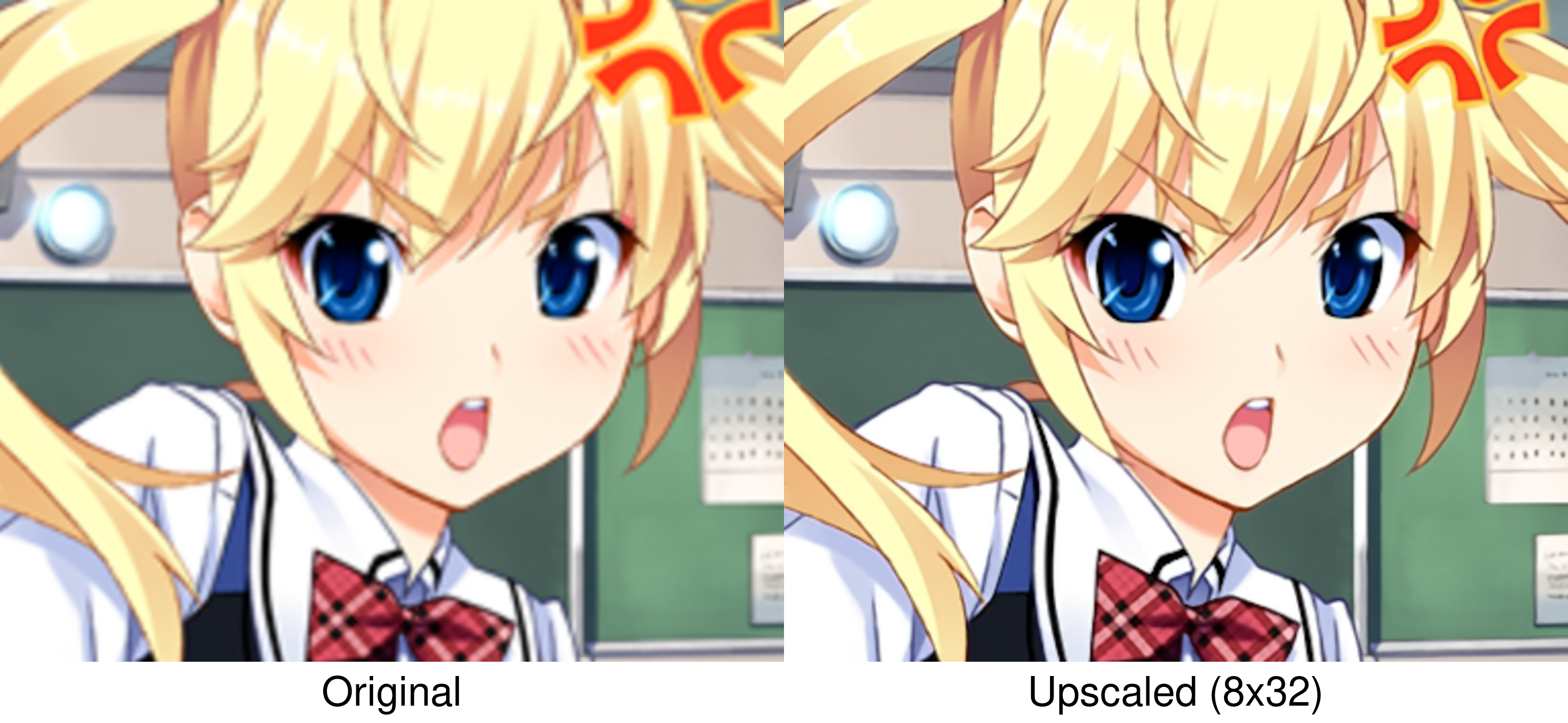
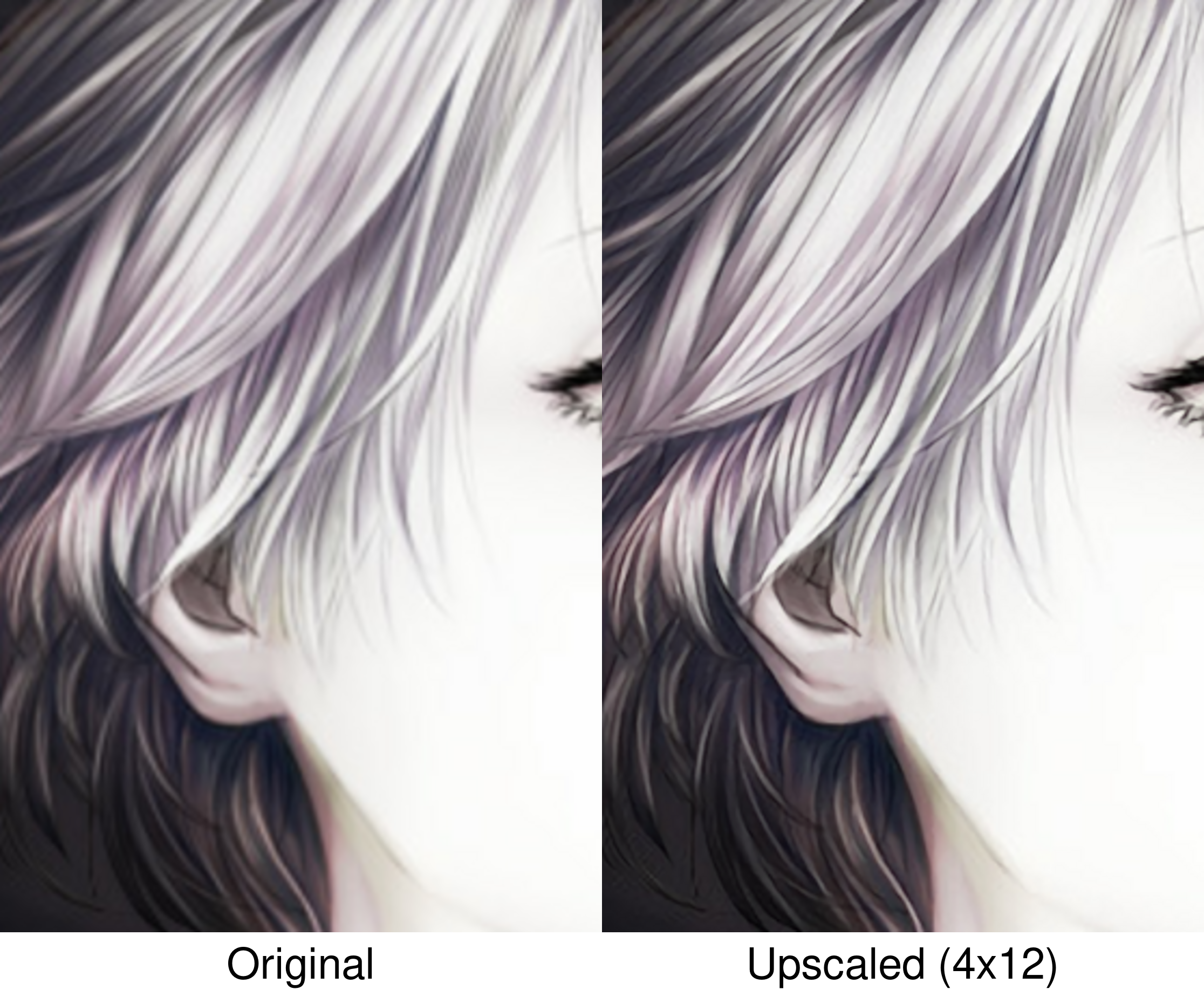
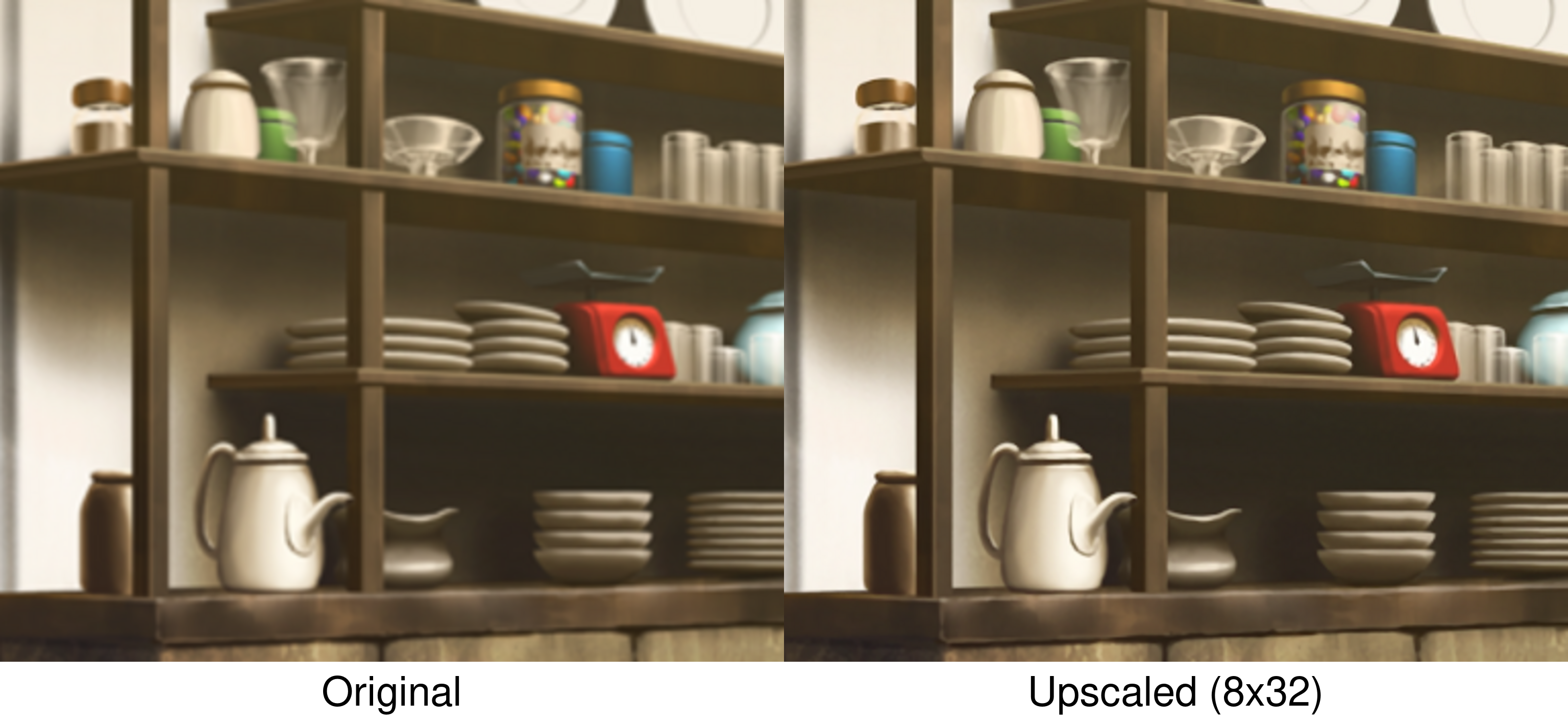
A real-time SRCNN upscaler for any X-Window (X11 or XWayland) on GNU/Linux. It uses CuNNy neural networks to perform 2x (or 4x) upscaling to full screen while preserving aspect ratio. Mouse clicks and motion are automatically forwarded to the original window.
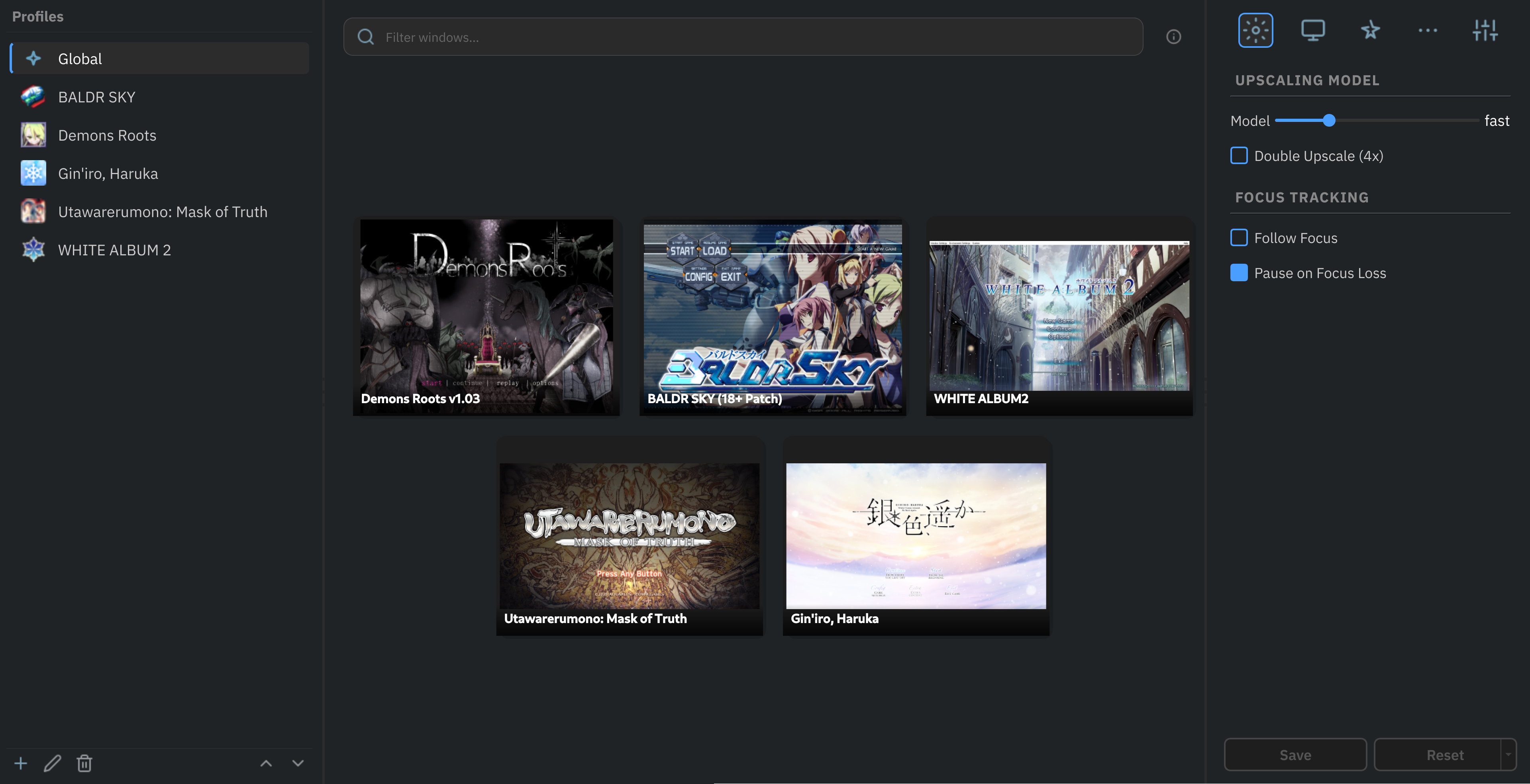
Results at 400% magnification
Features
- Neural-Network upscaling using SRCNNs trained for high-quality upscaling of visual novels and illustrations.
- Model selection from 9 variants with variable quality/performance trade-offs.
- Hardware accelerated using Vulkan compute.
- Tile-Based processing that upscales only the frame regions that change, reducing GPU load for mostly static content.
- Customizable output geometry: scaling mode (fit, stretch, cover), offset, crop and zoom.
- Input forwarding as if interacting directly with the original window.
Requirements
- GNU/Linux (X11 or Wayland with XWayland)
- Vulkan-capable GPU (NVIDIA, AMD, Intel)
- Python 3.10 or newer
- Qt XCB plugin
[!IMPORTANT]
Qt XCB plugin
This library is not installed by default on most desktop environments.
Installation
Install with pipx (recommended)
pipx install linux-rt-upscaler
Install from source
Required development packages (click to expand)
Debian / Ubuntu / Linux Mint
sudo apt update
sudo apt install gcc make libvulkan-dev libx11-dev libxcb1-dev libx11-xcb-dev \
    libxext-dev libxdamage-dev libxfixes-dev
Fedora / RHEL / CentOS
sudo dnf install gcc make vulkan-loader-devel libX11-devel libxcb-devel libX11-xcb-devel \
    libXext-devel libXdamage-devel libXfixes-devel
Arch Linux / CachyOS
sudo pacman -S base-devel vulkan-devel libx11 libxcb libxext libxdamage libxfixes
openSUSE
sudo zypper install gcc make vulkan-devel libX11-devel libxcb-devel libX11-xcb-devel \
    libXext-devel libXdamage-devel libXfixes-devel
git clone https://github.com/baronsmv/linux-rt-upscaler.git
cd linux-rt-upscaler

pip install -e .
Optional: Desktop integration
After installing, you can add a desktop entry so the GUI appears in your application menu:
curl -fsSL https://raw.githubusercontent.com/baronsmv/linux-rt-upscaler/refs/heads/main/scripts/desktop_integration.sh \
    -o /tmp/desktop_integration.sh
less /tmp/desktop_integration.sh  # always review scripts before running them
sh /tmp/desktop_integration.sh
Usage
After installation, the upscale-gui and upscale commands will be available globally:
Graphical mode
upscale-gui
The GUI displays live thumbnails of every open valid window. Click one to start upscaling that window.
Use the right panel to adjust any setting, and the left panel to create profiles that automatically apply when a matching window is detected, or when selected manually.
Command-line mode
# Upscale the currently active window
upscale

# Interactively select from visible windows
upscale -s

# Run a command and upscale its window
upscale -- <command>

# Choose a specific model (examples)
upscale -m 8x32      # Highest quality, slowest
upscale -m veryfast  # Maximum performance

# Perform 4x upscaling (two 2x passes)
upscale -2

# Crop 100 pixels from top and left, then upscale
upscale --crop-top 100 --crop-left 100
For a full list of options and examples:
upscale --help
Controls
| Shortcut | Action |
|---|---|
Alt+Shift+S |
Pause upscaling |
Alt+Shift+Escape |
Exit upscaling |
Alt+Shift+P |
Take a lossless screenshot |
Alt+Shift+M |
Switch to the next model |
Alt+Shift+G |
Cycle output geometry (fit, stretch, cover) |
Alt+Shift++ / - |
Zoom in / Zoom out |
Alt+Shift+↑ / ↓ / ← / → |
Pan the upscaled content |
All hotkeys can be customised in the configuration file.
Profiles
You can define named configuration profiles in your YAML config file. Profiles let you quickly switch settings for different games or applications without typing long command lines each time.
Create a config file (e.g., ~/.config/linux-rt-upscaler/config.yaml) and add a top-level profiles key. Each profile is a dictionary with an optional match section and an options section.
If no profile is selected manually, the program checks all profiles that have a match section against the title of the target window. If a profile matches (any match criterion is sufficient), its options are applied automatically.
# General defaults (lowest priority)
model: 3x12
double_upscale: true

# Profiles that override if matched
profiles:
  game:
    match:
      title: "Danganronpa"     # Exact match (case-insensitive)
      title_contains: "ronp"   # Or substring match (case-insensitive)
      title_regex: "Dangan.*"  # Or regular expression (case-insensitive)
    options:
      model: 4x24
      double_upscale: true
A more detailed example is included here.
How It Works
- Selects a window using X11 to find the target window by PID or WM_CLASS.
- Captures the window's pixels using XShm and XDamage.
- Upscales with SRCNN compute shaders to a 2x (or 4x) larger image.
- Scales with a Lanczos2 shader to fill the monitor.
- Renders in a overlay window that bypasses the window manager (so it always stays on top).
- Forwards mouse events to the original window.
Future Plans
- Addition of more SRCNN models (FSRCNNX planned).
-
Native Wayland support(on hold: Wayland capture is deeply compositor-specific and currently doesn’t align with the XShm/XDamage pipeline.)
Known Issues
Mouse forwarding may not work with Wine, Proton <10 and other applications
Synthetic mouse events (clicks, motion, wheel) sent by the overlay are ignored by:
- Wine and Proton versions older than 10.0 (GE-Proton10 + UMU works).
- Some native applications like Firefox.
For more details, see issue #7.
Acknowledgments
This project stands on the shoulders of several open-source works, mantained by amazing people:
- L65536, for the original RealTimeSuperResolutionScreenUpscalerforLinux, which demonstrated the feasibility of real-time SRCNN upscaling on Linux and served as a proof-of-concept for this project.
- funnyplanter, for the incredible CuNNy neural network upscaling models.
- Compushady, which served as an invaluable Vulkan foundation during early development.
- PySide6, the Qt binding that powers the entire graphical interface and overlay window.
- xcffib, the XCB binding used for window management, monitor querying and event forwarding.
- Pillow, the Python Imaging Library, used for saving screenshots and rendering OSD messages.
- PyYAML, the YAML parser used for configuration file operations.
1 maintainer

Download files
Download the file for your platform. If you're not sure which to choose, learn more about installing packages.
Source Distributions
Built Distributions
Filter files by name, interpreter, ABI, and platform.
If you're not sure about the file name format, learn more about wheel file names.
Copy a direct link to the current filters
File details
Details for the file linux_rt_upscaler-1.1.1.post1-cp314-cp314-manylinux_2_24_x86_64.manylinux_2_28_x86_64.whl.
File metadata
- Download URL: linux_rt_upscaler-1.1.1.post1-cp314-cp314-manylinux_2_24_x86_64.manylinux_2_28_x86_64.whl
- Upload date:
- Size: 4.7 MB
- Tags: CPython 3.14, manylinux: glibc 2.24+ x86-64, manylinux: glibc 2.28+ x86-64
- Uploaded using Trusted Publishing? Yes
- Uploaded via:
twine/7.0.0 CPython/3.13.14
File hashes
| Algorithm | Hash digest | |
|---|---|---|
| SHA256 |
3d3c8e3b2d747f313431568e590b48d6c9243f686c3ee2982df559f809eccf5f
|
|
| MD5 |
e26c5d75b8f4f1e3b884c4c2b511405c
|
|
| BLAKE2b-256 |
9b3a70be430db97d9a0af0e3603e4b43c510e1000ee17ae2823ea01bfac4b256
|
Provenance
The following attestation bundles were made for linux_rt_upscaler-1.1.1.post1-cp314-cp314-manylinux_2_24_x86_64.manylinux_2_28_x86_64.whl:
Publisher:
build_wheels.yml on baronsmv/linux-rt-upscaler
-
Statement:
-
Statement type:
https://in-toto.io/Statement/v1 -
Predicate type:
https://docs.pypi.org/attestations/publish/v1 -
Subject name:
linux_rt_upscaler-1.1.1.post1-cp314-cp314-manylinux_2_24_x86_64.manylinux_2_28_x86_64.whl -
Subject digest:
3d3c8e3b2d747f313431568e590b48d6c9243f686c3ee2982df559f809eccf5f - Sigstore transparency entry: 2296276912
- Sigstore integration time:
-
Permalink:
baronsmv/linux-rt-upscaler@29dbab097465265c91538b090f884be1d2187ff8 -
Branch / Tag:
refs/tags/v1.1.1.post1 - Owner: https://github.com/baronsmv
-
Access:
public
-
Token Issuer:
https://token.actions.githubusercontent.com -
Runner Environment:
github-hosted -
Publication workflow:
build_wheels.yml@29dbab097465265c91538b090f884be1d2187ff8 -
Trigger Event:
push
-
Statement type:
File details
Details for the file linux_rt_upscaler-1.1.1.post1-cp313-cp313-manylinux_2_24_x86_64.manylinux_2_28_x86_64.whl.
File metadata
- Download URL: linux_rt_upscaler-1.1.1.post1-cp313-cp313-manylinux_2_24_x86_64.manylinux_2_28_x86_64.whl
- Upload date:
- Size: 4.7 MB
- Tags: CPython 3.13, manylinux: glibc 2.24+ x86-64, manylinux: glibc 2.28+ x86-64
- Uploaded using Trusted Publishing? Yes
- Uploaded via:
twine/7.0.0 CPython/3.13.14
File hashes
| Algorithm | Hash digest | |
|---|---|---|
| SHA256 |
c156b442d2134a4923a6f3a9a87883dcd17b41d80d8268beea1dee0e5df1264d
|
|
| MD5 |
37383f93802eaa58db88f3fd1afb83bb
|
|
| BLAKE2b-256 |
6ea0ed7b5813e14348c8ef40aae85adafc7595f084af4038ccaf7d9bbdcdbb87
|
Provenance
The following attestation bundles were made for linux_rt_upscaler-1.1.1.post1-cp313-cp313-manylinux_2_24_x86_64.manylinux_2_28_x86_64.whl:
Publisher:
build_wheels.yml on baronsmv/linux-rt-upscaler
-
Statement:
-
Statement type:
https://in-toto.io/Statement/v1 -
Predicate type:
https://docs.pypi.org/attestations/publish/v1 -
Subject name:
linux_rt_upscaler-1.1.1.post1-cp313-cp313-manylinux_2_24_x86_64.manylinux_2_28_x86_64.whl -
Subject digest:
c156b442d2134a4923a6f3a9a87883dcd17b41d80d8268beea1dee0e5df1264d - Sigstore transparency entry: 2296276412
- Sigstore integration time:
-
Permalink:
baronsmv/linux-rt-upscaler@29dbab097465265c91538b090f884be1d2187ff8 -
Branch / Tag:
refs/tags/v1.1.1.post1 - Owner: https://github.com/baronsmv
-
Access:
public
-
Token Issuer:
https://token.actions.githubusercontent.com -
Runner Environment:
github-hosted -
Publication workflow:
build_wheels.yml@29dbab097465265c91538b090f884be1d2187ff8 -
Trigger Event:
push
-
Statement type:
File details
Details for the file linux_rt_upscaler-1.1.1.post1-cp312-cp312-manylinux_2_24_x86_64.manylinux_2_28_x86_64.whl.
File metadata
- Download URL: linux_rt_upscaler-1.1.1.post1-cp312-cp312-manylinux_2_24_x86_64.manylinux_2_28_x86_64.whl
- Upload date:
- Size: 4.7 MB
- Tags: CPython 3.12, manylinux: glibc 2.24+ x86-64, manylinux: glibc 2.28+ x86-64
- Uploaded using Trusted Publishing? Yes
- Uploaded via:
twine/7.0.0 CPython/3.13.14
File hashes
| Algorithm | Hash digest | |
|---|---|---|
| SHA256 |
9aca670b5815cdc79ed2178e611e9275d0f4ca528ed1d615a444fe39fdb95dd4
|
|
| MD5 |
ec7717a64f61519cdaf49387ef7440f2
|
|
| BLAKE2b-256 |
44184879cbb4269e7e26d58a1390c56a6505ea0739b32a0f4a3d2bd67d96eeda
|
Provenance
The following attestation bundles were made for linux_rt_upscaler-1.1.1.post1-cp312-cp312-manylinux_2_24_x86_64.manylinux_2_28_x86_64.whl:
Publisher:
build_wheels.yml on baronsmv/linux-rt-upscaler
-
Statement:
-
Statement type:
https://in-toto.io/Statement/v1 -
Predicate type:
https://docs.pypi.org/attestations/publish/v1 -
Subject name:
linux_rt_upscaler-1.1.1.post1-cp312-cp312-manylinux_2_24_x86_64.manylinux_2_28_x86_64.whl -
Subject digest:
9aca670b5815cdc79ed2178e611e9275d0f4ca528ed1d615a444fe39fdb95dd4 - Sigstore transparency entry: 2296276796
- Sigstore integration time:
-
Permalink:
baronsmv/linux-rt-upscaler@29dbab097465265c91538b090f884be1d2187ff8 -
Branch / Tag:
refs/tags/v1.1.1.post1 - Owner: https://github.com/baronsmv
-
Access:
public
-
Token Issuer:
https://token.actions.githubusercontent.com -
Runner Environment:
github-hosted -
Publication workflow:
build_wheels.yml@29dbab097465265c91538b090f884be1d2187ff8 -
Trigger Event:
push
-
Statement type:
File details
Details for the file linux_rt_upscaler-1.1.1.post1-cp311-cp311-manylinux_2_24_x86_64.manylinux_2_28_x86_64.whl.
File metadata
- Download URL: linux_rt_upscaler-1.1.1.post1-cp311-cp311-manylinux_2_24_x86_64.manylinux_2_28_x86_64.whl
- Upload date:
- Size: 4.7 MB
- Tags: CPython 3.11, manylinux: glibc 2.24+ x86-64, manylinux: glibc 2.28+ x86-64
- Uploaded using Trusted Publishing? Yes
- Uploaded via:
twine/7.0.0 CPython/3.13.14
File hashes
| Algorithm | Hash digest | |
|---|---|---|
| SHA256 |
4446c8fe2790c64d985bb755775fe09635cb9b8037c64f8e9e0570caed936a67
|
|
| MD5 |
642481dcadb60e3eb7b3832e64f7e637
|
|
| BLAKE2b-256 |
bcae1b1ebe169a1c32f0b6703461efae8ce96338ded55753154d5ceaa883a1d5
|
Provenance
The following attestation bundles were made for linux_rt_upscaler-1.1.1.post1-cp311-cp311-manylinux_2_24_x86_64.manylinux_2_28_x86_64.whl:
Publisher:
build_wheels.yml on baronsmv/linux-rt-upscaler
-
Statement:
-
Statement type:
https://in-toto.io/Statement/v1 -
Predicate type:
https://docs.pypi.org/attestations/publish/v1 -
Subject name:
linux_rt_upscaler-1.1.1.post1-cp311-cp311-manylinux_2_24_x86_64.manylinux_2_28_x86_64.whl -
Subject digest:
4446c8fe2790c64d985bb755775fe09635cb9b8037c64f8e9e0570caed936a67 - Sigstore transparency entry: 2296276554
- Sigstore integration time:
-
Permalink:
baronsmv/linux-rt-upscaler@29dbab097465265c91538b090f884be1d2187ff8 -
Branch / Tag:
refs/tags/v1.1.1.post1 - Owner: https://github.com/baronsmv
-
Access:
public
-
Token Issuer:
https://token.actions.githubusercontent.com -
Runner Environment:
github-hosted -
Publication workflow:
build_wheels.yml@29dbab097465265c91538b090f884be1d2187ff8 -
Trigger Event:
push
-
Statement type:
File details
Details for the file linux_rt_upscaler-1.1.1.post1-cp310-cp310-manylinux_2_24_x86_64.manylinux_2_28_x86_64.whl.
File metadata
- Download URL: linux_rt_upscaler-1.1.1.post1-cp310-cp310-manylinux_2_24_x86_64.manylinux_2_28_x86_64.whl
- Upload date:
- Size: 4.7 MB
- Tags: CPython 3.10, manylinux: glibc 2.24+ x86-64, manylinux: glibc 2.28+ x86-64
- Uploaded using Trusted Publishing? Yes
- Uploaded via:
twine/7.0.0 CPython/3.13.14
File hashes
| Algorithm | Hash digest | |
|---|---|---|
| SHA256 |
41068ee8ee1124906d0b34451211ea26f713465ae28fc0bb03c1a983a8088d58
|
|
| MD5 |
db7697b96c36d1da4d52fc4f85412b2c
|
|
| BLAKE2b-256 |
fe491042abe431be3560446beebd1a7c6b11295fe7c002dc50beeeaf1b3f028e
|
Provenance
The following attestation bundles were made for linux_rt_upscaler-1.1.1.post1-cp310-cp310-manylinux_2_24_x86_64.manylinux_2_28_x86_64.whl:
Publisher:
build_wheels.yml on baronsmv/linux-rt-upscaler
-
Statement:
-
Statement type:
https://in-toto.io/Statement/v1 -
Predicate type:
https://docs.pypi.org/attestations/publish/v1 -
Subject name:
linux_rt_upscaler-1.1.1.post1-cp310-cp310-manylinux_2_24_x86_64.manylinux_2_28_x86_64.whl -
Subject digest:
41068ee8ee1124906d0b34451211ea26f713465ae28fc0bb03c1a983a8088d58 - Sigstore transparency entry: 2296276687
- Sigstore integration time:
-
Permalink:
baronsmv/linux-rt-upscaler@29dbab097465265c91538b090f884be1d2187ff8 -
Branch / Tag:
refs/tags/v1.1.1.post1 - Owner: https://github.com/baronsmv
-
Access:
public
-
Token Issuer:
https://token.actions.githubusercontent.com -
Runner Environment:
github-hosted -
Publication workflow:
build_wheels.yml@29dbab097465265c91538b090f884be1d2187ff8 -
Trigger Event:
push
-
Statement type:







