
Speed up model training by fixing data loading

|
Transform ✅ Parallelize data processing |
Optimize / Stream ✅ Stream raw files with no prep |




Lightning AI • Quick start • Optimize data • Transform data • Modality • Features • Stream raw files • Paths & cloud URLs • Benchmarks • Templates • Used by • Skills • Community

Why LitData?
Speeding up model training involves more than kernel tuning. Data loading frequently slows down training, because datasets are too large to fit on disk, consist of millions of small files, or stream slowly from the cloud.
LitData provides tools to preprocess and optimize datasets into a format that streams efficiently from any cloud or local source. It also includes a map operator for distributed data processing before optimization. This makes data pipelines faster, cloud-agnostic, and can improve training throughput by up to 20×.
Looking for GPUs?
Over 340,000 developers use Lightning Cloud - purpose-built for PyTorch and PyTorch Lightning.
- GPUs from $0.19.
- Clusters: frontier-grade training/inference clusters.
- AI Studio (vibe train): workspaces where AI helps you debug, tune and vibe train.
- AI Studio (vibe deploy): workspaces where AI helps you optimize, and deploy models.
- Notebooks: Persistent GPU workspaces where AI helps you code and analyze.
- Inference: Deploy models as inference APIs.
Quick start
First, install LitData:
pip install litdata
Choose your workflow:
🚀 Speed up model training
🚀 Transform datasets
Advanced install
Install all the extras
pip install 'litdata[extras]'
On Linux/macOS, [extras] includes optional uvloop for a faster asyncio event loop used by StreamingRawDataset (stdlib asyncio is the fallback when it is not installed).
AI agent skill (Cursor, Claude Code, …)
Install the LitData expert skill so coding agents know the full API, path resolver, optimize/stream recipes, and internals. Full file map → Skills.
npx skills add Lightning-AI/litData
Source: .claude/skills/litdata/ in this repository (skills CLI).
Speed up model training
Stream datasets directly from cloud storage without local downloads. Choose the approach that fits your workflow:
Option 1: Stream existing files as-is ⚡⚡ — StreamingRawDataset
No optimize step. Point LitData at a folder of images, audio, text, or any files (local or cloud) and train with a normal PyTorch DataLoader. Downloads are fully asynchronous and batched; cloud clients include built-in retries. You receive raw bytes — decode, parse, or transform however you want.
Details → Stream raw files.
from litdata import StreamingRawDataset
from torch.utils.data import DataLoader
from PIL import Image
import io

dataset = StreamingRawDataset(
    "s3://my-bucket/raw-images/",          # or gs://, azure://, /teamspace/s3_connections/..., local path
    transform=lambda b: Image.open(io.BytesIO(b)).convert("RGB"),  # optional — default is raw bytes
)
loader = DataLoader(dataset, batch_size=32, num_workers=8)

for batch in loader:
    train_step(batch)
Key benefits:
✅ Zero preprocess: No chunking job — use the files you already have.
✅ Raw bytes, your rules: Each sample is file bytes; decode with PIL, torchaudio, json, or any custom logic (transform= optional).
✅ Fully async + batched: Concurrent downloads via asyncio / __getitems__ (not one-file-at-a-time).
✅ Built-in retries: Cloud downloads retry transient failures (adaptive client retries).
✅ Cloud-native: S3 / GCS / Azure / Studio connections; same path resolver as optimized streaming.
✅ Grouped samples: Override setup() to yield image+mask, audio+transcript, etc.
✅ Indexed once: index.json.zstd cached locally and on the bucket for fast restarts.
✅ Upgrade path: When I/O becomes the bottleneck, optimize → StreamingDataset for max throughput.
Option 2: Optimize for maximum performance ⚡⚡⚡
Accelerate model training (20x faster) by optimizing datasets for streaming directly from cloud storage. Work with remote data without local downloads with features like loading data subsets, accessing individual samples, and resumable streaming.
Step 1: Optimize your data (one-time setup)
Transform raw data into optimized chunks for maximum streaming speed. This step formats the dataset for fast loading by writing data in an efficient chunked binary format.
import numpy as np
import litdata as ld

def random_images(index):
    # Replace with your files: Image(path="photo.jpg") or Image(bytes=...).
    # Wrappers pick the serializer (a caption string is not an image).
    # quality/format encode JPEG — not uncompressed PIL RAW.
    array = np.random.randint(0, 256, (32, 32, 3), dtype=np.uint8)
    return {
        "index": index,
        "image": ld.Image(array=array, quality=95, format="jpeg"),
        "class": np.random.randint(10),
    }

if __name__ == "__main__":
    # Exactly one of chunk_bytes or chunk_size
    ld.optimize(
        fn=random_images,                   # the function applied to each input
        inputs=list(range(1000)),           # the inputs to the function (here it's a list of numbers)
        output_dir="fast_data",             # optimized data is stored here
        num_workers=4,                      # the number of workers on the same machine
        chunk_bytes="64MB"                  # default; see FAQ for larger samples
    )
Step 2: Put the data on the cloud
Upload the data to a Lightning Studio (backed by S3) or your own S3 bucket:
aws s3 cp --recursive fast_data s3://my-bucket/fast_data
Step 3: Stream the data during training
Load the data by replacing the PyTorch Dataset and DataLoader with the StreamingDataset and StreamingDataLoader.
import litdata as ld

dataset = ld.StreamingDataset(
    's3://my-bucket/fast_data',
    shuffle=True,
    drop_last=True,  # important for multi-GPU so every rank sees the same length
    seed=42,
)

# Custom collate function to handle the batch (optional)
def collate_fn(batch):
    return {
        "image": [sample["image"] for sample in batch],
        "class": [sample["class"] for sample in batch],
    }


dataloader = ld.StreamingDataLoader(dataset, batch_size=64, collate_fn=collate_fn)
for sample in dataloader:
    img, cls = sample["image"], sample["class"]
Keyed lookup and in-place patches (needs polars and optimize(..., key_fn=...) or build_keys_index):
ld.optimize(fn=fn, inputs=inputs, output_dir="fast_data", chunk_bytes="64MB", key_fn=lambda s: s["id"])

ds = ld.StreamingDataset("fast_data")
sample = ds["entity-id"]          # str keys
sample = ds.get_by_key(42)        # int entity keys; ds[42] is still positional

with ld.dataset_update("fast_data") as update:  # local directory only
    update["entity-id"] = {"id": "entity-id", "x": 1}
    update.commit()
mode="append" continues chunk numbering. use_checkpoint=True tries to resume an interrupted optimize. They are not the same.
Key benefits:
✅ Accelerate training: Optimized datasets load 20x faster.
✅ Stream cloud datasets: Work with cloud data without downloading it.
✅ PyTorch-first: Works with PyTorch libraries like PyTorch Lightning, Lightning Fabric, Hugging Face.
✅ Easy collaboration: Share and access datasets in the cloud, streamlining team projects.
✅ Scale across GPUs: Streamed data automatically scales to all GPUs.
✅ Flexible storage: Use S3, GCS, Azure, or your own cloud account for data storage.
✅ Compression: Reduce your data footprint by using advanced compression algorithms.
✅ Run local or cloud: Run on your own machines or auto-scale to 1000s of cloud GPUs with Lightning Studios.
✅ Enterprise security: Self host or process data on your cloud account with Lightning Studios.
Transform datasets
Accelerate data processing tasks (data scraping, image resizing, embedding creation, distributed inference) by parallelizing (map) the work across many machines at once.
Here's an example that resizes and crops a large image dataset:
from PIL import Image
import litdata as ld

# use a local or S3 folder
input_dir = "my_large_images"     # or "s3://my-bucket/my_large_images"
output_dir = "my_resized_images"  # or "s3://my-bucket/my_resized_images"

inputs = [os.path.join(input_dir, f) for f in os.listdir(input_dir)]

# resize the input image
def resize_image(image_path, output_dir):
  output_image_path = os.path.join(output_dir, os.path.basename(image_path))
  Image.open(image_path).resize((224, 224)).save(output_image_path)

ld.map(
    fn=resize_image,
    inputs=inputs,
    output_dir="output_dir",
)
Key benefits:
✅ Parallelize processing: Reduce processing time by transforming data across multiple machines simultaneously.
✅ Scale to large data: Increase the size of datasets you can efficiently handle.
✅ Flexible usecases: Resize images, create embeddings, scrape the internet, etc...
✅ Run local or cloud: Run on your own machines or auto-scale to 1000s of cloud GPUs with Lightning Studios.
✅ Enterprise security: Self host or process data on your cloud account with Lightning Studios.
Modality
Wrap each file so a caption is not treated as a path: Text(path=...), Image(path=...), Audio(path=...). Path and raw bytes are stored as-is; array / image / mesh encode.
| Type | Write | Stream |
|---|---|---|
| Text | ||
| Text | Text(path="a.txt") Text(bytes=utf8) Text(text="a caption") |
text # str |
| Tokens | Tensor(array=token_ids) optimize(..., item_loader=TokensLoader()) |
tokens # Tensor, length block_size — LLM training |
| Image | ||
| Image | Image(path="a.jpg") Image(bytes=jpeg) Image(array=hwc, quality=95, format="jpeg") |
image.shape # Tensor CHW |
| Jpeg | Jpeg(path="a.jpg") Jpeg(array=hwc, quality=95) |
image.shape # Tensor CHW |
| JpegArray | JpegArray(images=[Jpeg(path=p) for p in frames]) | images[0].shape # Tensor CHW |
| Pil | Pil(path="a.png") Pil(image=pil_img, mode="RGB") |
pil_img.size # PIL.Image |
| Tiff | Tiff(path="a.tif") Tiff(array=hw) |
array.shape # NumPy |
| Audio and Video | ||
| Audio | Audio(path="a.wav") Audio(bytes=wav) Audio(array=wave, sampling_rate=16000) |
audio["array"] audio["sampling_rate"] |
| Video | Video(path="c.mp4") Video(bytes=mp4) Video(array=frames, fps=25) |
video.get_frames_at(0) video.get_frames_in_range(0, 8) |
| File | ||
| File | File(path="doc.bin") File(bytes=blob) |
sidecar # raw bytes |
| Pdf(path="p.pdf") Pdf(pdf=pdfplumber_doc) |
pdf.pages[0] # Pdfplumber | |
| 3D and volume | ||
| Mesh | Mesh(path="m.glb") Mesh(mesh=trimesh_obj, file_type="glb") |
mesh.vertices # Trimesh |
| Nifti | Nifti(path="v.nii.gz") Nifti(array=vol, affine=np.eye(4)) |
nifti.get_fdata() # Nibabel |
| Array and Graph | ||
| Numpy | np.load("a.npy") np.zeros((3, 4, 4)) |
array # NumPy |
| Tensor | Tensor(array=torch.randn(3, 4, 4)) | feat # Tensor — 1-D token ids use TokensLoader under Text |
| Graph | Data(x=…, edge_index=…, y=…) Graph(x=…, edge_index=…, y=…) Graph(data=pyg_data) |
graph.x, graph.edge_index # PyG Data or Graph — PyG graphs |
| Parquet | ||
| Parquet | folder of .parquet files StreamingDataset(..., item_loader=ParquetLoader()) |
row["col"] # dict of columns — stream parquet |
Examples (path on disk → optimize → batch): examples/modality.
Key Features
Features for optimizing and streaming datasets for model training
✅ Stream raw files as-is (no optimize) — StreamingRawDataset 🔗
StreamingRawDataset streams your existing files from local disk or cloud storage with no conversion step. It is a map-style torch.utils.data.Dataset: use a standard PyTorch DataLoader (not StreamingDataLoader).
You get raw bytes. LitData does not impose a sample schema — open images with PIL, parse JSONL, decode audio, run your own tokenizer, or pass a transform= if you prefer. Grouped items yield list[bytes] (e.g. image + mask).
Downloads are fully asynchronous and batched: when the DataLoader requests a batch, __getitems__ fetches those files concurrently with asyncio.gather. Cloud clients include built-in retries for transient network errors.
Use it when you want to train or prototype on JPEGs, masks, audio, JSONL, etc. immediately. Switch to optimize → StreamingDataset later if you need maximum cloud training throughput.
StreamingRawDataset |
StreamingDataset (optimized) |
|
|---|---|---|
| Prep | None — point at a folder | One-time optimize → chunk-*.bin + index.json |
| Item | Raw file bytes (you decide how to decode) |
Deserialized samples (dict/tensor/…) |
| I/O | Fully async, batched downloads + retries | Chunk prefetch / cache pipeline |
| Loader | torch.utils.data.DataLoader |
Prefer StreamingDataLoader (shuffle, resume) |
| Best for | Instant start, full control over bytes | Highest sustained training I/O |
Install (cloud)
pip install "litdata[extra]" s3fs    # Amazon S3
pip install "litdata[extra]" gcsfs  # Google Cloud Storage
# Azure / Studio connections: see Paths & cloud URLs
Quick start
from torch.utils.data import DataLoader
from litdata import StreamingRawDataset
from PIL import Image
import io

def to_image(data: bytes):
    return Image.open(io.BytesIO(data)).convert("RGB")

dataset = StreamingRawDataset(
    "s3://my-bucket/images/",   # also: gs://, azure://, /teamspace/s3_connections/..., local path
    transform=to_image,         # optional; default yields raw bytes
    storage_options={},         # optional cloud credentials / endpoint
)
loader = DataLoader(dataset, batch_size=32, num_workers=8)

for batch in loader:
    train_step(batch)
Constructor knobs
| Arg | Default | Purpose |
|---|---|---|
input_dir |
required | Folder URL/path (same resolver as optimized streaming) |
cache_dir |
LitData default cache | Where the file index (and optional file cache) live |
cache_files |
False |
If True, keep downloaded files on disk under cache_dir (mirror remote layout) |
recompute_index |
False |
Force re-scan when remote files changed |
transform |
None |
fn(bytes) -> Any or fn(list[bytes]) -> Any for grouped items |
storage_options |
{} |
Cloud client options |
indexer |
FileIndexer() |
Custom discovery (subclass BaseIndexer) |
max_concurrent_downloads |
None (adaptive) |
Per-worker in-flight downloads. None = size-aware budget (bandwidth; Little’s-law only for medians <~8 MiB) split across workers; single-process capped at 128. An explicit int is used exactly (no silent clamp) |
max_prefetch |
16 |
Per-worker sequential look-ahead after each batch (default on). When num_workers > 1, effective look-ahead is min(max_prefetch, 64 // num_workers) so aggregate stays ~64 items. Pass 0 to disable |
prefetch_cache_size |
auto | LRU cap for prefetched items (defaults from max_prefetch) |
hedge_delay |
0 |
Seconds before a hedged duplicate GET for a slow download (0 = off, default; opt-in) |
range_parallel_threshold |
0 |
Objects ≥ this many bytes use parallel ranged GETs (0 = whole-object only; opt-in) |
item_type |
"bytes" |
"bytes" buffers in RAM; "path" returns local cache paths (cache_files=True required) |
Group related files (setup)
Default: one file = one sample. Override setup to filter or group (image + mask, audio + transcript, …). Return either a list of FileMetadata or a list of groups (list[list[FileMetadata]]).
from collections import defaultdict
from torch.utils.data import DataLoader
from litdata import StreamingRawDataset
from litdata.raw.indexer import FileMetadata

class SegmentationRawDataset(StreamingRawDataset):
    def setup(self, files: list[FileMetadata]) -> list[list[FileMetadata]]:
        # Pair img_001.jpg with img_001.png (mask) by stem
        by_stem: dict[str, dict[str, FileMetadata]] = defaultdict(dict)
        for f in files:
            name = f.path.rsplit("/", 1)[-1]
            stem, _, ext = name.rpartition(".")
            by_stem[stem][ext.lower()] = f
        items = []
        for stem, parts in sorted(by_stem.items()):
            if "jpg" in parts and "png" in parts:
                items.append([parts["jpg"], parts["png"]])
        return items

dataset = SegmentationRawDataset(
    "s3://bucket/seg/",
    transform=lambda pair: (pair[0], pair[1]),  # list[bytes]: [image, mask]
)
loader = DataLoader(dataset, batch_size=16, num_workers=4)
for images, masks in loader:
    ...
Index caching (index.json.zstd)
First open scans the tree and writes a compressed file list:
- Local cache under your LitData cache dir (fast restart on the same machine)
- Remote copy next to the data when possible (e.g.
s3://bucket/files/index.json.zstd) so every machine skips the scan
# After adding/removing files on the bucket:
dataset = StreamingRawDataset("s3://bucket/files/", recompute_index=True)
Do not confuse this with optimized LitData’s index.json (chunk metadata). Raw indexing only lists files.
How downloads work
- DataLoader asks for a batch of indices →
__getitems__. - LitData asynchronously downloads those files in parallel (
asyncio.gather+adownload_fileobj). - Cloud SDKs apply retries on transient failures (e.g. S3 adaptive retries).
- Each item is returned as
bytes(orlist[bytes]ifsetupgrouped files), then optionaltransform.
Your training loop stays normal PyTorch — no async/await in user code.
# Default: you own the bytes
dataset = StreamingRawDataset("s3://bucket/files/")
raw: bytes = dataset[0]
# e.g. Image.open(io.BytesIO(raw)), json.loads(raw), np.frombuffer(raw), ...
Tips
- Prefer
num_workers > 0so worker processes overlap async batch downloads with training. Scale workers toward host vCPUs for network-bound JPEG-sized objects — avoid saturating every vCPU. - On Linux, after any parent-process dataset I/O, use
DataLoader(..., multiprocessing_context="spawn", persistent_workers=True)— defaultforkcan hang S3 clients in workers. - Default
max_prefetch=16enables sequential look-ahead per DataLoader worker; shuffled access disables it. Pass0to turn off. Whennum_workers > 1, look-ahead and download concurrency both scale down with worker count so aggregate in-flight work stays bounded. - Prefer an
s3:///gs://URL or/teamspace/s3_connections/...so LitData hits the bucket directly (resolver) — avoid reading through FUSE. - Leave
range_parallel_threshold=0(default) for typical JPEGs; raise it only for large objects where parallel ranged GETs help. - Best for medium/large files. Tiny objects (≲100 KB) are request-overhead bound — pack with
optimize→StreamingDatasetwhen I/O plateaus.
Throughput
On ImageNet val raw over S3 (50 k JPEGs, batch size 64, spawn workers), throughput gains are clearest at low worker counts / notebooks (+20–80% at ≤8 workers). At high workers (≥16), results are roughly parity within run-to-run noise.
| workers | before | after | Δ |
|---|---|---|---|
| 0 | 543 | 735 | +35% |
| 2 | 816 | 1475 | +81% |
| 8 | 4841 | 5718 | +18% |
| 16+ | ~6k | ~6k | ~parity |
Useful knobs: num_workers, max_prefetch (default 16; worker-aware), download_timeout (batch-level hang protection). Ranged parallel downloads stay opt-in (range_parallel_threshold=0).
✅ Stream large cloud datasets 🔗
Use data stored on the cloud without needing to download it all to your computer, saving time and space.
Imagine you're working on a project with a huge amount of data stored online. Instead of waiting hours to download it all, you can start working with the data almost immediately by streaming it.
Once you've optimized the dataset with LitData, stream it as follows:
from litdata import StreamingDataset, StreamingDataLoader

dataset = StreamingDataset('s3://my-bucket/my-data', shuffle=True)
dataloader = StreamingDataLoader(dataset, batch_size=64)

for batch in dataloader:
    process(batch)  # Replace with your data processing logic
Additionally, you can inject client connection settings for S3 or GCP when initializing your dataset. This is useful for specifying custom endpoints and credentials per dataset.
from litdata import StreamingDataset

# boto3 compatible storage options for a custom S3-compatible endpoint
storage_options = {
    "endpoint_url": "your_endpoint_url",
    "aws_access_key_id": "your_access_key_id",
    "aws_secret_access_key": "your_secret_access_key",
}

dataset = StreamingDataset('s3://my-bucket/my-data', storage_options=storage_options)
Also, you can specify a custom cache directory when initializing your dataset. This is useful when you want to store the cache in a specific location.
from litdata import StreamingDataset

# Initialize the StreamingDataset with the custom cache directory
dataset = StreamingDataset('s3://my-bucket/my-data', cache_dir="/path/to/cache")
Any local path, s3:// / gs:// / r2:// / azure:// / hf://, local: network drive, or Lightning /teamspace/... connection works — see Resolve any path or cloud URL.
✅ Optimize images as JPEG (not raw PIL) 🔗
How you return images from optimize controls storage size and streaming speed.
| What you return | Serializer | Result |
|---|---|---|
litdata.Image(path=...) / Image(array=..., quality=95, format="jpeg") |
image |
Compressed bytes — preferred |
litdata.Jpeg(path=...) / Jpeg(array=..., quality=95) |
jpeg |
JPEG bytes |
PIL.JpegImageFile (e.g. PIL.Image.open("x.jpg")) |
jpeg |
Compressed bytes |
Plain PIL.Image / Image.fromarray(...) |
pil |
Uncompressed pixels — often 10×+ larger |
Best practice: wrap with Image / Jpeg at quality ≈ 95, or keep existing .jpg files via Image(path=...). Resize when helpful.
import litdata as ld

def load_image(path):
    return {"image": ld.Image(path=path, quality=95, format="jpeg"), "id": path}

if __name__ == "__main__":
    ld.optimize(fn=load_image, inputs=list_of_paths, output_dir="fast_data", chunk_bytes="64MB", num_workers=8)
Ready-made ImageNet optimize/stream scripts: benchmarks/litdata/ (--write_mode jpeg --quality 90).
✅ Custom serializers 🔗
LitData serializes each pytree leaf with a pluggable registry. Built-ins (tried in order) include: str, bool, int, float, video, audio, image, nifti, mesh, pdf, tifffile, file, pil, jpeg, jpeg_array, bytes, numpy / tensor (and no-header variants), graph, and pickle (fallback).
Prefer typed media wrappers (Audio, Video, Image, Graph, …) so a filepath is not confused with a caption. For images, Image(..., quality=95, format="jpeg") or a JpegImageFile stores JPEG; a plain PIL.Image selects pil (raw pixels). See Optimize images as JPEG.
Pass custom serializers when streaming (and when using the lower-level Cache writer):
from litdata import StreamingDataset
from litdata.streaming.serializers import Serializer

class MyTypeSerializer(Serializer):
    def serialize(self, item):
        return item.to_bytes(), None  # (bytes, optional metadata string)

    def deserialize(self, data: bytes):
        return MyType.from_bytes(data)

    def can_serialize(self, item) -> bool:
        return isinstance(item, MyType)

dataset = StreamingDataset(
    "s3://bucket/data",
    serializers={"my_type": MyTypeSerializer()},  # merged on top of built-ins
)
Keys you pass are tried before the defaults (so they win over pickle). optimize() uses the built-in registry based on the Python types your fn returns — prefer typed wrappers / JPEG / numpy / tensor leaves for best results.
✅ Stream PyG graphs 🔗
Store PyTorch Geometric Data / HeteroData as packed tensors (to_dict()), not torch.save / pickle. On read, LitData reconstructs with from_dict when torch-geometric is installed. optimize needs a top-level function (spawn).
StreamingDataLoader uses litdata_collate by default: graph samples become a DataBatch (Batch.from_data_list); everything else uses PyTorch default_collate. For follow_batch / exclude_keys, use torch_geometric.loader.DataLoader. Without PyG, graph batches stay a list of Graph.
Homogeneous Data + GCN
import torch
import torch.nn.functional as F
from torch_geometric.data import Data
from torch_geometric.nn import GCNConv, global_mean_pool

from litdata import StreamingDataLoader, StreamingDataset, optimize

def make_graph(i: int) -> Data:
    n = 8 + i % 5
    src = torch.randint(0, n, (12,), dtype=torch.long)
    dst = torch.randint(0, n, (12,), dtype=torch.long)
    return Data(
        x=torch.randn(n, 8),
        edge_index=torch.stack([src, dst], 0),
        y=torch.tensor(i % 3),
        train_mask=torch.ones(n, dtype=torch.bool),
        num_nodes=n,
    )

optimize(make_graph, inputs=list(range(1024)), output_dir="graphs", chunk_size=64)

dataset = StreamingDataset("graphs")
sample = dataset[0]  # Data when PyG is installed, else Graph
loader = StreamingDataLoader(dataset, batch_size=32, shuffle=True)
batch = next(iter(loader))  # DataBatch

class Net(torch.nn.Module):
    def __init__(self):
        super().__init__()
        self.conv = GCNConv(8, 16)
        self.lin = torch.nn.Linear(16, 3)

    def forward(self, data):
        x = F.relu(self.conv(data.x, data.edge_index))
        return self.lin(global_mean_pool(x, data.batch))
Graph wrapper (no PyG at write time)
from litdata import Graph, optimize

def make_graph(i: int) -> Graph:
    n = 6
    return Graph(
        x=torch.randn(n, 4),
        edge_index=torch.tensor([[0, 1, 2], [1, 2, 0]], dtype=torch.long),
        y=torch.tensor(i % 2),
        data={"num_nodes": n},  # extra tensors/scalars; field kwargs override data=
    )

optimize(make_graph, inputs=list(range(256)), output_dir="graphs")
# later: sample.to_pyg()  if the stream returned Graph
Graph(data=pyg_data) uses pyg_data.to_dict(). Do not mix tensor fields with an opaque NetworkX data=.
Heterogeneous HeteroData
from torch_geometric.data import HeteroData

from litdata import StreamingDataLoader, StreamingDataset, optimize

def make_hetero(i: int) -> HeteroData:
    data = HeteroData()
    data["paper"].x = torch.randn(8, 16)
    data["author"].x = torch.randn(4, 8)
    data["author", "writes", "paper"].edge_index = torch.tensor(
        [[0, 1, 2, 3], [0, 2, 4, 6]], dtype=torch.long
    )
    data.y = torch.tensor(i % 3)
    return data

optimize(make_hetero, inputs=list(range(512)), output_dir="hetero", chunk_size=32)

dataset = StreamingDataset("hetero")
sample = dataset[0]  # HeteroData
print(sample["paper"].x.shape, sample["author", "writes", "paper"].edge_index.shape)

loader = StreamingDataLoader(dataset, batch_size=16)
batch = next(iter(loader))  # HeteroDataBatch
# batch["paper"].x, batch["paper"].batch, batch["author", "writes", "paper"].edge_index
Graph plus metadata in one sample
def make_row(i: int) -> dict:
    return {"id": i, "graph": make_graph(i)}

optimize(make_row, inputs=list(range(1024)), output_dir="rows")
loader = StreamingDataLoader(StreamingDataset("rows"), batch_size=8)
batch = next(iter(loader))
# batch["id"] is a tensor; batch["graph"] is a DataBatch
Sample subgraphs first, then stream
NeighborLoader needs one in-memory graph. To stream, run the sampler in optimize and store each subgraph as a Data:
# sampler = NeighborSampler(big_graph, num_neighbors=[10, 10])

def sample_seed(seed: int) -> Data:
    out = sampler.sample_from_nodes(torch.tensor([seed]))
    return Data(x=out.x, edge_index=out.edge_index, y=out.y)

optimize(sample_seed, inputs=train_seeds.tolist(), output_dir="subgraphs")
NetworkX (or any non-tensor object) uses Graph(data=nx_graph) → graph:pickle. Do not torch.save a graph into the sample.
✅ Stream MosaicML MDS datasets 🔗
If you already have datasets written in MosaicML Streaming MDS (Mosaic Data Shard) format, you can stream them directly with LitData—no re-optimization or conversion required!
LitData's default PyTreeLoader natively understands the MDS binary layout, so you can read existing MDS shards using the familiar StreamingDataset and StreamingDataLoader APIs.
Assumption:
Your dataset directory contains MDS shard files (e.g. shard.00000.mds, ...) along with an index.json describing the shards and their column_sizes/column_names.
Stream the MDS dataset:
import litdata as ld

# point to your MDS dataset stored locally or in the cloud

mds_dataset_uri = "s3://my-bucket/my-mds-data" # or a local path

# LitData automatically detects and deserializes the MDS format

dataset = ld.StreamingDataset(mds_dataset_uri)

print("Sample", dataset[0])

dataloader = ld.StreamingDataLoader(dataset, batch_size=4)
for sample in dataloader:
  pass
How it works:
- LitData reads the
formatfield from the dataset config. When it's set to"mds", the item loader uses MDS-aware deserialization (mds_deserialize) that respects the per-column sizes stored in each shard. - Fixed-size columns are read directly, while variable-size columns are prefixed with a
uint32length header—exactly as in the MosaicML MDS spec. - Each sample is reconstructed into its original Python structure via LitData's
data_spec.
Key benefits:
✅ Zero conversion: Reuse existing MDS shards as-is.
✅ Drop-in APIs: Use the same StreamingDataset / StreamingDataLoader you already know.
✅ Cloud-native: Stream MDS shards directly from S3, GCS, or Azure.
✅ Easy migration: Move from MosaicML Streaming to LitData without re-optimizing.
Note: Encrypted data loading is not currently supported for the MDS format.
✅ Stream Hugging Face 🤗 datasets 🔗
To use your favorite Hugging Face dataset with LitData, simply pass its URL to StreamingDataset.
How to get HF dataset URI?
https://github.com/user-attachments/assets/3ba9e2ef-bf6b-41fc-a578-e4b4113a0e72
Prerequisites:
pip install 'litdata[extras]' huggingface_hub

# Optional: faster downloads on high-bandwidth networks
pip install hf_transfer
export HF_HUB_ENABLE_HF_TRANSFER=1
Supported for HF: datasets stored as Parquet only. Gated datasets: set HF_TOKEN.
Stream Hugging Face dataset (auto-index + auto ParquetLoader):
import litdata as ld

hf_dataset_uri = "hf://datasets/leonardPKU/clevr_cogen_a_train/data"

dataset = ld.StreamingDataset(hf_dataset_uri)  # indexes on first use; caches index.json locally
print("Sample", dataset[0])  # dict of columns

# With workers on Linux, use spawn (same as other ParquetLoader usage)
dataloader = ld.StreamingDataLoader(
    dataset, batch_size=4, num_workers=4, multiprocessing_context="spawn"
)
for sample in dataloader:
    pass
Unlike local/S3 parquet (stream parquet), hf:// automatically indexes (if needed) and selects ParquetLoader.
Indexing the HF dataset (optional, faster cold start)
import litdata as ld

# Returns the local cache directory that contains index.json
cache_dir = ld.index_hf_dataset("hf://datasets/leonardPKU/clevr_cogen_a_train/data")
Or control the index path explicitly:
import litdata as ld
from litdata.streaming.item_loader import ParquetLoader

uri = "hf://datasets/open-thoughts/OpenThoughts-114k/data"
ld.index_parquet_dataset(uri, "hf-index-dir")  # writes index under hf-index-dir

dataset = ld.StreamingDataset(uri, item_loader=ParquetLoader(), index_path="hf-index-dir")
for batch in ld.StreamingDataLoader(dataset, batch_size=4, multiprocessing_context="spawn"):
    pass
See also Stream parquet datasets for ParquetLoader knobs, wildcards, and stream-vs-optimize.
LitData Optimize v/s Parquet
Below is the benchmark for the Imagenet dataset (155 GB), demonstrating that optimizing the dataset using LitData is faster and results in smaller output size compared to raw Parquet files.
| Operation | Size (GB) | Time (seconds) | Throughput (images/sec) |
|---|---|---|---|
| LitData Optimize Dataset | 45 | 283.17 | 4000-4700 |
| Parquet Optimize Dataset | 51 | 465.96 | 3600-3900 |
| Index Parquet Dataset (overhead) | N/A | 6 | N/A |
✅ Streams on multi-GPU, multi-node 🔗
Data optimized and loaded with Lightning automatically streams efficiently in distributed training across GPUs or multi-node.
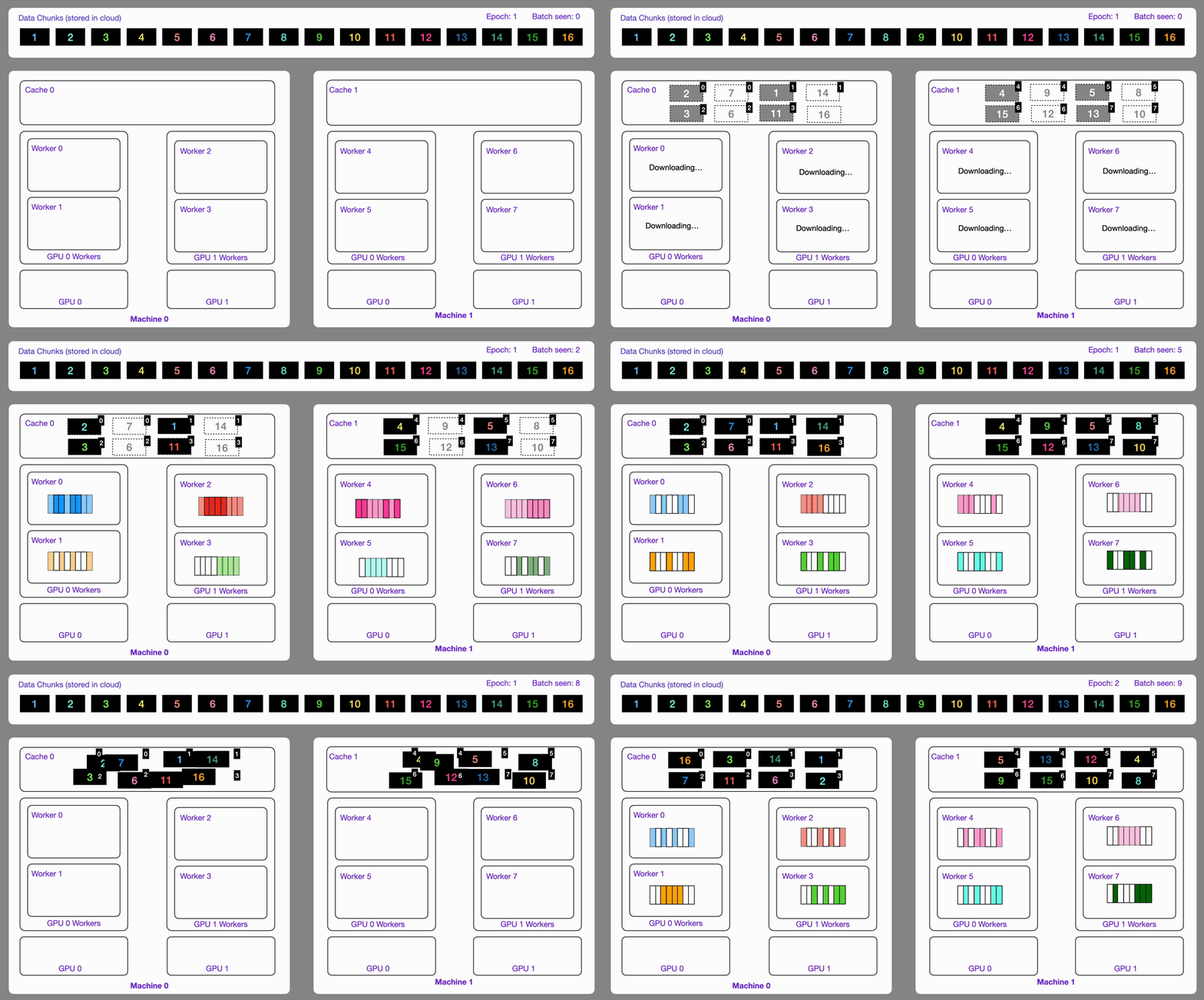
The StreamingDataset and StreamingDataLoader automatically make sure each rank receives the same quantity of varied batches of data, so it works out of the box with your favorite frameworks (PyTorch Lightning, Lightning Fabric, or PyTorch) to do distributed training.
Here you can see an illustration showing how the Streaming Dataset works with multi node / multi gpu under the hood.
from litdata import StreamingDataset, StreamingDataLoader

# For the training dataset, don't forget to enable shuffle and drop_last !!!
train_dataset = StreamingDataset('s3://my-bucket/my-train-data', shuffle=True, drop_last=True)
train_dataloader = StreamingDataLoader(train_dataset, batch_size=64)

for batch in train_dataloader:
    process(batch)  # Replace with your data processing logic

val_dataset = StreamingDataset('s3://my-bucket/my-val-data', shuffle=False, drop_last=False)
val_dataloader = StreamingDataLoader(val_dataset, batch_size=64)

for batch in val_dataloader:
    process(batch)  # Replace with your data processing logic
✅ Shuffle, seed, and drop_last 🔗
Shuffling is deterministic and designed for distributed training:
- Chunks are assigned (and possibly split) across ranks/workers.
- Items inside each chunk are permuted.
The permutation depends on seed, the epoch, and chunk metadata — the same settings always yield the same order (required for resumable state_dict).
Object storage (s3://, gs://, …) globally permutes chunks (FullShuffle). Random chunk order is cheap once files are already copied into the local cache.
POSIX-fast (automatic for any local path) mmaps chunks in place. Vast / NFS / Lustre / GPFS (and LITDATA_POSIX_FAST=1) use WindowShuffle: each worker gets whole chunks in a sequential stripe, then shuffles only inside a sliding window (default 16, LITDATA_POSIX_SHUFFLE_WINDOW) for both chunk order and in-chunk items. Local disks (ext4/xfs) keep global FullShuffle. Object URLs stay on FullShuffle. LITDATA_POSIX_FAST=0 disables in-place mmap.
from litdata import StreamingDataset, StreamingDataLoader

train = StreamingDataset(
    "s3://my-bucket/train",
    shuffle=True,
    drop_last=True,  # keep every rank/worker at the same length (default True under DDP)
    seed=42,         # default is 42; keep stable when resuming
)
loader = StreamingDataLoader(train, batch_size=64, num_workers=8)

# shuffle=/drop_last= on the loader override the dataset
loader = StreamingDataLoader(train, batch_size=64, shuffle=True, drop_last=True)
Notes
- Val/test: usually
shuffle=False,drop_last=False. - If
drop_last=Falseunder multi-GPU, LitData warns — collectives can hang when ranks see different lengths. - Resume with
loader.state_dict()/load_state_dict(). To deliberately ignore checkpointed shuffle settings, setforce_override_state_dict=Trueon the dataset.
✅ FAQ: chunk size & shuffle before optimize 🔗
What chunk_bytes should I use?
Default is 64MB — a good starting point for typical small/medium samples.
When each datapoint is large (e.g. a few MB), prefer a larger chunk (practical range often 256–512MB) so each chunk holds more samples and intra-chunk batch randomization has a bigger pool. Tradeoff: larger chunks take longer to download before they can be used.
This is expert guidance (recommended-range mindset), not a published chunk-size sweep.
Is StreamingDataset shuffle enough if my source data is ordered?
Not always. LitData handles distributed sampling and bucket sampling within chunks automatically (shuffle=True randomizes chunk order and item order inside each chunk). That is not a substitute for a fully shuffled file-level DataLoader when the source has strong structure (same subject/set contiguous, class blocks, etc.).
If ordered data would make chunked sampling problematic and you cannot embed the grouping as the sample unit:
- Shuffle the list of samples before
optimizeso chunks mix well, or - Use
StreamingRawDataset(per-file random access via a standard PyTorchDataLoaderwithshuffle=True) instead of optimize →StreamingDataset.
FUSE vs LitData (Lightning Studios)
/teamspace/s3_connections (and related mounts) are FUSE — fine for browsing, not for training I/O. Under load they are very slow and can crash. Pass the same path into LitData (StreamingRawDataset / StreamingDataset / optimize): LitData resolves it and talks directly to the bucket (Resolve any path).
Rough ImageNet order-of-magnitude on a Studio (not hard guarantees; right tuning for raw): FUSE hand-read ~600 images/s · StreamingRawDataset ~6–7k · optimized StreamingDataset (64MB chunks) ~11k.
✅ StreamingDataset & StreamingDataLoader knobs 🔗
StreamingDataset
| Argument | Default | Description |
|---|---|---|
input_dir |
required | Local path, cloud URI, Dir, or parquet path (basename wildcards OK) |
cache_dir |
LITDATA_CACHE_DIR or ~/.lightning/chunks |
Where chunks are cached |
item_loader |
from index | TokensLoader, ParquetLoader, … |
shuffle |
False |
Deterministic shuffle (see Shuffle) |
drop_last |
True if distributed else False |
Equal length across ranks |
seed |
42 |
Shuffle / subsample RNG |
serializers |
built-ins | Custom serialize/deserialize map |
max_cache_size |
None |
Evict consumed chunks beyond this size. Default: 75% of free disk, leaving ≥50GB when possible. Pin with "100G" / "50GB", a fraction (0.90), or MAX_CACHE_SIZE. |
max_pre_download |
2 |
Chunks each worker may prefetch (raise for throughput; watch disk / RAM) |
subsample |
1.0 |
Fraction of data (0.01) or upsample (2.5) |
encryption |
None |
FernetEncryption / RSAEncryption / custom |
storage_options |
{} |
Cloud client options |
session_options |
{} |
boto3 session options (S3) |
index_path |
None |
Parquet/HF index.json file or directory |
force_override_state_dict |
False |
Local ctor args override loaded checkpoint |
transform |
None |
Callable or list of callables per sample |
Peak disk ≈ num_workers × max_pre_download × mean_chunk_size.
On Vast / NFS / local disk, POSIX-fast is on by default (LITDATA_POSIX_FAST=0 to disable). WILLNEED prefetch and num_workers are capped when they would exceed about half of MemAvailable. Idle hugepages (common on GPU nodes) do not count as available RAM — drop unused nr_hugepages if MemAvailable looks tiny next to MemTotal.
StreamingDataLoader
| Argument | Description |
|---|---|
All usual torch.utils.data.DataLoader kwargs |
batch_size, num_workers, collate_fn, pin_memory, … |
shuffle / drop_last |
Forwarded to the streaming dataset |
profile_batches |
int / True / False — viztracer worker trace (see Profile data loading) |
profile_cprofile |
True — stdlib cProfile of the main process + worker 0 (see Profile data loading) |
profile_skip_batches / profile_dir |
Warm-up skip count; output dir for viztracer / cProfile files |
multiprocessing_context |
Use "spawn" (or "forkserver") with ParquetLoader + num_workers>0 on Linux |
Prefer StreamingDataLoader over a plain PyTorch DataLoader for optimized / combined / parallel datasets (resume + correct batch metadata).
✅ Stream from multiple cloud providers 🔗
The StreamingDataset provides support for reading optimized datasets from common cloud storage providers like AWS S3, Google Cloud Storage (GCS), and Azure Blob Storage. Below are examples of how to use StreamingDataset with each cloud provider.
import os
import litdata as ld

# Read data from AWS S3 using boto3
aws_storage_options={
    "aws_access_key_id": os.environ['AWS_ACCESS_KEY_ID'],
    "aws_secret_access_key": os.environ['AWS_SECRET_ACCESS_KEY'],
}
# You can also pass the session options. (for boto3 only)
aws_session_options = {
  "profile_name": os.environ['AWS_PROFILE_NAME'],  # Required only for custom profiles
  "region_name": os.environ['AWS_REGION_NAME'],    # Required only for custom regions
}
dataset = ld.StreamingDataset("s3://my-bucket/my-data", storage_options=aws_storage_options, session_options=aws_session_options)

# Read Data from AWS S3 with Unsigned Request using boto3
aws_storage_options={
  "config": botocore.config.Config(
        retries={"max_attempts": 1000, "mode": "adaptive"}, # Configure retries for S3 operations
        signature_version=botocore.UNSIGNED, # Use unsigned requests
  )
}
dataset = ld.StreamingDataset("s3://my-bucket/my-data", storage_options=aws_storage_options)

aws_storage_options={
    "AWS_ACCESS_KEY_ID": os.environ['AWS_ACCESS_KEY_ID'],
    "AWS_SECRET_ACCESS_KEY": os.environ['AWS_SECRET_ACCESS_KEY'],
    "S3_ENDPOINT_URL": os.environ['AWS_ENDPOINT_URL'],  # Required only for custom endpoints
}
dataset = ld.StreamingDataset("s3://my-bucket/my-data", storage_options=aws_storage_options)

dataset = ld.StreamingDataset("s3://my-bucket/my-data", storage_options=aws_storage_options)


# Read data from GCS
gcp_storage_options={
    "project": os.environ['PROJECT_ID'],
}
dataset = ld.StreamingDataset("gs://my-bucket/my-data", storage_options=gcp_storage_options)

# Read data from Azure
azure_storage_options={
    "account_url": f"https://{os.environ['AZURE_ACCOUNT_NAME']}.blob.core.windows.net",
    "credential": os.environ['AZURE_ACCOUNT_ACCESS_KEY']
}
dataset = ld.StreamingDataset("azure://my-bucket/my-data", storage_options=azure_storage_options)
✅ Pause, resume data streaming 🔗
Stream data during long training, if interrupted, pick up right where you left off without any issues.
LitData provides a stateful Streaming DataLoader e.g. you can pause and resume your training whenever you want.
Info: The Streaming DataLoader was used by Lit-GPT to pretrain LLMs. Restarting from an older checkpoint was critical to get to pretrain the full model due to several failures (network, CUDA Errors, etc..).
import os
import torch
from litdata import StreamingDataset, StreamingDataLoader

dataset = StreamingDataset("s3://my-bucket/my-data", shuffle=True)
dataloader = StreamingDataLoader(dataset, num_workers=os.cpu_count(), batch_size=64)

# Restore the dataLoader state if it exists
if os.path.isfile("dataloader_state.pt"):
    state_dict = torch.load("dataloader_state.pt")
    dataloader.load_state_dict(state_dict)

# Iterate over the data
for batch_idx, batch in enumerate(dataloader):

    # Store the state every 1000 batches
    if batch_idx % 1000 == 0:
        torch.save(dataloader.state_dict(), "dataloader_state.pt")
Same seed and shuffle are required. For a StreamingDataset, num_workers and world_size may change: LitData drops a global sample_in_epoch prefix and restripes the rest (never duplicates remaining IDs). For a matching loss curve keep global batch size (world_size * batch_size) constant and DDP ranks in lockstep. num_canonical_nodes (default: first-run world_size) is frozen in the checkpoint. POSIX WindowShuffle resumes whole remaining chunks. CombinedStreamingDataset and ParallelStreamingDataset resume only with the same world_size, num_workers, and batch_size.
dataset = StreamingDataset("s3://my-bucket/my-data", shuffle=True, num_canonical_nodes=8)
✅ Use shared queue for Optimizing 🔗
optimize / map default to a shared per-node queue (keep_data_ordered=False). Work is packed per node, then every worker on that node pulls the next item, so a slow worker does not leave others idle. Set keep_data_ordered=True to keep a static per-worker slice (required for use_checkpoint and align_chunking).
Local output_dir writes chunks in place. Remote inputs and outputs use the streaming downloader (adownload_file / aupload_file, obstore when available).
import numpy as np
import litdata as ld

def random_images(index):
    array = np.random.randint(0, 256, (32, 32, 3), dtype=np.uint8)
    return {
        "index": index,
        "image": ld.Image(array=array, quality=95, format="jpeg"),
        "class": np.random.randint(10),
    }

if __name__ == "__main__":
    # The optimize function writes data in an optimized format.
    ld.optimize(
        fn=random_images,                   # the function applied to each input
        inputs=list(range(1000)),           # the inputs to the function (here it's a list of numbers)
        output_dir="fast_data",             # optimized data is stored here
        num_workers=4,                      # The number of workers on the same machine
        chunk_bytes="64MB" ,                 # size of each chunk
        keep_data_ordered=False,             # default: shared queue (set True to keep input order)
    )
Shared queue vs ordered (skewed local files)
scripts/bench/bench_node_queue.py --files 4000 --workers 8 (first 500 files are 1 MiB). On main, unordered optimize sat on a 200s empty-queue timeout after work finished.
| Tree | Mode | Time | Throughput |
|---|---|---|---|
main (old default) |
keep_data_ordered=True |
23.7s | 169 files/s |
main |
keep_data_ordered=False |
223.6s | 18 files/s |
| this tree | keep_data_ordered=True |
22.9s | 175 files/s |
| this tree (new default) | keep_data_ordered=False |
18.8s | 213 files/s |
Shared-queue before → after: ~12×. New default vs old ordered default: 1.22×.
Local / remote input × output
python scripts/bench/bench_node_queue.py --files 200 --workers 4 --io-matrix (first 50 files are 1 MiB).
| Topology | Ordered | Shared | Speedup |
|---|---|---|---|
| local → local | 6.55s | 2.96s | 2.21× |
| remote → local | 7.44s | 3.48s | 2.14× |
| local → remote | 10.98s | 6.51s | 1.69× |
| remote → remote | 11.48s | 8.55s | 1.34× |
Shared queue balances uneven workers. It does not change later StreamingDataset throughput.
✅ Use a Queue as input for optimizing data 🔗
Sometimes you don’t have a static list of inputs to optimize — instead, you have a stream of data coming in over time. In such cases, you can use a multiprocessing.Queue to feed data into the optimize() function.
-
This is especially useful when you're collecting data from a remote source like a web scraper, socket, or API.
-
You can also use this setup to store
replay bufferdata during reinforcement learning and later stream it back for training.
from multiprocessing import Process, Queue
from litdata.processing.data_processor import ALL_DONE
import litdata as ld
import time

def yield_numbers():
    for i in range(1000):
        time.sleep(0.01)
        yield (i, i**2)

def data_producer(q: Queue):
    for item in yield_numbers():
        q.put(item)

    q.put(ALL_DONE)  # Sentinel value to signal completion

def fn(index):
    return index  # Identity function for demo

if __name__ == "__main__":
    q = Queue(maxsize=100)

    producer = Process(target=data_producer, args=(q,))
    producer.start()

    ld.optimize(
        fn=fn,                   # Function to process each item
        queue=q,                 # 👈 Stream data from this queue
        output_dir="fast_data",  # Where to store optimized data
        num_workers=2,
        chunk_size=100,
        mode="overwrite",
    )

    producer.join()
📌 Note: Using queues to optimize your dataset impacts optimization time, not streaming speed.
Irrespective of number of workers, you only need to put one sentinel value to signal completion.
It'll be handled internally by LitData.
✅ LLM Pre-training 🔗
LitData is highly optimized for LLM pre-training. First, we need to tokenize the entire dataset and then we can consume it.
import json
from pathlib import Path
import zstandard as zstd
from litdata import optimize, TokensLoader
from tokenizer import Tokenizer
from functools import partial

# 1. Define a function to convert the text within the jsonl files into tokens
def tokenize_fn(filepath, tokenizer=None):
    with zstd.open(open(filepath, "rb"), "rt", encoding="utf-8") as f:
        for row in f:
            text = json.loads(row)["text"]
            if json.loads(row)["meta"]["redpajama_set_name"] == "RedPajamaGithub":
                continue  # exclude the GitHub data since it overlaps with starcoder
            text_ids = tokenizer.encode(text, bos=False, eos=True)
            yield text_ids

if __name__ == "__main__":
    # 2. Generate the inputs (we are going to optimize all the compressed json files from SlimPajama dataset )
    input_dir = "./slimpajama-raw"
    inputs = [str(file) for file in Path(f"{input_dir}/SlimPajama-627B/train").rglob("*.zst")]

    # 3. Store the optimized data wherever you want under "/teamspace/datasets" or "/teamspace/s3_connections"
    outputs = optimize(
        fn=partial(tokenize_fn, tokenizer=Tokenizer(f"{input_dir}/checkpoints/Llama-2-7b-hf")), # Note: You can use HF tokenizer or any others
        inputs=inputs,
        output_dir="./slimpajama-optimized",
        chunk_size=(2049 * 8012),
        # This is important to inform LitData that we are encoding contiguous 1D array (tokens).
        # LitData skips storing metadata for each sample e.g all the tokens are concatenated to form one large tensor.
        item_loader=TokensLoader(),
    )
import os
from litdata import StreamingDataset, StreamingDataLoader, TokensLoader
from tqdm import tqdm

# Increase by one because we need the next word as well
dataset = StreamingDataset(
  input_dir=f"./slimpajama-optimized/train",
  item_loader=TokensLoader(block_size=2048 + 1),
  shuffle=True,
  drop_last=True,
)

train_dataloader = StreamingDataLoader(dataset, batch_size=8, pin_memory=True, num_workers=os.cpu_count())

# Iterate over the SlimPajama dataset
for batch in tqdm(train_dataloader):
    pass
✅ Filter illegal data 🔗
Sometimes, you have bad data that you don't want to include in the optimized dataset. With LitData, yield only the good data sample to include.
from litdata import optimize, StreamingDataset

def should_keep(index) -> bool:
  # Replace with your own logic
  return index % 2 == 0


def fn(data):
    if should_keep(data):
        yield data

if __name__ == "__main__":
    optimize(
        fn=fn,
        inputs=list(range(1000)),
        output_dir="only_even_index_optimized",
        chunk_bytes="64MB",
        num_workers=1
    )

    dataset = StreamingDataset("only_even_index_optimized")
    data = list(dataset)
    print(data)
    # [0, 2, 4, 6, 8, 10, ..., 992, 994, 996, 998]
You can even use try/expect.
from litdata import optimize, StreamingDataset

def fn(data):
    try:
        yield 1 / data
    except:
        pass

if __name__ == "__main__":
    optimize(
        fn=fn,
        inputs=[0, 0, 0, 1, 2, 4, 0],
        output_dir="only_defined_ratio_optimized",
        chunk_bytes="64MB",
        num_workers=1
    )

    dataset = StreamingDataset("only_defined_ratio_optimized")
    data = list(dataset)
    # The 0 are filtered out as they raise a division by zero
    print(data)
    # [1.0, 0.5, 0.25]
✅ Combine datasets 🔗
Mix and match different sets of data to experiment and create better models.
Combine datasets with CombinedStreamingDataset. As an example, this mixture of Slimpajama & StarCoder was used in the TinyLLAMA project to pretrain a 1.1B Llama model on 3 trillion tokens.
from litdata import StreamingDataset, CombinedStreamingDataset, StreamingDataLoader, TokensLoader
from tqdm import tqdm
import os

train_datasets = [
    StreamingDataset(
        input_dir="s3://tinyllama-template/slimpajama/train/",
        item_loader=TokensLoader(block_size=2048 + 1), # Optimized loader for tokens used by LLMs
        shuffle=True,
        drop_last=True,
    ),
    StreamingDataset(
        input_dir="s3://tinyllama-template/starcoder/",
        item_loader=TokensLoader(block_size=2048 + 1), # Optimized loader for tokens used by LLMs
        shuffle=True,
        drop_last=True,
    ),
]

# Mix SlimPajama data and Starcoder data with these proportions:
weights = (0.693584, 0.306416)
combined_dataset = CombinedStreamingDataset(
    datasets=train_datasets,
    seed=42,
    weights=weights,
    iterate_over_all=False,  # required when passing weights (see below)
)

train_dataloader = StreamingDataLoader(combined_dataset, batch_size=8, pin_memory=True, num_workers=os.cpu_count())

# Iterate over the combined datasets
for batch in tqdm(train_dataloader):
    pass
iterate_over_all vs weights (important)
| Mode | Behavior |
|---|---|
iterate_over_all=True (default) |
Iterate until all datasets are exhausted. Do not pass weights — LitData derives them from dataset lengths (raises ValueError if you pass both). |
iterate_over_all=False |
Stop when any dataset is exhausted. Pass explicit weights for your mixture (e.g. TinyLlama). Length may be None (variable). |
Batching Methods (batching_method)
Stratified (default): each batch mixes samples from multiple datasets according to the weights.
combined_dataset = CombinedStreamingDataset(
    datasets=[dataset1, dataset2],
    batching_method="stratified",  # default
)
Per-stream: each batch comes from only one randomly selected dataset (useful when shapes/dtypes differ).
combined_dataset = CombinedStreamingDataset(
    datasets=[dataset1, dataset2],
    batching_method="per_stream",
)
Other knobs: seed (default 42), force_override_state_dict=True to let local ctor args override a loaded checkpoint.
✅ Parallel streaming 🔗
While CombinedDataset allows to fetch a sample from one of the datasets it wraps at each iteration, ParallelStreamingDataset can be used to fetch a sample from all the wrapped datasets at each iteration:
from litdata import StreamingDataset, ParallelStreamingDataset, StreamingDataLoader
from tqdm import tqdm

parallel_dataset = ParallelStreamingDataset(
    [
        StreamingDataset(input_dir="input_dir_1"),
        StreamingDataset(input_dir="input_dir_2"),
    ],
)

dataloader = StreamingDataLoader(parallel_dataset)

for batch_1, batch_2 in tqdm(dataloader):
    pass
This is useful to generate new data on-the-fly using a sample from each dataset. To do so, provide a transform function to ParallelStreamingDataset:
def transform(samples: Tuple[Any]):
    sample_1, sample_2 = samples  # as many samples as wrapped datasets
    return sample_1 + sample_2  # example transformation

parallel_dataset = ParallelStreamingDataset([dset_1, dset_2], transform=transform)

dataloader = StreamingDataLoader(parallel_dataset)

for transformed_batch in tqdm(dataloader):
    pass
If the transformation requires random number generation, internal random number generators provided by ParallelStreamingDataset can be used. These are seeded using the current dataset state at the beginning of each epoch, which allows for reproducible and resumable data transformation. To use them, define a transform which takes a dictionary of random number generators as its second argument:
def transform(samples: Tuple[Any], rngs: Dict[str, Any]):
    sample_1, sample_2 = samples  # as many samples as wrapped datasets
    rng = rngs["random"]  # "random", "numpy" and "torch" keys available
    return rng.random() * sample_1 + rng.random() * sample_2  # example transformation

parallel_dataset = ParallelStreamingDataset([dset_1, dset_2], transform=transform)
✅ Cycle datasets 🔗
ParallelStreamingDataset can also be used to cycle a StreamingDataset. This allows to dissociate the epoch length from the number of samples in the dataset.
To do so, set the length option to the desired number of samples to yield per epoch. If length is greater than the number of samples in the dataset, the dataset is cycled. At the beginning of a new epoch, the dataset resumes from where it left off at the end of the previous epoch.
from litdata import StreamingDataset, ParallelStreamingDataset, StreamingDataLoader
from tqdm import tqdm

dataset = StreamingDataset(input_dir="input_dir")

cycled_dataset = ParallelStreamingDataset([dataset], length=100)

print(len(cycled_dataset)))  # 100

dataloader = StreamingDataLoader(cycled_dataset)

for batch, in tqdm(dataloader):
    pass
You can even set length to float("inf") for an infinite dataset!
✅ Merge datasets 🔗
Merge multiple optimized datasets into one.
import numpy as np

from litdata import Image, StreamingDataset, merge_datasets, optimize


def random_images(index):
    array = np.random.randint(0, 256, (32, 32, 3), dtype=np.uint8)
    return {
        "index": index,
        "image": Image(array=array, quality=95, format="jpeg"),
        "class": np.random.randint(10),
    }


if __name__ == "__main__":
    out_dirs = ["fast_data_1", "fast_data_2", "fast_data_3", "fast_data_4"]  # or ["s3://my-bucket/fast_data_1", etc.]"
    for out_dir in out_dirs:
        optimize(fn=random_images, inputs=list(range(250)), output_dir=out_dir, num_workers=4, chunk_bytes="64MB")

    merged_out_dir = "merged_fast_data" # or "s3://my-bucket/merged_fast_data"
    merge_datasets(input_dirs=out_dirs, output_dir=merged_out_dir)

    dataset = StreamingDataset(merged_out_dir)
    print(len(dataset))
    # out: 1000
If you wrote chunks yourself (Cache / BinaryWriter) and only have {rank}.index.json shards, finish the dataset:
from litdata import complete_dataset, StreamingDataset

complete_dataset("my_chunks")  # no-op if index.json already exists
StreamingDataset("my_chunks")  # also tries this automatically
✅ Transform datasets while Streaming 🔗
Transform datasets on-the-fly while streaming them, allowing for efficient data processing without the need to store intermediate results.
- You can use the
transformargument inStreamingDatasetto apply atransformation functionora list of transformation functionsto each sample as it is streamed.
# Define a simple transform function
torch_transform = transforms.Compose([
  transforms.Resize((256, 256)),       # Resize to 256x256
  transforms.ToTensor(),               # Convert to PyTorch tensor (C x H x W)
  transforms.Normalize(                # Normalize using ImageNet stats
      mean=[0.485, 0.456, 0.406],
      std=[0.229, 0.224, 0.225]
  )
])

def transform_fn(x, *args, **kwargs):
    """Define your transform function."""
    return torch_transform(x)  # Apply the transform to the input image

# Create dataset with appropriate configuration
dataset = StreamingDataset(data_dir, cache_dir=str(cache_dir), shuffle=shuffle, transform=[transform_fn])
Or, you can create a subclass of StreamingDataset and override its transform method to apply custom transformations to each sample.
class StreamingDatasetWithTransform(StreamingDataset):
        """A custom dataset class that inherits from StreamingDataset and applies a transform."""

        def __init__(self, *args, **kwargs):
            super().__init__(*args, **kwargs)

            self.torch_transform = transforms.Compose([
                transforms.Resize((256, 256)),       # Resize to 256x256
                transforms.ToTensor(),               # Convert to PyTorch tensor (C x H x W)
                transforms.Normalize(                # Normalize using ImageNet stats
                    mean=[0.485, 0.456, 0.406],
                    std=[0.229, 0.224, 0.225]
                )
            ])

        # Define your transform method
        def transform(self, x, *args, **kwargs):
            """A simple transform function."""
            return self.torch_transform(x)


dataset = StreamingDatasetWithTransform(data_dir, cache_dir=str(cache_dir), shuffle=shuffle)
✅ Split datasets for train, val, test 🔗
Split a dataset into train, val, test splits with train_test_split.
from litdata import StreamingDataset, train_test_split

dataset = StreamingDataset("s3://my-bucket/my-data") # data are stored in the cloud

print(len(dataset)) # display the length of your data
# out: 100,000

train_dataset, val_dataset, test_dataset = train_test_split(dataset, splits=[0.3, 0.2, 0.5])

print(train_dataset)
# out: 30,000

print(val_dataset)
# out: 20,000

print(test_dataset)
# out: 50,000
Or pick exact indices with StreamingDataset.subset:
train = dataset.subset(range(0, 30_000))
# dataset.subset(slice(0, 1000))
✅ Load a subset of the remote dataset 🔗
Work on a smaller, manageable portion of your data to save time and resources.
from litdata import StreamingDataset, train_test_split

dataset = StreamingDataset("s3://my-bucket/my-data", subsample=0.01) # data are stored in the cloud

print(len(dataset)) # display the length of your data
# out: 1000

# or a list / slice of global indices
small = dataset.subset([0, 10, 20])
✅ Upsample from your source datasets 🔗
Use to control the size of one iteration of a StreamingDataset using repeats. Contains floor(N) possibly shuffled copies of the source data, then a subsampling of the remainder.
from litdata import StreamingDataset

dataset = StreamingDataset("s3://my-bucket/my-data", subsample=2.5, shuffle=True)

print(len(dataset)) # display the length of your data
# out: 250000
✅ Easily modify optimized cloud datasets 🔗
Add new data to an existing dataset or start fresh if needed, providing flexibility in data management.
LitData optimized datasets are assumed to be immutable. However, you can make the decision to modify them by changing the mode to either append or overwrite.
from litdata import optimize, StreamingDataset

def compress(index):
    return index, index**2

if __name__ == "__main__":
    # Add some data
    optimize(
        fn=compress,
        inputs=list(range(100)),
        output_dir="./my_optimized_dataset",
        chunk_bytes="64MB",
    )

    # Later on, you add more data
    optimize(
        fn=compress,
        inputs=list(range(100, 200)),
        output_dir="./my_optimized_dataset",
        chunk_bytes="64MB",
        mode="append",
    )

    ds = StreamingDataset("./my_optimized_dataset")
    assert len(ds) == 200
    assert ds[:] == [(i, i**2) for i in range(200)]
The overwrite mode will delete the existing data and start from fresh.
✅ Stream parquet datasets 🔗
Stream existing Parquet files with LitData without converting them to LitData chunks — or convert them when you need LitData’s optimized binary format. Hugging Face parquet datasets are covered in Stream Hugging Face datasets.
Stream vs optimize vs map
| Goal | Use |
|---|---|
| Train on parquet as-is (no conversion) | index_parquet_dataset → StreamingDataset + ParquetLoader |
| Faster I/O / tokenize / custom sample shape | optimize(fn) that yields rows from parquet (reduce memory) |
| Reshard huge parquet files while mapping | map(..., reader=ParquetReader(cache_folder, num_rows=...)) |
Each sample from ParquetLoader is a dict (column name → value).
Prerequisites
pip install 'litdata[extras]'   # includes polars + pyarrow
# Cloud listing/index extras as needed:
pip install s3fs    # s3://
pip install gcsfs   # gs://
Index a parquet directory
import litdata as ld

ld.index_parquet_dataset(
    "s3://my-bucket/my-parquet-data",  # local path, s3://, gs://, or hf://
    cache_dir=None,                   # see table below
    storage_options={},               # cloud credentials / endpoints
    num_workers=4,                    # parallel metadata reads
)
| Scheme | Where index.json is written |
|---|---|
| Local directory | Next to the files, or under cache_dir if set |
s3:// / gs:// |
Uploaded to the bucket at {url}/index.json (needs write access) |
hf:// |
Local cache_dir (required for HF indexing via this helper) |
Indexing notes
- Lists top-level
.parquetfiles only (not recursive subfolders). - All files must share the same schema.
- Supported for indexing today: local,
s3://,gs://,hf://(notr2:///azure://yet). - For HF, prefer
index_hf_dataset(uri)(returns a local cache dir) or auto-index viaStreamingDataset("hf://...")— see HF section.
Stream with ParquetLoader
If the folder looks like parquet and has no index.json, StreamingDataset now builds the index automatically. You still need ParquetLoader for local/S3/GCS (it must match index.json). hf:// already auto-indexes and selects the loader.
import litdata as ld
from litdata.streaming.item_loader import ParquetLoader

uri = "s3://my-bucket/my-parquet-data"
dataset = ld.StreamingDataset(
    uri,
    item_loader=ParquetLoader(low_memory=True),  # default: row-group streaming
    # index_path="/path/to/index.json",         # optional if index lives elsewhere
)

# Basename wildcards when the path ends with .parquet:
# dataset = ld.StreamingDataset("s3://bucket/data/train-*.parquet", item_loader=ParquetLoader())

print(dataset[0])  # dict of columns

# Linux + num_workers>0: use spawn (Polars + fork deadlocks)
dataloader = ld.StreamingDataLoader(
    dataset,
    batch_size=4,
    num_workers=4,
    multiprocessing_context="spawn",
)
for batch in dataloader:
    pass
ParquetLoader knobs
| Arg | Default | Meaning |
|---|---|---|
low_memory |
True |
Stream by row group (lower RAM). False loads each whole file into memory (warns). |
pre_load_chunk |
False |
Prefetch full DataFrame — only effective when low_memory=False. |
Import: from litdata.streaming.item_loader import ParquetLoader (not re-exported at litdata top level).
Reshard parquet for map / optimize
from litdata import map
from litdata.processing.readers import ParquetReader

def process(pq_file, output_dir):
    # pq_file is a pyarrow.parquet.ParquetFile
    ...

map(
    fn=process,
    inputs=list_of_parquet_paths,
    output_dir="s3://bucket/out",
    reader=ParquetReader(cache_folder="/tmp/pq-shards", num_rows=65536),
)
ParquetReader splits inputs that exceed num_rows into smaller cached files before your fn runs.
✅ Use compression 🔗
Reduce your data footprint by using advanced compression algorithms.
import litdata as ld

def compress(index):
    return index, index**2

if __name__ == "__main__":
    # Add some data
    ld.optimize(
        fn=compress,
        inputs=list(range(100)),
        output_dir="./my_optimized_dataset",
        chunk_bytes="64MB",
        num_workers=1,
        compression="zstd"
    )
Using zstd, you can achieve high compression ratio like 4.34x for this simple example.
| Without | With |
|---|---|
| 2.8kb | 646b |
✅ Access samples without full data download 🔗
Look at specific parts of a large dataset without downloading the whole thing or loading it on a local machine.
from litdata import StreamingDataset

dataset = StreamingDataset("s3://my-bucket/my-data") # data are stored in the cloud

print(len(dataset)) # display the length of your data

print(dataset[42]) # show the 42th element of the dataset
✅ Use any data transforms 🔗
Customize how your data is processed to better fit your needs.
Subclass the StreamingDataset and override its __getitem__ method to add any extra data transformations.
from litdata import StreamingDataset, StreamingDataLoader
import torchvision.transforms.v2.functional as F

class ImagenetStreamingDataset(StreamingDataset):

    def __getitem__(self, index):
        image = super().__getitem__(index)
        return F.resize(image, (224, 224))

dataset = ImagenetStreamingDataset(...)
dataloader = StreamingDataLoader(dataset, batch_size=4)

for batch in dataloader:
    print(batch.shape)
    # Out: (4, 3, 224, 224)
✅ Profile data loading speed 🔗
StreamingDataLoader can record a viztracer Chrome trace of the DataLoader worker loop so you can see where time goes (fetch, deserialize, collate, IPC).
Prerequisites
pip install viztracer
Profiling requires num_workers >= 1 (raises otherwise). On multi-GPU, only global rank 0 installs the worker profiler.
Usage
from litdata import StreamingDataset, StreamingDataLoader

dataset = StreamingDataset("s3://my-bucket/my-data", shuffle=True, drop_last=True)

loader = StreamingDataLoader(
    dataset,
    batch_size=64,
    num_workers=4,
    profile_batches=20,          # record this many batches (int), or True for the whole run
    profile_skip_batches=5,      # warm up / skip cold-start batches before recording
    profile_dir="./profiles",    # where to write result.json (default: cwd)
)

for batch in loader:
    train_step(batch)
    # after profile_batches (+ skip) complete, worker 0 saves the trace and prints the path
| Arg | Default | Meaning |
|---|---|---|
profile_batches |
False |
int → stop after that many recorded batches; True → profile until the iterator ends; False → off |
profile_skip_batches |
0 |
Batches to skip before the tracer starts (useful to skip cache cold-start) |
profile_dir |
current working directory | Directory for result.json (overwrites an existing file) |
Only worker 0 is instrumented. When an int is used, the tracer wraps fetcher.fetch and stops after profile_skip_batches + profile_batches fetch calls. When True, tracing runs for the lifetime of that worker loop.
View the trace
# Option A — Chrome
# open chrome://tracing and load profiles/result.json

# Option B — Perfetto (often better for large traces)
# open https://ui.perfetto.dev and load the same file
Tips
- Delete or change
profile_dirbetween runs — LitData removes an existingresult.jsonbefore starting. - Pair with a wiped chunk cache if you care about cold epoch behavior (
litdata cache clear).
cProfile (main + worker 0)
Stdlib statistical profile of the parent process (queue wait, unpickle, collate handoff) and worker 0 (fetch, decode, transforms). No extra package.
loader = StreamingDataLoader(
    dataset,
    batch_size=64,
    num_workers=4,
    profile_cprofile=True,
    profile_dir="./profiles",
)

for batch in loader:
    train_step(batch)
# writes profiles/cprofile_main.prof + cprofile_worker0.prof (and .txt summaries)
python -m pstats profiles/cprofile_worker0.prof
# then: sort tottime   stats 30
Do not set profile_cprofile and profile_batches together — both install a sys.setprofile hook. With num_workers=0 only the main file is written. The parent profiler starts after workers spawn so fork does not inherit an active cProfile.
- For deeper LitData internals (download / read / delete timeline), use
enable_tracer()+ Litracer instead — see Debug & Profile LitData. That path is complementary: viztracer = DataLoader worker CPU timeline; cProfile = function self/cum time; Litracer = LitData pipeline events.
✅ Reduce memory use for large files 🔗
Handle large data files efficiently without using too much of your computer's memory.
Optimize from parquet (convert into LitData chunks) when you need tokenization or LitData’s binary format. To stream parquet without converting, see Stream parquet datasets.
When processing large parquet files, yield one item at a time to keep memory low:
from pathlib import Path
import pyarrow.parquet as pq
from litdata import optimize
from tokenizer import Tokenizer
from functools import partial

# 1. Define a function to convert the text within the parquet files into tokens
def tokenize_fn(filepath, tokenizer=None):
    parquet_file = pq.ParquetFile(filepath)
    # Process per batch to reduce RAM usage
    for batch in parquet_file.iter_batches(batch_size=8192, columns=["content"]):
        for text in batch.to_pandas()["content"]:
            yield tokenizer.encode(text, bos=False, eos=True)

# 2. Generate the inputs
input_dir = "/teamspace/s3_connections/tinyllama-template"
inputs = [str(file) for file in Path(f"{input_dir}/starcoderdata").rglob("*.parquet")]

# 3. Store the optimized data wherever you want under "/teamspace/datasets" or "/teamspace/s3_connections"
outputs = optimize(
    fn=partial(tokenize_fn, tokenizer=Tokenizer(f"{input_dir}/checkpoints/Llama-2-7b-hf")), # Note: Use HF tokenizer or any others
    inputs=inputs,
    output_dir="/teamspace/datasets/starcoderdata",
    chunk_size=(2049 * 8012), # Number of tokens to store by chunks. This is roughly 64MB of tokens per chunk.
)
✅ Limit local cache space 🔗
Control how much disk the local chunk cache may use. Downloaded chunks are deleted after use once the cache exceeds the limit.
Default max_cache_size is None: LitData uses 75% of currently free disk and still leaves ≥50GB free when the volume is large enough for checkpoints. Pass "100G" / "50GB" for a fixed budget, or a float (0.90) for that fraction of currently free space. MAX_CACHE_SIZE overrides the constructor (size or fraction).
Peak disk in flight is roughly:
num_workers × max_pre_download × mean_chunk_size
Keep max_cache_size comfortably above that peak. For remote datasets, async chunk prefetch often raises max_pre_download to ≥4 automatically — see async prefetch & environment variables.
from litdata import StreamingDataset

dataset = StreamingDataset(
    "s3://my-bucket/my-data",
    max_cache_size="10GB",
    max_pre_download=4,  # chunks each worker may prefetch (default 2; async may floor to 4)
)
✅ Async chunk prefetch & environment variables 🔗
Async chunk prefetch
LitData can overlap remote chunk downloads with training using asyncio inside each DataLoader worker’s prepare thread. This is not an async DataLoader — your loop stays:
for batch in StreamingDataLoader(dataset, batch_size=64, num_workers=8):
    train_step(batch)
| Situation | Async prefetch |
|---|---|
Remote dataset (s3://, gs://, …) |
On by default |
| Local-only dataset | Off by default |
LITDATA_ASYNC_CHUNK_PREFETCH=1 |
Force on |
LITDATA_ASYNC_CHUNK_PREFETCH=0 |
Force off |
When async is on, LitData raises max_pre_download to at least 4 so asyncio.gather has enough in-flight downloads (override with LITDATA_ASYNC_MIN_PRE_DOWNLOAD; set 0 to disable the floor). Concurrent GETs are capped by LITDATA_ASYNC_DOWNLOAD_CONCURRENCY (default 8). The prepare thread drains the prefetch queue up to that gather width whenever a cache slot is free. Peak disk ≈ num_workers × max_pre_download × chunk_size — size max_cache_size accordingly.
The reader does not poll the cache directory for each chunk. After a download finishes, the downloader atomically os.replaces the temp file and sets an in-process Event. Compressed chunks set that Event only after decompress publishes the readable .bin. Other DataLoader workers still fall back to a short filesystem check (Events are per process).
# Debugging download/delete races — force synchronous downloads
export LITDATA_ASYNC_CHUNK_PREFETCH=0

# Keep max_pre_download=2 even with async enabled
export LITDATA_ASYNC_MIN_PRE_DOWNLOAD=0

# Cap overlapping remote GETs (default 8)
export LITDATA_ASYNC_DOWNLOAD_CONCURRENCY=4
Common environment variables
| Variable | Default | Purpose |
|---|---|---|
LITDATA_CACHE_DIR |
~/.lightning/chunks |
Default chunk cache directory |
LITDATA_ASYNC_CHUNK_PREFETCH |
on for remote | 0/1 force async chunk download overlap |
LITDATA_ASYNC_MIN_PRE_DOWNLOAD |
4 |
Floor for max_pre_download when async is on (0 = no floor) |
LITDATA_ASYNC_DOWNLOAD_CONCURRENCY |
8 |
Max in-flight chunk GETs per gather |
LITDATA_OBSTORE_STREAM_MIN_CHUNK_MIB |
8 |
S3 obstore stream chunk size (MiB) |
MAX_WAIT_TIME |
120 |
Seconds to wait for a chunk before error |
FORCE_DOWNLOAD_TIME |
30 |
Seconds before force re-download of a missing chunk |
LITDATA_CHECK_UPDATES |
unset | 1 enables the PyPI upgrade tip (off by default) |
LITDATA_DISABLE_VERSION_CHECK |
on unless updates enabled | 1 skips the upgrade tip |
HF_TOKEN |
— | Gated Hugging Face datasets |
DEBUG_LITDATA / PRINT_DEBUG_LOGS |
0 |
Internal debug / stdout logs |
LITDATA_LOG_FILE |
litdata_debug.log |
enable_tracer() output path |
LITDATA_TRACE_LEVEL |
unset | batch / chunk / sample / debug / off (see Debug & Profile) |
LITDATA_TRACE_CATEGORIES |
from level | Comma-separated cats, e.g. download,read,delete |
Multi-node optimize/map on Studios also uses DATA_OPTIMIZER_* (set by the platform). Full catalog (debug logs, Studio injects, torchrun): see the LitData skill reference/env-vars.md when using agent skills, or the source modules constants.py / async_prefetch.py.
✅ Change cache directory path 🔗
Specify where cached chunk files are stored.
from litdata import StreamingDataset
from litdata.streaming.cache import Dir

# Simple: dedicated cache directory
dataset = StreamingDataset("s3://my-bucket/my_optimized_dataset", cache_dir="/path/to/your/cache")

# Or when cache path and remote URL should differ:
dataset = StreamingDataset(input_dir=Dir(path="/path/to/your/cache", url="s3://my-bucket/my_optimized_dataset"))
Global default without passing cache_dir every time:
export LITDATA_CACHE_DIR=/path/to/your/cache
CLI:
litdata cache path    # print the active cache directory
litdata cache clear   # delete cached chunks
✅ Optimize loading on networked drives 🔗
Optimize data handling for computers on a local network to improve performance for on-site setups.
On-prem compute nodes can mount and use a network drive. A network drive is a shared storage device on a local area network. In order to reduce their network overload, the StreamingDataset supports caching the data chunks.
from litdata import StreamingDataset

dataset = StreamingDataset(input_dir="local:/data/shared-drive/some-data")
✅ Optimize / map across multiple machines (Lightning Studios) 🔗
On Lightning Studios, num_nodes and machine scale optimize / map across many machines. This is not the same as num_workers (processes on one machine).
How it works
- You call
optimize(..., num_nodes=N, machine=...)(ormap) inside a Studio. - LitData starts a data-prep job that re-runs your script on N machines.
- Each machine processes a shard of the inputs (
num_nodes × num_workerstotal workers). The last node merges chunk indexes into a singleindex.json. - Your local call blocks until the job finishes; open the printed Runs URL to monitor.
Outside Studio, passing num_nodes / machine raises an error (create a Studio account to use multi-node).
from litdata import optimize, Machine

def compress(index):
    return (index, index ** 2)

if __name__ == "__main__":
    optimize(
        fn=compress,
        inputs=list(range(100)),
        num_workers=8,              # processes per machine
        output_dir="/teamspace/s3_connections/my-data/optimized-v1",  # durable bucket (recommended)
        chunk_bytes="64MB",
        num_nodes=32,               # machines in the job
        machine=Machine.DATA_PREP,  # or omit to use the current Studio machine type
    )
Where outputs land
output_dir |
Result |
|---|---|
/teamspace/s3_connections/..., /teamspace/datasets/..., s3://..., gs://... |
Written directly to that store (recommended) |
Local or /teamspace/studios/this_studio/... |
Remapped to the job’s artifacts storage; the Studio UI may also expose it under /teamspace/jobs/<job>/... |
from litdata import StreamingDataset

# Prefer the same connection / cloud URL you wrote to:
dataset = StreamingDataset("/teamspace/s3_connections/my-data/optimized-v1")
The same num_nodes / machine pattern works with map. See also Parallelize transforms and data optimization.
✅ Encrypt, decrypt data at chunk/sample level 🔗
Encrypt optimized data at sample or chunk level. Built-ins: FernetEncryption and RSAEncryption (litdata.utilities.encryption). Requires the cryptography package. Not supported for Mosaic MDS.
level |
Meaning |
|---|---|
"sample" (default) |
Encrypt each sample independently |
"chunk" |
Encrypt whole chunks |
Fernet (symmetric)
from litdata import optimize, StreamingDataset
from litdata.utilities.encryption import FernetEncryption

fernet = FernetEncryption(password="your_secure_password", level="sample")  # or level="chunk"
data_dir = "s3://my-bucket/optimized_data"

def fn(index):
    return {"index": index, "value": index**2}

if __name__ == "__main__":
    optimize(
        fn=fn,
        inputs=list(range(5)),
        num_workers=1,
        output_dir=data_dir,
        chunk_bytes="64MB",
        encryption=fernet,
    )
    fernet.save("fernet.pem")  # persist salt/level; keep the password safe

# Later — load key material with the same password
fernet = FernetEncryption.load("fernet.pem", password="your_secure_password")
ds = StreamingDataset(input_dir=data_dir, encryption=fernet)
RSA (asymmetric)
from litdata.utilities.encryption import RSAEncryption

rsa = RSAEncryption(password="your_secure_password", level="sample")  # or "chunk"
optimize(fn=fn, inputs=list(range(5)), output_dir=data_dir, chunk_bytes="64MB", encryption=rsa)
rsa.save("rsa.pem")

rsa = RSAEncryption.load("rsa.pem", password="your_secure_password")
ds = StreamingDataset(input_dir=data_dir, encryption=rsa)
Custom algorithm — subclass Encryption and implement encrypt / decrypt / save / load / state_dict / algorithm.
✅ Debug & Profile LitData with logs & Litracer 🔗
enable_tracer() records the streaming pipeline (download vs read vs delete vs batch) as one-line events. Litracer converts that log into a Chrome / Perfetto trace.
This is complementary to profile_batches (viztracer = DataLoader worker CPU; Litracer = LitData pipeline events).
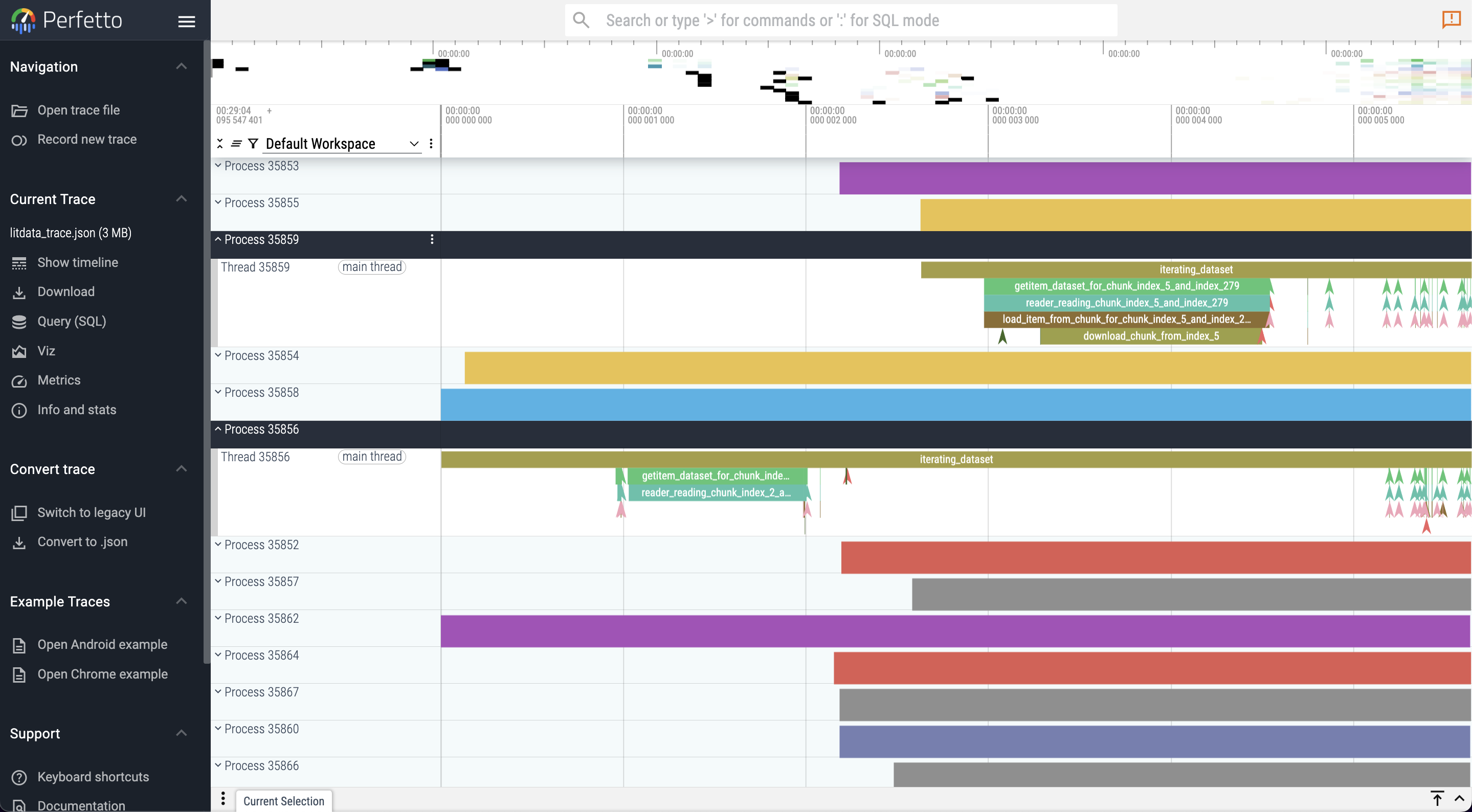
import litdata as ld
from litdata.debugger import enable_tracer

# Call once per process, before the DataLoader. Delete an existing log before re-tracing (append).
enable_tracer(level="chunk", log_file="litdata_debug.log")
# level="batch" | "chunk" (default) | "sample" | "debug" | "off"
# enable_tracer(categories=["download", "read", "delete"])

if __name__ == "__main__":
    dataset = ld.StreamingDataset("s3://my-bucket/my-data", shuffle=True)
    for batch in ld.StreamingDataLoader(dataset, batch_size=64, num_workers=8):
        ...
| Level | Events |
|---|---|
batch |
Epoch + per-batch spans, plus crashes |
chunk (default) |
+ download, read, delete, decompress, prefetch |
sample |
+ per-item __getitem__ (high volume) |
debug |
+ .cnt lock refcount spans |
off |
Disable |
Event names are stable (download, read, delete, batch, sample, crash). Chunk / sample indexes live in args so Perfetto groups all downloads together. Each line is key: value; pairs with Chrome microsecond timestamps. Crashes are a one-line instant (ph: I, name: crash); the Python traceback is printed to stderr, not the log file (a multi-line logger.exception would break Litracer).
Env overrides: LITDATA_LOG_FILE, LITDATA_TRACE_LEVEL, LITDATA_TRACE_CATEGORIES (comma-separated). Tracer calls are no-ops when tracing is off.
-
Generate the log:
python train.py # writes litdata_debug.log
-
Install Litracer (Go 1.23+):
git clone https://github.com/Lightning-AI/litracer.git
cd litracer && go build -o litracer .
Or
go install github.com/deependujha/litracer@latest(published Go module path). Untilgo.modis renamed,go install github.com/Lightning-AI/litracer@latestdoes not work. Release binaries: GitHub Releases. -
Convert and open in Perfetto:
litracer --quiet --validate -o litdata_trace.json.gz litdata_debug.log
litracer --quiet --cat download,read,delete -o io.json.gz litdata_debug.log
# open the .json.gz at https://ui.perfetto.dev (preferred) or chrome://tracing
--quietprints a one-line summary (per-category durations, unmatched B/E, crashes).--catkeeps only those categories. Matched B/E pairs become complete (ph: X) spans unless--no-complete. Default output is gzip Chrome JSON (.json.gz) — both Perfetto andchrome://tracingopen it; pass-o file.jsonfor uncompressed.
- For trace files
> 2GB, see Perfetto large traces. - If you connect Perfetto to the RPC server, prefer Chrome over Brave (Brave often does not autodetect the RPC server).
Multi-worker s3:// FileNotFoundError after ~120s: num_workers=0 working while num_workers>0 fails usually means the DataLoader parent started obstore (tokio) before fork and worker GETs hung. Current LitData fetches index.json with boto3 so workers can lazy-init obstore; they fall back to boto3 if the parent already started the runtime. On Studio R2 / lightning_storage, the same symptom can be a prefetch-thread crash (data_connection_id / endpoint_url into boto3.Session) — look for [litdata] PrepareChunksThread CRASHED on stderr and a crash instant in the trace.
✅ Resolve any path or cloud URL (local, S3, GCS, R2, Azure, HF, Studio) 🔗
LitData resolves every dataset path you pass to StreamingDataset, StreamingRawDataset, optimize, map, and related APIs. You write one path string; LitData figures out whether to read locally, download from object storage, or (inside Lightning Studios) talk directly to the bucket behind a /teamspace/... mount instead of going through slow FUSE I/O.
Supported URI schemes
| Scheme | Example | Use when |
|---|---|---|
| Local path | ./data or /data/imagenet |
Files on disk |
s3:// |
s3://my-bucket/optimized |
AWS S3 |
gs:// |
gs://my-bucket/optimized |
Google Cloud Storage |
r2:// |
r2://my-bucket/optimized |
Cloudflare R2 |
azure:// |
azure://container/optimized |
Azure Blob Storage |
hf:// |
hf://datasets/org/name/data |
Hugging Face datasets (parquet) |
local: |
local:/mnt/nfs/dataset |
Network / shared drive (LitData still caches chunks locally to reduce NAS load) |
from litdata import StreamingDataset, optimize

# Same APIs — only the path changes
StreamingDataset("s3://my-bucket/fast_data", shuffle=True, drop_last=True)
StreamingDataset("gs://my-bucket/fast_data")
StreamingDataset("r2://my-bucket/fast_data", storage_options={...})
StreamingDataset("azure://my-container/fast_data", storage_options={...})
StreamingDataset("hf://datasets/org/name/data")
StreamingDataset("local:/data/shared-drive/some-data")
StreamingDataset("/var/data/fast_data")  # plain local directory
Pass cloud credentials with storage_options (and optional session_options for boto3 profiles/regions). See Stream from multiple cloud providers.
Cache directory vs remote URL
By default LitData caches downloaded chunks under ~/.lightning/chunks (override with cache_dir= or LITDATA_CACHE_DIR). When the cache location and the dataset URL must differ, use Dir:
from litdata import StreamingDataset
from litdata.streaming.resolver import Dir

dataset = StreamingDataset(
    Dir(path="/fast-ssd/cache/run-1", url="s3://my-bucket/fast_data")
)
# Equivalent:
dataset = StreamingDataset("s3://my-bucket/fast_data", cache_dir="/fast-ssd/cache/run-1")
export LITDATA_CACHE_DIR=/fast-ssd/cache
litdata cache path    # show active cache directory
litdata cache clear   # wipe cached chunks
Date/time path templates
Embed a strftime pattern in {...} and LitData expands it to the current time (useful for versioned output_dirs):
# e.g. on 2025-05-05 → ".../run_2025-05-05"
optimize(
    fn=fn,
    inputs=inputs,
    output_dir="s3://my-bucket/datasets/run_{%Y-%m-%d}",
    chunk_bytes="64MB",
)
Lightning Studio /teamspace/... paths (direct bucket I/O)
In Lightning Studios, data connections appear under /teamspace/.... Prefer these paths in LitData — optimize/map uploads and StreamingDataset downloads use the backing object store URL (and temporary credentials when needed), which is much faster than reading every file through the FUSE mount.
| Path prefix | What LitData does |
|---|---|
/teamspace/studios/this_studio/... |
Local Studio workspace disk (not a cloud URL) |
/teamspace/studios/<other_studio>/... |
Resolves to that Studio’s content bucket (s3:// or gs://) |
/teamspace/s3_connections/<name>/... |
Direct S3 to the connection’s bucket |
/teamspace/gcs_connections/<name>/... |
Direct GCS |
/teamspace/s3_folders/<name>/... |
S3 folder connection |
/teamspace/gcs_folders/<name>/... |
GCS folder connection |
/teamspace/lightning_storage/<name>/... |
Lightning-managed object storage (R2-style) |
/teamspace/datasets/... |
Teamspace datasets mount → project datasets bucket |
from litdata import StreamingDataset, StreamingRawDataset, optimize

# Stream optimized data from an attached S3 connection (direct bucket download)
dataset = StreamingDataset("/teamspace/s3_connections/my-data-1/fast_data", shuffle=True, drop_last=True)

# Stream raw files from a connection
raw = StreamingRawDataset("/teamspace/s3_connections/my-bucket-1/raw")

# Optimize *into* a connection — chunks upload straight to the bucket
def should_keep(data):
    if data % 2 == 0:
        yield data

if __name__ == "__main__":
    optimize(
        fn=should_keep,
        inputs=list(range(1000)),
        output_dir="/teamspace/s3_connections/my-data-1/output",
        chunk_bytes="64MB",
        num_workers=1,
    )
Tips
- Version remote outputs (
.../v2,.../run_{%Y-%m-%d}). Optimized datasets are immutable unless you passmode="append"ormode="overwrite". - Outside Studio, use
s3:///gs:/// … with your own credentials —/teamspace/...resolution needs Lightning Studio environment variables. optimize/mapwithnum_nodeslaunch a Studio job (not local multi-process). Prefer a connection / cloudoutput_dir; local /this_studiooptimize outputs go to job artifacts (UI may show/teamspace/jobs/...). Details: distributed optimization.
Features for transforming datasets
✅ Parallelize data transformations (map) 🔗
Apply the same change to different parts of the dataset at once to save time and effort.
The map operator applies a function over a list of inputs. fn must write into output_dir and return None. Guard with if __name__ == "__main__" when using multiple workers.
import os
from litdata import map
from PIL import Image

input_dir = "my_large_images"  # or s3://...
inputs = [os.path.join(input_dir, f) for f in os.listdir(input_dir)]

def resize_image(image_path, output_dir):
    output_image_path = os.path.join(output_dir, os.path.basename(image_path))
    Image.open(image_path).resize((224, 224)).save(output_image_path)

if __name__ == "__main__":
    map(
        fn=resize_image,
        inputs=inputs,
        output_dir="s3://my-bucket/my_resized_images",
        num_workers=8,
    )
map arguments
| Argument | Default | Description |
|---|---|---|
fn |
required | fn(input, output_dir) -> None |
inputs |
required | Sequence or StreamingDataLoader |
output_dir |
required | Local or cloud path (resolver) |
input_dir |
None |
Root for remote inputs (background download while processing) |
weights |
None |
Per-input weights to balance workers |
num_workers |
CPU count | Local process workers |
fast_dev_run |
False |
Process only a few items (True → small default, or an int) |
num_nodes / machine |
None |
Scale out on Lightning Studios |
num_downloaders / num_uploaders |
auto | I/O concurrency per worker |
reorder_files |
True |
Pack by file size for balance; False preserves order |
error_when_not_empty |
False |
Error if output_dir already has files |
reader |
default | Custom reader for inputs |
batch_size |
None |
Group inputs into batches for fn |
start_method |
spawn† | Multiprocessing start method (†spawn unless IPython) |
optimize_dns |
None |
Optimized DNS (Studio / cloud) |
storage_options |
{} |
Cloud credentials / endpoints |
keep_data_ordered |
False |
Shared work queue (faster for uneven workers). True keeps a static per-worker slice. Forced True with use_checkpoint / align_chunking. |
✅ optimize arguments reference 🔗
Full knob list for litdata.optimize (see Quick start for the minimal recipe). Exactly one of chunk_bytes or chunk_size. Use if __name__ == "__main__".
| Argument | Default | Description |
|---|---|---|
fn |
required | Maps each input → sample (or yield samples / skip bad ones) |
inputs |
None |
Sequence or StreamingDataLoader (ignored if queue is set) |
queue |
None |
multiprocessing.Queue of live inputs; send one ALL_DONE when finished |
output_dir |
"optimized_data" |
Local or cloud (resolver); version remote prefixes |
input_dir |
None |
Remote input root for background download |
weights |
None |
Per-input weights to balance workers |
chunk_bytes |
None |
Max bytes per chunk (e.g. "64MB"; see FAQ for larger samples) |
chunk_size |
None |
Max items (or tokens with TokensLoader) per chunk |
align_chunking |
False |
Match single-worker chunk boundaries (needs chunk_size; uneven load) |
compression |
None |
"zstd" today |
encryption |
None |
FernetEncryption / RSAEncryption / custom (encrypt) |
num_workers |
CPU count | Local workers |
fast_dev_run |
False |
Smoke a subset of inputs |
num_nodes / machine |
None |
Multi-node on Lightning Studios |
num_downloaders / num_uploaders |
auto | I/O concurrency per worker |
reorder_files |
True |
Size-based packing; False preserves order |
reader |
default | Custom input reader |
batch_size |
None |
Group inputs for fn |
mode |
None |
"append" or "overwrite" existing dataset; default treats data as immutable |
use_checkpoint |
False |
Resume an interrupted optimize from .checkpoints |
item_loader |
None |
e.g. TokensLoader() for contiguous tokens |
start_method |
spawn† | Multiprocessing start method |
optimize_dns |
None |
Optimized DNS |
storage_options |
{} |
Cloud credentials / endpoints |
keep_data_ordered |
False |
Shared queue among workers. True keeps input order. Forced True with use_checkpoint / align_chunking. |
verbose |
True |
Progress logging |
Related features: shared queue, queue input, append/overwrite, compression, TokensLoader / LLM, filter.
✅ Cloud-optimized walk (list files at scale) 🔗
litdata.walk is a threaded, cloud-friendly alternative to os.walk for building large inputs= lists (especially on Lightning Studios). Yields (dirpath, dirnames, filenames) like os.walk, but order is not depth-first.
from litdata import walk, optimize

inputs = []
for root, dirs, files in walk("/teamspace/s3_connections/my-data/raw", max_workers=32):
    for name in files:
        if name.endswith(".jpg"):
            inputs.append(f"{root}/{name}")

if __name__ == "__main__":
    optimize(fn=load_image, inputs=inputs, output_dir="...", chunk_bytes="64MB")
Prints a warning outside Lightning Studio — it is optimized for that environment; elsewhere prefer os.walk or your cloud SDK’s listing API.
Benchmarks
In this section we show benchmarks for speed to optimize a dataset and the resulting streaming speed (Reproduce the benchmark).
Streaming speed
LitData Chunks
Data optimized and streamed with LitData achieves a 20x speed up over non optimized data and 2x speed up over other streaming solutions.
Speed to stream Imagenet 1.2M from AWS S3:
| Framework | Images / sec 1st Epoch (float32) | Images / sec 2nd Epoch (float32) | Images / sec 1st Epoch (torch16) | Images / sec 2nd Epoch (torch16) |
|---|---|---|---|---|
| LitData | 5839 | 6692 | 6282 | 7221 |
| Web Dataset | 3134 | 3924 | 3343 | 4424 |
| Mosaic ML | 2898 | 5099 | 2809 | 5158 |
Benchmark details
- Imagenet-1.2M dataset contains
1,281,167 images. - To align with other benchmarks, we measured the streaming speed (
images per second) loaded from AWS S3 for several frameworks.
Speed to stream Imagenet 1.2M from other cloud storage providers:
| Storage Provider | Framework | Images / sec 1st Epoch (float32) | Images / sec 2nd Epoch (float32) |
|---|---|---|---|
| Cloudflare R2 | LitData | 5335 | 5630 |
Speed to stream a synthetic ImageNet-scale set from Vast NFS with POSIX-fast (mmap in place, decode only, no transforms):
| Workers | Images / sec |
|---|---|
| 48 | 18.2k |
| 208 | 35.8k |
Raw Dataset
Speed to stream raw Imagenet 1.2M from different cloud storage providers:
| Storage | Images / s (without transform) | Images / s (with transform) |
|---|---|---|
| AWS S3 | ~6400 +/- 100 | ~3200 +/- 100 |
| Google Cloud Storage | ~5650 +/- 100 | ~3100 +/- 100 |
Also see:
StreamingRawDatasetstreams existing files with no optimize step (great default to start). UseStreamingDatasetafteroptimizewhen you need the highest sustained training throughput.
Time to optimize data
LitData optimizes the Imagenet dataset for fast training 3-5x faster than other frameworks:
Time to optimize 1.2 million ImageNet images (Faster is better):
| Framework | Train Conversion Time | Val Conversion Time | Dataset Size | # Files |
|---|---|---|---|---|
| LitData | 10:05 min | 00:30 min | 143.1 GB | 2.339 |
| Web Dataset | 32:36 min | 01:22 min | 147.8 GB | 1.144 |
| Mosaic ML | 49:49 min | 01:04 min | 143.1 GB | 2.298 |
Parallelize transforms and data optimization on cloud machines
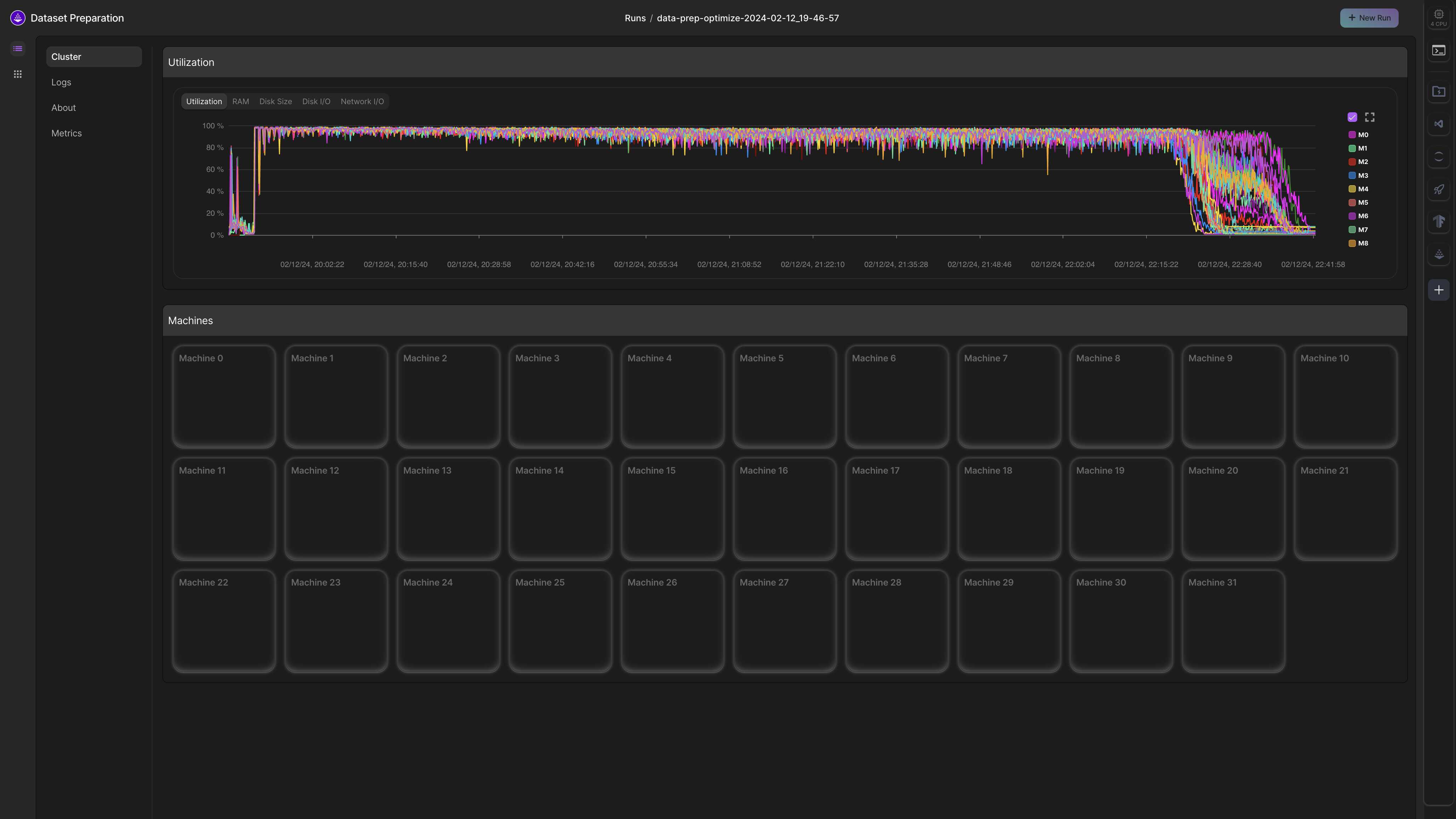
Parallelize data transforms
Transformations with LitData are linearly parallelizable across machines on Lightning Studios (see distributed optimization for how the job launch works).
For example, let's say that it takes 56 hours to embed a dataset on a single A10G machine. With LitData, this can be speed up by adding more machines in parallel
| Number of machines | Hours |
|---|---|
| 1 | 56 |
| 2 | 28 |
| 4 | 14 |
| ... | ... |
| 64 | 0.875 |
from litdata import map, Machine

map(
  ...
  num_nodes=32,
  machine=Machine.DATA_PREP,  # or omit to inherit the Studio machine
  # Prefer output_dir on /teamspace/s3_connections/... or s3://...
)
Parallelize data optimization
Same Studio job launch as map — num_nodes machines × num_workers processes; last node merges the index.
from litdata import optimize, Machine

optimize(
  ...
  num_nodes=32,
  machine=Machine.DATA_PREP,
  output_dir="/teamspace/s3_connections/my-data/optimized-v1",
)
Example: Process the LAION 400 million image dataset in 2 hours on 32 machines, each with 32 CPUs.
Start from a template
Below are templates for real-world applications of LitData at scale.
Templates: Transform datasets
| Studio | Data type | Time (minutes) | Machines | Dataset |
|---|---|---|---|---|
| Download LAION-400MILLION dataset | Image & Text | 120 | 32 | LAION-400M |
| Tokenize 2M Swedish Wikipedia Articles | Text | 7 | 4 | Swedish Wikipedia |
| Embed English Wikipedia under 5 dollars | Text | 15 | 3 | English Wikipedia |
Templates: Optimize + stream data
| Studio | Data type | Time (minutes) | Machines | Dataset |
|---|---|---|---|---|
| Benchmark cloud data-loading libraries | Image & Label | 10 | 1 | Imagenet 1M |
| Optimize GeoSpatial data for model training | Image & Mask | 120 | 32 | Chesapeake Roads Spatial Context |
| Optimize TinyLlama 1T dataset for training | Text | 240 | 32 | SlimPajama & StarCoder |
| Optimize parquet files for model training | Parquet Files | 12 | 16 | Randomly Generated data |
Used by
| Project | Description |
|---|---|
| PyHealth | Deep-learning toolkit for clinical prediction (MIMIC, eICU, OMOP, sleep, CXR). set_task() writes processed samples with LitData; SampleDataset subclasses StreamingDataset so training streams chunked EHR tensors instead of holding the cohort in RAM. |
| LBSTER | Protein and biological-sequence language models from Prescient Design (Genentech). Pre-training and concept-bottleneck models (fitness, embeddings, guided generation) stream large sequence corpora through LitData. |
| OpenSynth | Open toolkit for synthetic smart-meter / energy time series. Generated or historical meter traces are optimized and streamed for model training. |
| biomed-multi-view | IBM BiomedSciAI multi-view biomedical models. LitData is used to cache and stream paired modalities during training. |
| DEM | Phenotype and gene-mining pipeline (biodem). Large genomic / trait tables are packed into LitData chunks for repeated training passes. |
| deeptan | Graph multi-task models for multi-omics trait-associated networks. Guide graphs and expression tables are converted to LitData chunks before GNN training. |
| datarax | Data tooling with an optional cloud-streaming extra that uses LitData to read remote datasets without a full local copy. |
| fasr | Speech ASR framework. The LitData extra streams audio and transcripts for training instead of random-access file lists. |
Skills
Coding agents (Cursor, Claude Code, and others) should load the LitData skill instead of guessing the API.
npx skills add Lightning-AI/litData
Useful options: -g (user-global), -a cursor (Cursor only), -y (non-interactive). In this repo the skill already lives at .claude/skills/litdata/. Installer: skills CLI.
Start at SKILL.md, then load reference/using-litdata.md before writing examples.
| File | When to load |
|---|---|
| SKILL.md | Triggers, public API, traps |
| using-litdata.md | Optimize / stream / raw / modality cookbook |
| streaming.md | Read path, shuffle, resume, serializers |
| processing.md | optimize / map orchestration |
| data-movement.md | Download / upload / FUSE vs direct I/O |
| multi-node.md | Studio num_nodes jobs |
| resolver.md | Paths, URLs, Studio mounts |
| storage-format.md | Chunks, index.json, writer / reader |
| cache-and-chunk-lifecycle.md | Prefetch and eviction |
| env-vars.md | LITDATA_* and DATA_OPTIMIZER_* |
| keyed-lookup.md | key_fn, dataset_update |
| debugging.md | enable_tracer, Litracer |
| benchmarking.md | Fair benches |
| lightning-studio.md | Studio env and credentials |
| testing.md | Pytest / CI |
| contributing.md | PR / lint path |
Offline streaming what-if (not the Python package): simulator/ (litsim).
Community
LitData is a community project accepting contributions - Let's make the world's most advanced AI data processing framework.
💬 Get help on Discord
📋 License: Apache 2.0
Citation
@misc{litdata2023,
  author       = {Thomas Chaton and Lightning AI},
  title        = {LitData: Transform datasets at scale. Optimize datasets for fast AI model training.},
  year         = {2023},
  howpublished = {\url{https://github.com/Lightning-AI/litdata}}
}
Papers with LitData
Papers that train or stream with LitData (optimize / StreamingDataset). Scholar hits for “litdata streaming” are often weather lightning data, or mention LitData only as example source code.
| Paper | Venue | How LitData is used |
|---|---|---|
| Towards Interpretable Protein Structure Prediction with Sparse Autoencoders (code) | ICLR 2025 GEM | optimize shards ESM-2 embeddings; StreamingDataset streams from S3 for multi-GPU SAE training |
| TinyLlama: An Open-Source Small Language Model (code) | arXiv 2024 | 1.1B pretrain on SlimPajama + StarCoder via Lit-GPT’s lightning.data stack (now LitData): CombinedStreamingDataset + TokensLoader |
Governance
Maintainers
- Thomas Chaton (tchaton)
- Bhimraj Yadav (bhimrazy)
- Deependu (deependujha)
Emeritus Maintainers
- Luca Antiga (lantiga)
- Justus Schock (justusschock)
- Jirka Borda (Borda)
Alumni
- Adrian Wälchli (awaelchli)
Download files
Download the file for your platform. If you're not sure which to choose, learn more about installing packages.
Source Distribution
Built Distribution
Filter files by name, interpreter, ABI, and platform.
If you're not sure about the file name format, learn more about wheel file names.
Copy a direct link to the current filters
File details
Details for the file litdata-0.2.71.tar.gz.
File metadata
- Download URL: litdata-0.2.71.tar.gz
- Upload date:
- Size: 380.7 kB
- Tags: Source
- Uploaded using Trusted Publishing? Yes
- Uploaded via: twine/6.1.0 CPython/3.13.13
File hashes
| Algorithm | Hash digest | |
|---|---|---|
| SHA256 |
2d8cc2ba5d880cf3eb55d5ab5fe93d8ccdffd7f4c0697c264b89fcdb99e63b79
|
|
| MD5 |
20f569b298f37345270fde4dffb5d56c
|
|
| BLAKE2b-256 |
a2b3c3ceb796c7681436f4900fcfac54c62c576bc7254e76545eed29cd30242c
|
Provenance
The following attestation bundles were made for litdata-0.2.71.tar.gz:
Publisher:
release-pypi.yml on Lightning-AI/litData
-
Statement:
-
Statement type:
https://in-toto.io/Statement/v1 -
Predicate type:
https://docs.pypi.org/attestations/publish/v1 -
Subject name:
litdata-0.2.71.tar.gz -
Subject digest:
2d8cc2ba5d880cf3eb55d5ab5fe93d8ccdffd7f4c0697c264b89fcdb99e63b79 - Sigstore transparency entry: 2481196295
- Sigstore integration time:
-
Permalink:
Lightning-AI/litData@a847d57ee44a394e5640e60c350e3e2ddd35ea65 -
Branch / Tag:
refs/tags/v0.2.71 - Owner: https://github.com/Lightning-AI
-
Access:
public
-
Token Issuer:
https://token.actions.githubusercontent.com -
Runner Environment:
github-hosted -
Publication workflow:
release-pypi.yml@a847d57ee44a394e5640e60c350e3e2ddd35ea65 -
Trigger Event:
release
-
Statement type:
File details
Details for the file litdata-0.2.71-py3-none-any.whl.
File metadata
- Download URL: litdata-0.2.71-py3-none-any.whl
- Upload date:
- Size: 334.8 kB
- Tags: Python 3
- Uploaded using Trusted Publishing? Yes
- Uploaded via: twine/6.1.0 CPython/3.13.13
File hashes
| Algorithm | Hash digest | |
|---|---|---|
| SHA256 |
a924d144762f0a0199a996c432a5052ebb4f8d784a195987b05d84bc4c4d9f43
|
|
| MD5 |
99303ac87991b32fe6ea40fd5d83f80e
|
|
| BLAKE2b-256 |
8fa012ee989f0007044e812dda791615d44f39e1c790c997b4602a878b1af9b5
|
Provenance
The following attestation bundles were made for litdata-0.2.71-py3-none-any.whl:
Publisher:
release-pypi.yml on Lightning-AI/litData
-
Statement:
-
Statement type:
https://in-toto.io/Statement/v1 -
Predicate type:
https://docs.pypi.org/attestations/publish/v1 -
Subject name:
litdata-0.2.71-py3-none-any.whl -
Subject digest:
a924d144762f0a0199a996c432a5052ebb4f8d784a195987b05d84bc4c4d9f43 - Sigstore transparency entry: 2481196384
- Sigstore integration time:
-
Permalink:
Lightning-AI/litData@a847d57ee44a394e5640e60c350e3e2ddd35ea65 -
Branch / Tag:
refs/tags/v0.2.71 - Owner: https://github.com/Lightning-AI
-
Access:
public
-
Token Issuer:
https://token.actions.githubusercontent.com -
Runner Environment:
github-hosted -
Publication workflow:
release-pypi.yml@a847d57ee44a394e5640e60c350e3e2ddd35ea65 -
Trigger Event:
release
-
Statement type:







