
Gaussian-LiteSplat
A minimal, portable Gaussian Splatting sandbox for rapid small-scale experimentation and performance insights in pure Python.








🚀 Overview
Gaussian LiteSplat is a fully functional Gaussian Splatting framework implemented entirely in Keras (with Torch backend support).
It’s designed as a lightweight, open-source sandbox for researchers and developers to:
- Prototype fast,
- Experiment freely, and
- Understand performance behavior in a clean, dependency-minimal environment.
Gaussian LiteSplat
A minimal, portable Gaussian Splatting sandbox for rapid small-scale experimentation and performance insights in pure Python.
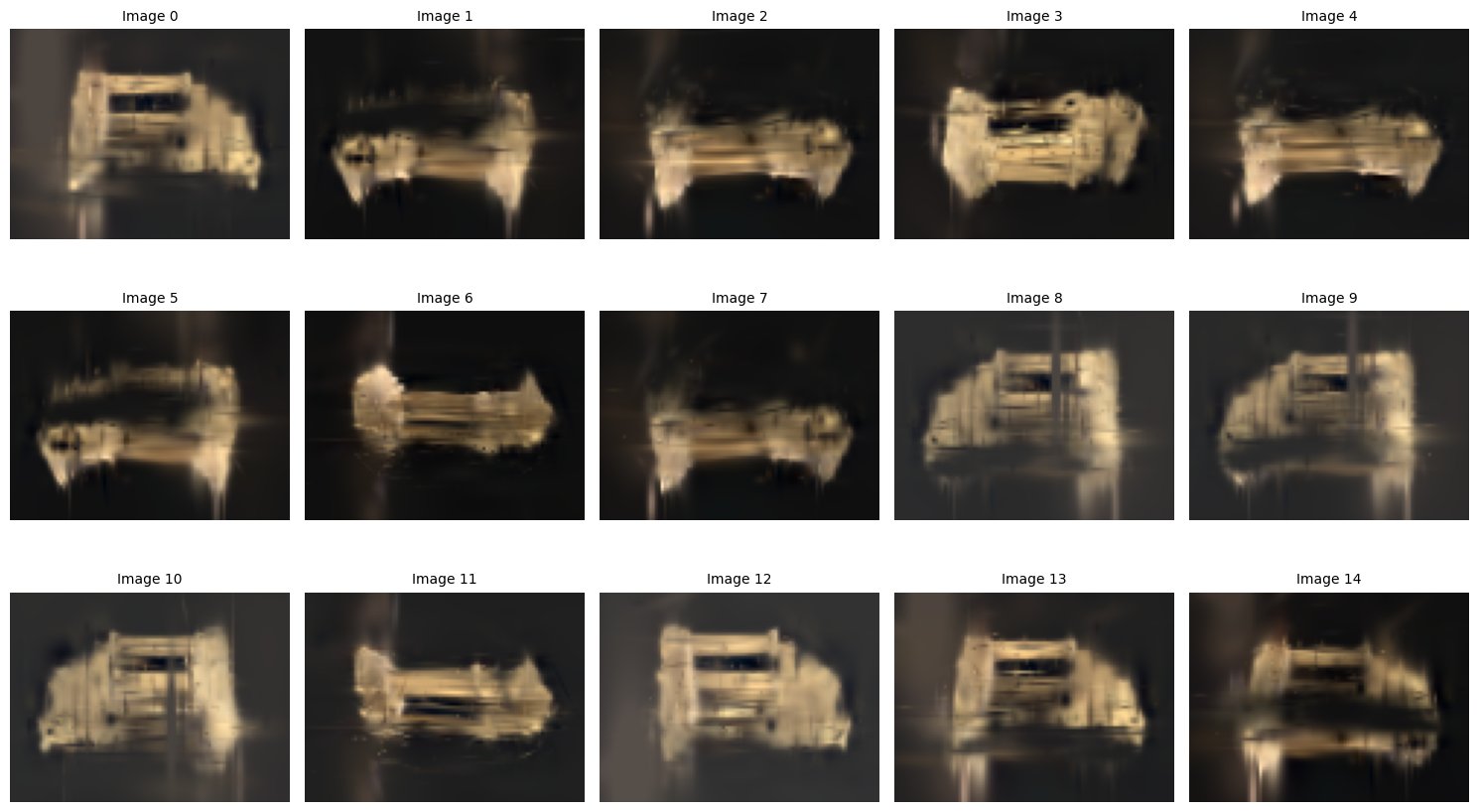
Result Showcase
2200 Gaussians · Trained 45 minutes · 15 Cameras · TempleRing dataset
TempleRing.zip — Middlebury Multiview Dataset
🧩 About Gaussian Splatting
Gaussian Splatting is a cutting-edge 3D representation technique that models a scene as a set of learnable 3D Gaussian primitives.
Each Gaussian defines a point in space with position, color, opacity, and scale — allowing highly efficient, differentiable rendering of complex scenes from multiple camera views.
Unlike mesh or voxel-based methods, Gaussian Splatting provides:
- Continuous, smooth surfaces using anisotropic Gaussian functions
- Real-time rendering capabilities with high-quality reconstruction
- Better scalability for neural radiance fields (NeRF)-like tasks
🧠 Why Gaussian LiteSplat?
Gaussian LiteSplat is a minimal, portable Gaussian Splatting sandbox implemented entirely in Keras (Torch backend) — no CUDA dependency required.
It is designed for researchers, educators, and developers who want to understand, prototype, or test Gaussian Splatting on CPU or lightweight GPU setups (including Google Colab).
Key motivations:
- Make Gaussian Splatting accessible without high-end GPUs
- Enable rapid experimentation on small-scale datasets
- Serve as a learning and benchmarking tool for further research
⚙️ Features
-
🧭 COLMAP Importer
Import scenes directly from COLMAP reconstructions (supportsSIMPLE_PINHOLE,PINHOLE, andSIMPLE_RADIAL(withoutk)). -
🔧 End-to-End Training
Import → Train → Export Gaussians in a simple, modular pipeline. -
🌈 Trainable RGB Color Support
Simplified color representation — only RGB (no spherical harmonics as in the original paper). -
🧮 Lightweight and CPU-Compatible
Runs entirely in Python and Keras (Torch backend) — no CUDA required. -
⏱️ Fast Experimentation
Train a few thousand Gaussians and start seeing results within minutes to hours. -
☁️ Google Colab Friendly
No complex environment setup — works with default Colab installs. -
🧪 Ideal For
- Low-resolution or small-scale reconstruction experiments
- Projection and efficiency testing
- Teaching or demonstrating the concept
- Quick research prototyping
💡 Summary
Gaussian LiteSplat is not a replacement for the original CUDA-accelerated implementation —
it’s a simplified, research-friendly version that emphasizes clarity, portability, and learning.
Perfect for exploring the fundamentals of Gaussian Splatting on any machine, even without GPU support.
⚙️ Installation
Gaussian LiteSplat can be installed in two ways depending on your use case:
🪶 Option 1 — Minimal Framework Installation
Use this if you only need the core Gaussian LiteSplat framework for importing, training, and rendering:
!pip install git+https://github.com/abhaskumarsinha/Gaussian-LiteSplat.git
This installs only the main package and its runtime dependencies — perfect for Google Colab, light experiments, or embedding into your own projects.
🧰 Option 2 — Full Development Installation
Use this if you want the complete toolkit, including benchmarking scripts, training templates, and utilities for end-to-end experiments.
!git clone https://github.com/abhaskumarsinha/Gaussian-LiteSplat.git
%cd Gaussian-LiteSplat
!pip install -r requirements.txt
This setup includes:
- Benchmarking utilities
- Dataset templates
- Predefined training configurations
- Example scripts for reproducing results
✅ Tip: Both installations work seamlessly on CPU and GPU (if available). No CUDA setup is required — everything runs with Keras (Torch backend) out of the box.
🚀 Quick Start Example
Once installed, you can start training directly from a COLMAP reconstruction using the provided training script.
In the Gaussian-LiteSplat directory, run:
!python ./scripts/train_colmap.py \
    --colmap_scene "[path_to_COLMAP_export_in_NeRF_format]" \
    --litesplat_scene "[path_to_save_litesplat_scene]" \
    --images_dir "[path_to_COLMAP_images_dir]" \
    --output_dir "output" \
    --torch_compile \
    --output_h 76 \
    --output_w 102 \
    --total_gaussians 2200 \
    --log_level DEBUG
🖼️ Results
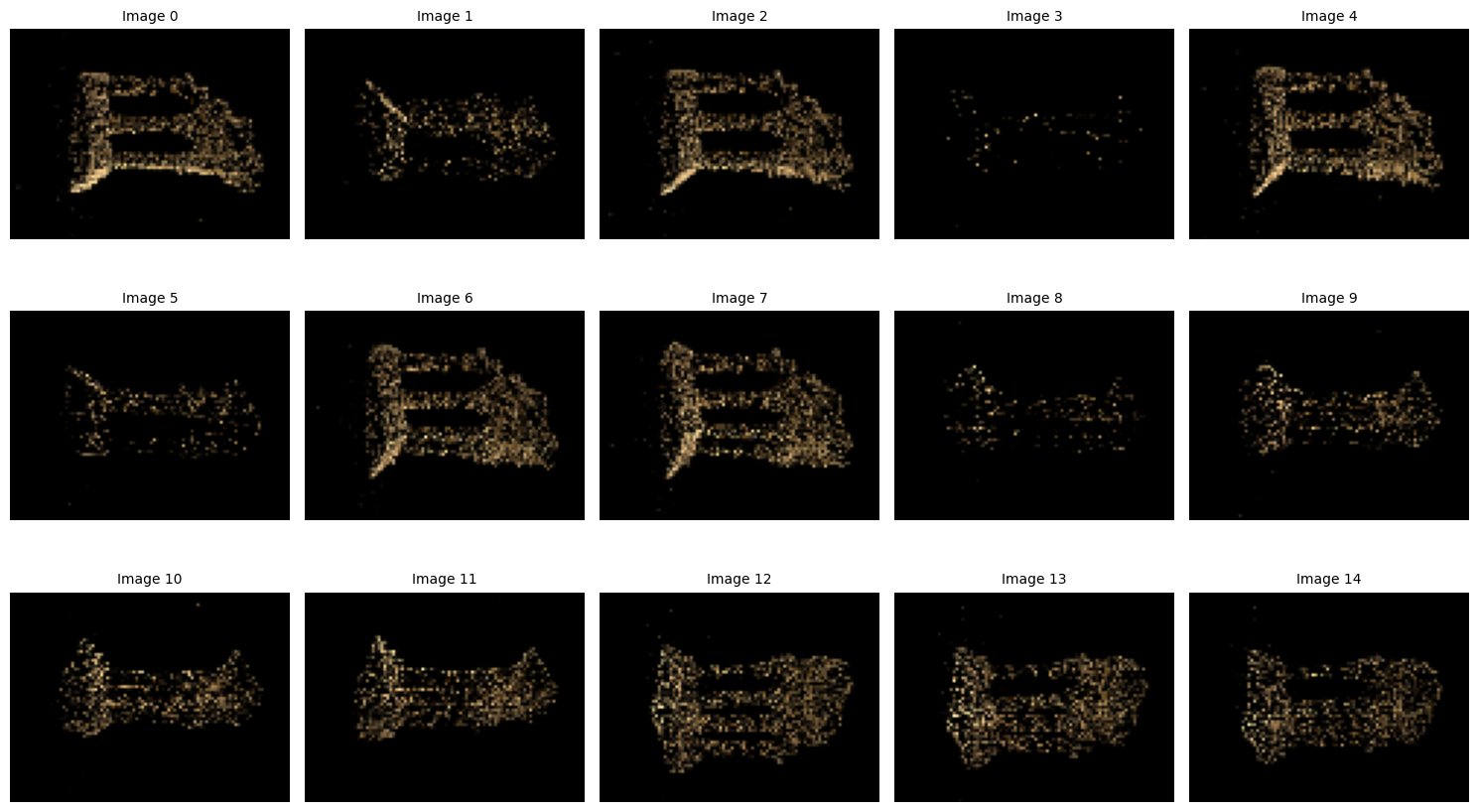
Below is an example experiment comparing the initial imported COLMAP scene and the trained Gaussian LiteSplat output.
The dataset used is TempleRing from the Middlebury Multiview Dataset,
featuring 15 camera views. The scene was trained with 2200 Gaussians for ~45 minutes on a GPU setup.
| Imported COLMAP Scene (Before Training) | Trained Gaussian LiteSplat Scene (After Training) |
|---|---|
 |
|
🧠 Observations
- The imported COLMAP scene provides sparse geometric information from Structure-from-Motion reconstruction.
- Despite no CUDA or SH color support, LiteSplat efficiently learns compact Gaussian representations suitable for small-scale research.
- Results begin to appear within minutes, making it ideal for testing projection, training dynamics, or dataset preprocessing.
⚡ These results demonstrate that even a simple GPU, minimal implementation of Gaussian Splatting can produce
meaningful multi-view 3D reconstructions with limited hardware and simple training pipelines.
📓 Notebook Examples
To help you get started quickly, Gaussian LiteSplat includes a set of ready-to-run Jupyter notebooks
available in the /notebooks directory of the repository.
These notebooks demonstrate:
- 🔹 End-to-end workflow — importing a COLMAP scene, training Gaussians, and visualizing results
- 🔹 Step-by-step explanation of LiteSplat internals (renderer, projection, and training loop)
- 🔹 Example experiments for benchmarking and low-Gaussian-resolution studies
- 🔹 Visualization utilities for comparing COLMAP vs trained LiteSplat scenes
Each notebook is Colab-compatible — simply open it in Google Colab with no additional installations required.
Just make sure to select the Torch backend for Keras if prompted.
References
- Kerbl, Bernhard, et al. "3D Gaussian splatting for real-time radiance field rendering." ACM Trans. Graph. 42.4 (2023): 139-1.
📚 Citation
If you find Gaussian LiteSplat useful in your research, teaching, or experimentation, please consider citing it:
@misc{Sinha2025GaussianLiteSplat,
  author       = {Abhas Kumar Sinha},
  title        = {Gaussian LiteSplat: A Minimal, Portable Gaussian Splatting Framework in Keras},
  year         = {2025},
  howpublished = {\url{https://github.com/abhaskumarsinha/Gaussian-LiteSplat}},
  note         = {A simplified, CPU-compatible Gaussian Splatting implementation for small-scale experimentation and research.}
}
1 maintainer

Metadata
1 maintainer
Release files for litesplat 0.1.1
For a detailed explanation of source distributions (sdists) and built distributions (wheels), please see the package formats documentation.
Source distribution (sdist)
| File | Size | Uploaded | Provenance | Actions |
|---|---|---|---|---|
| litesplat-0.1.1.tar.gz | 23.1 kB | With provenance | Details for litesplat-0.1.1.tar.gz |
Built distribution (wheel)
| File | Interpreter | ABI | Platform | Actions Reset |
|---|---|---|---|---|
| litesplat-0.1.1-py3-none-any.whl | Python 3 | none | any | Details for litesplat-0.1.1-py3-none-any.whl |
Total release size: 44.4 kB
Release files / litesplat-0.1.1.tar.gz
| Download URL | litesplat-0.1.1.tar.gz |
|---|---|
| Size | 23.1 kB |
| Tags | Source |
|
SHA-256 checksum How to use checksums |
962aac302d63fd02469ec0b11406d526c57d3230a2a746cd0f2da8005fb3f6e3
|
|
BLAKE2b-256 checksum How to use checksums |
41f68a9f69985ebaceb22d27652dcbf8cbbea5055290604374a4fa72b4a1e89a
|
| Upload date | |
|
Uploaded using Trusted Publishing? What is trusted publishing? |
Yes |
| Uploaded via |
twine/6.1.0 CPython/3.13.7
|
Provenance
Provenance describes where a file came from. On PyPI, provenance is shared via attestations, which provide a verifiable record of the build or publishing details. View details, limitations and caveats.


PyPI Publish Attestation
PyPI verified that this artifact, at this checksum, originated from the publisher listed below.
Signed by GitHub Actions, verified by PyPI on Nov 7, 2025.
Transparency logRelease files / litesplat-0.1.1-py3-none-any.whl
| Download URL | litesplat-0.1.1-py3-none-any.whl |
|---|---|
| Size | 21.3 kB |
| Tags | Python 3 |
|
SHA-256 checksum How to use checksums |
08c3d6bdb89f7819ff3485a77d020a21c17ee06785a2927b389ae3eab6bb9d2d
|
|
BLAKE2b-256 checksum How to use checksums |
73a23098e762b91f5f921d1a6eb8b68bd522e54df2921107e271cb4d3e8ab54f
|
| Upload date | |
|
Uploaded using Trusted Publishing? What is trusted publishing? |
Yes |
| Uploaded via |
twine/6.1.0 CPython/3.13.7
|
Provenance
Provenance describes where a file came from. On PyPI, provenance is shared via attestations, which provide a verifiable record of the build or publishing details. View details, limitations and caveats.
PyPI Publish Attestation
PyPI verified that this artifact, at this checksum, originated from the publisher listed below.
Signed by GitHub Actions, verified by PyPI on Nov 7, 2025.
Transparency logSecurity for litesplat 0.1.1
Provenance
Provenance describes where a file came from. On PyPI, provenance is shared via attestations, which provide a verifiable record of the build or publishing details. View details, limitations and caveats.
Full provenance
Both files in this release have been uploaded with provenance metadata.
Attestation for litesplat-0.1.1.tar.gz
PyPI Publish Attestation
PyPI verified that this artifact, at this checksum, originated from the publisher listed below.
Signed by GitHub Actions, verified by PyPI on Nov 7, 2025.
Transparency logA note on package security
PyPI is a repository for distributing packages, not a service for auditing them. While third-party security researchers and our staff do their best to detect and remove malicious packages, PyPI cannot guarantee the quality, security or suitability of any given package.
To learn more about protecting yourself from malicious actors, visit our package security documentation.














