
LiteSplat — A minimal, portable Gaussian Splatting sandbox for rapid small-scale experimentation and performance insights in pure Python and Keras.

Project description
Gaussian-LiteSplat
A minimal, portable Gaussian Splatting sandbox for rapid small-scale experimentation and performance insights in pure Python.








🚀 Overview
Gaussian LiteSplat is a fully functional Gaussian Splatting framework implemented entirely in Keras (with Torch backend support).
It’s designed as a lightweight, open-source sandbox for researchers and developers to:
- Prototype fast,
- Experiment freely, and
- Understand performance behavior in a clean, dependency-minimal environment.
Gaussian LiteSplat
A minimal, portable Gaussian Splatting sandbox for rapid small-scale experimentation and performance insights in pure Python.
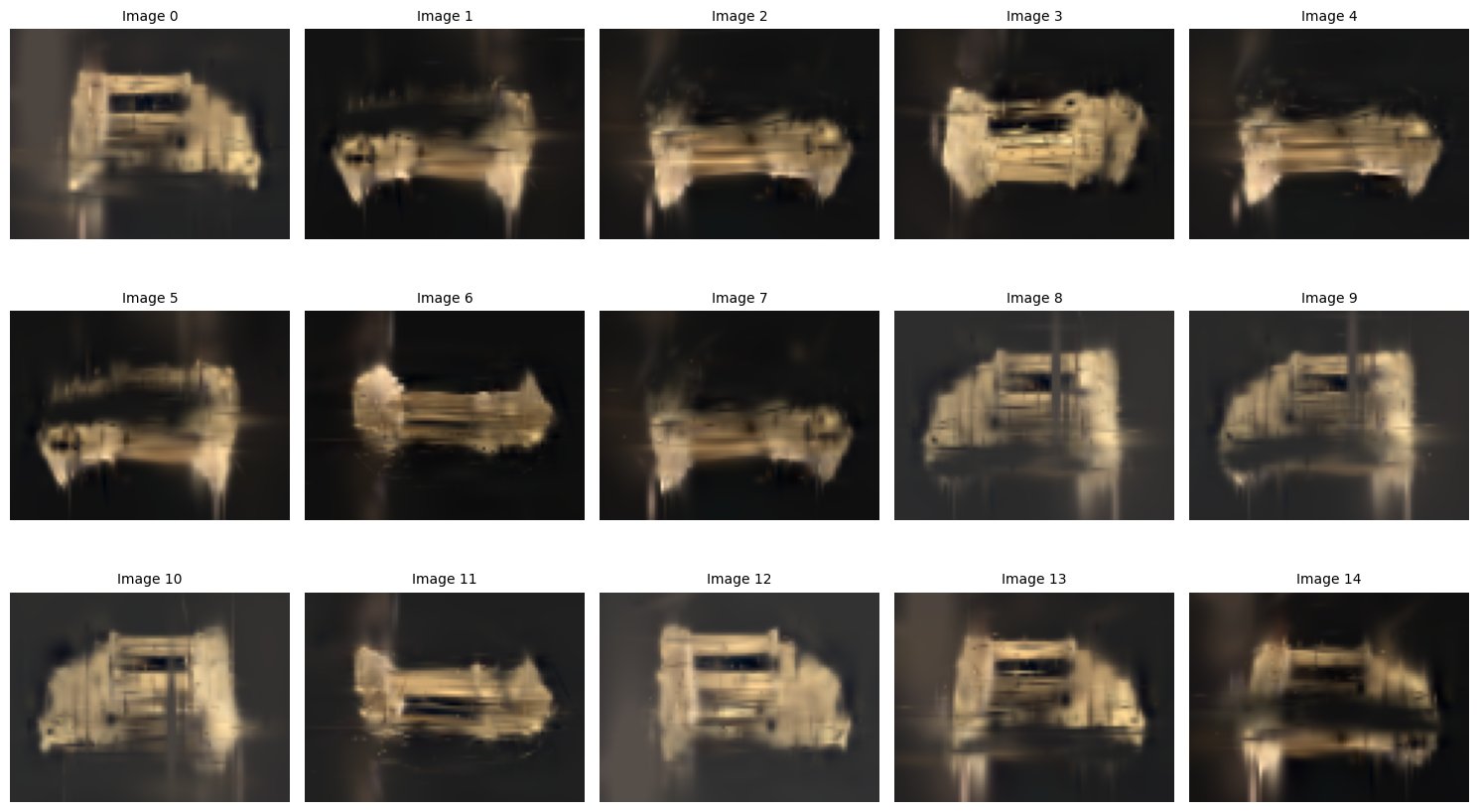
Result Showcase
2200 Gaussians · Trained 45 minutes · 15 Cameras · TempleRing dataset
TempleRing.zip — Middlebury Multiview Dataset
🧩 About Gaussian Splatting
Gaussian Splatting is a cutting-edge 3D representation technique that models a scene as a set of learnable 3D Gaussian primitives.
Each Gaussian defines a point in space with position, color, opacity, and scale — allowing highly efficient, differentiable rendering of complex scenes from multiple camera views.
Unlike mesh or voxel-based methods, Gaussian Splatting provides:
- Continuous, smooth surfaces using anisotropic Gaussian functions
- Real-time rendering capabilities with high-quality reconstruction
- Better scalability for neural radiance fields (NeRF)-like tasks
🧠 Why Gaussian LiteSplat?
Gaussian LiteSplat is a minimal, portable Gaussian Splatting sandbox implemented entirely in Keras (Torch backend) — no CUDA dependency required.
It is designed for researchers, educators, and developers who want to understand, prototype, or test Gaussian Splatting on CPU or lightweight GPU setups (including Google Colab).
Key motivations:
- Make Gaussian Splatting accessible without high-end GPUs
- Enable rapid experimentation on small-scale datasets
- Serve as a learning and benchmarking tool for further research
⚙️ Features
-
🧭 COLMAP Importer
Import scenes directly from COLMAP reconstructions (supportsSIMPLE_PINHOLE,PINHOLE, andSIMPLE_RADIAL(withoutk)). -
🔧 End-to-End Training
Import → Train → Export Gaussians in a simple, modular pipeline. -
🌈 Trainable RGB Color Support
Simplified color representation — only RGB (no spherical harmonics as in the original paper). -
🧮 Lightweight and CPU-Compatible
Runs entirely in Python and Keras (Torch backend) — no CUDA required. -
⏱️ Fast Experimentation
Train a few thousand Gaussians and start seeing results within minutes to hours. -
☁️ Google Colab Friendly
No complex environment setup — works with default Colab installs. -
🧪 Ideal For
- Low-resolution or small-scale reconstruction experiments
- Projection and efficiency testing
- Teaching or demonstrating the concept
- Quick research prototyping
💡 Summary
Gaussian LiteSplat is not a replacement for the original CUDA-accelerated implementation —
it’s a simplified, research-friendly version that emphasizes clarity, portability, and learning.
Perfect for exploring the fundamentals of Gaussian Splatting on any machine, even without GPU support.
⚙️ Installation
Gaussian LiteSplat can be installed in two ways depending on your use case:
🪶 Option 1 — Minimal Framework Installation
Use this if you only need the core Gaussian LiteSplat framework for importing, training, and rendering:
!pip install git+https://github.com/abhaskumarsinha/Gaussian-LiteSplat.git
This installs only the main package and its runtime dependencies — perfect for Google Colab, light experiments, or embedding into your own projects.
🧰 Option 2 — Full Development Installation
Use this if you want the complete toolkit, including benchmarking scripts, training templates, and utilities for end-to-end experiments.
!git clone https://github.com/abhaskumarsinha/Gaussian-LiteSplat.git
%cd Gaussian-LiteSplat
!pip install -r requirements.txt
This setup includes:
- Benchmarking utilities
- Dataset templates
- Predefined training configurations
- Example scripts for reproducing results
✅ Tip: Both installations work seamlessly on CPU and GPU (if available). No CUDA setup is required — everything runs with Keras (Torch backend) out of the box.
🚀 Quick Start Example
Once installed, you can start training directly from a COLMAP reconstruction using the provided training script.
In the Gaussian-LiteSplat directory, run:
!python ./scripts/train_colmap.py \
    --colmap_scene "[path_to_COLMAP_export_in_NeRF_format]" \
    --litesplat_scene "[path_to_save_litesplat_scene]" \
    --images_dir "[path_to_COLMAP_images_dir]" \
    --output_dir "output" \
    --torch_compile \
    --output_h 76 \
    --output_w 102 \
    --total_gaussians 2200 \
    --log_level DEBUG
🖼️ Results
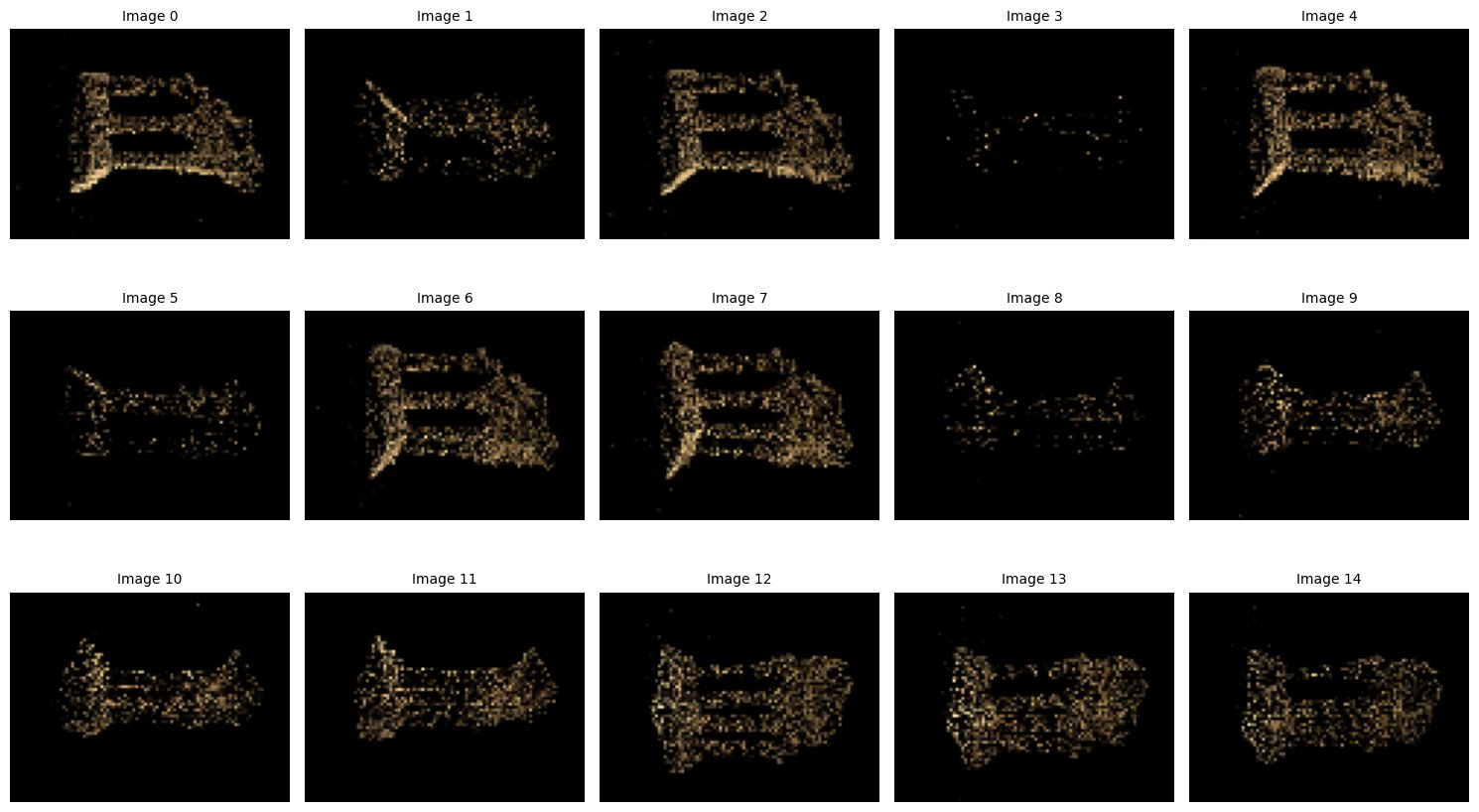
Below is an example experiment comparing the initial imported COLMAP scene and the trained Gaussian LiteSplat output.
The dataset used is TempleRing from the Middlebury Multiview Dataset,
featuring 15 camera views. The scene was trained with 2200 Gaussians for ~45 minutes on a CPU-only setup.
| Imported COLMAP Scene (Before Training) | Trained Gaussian LiteSplat Scene (After Training) |
|---|---|
 |
|
🧠 Observations
- The imported COLMAP scene provides sparse geometric information from Structure-from-Motion reconstruction.
- Despite no CUDA or SH color support, LiteSplat efficiently learns compact Gaussian representations suitable for small-scale research.
- Results begin to appear within minutes, making it ideal for testing projection, training dynamics, or dataset preprocessing.
⚡ These results demonstrate that even a CPU-based, minimal implementation of Gaussian Splatting can produce
meaningful multi-view 3D reconstructions with limited hardware and simple training pipelines.
📓 Notebook Examples
To help you get started quickly, Gaussian LiteSplat includes a set of ready-to-run Jupyter notebooks
available in the /notebooks directory of the repository.
These notebooks demonstrate:
- 🔹 End-to-end workflow — importing a COLMAP scene, training Gaussians, and visualizing results
- 🔹 Step-by-step explanation of LiteSplat internals (renderer, projection, and training loop)
- 🔹 Example experiments for benchmarking and low-Gaussian-resolution studies
- 🔹 Visualization utilities for comparing COLMAP vs trained LiteSplat scenes
Each notebook is Colab-compatible — simply open it in Google Colab with no additional installations required.
Just make sure to select the Torch backend for Keras if prompted.
References
- Kerbl, Bernhard, et al. "3D Gaussian splatting for real-time radiance field rendering." ACM Trans. Graph. 42.4 (2023): 139-1.
📚 Citation
If you find Gaussian LiteSplat useful in your research, teaching, or experimentation, please consider citing it:
@misc{Sinha2025GaussianLiteSplat,
  author       = {Abhas Kumar Sinha},
  title        = {Gaussian LiteSplat: A Minimal, Portable Gaussian Splatting Framework in Keras},
  year         = {2025},
  howpublished = {\url{https://github.com/abhaskumarsinha/Gaussian-LiteSplat}},
  note         = {A simplified, CPU-compatible Gaussian Splatting implementation for small-scale experimentation and research.}
}
Release history Release notifications | RSS feed


Download files
Download the file for your platform. If you're not sure which to choose, learn more about installing packages.
Source Distribution
Built Distribution
Filter files by name, interpreter, ABI, and platform.
If you're not sure about the file name format, learn more about wheel file names.
Copy a direct link to the current filters
File details
Details for the file litesplat-0.1.0.tar.gz.
File metadata
- Download URL: litesplat-0.1.0.tar.gz
- Upload date:
- Size: 23.1 kB
- Tags: Source
- Uploaded using Trusted Publishing? Yes
- Uploaded via: twine/6.1.0 CPython/3.13.7
File hashes
| Algorithm | Hash digest | |
|---|---|---|
| SHA256 |
74968c2b4839704697ef1c7e8bf49ab41a788fe4b9616a786e0e308141878ecc
|
|
| MD5 |
2a4c29e8381683d5fce0a8205aab159d
|
|
| BLAKE2b-256 |
929fd7c6a87fc217a89ac27e72c6ca7fcc36fc07bc5301930e1e9cb9343252c3
|
Provenance
The following attestation bundles were made for litesplat-0.1.0.tar.gz:
Publisher:
python-publish.yml on abhaskumarsinha/Gaussian-LiteSplat
-
Statement:
-
Statement type:
https://in-toto.io/Statement/v1 -
Predicate type:
https://docs.pypi.org/attestations/publish/v1 -
Subject name:
litesplat-0.1.0.tar.gz -
Subject digest:
74968c2b4839704697ef1c7e8bf49ab41a788fe4b9616a786e0e308141878ecc - Sigstore transparency entry: 679152959
- Sigstore integration time:
-
Permalink:
abhaskumarsinha/Gaussian-LiteSplat@214788947780063532539565a1195dc332c74768 -
Branch / Tag:
refs/heads/main - Owner: https://github.com/abhaskumarsinha
-
Access:
public
-
Token Issuer:
https://token.actions.githubusercontent.com -
Runner Environment:
github-hosted -
Publication workflow:
python-publish.yml@214788947780063532539565a1195dc332c74768 -
Trigger Event:
workflow_dispatch
-
Statement type:
File details
Details for the file litesplat-0.1.0-py3-none-any.whl.
File metadata
- Download URL: litesplat-0.1.0-py3-none-any.whl
- Upload date:
- Size: 21.3 kB
- Tags: Python 3
- Uploaded using Trusted Publishing? Yes
- Uploaded via: twine/6.1.0 CPython/3.13.7
File hashes
| Algorithm | Hash digest | |
|---|---|---|
| SHA256 |
40fd68596d15ec08b706ba45c2b6cd24847dc3d92a7c5bf1d97d6b92a48713dc
|
|
| MD5 |
4ed5dc9ce1605980d3ab2bbc1dbe434b
|
|
| BLAKE2b-256 |
de8bf3f1b64d0f840446ade8516760244d3b2224ec6b567aad6f1c567630f648
|
Provenance
The following attestation bundles were made for litesplat-0.1.0-py3-none-any.whl:
Publisher:
python-publish.yml on abhaskumarsinha/Gaussian-LiteSplat
-
Statement:
-
Statement type:
https://in-toto.io/Statement/v1 -
Predicate type:
https://docs.pypi.org/attestations/publish/v1 -
Subject name:
litesplat-0.1.0-py3-none-any.whl -
Subject digest:
40fd68596d15ec08b706ba45c2b6cd24847dc3d92a7c5bf1d97d6b92a48713dc - Sigstore transparency entry: 679152966
- Sigstore integration time:
-
Permalink:
abhaskumarsinha/Gaussian-LiteSplat@214788947780063532539565a1195dc332c74768 -
Branch / Tag:
refs/heads/main - Owner: https://github.com/abhaskumarsinha
-
Access:
public
-
Token Issuer:
https://token.actions.githubusercontent.com -
Runner Environment:
github-hosted -
Publication workflow:
python-publish.yml@214788947780063532539565a1195dc332c74768 -
Trigger Event:
workflow_dispatch
-
Statement type:






