
Lium — Python SDK & CLI
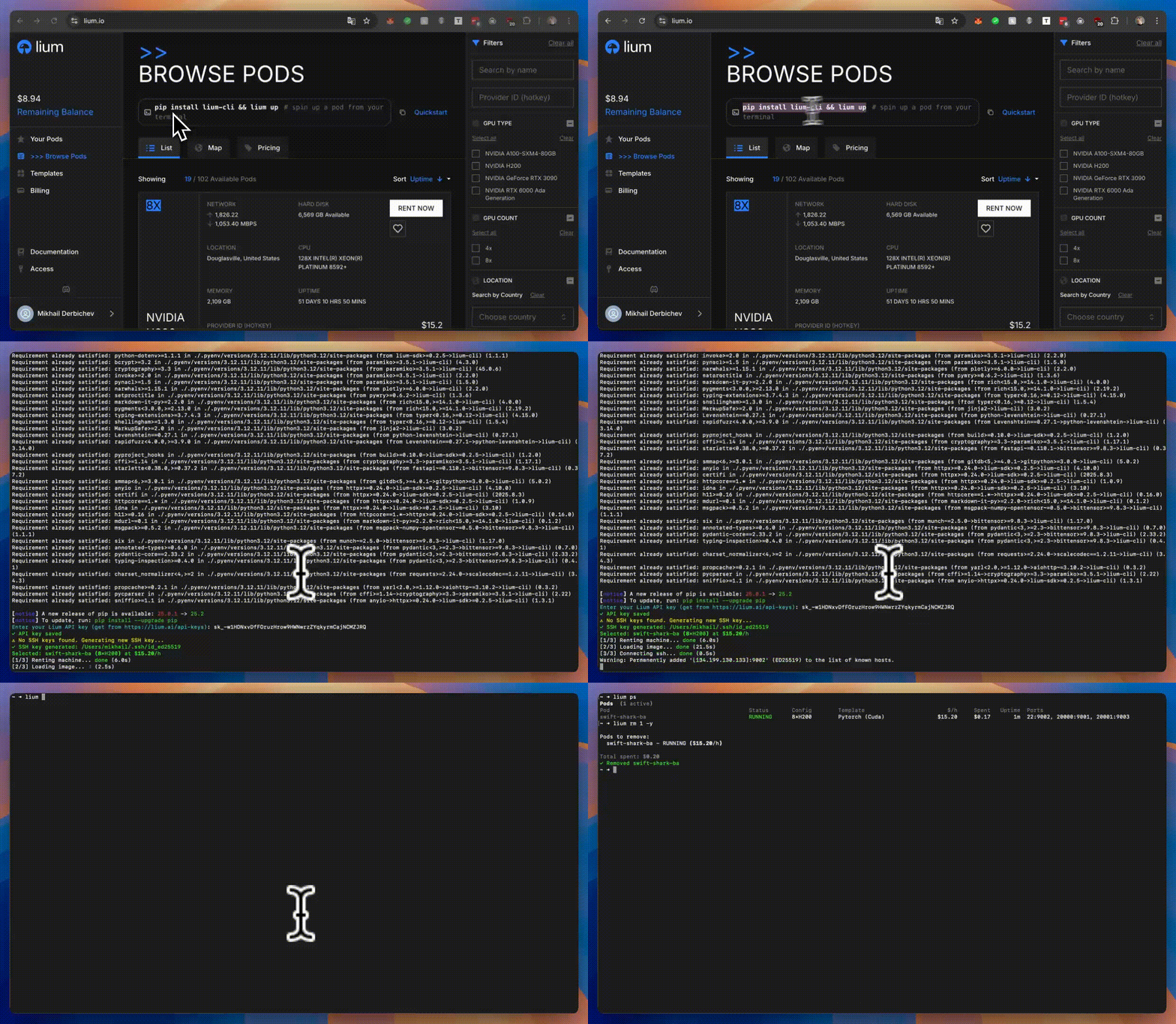
lium.io is a Python package that provides both a command-line interface and a Python SDK for managing GPU pods on the Lium platform. Install it once — use whichever interface fits the job.

Lium
Installation
Python package
pip install lium.io
Binary install (macOS amd64/arm64 / Linux amd64/arm64)
curl -fsSL https://lium.io/install.sh | bash
Fresh binary installs place a managed symlink at ~/.lium/bin/lium that points to a
versioned binary under ~/.lium/versions/<version>/lium.
Quick Start
CLI
# First-time setup
lium init

# List available nodes (GPU machines)
lium ls

# Create a pod using node index
lium up 1  # Use node #1 from previous ls

# Or create a pod using filters
lium up --gpu A100  # Auto-select best A100 node

# List your pods
lium ps

# Copy files to pod
lium scp 1 ./my_script.py

# SSH into a pod
lium ssh <pod-name>

# Stop a pod
lium rm <pod-name>
SDK
The SDK mirrors the CLI's capabilities for programmatic use. Two entry points: the @lium.machine decorator for quickly offloading isolated functions, and the Lium() client for long-lived orchestration code.
High-level decorator — annotate a function and offload work to a GPU pod:
import lium

@lium.machine(machine="A100", requirements=["torch", "transformers", "accelerate"])
def infer(prompt: str) -> str:
    from transformers import AutoTokenizer, AutoModelForCausalLM
    tokenizer = AutoTokenizer.from_pretrained("sshleifer/tiny-gpt2")
    model = AutoModelForCausalLM.from_pretrained("sshleifer/tiny-gpt2", device_map="cuda")
    tokens = tokenizer(prompt, return_tensors="pt").to("cuda")
    out = model.generate(**tokens, max_new_tokens=50)
    return tokenizer.decode(out[0], skip_special_tokens=True)

print(infer("Who discovered penicillin?"))
Direct SDK usage follows the same pattern:
from lium.sdk import Lium

lium = Lium()
node = lium.ls(gpu_type="A100")[0]
pod = lium.up(executor_id=node.id, name="demo")
ready = lium.wait_ready(pod, timeout=600)   # None only if still starting after 600 s
print(lium.exec(ready, command="nvidia-smi")["stdout"])
lium.down(ready)
wait_ready() raises PodStartError — with .pod, .status, .history and .cause (what the backend recorded, e.g. Container creation failed due to ... (failure_step: ssh_connect)) — when the pod reaches FAILED/CREATION_FAILED/STOPPED/BROKEN or disappears from the pod list, so a dead pod is not mistaken for a slow one. Pass on_poll=lambda pod, status, elapsed: ... to be told about every poll. lium up is bounded by --timeout SECONDS (default 900) for the whole rent, prints waiting for <pod>… <STATUS> (<n> s) while it waits, and exits 1 naming the pod when the budget runs out; --ready-timeout caps only the wait.
Full API reference: https://docs.lium.io/developers/sdk/reference
lium.ssh(pod) returns the pod's ssh command with -i <key> and the pinned host-key options
described under Configuration; pass refresh=True to rebuild it from the pod's current host and port
after a restart (lium.refresh_pod(pod) re-reads one pod by id or huid; LiumNotFoundError when it
is gone). lium ps --format json and lium describe (table and --json) show the same command
without -i as ssh_command (the key path lives in the SDK config, not in the pod record); the
JSON keeps the API's raw value as ssh_cmd.
Documentation
- CLI docs: https://docs.lium.io/category/cli
- SDK docs: https://docs.lium.io/developers/sdk
Binary Releases
- Supported binary targets:
darwin-amd64,darwin-arm64,linux-amd64,linux-arm64 - Maintainers can build locally with
bash scripts/build.sh [macos|linux|all] - Release artifacts publish through GitHub Releases with matching checksums
CLI Reference
The lium CLI exposes the full pod lifecycle. Run lium --help to see everything, or browse the reference below.
Core Commands
lium init- Initialize configuration (API key, SSH keys)lium ls [GPU_TYPE]- List available nodeslium up [NODE_ID]- Create a pod (use node ID or filters like--gpu,--count,--country)lium ps- List active pods; the#column is the row numberrm/ssh/exec/scpaccept in the same shell, for 10 minutes, and only while the pod shown on that row is still listed. Use the huid in scripts.lium describe <POD>- Full manifest of one pod: ports, GPU, template, billing, last lifecycle event (why it is REBOOT_FAILED/BROKEN) and the node's disk health (add--jsonfor machine-readable output). A deleted pod can still be described by its id: you get the events the backend kept for it and the reason it went away.lium ssh <POD>- SSH into a podlium exec <POD> <COMMAND>- Execute command on podlium scp <POD> <LOCAL_FILE> [REMOTE_PATH]- Copy files to pods (add-dto download from pods)lium rsync <POD> <LOCAL_DIR> [REMOTE_PATH]- Sync directories to podslium rm <POD>- Remove/stop a pod (--name-onlyto refuselium psrow numbers in scripts)lium reboot <POD>- Reboot a podlium audit [--pod POD] [--since 24h] [--key ID]- Who did what to the account's pods, and when: every rent, reboot, edit and delete with the session or API key that requested it (add--jsonfor machine-readable output)lium update <POD>- Install Jupyter on a podlium templates [SEARCH]- List available Docker templateslium fund- Fund account with TAO from Bittensor wallet
Volume Commands
lium volumes list- List all volumeslium volumes new <NAME>- Create a new volumelium volumes rm <VOLUME>- Remove a volume
Backup Commands
lium bk show <POD>- Show backup configuration for a podlium bk set <POD> --path <PATH>- Configure automatic backupslium bk logs <POD>- View backup logslium bk now <POD>- Trigger immediate backuplium bk cancel --id <BACKUP_ID>- Cancel an active backup and retain its historylium bk delete --id <BACKUP_ID>- Delete stored data for a completed backuplium bk restore <POD> --id <BACKUP_ID>- Restore from backuplium bk restore-cancel --id <RESTORE_ID>- Cancel an active restorelium bk rm <POD>- Remove backup configuration
Schedule Commands
lium schedules list- List scheduled terminationslium schedules rm <POD>- Cancel scheduled termination
Configuration Commands
lium config show- Show all configurationlium config get <KEY>- Get configuration valuelium config set <KEY> <VALUE>- Set configuration valuelium config unset <KEY>- Remove configuration keylium config edit- Edit configuration filelium config path- Show configuration file pathlium config reset- Reset all configuration
Provider Commands
lium provider … is the provider-side CLI for Bittensor Subnet 51 — full automation parity with the portal frontend at lium.io/portal: portal authentication, node lifecycle, central-miner-server configuration, batch sync, billing, and machine-request queries. Hotkey registration is still handled separately via btcli subnet register.
Group-level flags inherited by every subcommand: -w/--coldkey, -k/--hotkey, --portal-url, --json, --debug, -y/--yes, --dry-run. Persist wallet identity once with lium config set provider.coldkey <NAME> and lium config set provider.hotkey <NAME>. Spend-affecting subcommands run a persona prompt unless --yes or LIUM_PROVIDER_ACK=1 is set.
lium provider portal {login,logout,whoami}- Manage the cached portal JWTlium provider status [--netuid 51]- Aggregated provider snapshot (registration, portal session, nodes, validator weights)lium provider node list|get|add|rm|update-price|update-gpu- Node lifecycle on the portallium provider node min-gpu set|unset <NODE_ID> [COUNT]- Min GPU count for rental matchmakinglium provider node pods <NODE_ID>- Pods currently rented on a nodelium provider node machine-requests <NODE_ID>- Pending tenant requests on a nodelium provider node notice-period set|unset <NODE_ID>- Open/close a maintenance notice periodlium provider node notify-added <NODE_ID> --request-id <REQ>- Mark a tenant machine request fulfilledlium provider config show|opt-in|opt-out|set-email|set-subscriptions- Portal-account configuration (incl. lium.io central miner server toggle)lium provider sync from-miner-server|to-miner-server- Batch node-state sync between portal and the central miner serverlium provider billing list [--miner-hotkey HK] [--page N] [--limit N]- Paginated billing historylium provider machine-request list|get- Pending tenant machine requestslium provider machine list|estimate- Machine catalogue + reward estimates
Full reference with every flag and runnable examples: https://docs.lium.io/developers/cli/reference/provider.
Other Commands
lium theme [THEME]- Get or set UI theme (light/dark/auto)lium mine- Set up a compute subnet node/minersudo lium gpu-splitting setup [--device /dev/...] [--yes]- Prepare Docker storage for LIUM GPU splittinglium gpu-splitting check [--device /dev/...]- Inspect the host and print the GPU-splitting planlium gpu-splitting verify- Verify Docker storage matches LIUM GPU-splitting requirements
Command Examples
# Filter nodes by GPU type
lium ls H100
lium ls A100

# Create pod with node index
lium up 1 --name my-pod --yes

# Create pod with filters (auto-selects best node)
lium up --gpu A100 --count 8 --name my-pod --yes
lium up --gpu H200 --country US

# Create pod with specific template
lium up 1 --template_id <TEMPLATE_ID> --yes

# Set up node bootstrap flow
lium mine --auto --hotkey <HOTKEY>

# Provider-portal automation (same surface as the portal frontend)
lium config set provider.coldkey miner-prod        # one-time: persist wallet identity
lium config set provider.hotkey  miner-1
lium provider portal login                         # JWT exchange via hotkey signature
lium provider status                               # registration, portal session, nodes, weights
lium provider node list --limit 50
lium provider node add --gpu-type "NVIDIA H200 NVL" --gpu-count 8 \
    --ip 203.0.113.42 --port 8080 --price 1.85 --yes
lium provider node update-price <NODE_ID> --price 2.10 --yes
lium provider config opt-in --yes                  # use lium.io's central miner server
lium provider machine estimate --gpu-type "NVIDIA H200 NVL" --gpu-count 8
lium provider --json status                        # JSON envelope for scripts/agents

# Inspect or configure Docker storage for GPU splitting (Ubuntu/Debian + systemd, run setup as root)
lium gpu-splitting check
sudo lium gpu-splitting setup --yes
lium gpu-splitting verify

# Create pod with volume
lium up 1 --volume id:<VOLUME_HUID>
lium up 1 --volume new:name=mydata,desc="My dataset"

# Create pod with auto-termination
lium up 1 --ttl 6h                    # Terminate after 6 hours
lium up 1 --until "today 23:00"       # Terminate at 11 PM today

# Create pod with Jupyter
lium up 1 --jupyter --yes

# Fail (non-zero exit) if the pod exposes a different GPU count than requested or billed
lium up --gpu H200 --count 8 --verify-gpus --yes          # also counts GPUs with nvidia-smi over SSH
lium up --gpu H200 --count 8 --verify-gpus --strict-gpus  # ...and remove the pod on mismatch

# Execute commands
lium exec my-pod "nvidia-smi"
lium exec my-pod "python train.py"

# Copy files to and from pods
lium scp my-pod ./script.py                    # Copy to /root/script.py
lium scp 1 ./data.csv /root/data/             # Copy to specific directory
lium scp all ./config.json                    # Copy to all pods
lium scp 1,2,3 ./model.py /root/models/       # Copy to multiple pods
lium scp my-pod /root/output.log ./downloads -d  # Download into ./downloads directory

# Reboot pods
lium reboot my-pod                           # Reboot a single pod
lium reboot 1,2 --yes                        # Reboot pods 1 and 2 without confirmation
lium reboot all                              # Reboot all active pods
lium reboot my-pod --volume-id <VOLUME_ID>   # Reboot with a specific volume ID

# Sync directories to pods
lium rsync my-pod ./project                    # Sync to /root/project
lium rsync 1 ./data /root/datasets/           # Sync to specific directory
lium rsync all ./models                       # Sync to all pods
lium rsync 1,2,3 ./code /root/workspace/      # Sync to multiple pods

# Remove multiple pods
lium rm my-pod-1 my-pod-2
lium rm all  # Remove all pods

# Install Jupyter on existing pod
lium update my-pod

# Manage volumes
lium volumes list
lium volumes new mydata --description "My dataset"
lium volumes rm <VOLUME_HUID>

# Manage backups
lium bk show my-pod
lium bk set my-pod --path /root/data --every 24h --keep 7d
lium bk logs my-pod
lium bk now my-pod --name manual-backup
lium bk cancel --id <BACKUP_ID>
lium bk delete --id <BACKUP_ID>
lium bk restore my-pod --id <BACKUP_ID> --to /root/restore
lium bk restore-cancel --id <RESTORE_ID>
lium bk rm my-pod

# Manage schedules
lium schedules list
lium schedules rm my-pod

# Configuration management
lium config show
lium config get api.api_key
lium config set ssh.key_path /path/to/key
lium config edit

# Theme management
lium theme          # Show current theme
lium theme dark     # Set to dark theme
lium theme auto     # Auto-detect based on system

# Fund account with TAO
lium fund                           # Interactive mode
lium fund -w default -a 1.5        # Fund with specific wallet and amount
lium fund -w mywal -a 0.5 -y       # Skip confirmation
Features
- Dual Interface: Same package ships both the
liumCLI and a Python SDK (lium.sdk.Lium+@lium.machinedecorator) - Pareto Optimization:
lscommand shows optimal nodes with ★ indicator - Flexible Pod Creation: Use node index or auto-select with filters (GPU type, count, country)
- Index Selection: Use numbers from
lsoutput in commands - Full-Width Tables: Clean, readable terminal output
- Cost Tracking: See spending and hourly rates in
ps - Interactive Setup:
initcommand for easy onboarding - Volume Management: Create and attach persistent storage volumes
- Backup & Restore: Automated backups with configurable frequency and retention
- Auto-Termination: Schedule pods to terminate after duration or at specific time
- Jupyter Integration: One-command Jupyter installation on pods
- Theme Support: Light, dark, or auto-detect themes for better visibility
Configuration
Configuration is stored in ~/.lium/config.ini:
[api]
api_key = your-api-key-here

[ssh]
key_path = /home/user/.ssh/id_ed25519
You can also use environment variables:
export LIUM_API_KEY=your-api-key-here
SSH host keys of pods are pinned on first use under ~/.lium/known_hosts/<pod-id>
(lium ssh, lium up, and the SDK's exec, stream_exec, rsync). reboot, edit,
switch_template and rm drop the pin themselves (the container, and its key, are replaced).
A pod that later presents a different key is rejected — the SDK raises LiumHostKeyError,
lium ssh stops with OpenSSH's own "host identification has changed" message — after a
reboot the platform did on its own, or an interception; delete that file if the pod was
legitimately re-provisioned. Fingerprints are SHA256:…, as ssh-keygen -lf prints them.
LIUM_SSH_INSECURE=1 restores the old accept-anything behaviour (each accepted key is
reported with its fingerprint). lium ssh runs OpenSSH with an argument list built from the
pod's user, address and port; the API's connection string is never handed to a shell.
Scripts and agents (non-interactive use)
The CLI never waits on a prompt it cannot show. When stdin is not a terminal, or
LIUM_NONINTERACTIVE=1 is set, a command that would have asked a question either
takes its documented default or fails immediately (exit code 2) with a hint naming
the flag to pass:
export LIUM_API_KEY=...            # no browser login is attempted without a terminal
lium up --gpu H100 -y --no-ssh     # -y: rent without the confirmation prompt
lium rm my-pod -y                  # -y on every destructive command
lium fund -w default -a 1.5 -y     # values that would be prompted for must be passed as options
Requirements
- Python 3.9+
Development
# Clone repository
git clone https://github.com/datura-ai/lium.git
cd lium

# Install in development mode
pip install -e .
License
MIT License - see LICENSE file for details.
4 maintainers


Release files for lium.io 0.0.38
For a detailed explanation of source distributions (sdists) and built distributions (wheels), please see the package formats documentation.
Source distribution (sdist)
| File | Size | Uploaded | |
|---|---|---|---|
| lium_io-0.0.38.tar.gz | 703.9 kB | Details |
Built distribution (wheel)
| File | Interpreter | ABI | Platform | Reset |
|---|---|---|---|---|
| lium_io-0.0.38-py3-none-any.whl | Python 3 | none | any | Details |
Total release size: 1000.0 kB
Release files / lium_io-0.0.38.tar.gz
| Download URL | lium_io-0.0.38.tar.gz |
|---|---|
| Size | 703.9 kB |
| Tags | Source |
|
SHA-256 checksum How to use checksums |
fd5423f70d065fdc99bd2014f348131d15ddec82ebbefbc0af831b8f812d9f29
|
|
BLAKE2b-256 checksum How to use checksums |
fb4d1a71d747da50fe47ecb2016f1aac71fa7e60a748a5437c2e0b65c13ed211
|
| Upload date | |
|
Uploaded using Trusted Publishing? What is trusted publishing? |
Yes |
| Uploaded via |
twine/7.0.0 CPython/3.13.14
|
Provenance
Provenance describes where a file came from. On PyPI, provenance is shared via attestations, which provide a verifiable record of the build or publishing details. View details, limitations and caveats.


PyPI Publish Attestation
PyPI verified that this artifact, at this checksum, originated from the publisher listed below.
Signed by GitHub Actions, verified by PyPI on Sep 9, 2026.
Transparency logRelease files / lium_io-0.0.38-py3-none-any.whl
| Download URL | lium_io-0.0.38-py3-none-any.whl |
|---|---|
| Size | 296.1 kB |
| Tags | Python 3 |
|
SHA-256 checksum How to use checksums |
7c20a6d969ed45d8e4087e77ff9f4d7633d94bc12d1e95b33bd375cf683d8345
|
|
BLAKE2b-256 checksum How to use checksums |
816eda5a7020f35cf0981e2ba2793ad2e30b04e9aee2037ea9481d2772c0fe80
|
| Upload date | |
|
Uploaded using Trusted Publishing? What is trusted publishing? |
Yes |
| Uploaded via |
twine/7.0.0 CPython/3.13.14
|
Provenance
Provenance describes where a file came from. On PyPI, provenance is shared via attestations, which provide a verifiable record of the build or publishing details. View details, limitations and caveats.
PyPI Publish Attestation
PyPI verified that this artifact, at this checksum, originated from the publisher listed below.
Signed by GitHub Actions, verified by PyPI on Sep 9, 2026.
Transparency log













