
LiveSRT: Live Speech-to-Text & Translation
LiveSRT is a modular tool for real-time speech-to-text transcription and translation. It captures audio from your microphone (or a file), streams it to state-of-the-art AI transcription providers, and uses Large Language Models (LLMs) to correct and translate the output on the fly, displaying the results in a rich Terminal User Interface (TUI).
📺 Demo
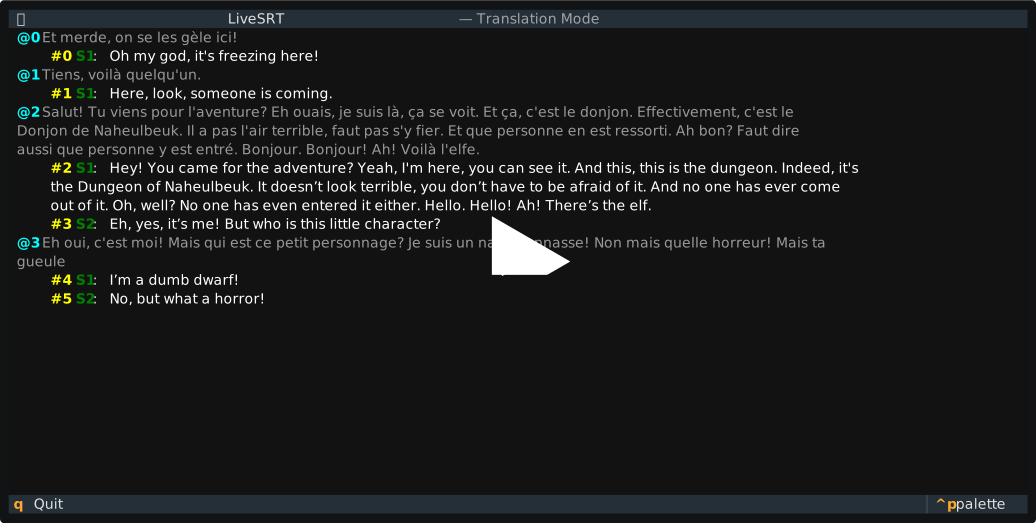
Here's a quick demonstration of LiveSRT in action:
✨ Features
- Live Transcription: Real-time speech-to-text using top-tier providers.
- Live Translation: Translate speech instantly using LLMs (Local or Remote).
- Rich TUI: A dedicated terminal interface to view live transcripts and translations side-by-side.
- Intelligent Post-processing: Uses LLMs to clean up stutters, fix ASR errors, and separate speakers.
- Audio Sources: Support for microphones and audio file replay (via ffmpeg).
- Configurable: Uses a YAML configuration file for reproducible setups.
🔌 Supported Providers
Transcription (ASR)
- AssemblyAI (Streaming API) - Default
- ElevenLabs (Realtime Speech-to-Text)
- Speechmatics (Realtime API)
Translation (LLMs)
- Local LLMs: Runs locally via
llama.cpp(e.g., Ministral, Qwen). - Remote LLMs: Support for Groq, Mistral, Google Gemini, DeepInfra, Ollama
and OpenRouter.
💡 Tip: The best quality/speed model is Ministral 3 8B. We recommend using
mistral/ministral-8b-latest, which is free with a Mistral API key.
🚀 Quick Start
As this is a PyPI package, you can run it directly without any installation
using uvx (or install via pip).
1. Initialization
First, create a default configuration file. This allows you to select your audio source, transcription backend, and translation settings.
uvx livesrt init-config
# Created config.yml
2. Authentication
Set the API key for your chosen provider (default is AssemblyAI). Keys are stored securely in your system keyring.
uvx livesrt set-token assembly_ai
3. Run
Start the application using the configuration from config.yml.
uvx livesrt run
To enable translation (if disabled in config), you can use the flag:
uvx livesrt run --translate
⚙ Configuration
LiveSRT relies on a config.yml file. You can generate a template using
livesrt init-config.
Key Configuration Sections:
- Audio: Select
micorfile. If using a microphone, find your device index usinglivesrt list-microphones. - Transcription: Choose between
assembly_ai,elevenlabs, orspeechmatics. - Translation: Toggle enabled/disabled, choose
local-llmorremote-llm, and set source/target languages. - API Keys: Manage namespaces for multiple environments.
📝 Command Reference
All commands start with livesrt. Use --help on any command for more details.
livesrt init-config
Creates a default config.yml in the current directory.
--output,-o: Path to the output file (default:config.yml).
livesrt run [OPTIONS]
Runs the main application using the loaded configuration.
--config,-c: Path to the configuration file (default:config.yml).--translate / --no-translate: Override the translation setting in the config.
livesrt set-token <provider> [OPTIONS]
Sets the API token for a specific provider securely.
<provider>choices:- ASR:
assembly_ai,elevenlabs,speechmatics - LLM:
groq,mistral,google,deepinfra,openrouter,ollama
- ASR:
--api-key,-k: (Optional) Your secret API key. If omitted, you are prompted securely.
livesrt list-microphones
Lists all available input microphone devices and their IDs. Use the resulting ID
to update the device_index in your config.yml.
💡 Usage Scenarios
Using a specific microphone
- List devices:
uvx livesrt list-microphones. - Edit
config.yml: Setaudio.device_indexto the desired ID. - Run:
uvx livesrt run.
Debugging with a file
Simulate a live stream using an audio file (requires ffmpeg):
- Edit
config.yml:audio: source_type: file file_path: "./interview.wav"
- Run:
uvx livesrt run.
Live Translation with Remote LLM
To offload processing to a fast remote API (e.g., Mistral):
- Set the key:
uvx livesrt set-token mistral. - Edit
config.yml:translation: enabled: true engine: remote-llm remote_llm: lang_to: Spanish model: mistral/ministral-8b-latest
- Run:
uvx livesrt run.
🛠 Development
To set up a local development environment:
uv sync
Development Commands
The Makefile contains helpers for common tasks:
make format: Formats the code usingruff format.make lint: Lints the code usingruff check --fix.make types: Performs static type checking usingmypy.make prettier: Formats Markdown and source files usingprettier.make clean: Runs all formatters, linters, and type checkers.
🏗 Code Structure
src/livesrt/cli.py: Entry point and CLI logic usingclick.src/livesrt/containers.py: Dependency Injection container used to wire components based on configuration.src/livesrt/tui.py: The Textual-based UI implementation.src/livesrt/transcribe/: Audio capture and ASR logic.transcripters/: Implementations for AssemblyAI, ElevenLabs, Speechmatics.audio_sources/: Mic (pyaudio) and File (ffmpeg) sources.
src/livesrt/translate/: Translation logic.local_llm.py: Wrapsllama_cppfor local inference.remote_llm.py: Wrapshttpxfor OpenAI-compatible APIs.base.py: Handles conversation context and tool-use for accurate translations.
📜 License
This project is licensed under the WTFPL (Do What The Fuck You Want To Public License).
1 maintainer

Metadata
1 maintainer
Release files for livesrt 0.1.1
For a detailed explanation of source distributions (sdists) and built distributions (wheels), please see the package formats documentation.
Source distribution (sdist)
| File | Size | Uploaded | Provenance | |
|---|---|---|---|---|
| livesrt-0.1.1.tar.gz | 31.8 kB | Without provenance | Details |
Built distribution (wheel)
| File | Interpreter | ABI | Platform | Reset |
|---|---|---|---|---|
| livesrt-0.1.1-py3-none-any.whl | Python 3 | none | any | Details |
Total release size: 75.9 kB
Release files / livesrt-0.1.1.tar.gz
| Download URL | livesrt-0.1.1.tar.gz |
|---|---|
| Size | 31.8 kB |
| Tags | Source |
|
SHA-256 checksum How to use checksums |
44526a054dd11df8d575c5c583f1d0c2ebc9cf551d8face27e45a52ed866daa4
|
|
BLAKE2b-256 checksum How to use checksums |
84c05d5007db384424049243433a7d8af2acf0e3396b015d12ad050ec3fc52d4
|
| Upload date | |
|
Uploaded using Trusted Publishing? What is trusted publishing? |
Yes |
| Uploaded via |
uv/0.9.18 {"installer":{"name":"uv","version":"0.9.18","subcommand":["publish"]},"python":null,"implementation":{"name":null,"version":null},"distro":{"name":"Ubuntu","version":"24.04","id":"noble","libc":null},"system":{"name":null,"release":null},"cpu":null,"openssl_version":null,"setuptools_version":null,"rustc_version":null,"ci":true}
|
Release files / livesrt-0.1.1-py3-none-any.whl
| Download URL | livesrt-0.1.1-py3-none-any.whl |
|---|---|
| Size | 44.0 kB |
| Tags | Python 3 |
|
SHA-256 checksum How to use checksums |
7aa96fb258c88f6ff18a4937adced8c0ac52087e67e838c0ff41f53e7f44c109
|
|
BLAKE2b-256 checksum How to use checksums |
29efffc5952660b45ced767a777b2affefdf9c87e61d9e0a1eacb42a9eaa2c86
|
| Upload date | |
|
Uploaded using Trusted Publishing? What is trusted publishing? |
Yes |
| Uploaded via |
uv/0.9.18 {"installer":{"name":"uv","version":"0.9.18","subcommand":["publish"]},"python":null,"implementation":{"name":null,"version":null},"distro":{"name":"Ubuntu","version":"24.04","id":"noble","libc":null},"system":{"name":null,"release":null},"cpu":null,"openssl_version":null,"setuptools_version":null,"rustc_version":null,"ci":true}
|
Security for livesrt 0.1.1
Provenance
Provenance describes where a file came from. On PyPI, provenance is shared via attestations, which provide a verifiable record of the build or publishing details. View details, limitations and caveats.
No provenance found
None of the files in this release were uploaded with provenance metadata.
A note on package security
PyPI is a repository for distributing packages, not a service for auditing them. While third-party security researchers and our staff do their best to detect and remove malicious packages, PyPI cannot guarantee the quality, security or suitability of any given package.














