
Live subtitles for your life

Project description
LiveSRT: Live Speech-to-Text & Translation
LiveSRT is a modular tool for real-time speech-to-text transcription and translation. It captures audio from your microphone (or a file), streams it to state-of-the-art AI transcription providers, and uses Large Language Models (LLMs) to correct and translate the output on the fly, displaying the results in a rich Terminal User Interface (TUI).
📺 Demo
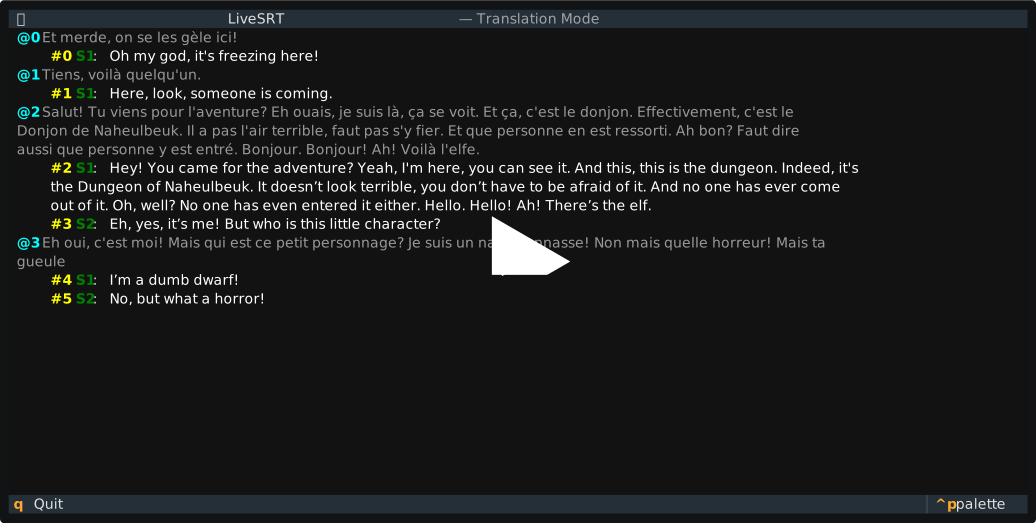
Here's a quick demonstration of LiveSRT in action:
✨ Features
- Live Transcription: Real-time speech-to-text using top-tier providers.
- Live Translation: Translate speech instantly using LLMs (Local or Remote).
- Rich TUI: A dedicated terminal interface to view live transcripts and translations side-by-side.
- Intelligent Post-processing: Uses LLMs to clean up stutters, fix ASR errors, and separate speakers.
- Audio Sources: Support for microphones and audio file replay (via ffmpeg).
- Configurable: Uses a YAML configuration file for reproducible setups.
🔌 Supported Providers
Transcription (ASR)
- AssemblyAI (Streaming API) - Default
- ElevenLabs (Realtime Speech-to-Text)
- Speechmatics (Realtime API)
Translation (LLMs)
- Local LLMs: Runs locally via
llama.cpp(e.g., Ministral, Qwen). - Remote LLMs: Support for Groq, Mistral, Google Gemini, DeepInfra, Ollama and OpenRouter.
🚀 Quick Start
As this is a PyPI package, you can run it directly without any installation
using uvx (or install via pip).
1. Initialization
First, create a default configuration file. This allows you to select your audio source, transcription backend, and translation settings.
uvx livesrt init-config
# Created config.yml
2. Authentication
Set the API key for your chosen provider (default is AssemblyAI). Keys are stored securely in your system keyring.
uvx livesrt set-token assembly_ai
3. Run
Start the application using the configuration from config.yml.
uvx livesrt run
To enable translation (if disabled in config), you can use the flag:
uvx livesrt run --translate
⚙ Configuration
LiveSRT relies on a config.yml file. You can generate a template using
livesrt init-config.
Key Configuration Sections:
- Audio: Select
micorfile. If using a microphone, find your device index usinglivesrt list-microphones. - Transcription: Choose between
assembly_ai,elevenlabs, orspeechmatics. - Translation: Toggle enabled/disabled, choose
local-llmorremote-llm, and set source/target languages. - API Keys: Manage namespaces for multiple environments.
📝 Command Reference
All commands start with livesrt. Use --help on any command for more details.
livesrt init-config
Creates a default config.yml in the current directory.
--output,-o: Path to the output file (default:config.yml).
livesrt run [OPTIONS]
Runs the main application using the loaded configuration.
--config,-c: Path to the configuration file (default:config.yml).--translate / --no-translate: Override the translation setting in the config.
livesrt set-token <provider> [OPTIONS]
Sets the API token for a specific provider securely.
<provider>choices:- ASR:
assembly_ai,elevenlabs,speechmatics - LLM:
groq,mistral,google,deepinfra,openrouter,ollama
- ASR:
--api-key,-k: (Optional) Your secret API key. If omitted, you are prompted securely.
livesrt list-microphones
Lists all available input microphone devices and their IDs. Use the resulting ID
to update the device_index in your config.yml.
💡 Usage Scenarios
Using a specific microphone
- List devices:
uvx livesrt list-microphones. - Edit
config.yml: Setaudio.device_indexto the desired ID. - Run:
uvx livesrt run.
Debugging with a file
Simulate a live stream using an audio file (requires ffmpeg):
- Edit
config.yml:audio: source_type: file file_path: "./interview.wav"
- Run:
uvx livesrt run.
Live Translation with Remote LLM
To offload processing to a fast remote API (e.g., Groq):
- Set the key:
uvx livesrt set-token groq. - Edit
config.yml:translation: enabled: true engine: remote-llm remote_llm: lang_to: Spanish model: groq/llama-3.3-70b-versatile
- Run:
uvx livesrt run.
🛠 Development
To set up a local development environment:
uv sync
Development Commands
The Makefile contains helpers for common tasks:
make format: Formats the code usingruff format.make lint: Lints the code usingruff check --fix.make types: Performs static type checking usingmypy.make prettier: Formats Markdown and source files usingprettier.make clean: Runs all formatters, linters, and type checkers.
🏗 Code Structure
src/livesrt/cli.py: Entry point and CLI logic usingclick.src/livesrt/containers.py: Dependency Injection container used to wire components based on configuration.src/livesrt/tui.py: The Textual-based UI implementation.src/livesrt/transcribe/: Audio capture and ASR logic.transcripters/: Implementations for AssemblyAI, ElevenLabs, Speechmatics.audio_sources/: Mic (pyaudio) and File (ffmpeg) sources.
src/livesrt/translate/: Translation logic.local_llm.py: Wrapsllama_cppfor local inference.remote_llm.py: Wrapshttpxfor OpenAI-compatible APIs.base.py: Handles conversation context and tool-use for accurate translations.
📜 License
This project is licensed under the WTFPL (Do What The Fuck You Want To Public License).
Release history Release notifications | RSS feed


Download files
Download the file for your platform. If you're not sure which to choose, learn more about installing packages.
Source Distribution
Built Distribution
Filter files by name, interpreter, ABI, and platform.
If you're not sure about the file name format, learn more about wheel file names.
Copy a direct link to the current filters
File details
Details for the file livesrt-0.1.0.tar.gz.
File metadata
- Download URL: livesrt-0.1.0.tar.gz
- Upload date:
- Size: 31.2 kB
- Tags: Source
- Uploaded using Trusted Publishing? Yes
- Uploaded via: uv/0.9.17 {"installer":{"name":"uv","version":"0.9.17","subcommand":["publish"]},"python":null,"implementation":{"name":null,"version":null},"distro":{"name":"Ubuntu","version":"24.04","id":"noble","libc":null},"system":{"name":null,"release":null},"cpu":null,"openssl_version":null,"setuptools_version":null,"rustc_version":null,"ci":true}
File hashes
| Algorithm | Hash digest | |
|---|---|---|
| SHA256 |
2287491a43679a2b6f8ac2d71a8235fe1e24254efb8e8ff2b68e3c6713b377f1
|
|
| MD5 |
dc1072b59e4fb9b043f48c1403211509
|
|
| BLAKE2b-256 |
f5696a2704cb030ad2144cb5efd7a95129a8c5e9cdfd2fda1298236a89dbe5b2
|
File details
Details for the file livesrt-0.1.0-py3-none-any.whl.
File metadata
- Download URL: livesrt-0.1.0-py3-none-any.whl
- Upload date:
- Size: 43.3 kB
- Tags: Python 3
- Uploaded using Trusted Publishing? Yes
- Uploaded via: uv/0.9.17 {"installer":{"name":"uv","version":"0.9.17","subcommand":["publish"]},"python":null,"implementation":{"name":null,"version":null},"distro":{"name":"Ubuntu","version":"24.04","id":"noble","libc":null},"system":{"name":null,"release":null},"cpu":null,"openssl_version":null,"setuptools_version":null,"rustc_version":null,"ci":true}
File hashes
| Algorithm | Hash digest | |
|---|---|---|
| SHA256 |
b09b0290de270a6c276fdcff48efa487773f45ffe3708431e1884411fae66b0e
|
|
| MD5 |
b17422fee43166eb7e6c9d120f9a8aa5
|
|
| BLAKE2b-256 |
7bd3408a170cd522d46514aef52981442cd4787368b422750a873d2fa0ab0ffa
|






