
Lixity






Lixity is a local workbench for authors. Explore language patterns and keep sources, claims and notes beside your manuscript. Try an invented example in your browser before installing the app for your own writing.
Open the example manuscript · Take the short tour · Install Lixity
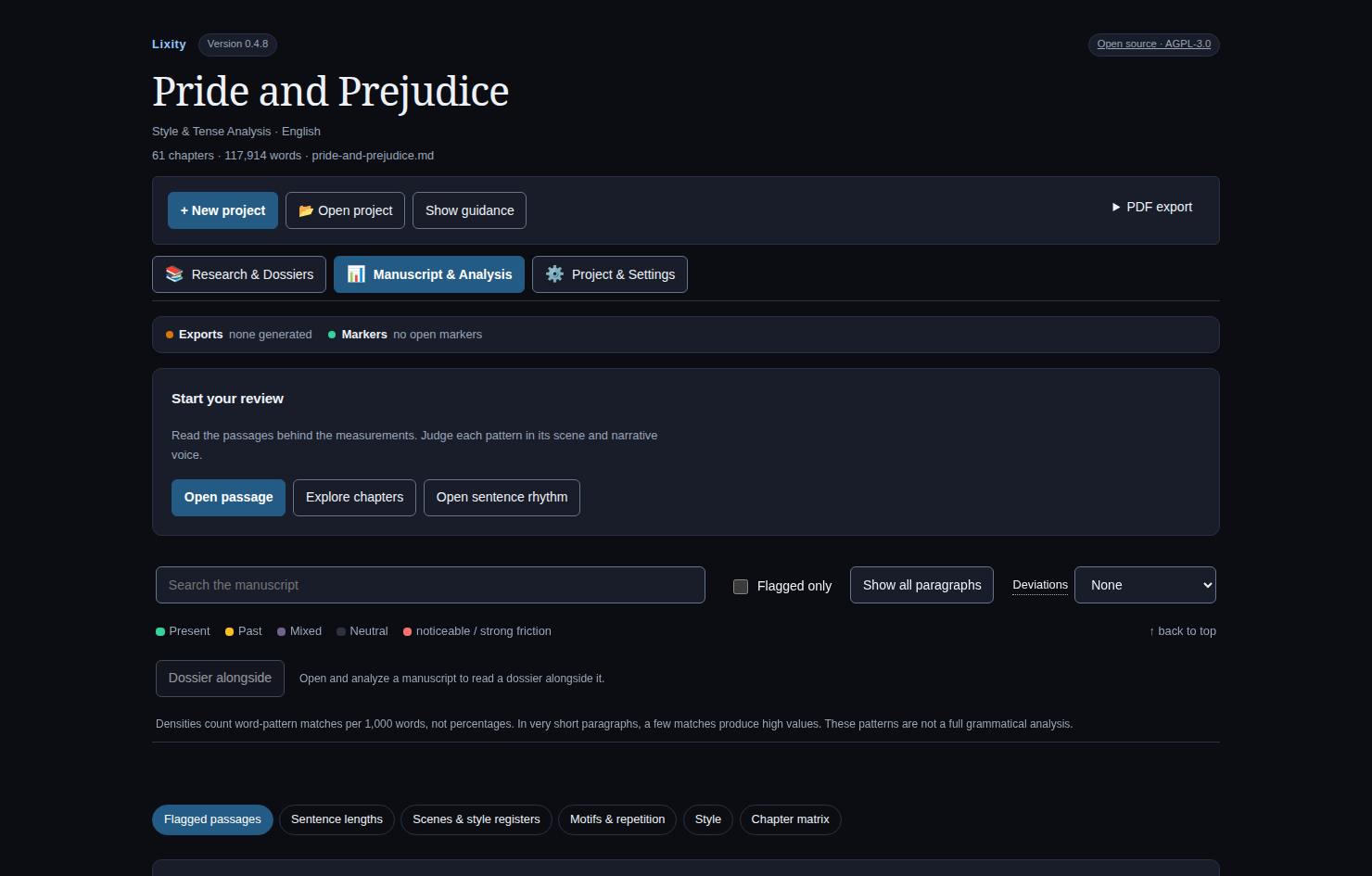
The read-only example uses six invented English chapters and credited research images. It needs no account or upload and cannot import, edit or save. More views and image credits.
Install and start
Install uv, then run on Windows, macOS or Linux:
uv tool install --python 3.12 --managed-python lixity
uv tool update-shell
Open a new terminal:
lixity --version
lixity service start --open
Choose Open Project or Analyze a manuscript, then confirm the language. English is the default; automatic detection is explicit. Built-in analysis works offline on your computer and does not grade or rewrite prose. Optional integrations have separate data boundaries.
Your first project explains the
workflow. Installation and updates
covers launchers, pinned wheels, service management and removal. After upgrading,
run lixity service restart --open and reload the browser; installing a package
does not update an already running service.
What you can do
- Manuscript & Analysis. Open paragraph values and work markers, or compare chapters against the manuscript's own patterns. Analysis can be turned on and off.
- Research & Dossiers. Link retained sources, authored claims and decisions to exact manuscript quotations. Keep a dossier alongside a passage; Zotero remains your collection tool. Retention is explicit, and archive integrity does not establish factual truth.
- Project & exports. Manage project metadata and create editorial, reading, submission or analysis PDFs, terminal reports and versioned JSON. NDA generation creates a draft without recording consent or signatures; dossier Markdown edits require explicit preview and apply. See export and project limits.
The browser app, CLI and Python API share one analysis pipeline;
lixity --help and lixity about --json describe installed capabilities.
Turn Analysis on beside the text, choose a metric and inspect its counted
passages through hover, touch or the paragraph menu. The same literal evidence
is available through lixity profile manuscript.md --layer asl --evidence.
A passage's Saved research opens its saved claim and dossier versions beside
the manuscript, with a return to the passage. See the
reader and CLI guide.
CLI workflows can reuse the project's configured manuscript; default manuscript guidance explains explicit project selection and settings scope.
English and German have the broadest analysis resources. French, Spanish, Italian, Portuguese and Dutch offer localized interfaces with narrower heuristic coverage. Language support and interpretation explain coverage, short-sample limits and unavailable measurements.
Documentation map
| Looking for | Start here |
|---|---|
| Everyday use | Usage and CLI reference · Interpret results |
| Research | Workflows and compatibility · Data model |
| Measurements | Methods · Validation |
| Integrations | API contracts · Architecture · Agent index |
| Contributing | Contributor setup and checks · Security |
In the repository, src/lixity/
contains the shared engine, CLI and UI;
tests/ verifies behavior;
docs/ holds maintained product
documentation; and samples/
contains synthetic or public-domain examples. Book-specific adapters belong in
their own projects.
Release, citation and license
The current release is v0.7.3, in the pre-1.0 development line. Historical v3.0.1 and earlier tags remain available. Product and schema versions are independent; Release notes cover archive compatibility and upgrades. See the changelog for subsequent work. The public demo follows current main and can show changes beyond the release.
Cite Lixity on Zenodo, with metadata in
CITATION.cff.
The software paper draft
describes its research context.
AGPL-3.0-or-later. Use Lixity for private or commercial writing, research and teaching, including self-publishing your book. A separate written commercial license is available for integrations that cannot meet the AGPL. Licensing guide · Full terms · Legal notice and contact.
1 maintainer

Metadata
1 maintainer
Release files for lixity 0.7.3
For a detailed explanation of source distributions (sdists) and built distributions (wheels), please see the package formats documentation.
Source distribution (sdist)
| File | Size | Uploaded | Provenance | |
|---|---|---|---|---|
| lixity-0.7.3.tar.gz | 2.0 MB | With provenance | Details |
Built distribution (wheel)
| File | Interpreter | ABI | Platform | Reset |
|---|---|---|---|---|
| lixity-0.7.3-py3-none-any.whl | Python 3 | none | any | Details |
Total release size: 3.6 MB
Release files / lixity-0.7.3.tar.gz
| Download URL | lixity-0.7.3.tar.gz |
|---|---|
| Size | 2.0 MB |
| Tags | Source |
|
SHA-256 checksum How to use checksums |
f55166a9711b92be07f36a2b06f30151b3c2104249f555a3646ef1339558ae25
|
|
BLAKE2b-256 checksum How to use checksums |
5a62dacd6dc152b4ac888bb5e00c0bff06d0a503190ad671b5b9e8152bfa0dd4
|
| Upload date | |
|
Uploaded using Trusted Publishing? What is trusted publishing? |
Yes |
| Uploaded via |
twine/7.0.0 CPython/3.13.16
|
Provenance
Provenance describes where a file came from. On PyPI, provenance is shared via attestations, which provide a verifiable record of the build or publishing details. View details, limitations and caveats.


PyPI Publish Attestation
PyPI verified that this artifact, at this checksum, originated from the publisher listed below.
Signed by GitHub Actions, verified by PyPI on Oct 21, 2026.
Transparency logRelease files / lixity-0.7.3-py3-none-any.whl
| Download URL | lixity-0.7.3-py3-none-any.whl |
|---|---|
| Size | 1.7 MB |
| Tags | Python 3 |
|
SHA-256 checksum How to use checksums |
7abbe65b9e395e3bc6d4359bca30d178c9175c993f0380ae160ec252e2a86658
|
|
BLAKE2b-256 checksum How to use checksums |
a63502fbb739db99f9dbd7e3fe2a673873cbc567c375844182d9d0abd10d8005
|
| Upload date | |
|
Uploaded using Trusted Publishing? What is trusted publishing? |
Yes |
| Uploaded via |
twine/7.0.0 CPython/3.13.16
|
Provenance
Provenance describes where a file came from. On PyPI, provenance is shared via attestations, which provide a verifiable record of the build or publishing details. View details, limitations and caveats.
PyPI Publish Attestation
PyPI verified that this artifact, at this checksum, originated from the publisher listed below.
Signed by GitHub Actions, verified by PyPI on Oct 21, 2026.
Transparency logSecurity for lixity 0.7.3
Provenance
Provenance describes where a file came from. On PyPI, provenance is shared via attestations, which provide a verifiable record of the build or publishing details. View details, limitations and caveats.
Full provenance
All 2 files in this release have been uploaded with provenance metadata.
Attestation for lixity-0.7.3.tar.gz
PyPI Publish Attestation
PyPI verified that this artifact, at this checksum, originated from the publisher listed below.
Signed by GitHub Actions, verified by PyPI on Oct 21, 2026.
Transparency logA note on package security
PyPI is a repository for distributing packages, not a service for auditing them. While third-party security researchers and our staff do their best to detect and remove malicious packages, PyPI cannot guarantee the quality, security or suitability of any given package.














