
/usr/bin/cat for the LLM era

Project description
/usr/bin/cat for LLMs
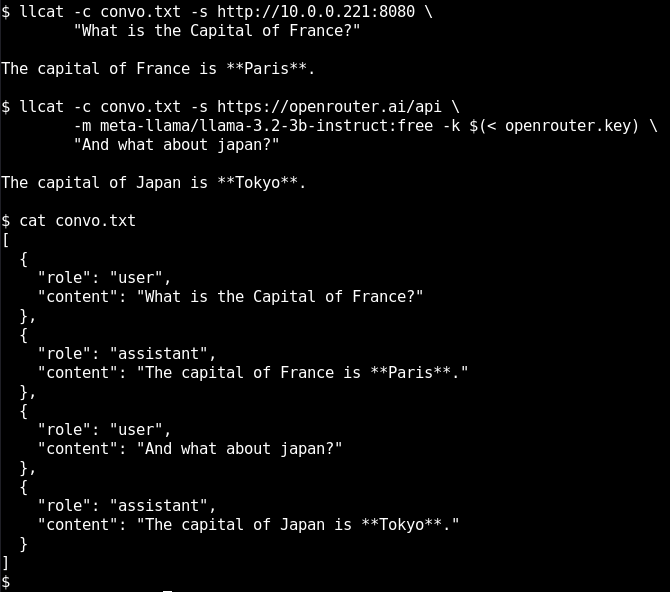
llcat is an LLM program with very little ambition in life.
That's what makes it useful.
- Pipe things into it or prompt it on the command line.
- Conversation history is an optional file.
- Tool Calling is done by using the toolcalling OpenAI spec. There's a file and a progrma example
- Servers:
OPENAI_API_BASEandLLM_BASE_URLare supported along with -s for one off.- Authentication tokens are passed with -k. You can do
$(< somefile)or whatever obfuscation you want, that's on you.
- Models are listed with the
-moption and specified with it as well.
Here's some things you can do
- pipx install llcat
- uv tool run llcat
There's no requirements.txt? That's right.
Examples
We start with Openrouter
Listing the models on openrouter
llmcat -s https://openrouter.ai/api -m
You can run that, unauthenticated, no problem.
$ llcat -s https://openrouter.ai/api \
        -m meta-llama/llama-3.2-3b-instruct:free \
        -c /tmp/convo.txt \
        -k $(cat openrouter.key) \
        "What is the capital of France?"

$ llcat -s https://openrouter.ai/api \
        -m meta-llama/llama-3.2-3b-instruct:free \
        -c /tmp/convo.txt \
        -k $(cat openrouter.key) \
        "And what about Canada?"
Let's continue it locally
$ llcat -s http://192.168.1.21:8080 \
        -c /tmp/convo.txt \
        "And what about Japan?"
Full documentation
usage: llcat [-h] [-c CONVERSATION] [-m [MODEL]] [-k KEY] [-s SERVER]
                [-tf TOOL_FILE] [-tp TOOL_PROGRAM]
                [prompt ...]

positional arguments:
  prompt                Your prompt

options:
  -h, --help            show this help message and exit
  -c, --conversation CONVERSATION
                        Conversation history file
  -m, --model [MODEL]   Model to use (or list models if no value)
  -k, --key KEY         API key for authorization
  -s, --server SERVER   Server URL (e.g., http://::1:8080)
  -tf, --tool_file TOOL_FILE
                        JSON file with tool definitions
  -tp, --tool_program TOOL_PROGRAM
                        Program to execute tool calls
Release history Release notifications | RSS feed


Download files
Download the file for your platform. If you're not sure which to choose, learn more about installing packages.
Source Distribution
Built Distribution
Filter files by name, interpreter, ABI, and platform.
If you're not sure about the file name format, learn more about wheel file names.
Copy a direct link to the current filters
File details
Details for the file llcat-0.1.0.tar.gz.
File metadata
- Download URL: llcat-0.1.0.tar.gz
- Upload date:
- Size: 4.3 kB
- Tags: Source
- Uploaded using Trusted Publishing? No
- Uploaded via: twine/6.1.0 CPython/3.13.11
File hashes
| Algorithm | Hash digest | |
|---|---|---|
| SHA256 |
6580994e2283d75698a02cbb02bde69771c377a3fb4c80c3fb73e3bd79f62e7c
|
|
| MD5 |
c5e586cb42fdf566ad127b24a3fdab58
|
|
| BLAKE2b-256 |
df645bc077ca922ac3627e0e6b80371bb4eb08271c33a3199d76dbd5139dceba
|
File details
Details for the file llcat-0.1.0-py3-none-any.whl.
File metadata
- Download URL: llcat-0.1.0-py3-none-any.whl
- Upload date:
- Size: 4.3 kB
- Tags: Python 3
- Uploaded using Trusted Publishing? No
- Uploaded via: twine/6.1.0 CPython/3.13.11
File hashes
| Algorithm | Hash digest | |
|---|---|---|
| SHA256 |
7973778cb1e6231520dd24d353adc825832c1213814cf02d87ac62360324821a
|
|
| MD5 |
afbb842afb246f26d558e46c8750ef67
|
|
| BLAKE2b-256 |
a11a3ab0e48d6a440e81c2f0413c1bb9c8c206a2f62ee3fc13f5e17d5dbc140c
|






