
/usr/bin/cat for LLMs

Project description
/usr/bin/cat for LLMs
llcat is a general-purpose CLI-based OpenAI-compatible /chat/completions caller.
It is intended to be like cURL or cat for LLMs as a stateless, transparent, explicit, low-level, composable tool for scripting and glue.
Conversations, keys, servers and other configurations are specified as command line arguments. They are not saved or stored. There is no configuration, caching, or state saved between runs.
There is no magic. Everything is surfaced and all errors are JSON parsable.
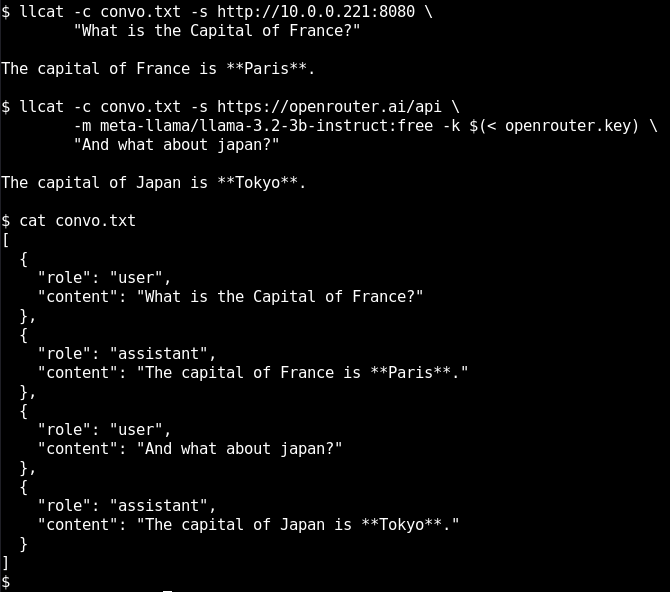
Very Quick Start
Got 0.3 seconds to spare?
List the models on OpenRouter:
uvx llcat -s https://openrouter.ai/api -m
llcat can:
- Use local or remote servers, authenticated or not.
- Store conversation history optionally, as a boring JSON file.
- Pipe things from stdin and/or be prompted on the command line.
- Do tool calling using the OpenAI spec and MCP STDIO servers.
- List and choose models, system prompts, and add attachments.
Example: Transferrable Conversations
Because conversations, models and servers are decoupled, you can easily mix and match them at any time.
Here's one conversation, hopping across models and servers.
Start a chat with Deepseek:
$ llcat -s https://openrouter.ai/api \
        -m deepseek/deepseek-r1-0528:free \
        -c /tmp/convo.txt \
        -k $(cat openrouter.key) \
        "What is the capital of France?"
Continue it with Qwen:
$ llcat -s https://openrouter.ai/api \
        -m qwen/qwen3-4b:free \
        -c /tmp/convo.txt \
        -k $(cat openrouter.key) \
        "And what about Canada?"
And finish on the local network:
$ llcat -s http://192.168.1.21:8080 \
        -c /tmp/convo.txt \
        "And what about Japan?"
Since the conversation goes to the filesystem as easily parsable JSON you can use things like inotify or fuse and push it off to a vector search backend or modify the context window between calls.
Example: Adding State
llcat's explicit syntax means lots of things are within reach.
For instance, simple wrappers can be made custom to your workflow.
Here's one way you could store state with environment variables to make invocation more convenient:
llc()        { llcat -m "$LLC_MODEL" -s "$LLC_SERVER" -k "$LLC_KEY" "$@" }
llc-model()  { LLC_MODEL=$(llcat -m  -s "$LLC_SERVER" -k "$LLC_KEY" | fzf) }
llc-server() { LLC_SERVER=$1 }
llc-key()    { LLC_KEY=$1 }
And now you can do things like this:
$ llc-server http://192.168.1.21:8080
$ llc "write a diss track where the knapsack problem hates on the towers of hanoi"
There's no configuration files to parse or implicit states.
Example: Interactive Chat
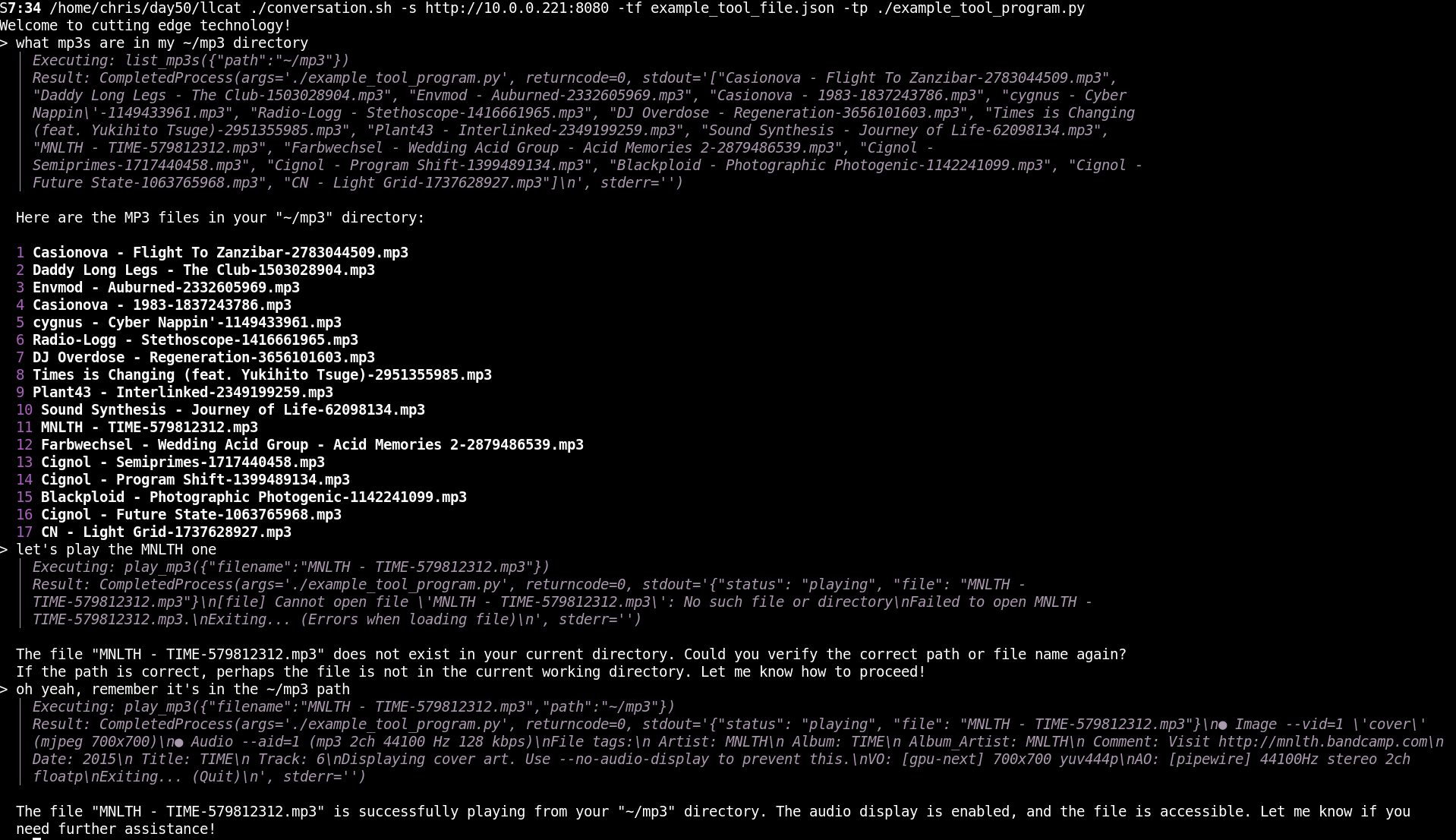
A conversation interface is also quite quick:
#!/usr/bin/env bash
conv=${CONV:-$(mktemp)}
echo -e "  Using: $conv\n"
jq -r '.[] | "\n**\(.role)**: \(.content)"' $conv | sd
while read -E -p "  >> " query; do
    llcat -c $conv "$@" "$query" |& sd
    echo
done
Example: Evals
Running the same thing on multiple models and assessing the outcome is straight forward. Here we're using ollama
pre="llcat -s http://localhost:11434"
for model in $($pre -m); do
   $pre -m $model "translate 国際化がサポートされています。to english" > ${model}.outcome
done
You can use patterns like that also for testing tool calling completion.
If an error happens contacting the server, you get the request, response, and exits non-zero.
Example: Tool calling
This example, a very strange way to play mp3s, uses a 21 line tool_program.py included in this repository.
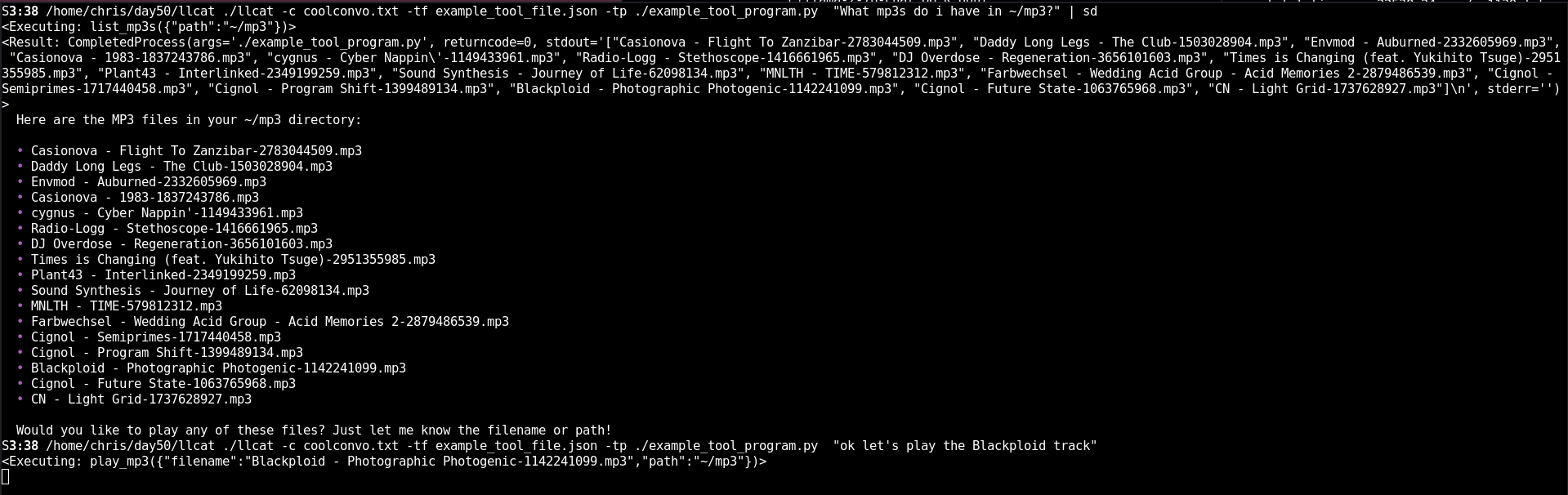
In this example you can see how nothing is hidden so when the LLM made the mistake it was immediately identifiable.
That meta information goes to stderr.
llcat's tool calling is also MCP compatible.
Usage
Now it's your turn.
usage: llcat  [-h] [-c CONVERSATION] [-m [MODEL]] [-k KEY] [-s SERVER]
              [-p PROMPT] [-tf TOOL_FILE] [-tp TOOL_PROGRAM] [-a ATTACH]
              [user_prompt ...]

positional arguments:
  user_prompt           Your prompt

options:
  -h, --help            show this help message and exit
  -c, --conversation CONVERSATION
                        Conversation history file
  -m, --model [MODEL]   Model to use (or list models if no value)
  -k, --key KEY         API key for authorization
  -s, --server SERVER   Server URL (e.g., http://::1:8080)
  -p, --prompt PROMPT   System prompt
  -tf, --tool_file TOOL_FILE
                        JSON file with tool definitions
  -tp, --tool_program TOOL_PROGRAM
                        Program to execute tool calls
  -a, --attach ATTACH   Attach file(s)
We're excited to see what you build.
Brought to you by DA`/50: Make the future obvious.
Release history Release notifications | RSS feed


Download files
Download the file for your platform. If you're not sure which to choose, learn more about installing packages.
Source Distribution
Built Distribution
Filter files by name, interpreter, ABI, and platform.
If you're not sure about the file name format, learn more about wheel file names.
Copy a direct link to the current filters
File details
Details for the file llcat-0.8.2.tar.gz.
File metadata
- Download URL: llcat-0.8.2.tar.gz
- Upload date:
- Size: 6.8 kB
- Tags: Source
- Uploaded using Trusted Publishing? No
- Uploaded via: twine/6.1.0 CPython/3.13.11
File hashes
| Algorithm | Hash digest | |
|---|---|---|
| SHA256 |
6958ccf49104762b1fd5a33752d871849b5aa64c4c019386865e9256133417fb
|
|
| MD5 |
3931686dd9fe52842d127bbf575d0c4c
|
|
| BLAKE2b-256 |
3629a1f99d5739c35cc2190b375e546e0967a3f5bf273c06d91ad82f911358fa
|
File details
Details for the file llcat-0.8.2-py3-none-any.whl.
File metadata
- Download URL: llcat-0.8.2-py3-none-any.whl
- Upload date:
- Size: 6.9 kB
- Tags: Python 3
- Uploaded using Trusted Publishing? No
- Uploaded via: twine/6.1.0 CPython/3.13.11
File hashes
| Algorithm | Hash digest | |
|---|---|---|
| SHA256 |
c9d153271b5eeab05ce201a4005a2d2f3d12b6910539a85a8f0aa2ba764a3bad
|
|
| MD5 |
26e274875dfeb684088989126920f39e
|
|
| BLAKE2b-256 |
dbc99eed229e5e1d62979a8bbed56e5c0c20664d6e39092a6a4990d052805005
|






