
A simple CI/CD utility for running LLM tasks with Semantic Kernel

Project description
AI-First Toolkit: LLM-Powered Automation









🚀 The Future of DevOps is AI-First
This toolkit represents a step toward AI-First DevOps - where intelligent automation handles the entire development lifecycle. Built for teams ready to embrace the exponential productivity gains of AI-powered development. Please read the blog post for more details on the motivation.
TLDR: What This Tool Does
Purpose: Transform any unstructured business knowledge into reliable, structured data that powers intelligent automation across your entire organization.
Perfect For:
- 🏦 Financial Operations: Convert loan applications, audits, and regulatory docs into structured compliance data
- 🏥 Healthcare Systems: Transform patient records, clinical notes, and research data into medical formats
- ⚖️ Legal & Compliance: Process contracts, court docs, and regulatory texts into actionable risk assessments
- 🏭 Supply Chain: Turn logistics reports, supplier communications, and forecasts into optimization insights
- 👥 Human Resources: Convert resumes, performance reviews, and feedback into structured talent analytics
- 🛡️ Security Operations: Transform threat reports, incident logs, and assessments into standard frameworks
- 🚀 DevOps & Engineering: Use commit logs, deployment reports, and system logs for automated AI actions
- 🔗 Enterprise Integration: Connect any business process to downstream systems with guaranteed consistency
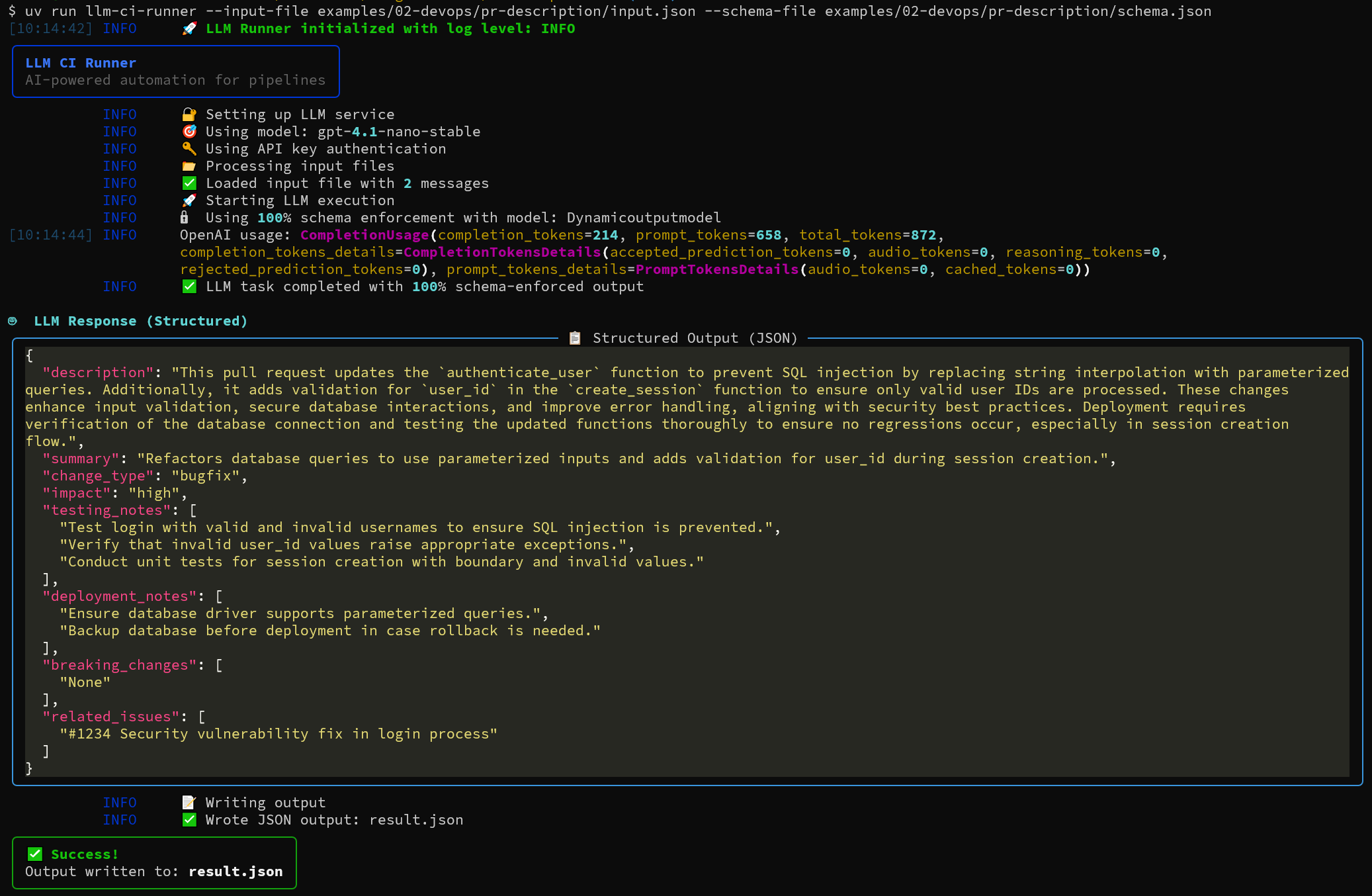
Simple structured output example
# Install and use immediately
pip install llm-ci-runner
llm-ci-runner --input-file examples/02-devops/pr-description/input.json --schema-file examples/02-devops/pr-description/schema.json
The AI-First Development Revolution
This toolkit embodies the principles outlined in Building AI-First DevOps:
| Traditional DevOps | AI-First DevOps (This Tool) |
|---|---|
| Manual code reviews | 🤖 AI-powered reviews with structured findings |
| Human-written documentation | 📝 AI-generated docs with guaranteed consistency |
| Reactive security scanning | 🔍 Proactive AI security analysis |
| Manual quality gates | 🎯 AI-driven validation with schema enforcement |
| Linear productivity | 📈 Exponential gains through intelligent automation |
Features
- 🎯 100% Schema Enforcement: Your pipeline never gets invalid data. Token-level schema enforcement with guaranteed compliance
- 🔄 Resilient execution: Retries with exponential back-off and jitter plus a clear exception hierarchy keep transient cloud faults from breaking your CI.
- 🚀 Zero-Friction CLI: Single script, minimal configuration for pipeline integration and automation
- 🔐 Enterprise Security: Azure RBAC via DefaultAzureCredential with fallback to API Key
- 📦 CI-friendly CLI: Stateless command that reads JSON/YAML, writes JSON/YAML, and exits with proper codes
- 🎨 Beautiful Logging: Rich console output with timestamps and colors
- 📁 File-based I/O: CI/CD friendly with JSON/YAML input/output
- 📋 Template-Driven Workflows: Handlebars, Jinja2, and Microsoft Semantic Kernel YAML templates with YAML variables for dynamic prompt generation
- 📄 YAML Support: Use YAML for schemas, input files, and output files - more readable than JSON
- 🔧 Simple & Extensible: Easy to understand and modify for your specific needs
- 🤖 Semantic Kernel foundation: async, service-oriented design ready for skills, memories, orchestration, and future model upgrades
- 📚 Documentation: Comprehensive documentation for all features and usage examples. Use your semantic kernel skills to extend the functionality.
- 🧑⚖️ Acceptance Tests: pytest framework with the LLM-as-Judge pattern for quality gates. Test your scripts before you run them in production.
- 💰 Coming soon: token usage and cost estimation appended to each result for budgeting and optimisation
🚀 The Only Enterprise AI DevOps Tool That Delivers RBAC Security, Robustness and Simplicity
LLM-CI-Runner stands alone in the market as the only tool combining 100% schema enforcement, enterprise RBAC authentication, and robust Semantic Kernel integration with templates in a single CLI solution. No other tool delivers all three critical enterprise requirements together.
Installation
pip install llm-ci-runner
That's it! No complex setup, no dependency management - just install and use. Perfect for CI/CD pipelines and local development.
Quick Start
1. Install from PyPI
pip install llm-ci-runner
2. Set Environment Variables
Azure OpenAI (Priority 1):
export AZURE_OPENAI_ENDPOINT="https://your-resource.openai.azure.com/"
export AZURE_OPENAI_MODEL="gpt-4.1-nano"  # or any other GPT deployment name
export AZURE_OPENAI_API_VERSION="2024-12-01-preview"  # Optional
OpenAI (Fallback):
export OPENAI_API_KEY="your-very-secret-api-key"
export OPENAI_CHAT_MODEL_ID="gpt-4.1-nano"  # or any OpenAI model
export OPENAI_ORG_ID="org-your-org-id"  # Optional
Authentication Options:
- Azure RBAC (Recommended): Uses
DefaultAzureCredentialfor Azure RBAC authentication - no API key needed! See Microsoft Docs for setup. - Azure API Key: Set
AZURE_OPENAI_API_KEYenvironment variable if not using RBAC. - OpenAI API Key: Required for OpenAI fallback when Azure is not configured.
Priority: Azure OpenAI takes priority when both Azure and OpenAI environment variables are present.
3a. Basic Usage
# Simple chat example
llm-ci-runner --input-file examples/01-basic/simple-chat/input.json

# With structured output schema
llm-ci-runner \
  --input-file examples/01-basic/sentiment-analysis/input.json \
  --schema-file examples/01-basic/sentiment-analysis/schema.json

# Custom output file
llm-ci-runner \
  --input-file examples/02-devops/pr-description/input.json \
  --schema-file examples/02-devops/pr-description/schema.json \
  --output-file pr-analysis.json

# YAML input files (alternative to JSON)
llm-ci-runner \
  --input-file config.yaml \
  --schema-file schema.yaml \
  --output-file result.yaml
3b. Template-Based Workflows
Dynamic prompt generation with YAML, Handlebars, Jinja2, or Microsoft Semantic Kernel templates:
# Handlebars template example
llm-ci-runner \
  --template-file examples/05-templates/handlebars-template/template.hbs \
  --template-vars examples/05-templates/handlebars-template/template-vars.yaml \
  --schema-file examples/05-templates/handlebars-template/schema.yaml \
  --output-file handlebars-result.yaml

# Or using Jinja2 templates
llm-ci-runner \
  --template-file examples/05-templates/jinja2-template/template.j2 \
  --template-vars examples/05-templates/jinja2-template/template-vars.yaml \
  --schema-file examples/05-templates/jinja2-template/schema.yaml \
  --output-file jinja2-result.yaml

# Or using Microsoft Semantic Kernel YAML templates with embedded schemas
llm-ci-runner \
  --template-file examples/05-templates/sem-ker-structured-analysis/template.yaml \
  --template-vars examples/05-templates/sem-ker-structured-analysis/template-vars.yaml \
  --output-file sk-analysis-result.json
For more examples see the examples directory.
Benefits of Template Approach:
- 🎯 Reusable Templates: Create once, use across multiple scenarios
- 📝 YAML Configuration: More readable than JSON for complex setups
- 🔄 Dynamic Content: Variables and conditional rendering
- 🚀 CI/CD Ready: Perfect for parameterized pipeline workflows
- 🤖 Semantic Kernel Integration: Microsoft Semantic Kernel YAML templates with embedded schemas and model settings
4. Python Library Usage
You can use LLM CI Runner directly from Python with both file-based and string-based templates, and with either dict or file-based variables and schemas. The main entrypoint is:
from llm_ci_runner.core import run_llm_task # Adjust import as needed for your package layout
Basic Usage: File-Based Input
import asyncio
from llm_ci_runner.core import run_llm_task

async def main():
    # Run with a traditional JSON input file (messages, etc)
    response = await run_llm_task(_input_file="examples/01-basic/simple-chat/input.json")
    print(response)

asyncio.run(main())
File-Based Template Usage
import asyncio
from llm_ci_runner.core import run_llm_task

async def main():
    # Handlebars, Jinja2, or Semantic Kernel YAML template via file
    response = await run_llm_task(
        template_file="examples/05-templates/pr-review-template/template.hbs",
        template_vars_file="examples/05-templates/pr-review-template/template-vars.yaml",
        schema_file="examples/05-templates/pr-review-template/schema.yaml",
        output_file="analysis.json"
    )
    print(response)

asyncio.run(main())
String-Based Template Usage
import asyncio
from llm_ci_runner.core import run_llm_task

async def main():
    # String template (Handlebars example)
    response = await run_llm_task(
        template_content="Hello {{name}}!",
        template_format="handlebars",
        template_vars={"name": "World"},
    )
    print(response)

asyncio.run(main())
Semantic Kernel YAML Template with Embedded Schema
Microsoft Semantic Kernel YAML templates provide embedded JSON schemas and model settings directly in the template. See Microsoft Semantic Kernel YAML Template Documentation for more details.
Please refer to the full example in examples/05-templates/sem-ker-structured-analysis/README.md.
import asyncio
from llm_ci_runner.core import run_llm_task

async def main():
    template_content = """
template: "Analyze: {{input_text}}"
input_variables:
  - name: input_text
execution_settings:
  azure_openai:
    temperature: 0.1
    response_format:
      type: json_schema
      json_schema:
        schema:
          type: object
          properties:
            sentiment: {type: string, enum: [positive, negative, neutral]}
            confidence: {type: number, minimum: 0, maximum: 1}
          required: [sentiment, confidence]
"""
    response = await run_llm_task(
        template_content=template_content,
        template_format="semantic-kernel",
        template_vars={"input_text": "Sample data"}
    )
    print(response)

asyncio.run(main())
Advanced: Dict-based Schema and Variables
import asyncio
from llm_ci_runner.core import run_llm_task

async def main():
    schema = {
        "type": "object",
        "properties": {
            "sentiment": {"type": "string", "enum": ["positive", "negative", "neutral"]},
            "confidence": {"type": "number", "minimum": 0, "maximum": 1}
        },
        "required": ["sentiment", "confidence"]
    }
    template = "Analyze this review: {{review}}"
    variables = {"review": "I love the new update!"}

    response = await run_llm_task(
        template_content=template,
        template_format="handlebars",
        template_vars=variables,
        schema=schema
    )
    print(response)

asyncio.run(main())
Notes & Tips
- Only one of
_input_file,template_file, ortemplate_contentmay be specified at a time. - Template variables: Use
template_vars(Python dict or YAML file path), ortemplate_vars_file(YAML file path). - Schema: Use
schema(dict or JSON/YAML file path), orschema_file(file path). - template_format is required with
template_content. Allowed:"handlebars","jinja2","semantic-kernel". - output_file: If specified, writes response to file.
Returns: String (for text output) or dict (for structured JSON output).
Errors: Raises InputValidationError or LLMRunnerError on invalid input or execution failure.
5. Development Setup (Optional)
For contributors or advanced users who want to modify the source:
# Install UV if you haven't already
curl -LsSf https://astral.sh/uv/install.sh | sh

# Clone and install for development
git clone https://github.com/Nantero1/ai-first-devops-toolkit.git
cd ai-first-devops-toolkit
uv sync

# Run from source
uv run llm-ci-runner --input-file examples/01-basic/simple-chat/input.json
The AI-First Transformation: Why Unstructured → Structured Matters
LLMs excel at extracting meaning from messy text, logs, documents, and mixed-format data, then emitting * schema-compliant JSON/YAML* that downstream systems can trust. This unlocks:
- 🔄 Straight-Through Processing: Structured payloads feed BI dashboards, RPA robots, and CI/CD gates without human parsing
- 🎯 Context-Aware Decisions: LLMs fuse domain knowledge with live telemetry to prioritize incidents, forecast demand, and spot security drift
- 📋 Auditable Compliance: Formal outputs make it easy to track decisions for regulators and ISO/NIST audits
- ⚡ Rapid Workflow Automation: Enable automation across customer service, supply-chain planning, HR case handling, and security triage
- 🔗 Safe Pipeline Composition: Structured contracts let AI-first pipelines remain observable and composable while capitalizing on unstructured enterprise data
Input Formats
Traditional JSON Input
{
  "messages": [
    {
      "role": "system",
      "content": "You are a helpful assistant."
    },
    {
      "role": "user",
      "content": "Your task description here"
    }
  ],
  "context": {
    "session_id": "optional-session-id",
    "metadata": {
      "any": "additional context"
    }
  }
}
Microsoft Semantic Kernel YAML Templates
The toolkit supports Microsoft Semantic Kernel YAML templates with embedded schemas and execution settings. See examples/05-templates/ for comprehensive examples.
Simple Question Template (template.yaml):
name: SimpleQuestion
description: Simple semantic kernel template for asking questions
template_format: semantic-kernel
template: |
  You are a helpful {{$role}} assistant.
  Please answer this question: {{$question}}

  Provide a clear and concise response.

input_variables:
  - name: role
    description: The role of the assistant (e.g., technical, customer service)
    default: "technical"
    is_required: false
  - name: question
    description: The question to be answered
    is_required: true

execution_settings:
  azure_openai:
    temperature: 0.7
    max_tokens: 500
    top_p: 1.0
Template Variables (template-vars.yaml):
role: expert DevOps engineer
question: What is the difference between continuous integration and continuous deployment?
Structured Analysis Template with embedded JSON schema:
name: StructuredAnalysis
description: SK template with embedded JSON schema for structured output
template_format: semantic-kernel
template: |
  Analyze the following text and provide a structured response: {{$text_to_analyze}}

input_variables:
  - name: text_to_analyze
    description: The text content to analyze
    is_required: true

execution_settings:
  azure_openai:
    model_id: gpt-4.1-stable
    temperature: 0.3
    max_tokens: 800
    response_format:
      type: json_schema
      json_schema:
        name: analysis_result
        schema:
          type: object
          properties:
            sentiment:
              type: string
              enum: ["positive", "negative", "neutral"]
              description: Overall sentiment of the text
            confidence:
              type: number
              minimum: 0.0
              maximum: 1.0
              description: Confidence score for the sentiment analysis
            key_themes:
              type: array
              items:
                type: string
              description: Main themes identified in the text
            summary:
              type: string
              description: Brief summary of the text
            word_count:
              type: integer
              description: Approximate word count
          required: ["sentiment", "confidence", "summary"]
          additionalProperties: false
Template-Based Input (Handlebars & Jinja2)
Handlebars Template (template.hbs):
<message role="system">
    You are an expert {{expertise.domain}} engineer.
    Focus on {{expertise.focus_areas}}.
</message>

<message role="user">
    Analyze this {{task.type}}:

    {{#each task.items}}
        - {{this}}
    {{/each}}

    Requirements: {{task.requirements}}
</message>
Jinja2 Template (template.j2):
<message role="system">
You are an expert {{expertise.domain}} engineer.
Focus on {{expertise.focus_areas}}.
</message>

<message role="user">
Analyze this {{task.type}}:

{% for item in task.items %}
- {{item}}
{% endfor %}

Requirements: {{task.requirements}}
</message>
Template Variables (vars.yaml):
expertise:
  domain: "DevOps"
  focus_areas: "security, performance, maintainability"
task:
  type: "pull request"
  items:
    - "Changed authentication logic"
    - "Updated database queries"
    - "Added input validation"
  requirements: "Focus on security vulnerabilities"
Structured Outputs with 100% Schema Enforcement
When you provide a --schema-file, the runner guarantees perfect schema compliance:
llm-ci-runner \
  --input-file examples/01-basic/sentiment-analysis/input.json \
  --schema-file examples/01-basic/sentiment-analysis/schema.json
Note: Output defaults to result.json. Use --output-file custom-name.json for custom output files.
Supported Schema Features:
✅ String constraints (enum, minLength, maxLength, pattern)
✅ Numeric constraints (minimum, maximum, multipleOf)
✅ Array constraints (minItems, maxItems, items type)
✅ Required fields enforced at generation time
✅ Type validation (string, number, integer, boolean, array)
CI/CD Integration
GitHub Actions Example
- name: Setup Python
  uses: actions/setup-python@v5
  with:
    python-version: '3.12'

- name: Install LLM CI Runner
  run: pip install llm-ci-runner

- name: Generate PR Review with Templates
  run: |
    llm-ci-runner \
      --template-file .github/templates/pr-review.j2 \
      --template-vars pr-context.yaml \
      --schema-file .github/schemas/pr-review.yaml \
      --output-file pr-analysis.yaml
  env:
    AZURE_OPENAI_ENDPOINT: ${{ secrets.AZURE_OPENAI_ENDPOINT }}
    AZURE_OPENAI_MODEL: ${{ secrets.AZURE_OPENAI_MODEL }}
For complete CI/CD examples, see * *examples/uv-usage-example.md **. This repo is also using itself for release note generation, **check it out here **.
Authentication
Azure OpenAI: Uses Azure's DefaultAzureCredential supporting:
- Environment variables (local development)
- Managed Identity (recommended for Azure CI/CD)
- Azure CLI (local development)
- Service Principal (non-Azure CI/CD)
OpenAI: Uses API key authentication with optional organization ID.
Testing
We maintain comprehensive test coverage with 100% success rate:
# For package users - install test dependencies
pip install llm-ci-runner[dev]

# For development - install from source with test dependencies
uv sync --group dev

# Run specific test categories
pytest tests/unit/ -v          # 70 unit tests
pytest tests/integration/ -v   # End-to-end examples
pytest acceptance/ -v          # LLM-as-judge evaluation

# Or with uv for development
uv run pytest tests/unit/ -v
uv run pytest tests/integration/ -v
uv run pytest acceptance/ -v
Architecture
Built on Microsoft Semantic Kernel for:
- Enterprise-ready Azure OpenAI and OpenAI integration
- Future-proof model compatibility
- 100% Schema Enforcement: KernelBaseModel integration with token-level constraints
- Dynamic Model Creation: Runtime JSON schema → Pydantic model conversion
- Azure RBAC: Azure RBAC via DefaultAzureCredential
- Automatic Fallback: Azure-first priority with OpenAI fallback
The AI-First Development Journey
This toolkit is your first step toward AI-First DevOps. As you integrate AI into your development workflows, you'll experience:
- 🚀 Exponential Productivity: AI handles routine tasks while you focus on architecture
- 🎯 Guaranteed Quality: Schema enforcement eliminates validation errors
- 🤖 Autonomous Operations: AI agents make decisions in your pipelines
- 📈 Continuous Improvement: Every interaction improves your AI system
The future belongs to teams that master AI-first principles. This toolkit gives you the foundation to start that journey today.
Real-World Examples
You can explore the examples directory for a complete collection of self-contained examples organized by category.
For comprehensive real-world CI/CD scenarios, see * *examples/uv-usage-example.md **.
100 AI Automation Use Cases for AI-First Automation
DevOps & Engineering 🔧
- 🤖 AI-generated PR review – automated pull request analysis with structured review findings
- 📝 Release note composer – map commits to semantic-version bump rules and structured changelogs
- 🔍 Vulnerability scanner – map code vulnerabilities to OWASP standards with actionable remediation
- ☸️ Kubernetes manifest optimizer – produce risk-scored diffs and security hardening recommendations
- 📊 Log anomaly triager – convert system logs into OTEL-formatted events for SIEM ingestion
- 💰 Cloud cost explainer – output tagged spend by team in FinOps schema for budget optimization
- 🔄 API diff analyzer – produce backward-compatibility scorecards from specification changes
- 🛡️ IaC drift detector – turn Terraform plans into CVE-linked security findings
- 📋 Dependency license auditor – emit SPDX-compatible reports for compliance tracking
- 🎯 SLA breach summarizer – file structured JIRA tickets with SMART action items
Governance, Risk & Compliance 🏛️
- 📊 Regulatory delta analyzer – emit change-impact matrices from new compliance requirements
- 🌱 ESG report synthesizer – map CSR prose to GRI indicators and sustainability metrics
- 📋 SOX-404 narrative converter – transform controls descriptions into testable audit checklists
- 🏦 Basel III stress-test interpreter – output capital risk buckets from regulatory scenarios
- 🕵️ AML SAR formatter – convert investigator notes into Suspicious Activity Report structures
- 🔒 Privacy policy parser – generate GDPR data-processing-activity logs from legal text
- 🔍 Internal audit evidence linker – export control traceability graphs for compliance tracking
- 📊 Carbon emission disclosure normalizer – structure sustainability data into XBRL taxonomy
- ⚖️ Regulatory update tracker – generate structured compliance action items from guideline changes
- 🛡️ Safety inspection checker – transform narratives into OSHA citation checklists
Financial Services 🏦
- 🏦 Loan application analyzer – transform free-text applications into Basel-III risk-model inputs
- 📊 Earnings call sentiment quantifier – output KPI deltas and investor sentiment scores
- 💹 Budget variance explainer – produce drill-down pivot JSON for financial analysis
- 📈 Portfolio risk dashboard builder – feed VaR models with structured investment analysis
- 💳 Fraud alert generator – map investigation notes to CVSS-scored security metrics
- 💰 Treasury cash-flow predictor – ingest email forecasts into structured planning models
- 📊 Financial forecaster – summarize reports into structured cash-flow and projection objects
- 🧾 Invoice processor – convert receipts into double-entry ledger posts with GAAP tags
- 📋 Stress test scenario packager – structure regulatory submission data for banking compliance
- 🏦 Insurance claim assessor – return structured claim-decision objects with risk scores
Healthcare & Life Sciences 🏥
- 🏥 Patient intake processor – build HL7/FHIR-compliant patient records from free-form intake forms
- 🧠 Mental health triage assistant – structure referral notes with priority classifications and care pathways
- 📊 Radiology report coder – output SNOMED-coded JSON from diagnostic imaging narratives
- 💊 Clinical trial note packager – create FDA eCTD modules from research documentation
- 📋 Prescription parser – turn text prescriptions into structured e-Rx objects with dosage validation
- ⚡ Vital sign anomaly summarizer – generate alert reports with clinical priority rankings
- 🧪 Lab result organizer – output LOINC-coded tables from diagnostic test narratives
- 🏥 Medical device log summarizer – generate UDI incident files for regulatory reporting
- 📈 Patient feedback sentiment analyzer – feed quality-of-care KPIs from satisfaction surveys
- 👩⚕️ Clinical observation compiler – convert research notes into structured data for trials
Legal & Compliance ⚖️
- 🏛️ Legal contract parser – extract clauses and compute risk scores from contract documents
- 📝 Court opinion digest – summarize judicial opinions into structured precedent and citation graphs
- 🏛️ Legal discovery summarizer – extract key issues and risks from large document sets
- 💼 Contract review summarizer – extract risk factors and key dates from legal contracts
- 🏛️ Policy impact assessor – convert policy proposals into stakeholder impact matrices
- 📜 Patent novelty comparator – produce claim-overlap matrices from prior art analysis
- 🏛️ Legal bill auditor – transform billing details into itemized expense and compliance reports
- 📋 Case strategy brainstormer – summarize likely arguments from litigation documentation
- 💼 Legal email analyzer – extract key issues and deadlines from email threads for review
- ⚖️ Expert witness report normalizer – create citation-linked outlines from testimony records
Customer Experience & Sales 🛒
- 🎧 Tier-1 support chatbot – convert customer queries into tickets with reproducible troubleshooting steps
- ⭐ Review sentiment miner – produce product-feature tallies from customer feedback analysis
- 📉 Churn risk email summarizer – export CRM risk scores from customer communication patterns
- 🗺️ Omnichannel conversation unifier – generate customer journey maps from multi-platform interactions
- ❓ Dynamic FAQ builder – structure knowledge base content from community forum discussions
- 📋 Proposal auto-grader – output RFP compliance matrices with scoring rubrics
- 📈 Upsell opportunity extractor – create lead-scoring JSON from customer interaction analysis
- 📱 Social media crisis detector – feed escalation playbooks with brand sentiment monitoring
- 🌐 Multilingual intent router – tag customer chats to appropriate support queues by language/topic
- 🎯 Marketing copy generator – create brand-compliant content with tone and messaging constraints
HR & People Operations 👥
- 📄 CV-to-JD matcher – rank candidates with explainable competency scores and fit analysis
- 🎤 Interview transcript summarizer – export structured competency rubrics with evaluation criteria
- ✅ Onboarding policy compliance checker – produce new-hire checklist completion tracking
- 📊 Performance review sentiment analyzer – create growth-plan JSON with development recommendations
- 💰 Payroll inquiry classifier – map employee emails to structured case codes for HR processing
- 🏥 Benefits Q&A automation – generate eligibility responses from policy documentation
- 🚪 Exit interview insight extractor – feed retention dashboards with structured departure analytics
- 📚 Training content gap mapper – align job roles to skill taxonomies for learning programs
- 🛡️ Workplace incident processor – convert safety reports into OSHA 301 compliance records
- 📊 Diversity metric synthesizer – summarize inclusion survey data into actionable insights
Supply Chain & Manufacturing 🏭
- 📊 Demand forecast summarizer – output SKU-level predictions from market analysis and sales data
- 📋 Purchase order processor – convert supplier communications into structured ERP line-items
- 🌱 Supplier risk scanner – generate ESG compliance scores from vendor assessment reports
- 🔧 Predictive maintenance log analyst – produce work orders from equipment telemetry narratives
- 🚛 Logistics delay explainer – return route-change suggestions from transportation disruption reports
- ♻️ Circular economy return classifier – create refurbishment tags from product return descriptions
- 🌍 Carbon footprint calculator – map transport legs to CO₂e emissions for sustainability reporting
- 📦 Safety stock alert generator – output inventory triggers with lead-time assumptions
- 📜 Regulatory import/export harmonizer – produce HS-code sheets from trade documentation
- 🏭 Production yield analyzer – generate efficiency reports from manufacturing floor logs
Security & Risk Management 🔒
- 🛡️ MITRE ATT&CK mapper – translate IDS alerts into tactic-technique JSON for threat intelligence
- 🎣 Phishing email extractor – produce IOC STIX bundles from security incident reports
- 🔐 Zero-trust policy generator – convert narrative access requests into structured policy rules
- 🚨 SOC alert deduplicator – cluster security tickets by kill-chain stage for efficient triage
- 🏴☠️ Red team debrief summarizer – export OWASP Top-10 gaps from penetration test reports
- 📋 Data breach notifier – craft GDPR-compliant disclosure packets with timeline and impact data
- 🧠 Threat intel feed normalizer – convert mixed security PDFs into MISP threat objects
- 🔍 Secret leak scanner – output GitHub code-owner mentions from repository security scans
- 📊 Vendor risk questionnaire scorer – generate SIG Lite security assessment answers
- 🏗️ Security audit tracker – link ISO-27001 controls to evidence artifacts for compliance
Knowledge & Productivity 📚
- 🎙️ Meeting transcript processor – extract action items with owners and deadlines into project tracking JSON
- 📚 Research paper summarizer – export citation graphs and key findings for literature review databases
- 📋 SOP generator – convert process narratives into step-by-step validation checklists
- 🔄 Code diff summarizer – generate reviewer hints and impact analysis from version control changes
- 📊 API changelog analyzer – produce backward-compatibility scorecards for development teams
- 🧠 Mind map creator – structure brainstorming sessions into hierarchical knowledge trees
- 📖 Knowledge base gap detector – suggest article stubs from frequently asked questions analysis
- 🎯 Personal OKR journal parser – output progress dashboards with milestone tracking
- 💼 White paper composer – transform technical discussions into structured thought leadership content
- 🧩 Universal transformer – convert any unstructured domain knowledge into your custom schema-validated JSON
License
MIT License - See LICENSE file for details. Copyright (c) 2025, Benjamin Linnik.
Support
🐛 Found a bug? 💡 Have a question? 📚 Need help?
GitHub is your primary destination for all support:
- 📋 Issues & Bug Reports: Create an issue
- 📖 Documentation: Browse examples
- 🔧 Source Code: View source
Before opening an issue, please:
- ✅ Check the examples directory for solutions
- ✅ Review the error logs (beautiful output with Rich!)
- ✅ Validate your Azure authentication and permissions
- ✅ Ensure your input JSON follows the required format
- ✅ Search existing issues for similar problems
Quick Links:
Ready to embrace the AI-First future? Start with this toolkit and build your path to exponential productivity. Learn more about the AI-First DevOps revolution in Building AI-First DevOps.
Release history Release notifications | RSS feed


Download files
Download the file for your platform. If you're not sure which to choose, learn more about installing packages.
Source Distribution
Built Distribution
Filter files by name, interpreter, ABI, and platform.
If you're not sure about the file name format, learn more about wheel file names.
Copy a direct link to the current filters
File details
Details for the file llm_ci_runner-1.5.4.tar.gz.
File metadata
- Download URL: llm_ci_runner-1.5.4.tar.gz
- Upload date:
- Size: 838.2 kB
- Tags: Source
- Uploaded using Trusted Publishing? No
- Uploaded via: twine/6.2.0 CPython/3.12.11
File hashes
| Algorithm | Hash digest | |
|---|---|---|
| SHA256 |
6f4deb81aea5d76a6b92061be5f2ae654ba286c40d6cbf75f49d6678432c1a03
|
|
| MD5 |
363ba06b6f4f47a68aaac22d0434b51e
|
|
| BLAKE2b-256 |
8a5586703313606065ae044e9dd36f02ce171f9da9e5d4a0292f6e419de6a141
|
File details
Details for the file llm_ci_runner-1.5.4-py3-none-any.whl.
File metadata
- Download URL: llm_ci_runner-1.5.4-py3-none-any.whl
- Upload date:
- Size: 51.2 kB
- Tags: Python 3
- Uploaded using Trusted Publishing? No
- Uploaded via: twine/6.2.0 CPython/3.12.11
File hashes
| Algorithm | Hash digest | |
|---|---|---|
| SHA256 |
108863e3f4c288de7f732c8e13902891e1a710aff8e5c6cd684d4e6c0419665c
|
|
| MD5 |
748a1731da6519a6f94ca3e439bbfb18
|
|
| BLAKE2b-256 |
48535fdfc107a3e52a31ff3633a76371bc7873236e8cbf3ccb08db3534593a31
|






