
Local web UI for browsing and managing LLM CLI conversation history (currently: Claude Code).

Project description
llm-lens-web
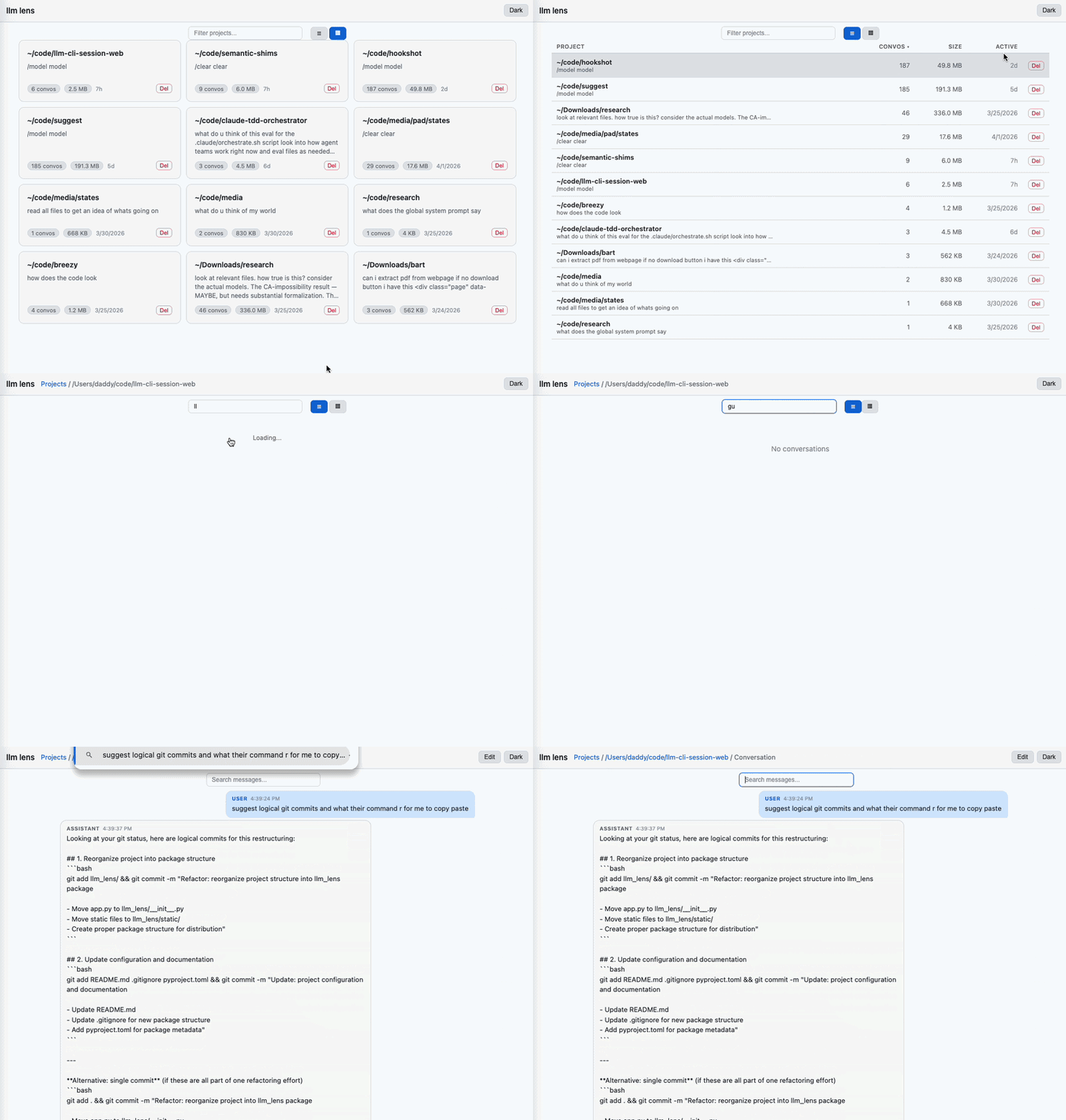
A local web UI for browsing, searching, and managing the conversation history stored by LLM CLIs. Currently supports Claude Code, which saves every session as a .jsonl file under ~/.claude/projects/. llm-lens-web gives you a browser-based interface into that data so you don't have to dig through raw JSON on the command line.
The architecture is designed to accommodate other provider backends (OpenAI Codex CLI, Gemini CLI, etc.) — see Extending to other providers — but today only Claude Code is implemented.
Why this exists
Claude Code accumulates session history fast. After a few weeks of active use you can have hundreds of conversations spread across dozens of projects, with no built-in way to browse, search, or prune them. This tool solves that — it reads the same directory Claude Code writes to and gives you a real UI to manage it.
What it does
Three-level navigation mirroring Claude Code's own storage layout:
- Projects — one entry per folder in
~/.claude/projects/, showing conversation count, total size, and a preview of the most recent message. Sortable by name, activity, size, or conversation count. List or card layout. - Conversations — all
.jsonlsessions within a project, paginated and sortable. Each shows a preview of the first user message, file size, and last-modified time. - Messages — chat-style view of a single conversation. Renders tool calls and tool results as inline badges. Thinking blocks are collapsed by default and expandable. Paginated so large conversations load quickly.
Things you can do:
| Action | Where |
|---|---|
| Filter/search | All three levels, client-side |
| Sort by column | Projects + Conversations views |
| Toggle list / card layout | Projects + Conversations views |
| Delete a project | Projects view |
| Delete a conversation | Conversations view |
| Duplicate a conversation | Conversations view |
| Bulk-delete conversations | Conversations view (checkbox select) |
| Copy a message to clipboard | Messages view |
| Delete a single message | Messages view |
| Select messages and copy them | Messages view (Edit mode) |
| Extract selected messages to a new conversation | Messages view (Edit mode) |
| Bulk-delete selected messages | Messages view (Edit mode) |
| View sidechain (sub-agent) messages | Messages view |
| Dark / light theme | Header toggle, persisted in localStorage |
What it doesn't do: it has no write path back to Claude Code. Deleting or editing sessions here does not affect any running Claude Code process — it only modifies the files on disk.
For users: running it
Requirements
- Python 3.8+
- A browser
- At least one supported LLM CLI installed and used at least once (currently: Claude Code, which populates
~/.claude/projects/)
Install
The recommended way is pipx or uv tool, which install CLI apps into isolated environments and put them on your PATH:
# with pipx
pipx install llm-lens-web

# or with uv
uv tool install llm-lens-web
Then run:
llm-lens-web
and open http://localhost:5111 in your browser.
To use a different port:
llm-lens-web 8080
The server binds to 0.0.0.0 so it is also reachable from other devices on your local network on whatever port you choose. It has no authentication — only run it on a trusted network.
Alternative: plain pip
pip install llm-lens-web
llm-lens-web
Upgrading / uninstalling
pipx upgrade llm-lens-web      # or: uv tool upgrade llm-lens-web
pipx uninstall llm-lens-web    # or: uv tool uninstall llm-lens-web
For developers / contributors
Project layout
pyproject.toml          Package metadata & dependencies
llm_lens/
  __init__.py           Flask backend — REST API + static file serving + main() entry point
  static/
    index.html          Single-page app shell
    css/styles.css      All styles (dark/light theme via CSS vars)
    js/
      main.js           Entry point: routing, theme, delegated click handler
      state.js          Shared mutable state + localStorage persistence
      api.js            Thin fetch wrappers for every backend endpoint
      router.js         Hash-based client-side router
      toolbar.js        Toolbar rendering helper
      modal.js          Confirm dialog
      utils.js          Formatting helpers (timeAgo, fmtSize, esc, etc.)
      views/
        projects.js     Projects list view
        conversations.js Conversations list view
        messages.js     Message thread view
No frontend build step. No bundler. No npm. The frontend is plain ES modules loaded directly by the browser.
Running locally (editable install)
git clone <repo-url>
cd llm-lens
pip install -e .
LLM_LENS_DEBUG=1 llm-lens-web
-e (editable) installs the package so code edits take effect immediately. Setting LLM_LENS_DEBUG=1 enables Flask's auto-reloader.
Backend
llm_lens/__init__.py is a single-file Flask app. Key design notes:
~/.claude/projects/is the data source. The path is hardcoded asCLAUDE_PROJECTS_DIR. Each subdirectory is a "project"; each.jsonlfile inside is a conversation. This is the main provider-specific coupling today — see Extending to other providers.- LRU cache with file-stat invalidation.
_peek_jsonl_cachedand_parse_messages_cachedare@lru_cachefunctions keyed on(filepath, mtime, size). Any write to a file (delete, duplicate, extract) calls_invalidate_cache_for()which does a full cache clear. This keeps reads fast without serving stale data. - Pagination everywhere. Projects, conversations, and messages are all paginated. The conversations endpoint supports server-side sort by recency and size; sort-by-message-count loads all files and sorts in Python (unavoidable since line counts require reading each file).
- Mutations are plain filesystem ops. Delete =
unlink. Duplicate =shutil.copy2. Extract = filtered line-by-line copy to a new UUID-named file. No database.
Frontend
The frontend is a small hand-rolled SPA:
- Hash router (
router.js) — three routes:/,/p/:folder,/p/:folder/c/:convoId. - Delegated click handler (
main.js) — all interactive elements carrydata-action="...". One top-level listener ondocument.bodydispatches to an actions map. No inline handlers anywhere. - Edit mode — a global toggle that adds
edit-modeto<body>. Message checkboxes and a floating selection bar appear only in this mode. - Content rendering —
processContent()inmessages.jshandles thinking blocks (<thinking>...</thinking>) and tool call markers ([Tool: name],[Tool Result]) before HTML-escaping the rest. Thinking blocks become collapsible toggles. Tool calls become styled badges.
API reference
| Method | Path | Description |
|---|---|---|
GET |
/api/projects |
All projects with metadata |
GET |
/api/projects/:folder/conversations |
Paginated conversations (offset, limit, sort, desc) |
GET |
/api/projects/:folder/conversations/:id |
Paginated messages (offset, limit) |
DELETE |
/api/projects/:folder/conversations/:id |
Delete a conversation |
POST |
/api/projects/:folder/conversations/:id/duplicate |
Duplicate a conversation |
DELETE |
/api/projects/:folder/conversations/:id/messages/:uuid |
Delete a single message |
POST |
/api/projects/:folder/conversations/:id/extract |
Create new conversation from selected message UUIDs |
POST |
/api/projects/:folder/conversations/bulk-delete |
Delete multiple conversations |
DELETE |
/api/projects/:folder |
Delete an entire project |
All mutation endpoints invalidate the in-process LRU cache and return {"ok": true} on success.
Adding features
- New backend endpoints go in
llm_lens/__init__.pyfollowing the existing pattern (route → filesystem op → cache invalidation → JSON response). - New frontend actions: add an entry to the
actionsmap inmain.js, implement the function in the relevant view file, and add adata-action="..."attribute to whatever HTML element triggers it. - Styles are all in
static/css/styles.cssusing CSS custom properties for theming. Dark theme is the default;.lighton<body>overrides the vars.
Extending to other providers
Today llm-lens-web only supports Claude Code. The codebase is single-provider but structured so a second provider is straightforward to add. The Claude-specific surface area is small:
CLAUDE_PROJECTS_DIR— where to look on disk_peek_jsonl_cached/_parse_messages_cached— JSONL shape (message.role, content blockstext/tool_use/tool_result/thinking,isSidechain,isMeta,file-history-snapshot,uuid,cwd,timestamp)- Mutation endpoints — line-level JSONL ops for delete/duplicate/extract
When adding a second provider, the recommended refactor is:
- Introduce a
Providerprotocol with methods likediscover_projects(),list_conversations(project),read_messages(convo),delete_conversation(convo). - Move the existing Claude logic into
llm_lens/providers/claude_code.pybehind that interface. - Add the new provider as a sibling module.
- Add a
:providersegment to API routes (/api/:provider/projects/...) and a provider selector to the frontend. - Declare per-provider dependencies as
[project.optional-dependencies]extras inpyproject.toml, e.g.pip install llm-lens-web[codex].
Don't pre-build this abstraction before the second provider exists — extract it from two working implementations rather than guessing.
Release history Release notifications | RSS feed


Download files
Download the file for your platform. If you're not sure which to choose, learn more about installing packages.
Source Distribution
Built Distribution
Filter files by name, interpreter, ABI, and platform.
If you're not sure about the file name format, learn more about wheel file names.
Copy a direct link to the current filters
File details
Details for the file llm_lens_web-0.1.3.tar.gz.
File metadata
- Download URL: llm_lens_web-0.1.3.tar.gz
- Upload date:
- Size: 25.9 kB
- Tags: Source
- Uploaded using Trusted Publishing? No
- Uploaded via: twine/6.2.0 CPython/3.14.4
File hashes
| Algorithm | Hash digest | |
|---|---|---|
| SHA256 |
5b6da1459150dba71bc41f7c730d7951ef6190fabec7c60a448969b3078dc2f3
|
|
| MD5 |
edddf24ea72ca8f5ba75ce626098e28f
|
|
| BLAKE2b-256 |
a7d3bf8c99a72536a1198ffb6d64806aa3124c79e94ee71fc28ebe5184922194
|
File details
Details for the file llm_lens_web-0.1.3-py3-none-any.whl.
File metadata
- Download URL: llm_lens_web-0.1.3-py3-none-any.whl
- Upload date:
- Size: 26.6 kB
- Tags: Python 3
- Uploaded using Trusted Publishing? No
- Uploaded via: twine/6.2.0 CPython/3.14.4
File hashes
| Algorithm | Hash digest | |
|---|---|---|
| SHA256 |
515ac3ec10c5834d44b072211bc6c1187b4788766bf9cbff8b88b0d912f2f94c
|
|
| MD5 |
8812484bf80b7590c11fa69eedf2ff83
|
|
| BLAKE2b-256 |
37961179adddd46ab48c766f0c9bb079f3348fad88a7cc3938b4a66782382d92
|






