
Local web UI for browsing and managing LLM CLI conversation history (currently: Claude Code).

Project description
llm-lens-web
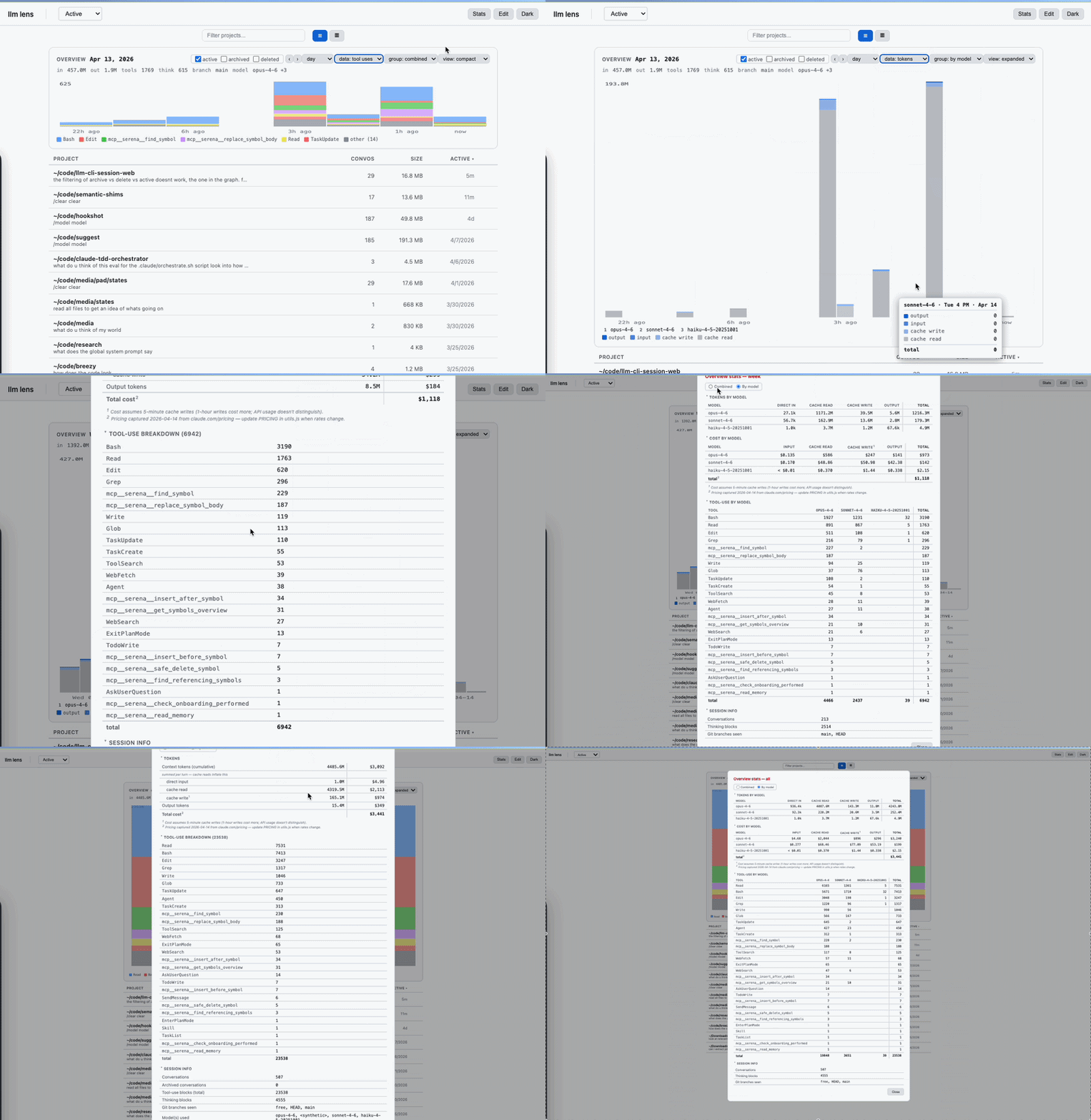
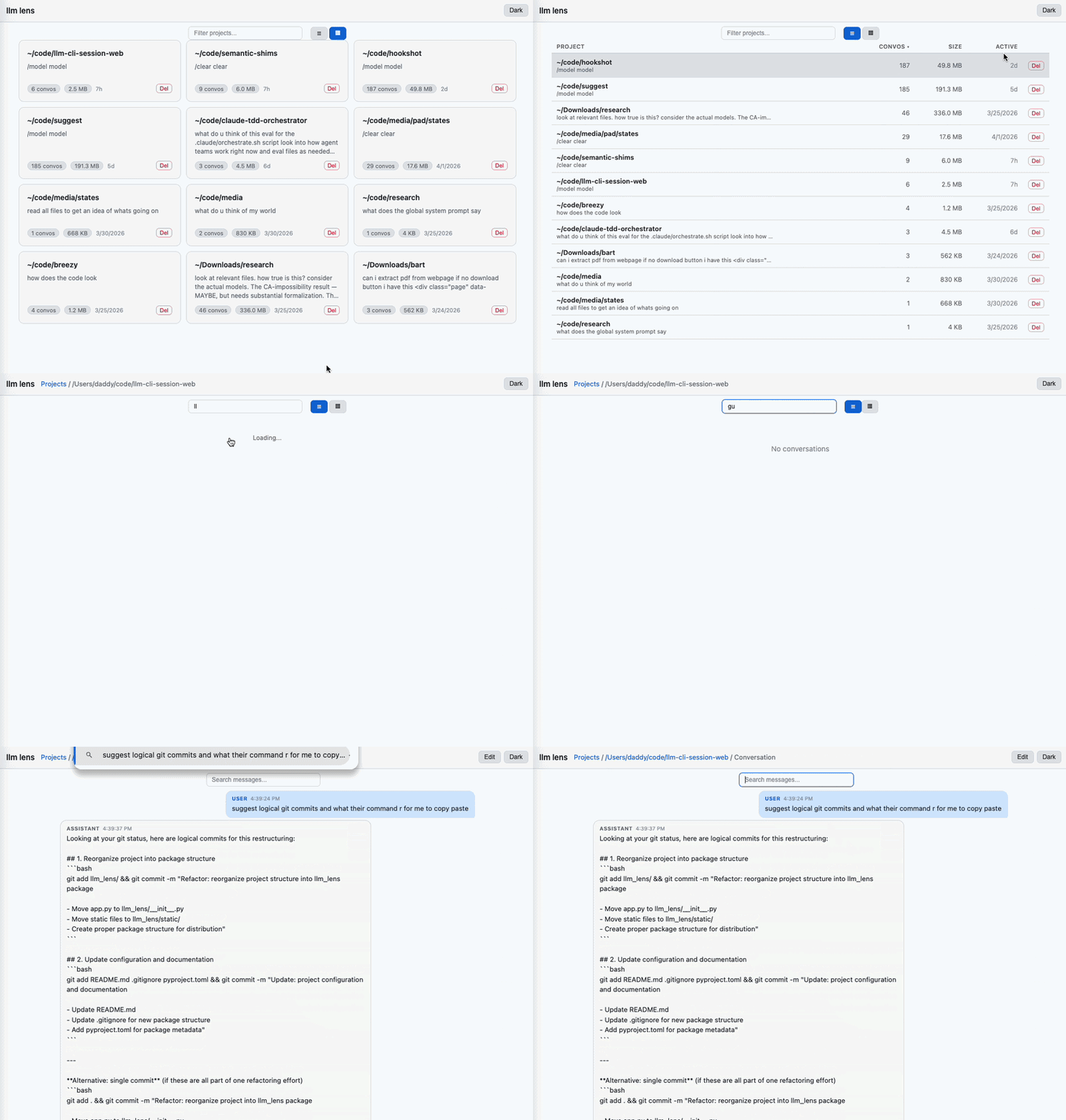
A local, offline web UI for auditing, pruning, and cleaning the conversation history your LLM CLI has written to disk. Currently supports Claude Code; the architecture accommodates other providers (Codex, Gemini) but only Claude is implemented today.
Local only. No API key. No auth. No outbound network. Never invokes claude. Reads and rewrites ~/.claude/projects/*.jsonl on your machine, nothing else.
Status: alpha. Active development, fast-moving surface. APIs, JSONL marker formats, sidecar layouts, and word-list semantics all change without notice between commits. Pin a version if you depend on any of it. Bug reports and pull requests welcome; expect churn.
Why you'd use it
1. Know what you're spending
Token counts and USD costs come from the actual message.usage fields Anthropic returned for each turn — not estimates. Per-model breakdowns, per-project rollups, per-day/week/month buckets. The overview chart shows where your money went and which sessions were expensive. Pricing table in utils.js (captured from claude.com/pricing on 2026-04-14; update when rates change).
2. Make future /resume cheaper
This is the lever that's easy to miss. Anything you remove from a conversation shrinks what Claude Code sends as context the next time you /resume it. Less context sent → fewer input tokens billed per turn going forward. The editing tools aren't just cleanup; they're direct downstream cost reduction:
- Edit — rewrite a prose message's text in place;
usage, UUIDs, and the resume chain stay intact. For fine-tuned customization. Prose-only: tool/thinking blocks are locked. - Scrub — redact a message's text to
.. Originalusageis preserved (historical accuracy), but on resume the scrubbed content is what gets sent. - Normalize whitespace — collapse runs of spaces/tabs and 3+ newlines.
- Strip agent-priming language. Two curated lists for the two flavors, both stored at
~/.cache/llm-lens/word_lists.jsonand editable in-app:- Swears — emotionally charged words that prime an agent toward worse output. Word-bounded, with a
*stem syntax for safe conjugation matching (fuck*catches fuck/fucks/fucker/fucking;assstays exact soassistantsurvives). - Filler / drift phrases — sycophancy and meta-commentary that nudge the agent off task: "You're absolutely right!", "Let me think step by step.", "I apologize for the confusion.", etc. Same mechanism, different register.
- Swears — emotionally charged words that prime an agent toward worse output. Word-bounded, with a
- Extract a pruned subset into a new conversation, leaving the original untouched.
3. Context Window Awareness
Each conversation card shows a ctx 120k (60%) badge, and the conversations table has a sortable Ctx column. It shows how close Claude Code's auto-compaction will fire. Sort descending to surface sessions near the window; those are the ones worth pruning before /compact swaps your working memory for a summary. Denominator is 200k by default, promotes to 1M if any session in your cache has exceeded 200k (signal you're on the 1M plan); override with the LLM_LENS_CONTEXT_WINDOW env var.
4. Stay honest about history
Deletes don't vanish from your accounting. Per-conversation deleted_delta tombstones are stored in the sidecar cache so project- and overview-level rollups still reflect what you actually spent. Duplicating a conversation writes a sidecar recording the shared-prefix stats so the copy doesn't double-count against the parent while both exist.
5. See what the agent actually ran
Every Bash tool_use block is parsed for the underlying command name and counted: grep × 42, git × 31, sed × 8. Wrappers like sudo, env FOO=1, and bash -c '...' are stripped (the inner script is what counts); pipelines attribute to the first command. The per-conversation stats modal has a Bash commands section with the breakdown.
In the Messages view, Bash badges expand inline to show the actual command — truncated preview by default, click show full for the whole thing. Strings that look like API keys, GitHub/Slack/AWS/OpenAI/Anthropic tokens, Bearer headers, *_KEY=/*_SECRET=/*_PASSWORD= env assignments, or URLs with embedded passwords are masked as [sensitive] and require a click to reveal — safer to screenshot or share-screen with this on.
6. Read the file like an IDE when you need to
A whitespace-rendering toggle (· for spaces, → for tabs) on the Messages view, useful when tracking down stray characters in scrubbed/normalized text or comparing what the agent wrote to what you expected. Off by default; off doesn't affect on-disk content.
7. Slice your project with tags
Each project gets up to 5 colored tags with custom labels you set yourself (e.g. bug-fix, spike, needs-review). Tags are project-scoped — different projects keep independent label sets — and stored in ~/.cache/llm-lens/tags.json, separate from sessions.json so they survive cache rebuilds. Click a tag in the bar above the conversation list to filter by it; the overview chart, summary stats, and Stats modal all re-aggregate to just the tagged subset, so questions like "how much did my bug-fix work cost this month?" are one click away.
Tagging itself is gated behind the Edit button, alongside the existing message-level edit mode:
- Manual selection — check a few conversations, then click "Tag N selected" in the toolbar. A popup lists existing tags and lets you create-and-apply a new one inline.
- Smart-select presets —
Heavy tools,Thinking,Expensive, andEdited(any conversation that's had a message scrubbed or deleted). Each has a live slider; matching conversations highlight as you drag. Combined with the assign popup, this is "tag every conversation with >50 tool uses asheavy" in three clicks. - From inside a conversation — pills appear in the breadcrumb with × to remove and + to add. Same tag set as the project view.
Tags persist across archive/unarchive (keyed by conversation ID, not file path) and clean up automatically when a conversation or project is deleted.
Workflows
Audit a month
Open the Overview chart at the top of Projects or Conversations. Range → Month, Mode → Tokens or Cost. Click into the heavy days. Drill from Projects → Conversations → Messages. Archive stuff you're done with; delete stuff you'll never need; leave the rest.
Prune a runaway conversation
- Duplicate it (the copy gets a fresh
sessionIdand rewritten message UUIDs so/resumedoesn't collide with the parent). - Open the duplicate in Edit mode. Select the noise. Bulk-scrub, bulk-delete, or extract the signal to a new convo.
- Keep the original around as a fallback. There's no in-tool way to confirm the edited copy will
/resumecleanly — that's a separateclaude --resume <id>from the terminal, and undocumented invariants mean a pass today doesn't guarantee a pass tomorrow.
Redact before sharing a transcript
Select the messages to redact. Scrub. The chain, UUIDs, and token counts stay intact — only the visible text becomes .. Safe to paste the file into a bug report or share the session ID.
Cut agent-priming language across a session
Open the Messages view. Edit mode → Select all → split-button ▾ → Remove swears or Remove filler / drift phrases. Both are doing the same job — stripping language that degrades the next turn's output, whether by emotional priming (swears) or sycophancy-induced drift (filler). Curate either list via Curate word lists… (stored at ~/.cache/llm-lens/word_lists.json).
Audit shell activity in a session
Open a conversation's stats modal → Bash commands section. See the frequency-ranked list of what was run. For specific calls, scroll the Messages view: each Bash badge is expandable inline and shows the full command (with sensitive-pattern masking on by default).
Slice the overview by tag
Click Edit on the project view. Click an empty tag slot, name it (e.g. bug-fix). Use the Smart-select presets to find matching conversations — Edited for ones you've pruned, Heavy tools with the slider for shell-heavy sessions, etc. Click "Tag N matching" → pick the tag. Exit edit mode. Now click that tag pill in the bar: the conversation list, the overview chart, and the per-bucket totals all narrow to just those conversations.
Safety model
This tool is non-destructive by default. Every editing action has a preserving alternative:
| You want to | Non-destructive option |
|---|---|
| Hide a conversation | Archive (moves to ~/.cache/llm-lens/archive/, reversible) |
| Remove messages | Extract to new convo (leaves original intact) |
| Edit a message | Scrub text, keeping usage and chain |
| Try a risky edit | Duplicate first, edit the copy |
Destructive actions (delete-convo, delete-message, in-place normalize/scrub) rewrite files on disk. Claude Code's /resume replay semantics aren't publicly documented, so any in-place edit is best-effort — the tool re-links parentUuid chains and strips orphan tool_use/tool_result blocks to stay resume-safe, but we can't guarantee it against invariants we can't see. If resume-ability of a specific conversation matters to you, duplicate before editing.
Deleting a whole conversation or project is low-risk — that's just file removal, no chain-surgery.
What it shows
Three views, each paginated + sortable + searchable:
- Projects — one entry per
~/.claude/projects/*subdirectory. Convo count, total size, preview, aggregate stats. - Conversations — all
.jsonlsessions in a project. Toggle active/archived. Card view shows inline stats. Delete/archive/duplicate per-row. - Messages — chat view. Tool calls and results render as inline badges; Bash badges expand to show the actual command with sensitive-string masking. Thinking blocks collapsed by default. Toggle to render whitespace (
·for spaces,→for tabs) when you care about exact text. Edit mode surfaces per-message Copy / Scrub (split-button with transform variants: scrub / normalize whitespace / remove swears / remove filler) / Delete, plus a bulk action bar with select-all when messages are selected.
Overview chart on Projects and Conversations views: activity over day/week/month buckets, with modes for message count, tokens, or USD cost. Aggregate totals and cost estimates for the selected window.
Install + run
Requirements: Python 3.8+, a browser, Claude Code installed at least once (so ~/.claude/projects/ exists).
pipx install llm-lens-web     # or: uv tool install llm-lens-web
llm-lens-web                  # opens http://localhost:5111
Custom port: llm-lens-web 8080. The server binds 0.0.0.0 — reachable on your LAN. There's no auth, so don't run it on an untrusted network.
Upgrade / uninstall: pipx upgrade llm-lens-web / pipx uninstall llm-lens-web (substitute uv tool if that's what you used).
For developers
Layout
pyproject.toml          Package metadata
llm_lens/
  __init__.py           Flask backend: REST API, static serving, main()
  peek_cache.py         Persistent sidecar cache (token stats, titles, tombstones)
  tag_store.py          Per-project tag labels + assignments (separate sidecar)
  static/
    index.html          SPA shell
    css/styles.css      All styles; dark/light via CSS vars
    js/
      main.js           Routing + delegated click handler
      state.js          Shared state + localStorage
      api.js            Fetch wrappers
      router.js         Hash router
      toolbar.js        Toolbar helper
      modal.js          Confirm dialogs
      utils.js          Formatting + PRICING table
      views/
        projects.js
        conversations.js
        messages.js
No build step. Plain ES modules.
Running locally
git clone <repo>
cd llm-cli-session-web
pip install -e .
LLM_LENS_DEBUG=1 llm-lens-web
-e + LLM_LENS_DEBUG=1 gives edit-reload.
Design notes
- Data source.
CLAUDE_PROJECTS_DIR = ~/.claude/projects/is hardcoded. Each subdirectory is a project; each.jsonlis a conversation. Main provider coupling. - Sidecar cache.
~/.cache/llm-lens/sessions.json, keyed on(filepath, mtime, size)so entries auto-invalidate. Debounced atomic writes; in-process@lru_cachein front for hot reads. - Tombstones. Deleted conversations leave a
deleted_deltaentry preserving final stats so project/overview rollups stay honest. Path-reuse handled by keying on(pre-delete mtime, size). Scrub operations contribute amessages_scrubbedcounter to the same delta so the Edited smart-select preset works without re-reading files. - Tags. Stored in
~/.cache/llm-lens/tags.json— separate fromsessions.jsonso apeek_cache.hard_clear()doesn't wipe them. Same lock + debounce-flush pattern aspeek_cache, plus anatexit.register(flush)so abrupt shutdowns still persist. Per-folder shape:{labels: [{name, color}, ...], assignments: {convo_id: [tag_idx, ...]}}. Overview/stats endpoints accept an optionaltagsfilter that intersects againstassignmentsserver-side; tombstones are skipped under tag filtering since deleted convos no longer have assignments. - Archive.
renameto~/.cache/llm-lens/archive/<folder>/, mtime preserved so time-bucketed stats don't shift. - Duplicate. New file UUID and rewritten
sessionId/uuid/parentUuidinside so/resumedoesn't collide with the parent. Sidecar<new-id>.dup.jsonrecords the shared-prefix stats so aggregation subtracts them while the parent still exists. - Word lists. User-curated at
~/.cache/llm-lens/word_lists.json({swears, filler}). Empty list = opt-out (not "fall back to defaults"). Defaults shipped in code and exposed viaGET /api/word-lists/defaults. - Bash command extraction.
_extract_command_name(cmd)parses each Bashtool_use'sinput.command, strips wrappers (sudo,env VAR=…,bash -c '…'recurses into the inner script) and pipeline tail, returns the first real command. Aggregated per-conversation asstats.commands: {name: count}. Tool-use markers in parsed messages are now[Tool: Bash:<tool_use_id>]so the frontend can correlate a badge with the command attached to the message via thecommands: [{id, command}]field. - Secret masking. Frontend-only.
SECRET_PATTERNSinviews/messages.jsmatches well-known credential shapes (Anthropic/OpenAI/GitHub/Slack/AWS/Google keys,Bearer …,*_KEY=/*_SECRET=/*_PASSWORD=env-style, URL-embedded passwords). Matches render as[sensitive]chips with the original indata-secret;revealSecret(el)swaps the chip for the raw text on click. Conservative — high-entropy strings without a known prefix won't match. - Mutations. Plain filesystem ops:
unlink,rename,shutil.copy2, line-filtered rewrites. No database.
API
| Method | Path | Description |
|---|---|---|
GET |
/api/overview |
Activity buckets (range, mode, group_by, offset, optional tags=0,2 when folder is set) |
GET |
/api/projects |
All projects + metadata |
POST |
/api/projects/stats |
Aggregate token stats across projects (optional tags: {folder: [idx,...]} in body) |
GET |
/api/projects/:folder/conversations |
Paginated conversations |
GET |
/api/projects/:folder/archived |
Archived conversations |
POST |
/api/projects/:folder/stats |
Aggregate stats for a project |
POST |
/api/projects/:folder/names |
Bulk custom-title fetch |
POST |
/api/projects/:folder/refresh-cache |
Re-scan + flush sidecar |
GET |
/api/projects/:folder/conversations/:id |
Paginated messages |
GET |
/api/projects/:folder/conversations/:id/stats |
Stats for one conversation |
DELETE |
/api/projects/:folder/conversations/:id |
Delete (stats tombstoned) |
POST |
/api/projects/:folder/conversations/:id/archive |
Archive |
POST |
/api/projects/:folder/conversations/:id/unarchive |
Unarchive |
POST |
/api/projects/:folder/conversations/:id/duplicate |
Duplicate (rewrites IDs, writes sidecar) |
DELETE |
/api/projects/:folder/conversations/:id/messages/:uuid |
Delete one message |
POST |
/api/projects/:folder/conversations/:id/messages/:uuid/scrub |
Transform one message. Body: {kind: "scrub"|"normalize_whitespace"|"remove_swears"|"remove_filler"} |
POST |
/api/projects/:folder/conversations/:id/extract |
New convo from selected UUIDs |
POST |
/api/projects/:folder/conversations/bulk-delete |
Bulk delete |
POST |
/api/projects/:folder/conversations/bulk-archive |
Bulk archive |
POST |
/api/projects/:folder/conversations/bulk-unarchive |
Bulk unarchive |
DELETE |
/api/projects/:folder |
Delete an entire project |
GET |
/api/projects/:folder/tags |
Label definitions + per-conversation assignments |
PUT |
/api/projects/:folder/tags/labels |
Replace label definitions (max 5; {labels: [{name, color}, ...]}) |
POST |
/api/projects/:folder/tags/assign |
Set tags for one conversation ({convo_id, tags: [idx,...]}) |
POST |
/api/projects/:folder/tags/bulk-assign |
Add or remove a single tag across many ({ids, tag, add: bool}) |
GET |
/api/word-lists |
Effective swears + filler lists |
POST |
/api/word-lists |
Persist user-curated lists |
GET |
/api/word-lists/defaults |
Shipped defaults |
All mutations invalidate the sidecar cache for affected files and return {"ok": true} on success.
Adding features
- New backend endpoint: add a route in
__init__.pyfollowing the pattern (route → fs op → cache invalidation → JSON). - New frontend action: register in the
actionsmap inmain.js, implement in the relevant view, tag the HTML element withdata-action="...".
Extending to other providers
Claude-specific surface is small:
CLAUDE_PROJECTS_DIR— discovery path_peek_jsonl_cached/_parse_messages_cached— JSONL shape (message.role, content blocks,isSidechain,isMeta,file-history-snapshot,uuid,cwd,timestamp)- Mutation endpoints — line-level JSONL ops
When adding a second provider:
- Define a
Providerprotocol withdiscover_projects(),list_conversations(),read_messages(),delete_conversation(), etc. - Move current logic to
llm_lens/providers/claude_code.pybehind it. - Add the new provider as a sibling module.
- Add
:providerto API routes and a provider selector to the frontend. - Declare per-provider deps as
[project.optional-dependencies]extras.
Don't pre-build the abstraction before there's a second implementation — extract from two working ones, not from guesses.
Release history Release notifications | RSS feed


Download files
Download the file for your platform. If you're not sure which to choose, learn more about installing packages.
Source Distribution
Built Distribution
Filter files by name, interpreter, ABI, and platform.
If you're not sure about the file name format, learn more about wheel file names.
Copy a direct link to the current filters
File details
Details for the file llm_lens_web-0.2.2.tar.gz.
File metadata
- Download URL: llm_lens_web-0.2.2.tar.gz
- Upload date:
- Size: 122.0 kB
- Tags: Source
- Uploaded using Trusted Publishing? No
- Uploaded via: twine/6.2.0 CPython/3.14.4
File hashes
| Algorithm | Hash digest | |
|---|---|---|
| SHA256 |
9d095ff3912cbd6d90ea4700981a0119903c7b14e5eeae19b4a84f62f42e3207
|
|
| MD5 |
8b640fd1c0fcbfbb28771544e0afa04e
|
|
| BLAKE2b-256 |
19f3dadf5a2eed3e10df00214f1f75ce3822622231f78baf1a775039cf5519ab
|
File details
Details for the file llm_lens_web-0.2.2-py3-none-any.whl.
File metadata
- Download URL: llm_lens_web-0.2.2-py3-none-any.whl
- Upload date:
- Size: 99.5 kB
- Tags: Python 3
- Uploaded using Trusted Publishing? No
- Uploaded via: twine/6.2.0 CPython/3.14.4
File hashes
| Algorithm | Hash digest | |
|---|---|---|
| SHA256 |
ce49630fe8bb69340ceb1195e7db1593dea39c7477dad3d9928129fced8b7b77
|
|
| MD5 |
95f18620e6334eceb713c1de3acc1450
|
|
| BLAKE2b-256 |
b1715523593436b4263fb67e16eb18408412f16762aba2bf21d0889a74fa596b
|






