
LLM Light: Auto-Warmer & Hybrid RAG Chat CLI
Renamed from
claude_light. The tool now runs Claude, Gemini (viaagy) and Codex, so the name isllm_light. Existing installs keep working: theclaude-lightcommand andclaude_light.pystill run,CLAUDE_LIGHT_*environment variables are still read, and~/.claude_light_automation_token,~/.claude_light_stats.jsonand~/.claude_light_sessions/are copied to their~/.llm_light_*names on first use (the old ones are kept). The per-project index in.llm_light_cache/is rebuilt on the first run after the rename. See docs/CONFIG.md.
llm_light.py is an interactive CLI chat tool for querying and editing a codebase using Claude, Gemini or Codex. By combining Anthropic's prompt caching with a highly optimized hybrid RAG (Retrieval-Augmented Generation) pipeline, it drastically reduces API costs while maintaining full context of your project.
License: Free for personal and hobby use (PolyForm Noncommercial). Commercial use requires a license — contact Peter Isberg.

📊 Real-World Benchmark Results
Measured against 4 popular Python open-source libraries, running the same 10 queries per repo with each tool (live API runs, 2026-03-23).
Claude Code = the Anthropic CLI (claude --print), each query in a fresh isolated session using its built-in tool-calling to fetch files on demand.
llm_light = this project — hybrid RAG + prompt caching with automatic model routing.
Cost per 10 queries — Claude Code vs llm_light
| Repository | Repo size | Claude Code | llm_light | Savings |
|---|---|---|---|---|
psf/requests v2.31.0 |
108K tokens | $0.91 | $0.23 | 75% |
pallets/flask 3.0.0 |
144K tokens | $1.62 | $0.17 | 89% |
encode/httpx 0.25.2 |
191K tokens | $1.75 | $0.45 | 74% |
bottlepy/bottle 0.13.2 |
92K tokens | $1.52 | $0.30 | 80% |
| Total (≈40 queries) | $5.81 | $1.16 | 80% / 5× cheaper |
Why Claude Code costs more
Claude Code is a powerful general-purpose agentic tool and the cost difference reflects that:
- Its built-in system prompt and tool definitions consume ~35–40K tokens per session (cached, but cache-reads still cost $0.30/M).
- It always uses Sonnet, even for simple lookups where Haiku would suffice.
- Multi-turn tool calls (2–14 turns per query) accumulate cached context with each round-trip.
- It rediscovers the codebase via tools on every session — no pre-indexing.
llm_light makes different trade-offs: pre-indexes the codebase offline, routes simple queries to Haiku, and injects only ~2–3K targeted tokens per query.
How to reproduce:
python tests/benchmarks/benchmark_cost.py --json > cl_results.json, thenpython tests/benchmarks/benchmark_claude_code.py --llm-light-results cl_results.json. Both make live API calls, and the second needs Claude Code installed. Seedocs/BENCHMARKS.mdsection 4 for the methodology.
📉 How It Optimizes Token Usage
This tool is aggressively designed to prevent you from paying full price for tokens. It tackles context bloat and cache expiration through several core strategies:
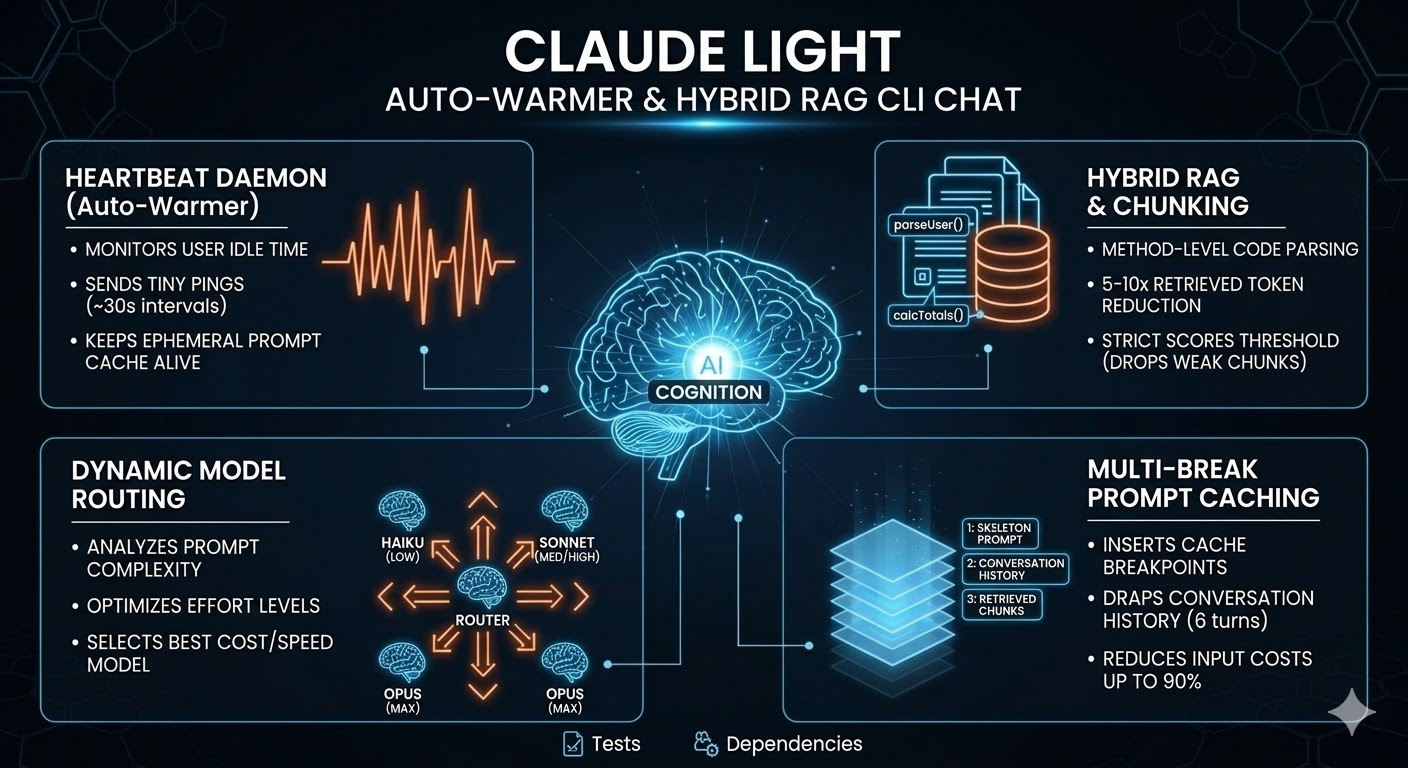
- Hybrid RAG + Prompt Caching: The tool uses a two-tier caching strategy. The project's directory tree source files and all
.mdfiles act as a cached "skeleton" system prompt. - Three-Tier Prompt Caching: The tool places three
ephemeralcache breakpoints in every request: (1) after the skeleton system prompt — stable for the whole session; (2) after the conversation history — stable for all but the newest turn; (3) after the retrieved RAG chunks in the current user message — stable across consecutive questions about the same code area. If you ask follow-up questions about the same module, the chunk block hits the cache and only your new question text is billed at full price ($2.00/M on Sonnet 5.5); everything above it costs the cache-read rate ($0.10/M). - The "Heartbeat" Auto-Warmer: In API-key mode, a background daemon checks the session every 30 seconds and, once 55 minutes have passed since the last turn or warm, sends one
max_tokens=0request that re-reads the skeleton's 1-hour cache entry and so resets its timer. An idle hour costs one cache read. It warms the model your turns use, and nothing before that model is known. (OAuth/Pro-subscription mode skips the heartbeat: each turn already spawns a freshclaudeCLI subprocess, so there is no persistent process to warm — the Anthropic backend's content-hashed prompt cache still hits across subprocess invocations on its own.) - Method-Level Chunking: Instead of stuffing entire 1,500-line files into the context window, a brace-depth scanner splits source files into one chunk per method or constructor. Each chunk retains its package, imports, and class header to remain self-contained. This provides a massive 5–10× reduction in retrieved tokens.
- Sliding Window History: To prevent conversation history from growing unboundedly and costing you on every turn, the tool caps memory at the last 6 turns via the
MAX_HISTORY_TURNSsetting. - Strict Scoring Threshold: Two filters drop low-quality chunks before sending them to Claude.
MIN_SCORE(0.35) is an absolute cosine-similarity floor (natural-language questions score lower against code than keyword queries), andRELATIVE_SCORE_FLOOR(0.60) drops any chunk whose score is below 60% of the top-ranked chunk for that query. Together they prevent a single weak query from dragging in noise alongside one strong hit. - Compressed Skeleton Tree: The directory tree sent in the cached system prompt is compacted in two ways: single-child directory chains are collapsed (
main/java/com/example/on one line), and sibling files sharing an extension are brace-grouped ({OrderService,UserService,PaymentService}.java). This saves 30–50 % of skeleton tokens on typical Java/Go/Python projects. - Retrieved-Chunk Deduplication: When multiple methods from the same file rank highly, the shared preamble (package, imports, class header) is emitted only once, with all retrieved methods listed underneath. This saves 5–20 % of retrieved-context tokens on class-heavy queries.
For a deeper dive into the implementation, see docs/architecture/.
🚀 Getting Started
llm_light supports two ways to authenticate. If you are a Claude Pro subscriber, it will automatically detect your CLI session. For the best experience on Windows, we recommend a one-time setup of a long-lived Automation Token (claude setup-token) which provides a permanent, headless-friendly connection.
Note:
sentence-transformerspulls in PyTorch, which is approximately 1.5 GB on the first install.
Install as a tool (recommended)
If you have pipx or uv installed, the fastest path is to install llm-light-cli from PyPI as a globally-available CLI in its own isolated environment. It installs the llm-light command:
# pipx
pipx install llm-light-cli

# uv
uv tool install llm-light-cli
Then run from any project root:
llm-light                 # interactive
llm-light "what does OrderService do?"   # one-shot
Optional extras:
pipx install "llm-light-cli[llmlingua]"
LLMLingua compresses retrieved context only when it is at least LLM_LIGHT_LLMLINGUA_MIN_TOKENS tokens long (default 800). The retrieval budgets are 1 500 to 9 000 tokens, so a full retrieval always qualifies; lower the value only if small retrievals should be compressed too. The first compression loads a model (about 280 MB) on CPU, which takes around 10 seconds.
To run the unreleased main instead of the latest release, install from GitHub: pipx install git+https://github.com/PIsberg/llm-light.git. Releases are listed in CHANGELOG.md. The methods below run from a source checkout.
Quick Start
- Install Dependencies:
pip install -r requirements.txt
- Authenticate (Pick One):
- Claude Pro: Run
claude auth loginORclaude setup-token(recommended for Windows persistence). - API Key: Set
export ANTHROPIC_API_KEY=sk-ant-...in your shell.
- Claude Pro: Run
- Run:
python llm_light.py
macOS (Automated)
# Clone or download the repo, then:
bash installers/install_macos.sh
The macOS installer handles the details specific to macOS:
- Detects Apple Silicon (
/opt/homebrew) vs Intel (/usr/local) Homebrew paths - Installs Python 3.12 via Homebrew if no 3.12+ interpreter is found
- Creates a
.venvvirtual environment to avoid the PEP 668 "externally managed" error on macOS 13+ - Generates a
run.shwrapper so you don't need to activate the venv manually - Reminds you to add the key to
~/.zshrc(macOS default shell)
# Set API key (zsh — macOS default since Catalina)
echo 'export ANTHROPIC_API_KEY=sk-ant-your-key-here' >> ~/.zshrc && source ~/.zshrc

# Run from your project root
cd /path/to/your/project
/path/to/llm_light/run.sh
Linux
# Clone or download the repo, then:
bash installers/install.sh
export ANTHROPIC_API_KEY=sk-ant-your-key-here
The script finds a Python 3.12+ interpreter and installs everything in requirements.txt via pip.
Windows (PowerShell)
# Allow scripts for this session, then run the installer:
Set-ExecutionPolicy -Scope Process -ExecutionPolicy Bypass;
.\installers\install.ps1
[System.Environment]::SetEnvironmentVariable("ANTHROPIC_API_KEY","sk-ant-your-key-here","User")
Manual installation
Python 3.12 or newer. Install everything in requirements.txt:
pip install -r requirements.txt
Without tree-sitter, chunking falls back to whole-file mode. Without rich, output degrades gracefully to plain text formatting.
🔑 API key
🔑 Authentication
llm_light is designed to be flexible with how you pay for tokens. It resolves your identity in this order:
- Environment Variable:
ANTHROPIC_API_KEY(Standard API Key) - Local Dotfiles:
.anthropic(home dir) or.env(project dir) - Claude CLI Config (OAuth): Automatically reads your Claude Pro session from
~/.claude/.credentials.json.
Other providers: Gemini and Codex
python3 llm_light.py --provider gemini or --provider codex sends the same skeleton and retrieved chunks to that tool's CLI instead of Claude. Without --provider nothing changes.
- Gemini: runs Google's Antigravity CLI
agy(install: https://antigravity.google) and sign in by runningagyonce. llm_light denies agy's shell, MCP and file tools per run and starts agy with an empty home directory, so your agy plugins, hooks, rules and MCP servers are not loaded (your chosen agy model is kept). agy'ssearch_webstill runs and cannot be turned off; what it can send is the prompt llm_light gives it. - Codex: install
codex(npm install -g @openai/codex) and runcodex login. - Unavailable there: prompt caching, effort routing, the top-tier prompt,
/budget, token and cost figures, and shell access. Each says so when you use it. Each tool runs in an empty temporary directory, so it answers from what llm_light sends and does not read or run anything in your repo. - Sessions: saved per provider;
--continuewith another provider's file starts fresh and names the provider to resume.
Option A: Claude Pro Subscription (OAuth)
If you have a Claude Pro or Team subscription and have authorized the official Claude CLI, llm_light will automatically use your flat-rate subscription.
- Cost: Included in your $20/mo subscription.
- Setup: Just run
claude auth loginonce. - Instructions it sees: the repo's own
CLAUDE.mdfiles are loaded; your personal~/.claude/CLAUDE.mdis not, even when the repo lives under your home directory, so instructions written for your own Claude Code setup do not leak into llm_light's agent. - Running commands: the agent edits files without asking but runs no shell commands by default. To let it run some, such as your tests so it can check its own changes, allow command prefixes (read-only commands like
git statusthen work too):llm_light.py --allow-command "python -m pytest"(repeatable) orLLM_LIGHT_ALLOW_COMMANDS="python -m pytest; npm test". A PowerShell command takes apowershell:tag, e.g.--allow-command "powershell: Invoke-Pester", and runs under the PowerShell tool; untagged entries (andbash:) run under Bash. An entry allows any command that starts with it. A command that chains, pipes, redirects or substitutes (any of;,&,|,<,>, a backtick,$or a newline) is refused, sonpm test && rm -rf xdoes not run therm. PowerShell commands also refuse(,),{,}and@, because PowerShell evaluates an argument such as(New-Item x); the agent runs one simple command per call. With an allowlist the agent edits files with its own tools so it can run the tests on its change before it finishes; llm_light then shows the diff and commits it (/undoreverts). Without one, edits come back as SEARCH/REPLACE blocks that llm_light lint-checks, previews and applies. Anything else is refused, and llm_light lists the refused commands after the turn. Permission rules, hooks and MCP servers configured inside the repo you are working on are ignored, so a cloned repo cannot grant itself commands. - Long tasks: each turn runs the CLI's own agent loop (it can read and edit files itself), so a multi-file change can take several minutes. Each file it reads, searches or edits is shown as it happens (
⏺ Read llm_light/llm.py). Press Ctrl+C to cancel a turn: the agent process is stopped and you are back at the prompt (files it already changed stay in the working tree, uncommitted). The turn is also cancelled if the CLI produces no output for 5 minutes, or after 1 hour in total. On the very first run the index is still being built (several minutes on a CPU); you can ask questions immediately and they go to the agent without retrieved context until the index is ready. One-shot runs (llm_light.py "question") do the same: the answer comes first, then the index finishes building before the process exits, so the next run has it.
Option B: Anthropic API Key
If you prefer to pay per-token or don't have a Pro subscription:
- Cost: Usage-based (Pay-as-you-go via the Anthropic Console).
- Files beyond the retrieved context: the model can call three read-only tools,
read_file,grepandlist_files, confined to the project directory, when retrieval missed the code it needs (up to 8 rounds per turn). It cannot run commands; edits still come back as SEARCH/REPLACE blocks that llm_light lint-checks, previews and commits. - Setup: Set the environment variable:
# Linux / macOS
export ANTHROPIC_API_KEY=sk-ant-your-key-here

# Windows PowerShell (persistent)
[System.Environment]::SetEnvironmentVariable("ANTHROPIC_API_KEY","sk-ant-your-key-here","User")
Run the script from the root of your project — it will immediately build the skeleton, chunk your files, and auto-tune the embedding model.
🚀 Usage
1. Interactive Loop (Default)
python3 llm_light.py
The prompt appears in about half a second: the index builds in the background, and the toolbar under the prompt says indexing… until it is ready, then shows the session's tokens, cache hit rate and cost. Replies stream in as rendered markdown (tables, lists, syntax-highlighted code), with a spinner and elapsed time while Claude thinks or runs a tool, and one line per file it reads, searches or edits. In the reply each proposed edit is a single ✎ edit to path line; the change itself is shown as a diff, with a menu underneath to approve them (arrow keys and Enter, or press 1/2/3; Esc says no). Keys typed before the menu appears are ignored, so a stray Enter cannot answer it. "Yes, and don't ask again" stops that one question for the rest of the session (applying edits and committing the agent's edits are remembered separately); -y approves both from the start.
Permission modes
What llm_light may do without asking is set by a permission mode, named after Claude Code's. shift+tab at the prompt cycles through them, /permissions <mode> sets one, and the toolbar shows any mode other than the default.
| Mode | Start with | Edits | Shell commands |
|---|---|---|---|
default |
(nothing) | Asks before applying edits and before committing the agent's edits | Only --allow-command prefixes, one simple command at a time |
acceptEdits |
-y |
Applied and committed without asking | As in default |
plan |
--permission-mode plan |
None: the model investigates and proposes a plan; any SEARCH/REPLACE blocks it writes are shown, not applied | None |
bypassPermissions |
--dangerously-skip-permissions (alias --yolo) |
Applied and committed without asking | Any command, chaining included, with no allowlist; a failing affected-test run keeps the edit instead of asking to revert it |
Bypass asks nothing, so use it only in a sandbox, a container or a repository you can restore: the agent can run any command your user can. As in Claude Code, shift+tab and /permissions offer it only when llm_light was started with --dangerously-skip-permissions or --allow-dangerously-skip-permissions (the latter starts in another mode). Spending questions are not permissions: the top-tier model prompt and the /budget cap still ask in every mode. In plan and bypass modes a one-line note goes before each question, so the model knows; default and acceptEdits requests are unchanged.
python3 llm_light.py --continue (or -c) picks up this project's previous conversation where you left it, as claude --continue does. The conversation is saved after every turn to ~/.llm_light_sessions/ (one file per project, outside the repo so a cloned repo cannot supply one), along with the session's model. Cost counters start from zero. Retrieval runs fresh for each new question, but earlier answers may describe code that has changed since. /clear deletes the saved conversation. --continue works only for the interactive loop: a one-shot question sends no history, so combining the two is an error.
Each question is routed to Haiku 5.5, Sonnet 5.5 or Opus 5.5, and the session keeps the first question's model (LLM_LIGHT_ROUTE_ONCE=0 routes every question). A question that routes to Opus asks first: Opus 5.5, Fable 5.1 or Sonnet 5.5, each with its estimated cost for the turn. Esc, or running without a terminal, picks Sonnet 5.5.
| Command / key | What it does |
|---|---|
/help |
Commands and keys |
/clear |
Start a new conversation and delete the one saved for --continue; the next question also picks the model again, which the session then keeps (LLM_LIGHT_ROUTE_ONCE=0 picks it per question) |
/compact |
Replace the conversation so far with a summary, so later turns send fewer tokens |
/copy [n] |
Copy the latest reply, or the n-th latest, to the clipboard, code blocks included. Uses clip on Windows, pbcopy on macOS and wl-copy, xclip or xsel on Linux; without one (over SSH, say) it sends an OSC 52 escape, which many terminals copy locally |
/cost |
Token usage and cost for this session, and lifetime savings |
/diff |
The uncommitted changes under the current directory, one diff per file, and the untracked files |
/export [file] |
Save the conversation as plain text; without a name, to llm_light-conversation-<date>-<time>.txt in the project (a .txt, so the skeleton does not pick it up) |
/model [name] |
Show the model; opus, sonnet, haiku, fable or a full model id pins every question to it, auto returns to routing. Claude only: Gemini and Codex pick their own |
/permissions [mode] |
Show the permission mode, or set one (see above) |
/run <cmd> |
Run a shell command and ask Claude about its output |
/budget <$> |
Cap the session's spend; at the cap, questions go to the cheapest model. /budget off removes it |
/status |
Version, project, provider and access, model, permission mode, what the shell may run, index state and where the conversation is saved |
/undo |
Undo the last Claude: commit. Keeps uncommitted work; refuses if the last commit is yours or its files have local edits |
/why |
How the last query was routed and what was retrieved |
/exit, exit, quit |
Quit; prints a one-line session summary |
!<cmd> |
Run a command yourself, from the project root; its output is shown and sent with your next message. No allowlist applies, since you typed it |
@<path> |
Attach a project file to the message (tab completes the path). Up to 50,000 characters per file; a file outside the project, a directory or a binary file is not attached, and a line says why. Routing and retrieval still see only what you typed |
Typing / |
Menu of commands with descriptions |
shift+tab |
Cycle the permission mode |
alt+enter |
New line in the prompt (enter sends) |
ctrl+c |
Cancel the running turn; at the prompt, quit |
One-shot runs write only the answer to stdout, as plain text; progress and tool lines go to stderr, so llm_light.py "question" > answer.md holds just the answer. -p (--print) asks for one-shot mode explicitly, as in claude -p; @path mentions work there too.
Other flags: --model <name> pins the model from the start (as /model does), --permission-mode <mode> starts in a permission mode, and --version prints the version.
The script runs three concurrent threads to keep your workflow seamless:
- Main Thread: Handles the input loop, retrieves relevant chunks per query, and manages the conversation history.
- Watchdog: Monitors your directory for file saves. If a source file changes, it automatically re-chunks and re-embeds it; if a
.mdfile changes, it rebuilds the skeleton cache. Files under.git,.venv,node_modulesand other skipped directories are ignored. It reports in the toolbar (re-indexed calc.py (2 chunks)), never in the middle of a reply. - Heartbeat Daemon (API-key mode only): Keeps the Anthropic prompt cache warm while you step away. Disabled in OAuth/Pro-subscription mode, where each turn spawns a fresh
claudeCLI subprocess and there is no persistent process to keep warm.
Embedding Models (hybrid retrieval)
Code is indexed twice, by two models that are good at different questions:
static-retrieval-mrl-en-v1(static embeddings, no transformer): indexes this repo's 1,400 chunks in about 2 s on a CPU, so retrieval works from the first question. Best of six models measured at questions that name code ("where isretry_with_backoffused?").all-mpnet-base-v2: about 380 s for the same chunks, so it runs in the background while you work, and its vectors are cached. Best at questions that describe behaviour without naming it ("where do we wait longer between attempts?").
Once both are ready, each chunk's similarity to the question is z-scored per model and averaged. On 35 questions about this repo, the file that answers the question reached the model's context for 23, against 15 with mpnet alone (the setup before this change), and the 6 off-topic questions still got no context. Measure on your own changes with python tests/benchmarks/benchmark_models.py. LLM_LIGHT_HYBRID=0 switches back to a single model picked by repository size (all-MiniLM-L6-v2 under 50 files, all-mpnet-base-v2 under 200, nomic-ai/nomic-embed-text-v1.5 above).
🛡️ Security & SBOM
To ensure supply chain transparency and prevent dependency confusion, llm_light uses:
- Version floors:
requirements.txtandpyproject.tomlset each dependency's minimum to the newest release that installs on Python 3.12. The installers readrequirements.txt, so there is one list to keep current. TheInstallersworkflow runs all three on clean Linux, macOS and Windows runners whenever an installer orrequirements.txtchanges, and weekly. - SBOM (Software Bill of Materials): The project maintains an industry-standard SBOM in CycloneDX format.
Continuous Inventory
A GitHub Action automatically generates a fresh sbom.json on every push to main and uploads it as a build artifact.
Manual Generation
You can generate the SBOM manually using the provided scripts:
# Linux / macOS
bash scripts/generate_sbom.sh

# Windows
.\scripts\generate_sbom.ps1
Tests
Run the full unit test suite:
python -m pytest -q
Run a quick CLI smoke test with the synthetic mocked codebase:
python -m llm_light --test-mode small "List all public classes or modules in this codebase"
Larger synthetic presets are also available for local stress testing:
python -m llm_light --test-mode medium
python -m llm_light --test-mode large
python -m llm_light --test-mode extra-large
CI Regression Checks
The GitHub Actions workflow (.github/workflows/test.yml, Python 3.12) runs three steps:
- Unit tests
python -m pytest -q
- Analytical token-cost regression
python tests/benchmarks/benchmark.py --json > tests/baseline_token_stats_new.json
python tests/linting/check_regression.py tokens tests/fixtures/baseline_token_stats.json tests/baseline_token_stats_new.json
- Offline retrieval regression on the committed local fixture
python tests/benchmarks/benchmark_retrieval.py --fixture tests/fixtures/retrieval_cases.json --output tests/baseline_retrieval_stats_new.json
python tests/linting/check_regression.py retrieval tests/fixtures/baseline_retrieval_stats.json tests/baseline_retrieval_stats_new.json
If retrieval behavior changes intentionally, refresh the baseline with the same fixture command so CI remains deterministic:
python tests/benchmarks/benchmark_retrieval.py --fixture tests/fixtures/retrieval_cases.json --output tests/fixtures/baseline_retrieval_stats.json
1 maintainer

Metadata
1 maintainer
Release files for llm-light-cli 0.1.0
For a detailed explanation of source distributions (sdists) and built distributions (wheels), please see the package formats documentation.
Source distribution (sdist)
| File | Size | Uploaded | Provenance | Actions |
|---|---|---|---|---|
| llm_light_cli-0.1.0.tar.gz | 140.3 kB | With provenance | Details for llm_light_cli-0.1.0.tar.gz |
Built distribution (wheel)
| File | Interpreter | ABI | Platform | Actions Reset |
|---|---|---|---|---|
| llm_light_cli-0.1.0-py3-none-any.whl | Python 3 | none | any | Details for llm_light_cli-0.1.0-py3-none-any.whl |
Total release size: 283.1 kB
Release files / llm_light_cli-0.1.0.tar.gz
| Download URL | llm_light_cli-0.1.0.tar.gz |
|---|---|
| Size | 140.3 kB |
| Tags | Source |
|
SHA-256 checksum How to use checksums |
b3bfd43cdce65b5487d9ab525d483faa5216643e5e171679657e757f83524508
|
|
BLAKE2b-256 checksum How to use checksums |
ae53d45881ac7f30f46a089679c44f6e2c7421d1af07ae5c8170a406a8611d09
|
| Upload date | |
|
Uploaded using Trusted Publishing? What is trusted publishing? |
Yes |
| Uploaded via |
twine/7.0.0 CPython/3.13.16
|
Provenance
Provenance describes where a file came from. On PyPI, provenance is shared via attestations, which provide a verifiable record of the build or publishing details. View details, limitations and caveats.


PyPI Publish Attestation
PyPI verified that this artifact, at this checksum, originated from the publisher listed below.
Signed by GitHub Actions, verified by PyPI on Nov 1, 2026.
Transparency logRelease files / llm_light_cli-0.1.0-py3-none-any.whl
| Download URL | llm_light_cli-0.1.0-py3-none-any.whl |
|---|---|
| Size | 142.8 kB |
| Tags | Python 3 |
|
SHA-256 checksum How to use checksums |
0b54aa40dc673d3fdab862a71a887b24c99884148bc1fb767605ee6790c5302b
|
|
BLAKE2b-256 checksum How to use checksums |
b0c25c031a9c04a743e3dad5f42587c30e68550c484929153f043f74b7dabdac
|
| Upload date | |
|
Uploaded using Trusted Publishing? What is trusted publishing? |
Yes |
| Uploaded via |
twine/7.0.0 CPython/3.13.16
|
Provenance
Provenance describes where a file came from. On PyPI, provenance is shared via attestations, which provide a verifiable record of the build or publishing details. View details, limitations and caveats.
PyPI Publish Attestation
PyPI verified that this artifact, at this checksum, originated from the publisher listed below.
Signed by GitHub Actions, verified by PyPI on Nov 1, 2026.
Transparency logSecurity for llm-light-cli 0.1.0
Provenance
Provenance describes where a file came from. On PyPI, provenance is shared via attestations, which provide a verifiable record of the build or publishing details. View details, limitations and caveats.
Full provenance
Both files in this release have been uploaded with provenance metadata.
Attestation for llm_light_cli-0.1.0.tar.gz
PyPI Publish Attestation
PyPI verified that this artifact, at this checksum, originated from the publisher listed below.
Signed by GitHub Actions, verified by PyPI on Nov 1, 2026.
Transparency logA note on package security
PyPI is a repository for distributing packages, not a service for auditing them. While third-party security researchers and our staff do their best to detect and remove malicious packages, PyPI cannot guarantee the quality, security or suitability of any given package.
To learn more about protecting yourself from malicious actors, visit our package security documentation.














