
llm-route-audit
Find out whether LLM model routing saves money without hurting quality, on your own traffic.


Model routers send easy prompts to cheap models and hard prompts to strong ones. Whether that works for your workload is usually a guess. llm-route-audit replays a sample of your real requests on cheaper models, grades every answer against the original, and tells you, task by task, where a cheaper model is good enough. You get a report and a routing policy for the gateway you already run.
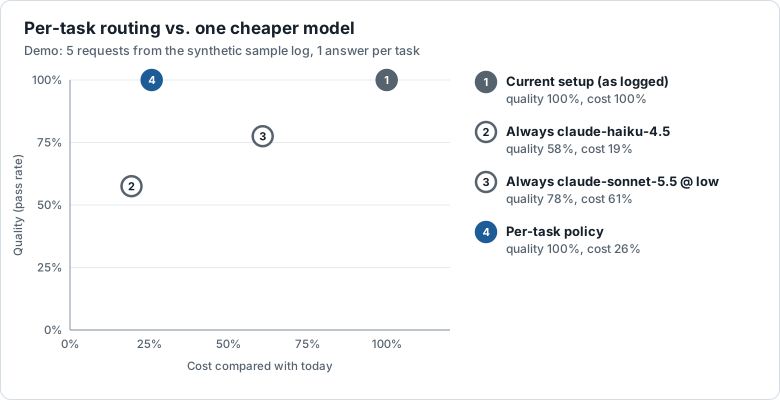
Demo run on 5 requests: using Haiku everywhere cut cost to 19% but only 58% of answers passed. Per-task routing kept every answer passing at 26% of the cost. The sample is far too small to trust, so run it on your own logs.
Install
pip install llm-route-audit
Requires Python 3.11+. The command-line tool is called llm-route-audit; run llm-route-audit --help to see every command.
Try it in one minute
No API key needed. The repository includes the results of a real run.
git clone https://github.com/good2idnan/llm-route-audit.git
cd llm-route-audit
uv sync
uv run llm-route-audit report examples/sample_logs.jsonl \
  --replay examples/demo/replay.jsonl --grades examples/demo/grades.jsonl --min-samples 1
The commands below use uv run from a clone of the repository. With pip install, drop the uv run prefix.
Why
- Routers often don't beat one good model. In independent benchmarks, most learned routers fail to beat simply using the best single model.
- Cheaper per call isn't cheaper per task. A cheap model that breaks your JSON format or gets the facts wrong costs more than it saves.
- Your workload is not a benchmark. The only evidence that counts is how candidate models do on your own requests.
llm-route-audit is not a router. It measures whether routing pays off, and can tell you not to route.
Features
- Your own data. Replays your logged requests, not public benchmarks.
- Per task type. Recommends a model for each kind of request, since one cheaper model rarely fits all of them.
- Honest grading. Exact checks first (JSON, fields, required text), then an AI judge that reads each pair in both orders, with its consistency reported.
- Model and effort. Tests (model, reasoning effort) pairs, not just models.
- Agents too. Audits tool-using agents step by step, re-runs whole sessions, and recommends a model per type of session.
- Audits routers. Checks whether an auto-router's picks beat simpler strategies.
- Closes the loop. A runtime router applies the policy in your app, and real-world feedback can send a route back.
- Spending you control. A cost estimate and confirmation before any paid call, plus a hard
--max-spendlimit that can't be exceeded. Answers are cached, so you never pay twice. - Readable output. An offline HTML report, a YAML policy, or a ready-to-use LiteLLM config.
- Local first. Logs, results and reports stay on your machine.
How it works
your logs ─▶ analyze ─▶ replay a sample ─▶ grade answers ─▶ report ─▶ export policy ─▶ monitor / outcomes
| Command | What it does |
|---|---|
llm-route-audit import |
Convert LiteLLM, Langfuse or OpenTelemetry logs into llm-route-audit's log format |
llm-route-audit label |
Give requests a task type automatically, if your logs don't have one |
llm-route-audit redact |
Hide private data (emails, phones, cards, secrets, ...) in a copy of your logs |
llm-route-audit validate |
Check a log file |
llm-route-audit analyze |
Show what your traffic costs today, by task type and model |
llm-route-audit replay |
Re-run a sample of requests on candidate models (Anthropic, OpenAI, Gemini, OpenRouter, Ollama, any OpenAI-compatible server) or routers |
llm-route-audit grade |
Compare every answer with the original: exact checks, then an AI judge |
llm-route-audit report |
Recommend a model per task type, with cost and quality for each strategy |
llm-route-audit export |
Write the policy as YAML or as a LiteLLM proxy config |
llm-route-audit monitor |
After you switch, check that routed traffic still meets the audited quality |
llm-route-audit check-model |
Test a newly released model on your last audit's sample and see what it would change |
llm-route-audit outcomes |
Learn from real-world feedback: send a route back if its good-outcome rate drops |
llm-route-audit rerun |
Re-run whole agent sessions on cheaper models and see if they still finish the job |
Audit your own traffic
The commands below use the bundled synthetic sample, examples/sample_logs.jsonl. Swap in your own log file.
1. See what you spend today
uv run llm-route-audit analyze examples/sample_logs.jsonl
By task type (most expensive first)
  Task             Requests  Share  Avg in  Avg out     Cost  Cost share  Per 1K    p50
  review_contract        30    15%     209    1,126  $0.7005         55%  $23.35  24.1s
  summarize_call         40    20%     199      235  $0.2197         17%   $5.49   6.3s
  classify_ticket        45    22%     121       31  $0.0499          4%   $1.11   1.6s
2. Replay a sample on cheaper models
List the candidates in a YAML file (see examples/candidates.yaml), check the cost first, then run:
uv run llm-route-audit replay examples/sample_logs.jsonl -c examples/candidates.yaml --dry-run
uv run llm-route-audit replay examples/sample_logs.jsonl -c examples/candidates.yaml --max-spend 1.00
3. Grade the answers
uv run llm-route-audit grade examples/sample_logs.jsonl --config examples/grading.yaml --max-spend 1.00
Rules are set per task type in examples/grading.yaml. Exact checks run first and cost nothing. Answers that pass them go to the AI judge, which compares each one with the original twice, swapping the order to cancel position bias. Disagreements count as ties. Pick the judge with --judge-model.
| Check | Passes when the answer... |
|---|---|
json |
is valid JSON (code fences fail unless allow_code_fence: true) |
json_schema |
is JSON that fits a JSON Schema, given inline (schema:) or in a file (schema_file:, relative to the grading file) |
match_reference |
has the same values as the original in the listed JSON fields |
exact_match |
equals the original, ignoring case and extra spaces |
contains |
contains every listed text |
regex |
matches a regular expression |
length |
is between min and max characters |
Your own verdicts win. Pass a file of pass/fail labels with --labels labels.csv. Each label overrides the checks and the judge for one answer, and labelled answers are never sent to the judge. Use the record id and the candidate name from .llm-route-audit/grades.jsonl (original for the logged answer):
record_id,candidate,outcome,note
req_0042,claude-sonnet-5-5 @ low,fail,wrong refund amount
req_0107,original,fail,the original answer was wrong too
4. Get the report
uv run llm-route-audit report examples/sample_logs.jsonl
For each task type, the report recommends the cheapest option that keeps at least 95% of the original's pass rate, and only once that option has at least 10 graded answers. Until then it keeps your current model and says why. Pass rates and costs both come with a 95% range, so you can see how sure each number is. The same report is saved as .llm-route-audit/report.html. Tune the rules with --target and --min-samples.
5. Export the policy
uv run llm-route-audit export examples/sample_logs.jsonl --out routing-policy.yaml
uv run llm-route-audit export examples/sample_logs.jsonl --format litellm --out litellm-config.yaml
The LiteLLM config gives each task type its own model alias, such as route/draft_reply. Your app sends each request to its task's alias, and LiteLLM forwards it to the chosen model with the right effort setting.
6. Keep watching after you switch
Models change and traffic drifts, so a cheaper route that passed the audit can get worse later. Once the policy is live, point monitor at fresh production logs:
uv run llm-route-audit monitor production-logs.jsonl --policy routing-policy.yaml --config examples/grading.yaml
For each task that switched to a cheaper model, it samples recent requests (--per-task 20) and replays them on the model the route replaced. It then grades the production answer against that reference answer and compares the pass rate with what the audit measured:
| Status | Meaning |
|---|---|
OK |
At or above the audited pass rate, minus a small tolerance (--tolerance 0.05) |
WAIT |
No problem so far, but too few checks to be sure (--min-checks 10) |
WARN |
Below the line, but the sample can't rule out bad luck yet |
ALERT |
95% sure quality dropped. The command exits with code 2, so cron or CI can flag it. |
Monitoring uses the same cost estimate, confirmation, --max-spend and cache as replay.
7. Test a new model in one command
When a new model comes out, test it on the same requests as your last audit:
uv run llm-route-audit check-model examples/sample_logs.jsonl -m claude-sonnet-5-5 --effort low --config examples/grading.yaml
It replays and grades only the new model, adds its results to your audit files, and shows which tasks it would take over and how projected savings change. To test the "one strong model at lower effort" alternative, check your current model at --effort low.
8. Learn from real-world feedback
If your app records how requests turned out (thumbs up or down, tests passed, ticket resolved), put it in each log record's outcome field, or in a separate file of record_id,outcome lines like the one the runtime router writes:
uv run llm-route-audit outcomes production-logs.jsonl --policy routing-policy.yaml --outcomes feedback.csv --out updated-policy.yaml
For each task that switched to a cheaper model, it compares the share of good outcomes on that model with the share on the model it replaced, from logs before the switch or from traffic you keep on it. Values such as good, thumbs_up, resolved and bad, thumbs_down, escalated are recognised; add your own with --good and --bad.
| Status | Meaning |
|---|---|
OK |
As many good outcomes as the model it replaced |
WAIT |
Too few outcomes on one of the models to judge (--min-outcomes 30) |
WATCH |
Fewer good outcomes, but it could still be chance |
REVERT |
95% sure the routed model does worse. --out writes a policy with the route sent back, and the command exits with code 2. |
Agents
Tool-using agents can be audited too. Each logged model call is one step: the history so far (including tool calls and tool results) and what the model did next, either calling tools or replying.
- Replay. Each sampled step is replayed with the exact history the original model saw, including the real tool results and the same tool definitions. Whole sessions are sampled, so every session can be followed step by step.
- Grade. When the original called tools, a candidate passes if it calls the same tools with the same arguments. Parallel calls can come in any order, and arguments are compared loosely, as in
match_reference. Final answers are graded like any other answer. - Report. For each session type, the report shows how often each model made the same tool calls, how its final answers graded, how many sessions matched at every step, the step where sessions typically went a different way, and the cost of a whole session.
- Route whole sessions. The recommendation is per session type, never per step, so a session stays on one model and keeps its prompt cache. When your log shows caching, costs assume the candidate gets the same cache hits as the original.
Try it on the bundled synthetic support agent (examples/agent_logs.jsonl: 40 sessions, two session types):
uv run llm-route-audit replay examples/agent_logs.jsonl -c examples/candidates.yaml --sample 40 --max-spend 1.00
uv run llm-route-audit grade examples/agent_logs.jsonl --config examples/grading-agent.yaml
uv run llm-route-audit report examples/agent_logs.jsonl
Tune how steps are compared per task type in the grading file:
tasks:
  refund_request:
    agent:
      ignore_arguments: [reason, note]   # free text that never matches word for word
      judge_alternatives: true           # the judge decides if a different step is still reasonable
Give every step of a session the same session_id and the same task type (the session type). Matching the next step is not the same as finishing the task: a model can take a different path that also works, which is what judge_alternatives is for. Logs need the tool definitions and full tool results.
Re-run whole sessions. To see whether a cheaper model actually finishes the job, let it drive entire sessions:
uv run llm-route-audit rerun examples/agent_logs.jsonl -c examples/candidates.yaml --config examples/grading-agent.yaml --sessions 10 --max-spend 1.00
The candidate starts from each session's opening request and makes its own tool calls. When it makes a call the original session made (same tool, same arguments), it gets the logged result back. That is free and runs nothing. A call the log has no result for ends the session there, unless you give your own tools:
--tool-handler my_tools.py:handle: a Python function called ashandle(name, arguments), for example a stub or a staging API.--mcp "python my_server.py"(or a URL): tools from an MCP server. Needspip install "llm-route-audit[mcp]".
These calls run for real, so point them at test accounts or a sandbox. llm-route-audit warns and asks first. The report shows, per session type, how many sessions finished, how many final answers passed grading, how many of the original tool calls the candidate also made, and the cost per session.
Audit a router
Routers such as OpenRouter's Auto Router or TypeSafe's Jev Router pick a model for every request. Do their picks beat simply using one model, or your own per-task policy? Replay them like any other candidate, with router: true:
uv run llm-route-audit replay examples/sample_logs.jsonl -c examples/candidates-routers.yaml --max-spend 1.00
uv run llm-route-audit grade examples/sample_logs.jsonl --config examples/grading.yaml --max-spend 1.00
uv run llm-route-audit report examples/sample_logs.jsonl
Every answer records the model the router actually picked. The report adds a Router audit: which models the router chose for each task, how those answers graded, and whether any other strategy (your current setup, always one model, or the per-task policy) is at least as good for less money. A LiteLLM proxy with an auto-router is audited the same way, through base_url. See examples/candidates-routers.yaml.
Routers have no fixed price, so price_as names the model to use for estimates and the --max-spend limit (usually the most expensive model the router may pick). Real costs come from the provider's own figure, or from the price of the model the router picked.
Use the policy in your app
No gateway? The runtime router applies an exported policy inside your Python app:
from llm_route_audit.runtime import Router

router = Router.from_file("routing-policy.yaml", log_path="logs/requests.jsonl")

reply = router.complete("classify_ticket", [{"role": "user", "content": "I was charged twice"}])
print(reply.text)

router.record_outcome(reply.record_id, "thumbs_up")  # feedback from your users, if you have it
completesends the request to the model the policy picked for that task type, using the same providers as the audit. If the cheaper model fails, it retries once on the model it replaced.- Prefer your own client?
router.anthropic_args(task),router.openai_args(task)androuter.litellm_args(task)return the model (and effort) to pass to the Anthropic SDK, the OpenAI SDK or LiteLLM. - With
log_path, every call is saved in llm-route-audit's log format, ready formonitorandoutcomes.
Providers and spending
Name each candidate (and the judge) after where it runs, and put the key in a .env file:
| Provider | Model name | Key in .env |
|---|---|---|
| Anthropic | claude-haiku-4-5 |
ANTHROPIC_API_KEY |
| OpenAI | openai/gpt-6-luna |
OPENAI_API_KEY |
| Google Gemini | gemini/gemini-3-flash |
GEMINI_API_KEY |
| OpenRouter | openrouter/anthropic/claude-haiku-4.5 |
OPENROUTER_API_KEY |
| Ollama (local, free) | ollama/llama3.2 |
none |
Any other server that speaks OpenAI's API, such as Groq, Together, vLLM or LM Studio, works through base_url (and api_key_env if its key has another name). See examples/candidates-openai.yaml. Models on your own machine count as free.
Effort levels (none to max, where a model supports them) go next to the model in the candidates file. For Gemini they set the thinking level. Prices for OpenAI, Gemini and OpenRouter models are looked up automatically, and OpenRouter's real cost for each call is recorded.
Three spending controls work on both replay and grade:
- Confirmation. llm-route-audit shows the estimate and asks before spending (
--yesskips the question). --budget 1.00refuses to start if the estimate is above $1.00.--max-spend 1.00is a hard limit on actual spend. Each call reserves its worst-case cost first, so even parallel calls can't push the total over. Calls that don't fit are held back and reported.
Half-price batches. Add --batch to replay or grade to use the batch APIs of Anthropic and OpenRouter. They cost about half the normal price and answer within 24 hours, usually much sooner. llm-route-audit sends what the run still needs, waits up to --wait-minutes 60, and saves the answers. If some are still in progress when the wait ends, run the same command again later to collect them; nothing is sent or paid for twice. Not every model accepts batches. If one doesn't, llm-route-audit stops and says so instead of quietly paying full price.
Logs
Already logging somewhere? Import from the tool you use. Point import at one file or a folder:
| Source | Command | Task type comes from |
|---|---|---|
| LiteLLM logging callbacks (JSON/JSONL) | llm-route-audit import litellm-logs/ --format litellm |
request tag task:<name> |
Langfuse observations (UI export or /api/public/v2/observations) |
llm-route-audit import observations.json --format langfuse |
trace tag task:<name>, or --task-from-name |
| OpenTelemetry GenAI spans (OTLP JSON, e.g. the Collector's file exporter) | llm-route-audit import traces.jsonl --format otel |
span attribute task_type (--task-attribute) |
Only real model calls are imported. Requests that can't be replayed faithfully are skipped and counted: failed calls, cache hits and images. Agent steps keep their tool calls, tool results and tool definitions, and are grouped into sessions: by litellm_session_id (or the trace) for LiteLLM, by session or trace for Langfuse, and by gen_ai.conversation.id (or the trace) for OpenTelemetry. For OpenTelemetry, turn on GenAI message capture so the spans include the prompts and answers. API keys and other metadata are not copied.
No task types in your logs? Recommendations are per task type, so label the requests first:
llm-route-audit label logs.jsonl --out labelled.jsonl
By default it groups requests that share the same system instructions, which almost always means the same job, and names each group from them. On the bundled sample it recovers all 5 task types exactly. It is free, instant and needs nothing extra.
To sort requests into task types you define, use the open laya decision model, which runs on your own machine:
pip install "llm-route-audit[laya]"
llm-route-audit label logs.jsonl --out labelled.jsonl --by laya --tasks tasks.yaml
tasks.yaml lists each task type with a one-line description (tasks: {billing: "payments and refunds", ...}). Requests laya is unsure about (--min-confidence) stay unlabelled. The laya extra installs PyTorch and downloads about 800 MB of model weights the first time.
TypeSafe's hosted Jev decision model does the same job through its API, with nothing to install: --by jev, with TYPESAFE_API_KEY in .env. It is fast and cheap (about $0.04 per million input tokens at launch), but the request text is sent to TypeSafe, so llm-route-audit shows the estimate and asks first.
Private data in your logs? Clean a copy first and run the audit on that copy, so no private values are sent to any model:
llm-route-audit redact logs.jsonl --out safe-logs.jsonl
It hides email addresses, phone numbers, payment cards (checksum-verified), IBANs, ID numbers (US SSN, UK NI), IP addresses, links carrying tokens, API keys and passwords, and dates of birth. It works offline and only prints counts, never the values. Each value becomes a numbered placeholder such as [EMAIL_1], the same in the request and the original answer, so grading stays fair. Choose types and add your own patterns in a YAML file passed with --rules:
types: [email, phone, card, secret]   # default: all types
custom:
  - name: customer_id
    pattern: 'CUST-\d{6}'
Names and street addresses are not detected, since they have no fixed pattern. Open the cleaned file and check it before you run an audit.
Writing your own logs? Use one JSON object per line:
{"id": "req_0001", "timestamp": "2026-09-28T09:14:03Z", "model": "claude-opus-5-5",
 "task_type": "classify_ticket",
 "messages": [{"role": "system", "content": "..."}, {"role": "user", "content": "..."}],
 "response": "{\"category\": \"billing\", \"priority\": \"high\"}",
 "input_tokens": 180, "output_tokens": 32, "latency_ms": 1610}
| Field | Required | Notes |
|---|---|---|
id, timestamp, model |
Yes | id must be unique |
messages or prompt |
Yes | Use either one. Messages may use the tool role and carry tool_calls |
response |
Yes, unless the model called tools | The answer text |
response_tool_calls, tools, session_id |
For agents | Tool calls made ([{"name", "arguments"}]), tool definitions ([{"name", "description", "parameters"}]), and the session the step belongs to |
input_tokens, output_tokens |
No | input_tokens counts uncached input only; estimated from text if missing |
cache_read_tokens, cache_write_tokens |
No | For cache-aware pricing |
task_type |
No | Strongly recommended: recommendations are per task type |
latency_ms, outcome, metadata |
No | Unknown fields are ignored |
Prices. A starter table for Claude models is built in. Pass your own with --prices my-prices.yaml (USD per 1M tokens: input, output, cache_read, cache_write). Requests whose model has no price are reported, not silently dropped.
FAQ
When should I not route? When traffic is low, when every request is equally hard, or in long agent sessions where switching models throws away the prompt cache. Also whenever cheaper models fail your checks. "Keep your current model" is a normal result.
How much does an audit cost?
Mostly the replay and judge calls. The demo in this repo (5 requests, 2 candidates, a Sonnet judge) cost $0.11. Costs grow roughly in line with requests × candidates. --dry-run shows the estimate, --max-spend caps it, and local Ollama models are free.
Does my data leave my machine? Only the requests you choose to replay, sent to the providers you configure. Logs, answers, grades and reports stay in your project folder, and the HTML report loads nothing from the internet.
Can I trust an AI judge?
Treat it as one signal. Exact checks come first and settle formats and facts for free. The judge sees each pair in both orders, and the report shows how often its two verdicts agree. Use a strong judge model, and spot-check .llm-route-audit/grades.jsonl.
How many requests do I need? At least 10 graded answers per task type before anything is recommended, and 30 or more for confident numbers. The report shows a 95% range for every pass rate and every cost.
Does it handle agents and tool calls?
Yes, two ways. The next-step audit replays each step with its real history and compares the tool calls with the original. rerun lets a cheaper model drive whole sessions, with tool results from the log or from your own tools. See Agents.
Is an auto-router worth it?
Audit it: replay it as a candidate with router: true, and the report shows its picks and whether a simpler strategy does as well for less. See Audit a router.
Is this a router?
Not mainly. It audits routing and produces a policy. Put the policy in the gateway you already use, for example with the LiteLLM export, or apply it with the small runtime router in llm_route_audit.runtime, which only follows the policy: it does not guess task types or learn on its own.
Development
uv sync
uv run pytest
uv run ruff check . && uv run ruff format --check .
Issues and pull requests are welcome. See CONTRIBUTING.md.
License
1 maintainer

Metadata
1 maintainer
Release files for llm-route-audit 0.3.0
For a detailed explanation of source distributions (sdists) and built distributions (wheels), please see the package formats documentation.
Source distribution (sdist)
| File | Size | Uploaded | |
|---|---|---|---|
| llm_route_audit-0.3.0.tar.gz | 212.2 kB | Details |
Built distribution (wheel)
| File | Interpreter | ABI | Platform | Reset |
|---|---|---|---|---|
| llm_route_audit-0.3.0-py3-none-any.whl | Python 3 | none | any | Details |
Total release size: 343.4 kB
Release files / llm_route_audit-0.3.0.tar.gz
| Download URL | llm_route_audit-0.3.0.tar.gz |
|---|---|
| Size | 212.2 kB |
| Tags | Source |
|
SHA-256 checksum How to use checksums |
0ab9c7158728778f059862111d09f73cd8a997f3da891f4ab6a266968682c539
|
|
BLAKE2b-256 checksum How to use checksums |
e198bd80b5c544876c8da58f2035817ef502a728fed4f6578b6c6b2e4bcb0590
|
| Upload date | |
|
Uploaded using Trusted Publishing? What is trusted publishing? |
No |
| Uploaded via |
uv/0.9.22 {"installer":{"name":"uv","version":"0.9.22","subcommand":["publish"]},"python":null,"implementation":{"name":null,"version":null},"distro":null,"system":{"name":null,"release":null},"cpu":null,"openssl_version":null,"setuptools_version":null,"rustc_version":null,"ci":null}
|
Release files / llm_route_audit-0.3.0-py3-none-any.whl
| Download URL | llm_route_audit-0.3.0-py3-none-any.whl |
|---|---|
| Size | 131.2 kB |
| Tags | Python 3 |
|
SHA-256 checksum How to use checksums |
a019c225f7547583652bd47faa40cced77fd80a38edf0285a4e6b8ffd8ba10ad
|
|
BLAKE2b-256 checksum How to use checksums |
295faf3c420a8937c21c3f0dced5b048e034e5317c2a86f36b7c11f776dc656b
|
| Upload date | |
|
Uploaded using Trusted Publishing? What is trusted publishing? |
No |
| Uploaded via |
uv/0.9.22 {"installer":{"name":"uv","version":"0.9.22","subcommand":["publish"]},"python":null,"implementation":{"name":null,"version":null},"distro":null,"system":{"name":null,"release":null},"cpu":null,"openssl_version":null,"setuptools_version":null,"rustc_version":null,"ci":null}
|














