
LLM2Vec: Large Language Models Are Secretly Powerful Text Encoders





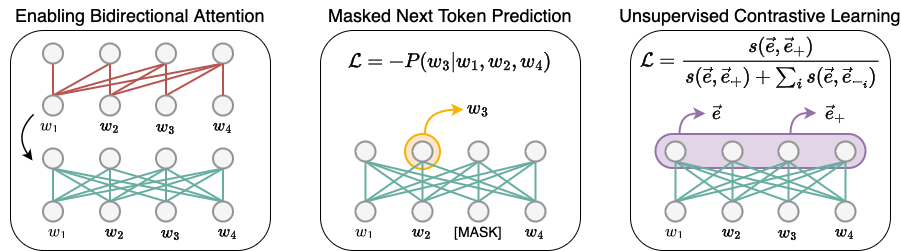
LLM2Vec is a simple recipe to convert decoder-only LLMs into text encoders. It consists of 3 simple steps: 1) enabling bidirectional attention, 2) training with masked next token prediction, and 3) unsupervised contrastive learning. The model can be further fine-tuned to achieve state-of-the-art performance.
**************************** Updates ****************************
-
03/10: Added support for latest transformer versions, which support Llama 3.1, 3.2 and other latest models. Expanded support to evaluate any LLM2vec model, check mteb_eval_custom.py
-
04/07: Added support for Gemma and Qwen-2 models, huge thanks to @bzantium for the contribution.
-
30/04: We release LLM2Vec transformed Meta-Llama-3 checkpoints. See our HuggingFace collection for both supervised and unsupervised variants.
Installation
To use LLM2Vec, first install the llm2vec package from PyPI, followed by installing flash-attention:
pip install llm2vec
pip install flash-attn --no-build-isolation
You can also directly install the latest version of llm2vec by cloning the repository:
pip install -e .
pip install flash-attn --no-build-isolation
Getting Started
LLM2Vec class is a wrapper on top of HuggingFace models to support enabling bidirectionality in decoder-only LLMs, sequence encoding and pooling operations. The steps below showcase an example on how to use the library.
Preparing the model
Initializing LLM2Vec model using pretrained LLMs is straightforward. The from_pretrained method of LLM2Vec takes a base model identifier/path and an optional PEFT model identifier/path. All HuggingFace model loading arguments can be passed to from_pretrained method. By default, the models are loaded with bidirectional connections enabled. This can be turned off by passing enable_bidirectional=False to the from_pretrained method.
Here, we first initialize the Llama-3 MNTP base model and load the unsupervised-trained LoRA weights (trained with SimCSE objective and wiki corpus).
import torch
from llm2vec import LLM2Vec

l2v = LLM2Vec.from_pretrained(
    "McGill-NLP/LLM2Vec-Meta-Llama-3-8B-Instruct-mntp",
    peft_model_name_or_path="McGill-NLP/LLM2Vec-Meta-Llama-3-8B-Instruct-mntp-unsup-simcse",
    device_map="cuda" if torch.cuda.is_available() else "cpu",
    torch_dtype=torch.bfloat16,
)
We can also load the model with supervised-trained LoRA weights (trained with contrastive learning and public E5 data) by changing the peft_model_name_or_path.
import torch
from llm2vec import LLM2Vec

l2v = LLM2Vec.from_pretrained(
    "McGill-NLP/LLM2Vec-Meta-Llama-3-8B-Instruct-mntp",
    peft_model_name_or_path="McGill-NLP/LLM2Vec-Meta-Llama-3-8B-Instruct-mntp-supervised",
    device_map="cuda" if torch.cuda.is_available() else "cpu",
    torch_dtype=torch.bfloat16,
)
By default the LLM2Vec model uses the mean pooling strategy. You can change the pooling strategy by passing the pooling_mode argument to the from_pretrained method. Similarly, you can change the maximum sequence length by passing the max_length argument (default is 512).
Inference
This model now returns the text embedding for any input in the form of [[instruction1, text1], [instruction2, text2]] or [text1, text2]. While training, we provide instructions for both sentences in symmetric tasks, and only for for queries in asymmetric tasks.
# Encoding queries using instructions
instruction = (
    "Given a web search query, retrieve relevant passages that answer the query:"
)
queries = [
    [instruction, "how much protein should a female eat"],
    [instruction, "summit define"],
]
q_reps = l2v.encode(queries)

# Encoding documents. Instruction are not required for documents
documents = [
    "As a general guideline, the CDC's average requirement of protein for women ages 19 to 70 is 46 grams per day. But, as you can see from this chart, you'll need to increase that if you're expecting or training for a marathon. Check out the chart below to see how much protein you should be eating each day.",
    "Definition of summit for English Language Learners. : 1  the highest point of a mountain : the top of a mountain. : 2  the highest level. : 3  a meeting or series of meetings between the leaders of two or more governments.",
]
d_reps = l2v.encode(documents)

# Compute cosine similarity
q_reps_norm = torch.nn.functional.normalize(q_reps, p=2, dim=1)
d_reps_norm = torch.nn.functional.normalize(d_reps, p=2, dim=1)
cos_sim = torch.mm(q_reps_norm, d_reps_norm.transpose(0, 1))

print(cos_sim)
"""
tensor([[0.6470, 0.1619],
        [0.0786, 0.5844]])
"""
More examples of classification, clustering, sentence similarity etc are present in examples directory.
Model List
| Meta-Llama-3-8B | Mistral-7B | Llama-2-7B | Sheared-Llama-1.3B | |
|---|---|---|---|---|
| Bi + MNTP | HF Link | HF Link | HF Link | HF Link |
| Bi + MNTP + SimCSE | HF Link | HF Link** | HF Link | HF Link |
| Bi + MNTP + Supervised | HF Link* | HF Link | HF Link | HF Link |
* State-of-the-art on MTEB among models trained on public data
** Unsupervised state-of-the-art on MTEB
Training
MNTP training
To train the model with Masked Next Token Prediction (MNTP), you can use the experiments/run_mntp.py script. It is adapted from HuggingFace Masked Language Modeling (MLM) script. To train the Meta-Llama-3-8B model with MNTP, run the following command:
python experiments/run_mntp.py train_configs/mntp/MetaLlama3.json
The Meta-Llama-3-8B training configuration file contains all the training hyperparameters and configurations used in our paper.
{
    "model_name_or_path": "meta-llama/Meta-Llama-3-8B-Instruct",
    "dataset_name": "wikitext",
    "dataset_config_name": "wikitext-103-raw-v1",
    "mask_token_type": "blank",
    "data_collator_type": "default",
    "mlm_probability": 0.2,
    "lora_r": 16,
    "gradient_checkpointing": true,
    "torch_dtype": "bfloat16",
    "attn_implementation": "flash_attention_2"
    // ....
}
Similar configurations are also available forMistral-7B, Llama-2-7B, and Sheared-Llama-1.3B models.
Unsupervised contrastive training (SimCSE)
For SimCSE training, we replicated the training procedure from SimCSE paper. For training, we use the dataset 1 million sentences from English Wikipedia released by the authors. It can be downloaded using the following command:
wget https://huggingface.co/datasets/princeton-nlp/datasets-for-simcse/resolve/main/wiki1m_for_simcse.txt
To use the training script with pre-set configurations, the downloaded file should be placed in the cache directory. The directory layout should be as follows:
cache
└── wiki1m_for_simcse.txt
If the dataset is placed in a different directory, please change the dataset_file_path in the training configuration accordingly.
To train the Meta-Llama-3-8B model with SimCSE, run the following command:
python experiments/run_simcse.py train_configs/simcse/MetaLlama3.json
The Meta-Llama-3-8B training configuration file contains all the training hyperparameters and configurations used in our paper.
{
    "model_name_or_path": "meta-llama/Meta-Llama-3-8B-Instruct",
    "peft_model_name_or_path": "McGill-NLP/LLM2Vec-Meta-Llama-3-8B-Instruct-mntp",
    "simcse_dropout": 0.3,
    "bidirectional": true,
    "pooling_mode": "mean",
    "dataset_name": "Wiki1M",
    "dataset_file_path": "cache/wiki1m_for_simcse.txt",
    "learning_rate": 3e-5,
    "loss_scale": 20,
    "per_device_train_batch_size": 128,
    "max_seq_length": 128,
    "stop_after_n_steps": 1000,
    "lora_r": 16,
    "gradient_checkpointing": true,
    "torch_dtype": "bfloat16",
    "attn_implementation": "flash_attention_2",
    // ....
}
Similar configurations are also available for Mistral, Llama-2-7B, and Sheared-Llama-1.3B models.
Supervised contrastive training
For supervised contrastive training, we use the public portion of dataset used in Improving Text Embeddings with Large Language Models, curated by authors of Repetition Improves Language Model Embeddings. The dataset can be downloaded from the GitHub page of Echo embeddings repository. To use the training script, the downloaded dataset should be placed in the cache directory. The directory layout should be as follows:
cache
|── wiki1m_for_simcse.txt
└── echo-data
    ├── allnli_split1.jsonl
    ├── allnli_split2.jsonl
    ├── allnli.jsonl
    ├── dureader.jsonl
    ...
If the dataset is placed in a different directory, please change the dataset_file_path in the training configuration accordingly.
To train the Meta-Llama-3-8B model with supervised contrastive learning, run the following command:
torchrun --nproc_per_node=8 experiments/run_supervised.py train_configs/supervised/MetaLlama3.json
The number of GPUs can be changed by modifying the --nproc_per_node argument.
The Meta-Llama-3-8B training configuration file contains all the training hyperparameters and configurations used in our paper.
{
    "model_name_or_path": "meta-llama/Meta-Llama-3-8B-Instruct",
    "peft_model_name_or_path": "McGill-NLP/LLM2Vec-Meta-Llama-3-8B-Instruct-mntp",
    "bidirectional": true,
    "pooling_mode": "mean",
    "dataset_name": "E5",
    "dataset_file_path": "cache/echo-data",
    "learning_rate": 2e-4,
    "num_train_epochs": 3,
    "warmup_steps": 300,
    "per_device_train_batch_size": 64,
    "lora_r": 16,
    "gradient_checkpointing": true,
    "torch_dtype": "bfloat16",
    "attn_implementation": "flash_attention_2"
    // ....
}
Similar configurations are also available for Mistral, Llama-2-7B, and Sheared-Llama-1.3B models.
Word-level tasks training
To tune the model for word-level tasks, we define a classifier on top of the models, and only train the classifier weights. The code is adapted from HuggingFace token classification example. To train and test the classifier for Llama-2-7B MNTP model on pos_tags task, run the following command:
python experiments/run_word_task.py train_configs/word-task/Llama2-bi-mntp.json
python experiments/test_word_task.py --config_file test_configs/word-task/Llama2-bi-mntp.json
The config files contain all the parameters and configurations used in our paper. For instance, Llama2-bi-mntp.json includes:
{
    "model_name_or_path": "meta-llama/Llama-2-7b-chat-hf",
    "peft_addr": "McGill-NLP/LLM2Vec-Llama-2-7b-chat-hf-mntp", // or any local directory containing `adapter_model` files.
    "model_class": "custom",
    "bidirectional": true,
    "classifier_dropout": 0.1,
    "merge_subwords": true,
    "retroactive_labels": "next_token",
    "output_dir": "output/word-task/pos_tags/Llama2/bi-mntp",
    "dataset_name": "conll2003",
    "task": "pos_tags", // or ner_tags, or chunk_tags
    // ....
}
train_configs/word-task and test_configs/word-task contain similar configurations for Llama-2-7B, Mistral-7B, and Sheared-Llama-1.3B for all Uni, Bi, Bi-MNTP, and Bi-MNTP-SimCSE (LLM2Vec) variants.
Evaluation
MTEB Evaluation
To evaluate the model on the MTEB benchmark, we use the experiments/mteb_eval.py script. The script requires mteb>=1.12.60, amongst other dependencies, which can be installed with the following command.
pip install llm2vec[evaluation]
The evaluation utilizes instructions for each task which are provided in the test_configs/mteb/task_to_instructions.json file.
To evaluate the supervised trained Meta-Llama-3-8B model on the STS16 task, run the following command:
python experiments/mteb_eval.py --model_name McGill-NLP/LLM2Vec-Meta-Llama-3-8B-Instruct-mntp-supervised \
--task_name STS16 \
--task_to_instructions_fp test_configs/mteb/task_to_instructions.json \
--output_dir results
The evaluation script supports all the models available in the HuggingFace collection.
Citation
If you find our work helpful, please cite us:
@inproceedings{
llm2vec,
title={{LLM2V}ec: Large Language Models Are Secretly Powerful Text Encoders},
author={Parishad BehnamGhader and Vaibhav Adlakha and Marius Mosbach and Dzmitry Bahdanau and Nicolas Chapados and Siva Reddy},
booktitle={First Conference on Language Modeling},
year={2024},
url={https://openreview.net/forum?id=IW1PR7vEBf}
}
Bugs or questions?
If you have any questions about the code, feel free to open an issue on the GitHub repository.
2 maintainers


Metadata
2 maintainers
Release files for llm2vec 0.2.3
For a detailed explanation of source distributions (sdists) and built distributions (wheels), please see the package formats documentation.
Source distribution (sdist)
| File | Size | Uploaded | |
|---|---|---|---|
| llm2vec-0.2.3.tar.gz | 27.7 kB | Details |
Release files / llm2vec-0.2.3.tar.gz
| Download URL | llm2vec-0.2.3.tar.gz |
|---|---|
| Size | 27.7 kB |
| Tags | Source |
|
SHA-256 checksum How to use checksums |
4ab7491478147da03f07ce54d245670c72cb09e47d4de0c8752ef008416d35fc
|
|
BLAKE2b-256 checksum How to use checksums |
79454b71b3d3112d7cb17e9e221ef0a2acd35563f206d7d22ddcf13f460c78c6
|
| Upload date | |
|
Uploaded using Trusted Publishing? What is trusted publishing? |
No |
| Uploaded via |
twine/6.1.0 CPython/3.9.7
|














