
LLMBrick




一個強調「模組化設計」、「明確協定定義」、「靈活組裝」與「易於擴展」的 LLM 應用開發框架。 核心理念為:所有功能皆以 Brick 組件為單元,協定明確、組裝彈性,方便擴充與客製化。
特色
- 🧱 模組化設計:所有功能皆以 Brick 為單元,組件可插拔、可重組,支援多層次組裝。
- 📑 明確協定定義:所有 Brick 之間的資料流、型別、錯誤皆有明確協定(protocols/ 目錄),便於跨語言、跨協議整合。
- 🔄 多協議支援:SSE、gRPC(WebSocket/WebRTC 計畫中),可依需求切換。
- 🔧 易於擴展:插件系統與自定義組件,支援靈活擴充與客製化。
設計理念
- 模組化:每個 Brick 可獨立開發、測試、組裝,降低耦合。
- 協定導向:所有資料流、型別、錯誤皆有明確協定,便於跨語言、跨協議整合。
- 靈活組裝:Pipeline、Server、Client 皆可自由組合各種 Brick,支援多種應用場景。
- 易於擴展:可自訂新 Brick、協定或插件,快速擴充功能。
快速開始
安裝
pip install llmbrick
基本使用
from llmbrick import OpenAILLM
from llmbrick.servers.sse import SSEServer

# 建立 LLM Brick
llm_brick = OpenAILLM(api_key="your-api-key")

# 啟動 SSE 服務
server = SSEServer(llm_brick)
server.run(host="0.0.0.0", port=8000)
測試頁面
SSEServer 提供了內建的測試頁面,方便開發和測試:
# 啟用測試頁面
server = SSEServer(enable_test_page=True)
server.run(host="0.0.0.0", port=8000)
測試頁面特色:
- 完整的請求表單,支援所有 SSERequest 欄位
- 動態訊息管理(新增/刪除/重排序)
- 即時串流輸出顯示,支援自動捲動
- 不同類型訊息顏色區分
- 時間戳記標記
- 深色/淺色主題切換
- 完整的 API 文件和範例
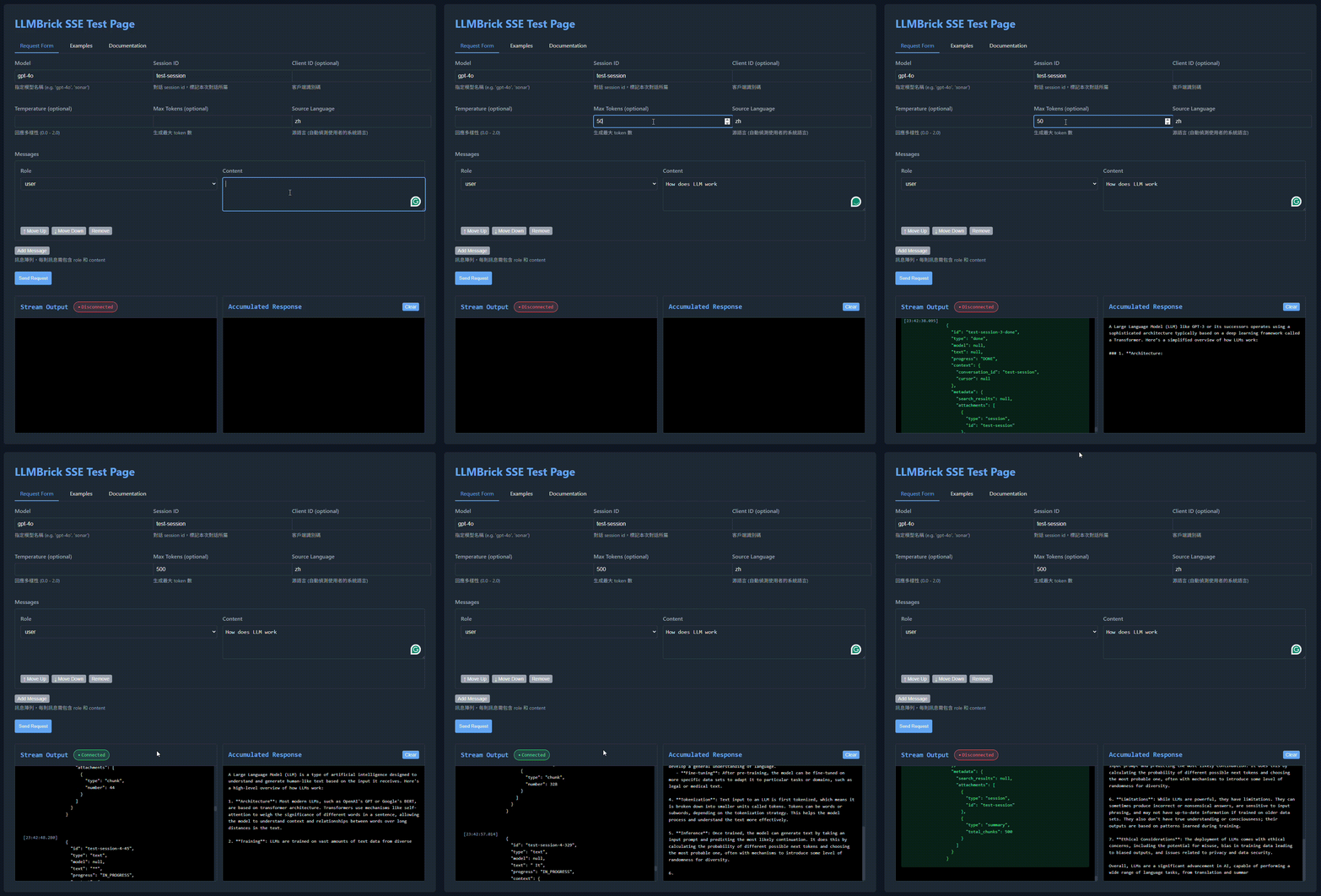
範例
OpenAI GPT Brick with SSE Server
完整的 OpenAI GPT 整合示例,包含:
- SSE 服務器整合與測試頁面
- 串流輸出與即時累積回應
- 自動系統語言偵測
- 深色/淺色主題支援
標準用法範例
1. CommonBrick 標準用法
from llmbrick.bricks.common.common import CommonBrick
from llmbrick.core.brick import unary_handler, get_service_info_handler
from llmbrick.protocols.models.bricks.common_types import CommonRequest, CommonResponse, ErrorDetail, ServiceInfoResponse

class SimpleBrick(CommonBrick):
    @unary_handler
    async def process(self, request: CommonRequest) -> CommonResponse:
        return CommonResponse(
            data={"message": f"Hello, {request.data.get('name', 'World')}!"},
            error=ErrorDetail(code=ErrorCodes.SUCCESS, message="Success")
        )

    @get_service_info_handler
    async def get_info(self) -> ServiceInfoResponse:
        return ServiceInfoResponse(
            service_name="SimpleBrick",
            version="1.0.0",
            models=[],
            error=ErrorDetail(code=ErrorCodes.SUCCESS, message="Success")
        )
2. LLMBrick 標準用法
from llmbrick.bricks.llm.base_llm import LLMBrick
from llmbrick.core.brick import unary_handler, output_streaming_handler, get_service_info_handler
from llmbrick.protocols.models.bricks.llm_types import LLMRequest, LLMResponse, Context
from llmbrick.protocols.models.bricks.common_types import ErrorDetail, ServiceInfoResponse

class SimpleLLMBrick(LLMBrick):
    @unary_handler
    async def echo(self, request: LLMRequest) -> LLMResponse:
        return LLMResponse(
            text=f"Echo: {request.prompt}",
            tokens=["echo"],
            is_final=True,
            error=ErrorDetail(code=ErrorCodes.SUCCESS, message="Success"),
        )

    @get_service_info_handler
    async def info(self) -> ServiceInfoResponse:
        return ServiceInfoResponse(
            service_name="SimpleLLMBrick",
            version="1.0.0",
            models=[],
            error=ErrorDetail(code=ErrorCodes.SUCCESS, message="Success"),
        )
3. ComposeBrick 標準用法
from llmbrick.bricks.compose.base_compose import ComposeBrick
from llmbrick.core.brick import unary_handler, output_streaming_handler, get_service_info_handler
from llmbrick.protocols.models.bricks.compose_types import ComposeRequest, ComposeResponse
from llmbrick.protocols.models.bricks.common_types import ErrorDetail, ServiceInfoResponse

class SimpleCompose(ComposeBrick):
    @unary_handler
    async def process(self, request: ComposeRequest) -> ComposeResponse:
        return ComposeResponse(
            output={"message": f"文件數量: {len(request.input_documents)}"},
            error=ErrorDetail(code=ErrorCodes.SUCCESS, message="Success")
        )

    @get_service_info_handler
    async def get_info(self) -> ServiceInfoResponse:
        return ServiceInfoResponse(
            service_name="SimpleCompose",
            version="1.0.0",
            models=[],
            error=ErrorDetail(code=ErrorCodes.SUCCESS, message="Success")
        )
4. GuardBrick 標準用法
from llmbrick.bricks.guard.base_guard import GuardBrick
from llmbrick.core.brick import unary_handler, get_service_info_handler
from llmbrick.protocols.models.bricks.guard_types import GuardRequest, GuardResponse, GuardResult
from llmbrick.protocols.models.bricks.common_types import ErrorDetail, ServiceInfoResponse

class SimpleGuard(GuardBrick):
    @unary_handler
    async def check(self, request: GuardRequest) -> GuardResponse:
        is_attack = "attack" in (request.text or "").lower()
        result = GuardResult(
            is_attack=is_attack,
            confidence=0.99 if is_attack else 0.1,
            detail="Detected attack" if is_attack else "Safe"
        )
        return GuardResponse(
            results=[result],
            error=ErrorDetail(code=ErrorCodes.SUCCESS, message="Success")
        )

    @get_service_info_handler
    async def info(self) -> ServiceInfoResponse:
        return ServiceInfoResponse(
            service_name="SimpleGuard",
            version="1.0.0",
            models=[],
            error=ErrorDetail(code=ErrorCodes.SUCCESS, message="Success")
        )
5. IntentionBrick 標準用法
from llmbrick.bricks.intention.base_intention import IntentionBrick
from llmbrick.core.brick import unary_handler, get_service_info_handler
from llmbrick.protocols.models.bricks.intention_types import IntentionRequest, IntentionResponse, IntentionResult
from llmbrick.protocols.models.bricks.common_types import ErrorDetail, ServiceInfoResponse

class SimpleIntentionBrick(IntentionBrick):
    @unary_handler
    async def process(self, request: IntentionRequest) -> IntentionResponse:
        return IntentionResponse(
            results=[IntentionResult(intent_category="greet", confidence=1.0)],
            error=ErrorDetail(code=ErrorCodes.SUCCESS, message="Success")
        )

    @get_service_info_handler
    async def get_info(self) -> ServiceInfoResponse:
        return ServiceInfoResponse(
            service_name="SimpleIntentionBrick",
            version="1.0.0",
            models=[],
            error=ErrorDetail(code=ErrorCodes.SUCCESS, message="Success")
        )
6. RectifyBrick 標準用法
from llmbrick.bricks.rectify.base_rectify import RectifyBrick
from llmbrick.core.brick import unary_handler, get_service_info_handler
from llmbrick.protocols.models.bricks.rectify_types import RectifyRequest, RectifyResponse
from llmbrick.protocols.models.bricks.common_types import ErrorDetail, ServiceInfoResponse

class SimpleRectifyBrick(RectifyBrick):
    @unary_handler
    async def rectify_handler(self, request: RectifyRequest) -> RectifyResponse:
        return RectifyResponse(
            corrected_text=request.text.upper(),
            error=ErrorDetail(code=ErrorCodes.SUCCESS, message="Success")
        )

    @get_service_info_handler
    async def service_info_handler(self) -> ServiceInfoResponse:
        return ServiceInfoResponse(
            service_name="SimpleRectifyBrick",
            version="1.0.0",
            models=[],
            error=ErrorDetail(code=ErrorCodes.SUCCESS, message="Success")
        )
7. RetrievalBrick 標準用法
from llmbrick.bricks.retrieval.base_retrieval import RetrievalBrick
from llmbrick.core.brick import unary_handler, get_service_info_handler
from llmbrick.protocols.models.bricks.retrieval_types import RetrievalRequest, RetrievalResponse
from llmbrick.protocols.models.bricks.common_types import ErrorDetail, ServiceInfoResponse

class SimpleRetrievalBrick(RetrievalBrick):
    @unary_handler
    async def search(self, request: RetrievalRequest) -> RetrievalResponse:
        return RetrievalResponse(
            documents=[],
            error=ErrorDetail(code=ErrorCodes.SUCCESS, message="Success")
        )

    @get_service_info_handler
    async def info(self) -> ServiceInfoResponse:
        return ServiceInfoResponse(
            service_name="SimpleRetrievalBrick",
            version="1.0.0",
            models=[],
            error=ErrorDetail(code=ErrorCodes.SUCCESS, message="Success")
        )
8. TranslateBrick 標準用法
from llmbrick.bricks.translate.base_translate import TranslateBrick
from llmbrick.core.brick import unary_handler, output_streaming_handler, get_service_info_handler
from llmbrick.protocols.models.bricks.translate_types import TranslateRequest, TranslateResponse
from llmbrick.protocols.models.bricks.common_types import ErrorDetail, ServiceInfoResponse

class SimpleTranslator(TranslateBrick):
    @unary_handler
    async def echo_translate(self, request: TranslateRequest) -> TranslateResponse:
        return TranslateResponse(
            text=f"{request.text} (to {request.target_language})",
            tokens=[1, 2, 3],
            language_code=request.target_language,
            is_final=True,
            error=ErrorDetail(code=ErrorCodes.SUCCESS, message="Success"),
        )

    @get_service_info_handler
    async def service_info(self) -> ServiceInfoResponse:
        return ServiceInfoResponse(
            service_name="SimpleTranslator",
            version="1.0.0",
            models=[],
            error=ErrorDetail(code=ErrorCodes.SUCCESS, message="Success"),
        )
9. gRPC 服務端與客戶端範例
# 服務端
from llmbrick.servers.grpc.server import GrpcServer
from llmbrick.bricks.llm.base_llm import LLMBrick
import asyncio

brick = LLMBrick(default_prompt="你好")
server = GrpcServer(port=50051)
server.register_service(brick)
server.run()


# 客戶端
from llmbrick.bricks.llm.base_llm import LLMBrick
from llmbrick.protocols.models.bricks.llm_types import LLMRequest
import asyncio

async def use_grpc_client():
    client_brick = LLMBrick.toGrpcClient(remote_address="127.0.0.1:50051")
    req = LLMRequest(prompt="Test", context=[])
    resp = await client_brick.run_unary(req)
    print(resp)

asyncio.run(use_grpc_client())
10. SSE Server 標準用法
from llmbrick.servers.sse.server import SSEServer
from llmbrick.protocols.models.http.conversation import ConversationSSEResponse

server = SSEServer()

@server.handler
async def my_handler(request_data):
    # 回傳多個事件
    yield ConversationSSEResponse(
        id="msg-1",
        type="text",
        text="Hello World",
        progress="IN_PROGRESS"
    )
    yield ConversationSSEResponse(
        id="msg-2",
        type="done",
        progress="DONE"
    )

if __name__ == "__main__":
    server.run(host="0.0.0.0", port=8000)
📚 文檔
- 完整線上文檔(Docusaurus) 包含所有指南、API 參考、教學與部署說明,建議優先查閱。
- 快速開始 最精簡的安裝與第一個 Brick 實作步驟。
- API 參考 各類 Brick 與核心方法的 API 文件。
- 教學範例 Step-by-step 教學與開發實例。
- 元件指南(Brick Guides) 詳細說明各類 Brick(如 CommonBrick、LLMBrick、GuardBrick 等)的設計理念、實作範例與最佳實踐。
文檔結構說明:
- 快速開始:新手入門、安裝與 Hello World
- API 參考:查詢各元件方法與型別
- 教學範例:實戰案例、進階應用
- 元件指南:每種 Brick 的設計與最佳實踐
- 完整文檔:建議直接瀏覽 Docusaurus 以獲得最佳閱讀體驗
授權
MIT License
Metrics Utilities
The llmbrick.utils.metrics module provides decorators for monitoring function performance and resource usage. All decorators support both sync and async functions.
Available Decorators
-
@measure_time
Logs the execution time of the decorated function. -
@measure_memory
Logs the difference in process memory usage (RSS, MB) before and after the function runs. Requirespsutil. -
@measure_peak_memory
Logs the peak memory usage (MB) during function execution usingtracemalloc.
Usage Example
from llmbrick.utils.metrics import measure_time, measure_memory, measure_peak_memory

@measure_time
def sync_func(x):
    return x * 2

@measure_memory
async def async_func(x):
    a = [0] * 10000
    return x + 1

@measure_peak_memory
def another_sync_func(x):
    a = [0] * 10000
    return x - 1
All decorators will log performance metrics using the standard logging module.
For async functions, simply decorate as usual.
1 maintainer

Metadata
1 maintainer
Release files for llmbrick 0.2.10
For a detailed explanation of source distributions (sdists) and built distributions (wheels), please see the package formats documentation.
Source distribution (sdist)
| File | Size | Uploaded | Provenance | |
|---|---|---|---|---|
| llmbrick-0.2.10.tar.gz | 76.4 kB | Without provenance | Details |
Built distribution (wheel)
| File | Interpreter | ABI | Platform | Reset |
|---|---|---|---|---|
| llmbrick-0.2.10-py3-none-any.whl | Python 3 | none | any | Details |
Total release size: 180.6 kB
Release files / llmbrick-0.2.10.tar.gz
| Download URL | llmbrick-0.2.10.tar.gz |
|---|---|
| Size | 76.4 kB |
| Tags | Source |
|
SHA-256 checksum How to use checksums |
3acbe6b766e4d90a7ea303c32df9a57d187c80b677abeb4c773e3225b7ee029e
|
|
BLAKE2b-256 checksum How to use checksums |
5e10835469c0565ebbb4cae0109af852e017017da7459f66672f4a13f34c4ca2
|
| Upload date | |
|
Uploaded using Trusted Publishing? What is trusted publishing? |
No |
| Uploaded via |
twine/6.2.0 CPython/3.11.13
|
Release files / llmbrick-0.2.10-py3-none-any.whl
| Download URL | llmbrick-0.2.10-py3-none-any.whl |
|---|---|
| Size | 104.2 kB |
| Tags | Python 3 |
|
SHA-256 checksum How to use checksums |
1e6095cf11f8b7a910a6457ca7397b77c89e7c3d0048363702c9cf1e2cd4d8be
|
|
BLAKE2b-256 checksum How to use checksums |
04dcb00f17136c732386ebc6f592aa412ab2297f92759360349a2b105c462900
|
| Upload date | |
|
Uploaded using Trusted Publishing? What is trusted publishing? |
No |
| Uploaded via |
twine/6.2.0 CPython/3.11.13
|
Security for llmbrick 0.2.10
Provenance
Provenance describes where a file came from. On PyPI, provenance is shared via attestations, which provide a verifiable record of the build or publishing details. View details, limitations and caveats.
No provenance found
None of the files in this release were uploaded with provenance metadata.
A note on package security
PyPI is a repository for distributing packages, not a service for auditing them. While third-party security researchers and our staff do their best to detect and remove malicious packages, PyPI cannot guarantee the quality, security or suitability of any given package.














