
LLM Diff
Prompt regression testing for RAG pipelines. Like git diff, but for AI.



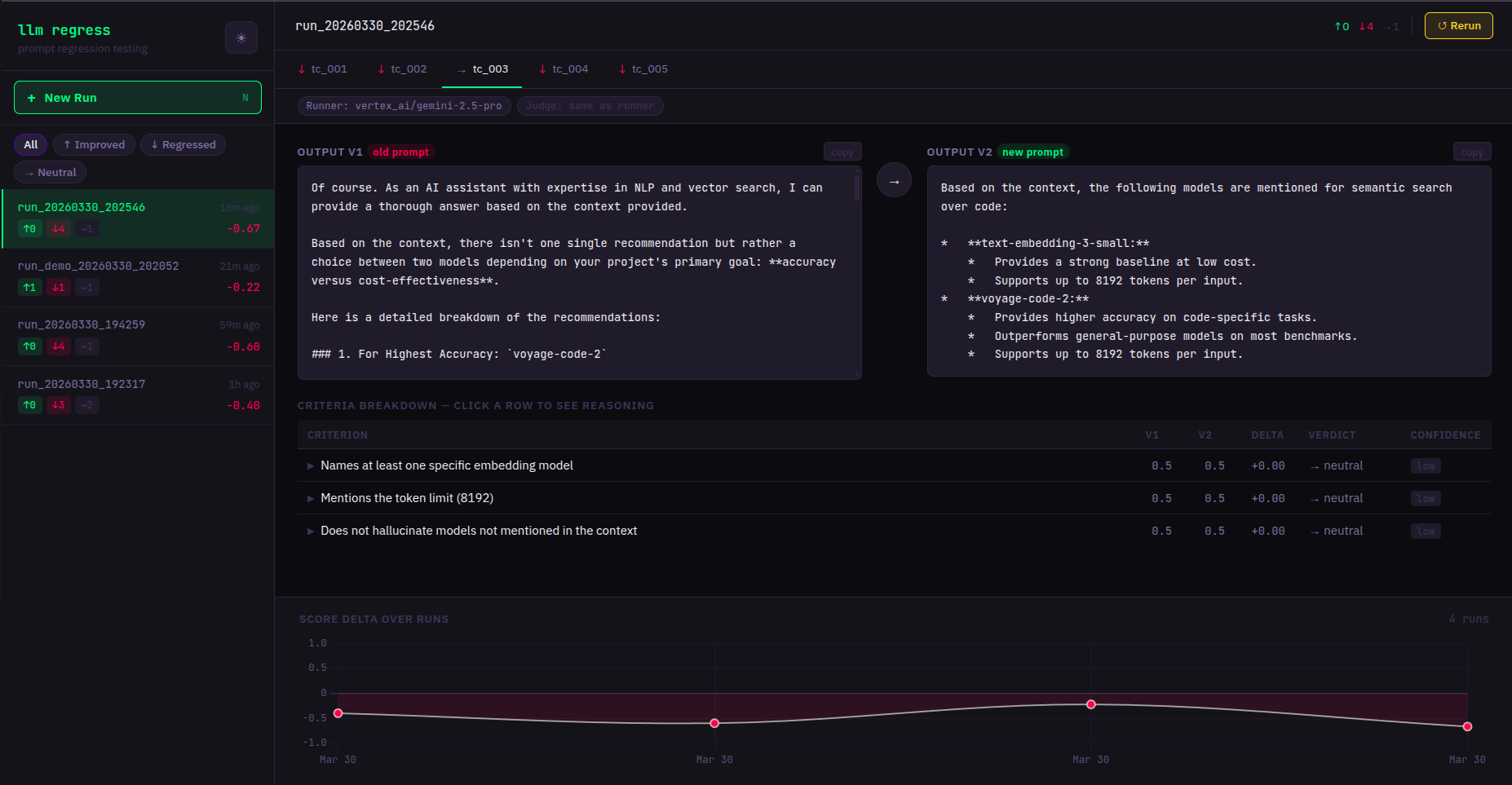
Why LLM Diff
- You changed a prompt. Did it get better? Find out in 2 minutes.
- Works with any LLM — OpenAI, Anthropic, Google Gemini, and more.
- Local-first. No accounts, no cloud, no data leaves your machine.
- One env var. Set your API key and you're done.
Quickstart
# 1. Install
pip install llmregress

# 2. Set your API key (pick any provider you already have)
export ANTHROPIC_API_KEY=your_key_here
# or: export OPENAI_API_KEY=your_key_here
# or: export GOOGLE_API_KEY=your_key_here

# 3. Copy an example test file
cp examples/rag_pipeline.yaml my_tests.yaml

# 4. Compare your prompts
llmregress compare my_tests.yaml

# 5. Open the web dashboard
llmregress serve
# → http://localhost:7331
I have a LangChain RAG app — how do I use this?
If your app looks like:
result = chain.invoke({"question": q, "context": c})
Translate it into a YAML test case:
model: anthropic/claude-3-5-haiku-20241022
judge_model: openai/gpt-4o-mini
test_cases:
  - id: my_test
    input: "What is the default chunk size?"
    context: "LangChain's default chunk_size is 1000 characters..."
    reference_answer: >
      LangChain's RecursiveCharacterTextSplitter defaults to a chunk_size of 1000 characters
      and a chunk_overlap of 200 characters.
    criteria:
      - "Answer is factually correct"
      - "Response is concise (under 50 words)"
    prompt_v1: |
      You are a helpful assistant. Context: {context}
      Question: {input}
    prompt_v2: |
      Answer only from context. Be concise.
      Context: {context}
      Question: {input}
Then run: llmregress compare my_tests.yaml
Providers & model strings
Change 1–2 lines in your YAML — no code changes. You can use any model from each provider family:
| Provider | Example model string | Env var |
|---|---|---|
| Anthropic | anthropic/claude-3-5-haiku-20241022 |
ANTHROPIC_API_KEY |
| Anthropic | anthropic/claude-opus-4 |
ANTHROPIC_API_KEY |
| OpenAI | openai/gpt-4o-mini |
OPENAI_API_KEY |
| OpenAI | openai/gpt-4o |
OPENAI_API_KEY |
| Google Gemini | gemini/gemini-2.0-flash |
GOOGLE_API_KEY |
| Google Gemini | gemini/gemini-1.5-pro |
GOOGLE_API_KEY |
| Ollama (local) | ollama/llama3 |
(none) |
The model string format is always
provider/model-name. Any model supported by LiteLLM works — just set the matching API key.
Reduce judge bias: use a different model family for
judge_modelthanmodel. Example: Anthropic runner + OpenAI judge = cross-family, lowest self-preference bias.
CLI reference
| Command | Description |
|---|---|
llmregress compare <yaml> |
Run + print colored diff to terminal |
llmregress run <yaml> |
Run + store results (no terminal output) |
llmregress history |
List past runs |
llmregress serve |
Start web dashboard at localhost:7331 |
llmregress demo |
Try it without an API key |
Web dashboard
llmregress serve
Opens at http://localhost:7331. Features:
- Side-by-side output comparison per test case
- Live streaming — results appear as they complete
- Run history with score trend chart
- Click any past run while a new test is running — views are independent
Environment variables
| Variable | Default | Description |
|---|---|---|
ANTHROPIC_API_KEY |
— | Anthropic API key |
OPENAI_API_KEY |
— | OpenAI API key |
GOOGLE_API_KEY |
— | Google Gemini API key |
LLMREGRESS_DB_PATH |
~/.llmregress/history.db |
SQLite database path |
LLMREGRESS_PORT |
7331 |
Web server port |
LLMREGRESS_HOST |
127.0.0.1 |
Web server bind address |
LLMREGRESS_YAML_DIR |
~/.llmregress/tests |
Allowed directory for YAML test files |
LLMREGRESS_JUDGE_VOTES |
3 |
Calls per criterion: 1=fast, 3=reliable majority vote |
Docker
docker-compose up
# Dashboard at http://localhost:7331
Mount your YAML test files into the container:
# docker-compose.yml — add a volume:
volumes:
  - ./my_tests:/workspace/tests
Contributing
- Fork the repo
- Create a branch:
git checkout -b feat/my-feature - Run tests:
pytest tests/ -v - Open a PR
1 maintainer

Metadata
1 maintainer
Release files for llmregress 0.1.6
For a detailed explanation of source distributions (sdists) and built distributions (wheels), please see the package formats documentation.
Source distribution (sdist)
| File | Size | Uploaded | Provenance | |
|---|---|---|---|---|
| llmregress-0.1.6.tar.gz | 34.0 kB | Without provenance | Details |
Built distribution (wheel)
| File | Interpreter | ABI | Platform | Reset |
|---|---|---|---|---|
| llmregress-0.1.6-py3-none-any.whl | Python 3 | none | any | Details |
Total release size: 65.5 kB
Release files / llmregress-0.1.6.tar.gz
| Download URL | llmregress-0.1.6.tar.gz |
|---|---|
| Size | 34.0 kB |
| Tags | Source |
|
SHA-256 checksum How to use checksums |
3f037a5aeba17601be8d61d1a554fc6b36b6081d11a5a363faf132f734130c15
|
|
BLAKE2b-256 checksum How to use checksums |
5e2ebe7deae35a76f9bca7e6ea9c0f85f121b0af7adf682d3b196138b7c85239
|
| Upload date | |
|
Uploaded using Trusted Publishing? What is trusted publishing? |
No |
| Uploaded via |
twine/6.2.0 CPython/3.11.15
|
Release files / llmregress-0.1.6-py3-none-any.whl
| Download URL | llmregress-0.1.6-py3-none-any.whl |
|---|---|
| Size | 31.5 kB |
| Tags | Python 3 |
|
SHA-256 checksum How to use checksums |
ac06b7da626c74359589e7b5d6b442cb66a88989bdf47b06ec781a23c6e7ecb4
|
|
BLAKE2b-256 checksum How to use checksums |
ed5b94c62884623b3bf61c646182c071faa09f01fa943a58cc6ed417df40844f
|
| Upload date | |
|
Uploaded using Trusted Publishing? What is trusted publishing? |
No |
| Uploaded via |
twine/6.2.0 CPython/3.11.15
|
Security for llmregress 0.1.6
Provenance
Provenance describes where a file came from. On PyPI, provenance is shared via attestations, which provide a verifiable record of the build or publishing details. View details, limitations and caveats.
No provenance found
None of the files in this release were uploaded with provenance metadata.
A note on package security
PyPI is a repository for distributing packages, not a service for auditing them. While third-party security researchers and our staff do their best to detect and remove malicious packages, PyPI cannot guarantee the quality, security or suitability of any given package.
To learn more about protecting yourself from malicious actors, visit our package security documentation.














