
LLMRig
Know what your rig can run.
Hardware-aware local LLM selection, setup, and benchmarking.


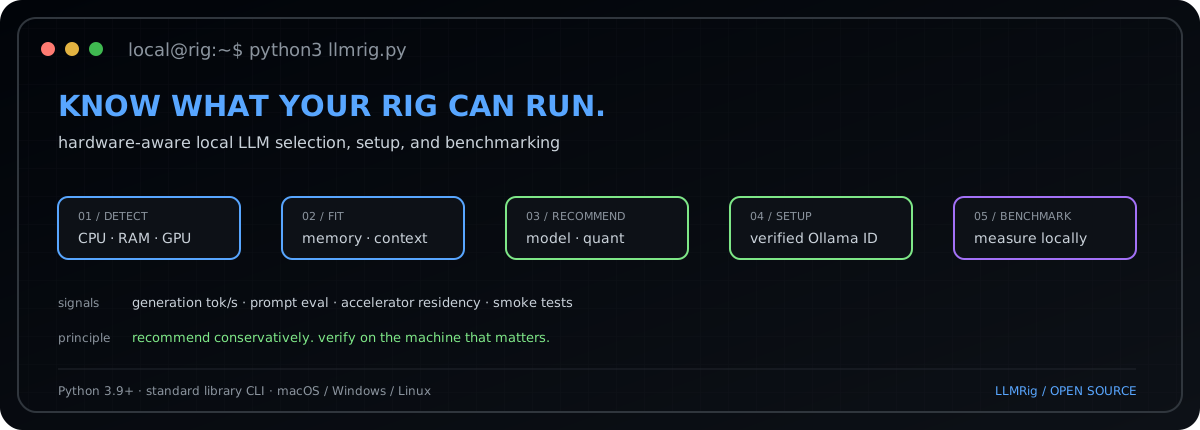
LLMRig answers one practical question:
Which local LLM can this machine actually run well?
It detects the hardware you actually have, estimates a conservative model budget, recommends a practical model and context configuration, can set it up through Ollama, and benchmarks the result on the machine itself.
Install
Install LLMRig from PyPI:
python3 -m pip install llmrig
Then use LLMRig from anywhere:
llmrig doctor
llmrig recommend
llmrig models --fit
Or run directly from source without installing:
python3 llmrig.py
LLMRig has no third-party Python runtime dependencies. The CLI uses only the Python standard library.
detect hardware → estimate fit → recommend → setup → benchmark → compare
LLMRig is currently Qwen-first. The architecture is intended to expand to additional model families, runtimes, GPUs, and platforms without changing the core workflow.
What LLMRig does
- Runs on macOS, Windows, and Linux
- Detects CPU/chip, architecture, RAM, free disk space, and GPU/VRAM when available
- Respects
OLLAMA_MODELSwhen checking model-storage capacity - Checks whether Ollama and its local API are available
- Gives a conservative local-LLM readiness assessment
- Recommends a model for
balanced,speed, orqualitypriorities - Separates official Qwen models from community reduced-refusal derivatives
- Discovers newly published official Qwen repositories from Hugging Face at runtime
- Auto-pulls only curated, verified Ollama identifiers
- Benchmarks generation speed, prompt-evaluation speed, accelerator residency, and lightweight correctness checks
- Isolates benchmark runs by unloading resident Ollama models before and after each test
- Saves shareable benchmark reports as JSON and Markdown
- Uses only the Python standard library
Current scope
LLMRig currently has a Qwen-first curated catalog and uses Ollama as its local inference backend. Live discovery tracks likely Qwen LLM/multimodal inference repositories, while automatic installation is limited to model identifiers that have been manually verified.
The project name is intentionally broader than Qwen because the long-term direction is to support additional model families and runtimes without changing the user experience:
hardware → discover → recommend → setup → benchmark → compare
If you want to add support for another model family, runtime, GPU vendor, or operating system, see CONTRIBUTING.md.
Requirements
- Python 3.9+
- macOS, Windows, or Linux
- Ollama for automatic model setup and benchmarking
- Internet access for live discovery and model downloads
- No third-party Python runtime dependencies
Quick start
Run the interactive wizard:
llmrig
The wizard inspects the machine, recommends a supported model, pulls it if necessary, benchmarks it, and prints the local chat/API details.
Commands
Inspect the machine
llmrig doctor
Machine-readable output:
llmrig doctor --json
List models
Show curated local-ready models plus the newest live Qwen LLM/multimodal candidates:
llmrig models --fit
Force live refresh:
llmrig models --refresh --fit
Show the full Qwen Hugging Face organization catalog, including non-LLM artifacts:
llmrig models --all --fit
Use only the built-in curated snapshot:
llmrig models --offline --fit
Get a recommendation
llmrig recommend
Official models only:
llmrig recommend --category official
Community reduced-refusal models only:
llmrig recommend --category unrestricted
Prioritize quality:
llmrig recommend \
  --category official \
  --preference quality
For CLI convenience, unrestricted, uncensored, and reduced-refusal map to the community reduced-refusal category. restricted is accepted as an alias for the official category. LLMRig uses official and reduced-refusal in its output because those labels are more precise.
Set up a model
llmrig setup --category official
Or choose an exact curated model:
llmrig setup \
  --model qwen3.8:27b-mlx \
  --context 32768
If a known alias of the selected curated build is already installed, LLMRig reuses it when possible.
Benchmark installed models
One model:
llmrig bench \
  --model qwen3.8:27b-mlx \
  --context 32768 \
  --runs 2
All installed supported Qwen models:
llmrig bench \
  --all-installed \
  --context 32768 \
  --runs 2
LLMRig deduplicates installed aliases that resolve to the same Ollama model ID.
Run project checks
Offline:
llmrig check
Include live Hugging Face discovery:
llmrig check --online
Model discovery and safety
LLMRig deliberately separates discovery from automatic installation.
The curated catalog contains local model identifiers that LLMRig may pull automatically. Live discovery queries the official Qwen organization on Hugging Face so new releases can appear without requiring an immediate LLMRig release.
A newly discovered repository is discovery only. LLMRig does not infer package size, hardware fit, or Ollama compatibility from a repository name. A model becomes eligible for one-command setup only after its identifier, package size, context capability, backend support, and provenance are verified and added to the curated catalog.
Community reduced-refusal discovery is best-effort and is not an authoritative registry. Third-party models should be reviewed before use.
Official vs reduced-refusal models
Official entries are upstream Qwen models distributed through the selected local backend.
Community reduced-refusal entries are third-party derivatives that modify model behavior to reduce refusals. Their authors may use terms such as uncensored, unrestricted, or abliterated.
Reduced refusal behavior does not imply better reasoning, accuracy, safety, or reliability. Review model provenance, licensing, and benchmark results before relying on a derivative for important work.
Hardware fit and context
LLMRig deliberately leaves headroom for the operating system, inference runtime, KV cache, other applications, and GPU/runtime buffers.
For Apple Silicon, CPU and GPU share unified memory. For discrete GPUs, LLMRig favors configurations likely to stay mostly or fully on the accelerator when VRAM can be detected.
The model's advertised maximum context is not automatically used as the default. Longer context allocations consume more memory, so LLMRig starts conservatively and increases context only when there is comfortable headroom.
Hardware-fit results are estimates. The benchmark on the user's actual machine is the final check.
Benchmarking
LLMRig unloads currently resident Ollama models before a benchmark and unloads the target model afterward. This reduces cross-model memory contamination and makes comparisons more reproducible.
Each benchmark records:
- generation tokens/second
- prompt-evaluation tokens/second
- load and total duration
- Ollama-reported context length
- accelerator residency when available
- RAM/swap snapshots when available
- three lightweight deterministic correctness smoke tests
Reports are written under benchmarks/ as JSON and Markdown. That directory is ignored by Git by default so local benchmark data is not published accidentally. Review any benchmark before sharing it.
These are local performance/configuration checks, not academic model-quality benchmarks. Memory values are snapshots rather than peak-memory measurements.
Contributing
LLMRig is open source and contributions are welcome.
Good first contribution areas include:
- additional model families
- new Ollama/local-backend model mappings
- AMD, Intel, and NVIDIA GPU detection improvements
- Windows and Linux hardware testing
- reproducible benchmark improvements
- new hardware profiles and recommendation rules
- documentation and usability improvements
- tests for new operating systems and model variants
Please read CONTRIBUTING.md before opening a pull request. Bug reports, feature ideas, model-support requests, and benchmark improvements are all welcome through GitHub issues.
Development
Run the full local validation set before opening a pull request:
python3 -m py_compile llmrig.py
python3 -m unittest discover -s tests -v
python3 llmrig.py check
python3 llmrig.py models --offline --fit
With internet access:
python3 llmrig.py check --online
GitHub Actions also runs compile, unit-test, and sanity-check jobs on Linux, macOS, and Windows.
Repository layout
llmrig/
├── .github/
│   ├── ISSUE_TEMPLATE/
│   ├── workflows/
│   │   ├── ci.yml
│   │   ├── publish-to-pypi.yml
│   │   └── refresh-profile-on-release.yml
│   └── PULL_REQUEST_TEMPLATE.md
├── assets/
│   └── llmrig-terminal.svg
├── tests/
│   ├── __init__.py
│   └── test_llmrig.py
├── .gitignore
├── CHANGELOG.md
├── CODE_OF_CONDUCT.md
├── CONTRIBUTING.md
├── LICENSE
├── pyproject.toml
├── README.md
├── SECURITY.md
└── llmrig.py
Roadmap
The roadmap is intentionally community-driven. Likely directions include support for more model families, multiple local inference runtimes, richer GPU detection, benchmark leaderboards, and standardized community hardware reports.
The rule for new functionality is simple: be useful, be reproducible, and do not turn unverified discovery metadata into an automatic install decision.
License
LLMRig is released under the MIT License.
Primary references
- Qwen official Hugging Face organization:
https://huggingface.co/Qwen - Qwen3.8 official repository:
https://github.com/QwenLM/Qwen3.8 - Hugging Face Hub API:
https://huggingface.co/docs/huggingface_hub/package_reference/hf_api - Ollama documentation:
https://docs.ollama.com/ - Ollama generate API:
https://docs.ollama.com/api/generate - Ollama running-model API:
https://docs.ollama.com/api/ps - Qwen3.8 Ollama tags:
https://ollama.com/library/qwen3.8/tags
1 maintainer

Download files
Download the file for your platform. If you're not sure which to choose, learn more about installing packages.
Source Distribution
Built Distribution
Filter files by name, interpreter, ABI, and platform.
If you're not sure about the file name format, learn more about wheel file names.
Copy a direct link to the current filters
File details
Details for the file llmrig-0.4.1.tar.gz.
File metadata
- Download URL: llmrig-0.4.1.tar.gz
- Upload date:
- Size: 28.0 kB
- Tags: Source
- Uploaded using Trusted Publishing? Yes
- Uploaded via:
twine/7.0.0 CPython/3.13.14
File hashes
| Algorithm | Hash digest | |
|---|---|---|
| SHA256 |
ece98a0e3f3fbf7aad2bdf265266cf0dce23f14b78b51caab72b72116aca48d9
|
|
| MD5 |
2364f2b7e6464109b9de05a6b35f04e0
|
|
| BLAKE2b-256 |
2312e5ead2d3b14e1c1a9786714e18da37ade3de32edf70d4ca5d3227e55f819
|
Provenance
The following attestation bundles were made for llmrig-0.4.1.tar.gz:
Publisher:
publish-to-pypi.yml on sunilteja93/llmrig
-
Statement:
-
Statement type:
https://in-toto.io/Statement/v1 -
Predicate type:
https://docs.pypi.org/attestations/publish/v1 -
Subject name:
llmrig-0.4.1.tar.gz -
Subject digest:
ece98a0e3f3fbf7aad2bdf265266cf0dce23f14b78b51caab72b72116aca48d9 - Sigstore transparency entry: 2579913824
- Sigstore integration time:
-
Permalink:
sunilteja93/llmrig@d200e491bd5bf26dfd375c2c6c79d5747e3d93eb -
Branch / Tag:
refs/tags/v0.4.1 - Owner: https://github.com/sunilteja93
-
Access:
public
-
Token Issuer:
https://token.actions.githubusercontent.com -
Runner Environment:
github-hosted -
Publication workflow:
publish-to-pypi.yml@d200e491bd5bf26dfd375c2c6c79d5747e3d93eb -
Trigger Event:
release
-
Statement type:
File details
Details for the file llmrig-0.4.1-py3-none-any.whl.
File metadata
- Download URL: llmrig-0.4.1-py3-none-any.whl
- Upload date:
- Size: 26.5 kB
- Tags: Python 3
- Uploaded using Trusted Publishing? Yes
- Uploaded via:
twine/7.0.0 CPython/3.13.14
File hashes
| Algorithm | Hash digest | |
|---|---|---|
| SHA256 |
1a4c19f8c99155975f8799795dae0810c37c31b880a4553d8a89ef77d49780f2
|
|
| MD5 |
f8e354c0b22cf076cb0004b366011edd
|
|
| BLAKE2b-256 |
b571efba822d5482e67172195bc000944d9b18f5b7be19f5da31de287f8964a2
|
Provenance
The following attestation bundles were made for llmrig-0.4.1-py3-none-any.whl:
Publisher:
publish-to-pypi.yml on sunilteja93/llmrig
-
Statement:
-
Statement type:
https://in-toto.io/Statement/v1 -
Predicate type:
https://docs.pypi.org/attestations/publish/v1 -
Subject name:
llmrig-0.4.1-py3-none-any.whl -
Subject digest:
1a4c19f8c99155975f8799795dae0810c37c31b880a4553d8a89ef77d49780f2 - Sigstore transparency entry: 2579913833
- Sigstore integration time:
-
Permalink:
sunilteja93/llmrig@d200e491bd5bf26dfd375c2c6c79d5747e3d93eb -
Branch / Tag:
refs/tags/v0.4.1 - Owner: https://github.com/sunilteja93
-
Access:
public
-
Token Issuer:
https://token.actions.githubusercontent.com -
Runner Environment:
github-hosted -
Publication workflow:
publish-to-pypi.yml@d200e491bd5bf26dfd375c2c6c79d5747e3d93eb -
Trigger Event:
release
-
Statement type:














