
LLMsTxt Architect
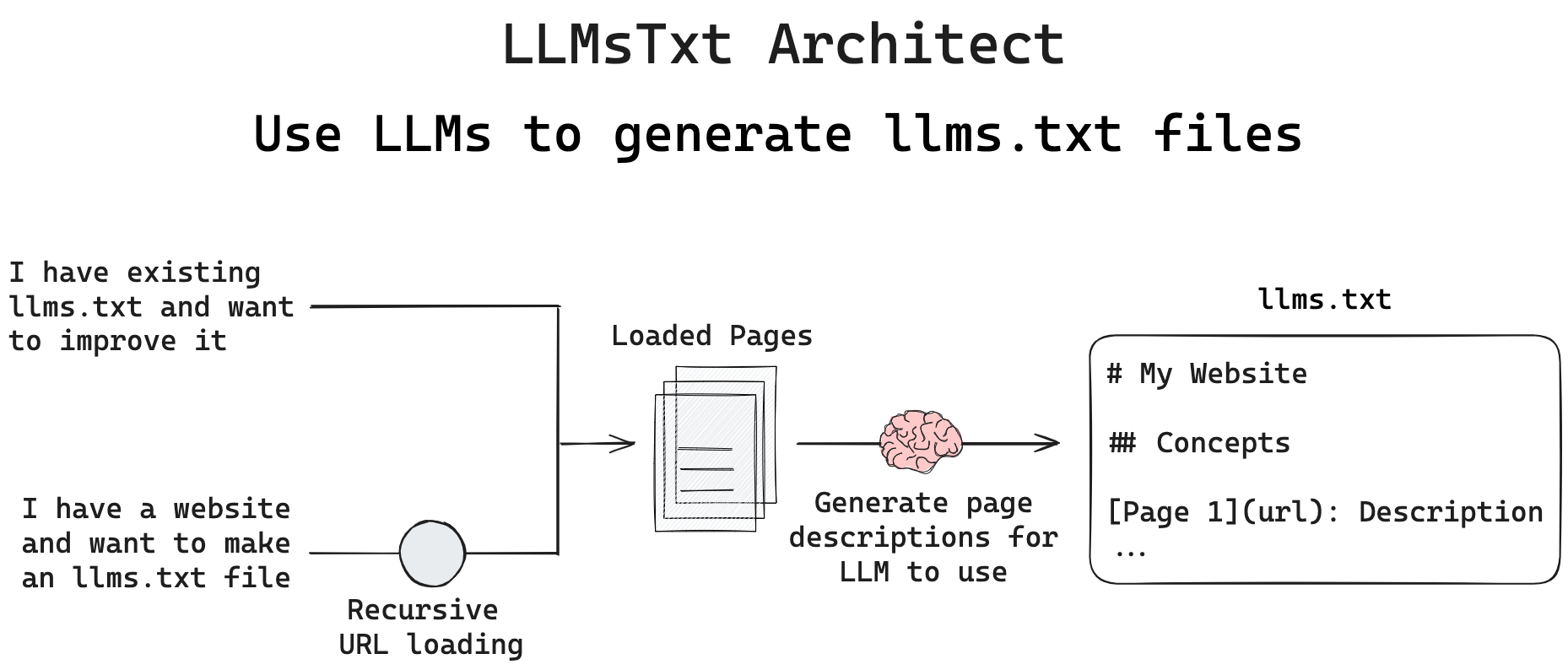
llms.txt is an emerging standard for communicating website contents to LLMs. It is a markdown file listing URLs within a site and their descriptions, giving LLMs a guide to help fetch and read pages in order to accomplish tasks. LLMsTxt Architect is a Python package that builds LLMs.txt automatically, using LLMs to automate the process. It can start with a list of URLs or an existing llms.txt file, and a user can specify the LLM provider, model, prompt used to generate description along with other options.
Quickstart
You can run this tool with many LLM providers. For example, Anthropic (be sure ANTHROPIC_API_KEY is set):
$ curl -LsSf https://astral.sh/uv/install.sh | sh
$ uvx --from llmstxt-architect llmstxt-architect --urls https://langchain-ai.github.io/langgraph/concepts --max-depth 1 --llm-name claude-3-7-sonnet-latest --llm-provider anthropic --project-dir tmp
Local model via Ollama (be sure Ollama is installed and the model is pulled):
$ ollama pull llama3.2:latest
$ uvx --from llmstxt-architect llmstxt-architect --urls https://langchain-ai.github.io/langgraph/concepts --max-depth 1 --llm-name llama3.2:latest --llm-provider ollama --project-dir tmp
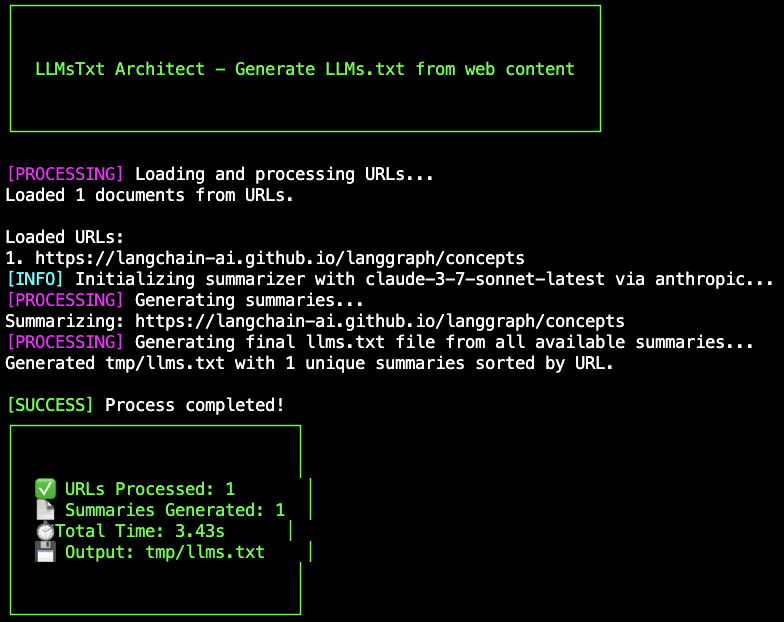
Both will use RecursiveURLLoader with max-depth 1 to only load the provided page. While running you will see:
The resulting llms.txt file for this example input page:
[Concepts](https://langchain-ai.github.io/langgraph/concepts): LLM should read this page when seeking to understand LangGraph framework concepts, exploring agent patterns, or learning about LangGraph Platform deployment options. The page covers key concepts including LangGraph basics, agentic patterns, multi-agent systems, memory, persistence, streaming, and various LangGraph Platform deployment options (Self-Hosted, Cloud SaaS, BYOC).
You can see some of the llms.txt files generated with this tool:
Installation
You can also install the package with pip, and use the CLI:
$ python3 -m venv .venv
$ source .venv/bin/activate  # On Windows: .venv\Scripts\activate
$ pip install llmstxt-architect
$ llmstxt-architect --urls https://langchain-ai.github.io/langgraph/concepts --max-depth 1 --llm-name claude-3-7-sonnet-latest --llm-provider anthropic --project-dir test
Use it in a notebook:
import asyncio
from llmstxt_architect.main import generate_llms_txt

await generate_llms_txt(
      urls=["https://langchain-ai.github.io/langgraph/concepts"],
      max_depth=1,
      llm_name="claude-3-7-sonnet-latest",
      llm_provider="anthropic",
      project_dir="test",
  )
Use it in a script:
import asyncio
from llmstxt_architect.main import generate_llms_txt

async def main():
      await generate_llms_txt(
          urls=["https://langchain-ai.github.io/langgraph/concepts"],
          max_depth=1,
          llm_name="claude-3-7-sonnet-latest",
          llm_provider="anthropic",
          project_dir="test_script",
      )

if __name__ == "__main__":
      asyncio.run(main())
Configurations
The full list of configurations is available in the CLI help.
| Parameter | Type | Default | Description |
|---|---|---|---|
--urls |
List[str] | (Required if not using --existing-llms-file) |
List of URLs to process |
--existing-llms-file |
str | (Required if not using --urls) |
Path to an existing llms.txt file to extract URLs from and update |
--update-descriptions-only |
flag | False | Update only descriptions in existing llms.txt while preserving structure and URL order |
--max-depth |
int | 5 | Maximum recursion depth for URL crawling |
--llm-name |
str | "claude-3-sonnet-20240229" | LLM model name |
--llm-provider |
str | "anthropic" | LLM provider |
--project-dir |
str | "llms_txt" | Main project directory to store all outputs |
--output-dir |
str | "summaries" | Directory within project-dir to save individual summaries |
--output-file |
str | "llms.txt" | Output file name for combined summaries |
--summary-prompt |
str | "You are creating a summary..." | Prompt to use for summarization |
--blacklist-file |
str | None | Path to a file containing blacklisted URLs to exclude (one per line) |
--extractor |
str | "default" | HTML content extractor to use (choices: "default" (Markdownify), "bs4" (BeautifulSoup)) |
URLs
You can pass multiple URLs that you want to use as the basis for the llms.txt file. The RecursiveURLLoader will crawl each URL to the maximum depth as specified by --max-depth and use an LLM to summarize all of the resulting pages.
---urls https://langchain-ai.github.io/langgraph/concepts https://langchain-ai.github.io/langgraph/tutorials
--max-depth 1
Max depth can be used to increase the search depth:
  - max_depth=1: Returns only the initial page itself
  - max_depth=2: Returns the initial page plus direct links from that page
  - max_depth=3: Returns the initial page, direct links, and links found on those pages
  etc.
Existing llms.txt File
If you have an existing llms.txt file (locally or remotely), you can extract the URLs from it and generates a completely new llms.txt with freshly generated descriptions. The original file's structure (headers, ordering, etc.) is not preserved by default.
# Use a local file
llmstxt-architect --existing-llms-file path/to/llms.txt

# Or use a remote file
llmstxt-architect --existing-llms-file https://example.com/llms.txt
Preserving llms.txt Structure While Updating Descriptions
If you have an llms.txt file that you want to preserve the structure of, you can use the --update-descriptions-only flag. This will preserve all structural elements (headers, subheaders, newlines) and the exact ordering of URLs while only updating the descriptions. It also maintains the exact ordering of URLs, preserves titles from the original file, and only updates the descriptions for each URL. This is particularly useful when the existing llms.txt file has a carefully curated structure that you want to maintain and you want to improve descriptions without changing the organization.
# Use a local file
llmstxt-architect --existing-llms-file path/to/llms.txt --update-descriptions-only

# Or use a remote file
llmstxt-architect --existing-llms-file https://example.com/llms.txt --update-descriptions-only
Model
The package uses LLMs for generating descriptions for each URL in the llms.txt file. By default, it's configured for Anthropic's Claude models, but you can easily select from many different LLM providers:
Hosted LLMs (OpenAI, Anthropic, etc.):
- Install the corresponding package (e.g.,
pip install langchain-openai) - Set the appropriate API key (e.g.,
export OPENAI_API_KEY=your_api_key_here) - Specify the provider and model with the
--llm-providerand--llm-nameoptions, e.g., using the LLM provider names as shown here
--llm-provider openai --llm-name gpt-4o
Local Models with Ollama:
- Install Ollama
- Pull your desired model (e.g.,
ollama pull llama3.2:latest) - Install the package:
pip install langchain-ollama - Specify the provider and model with the
--llm-providerand--llm-nameoptions, e.g.,
--llm-provider ollama --llm-name llama3.2:latest
Prompt
By default, it uses this prompt (see llmstxt_architect/cli.py):
"You are creating a summary for a webpage to be used in a llms.txt file "
"to help LLMs in the future know what is on this page. Produce a concise "
"summary of the key items on this page and when an LLM should access it."
You can override this prompt with the --summary-prompt option, e.g.,
--summary-prompt "You are creating a summary for a webpage to be used in a llms.txt file ..."
Extractor
You can specify which built-in extractor to use with the --extractor CLI option:
# Use BeautifulSoup extractor
llmstxt-architect --urls https://example.com --extractor bs4

# Use default Markdownify extractor
llmstxt-architect --urls https://example.com --extractor default
For advanced use cases, you can override the default extractor in the Python API with your own custom extractor function, e.g.,
def my_extractor(html: str) -> str:
    """
    Extract content from HTML using xxx.

    Args:
        html (str): The HTML content to extract from

    Returns:
        content (str): Extracted text content
    """

    # TODO: Implement your custom extractor here

    return content

import asyncio
from llmstxt_architect.main import generate_llms_txt

await generate_llms_txt(
      urls=["https://langchain-ai.github.io/langgraph/concepts"],
      max_depth=1,
      llm_name="claude-3-7-sonnet-latest",
      llm_provider="anthropic",
      project_dir="test",
      extractor=my_extractor
  )
Project directory, output directory, and output file
LLMsTxt Architect provides checkpoint functionality to handle interruptions during processing. It creates a project directory to store all outputs. While running, it saves each page's summary to the output directory and updates a checkpoint file (summarized_urls.json) to track which pages have been processed. If the process is interrupted, you can simply run the same command again to resume from where it left off.
- Progress tracker:
<project_dir>/<output_dir>/summarized_urls.json - Individual summaries:
<project_dir>/<output_dir>/<url>.txt - Combined output llms.txt file:
<project_dir>/<output_file>
All paths are configurable with:
--project-dir, --output-dir, --output-file
If processing is interrupted (timeout, network issues, etc.), simply run the same command again. The tool will:
- Skip already processed pages using the checkpoint file
- Resume processing from where it left off
- Update the output file periodically (every 5 documents)
- Generate a complete, sorted llms.txt file upon completion
This is particularly valuable when processing large websites or when using rate-limited API-based LLMs.
URL Blacklisting
You can exclude specific URLs from your llms.txt file by providing a blacklist file:
# Create a blacklist file
cat > blacklist.txt << EOF
# Deprecated pages
https://example.com/old-version/
https://example.com/beta-feature

# Pages with known issues
https://example.com/broken-page
EOF
The name of the blacklist file is configurable with the --blacklist-file option.
The blacklist file should contain one URL per line. Empty lines and lines starting with # are ignored. The tool will:
- Skip summarization of blacklisted URLs during crawling
- Filter out blacklisted URLs from the final llms.txt file
- Report how many blacklisted URLs were excluded
This is useful for excluding deprecated documentation, beta features, or pages with known issues.
License
MIT
1 maintainer

Metadata
1 maintainer
Release files for llmstxt-architect 0.6.1
For a detailed explanation of source distributions (sdists) and built distributions (wheels), please see the package formats documentation.
Source distribution (sdist)
| File | Size | Uploaded | |
|---|---|---|---|
| llmstxt_architect-0.6.1.tar.gz | 246.8 kB | Details |
Built distribution (wheel)
| File | Interpreter | ABI | Platform | Reset |
|---|---|---|---|---|
| llmstxt_architect-0.6.1-py3-none-any.whl | Python 3 | none | any | Details |
Total release size: 268.4 kB
Release files / llmstxt_architect-0.6.1.tar.gz
| Download URL | llmstxt_architect-0.6.1.tar.gz |
|---|---|
| Size | 246.8 kB |
| Tags | Source |
|
SHA-256 checksum How to use checksums |
c23596094993deff3038d2b5d23f9eea8fc2f0d708a56f7a416bc84104c9abdf
|
|
BLAKE2b-256 checksum How to use checksums |
2c48d6fa038fa7454c216c2ee3d31f9ad6eb9d24999d556792bd78b8f267b96e
|
| Upload date | |
|
Uploaded using Trusted Publishing? What is trusted publishing? |
No |
| Uploaded via |
twine/6.1.0 CPython/3.13.1
|
Release files / llmstxt_architect-0.6.1-py3-none-any.whl
| Download URL | llmstxt_architect-0.6.1-py3-none-any.whl |
|---|---|
| Size | 21.6 kB |
| Tags | Python 3 |
|
SHA-256 checksum How to use checksums |
e17a12d6d565bbbddbf81158fa150dd17a89bdeadc43298b070cb909087676a3
|
|
BLAKE2b-256 checksum How to use checksums |
b2f41630aa2c7f8c0441fac69b72c3232941482ed5e71c6530c0a4145e62bc4c
|
| Upload date | |
|
Uploaded using Trusted Publishing? What is trusted publishing? |
No |
| Uploaded via |
twine/6.1.0 CPython/3.13.1
|














