
Easy-to-use fine-tuning framework using PEFT

Project description
LLaMA Efficient Tuning





👋 Join our WeChat.
[ English | 中文 ]
Changelog
[23/08/18] Now we support resuming training, upgrade transformers to 4.31.0 to enjoy this feature.
[23/08/12] Now we support RoPE scaling to extend the context length of the LLaMA models. Try --rope_scaling linear argument in training and --rope_scaling dynamic argument at inference to extrapolate the position embeddings.
[23/08/11] Now we support DPO training for instruction-tuned models. See this example to train your models (experimental feature).
[23/08/03] Now we support training the Qwen-7B model in this repo. Try --model_name_or_path Qwen/Qwen-7B-Chat and --lora_target c_attn arguments to train the Qwen-7B model. Remember to use --template chatml argument when you are using the Qwen-7B-Chat model.
[23/07/31] Now we support dataset streaming. Try --streaming and --max_steps 10000 arguments to load your dataset in streaming mode.
[23/07/29] We release two instruction-tuned 13B models at Hugging Face. See these Hugging Face Repos (LLaMA-2 / Baichuan) for details.
[23/07/19] Now we support training the LLaMA-2 models in this repo. Try --model_name_or_path meta-llama/Llama-2-7b-hf argument to use the LLaMA-2 model. Remember to use --template llama2 argument when you are using the LLaMA-2-chat model.
[23/07/18] Now we develop an all-in-one Web UI for training, evaluation and inference. Try train_web.py to fine-tune models in your Web browser. Thank @KanadeSiina and @codemayq for their efforts in the development.
[23/07/11] Now we support training the Baichuan-13B model in this repo. Try --model_name_or_path baichuan-inc/Baichuan-13B-Base and --lora_target W_pack arguments to train the Baichuan-13B model. Remember to use --template baichuan argument when you are using the Baichuan-13B-Chat model.
[23/07/09] Now we release FastEdit ⚡🩹, an easy-to-use package for editing the factual knowledge of large language models efficiently. Please follow FastEdit if you are interested.
[23/07/07] Now we support training the InternLM-7B model in this repo. Try --model_name_or_path internlm/internlm-7b argument to use the InternLM model. Remember to use --template intern argument when you are using the InternLM-chat model.
[23/07/05] Now we support training the Falcon-7B/40B models in this repo. Try --model_name_or_path tiiuae/falcon-7b and --lora_target query_key_value arguments to use the Falcon model.
[23/06/29] We provide a reproducible example of training a chat model using instruction-following datasets, see this Hugging Face Repo for details.
[23/06/22] Now we align the demo API with the OpenAI's format where you can insert the fine-tuned model in arbitrary ChatGPT-based applications.
[23/06/15] Now we support training the Baichuan-7B model in this repo. Try --model_name_or_path baichuan-inc/Baichuan-7B and --lora_target W_pack arguments to use the Baichuan-7B model.
[23/06/03] Now we support quantized training and inference (aka QLoRA). Try --quantization_bit 4/8 argument to work with quantized models.
[23/05/31] Now we support training the BLOOM & BLOOMZ models in this repo. Try --model_name_or_path bigscience/bloomz-7b1-mt and --lora_target query_key_value arguments to use the BLOOMZ model.
Supported Models
| Model | Model size | Default module | Template |
|---|---|---|---|
| LLaMA | 7B/13B/33B/65B | q_proj,v_proj | - |
| LLaMA-2 | 7B/13B/70B | q_proj,v_proj | llama2 |
| BLOOM | 560M/1.1B/1.7B/3B/7.1B/176B | query_key_value | - |
| BLOOMZ | 560M/1.1B/1.7B/3B/7.1B/176B | query_key_value | - |
| Falcon | 7B/40B | query_key_value | - |
| Baichuan | 7B/13B | W_pack | baichuan |
| InternLM | 7B | q_proj,v_proj | intern |
| Qwen | 7B | c_attn | chatml |
| XVERSE | 13B | q_proj,v_proj | - |
| ChatGLM2 | 6B | query_key_value | chatglm2 |
- Default module is used for the
--lora_targetargument. Please usepython src/train_bash.py -hto see all available options. - For the "base" models, the
--templateargument can be chosen fromdefault,alpaca,vicunaetc. But make sure to use the corresponding template for the "chat" models.
Supported Training Approaches
| Approach | Full-parameter | Partial-parameter | LoRA | QLoRA |
|---|---|---|---|---|
| Pre-Training | :white_check_mark: | :white_check_mark: | :white_check_mark: | :white_check_mark: |
| Supervised Fine-Tuning | :white_check_mark: | :white_check_mark: | :white_check_mark: | :white_check_mark: |
| Reward Modeling | :white_check_mark: | :white_check_mark: | ||
| PPO Training | :white_check_mark: | :white_check_mark: | ||
| DPO Training | :white_check_mark: | :white_check_mark: | :white_check_mark: |
- Use
--quantization_bit 4/8argument to enable QLoRA.
Provided Datasets
- For pre-training:
- For supervised fine-tuning:
- Stanford Alpaca (en)
- Stanford Alpaca (zh)
- GPT-4 Generated Data (en&zh)
- Open Assistant (multilingual)
- Self-cognition (zh)
- ShareGPT (zh)
- Guanaco Dataset (multilingual)
- BELLE 2M (zh)
- BELLE 1M (zh)
- BELLE 0.5M (zh)
- BELLE Dialogue 0.4M (zh)
- BELLE School Math 0.25M (zh)
- BELLE Multiturn Chat 0.8M (zh)
- Firefly 1.1M (zh)
- LIMA (en)
- CodeAlpaca 20k (en)
- Alpaca CoT (multilingual)
- Web QA (zh)
- UltraChat (en)
- WebNovel (zh)
- For reward modeling or DPO training:
Please refer to data/README.md for details.
Some datasets require confirmation before using them, so we recommend logging in with your Hugging Face account using these commands.
pip install --upgrade huggingface_hub
huggingface-cli login
Requirement
- Python 3.8+ and PyTorch 1.13.1+
- 🤗Transformers, Datasets, Accelerate, PEFT and TRL
- sentencepiece and tiktoken
- jieba, rouge-chinese and nltk (used at evaluation)
- gradio and matplotlib (used in web_demo.py)
- uvicorn, fastapi and sse-starlette (used in api_demo.py)
And powerful GPUs!
Getting Started
Data Preparation (optional)
Please refer to data/example_dataset for checking the details about the format of dataset files. You can either use a single .json file or a dataset loading script with multiple files to create a custom dataset.
Note: please update data/dataset_info.json to use your custom dataset. About the format of this file, please refer to data/README.md.
Dependence Installation (optional)
git clone https://github.com/hiyouga/LLaMA-Efficient-Tuning.git
conda create -n llama_etuning python=3.10
conda activate llama_etuning
cd LLaMA-Efficient-Tuning
pip install -r requirements.txt
If you want to enable the quantized LoRA (QLoRA) on the Windows platform, you will be required to install a pre-built version of bitsandbytes library, which supports CUDA 11.1 to 12.1.
pip install https://github.com/jllllll/bitsandbytes-windows-webui/releases/download/wheels/bitsandbytes-0.39.1-py3-none-win_amd64.whl
All-in-one Web UI
CUDA_VISIBLE_DEVICES=0 python src/train_web.py
We strongly recommend using the all-in-one Web UI for newcomers since it can also generate training scripts automatically.
Currently the web UI only supports training on a single GPU.
Train on a single GPU
Pre-Training
CUDA_VISIBLE_DEVICES=0 python src/train_bash.py \
    --stage pt \
    --model_name_or_path path_to_llama_model \
    --do_train \
    --dataset wiki_demo \
    --template default \
    --finetuning_type lora \
    --lora_target q_proj,v_proj \
    --output_dir path_to_pt_checkpoint \
    --overwrite_cache \
    --per_device_train_batch_size 4 \
    --gradient_accumulation_steps 4 \
    --lr_scheduler_type cosine \
    --logging_steps 10 \
    --save_steps 1000 \
    --learning_rate 5e-5 \
    --num_train_epochs 3.0 \
    --plot_loss \
    --fp16
Supervised Fine-Tuning
CUDA_VISIBLE_DEVICES=0 python src/train_bash.py \
    --stage sft \
    --model_name_or_path path_to_llama_model \
    --do_train \
    --dataset alpaca_gpt4_en \
    --template default \
    --finetuning_type lora \
    --lora_target q_proj,v_proj \
    --output_dir path_to_sft_checkpoint \
    --overwrite_cache \
    --per_device_train_batch_size 4 \
    --gradient_accumulation_steps 4 \
    --lr_scheduler_type cosine \
    --logging_steps 10 \
    --save_steps 1000 \
    --learning_rate 5e-5 \
    --num_train_epochs 3.0 \
    --plot_loss \
    --fp16
Reward Modeling
CUDA_VISIBLE_DEVICES=0 python src/train_bash.py \
    --stage rm \
    --model_name_or_path path_to_llama_model \
    --do_train \
    --dataset comparison_gpt4_en \
    --template default \
    --finetuning_type lora \
    --lora_target q_proj,v_proj \
    --resume_lora_training False \
    --checkpoint_dir path_to_sft_checkpoint \
    --output_dir path_to_rm_checkpoint \
    --per_device_train_batch_size 2 \
    --gradient_accumulation_steps 4 \
    --lr_scheduler_type cosine \
    --logging_steps 10 \
    --save_steps 1000 \
    --learning_rate 1e-6 \
    --num_train_epochs 1.0 \
    --plot_loss \
    --fp16
PPO Training
CUDA_VISIBLE_DEVICES=0 python src/train_bash.py \
    --stage ppo \
    --model_name_or_path path_to_llama_model \
    --do_train \
    --dataset alpaca_gpt4_en \
    --template default \
    --finetuning_type lora \
    --lora_target q_proj,v_proj \
    --resume_lora_training False \
    --checkpoint_dir path_to_sft_checkpoint \
    --reward_model path_to_rm_checkpoint \
    --output_dir path_to_ppo_checkpoint \
    --per_device_train_batch_size 2 \
    --gradient_accumulation_steps 4 \
    --lr_scheduler_type cosine \
    --logging_steps 10 \
    --save_steps 1000 \
    --learning_rate 1e-5 \
    --num_train_epochs 1.0 \
    --plot_loss \
    --fp16
DPO Training
CUDA_VISIBLE_DEVICES=0 python src/train_bash.py \
    --stage dpo \
    --model_name_or_path path_to_llama_model \
    --do_train \
    --dataset comparison_gpt4_en \
    --template default \
    --finetuning_type lora \
    --lora_target q_proj,v_proj \
    --resume_lora_training False \
    --checkpoint_dir path_to_sft_checkpoint \
    --output_dir path_to_dpo_checkpoint \
    --per_device_train_batch_size 2 \
    --gradient_accumulation_steps 4 \
    --lr_scheduler_type cosine \
    --logging_steps 10 \
    --save_steps 1000 \
    --learning_rate 1e-5 \
    --num_train_epochs 1.0 \
    --plot_loss \
    --fp16
Distributed Training
Use Huggingface Accelerate
accelerate config # configure the environment
accelerate launch src/train_bash.py # arguments (same as above)
Example config.yaml for training with DeepSpeed ZeRO-2
compute_environment: LOCAL_MACHINE
deepspeed_config:
  gradient_accumulation_steps: 4
  gradient_clipping: 0.5
  offload_optimizer_device: none
  offload_param_device: none
  zero3_init_flag: false
  zero_stage: 2
distributed_type: DEEPSPEED
downcast_bf16: 'no'
machine_rank: 0
main_training_function: main
mixed_precision: fp16
num_machines: 1
num_processes: 4
rdzv_backend: static
same_network: true
tpu_env: []
tpu_use_cluster: false
tpu_use_sudo: false
use_cpu: false
Use DeepSpeed
deepspeed --num_gpus 8 --master_port=9901 src/train_bash.py \
    --deepspeed ds_config.json \
    ... # arguments (same as above)
Example ds_config.json for training with DeepSpeed ZeRO-2
{
  "train_micro_batch_size_per_gpu": "auto",
  "gradient_accumulation_steps": "auto",
  "gradient_clipping": "auto",
  "zero_allow_untested_optimizer": true,
  "fp16": {
    "enabled": "auto",
    "loss_scale": 0,
    "initial_scale_power": 16,
    "loss_scale_window": 1000,
    "hysteresis": 2,
    "min_loss_scale": 1
  },
  "zero_optimization": {
    "stage": 2,
    "allgather_partitions": true,
    "allgather_bucket_size": 5e8,
    "reduce_scatter": true,
    "reduce_bucket_size": 5e8,
    "overlap_comm": false,
    "contiguous_gradients": true
  }
}
Export model
python src/export_model.py \
    --model_name_or_path path_to_llama_model \
    --template default \
    --finetuning_type lora \
    --checkpoint_dir path_to_checkpoint \
    --output_dir path_to_export
API Demo
python src/api_demo.py \
    --model_name_or_path path_to_llama_model \
    --template default \
    --finetuning_type lora \
    --checkpoint_dir path_to_checkpoint
Visit http://localhost:8000/docs for API documentation.
CLI Demo
python src/cli_demo.py \
    --model_name_or_path path_to_llama_model \
    --template default \
    --finetuning_type lora \
    --checkpoint_dir path_to_checkpoint
Web Demo
python src/web_demo.py \
    --model_name_or_path path_to_llama_model \
    --template default \
    --finetuning_type lora \
    --checkpoint_dir path_to_checkpoint
Evaluation (BLEU and ROUGE_CHINESE)
CUDA_VISIBLE_DEVICES=0 python src/train_bash.py \
    --stage sft \
    --model_name_or_path path_to_llama_model \
    --do_eval \
    --dataset alpaca_gpt4_en \
    --template default \
    --finetuning_type lora \
    --checkpoint_dir path_to_checkpoint \
    --output_dir path_to_eval_result \
    --per_device_eval_batch_size 8 \
    --max_samples 100 \
    --predict_with_generate
We recommend using --per_device_eval_batch_size=1 and --max_target_length 128 at 4/8-bit evaluation.
Predict
CUDA_VISIBLE_DEVICES=0 python src/train_bash.py \
    --stage sft \
    --model_name_or_path path_to_llama_model \
    --do_predict \
    --dataset alpaca_gpt4_en \
    --template default \
    --finetuning_type lora \
    --checkpoint_dir path_to_checkpoint \
    --output_dir path_to_predict_result \
    --per_device_eval_batch_size 8 \
    --max_samples 100 \
    --predict_with_generate
TODO
- Supporting flash attention (torch / xformers / flashattn).
- Implementing multi-query attention for faster inference.
- Supporting full-parameter RLHF training.
License
This repository is licensed under the Apache-2.0 License.
Please follow the model licenses to use the corresponding model weights:
Citation
If this work is helpful, please kindly cite as:
@Misc{llama-efficient-tuning,
  title = {LLaMA Efficient Tuning},
  author = {hiyouga},
  howpublished = {\url{https://github.com/hiyouga/LLaMA-Efficient-Tuning}},
  year = {2023}
}
Acknowledgement
This repo is a sibling of ChatGLM-Efficient-Tuning. They share a similar code structure of efficient tuning on large language models.
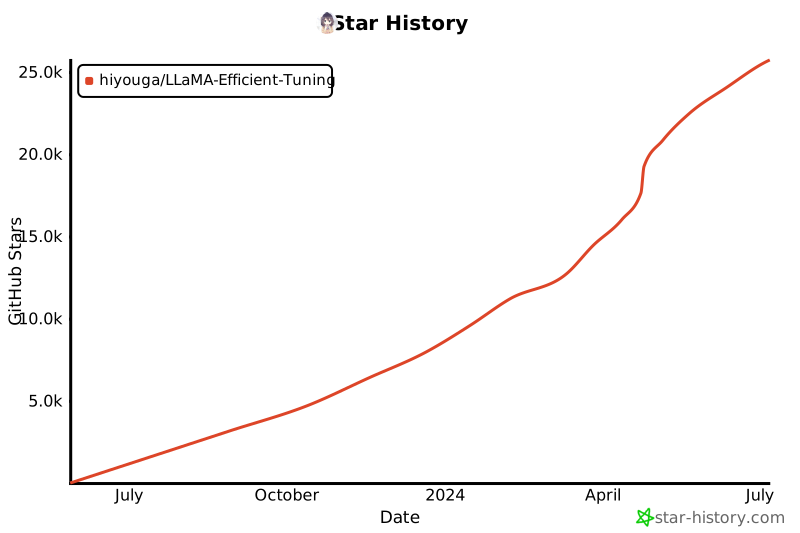
Star History
Release history Release notifications | RSS feed


Download files
Download the file for your platform. If you're not sure which to choose, learn more about installing packages.
Source Distribution
Built Distribution
Filter files by name, interpreter, ABI, and platform.
If you're not sure about the file name format, learn more about wheel file names.
Copy a direct link to the current filters
File details
Details for the file llmtuner-0.1.7.tar.gz.
File metadata
- Download URL: llmtuner-0.1.7.tar.gz
- Upload date:
- Size: 66.5 kB
- Tags: Source
- Uploaded using Trusted Publishing? No
- Uploaded via: twine/4.0.2 CPython/3.10.10
File hashes
| Algorithm | Hash digest | |
|---|---|---|
| SHA256 |
5ac4506f4c2009ef6a13a79d179ee998180c18def8456c605a2c6d281efbd0ee
|
|
| MD5 |
1c79d1236e0c9b3573c86f0b32201117
|
|
| BLAKE2b-256 |
d6802197b76b980ec7d8185868c6fc59f7758fabc1f5fb9f29fd72760c6d9800
|
File details
Details for the file llmtuner-0.1.7-py3-none-any.whl.
File metadata
- Download URL: llmtuner-0.1.7-py3-none-any.whl
- Upload date:
- Size: 82.5 kB
- Tags: Python 3
- Uploaded using Trusted Publishing? No
- Uploaded via: twine/4.0.2 CPython/3.10.10
File hashes
| Algorithm | Hash digest | |
|---|---|---|
| SHA256 |
de98ac93240e27921b9735f15b0e7354f8aec2a3793ee1437404cd9f23d716b5
|
|
| MD5 |
4a6b0977d0ffc17ae004cd230e87a816
|
|
| BLAKE2b-256 |
13e42aad2816c1468e799d43a331a672b446f70bce76c115c24689d71f0fb74c
|







