
lobemap
lobemap shows the published maps of the Drosophila antennal lobe side by side, in one viewer.
The antennal lobe is the first olfactory center of the fly brain. It is made of small, round compartments called glomeruli (one: glomerulus). Several groups have published a glomerular atlas: a 3D shape and a name for each glomerulus. The atlases come from different brains, and each one uses its own names. lobemap puts these atlases in one window, so you can compare them in 3D or one section at a time. It is built on the napari image viewer.
Demo
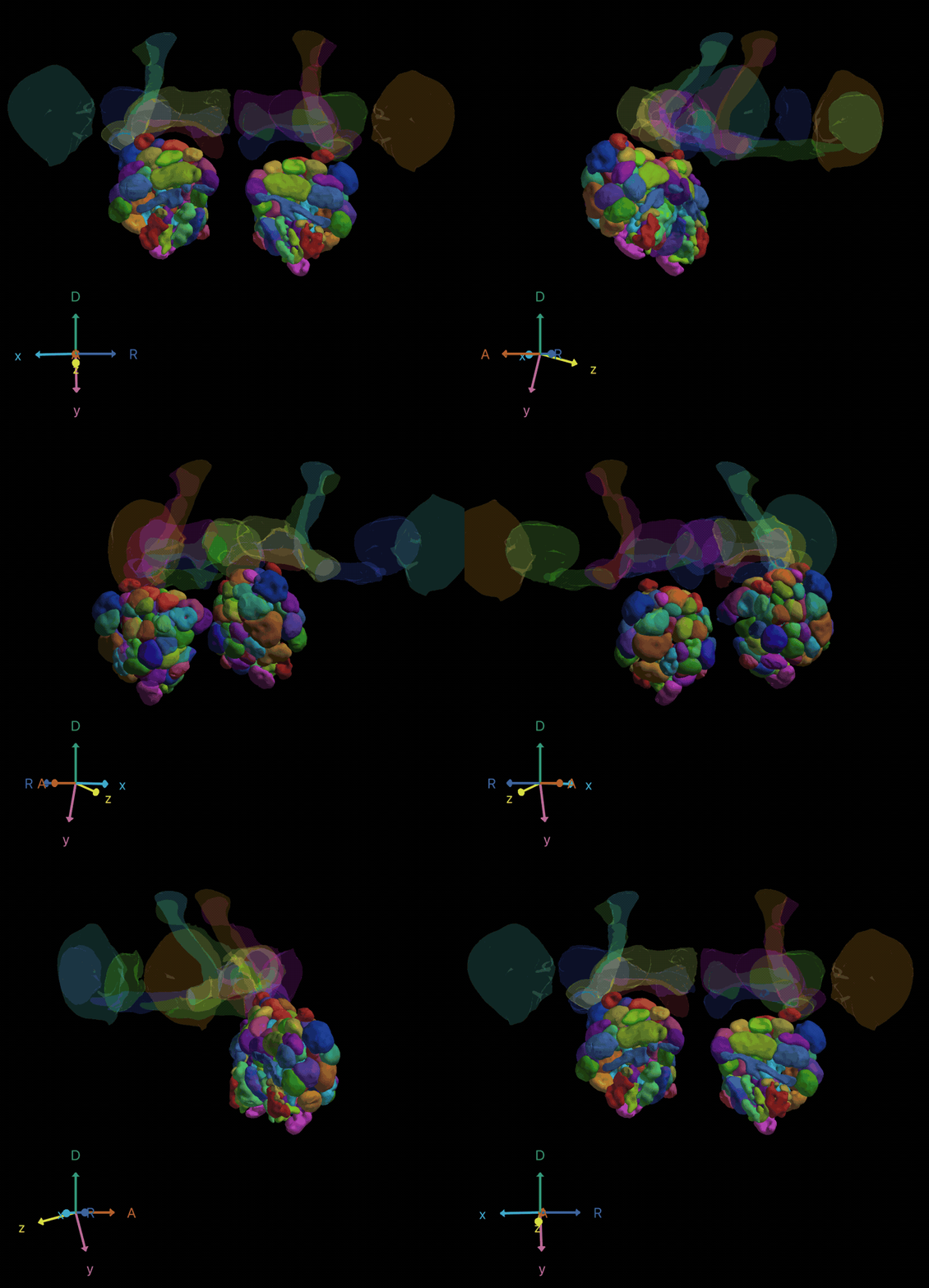
The glomeruli of one atlas in 3D. Each glomerulus has its own color.
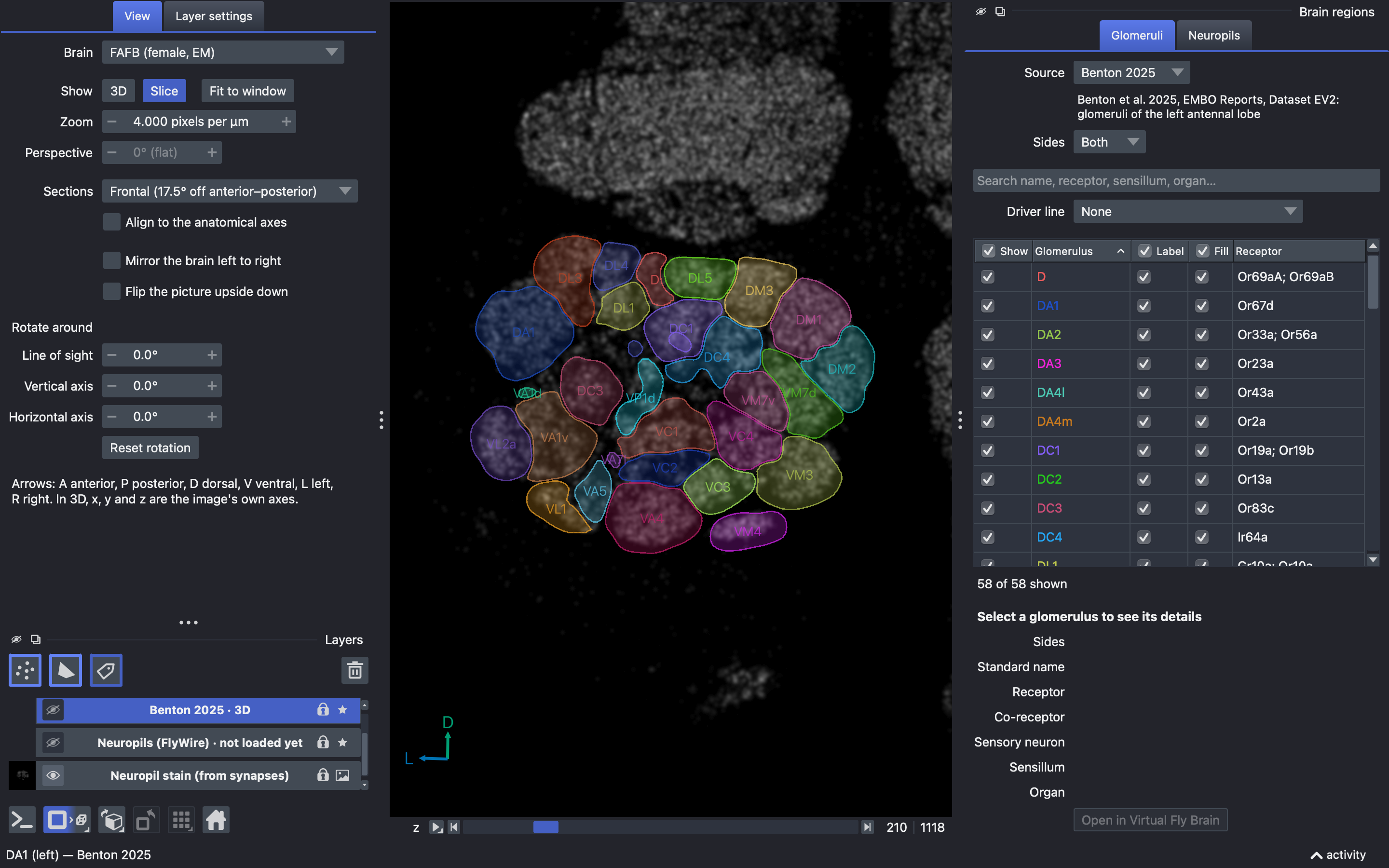
Slice view: each glomerulus is an exact outline on the image, with an optional fill and name.
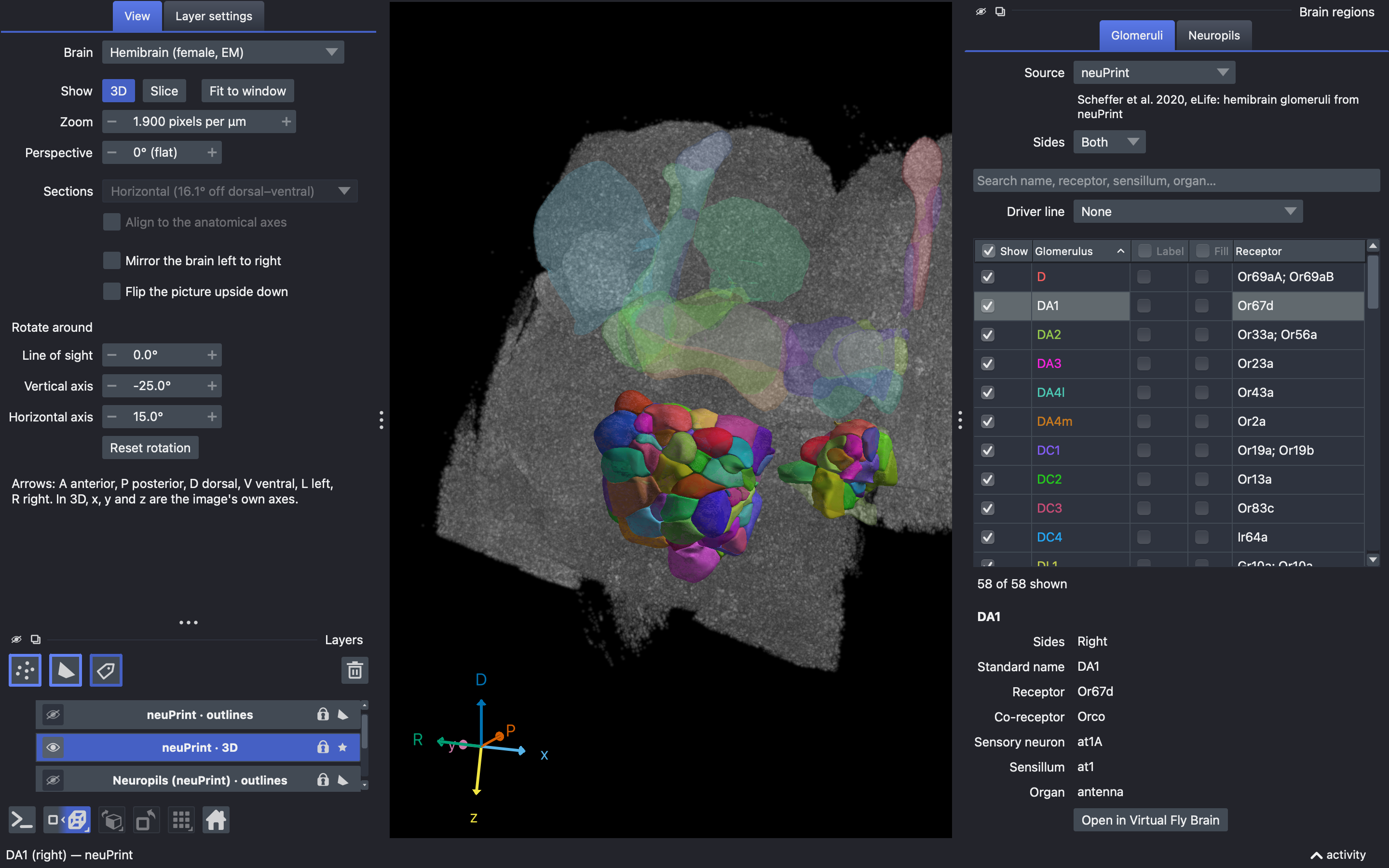
The hemibrain in 3D, with its stain and neuropils. The panel on the right lists the glomeruli.
Install
lobemap needs Python 3.11 or 3.12.
pip install lobemap
lobemap fetch
The first command installs the viewer. The second downloads the data, 2.5 GB, into your user cache folder, and prints where it put it. Data explains how to keep it somewhere else.
To download only 76 MB, use lobemap fetch --nostains. All four brains still open, but the three electron microscopy (EM) brains open without their background image. Run lobemap fetch later to add it.
Quick start
List the brains and what each one shows:
lobemap spaces
Open one brain, here the hemibrain:
lobemap view JRCFIB2018F
lobemap alone opens FAFB. If the data is not on your computer yet, lobemap view first downloads the 76 MB it needs.
The window shows the View controls on the left, the brain in the middle, and the Brain regions panel on the right. Things to try first:
- Turn the brain. In 3D, drag the brain with the mouse. To set exact angles, use Rotate around.
- Look at sections. Set Show to Slice, then move the slider under the image. Each glomerulus is an outline on the image. Tick its
LabelorFillbox to name or fill it. In Rotate around, a turn about the Vertical axis or the Horizontal axis cuts an oblique section: a section at an angle to the image's own planes. - Show or hide glomeruli. In Brain regions, tick or clear the
Showbox of each glomerulus. Search by name or receptor, or choose a Driver line to show only the glomeruli that a GAL4 or QF2 line labels. Click a glomerulus to see its receptor, sensillum and other details. - Compare atlases. The hemibrain has three atlases of the same lobe. Choose one in Source, then tick its glomeruli. All the atlases you tick are drawn together, and a glomerulus has the same color in each. To see an atlas of another brain, choose that brain in Brain.
- Mirror or flip. Mirror the brain left to right helps you compare a left lobe with a right one. Flip the picture upside down turns the picture over. Both change the display only, not the data.
What's inside
Each atlas was drawn in one brain volume. lobemap calls that volume a coordinate space: all its atlases share the same coordinates, so they line up and can be drawn over each other. The viewer calls a space a brain, and commands name it by its id.
| Brain | Id | Atlas | Glomeruli |
|---|---|---|---|
| FAFB: a whole female brain, EM | FAFB14 |
Benton et al. 2025 | 58, left lobe |
| Hemibrain: part of a female brain, EM | JRCFIB2018F |
neuPrint hemibrain, Scheffer et al. 2020 | 58 right, 19 left |
| Schlegel et al. 2021, from sensory neurons | 59, right lobe | ||
| Schlegel et al. 2021, from projection neurons | 58, right lobe | ||
| Male CNS: a male brain and nerve cord, EM | JRCFIB2022M |
neuPrint male CNS, Berg et al. 2026 | 58 per lobe |
| Grabe 2015: a living brain, light microscopy | GRABE |
Grabe et al. 2015 | 54 per lobe |
The three EM brains also show their neuropils, the named regions of the brain, and a virtual neuropil stain: an image made from synapse positions that looks like an nc82 antibody stain. Grabe 2015 shows its own confocal image.
The brains and atlases says which atlas fits which comparison, and lists known gaps in the published data.
Learn more
- Using the viewer: every control, the panel, the layers, and speed.
- The brains and atlases: what each atlas is, which one to use, and known gaps in the data.
- Data: download, storage, checks, rebuilding from source, and data licenses.
- Data sources: where each dataset came from, and what lobemap does to it.
- Commands: every
lobemapcommand and option. - Upgrading from 0.1: what changed, and what was removed.
- Development: work from the source code, run the tests, and release.
- Changelog: what changed in each version.
Data licenses and citation
If you use an atlas, cite the paper it came from. Data sources gives the citations.
The lobemap code is under the MIT License. The data is not: each dataset keeps the license of its source.
- CC BY 4.0: the neuPrint hemibrain and male CNS data, Schlegel 2021, and the hemibrain and male CNS stains.
- CC0 1.0: the Benton 2025 atlas.
- CC BY-NC 4.0, no commercial use: the FAFB neuropils and stain, from FlyWire.
- No published terms: the Grabe 2015 files. The rights stay with the authors and the publisher.
Data licenses has the full table.
1 maintainer

Metadata
1 maintainer
Release files for lobemap 0.2.1
For a detailed explanation of source distributions (sdists) and built distributions (wheels), please see the package formats documentation.
Source distribution (sdist)
| File | Size | Uploaded | |
|---|---|---|---|
| lobemap-0.2.1.tar.gz | 541.8 kB | Details |
Built distribution (wheel)
| File | Interpreter | ABI | Platform | Reset |
|---|---|---|---|---|
| lobemap-0.2.1-py3-none-any.whl | Python 3 | none | any | Details |
Total release size: 876.3 kB
Release files / lobemap-0.2.1.tar.gz
| Download URL | lobemap-0.2.1.tar.gz |
|---|---|
| Size | 541.8 kB |
| Tags | Source |
|
SHA-256 checksum How to use checksums |
a49ecf029dda72ebef3d3dc3b6ad24e30752f7c4aebe0959a3f0c9647ed44df1
|
|
BLAKE2b-256 checksum How to use checksums |
904811549ad9ca92716d6b4908f88c9020f33e3f4a7bce0ce57762e011c6740b
|
| Upload date | |
|
Uploaded using Trusted Publishing? What is trusted publishing? |
Yes |
| Uploaded via |
twine/7.0.0 CPython/3.13.14
|
Provenance
Provenance describes where a file came from. On PyPI, provenance is shared via attestations, which provide a verifiable record of the build or publishing details. View details, limitations and caveats.


PyPI Publish Attestation
PyPI verified that this artifact, at this checksum, originated from the publisher listed below.
Signed by GitHub Actions, verified by PyPI on Oct 5, 2026.
Transparency logRelease files / lobemap-0.2.1-py3-none-any.whl
| Download URL | lobemap-0.2.1-py3-none-any.whl |
|---|---|
| Size | 334.5 kB |
| Tags | Python 3 |
|
SHA-256 checksum How to use checksums |
39f11e4a0e8c659f1cfc16801172ed732099da0753994228717a3c2889e4f853
|
|
BLAKE2b-256 checksum How to use checksums |
555c7c2e8b398c3a5ac299ec3e997ba09d22dd84871e31a0c5a4a3fe1b66cb1d
|
| Upload date | |
|
Uploaded using Trusted Publishing? What is trusted publishing? |
Yes |
| Uploaded via |
twine/7.0.0 CPython/3.13.14
|
Provenance
Provenance describes where a file came from. On PyPI, provenance is shared via attestations, which provide a verifiable record of the build or publishing details. View details, limitations and caveats.
PyPI Publish Attestation
PyPI verified that this artifact, at this checksum, originated from the publisher listed below.
Signed by GitHub Actions, verified by PyPI on Oct 5, 2026.
Transparency log













