
Multi-Agent Bioinformatics Analysis System powered by LangGraph
Verified details
These details have been verified by PyPIProject links
GitHub Statistics
Maintainers

Project description

 |
 |
 |
 |
 |
 |
Quickstart
1. Install Lobster AI (macOS/Linux):
curl -fsSL https://install.lobsterbio.com | bash
(Windows users: irm https://install.lobsterbio.com/windows | iex)
2. Configure your LLM (Anthropic, Gemini, local Ollama, etc.):
lobster init
Watch: installation & init walkthrough
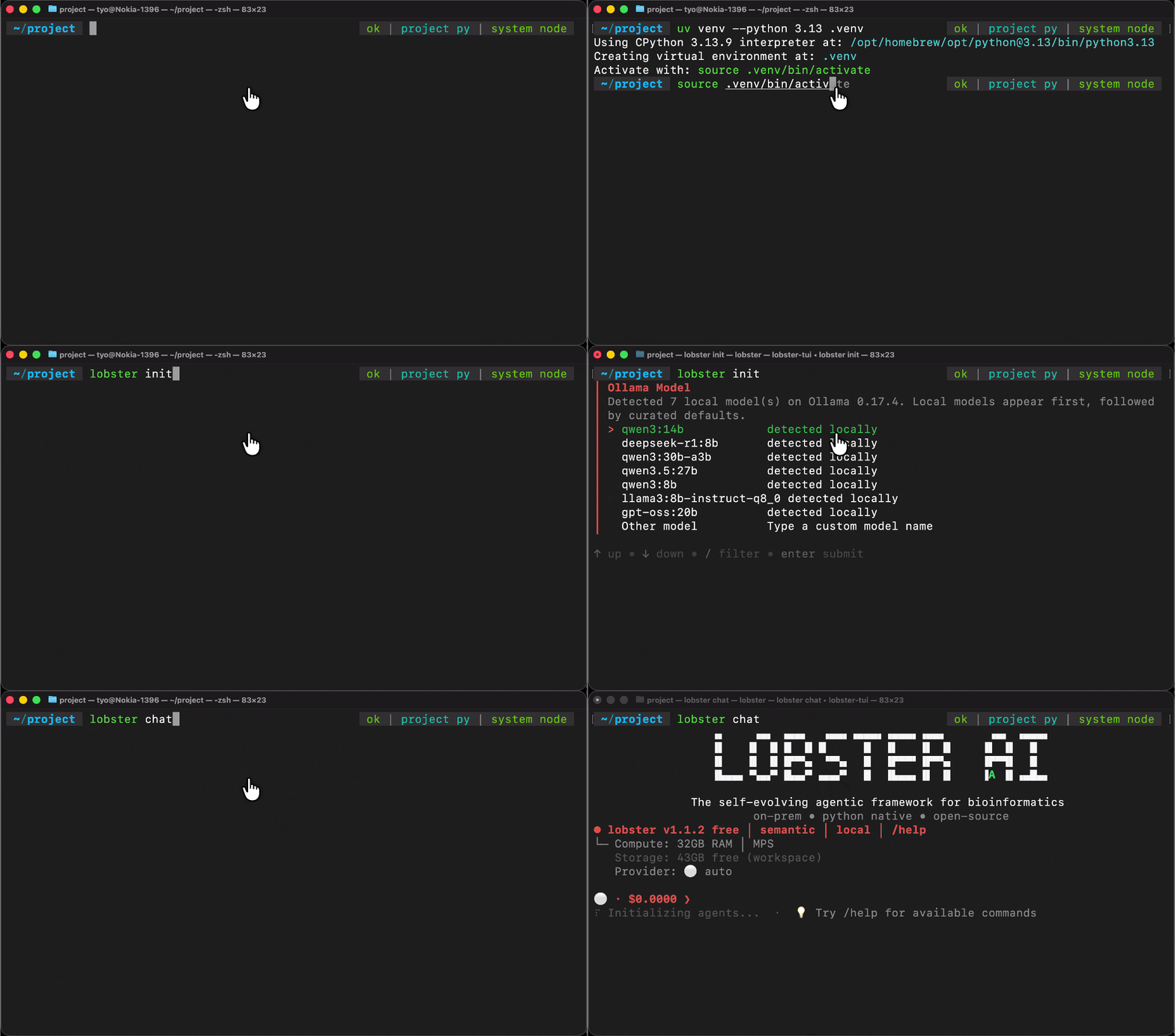
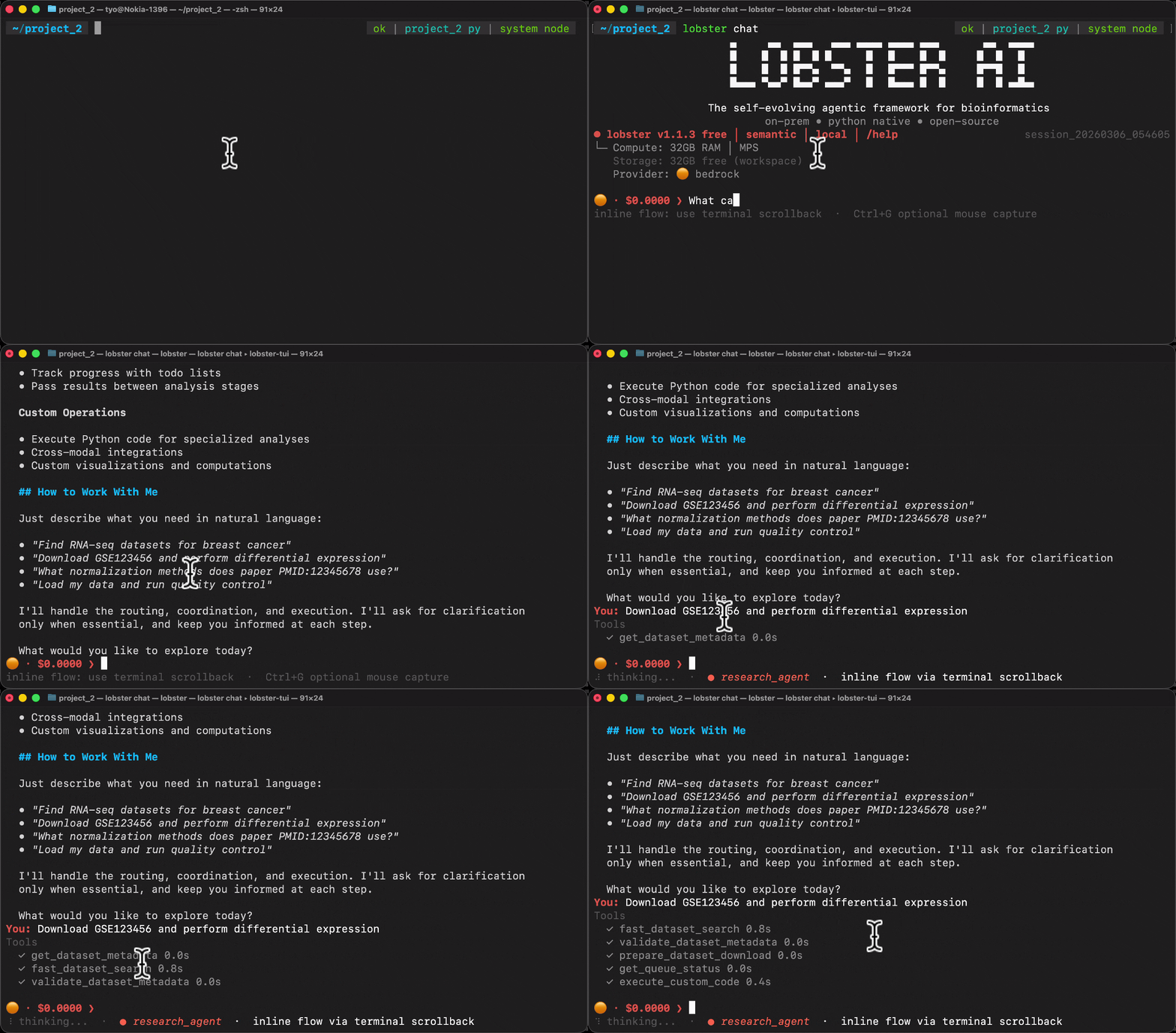
3. Start an interactive session:
lobster chat
Then describe your analysis in plain language:
> Search PubMed for single-cell CRISPR screens in T cells from 2023–2024,
  download the most cited dataset, run QC, integrate batches with Harmony,
  cluster the cells, annotate cell types, and export a reproducible notebook.
Watch: analysis session walkthrough
CLI Reference
Core commands:
lobster chat                        # Interactive session (default)
lobster query "your request"        # Single-turn, non-interactive
lobster init                        # Configure LLM provider and API keys
lobster --help                      # Full command reference
Session continuity:
lobster query --session-id my_project "Search PubMed for CRISPR"
lobster query --session-id latest "Download the first result"  # resume last session
In-session slash commands (inside lobster chat):
> /pipeline export                  # Export analysis as a reproducible Jupyter notebook
> /pipeline run analysis.ipynb      # Re-run an exported notebook
> /data                             # List loaded datasets and modalities
> /files                            # Browse workspace files
> /status                           # Session info, token usage, active agents
> /help                             # All slash commands
Developer commands:
lobster scaffold agent --name my_expert --display-name "My Expert" \
  --description "Description" --tier free   # Generate a new agent package
lobster validate-plugin ./my-package/        # Validate package structure (7 checks)
🤖 For AI Coding Agents
Install skills that give Claude Code, Cursor, or Gemini CLI deep knowledge of the Lobster architecture:
curl -fsSL https://skills.lobsterbio.com | bash
This installs lobster-use (analysis workflows) and lobster-dev (agent development). With these loaded, your coding agent understands the full 10-package structure, tool patterns, entry point registration, and AQUADIF contract — without needing to read source code manually.
Scaffold a new agent package from the command line:
lobster scaffold agent \
  --name epigenomics_expert \
  --display-name "Epigenomics Expert" \
  --description "ATAC-seq, ChIP-seq, and DNA methylation analysis" \
  --tier free
Generates a complete, contract-compliant package: pyproject.toml, entry point wiring, tool stubs with AQUADIF metadata, and contract tests. Then point your coding agent at the generated scaffolding and ask it to implement the domain logic.
Use Cases
End-to-end walkthroughs across omics domains:
| Domain | Case Study |
|---|---|
| Single-Cell Transcriptomics | Cell clustering, annotation & trajectory inference |
| CML Drug Resistance | Resistance mechanism discovery from scRNA-seq |
| Drug Discovery | Target identification & compound prioritization |
| Clinical Genomics | Variant annotation & GWAS analysis |
| Mass Spec Proteomics | Biomarker panel selection from DIA-NN data |
| Literature Mining | Automated dataset discovery from PubMed |
| Multi-Omics ML | Feature selection & survival analysis |
🧠 Architecture
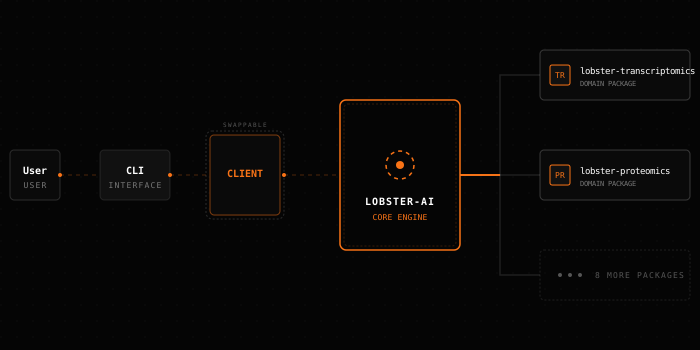
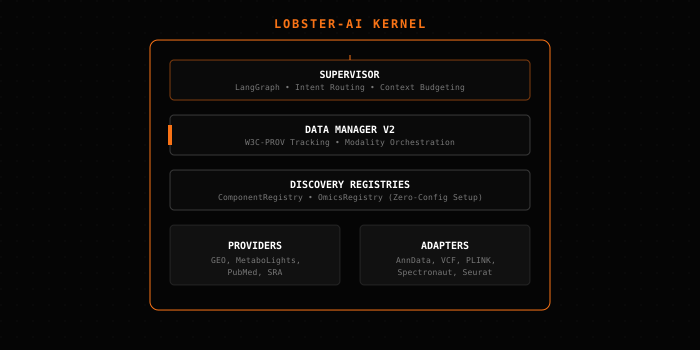
Lobster AI is a multi-agent system: 22 specialist agents across 10 installable packages, orchestrated by a LangGraph supervisor. Each agent owns a specific omics domain and calls validated scientific libraries directly — no code generation, no hallucinated results.
- Local execution: All analysis runs on your machine. Patient data never leaves your hardware.
- Scientific libraries: Agents call Scanpy, PyDESeq2, Harmony, and others via tool functions — not by generating scripts.
- W3C-PROV provenance: Every analysis step is tracked and exportable as a reproducible Jupyter notebook.
🛠️ Build Your Own Agent
New agents are standalone packages that plug into Lobster via Python entry points. The lobster-dev skill loads the full architecture reference into your coding agent (Claude Code, Gemini CLI, Cursor) — package layout, tool patterns, AQUADIF contract, and test fixtures. Use lobster scaffold to generate the package skeleton, then let your coding agent implement the domain logic.
1. The Request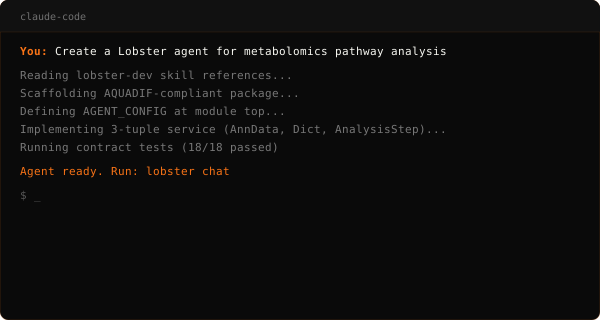
|
2. The Result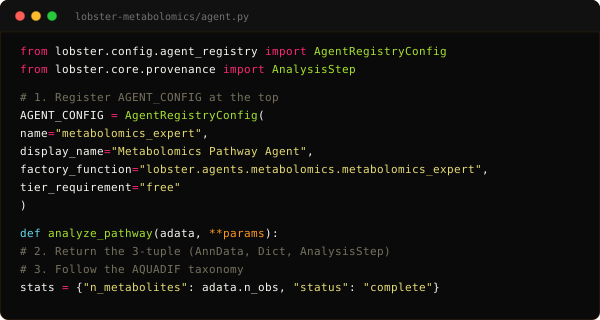
|
FAQ
What omics domains are supported?
| Domain | Input Formats | Key Capabilities |
|---|---|---|
| Single-Cell RNA-seq | AnnData, 10x, h5ad | QC, doublet detection (Scrublet), batch integration (Harmony/scVI), clustering, cell type annotation, trajectory inference (DPT/PAGA) |
| Bulk RNA-seq | Salmon, kallisto, featureCounts | Sample QC, normalization (DESeq2/VST/CPM), differential expression (PyDESeq2), GSEA, publication-ready export |
| Genomics | VCF, PLINK | GWAS, LD pruning, kinship estimation, association testing, result clumping |
| Clinical Genomics | VCF, ClinVar, gnomAD | Variant annotation (VEP), pathogenicity scoring, clinical variant prioritization |
| Mass Spec Proteomics | MaxQuant, DIA-NN, Spectronaut | PTM analysis (phospho/acetyl/ubiquitin), peptide-to-protein rollup, batch correction |
| Affinity Proteomics | Olink NPX, SomaScan ADAT, Luminex MFI | LOD quality filtering, bridge normalization, cross-platform concordance |
| Proteomics Downstream | Any loaded proteomics modality | GO/Reactome/KEGG enrichment, kinase enrichment (KSEA), STRING PPI, biomarker panel selection (LASSO/Boruta) |
| Metabolomics | LC-MS, GC-MS, NMR | QC (RSD/TIC), imputation, normalization (PQN/TIC/IS), PCA, PLS-DA, OPLS-DA, m/z annotation (HMDB/KEGG), lipid class analysis |
| Machine Learning | Any modality | Feature selection (stability/LASSO/variance), survival analysis (Cox/KM), cross-validation, SHAP, multi-omics integration (MOFA) |
| Research & Data Access | — | PubMed/GEO/PRIDE/MetaboLights search, dataset download orchestration, metadata harmonization |
Which LLMs can I use?
Configure via lobster init or environment variables. All providers use the same agent interface.
| Provider | Type | Setup | Notes |
|---|---|---|---|
| Anthropic | Cloud | API key | Claude models — recommended default |
| Ollama | Local | ollama pull <model> |
Fully offline, no data leaves the machine |
| OpenRouter | Cloud | API key | Access 200+ models via a single endpoint |
| Google Gemini | Cloud | Google API key | Long context window |
| AWS Bedrock | Cloud | AWS credentials | Enterprise compliance, IAM-based auth |
| Azure AI | Cloud | Endpoint + credential | Azure-hosted deployments |
Pipeline export and slash commands
lobster chat
> /pipeline export         # Export reproducible Jupyter notebook
> /pipeline list           # List exported pipelines
> /pipeline run analysis.ipynb geo_gse109564
> /data                    # Show loaded datasets
> /status                  # Session info
> /help                    # All commands
Advanced installation (Windows, pip)
Windows (PowerShell):
irm https://install.lobsterbio.com/windows | iex
uv (recommended manual install):
uv tool install 'lobster-ai[full]'              # All agents, choose provider at init
lobster init
pip:
pip install 'lobster-ai[full]'
lobster init
Upgrade:
uv tool upgrade lobster-ai    # uv
pip install -U lobster-ai      # pip
How do I build my own agent?
Agents are standalone Python packages that register via PEP 517 entry points. No changes to core required — Lobster discovers them automatically at startup.
1. Scaffold the package:
lobster scaffold agent \
  --name my_domain_expert \
  --display-name "My Domain Expert" \
  --description "Analysis for [your domain]" \
  --tier free
2. Implement your tools in the generated tools/ directory. Each tool must declare AQUADIF metadata:
@tool
def run_analysis(modality_name: str) -> str:
    """Run domain-specific analysis on a loaded modality."""
    ...

run_analysis.metadata = {"categories": ["ANALYZE"], "provenance": True}
run_analysis.tags = ["ANALYZE"]
3. Validate the package structure before wiring:
lobster validate-plugin ./my-domain-package/
4. Install and test:
uv pip install -e ./my-domain-package/
pytest -m contract  # runs all AQUADIF contract checks
Install the lobster-dev skill to give your coding agent the complete reference — package layout, AGENT_CONFIG pattern, factory function signature, tool design rules, and the full validation checklist:
curl -fsSL https://skills.lobsterbio.com | bash
Acknowledgements

|
Structural inspiration for the drug discovery agent package — CLI design patterns and domain decomposition. |

|
Foundation for the lobster-use and lobster-dev skills — domain knowledge structure and skill distribution patterns.
|

|
UI component architecture and streaming patterns used in the Omics-OS Cloud frontend. |

|
BubbleTea, Lipgloss, Glamour, and huh — the entire terminal UI stack powering lobster chat.
|
Project details
Verified details
These details have been verified by PyPIProject links
GitHub Statistics
Maintainers
Release history Release notifications | RSS feed


Download files
Download the file for your platform. If you're not sure which to choose, learn more about installing packages.
Source Distribution
Built Distribution
Filter files by name, interpreter, ABI, and platform.
If you're not sure about the file name format, learn more about wheel file names.
Copy a direct link to the current filters
File details
Details for the file lobster_ai-1.1.405.tar.gz.
File metadata
- Download URL: lobster_ai-1.1.405.tar.gz
- Upload date:
- Size: 1.3 MB
- Tags: Source
- Uploaded using Trusted Publishing? Yes
- Uploaded via: twine/6.1.0 CPython/3.13.7
File hashes
| Algorithm | Hash digest | |
|---|---|---|
| SHA256 |
40eb9b7d03c409cc28ae80751579cae5af73c4e498294fd087b0499d20ee2070
|
|
| MD5 |
927a914b0515f24bb6c43d750a5e7d9b
|
|
| BLAKE2b-256 |
6413963270e2a3243f03a5f721cb8d8917aa603712ef98667aaa4f44e25cd487
|
Provenance
The following attestation bundles were made for lobster_ai-1.1.405.tar.gz:
Publisher:
publish-packages.yml on the-omics-os/lobster
-
Statement:
-
Statement type:
https://in-toto.io/Statement/v1 -
Predicate type:
https://docs.pypi.org/attestations/publish/v1 -
Subject name:
lobster_ai-1.1.405.tar.gz -
Subject digest:
40eb9b7d03c409cc28ae80751579cae5af73c4e498294fd087b0499d20ee2070 - Sigstore transparency entry: 1063113660
- Sigstore integration time:
-
Permalink:
the-omics-os/lobster@c05342faf80b4df821e20f1ac9e9270475bb9f35 -
Branch / Tag:
refs/tags/v1.1.405 - Owner: https://github.com/the-omics-os
-
Access:
public
-
Token Issuer:
https://token.actions.githubusercontent.com -
Runner Environment:
github-hosted -
Publication workflow:
publish-packages.yml@c05342faf80b4df821e20f1ac9e9270475bb9f35 -
Trigger Event:
push
-
Statement type:
File details
Details for the file lobster_ai-1.1.405-py3-none-any.whl.
File metadata
- Download URL: lobster_ai-1.1.405-py3-none-any.whl
- Upload date:
- Size: 1.5 MB
- Tags: Python 3
- Uploaded using Trusted Publishing? Yes
- Uploaded via: twine/6.1.0 CPython/3.13.7
File hashes
| Algorithm | Hash digest | |
|---|---|---|
| SHA256 |
70992cb951f1b659fd6803d5183c06a0740e19227bcf3f935ecfa8ab125a207f
|
|
| MD5 |
eb7c7528201dc0e021618a785ef24d5f
|
|
| BLAKE2b-256 |
80f1e5034fc29994405ca5b107be9441988facf34f087519424ce35ad00c2802
|
Provenance
The following attestation bundles were made for lobster_ai-1.1.405-py3-none-any.whl:
Publisher:
publish-packages.yml on the-omics-os/lobster
-
Statement:
-
Statement type:
https://in-toto.io/Statement/v1 -
Predicate type:
https://docs.pypi.org/attestations/publish/v1 -
Subject name:
lobster_ai-1.1.405-py3-none-any.whl -
Subject digest:
70992cb951f1b659fd6803d5183c06a0740e19227bcf3f935ecfa8ab125a207f - Sigstore transparency entry: 1063113709
- Sigstore integration time:
-
Permalink:
the-omics-os/lobster@c05342faf80b4df821e20f1ac9e9270475bb9f35 -
Branch / Tag:
refs/tags/v1.1.405 - Owner: https://github.com/the-omics-os
-
Access:
public
-
Token Issuer:
https://token.actions.githubusercontent.com -
Runner Environment:
github-hosted -
Publication workflow:
publish-packages.yml@c05342faf80b4df821e20f1ac9e9270475bb9f35 -
Trigger Event:
push
-
Statement type:






