
LAO — interactive Pilot Mode (local agentic chat + tools) plus planner→coder→reviewer orchestration over LM Studio / OpenAI-compatible APIs, with SQLite state, project registry, and optional per-plan Git.
Verified details
These details have been verified by PyPIProject links
GitHub Statistics
Maintainers

Project description
Local AI Agent Orchestrator (LAO)
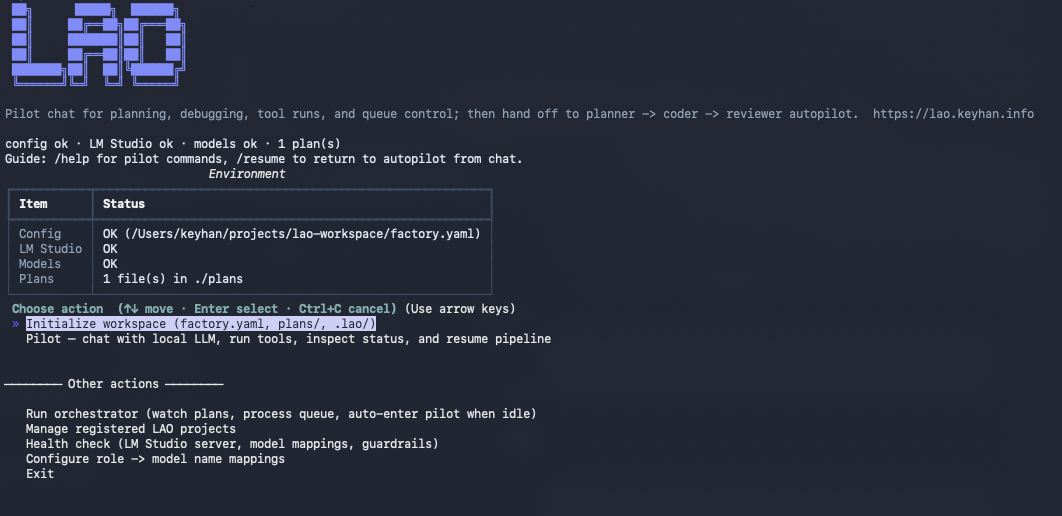
LAO (v3.0.8+) is a local coding factory for LM Studio and other OpenAI-compatible servers: a planner → coder → reviewer pipeline for long-running work, plus Pilot Mode—an interactive, agentic chat on your terminal that can run workspace tools, inspect the queue, create plans, switch projects, and hand control back to autopilot when you type /resume. Everything is backed by SQLite, memory-aware model swapping, optional per-plan Git, and a unified TTY experience (Rich + prompt_toolkit).






| Resource | Link |
|---|---|
| PyPI | pypi.org/project/local-ai-agent-orchestrator |
| Website | lao.keyhan.info |
| Repository | github.com/KEYHAN-A/local-ai-agent-orchestrator |
| Issues | GitHub Issues |
| License | GPL-3.0-only |
| Changelog | CHANGELOG.md |
Table of contents
- Installation
- Features
- LAO Pilot Mode
- Project commands and multi-repo workflows
- Why the OpenAI SDK (not LangChain / CrewAI)?
- Requirements
- Prerequisites (LM Studio)
- Quick start
- Configuration overview
- CLI reference
- Workspaces, paths, and resume behavior
- Git traceability
- Architecture
- Documentation
- Security
- Contributing
- Releases
Installation
From PyPI (recommended)
pip install local-ai-agent-orchestrator
pip install -U local-ai-agent-orchestrator   # upgrade
The CLI entry point is lao (also local-ai-agent-orchestrator).
One-line installer (curl)
The canonical script in git is scripts/install.sh. It prefers pipx when available (isolated app environment), otherwise pip install --user.
Short URL (GitHub Pages):
curl -fsSL https://lao.keyhan.info/install.sh | bash
That bootstrap is a tiny script that downloads the same implementation from GitHub main—so there is only one full installer to maintain.
Direct from GitHub (easy to audit against the repo):
curl -fsSL https://raw.githubusercontent.com/KEYHAN-A/local-ai-agent-orchestrator/main/scripts/install.sh | bash
Trust trade-off: piping to bash always means you trust the host and transport. Many people prefer the raw.githubusercontent.com URL because the path maps cleanly to main/scripts/install.sh in this repository. The lao.keyhan.info URL is the same behavior after one redirect through the small bootstrap.
Optional environment variables: LAO_VERSION (pin a release, e.g. 3.0.8), LAO_PACKAGE (override PyPI name).
Homebrew ecosystem
LAO is a Python package on PyPI. Homebrew does not replace PyPI here; the usual approach on macOS is to use Homebrew’s pipx and install LAO into an isolated environment:
brew install pipx
pipx ensurepath
pipx install local-ai-agent-orchestrator
# later: pipx upgrade local-ai-agent-orchestrator
A first-party Homebrew formula in homebrew-core is possible but requires vendoring every Python dependency with fixed URLs and checksums (no PyPI access during brew install). If you want a custom tap (brew install yourname/tap/lao), generate or hand-maintain a formula with something like homebrew-pypi-poet or follow Homebrew’s Python guide.
npm
LAO is implemented in Python, not JavaScript. Publishing an npm package that only shells out to pip would be confusing to npm users and fragile across machines. Use pip, pipx, or the curl installer above instead.
Editable install (development)
git clone https://github.com/KEYHAN-A/local-ai-agent-orchestrator.git
cd local-ai-agent-orchestrator
python -m venv .venv
source .venv/bin/activate   # Windows: .venv\Scripts\activate
pip install -e .
Without installing the package
python main.py health
(main.py adds src/ for you.)
Features
End-to-end pipeline
- Planner (architect): Decomposes a master plan into a JSON array of micro-tasks (title, description, file paths, dependencies). Large plans are chunked to fit the planner context; completed chunks are resumed instead of recomputed.
- Task queue: SQLite (WAL) stores plans, tasks, run logs, and structured review findings. Dependency-aware scheduling: tasks wait on prerequisites; dependents of failed tasks are failed with explicit feedback.
- Coder: OpenAI-style chat with tool calling (when the model supports it):
file_read,file_write,file_patch,list_dir,shell_exec. Work runs inside the active plan workspace (see below). - Reviewer: Single completion that must yield structured JSON (
verdict,findings,summary). Feeds back into queue state (approve, rework, or fail after max attempts).
State, recovery, and operator tools
- Resume by default: On startup, tasks stuck in transient phases are reset (
coding→pending,review→coded) viarecover_interrupted(). - Plan deduplication: Identical plan content is hashed; resubmitting the same text does not spawn a second decomposition.
lao retry-failed: Movesfailedtasks back topendingfor another pass.lao reset-failedis a deprecated alias.
Models and memory
- Role-specific models in
factory.yaml(planner,coder,reviewer,pilot, optionalembedder). - ModelManager loads/unloads via LM Studio’s HTTP API so only one large LLM tends to sit in VRAM at a time.
- Memory gate: After unload, waits until freed memory (via
vm_staton macOS) meets configured thresholds before loading the next model. - LLM retries: Configurable timeouts, attempts, and exponential backoff for transient API errors.
Semantic context (embedder)
- When configured, embedding search (
find_relevant_files) can rank files before coding so the coder prompt includes short excerpts from likely-relevant paths (seetools.py).
Quality gates and validation
- Post-coder validation (placeholder text, selected code smells, optional
validation_build_cmd/validation_lint_cmdwhen set in config) produces findings; severity drives gating whenquality_gate_modeisstandardorstrict. - Per-plan
quality_report.jsonsummarizes runs and findings for traceability (seereportingmodule and docs).
Reviewer robustness (local models)
- Chain-of-thought stripping:
<think>…</think>-style blocks are removed before parsing reviewer output (R1 / Qwen-style models). - JSON verdict parsing: Accepts raw JSON, JSON inside markdown code fences, or a JSON object embedded in surrounding prose—so
APPROVEDinside a fenced block is not misread as a rejection.
Optional Git traceability
- When enabled, each plan’s project directory can be a Git repo:
LAO_PLAN.md,LAO_TASKS.json, phase commits with subjects likelao(coder): task #42 …, andLAO_REVIEW.logappended after review. Disable globally in YAML or per run with--no-git.
Operator experience
lao(no subcommand): Interactive home on a TTY—environment status, grouped menu (initialize workspace + pilot first, then other actions; Exit last).lao init: Scaffoldfactory.yaml/factory.example.yaml,.lao/,plans/, optional workspaceREADME.md.lao configure-models: Interactive remap of model keys to matchlms ls/ LM Studio.lao run: Orchestrator loop with unified TTY UI when idle transitions into Pilot Mode (configurable).--plainyields classic timestamped logs (CI, pipes, debugging).
LAO Pilot Mode (v3.0.4+)
Pilot Mode is the interactive layer when the pipeline is idle—or when you run lao pilot / choose Pilot from the home menu. The Pilot uses the same OpenAI tools pattern as the coder (read/write/patch files, shell, semantic search) and adds pipeline controls (pipeline_status, create_plan, retry_failed, resume_pipeline, project_status, …).
- Unified UI: Scrollback for chat and activity, compact status line (phase / model / task), slash hints (
/help,/status,/resume,/clear,/exit,/project …). - Project awareness:
lao projects(list, scan, add, use, needs-action, remove) and in-chat/projectto list, scan, switch workspace, or show status. Registry stored at~/.lao/projects.json. Intent phrases and paths can trigger a workspace switch before the tool loop. - Guardrails: Repeated tool errors back off and ask for a clearer path; absolute paths like
/Users/...are not mis-parsed as slash commands. - Exiting chat: Double Ctrl+C exits the prompt; Ctrl+D (EOF) also ends input.
Screenshots
Pilot Mode
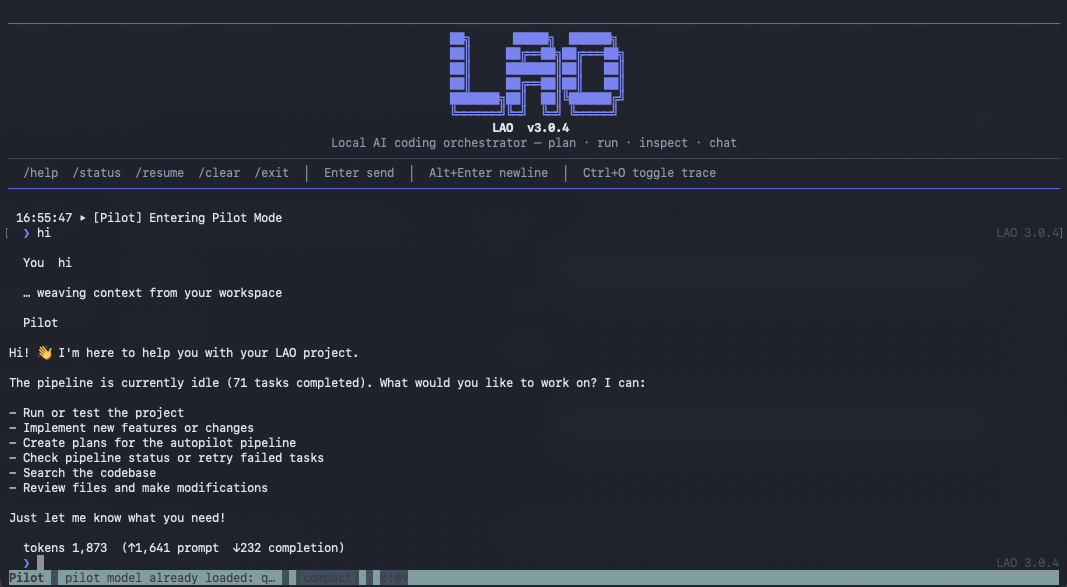
(Images are also in-repo under docs/assets/ for the site and offline viewing.)
Operator flow (autopilot + pilot)
flowchart LR
  home["lao home"] --> init["lao init"]
  home --> pilotEntry["lao pilot"]
  home --> run["lao run"]
  run --> work["Planner Coder Reviewer"]
  work --> idle{Queue idle?}
  idle -->|yes| pilot["Pilot chat"]
  idle -->|no| work
  pilot --> resume["/resume or tool"]
  resume --> work
  pilot --> home2["Exit"]
Full release notes: CHANGELOG.md (latest: v3.0.8; Pilot highlights in v3.0.4).
Project commands and multi-repo workflows
If you start LAO from a parent directory (no factory.yaml in the current folder), use lao projects scan (or the home menu Scan for LAO projects) to discover repos that have factory.yaml, plans/*.md, or .lao/state.db. lao projects use <name-or-path> re-binds configuration to that project. In Pilot chat, /project use … performs the same switch for the session.
Why the OpenAI SDK (not LangChain / CrewAI)?
LAO calls the OpenAI Python SDK directly against your local server to avoid heavy multi-agent framework scaffolding and extra token overhead on small local context windows.
Requirements
- Python 3.10+
- LM Studio — install the desktop application, then enable the local server (Developer → server; default URL matches
lao init/factory.yaml). You can point LAO at another OpenAI-compatible HTTP endpoint for chat, but automated load/unload and the memory gate use LM Studio’s REST API (see Prerequisites below). - Model keys in
factory.yamlthat match what the server exposes (uselao healthorlms ls) gitonPATHif you use Git traceability, withuser.name/user.emailconfigured- Apple Silicon: if large models fail to load, relax LM Studio Model Loading Guardrails (Developer → Server Settings)
Full reference: docs/CONFIGURATION.md.
Prerequisites (LM Studio)
- Install LM Studio and open the app.
- Start the local server so LAO can reach it (default http://127.0.0.1:1234 unless you changed it). Download or load the models you plan to use; role keys in
factory.yamlmust match what LM Studio exposes (lao health,lms ls, or the UI). - Memory-aware model switching (unload other LLMs → wait for memory to settle → load the next model) is implemented against LM Studio’s HTTP load/unload API (
ModelManager). For that behavior, keep LM Studio running with the server enabled.
Quick start
lao                  # interactive home (TTY) — init, pilot, run, projects, …
lao init             # scaffold config, .lao/, plans/

lao health           # LM Studio reachability + configured model keys
lao run              # watch plans/, run pipeline; enters Pilot when idle (TTY)
lao pilot            # jump straight into Pilot chat (after health check)

# Parent folder without factory.yaml: discover and register projects
lao projects scan
lao projects use my-repo

# Alternative: one plan, one pass
lao --plan plans/my_project.md --single-run run
Drop new *.md files into your configured plans/ directory (by default next to factory.yaml). plans/README.md is never ingested as a plan.
Configuration overview
Configuration lives in factory.yaml (or path from LAO_CONFIG / --config). Typical areas:
| Area | Purpose |
|---|---|
lm_studio_base_url, openai_api_key |
Server endpoint and API key (LM Studio often uses a placeholder key). |
paths.plans, paths.database |
Where plans are scanned and where SQLite lives (default .lao/state.db). |
memory_gate.* |
Release fraction, swap growth limits, settle timeout, poll interval. |
orchestration.* |
Load timeouts, max_task_attempts, watch interval, LLM timeouts/retries, phase_gated, coder_batch_size, reviewer_batch_size, max_context_utilization, quality_gate_mode, pilot_mode_enabled, optional validation_build_cmd / validation_lint_cmd. |
git.* |
Enable/disable traceability, plan snapshot filename, optional commit trailers. |
models.* |
Per-role key, context_length, max_completion, supports_tools, size hints for memory accounting. Roles include pilot for Pilot Mode. |
Environment variables (including LM_STUDIO_BASE_URL, OPENAI_API_KEY, TOTAL_RAM_GB, WORKSPACE_ROOT, PLANS_DIR, DB_PATH) are documented in .env.example.
CLI reference
Commands
| Command | Description |
|---|---|
lao |
Interactive home: environment status and grouped actions (TTY). |
lao run |
Watch plans/, run architect/coder/reviewer loop until interrupted; on TTY, Pilot Mode when idle unless --no-pilot. |
lao pilot |
Enter Pilot Mode immediately (LM Studio must be reachable). |
lao projects |
Manage known workspaces: list (default), scan, add, use, remove, needs-action. Optional --root, --tag on add. |
lao init |
Onboarding scaffold: factory.example.yaml, .lao/, plans/, optional README.md. Flags: --skip-readme, --no-interactive. |
lao health |
Check server reachability and that configured model keys exist. |
lao status |
SQLite queue summary and token totals. |
lao configure-models |
Interactive update of role model keys (planner, coder, reviewer, embedder, pilot) in factory.yaml. |
lao preflight |
Plan context diagnostics: --plan PATH (required). |
lao benchmark |
Core reliability benchmark suite; writes report under config dir. |
lao kpi |
KPI snapshot for tracking. |
lao dashboard |
Operator dashboard snapshot. |
lao report |
Quality report schema: check or migrate (--file optional). |
lao retry-failed |
Reset failed tasks to pending for another attempt. |
lao reset-failed |
Deprecated alias for retry-failed. |
lao run accepts --plan PATH (single plan) and --single-run (one scheduler pass then exit).
Global flags
| Flag | Description |
|---|---|
--config PATH |
Path to factory.yaml (default: ./factory.yaml if present). |
--lm-studio-url URL |
Override LM Studio base URL. |
--ram-gb N |
Total RAM in GB (logged; reserved for future tuning). |
--workspace, --plans-dir, --db |
Override workspace, plans directory, and SQLite path. |
--planner-model, --coder-model, --reviewer-model, --embedder-model, --pilot-model |
Override model keys without editing YAML. |
--plain |
Classic scrolling log instead of the unified TTY experience. |
--no-git |
Disable Git snapshots/commits for this run (overrides factory.yaml). |
--no-pilot |
Disable Pilot Mode during lao run (legacy idle behavior). |
--pilot-only |
Jump straight into Pilot Mode (works with lao run as well as lao pilot). |
--phase-gated |
Enable role-batched phase execution (coder/reviewer waves) for this run. |
--batch-size N |
Coder batch size override for this run. |
--max-context-utilization RATIO |
Planner context utilization hint (0–1). |
--quality-gate |
Override quality gate: strict, standard, or off. |
Workspaces, paths, and resume behavior
- Per-plan project directory: For a plan file
plans/MyPlan.md, the default workspace is<config_dir>/MyPlan/(same stem as the plan), i.e. next to yourplans/folder afterlao init. The coder’s file tools operate inside that directory (with safety checks). - Fallback: If a plan has no normal stem,
.lao/_misc/can be used as a fallback workspace (see configuration docs). - State database: Default
.lao/state.dbunless overridden. - Resume: Restarting
lao runcontinues from SQLite; interrupted phases are recovered automatically.
On a TTY, lao run uses the unified LAO shell (status + activity + pilot when idle). Use --plain for logs suitable for CI or redirection.
Git traceability
When git.enabled is true (default), LAO uses <config_dir>/<plan-stem>/ as the Git working tree:
- Plan snapshot:
LAO_PLAN.mdcommitted when appropriate (lao(plan): …). - After architect:
LAO_TASKS.json(lao(architect): …). - After coder: staged changes (
lao(coder): task #…). - After reviewer:
LAO_REVIEW.logupdated (lao(reviewer): …).
Disable with git.enabled: false or lao --no-git run. Existing .git directories are respected (no forced re-init).
Architecture
Module-level detail: docs/ARCHITECTURE.md.
Pipeline overview
flowchart LR
  plansMd["plans/*.md"] --> register[Register_and_hash]
  register --> plannerLLM[Planner_LLM]
  plannerLLM --> sqliteQ[("SQLite_queue")]
  sqliteQ --> coderLLM[Coder_LLM]
  coderLLM --> reviewerLLM[Reviewer_LLM]
  reviewerLLM --> sqliteQ
  coderLLM -.->|optional| gitTrace[Git_traceability]
  reviewerLLM -.->|optional| gitTrace
Model loading and memory gate
flowchart TB
  subgraph roles [Phases_need_models]
    direction LR
    rolePlanner[planner] --> roleCoder[coder] --> roleReviewer[reviewer]
  end
  rolePlanner --> mm[ModelManager_ensure_loaded]
  roleCoder --> mm
  roleReviewer --> mm
  mm --> unload[Unload_other_LLMs]
  unload --> gate[Memory_gate]
  gate --> load[LM_Studio_load_API]
Documentation
| Doc | Description |
|---|---|
| docs/ARCHITECTURE.md | Components, execution flow, resume, Git, model swapping |
| docs/CONFIGURATION.md | factory.yaml, paths, orchestration, Git |
| docs/CONTRIBUTING.md | How to contribute |
| docs/PYPI_PUBLISH.md | Maintainer: publishing to PyPI |
| lao.keyhan.info | Project site (from docs/index.html) |
Security
LAO can execute shell commands and write files in the configured workspace as driven by the coder and your plan. Run only in trusted directories, use --no-git or disable tools if you need a read-only mental model, and review factory.yaml before production use. This project is GPL-3.0-only; dependencies have their own licenses.
Contributing
Issues and pull requests are welcome. See docs/CONTRIBUTING.md for guidelines.
Releases
- Latest changes: see CHANGELOG.md (full history from v1.0.0).
- Install the latest build:
pip install -U local-ai-agent-orchestrator - GitHub Releases: github.com/KEYHAN-A/local-ai-agent-orchestrator/releases
Recent highlights (v3.0.8): Pilot tools resolve under the real project directory; Swift/schema validation and plan retry_failed ergonomics improved—see CHANGELOG.md. LAO Pilot Mode (v3.0.4+): interactive agentic chat, project registry (lao projects, /project), grouped home menu, hardened terminal UX.
Project details
Verified details
These details have been verified by PyPIProject links
GitHub Statistics
Maintainers
Release history Release notifications | RSS feed


Download files
Download the file for your platform. If you're not sure which to choose, learn more about installing packages.
Source Distribution
Built Distribution
Filter files by name, interpreter, ABI, and platform.
If you're not sure about the file name format, learn more about wheel file names.
Copy a direct link to the current filters
File details
Details for the file local_ai_agent_orchestrator-3.0.8.tar.gz.
File metadata
- Download URL: local_ai_agent_orchestrator-3.0.8.tar.gz
- Upload date:
- Size: 142.2 kB
- Tags: Source
- Uploaded using Trusted Publishing? Yes
- Uploaded via: twine/6.1.0 CPython/3.13.7
File hashes
| Algorithm | Hash digest | |
|---|---|---|
| SHA256 |
69c85432b09e51bd0f087e12b59ca178ab13d8746e27c29b0edcd68c2da686a6
|
|
| MD5 |
cf32a8c46b314e70d963bcd423d4fb21
|
|
| BLAKE2b-256 |
ff3fc63b493871fe462141c2cfb5ca11813434b5cb8dd9077b7b8115a1a0407a
|
Provenance
The following attestation bundles were made for local_ai_agent_orchestrator-3.0.8.tar.gz:
Publisher:
publish-pypi.yml on KEYHAN-A/local-ai-agent-orchestrator
-
Statement:
-
Statement type:
https://in-toto.io/Statement/v1 -
Predicate type:
https://docs.pypi.org/attestations/publish/v1 -
Subject name:
local_ai_agent_orchestrator-3.0.8.tar.gz -
Subject digest:
69c85432b09e51bd0f087e12b59ca178ab13d8746e27c29b0edcd68c2da686a6 - Sigstore transparency entry: 1189732146
- Sigstore integration time:
-
Permalink:
KEYHAN-A/local-ai-agent-orchestrator@019beda5d6b87af562911f3c1ddd7a84a538ddbc -
Branch / Tag:
refs/tags/v3.0.8 - Owner: https://github.com/KEYHAN-A
-
Access:
public
-
Token Issuer:
https://token.actions.githubusercontent.com -
Runner Environment:
github-hosted -
Publication workflow:
publish-pypi.yml@019beda5d6b87af562911f3c1ddd7a84a538ddbc -
Trigger Event:
release
-
Statement type:
File details
Details for the file local_ai_agent_orchestrator-3.0.8-py3-none-any.whl.
File metadata
- Download URL: local_ai_agent_orchestrator-3.0.8-py3-none-any.whl
- Upload date:
- Size: 127.3 kB
- Tags: Python 3
- Uploaded using Trusted Publishing? Yes
- Uploaded via: twine/6.1.0 CPython/3.13.7
File hashes
| Algorithm | Hash digest | |
|---|---|---|
| SHA256 |
3d298e88e1db0b103a1766569f3aaff0c8c9a8e56ec34975e5ee8d183d91eba6
|
|
| MD5 |
93cb5884b907e7ec4116312b1939a285
|
|
| BLAKE2b-256 |
309efa624a6dafdf1033f94b948afdcb42ae8cd3e9f6aa9ace0c39fb3c54e5cd
|
Provenance
The following attestation bundles were made for local_ai_agent_orchestrator-3.0.8-py3-none-any.whl:
Publisher:
publish-pypi.yml on KEYHAN-A/local-ai-agent-orchestrator
-
Statement:
-
Statement type:
https://in-toto.io/Statement/v1 -
Predicate type:
https://docs.pypi.org/attestations/publish/v1 -
Subject name:
local_ai_agent_orchestrator-3.0.8-py3-none-any.whl -
Subject digest:
3d298e88e1db0b103a1766569f3aaff0c8c9a8e56ec34975e5ee8d183d91eba6 - Sigstore transparency entry: 1189732191
- Sigstore integration time:
-
Permalink:
KEYHAN-A/local-ai-agent-orchestrator@019beda5d6b87af562911f3c1ddd7a84a538ddbc -
Branch / Tag:
refs/tags/v3.0.8 - Owner: https://github.com/KEYHAN-A
-
Access:
public
-
Token Issuer:
https://token.actions.githubusercontent.com -
Runner Environment:
github-hosted -
Publication workflow:
publish-pypi.yml@019beda5d6b87af562911f3c1ddd7a84a538ddbc -
Trigger Event:
release
-
Statement type:






