

LocalDeploy
Pick, deploy, and benchmark the best local AI model for your machine.



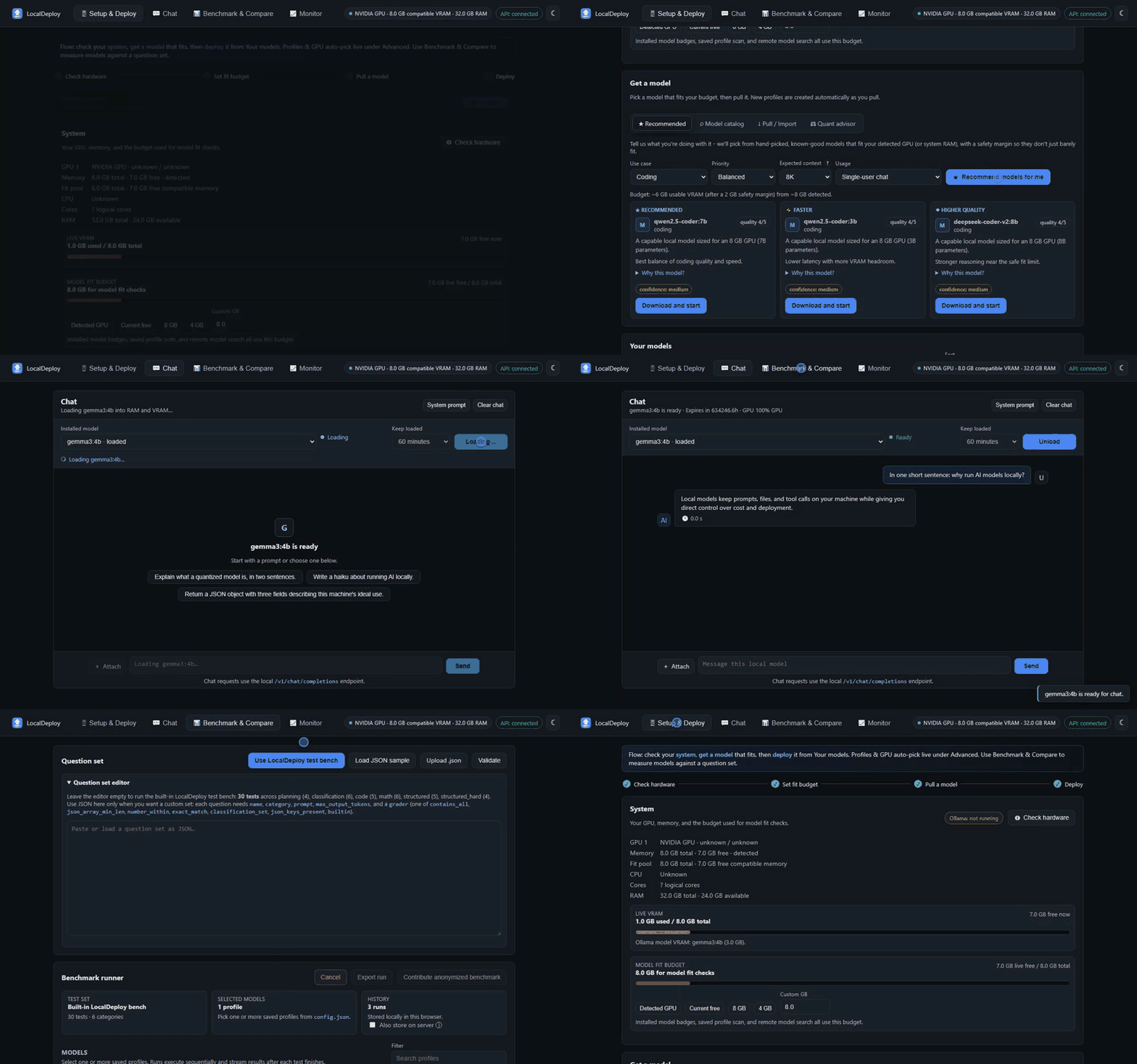
LocalDeploy sits on top of Ollama and can also work with llama.cpp and loopback OpenAI-compatible runtimes. It detects your hardware, estimates whether a model will fit before you download it, manages local models, and records benchmark results. It serves an OpenAI-compatible API, so tools you already use can talk to the model you deployed. It has no telemetry and does not provide cloud inference.
Quick start
With Python 3.10+ and Ollama already installed:
pip install localdeploy
localdeploy        # starts the server and opens http://localhost:8000/ui
uvx localdeploy runs it without installing, if you use uv. Add --no-browser to keep the browser closed.
Without them, use the launcher from a clone. It creates the environment, opens the UI, and on macOS and Linux offers to install a missing Python or Ollama first:
git clone https://github.com/oney-erge/LocalDeploy.git
cd LocalDeploy
./run.sh           # Linux. macOS: ./run.command   Windows: .\run.bat
Docker, the Windows installer, and the details are under Install.
What it does
- Detects NVIDIA, AMD, Intel, and Apple Silicon hardware, including compatible multi-GPU layouts.
- Searches the Ollama library, Hugging Face, and ModelScope GGUF repositories from one screen.
- Imports GGUF files that aren't in any registry - already on disk, or from a direct URL (e.g. GitHub Releases).
- Estimates model memory before a pull or deploy and explains when CPU offload is likely.
- Pulls, starts, switches, unloads, and deletes local models.
- Provides a streamed chat UI with image and document attachments.
- Runs repeatable local benchmarks and compares accuracy, latency, throughput, and memory use.
- Shows current VRAM, CPU, RAM, placement, request timing, and model throughput.
- Exports benchmark reports and deployment manifests for later use.
If you already know which Ollama model you want and only need a terminal chat, Ollama may be all you need. LocalDeploy is meant for the less certain part: choosing a model for a particular machine and comparing it with real runs.
Why it exists
I built LocalDeploy because I needed a dependable way to choose and run local models for other work I am involved in. It became useful enough that I decided to make it public. I hope it saves someone else some setup time and trial and error.
Install
The stable project entry points are run.bat on Windows, run.command on
macOS, and run.sh on Linux. Re-running them is safe. They use the existing
environment when it is current and repair missing dependencies when needed.
Each also accepts doctor, repair, docker, logs, and stop.
Setup checks disk space, prevents concurrent environment changes, retries
temporary network failures up to three times, and writes persistent failures
to .setup/install.log. The logs action follows the active native or
Docker logs rather than requiring Docker.
From a clone:
.\run.bat # Windows
./run.command      # macOS
./run.sh           # Linux
Use .\run.ps1 from PowerShell. Add an action after any launcher, such as
.\run.ps1 doctor or ./run.sh docker. The default run action waits for
LocalDeploy to become ready before opening the UI.
Install from PyPI when Python and Ollama are already available:
python -m pip install localdeploy
localdeploy
The launchers below can also set up a local clone and help install prerequisites.
Windows
The installer can offer to install Python and Ollama through winget, clone the repository, create a virtual environment, and start the UI. Download it first so you can inspect it before running it:
$installer = Join-Path $env:TEMP "localdeploy-install.ps1"
Invoke-RestMethod https://raw.githubusercontent.com/oney-erge/LocalDeploy/main/scripts/install.ps1 -OutFile $installer
& $installer
From an existing clone, use the stable root launcher:
git clone https://github.com/oney-erge/LocalDeploy.git
cd LocalDeploy
.\run.bat
The launcher creates .env, config.json, and .venv, starts Ollama when it is installed, and opens http://localhost:8000/ui. Stop it with .\run.ps1 stop. The lower-level scripts\start.ps1 remains available for development-specific flags.
macOS and Linux
git clone https://github.com/oney-erge/LocalDeploy.git
cd LocalDeploy
./run.command  # macOS
./run.sh       # Linux
If Python 3 or Ollama is missing, the launcher offers to install it for you (Homebrew on macOS; apt, dnf, pacman, or zypper for Python and the official installer for Ollama on Linux) and asks before running anything. Answer no, or run non-interactively, and it prints the exact manual command instead.
On macOS you can double-click run.command from a clone. A ZIP download can strip the executable bit, so after unzipping run chmod +x run.command run.sh scripts/*.sh once, or use git clone as above.
The launcher starts Ollama when it is installed but not already reachable, then keeps the LocalDeploy server in the foreground. Press Ctrl+C to stop LocalDeploy. Run ./scripts/stop.sh --ollama if you also want to stop an Ollama process started by the launcher. Set START_OLLAMA=false in .env when another service manages Ollama.
Docker
The published container bundles Ollama, so Python is not needed on the host:
docker run -d --name localdeploy \
  -p 127.0.0.1:8000:8000 \
  -v localdeploy-data:/data/localdeploy \
  -v ollama-data:/root/.ollama \
  ghcr.io/oney-erge/localdeploy:latest
To build from source instead:
git clone https://github.com/oney-erge/LocalDeploy.git
cd LocalDeploy
docker compose up --build -d
Open http://localhost:8000/ui. Use docker compose down to stop it. The default port mapping only listens on 127.0.0.1. Model and profile data live in named volumes. NVIDIA passthrough is available in docker-compose.yml and requires the NVIDIA Container Toolkit.
Basic use
Open the UI and check the detected hardware and memory budget. Use Get a model to search or enter an Ollama tag, then review the fit estimate before downloading. Once the model is present, deploy it and use the Chat tab. The Benchmark tab can compare several installed models, and Monitor shows what is happening while they run.
A new install starts without profiles or models. Pulling the first model creates its profile and makes it the default. config.example.json is a field reference, not a list of models that are assumed to be installed.
The hardware and memory estimates are guidance. Drivers, runtime versions, context length, desktop GPU use, and quantization all affect the actual result. LocalDeploy records observed memory after deployment so later estimates can be adjusted for that machine.
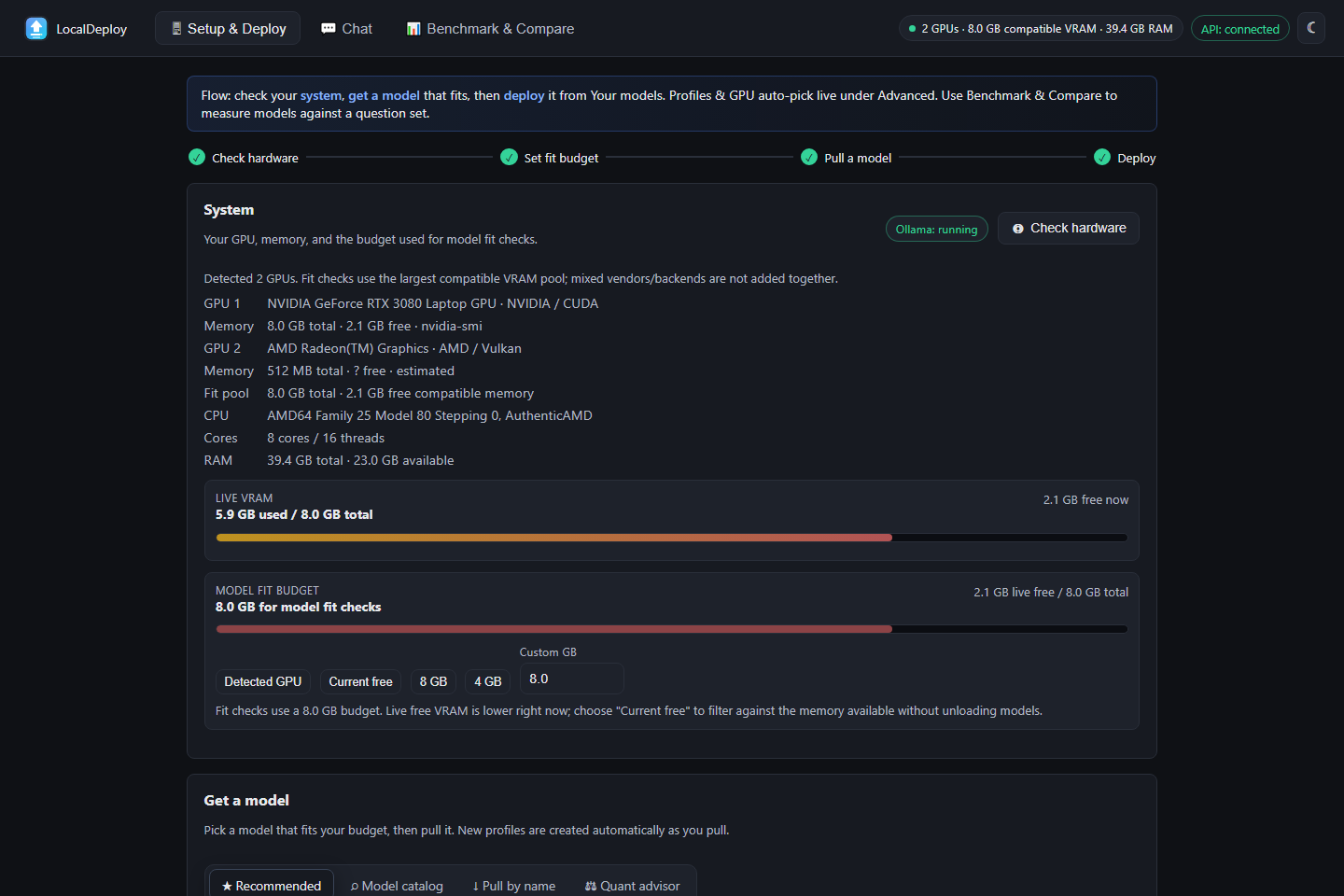
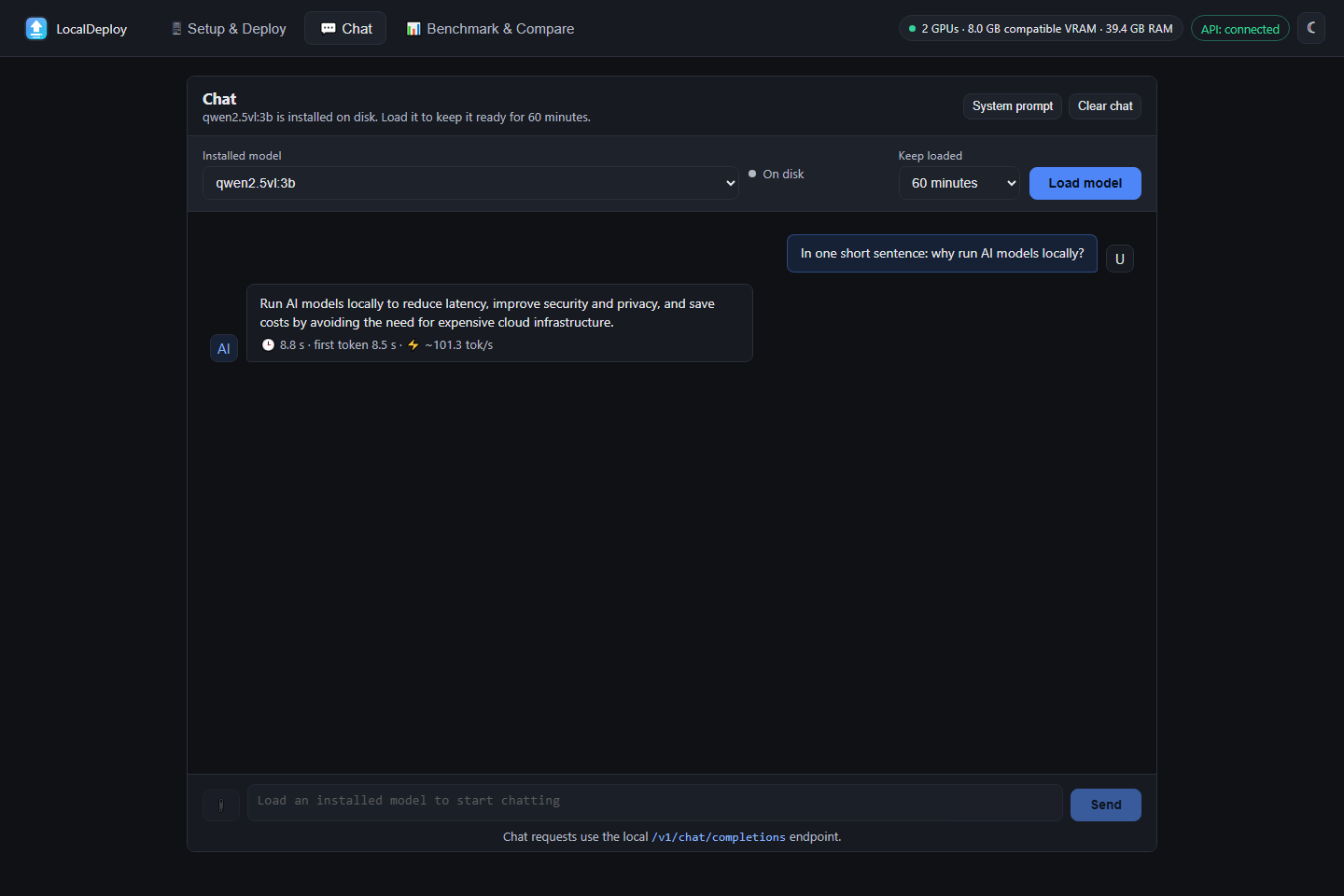
More screenshots are in docs/SCREENSHOTS.md.
API and integrations
OpenAPI documentation is served at http://127.0.0.1:8000/docs.
The OpenAI-compatible routes are /v1/chat/completions, /v1/responses, /v1/embeddings, and /v1/models. Tool calls are returned to the client but are never executed by LocalDeploy. Native routes cover hardware, model lifecycle, fit checks, monitoring, recommendations, manifests, and benchmarks.
Supported local runtimes include Ollama, llama.cpp, LM Studio, vLLM, Docker Model Runner, and other OpenAI-compatible servers on loopback addresses. Backend URLs are checked in code and non-local addresses are rejected.
See docs/API_OPTIONS.md for request fields, docs/UI.md for the UI, docs/CLI.md for terminal use, and examples for small clients.
Data and network access
LocalDeploy sends inference requests only to a configured loopback runtime. It does not include telemetry or upload prompts, responses, hardware details, or benchmark results. A runtime installed separately may have its own cloud features and settings. The supplied Docker setup and local launchers disable Ollama cloud models with OLLAMA_NO_CLOUD=true when they start Ollama.
Two features can make outbound requests: model search queries Hugging Face and the Ollama library when you use search, and the UI checks this repository's GitHub releases once per page load. Set OFFLINE=true to disable both. python scripts/egress_selftest.py verifies the offline path.
The API listens on 127.0.0.1 by default. API_TOKEN is an optional shared token, not full authentication. There is no TLS, user isolation, or rate limiting. Do not expose LocalDeploy directly to the internet or an untrusted network. Read SECURITY.md before changing the bind address.
Development
python -m pip install -e ".[dev]"
python -m playwright install chromium
python -m ruff check .
pytest -q
python scripts\egress_selftest.py
Use .\scripts\start.ps1 -Foreground for live server logs. The frontend is plain HTML, CSS, and seven native ES modules, with no npm install or build step.
Desktop packaging is experimental and unsigned (Windows SmartScreen and, for the macOS build, Gatekeeper will warn on first run - see docs/PACKAGING.md for what that means and how to get past it). packaging/localdeploy.spec builds a Windows tray application with PyInstaller; add -Msi for a double-click .msi installer (per-user install, no admin/UAC prompt, Start Menu + Desktop shortcuts, proper Settings > Apps entry):
python -m pip install -e ".[packaging]"
.\packaging\build.ps1          # dist\LocalDeploy\LocalDeploy.exe
.\packaging\build.ps1 -Msi     # also dist\LocalDeploy-Setup.msi
The -Msi build fetches the WiX v3 toolset itself (a plain NuGet package, no admin rights, no license fee) into build\wix-tools on first run.
Contributing
Issues and focused pull requests are welcome. Please read CONTRIBUTING.md first.
License
1 maintainer

Metadata
1 maintainer
Release files for localdeploy 0.6.2
For a detailed explanation of source distributions (sdists) and built distributions (wheels), please see the package formats documentation.
Source distribution (sdist)
| File | Size | Uploaded | |
|---|---|---|---|
| localdeploy-0.6.2.tar.gz | 275.8 kB | Details |
Built distribution (wheel)
| File | Interpreter | ABI | Platform | Reset |
|---|---|---|---|---|
| localdeploy-0.6.2-py3-none-any.whl | Python 3 | none | any | Details |
Total release size: 550.9 kB
Release files / localdeploy-0.6.2.tar.gz
| Download URL | localdeploy-0.6.2.tar.gz |
|---|---|
| Size | 275.8 kB |
| Tags | Source |
|
SHA-256 checksum How to use checksums |
d81e0379b71a272e0cab42611d7f782fe62dce8825cabbf7d5d37bff38ed1dca
|
|
BLAKE2b-256 checksum How to use checksums |
d48f594f8e6807676ec41f12bfe48fbfb7e12896301966cc45eab20c04a8308f
|
| Upload date | |
|
Uploaded using Trusted Publishing? What is trusted publishing? |
Yes |
| Uploaded via |
twine/7.0.0 CPython/3.13.14
|
Provenance
Provenance describes where a file came from. On PyPI, provenance is shared via attestations, which provide a verifiable record of the build or publishing details. View details, limitations and caveats.


PyPI Publish Attestation
PyPI verified that this artifact, at this checksum, originated from the publisher listed below.
Signed by GitHub Actions, verified by PyPI on Oct 3, 2026.
Transparency logRelease files / localdeploy-0.6.2-py3-none-any.whl
| Download URL | localdeploy-0.6.2-py3-none-any.whl |
|---|---|
| Size | 275.1 kB |
| Tags | Python 3 |
|
SHA-256 checksum How to use checksums |
e49afac04cc525b1bc4c900344d7f9c48612ce7bf05cbd1d7aa081c850abd1be
|
|
BLAKE2b-256 checksum How to use checksums |
d7394c8b13b62365c1042db8bcbf02139940272691d1e03f84f4685123bbdc88
|
| Upload date | |
|
Uploaded using Trusted Publishing? What is trusted publishing? |
Yes |
| Uploaded via |
twine/7.0.0 CPython/3.13.14
|
Provenance
Provenance describes where a file came from. On PyPI, provenance is shared via attestations, which provide a verifiable record of the build or publishing details. View details, limitations and caveats.
PyPI Publish Attestation
PyPI verified that this artifact, at this checksum, originated from the publisher listed below.
Signed by GitHub Actions, verified by PyPI on Oct 3, 2026.
Transparency log













