
logab 🐢
A lightweight Python package for structured logging with automatic balance (ab) formatting for cleaner, more readable output.
- 🤤 Python built-ins only
- 🤯 No dependencies
- 🥵 Minimal set-up
Table of Contents
🛠️ Installation
pip install logab
🔎 How to use
logab provides two functions: log_wrap() and log_init()
🌮 log_wrap()
log_wrap() is a ready-to-use wrapper with pre-configured logging. log_wrap() should be used only once at the program's entry point to configure logging globally.
Parameters:
log_file: file path for storing logs. If not specified, logs will be printed to the terminal.log_level: severity level of log messages being recorded. Defaults to "info"print_level: severity level of all messages output byprint()command. Defaults "info"
🍉 log_init()
The logab package supports logging through three methods:
- Using
print(): simple built-in Python function for basic output. - Using
logging: Python's standard logging module for structured and configurable logging. - Using
log_init(): works just like Python'slogging.getLogger(__name__), just shorter syntax so I don't have to write some boilerplate code hehe.
All three methods are compatible with the logab package, as long as they are used within the log_wrap() context. Usage example is provided in the next section.
🍻 example
import logging
from logab import log_init, log_wrap

def main_func():
    # We can log using Python's logging module
    logger_python = logging.getLogger(__name__)
    logger_python.warning("Warning message using Python's logging")
    # or logab's log_init()
    logger = log_init()
    logger.critical("Critical message using logab's log_init()")
    # or print() (default level is "info", can be configured through log_wrap())
    print("Debug message using print()")

if __name__=="__main__":
    with log_wrap(log_file="./app.log", log_level="debug", print_level="debug" ):
        logger = log_init()
        logger.info("Prepare to do main_func")
        main_func()
        logger.info("Finish main_func")
        x = 0
        print(10/x)
Output log messages in "./app.log":
PID   | Time                    | Level       | Function  |    File:No | Message
------+-------------------------+-------------+-----------+------------+-----------------------------------------
35814 | 2025-05-15 14:22:15,950 | 🔵 info     | <module>  | main.py:19 | Prepare to do main_func
35814 | 2025-05-15 14:22:15,954 | 🟡 warning  | main_func | main.py:9  | Warning message using Python's logging
35814 | 2025-05-15 14:22:15,955 | 🟣 critical | main_func | main.py:12 | Critical message using logab's log_init()
35814 | 2025-05-15 14:22:15,955 | 🟢 debug    | main_func | main.py:14 | Debug message using print()
35814 | 2025-05-15 14:22:15,955 | 🔵 info     | <module>  | main.py:21 | Finish main_func
35814 | 2025-05-15 14:22:15,958 | 🔴 error    | log_wrap  |   logab:0  | division by zero
------+-------------------------+-------------+-----------+------------+-----------------------------------------
Traceback (most recent call last):
  File "/home/namkha/Documents/mydev/logab/logab/log_utils.py", line 179, in log_wrap
    yield
  File "/home/namkha/Documents/mydev/logab/main.py", line 23, in <module>
    print(10/x)
          ~~^~
ZeroDivisionError: division by zero
------+-------------------------+-------------+-----------+------------+-----------------------------------------
35814 | 2025-05-15 14:22:15,958 | 🔵 info     | log_wrap  |   logab:0  | Execution time 0.0085 seconds
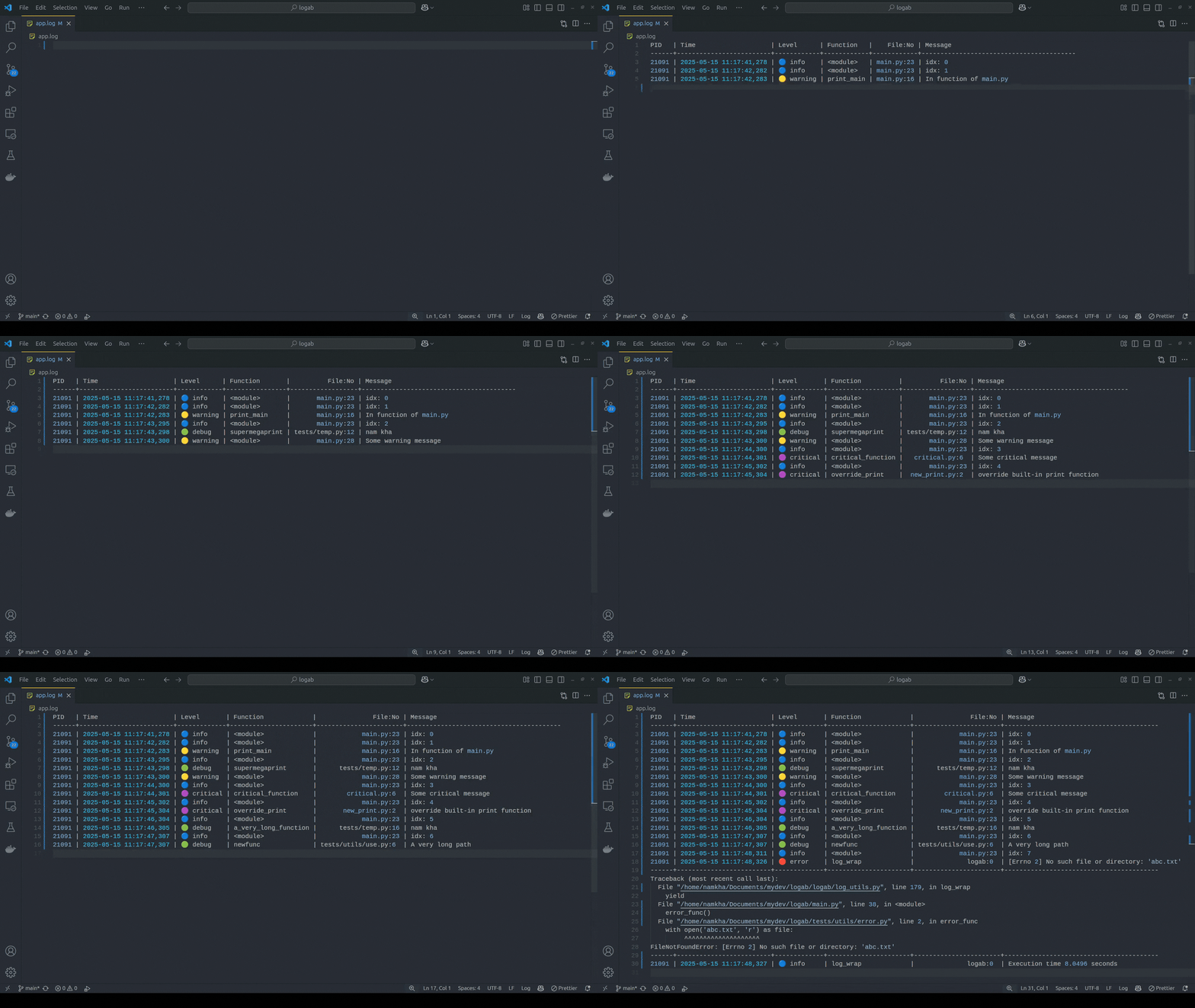
⚖️ Automatic balance
Log messages will be displayed in a table format. Each column automatically adjusts its width to fit the longest value in that column, ensuring the entire table remains clearly visible and easy to read.
⏳ Upcoming features
- Log rotation & retention: automatically create new files to handle large-size files
- Structured logging: support for structured (dict-style) logs
- Thread/process-safe logging: Ensure logging from multiple threads/proccesses is handled correctly
- ...
1 maintainer

Metadata
1 maintainer
Release files for logab 0.2.4
For a detailed explanation of source distributions (sdists) and built distributions (wheels), please see the package formats documentation.
Source distribution (sdist)
| File | Size | Uploaded | Provenance | Actions |
|---|---|---|---|---|
| logab-0.2.4.tar.gz | 8.5 kB | Without provenance | Details for logab-0.2.4.tar.gz |
Built distribution (wheel)
| File | Interpreter | ABI | Platform | Actions Reset |
|---|---|---|---|---|
| logab-0.2.4-py3-none-any.whl | Python 3 | none | any | Details for logab-0.2.4-py3-none-any.whl |
Total release size: 16.8 kB
Release files / logab-0.2.4.tar.gz
| Download URL | logab-0.2.4.tar.gz |
|---|---|
| Size | 8.5 kB |
| Tags | Source |
|
SHA-256 checksum How to use checksums |
ee39f85018fcec9aaf3f3cf90d48608c2faa64ef37c8e76c95082a12cc49e983
|
|
BLAKE2b-256 checksum How to use checksums |
92af6850d1c98586a10274c4ec24a180e232d04fc7d7972f0fb0811a8aab720a
|
| Upload date | |
|
Uploaded using Trusted Publishing? What is trusted publishing? |
No |
| Uploaded via |
twine/7.0.0 CPython/3.10.20
|
Release files / logab-0.2.4-py3-none-any.whl
| Download URL | logab-0.2.4-py3-none-any.whl |
|---|---|
| Size | 8.3 kB |
| Tags | Python 3 |
|
SHA-256 checksum How to use checksums |
0306933334b78952b3f844abeb7ce72f85b70c2a259c9d518b48a166524c4ec4
|
|
BLAKE2b-256 checksum How to use checksums |
e99180cc4e0a013d13af6ceb207868c795f525f2e17b5157908c6b701b24d154
|
| Upload date | |
|
Uploaded using Trusted Publishing? What is trusted publishing? |
No |
| Uploaded via |
twine/7.0.0 CPython/3.10.20
|
Security for logab 0.2.4
Provenance
Provenance describes where a file came from. On PyPI, provenance is shared via attestations, which provide a verifiable record of the build or publishing details. View details, limitations and caveats.
No provenance found
None of the files in this release were uploaded with provenance metadata.
A note on package security
PyPI is a repository for distributing packages, not a service for auditing them. While third-party security researchers and our staff do their best to detect and remove malicious packages, PyPI cannot guarantee the quality, security or suitability of any given package.
To learn more about protecting yourself from malicious actors, visit our package security documentation.














