






Drop-in logging foundation for Python projects.
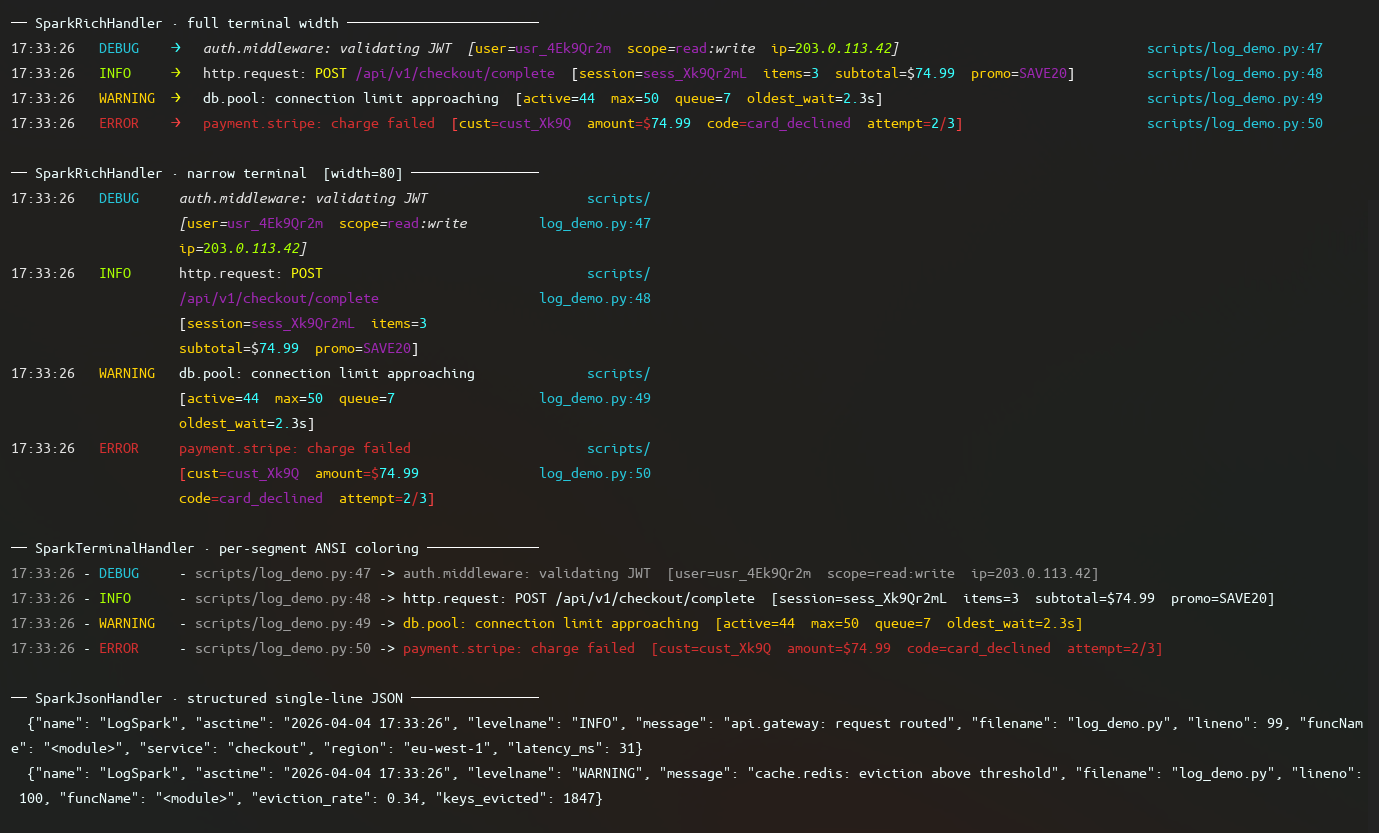
LogSpark is a configuration and integration layer over Python's standard logging module. It adds lifecycle enforcement, environment-aware output policy, and corrected defaults — without replacing stdlib logging or introducing a new API. Every handler, filter, and formatter is a plain stdlib object.
Installation
pip install logspark
Optional extras:
pip install logspark[color]   # Rich terminal output with layout and color
pip install logspark[json]    # Structured single-line JSON output
pip install logspark[trace]   # Datadog DDTrace correlation injection
pip install logspark[all]     # All of the above
Quick Start
Minimal setup
from logspark.Instance import spark_logger as logger

logger.configure()
logger.info("Application started")
configure() with no arguments gives you terminal output to stdout, INFO level and above, color if your terminal supports it, compact tracebacks, and relative file paths in log lines.
Set the log level
import logging
from logspark.Instance import spark_logger as logger

logger.configure(level=logging.DEBUG)
Standard stdlib level constants and string names both work.
Log exceptions
try:
    result = 1 / 0
except ZeroDivisionError:
    logger.exception("Calculation failed")
Attach structured fields
logger.info("Request completed", extra={
    "method": "GET",
    "path": "/api/users",
    "status": 200,
    "duration_ms": 42,
})
JSON output
import logging
from logspark.Instance import spark_logger as logger
from logspark.Handlers import SparkJsonHandler

logger.configure(level=logging.INFO, handler=SparkJsonHandler())
logger.info("Structured record", extra={"env": "production"})
Rich terminal output
import logging
from logspark.Instance import spark_logger as logger
from logspark.Handlers.Rich.SparkRichHandler import SparkRichHandler

logger.configure(level=logging.DEBUG, handler=SparkRichHandler())
logger.debug("Rich layout with columns, color, and path resolution")
Silence or unify third-party loggers
import logging
import httpx
from logspark.Instance import spark_logger as logger, spark_log_manager

logger.configure()

spark_log_manager.adopt_all()
spark_log_manager.unify(
    spark_logger_instance=logger,
    level=logging.WARNING,
    propagate=False,
)
Scoped debug level
import logging
from logspark import TempLogLevel
from logspark.Instance import spark_logger as logger
from logspark.Handlers import SparkTerminalHandler

logger.configure(level=logging.INFO, handler=SparkTerminalHandler())

with TempLogLevel(logging.DEBUG):
    logger.debug("Visible only inside this block")
Key features
| Feature | Description |
|---|---|
| Lifecycle enforcement | configure -> freeze -> use: configuration happens once, explicitly |
| Output modes | Terminal with color or JSON, switchable via environment variable |
| Traceback control | Hide, compact, or full tracebacks per-logger |
| Scoped debugging | Temporarily lower the log level for a block without changing config |
| Third-party management | Suppress or unify noisy loggers without touching their source |
| stdlib compatibility | Every component works standalone with any logging.Logger |
Where to call configure()
At process startup, before any other module uses the logger:
# main.py
import logging
from logspark.Instance import spark_logger as logger

logger.configure(level=logging.INFO)

from myapp import run
run()
If a log record is emitted before configure(), LogSpark uses a minimal fallback format and emits a one-time warning. It does not silently discard records.
Documentation
- Concepts
- Lifecycle
- Output Modes
- Environment Variables
- Scoped Logging
- Third Party Loggers
- Component Reference
License
MIT — see LICENSE for details.
1 maintainer

Release files for logspark 0.12.0
For a detailed explanation of source distributions (sdists) and built distributions (wheels), please see the package formats documentation.
Source distribution (sdist)
| File | Size | Uploaded | |
|---|---|---|---|
| logspark-0.12.0.tar.gz | 38.8 kB | Details |
Built distribution (wheel)
| File | Interpreter | ABI | Platform | Reset |
|---|---|---|---|---|
| logspark-0.12.0-py3-none-any.whl | Python 3 | none | any | Details |
Total release size: 93.9 kB
Release files / logspark-0.12.0.tar.gz
| Download URL | logspark-0.12.0.tar.gz |
|---|---|
| Size | 38.8 kB |
| Tags | Source |
|
SHA-256 checksum How to use checksums |
952beba95970a6e6849ebd112e1ba0922f959bb02f5dc8accc620dc7b8e4f459
|
|
BLAKE2b-256 checksum How to use checksums |
608b71a141480c3bf1175ead68c2b6a688eb348d55dbe409611653bcef6f6466
|
| Upload date | |
|
Uploaded using Trusted Publishing? What is trusted publishing? |
Yes |
| Uploaded via |
twine/6.1.0 CPython/3.13.7
|
Provenance
Provenance describes where a file came from. On PyPI, provenance is shared via attestations, which provide a verifiable record of the build or publishing details. View details, limitations and caveats.


PyPI Publish Attestation
PyPI verified that this artifact, at this checksum, originated from the publisher listed below.
Signed by GitHub Actions, verified by PyPI on Jun 16, 2026.
Transparency logRelease files / logspark-0.12.0-py3-none-any.whl
| Download URL | logspark-0.12.0-py3-none-any.whl |
|---|---|
| Size | 55.1 kB |
| Tags | Python 3 |
|
SHA-256 checksum How to use checksums |
c5e5739b6e4a838a52b55ce0ea20c80427ccc962acfc280ffcad2860d336a054
|
|
BLAKE2b-256 checksum How to use checksums |
f0146c07d6072e840adddac849554464cee67ee84c62117bf007743006048348
|
| Upload date | |
|
Uploaded using Trusted Publishing? What is trusted publishing? |
Yes |
| Uploaded via |
twine/6.1.0 CPython/3.13.7
|
Provenance
Provenance describes where a file came from. On PyPI, provenance is shared via attestations, which provide a verifiable record of the build or publishing details. View details, limitations and caveats.
PyPI Publish Attestation
PyPI verified that this artifact, at this checksum, originated from the publisher listed below.
Signed by GitHub Actions, verified by PyPI on Jun 16, 2026.
Transparency log













