
Logging control plane and unifier
Verified details
These details have been verified by PyPIProject links
GitHub Statistics
Maintainers

Project description





Drop-in logging foundation for Python projects.
LogSpark is a configuration and integration layer over Python's standard logging module. It adds lifecycle enforcement, environment-aware output policy, and corrected defaults — without replacing stdlib logging or introducing a new API. Every handler, filter, and formatter is a plain stdlib object.
Installation
pip install logspark
Optional extras:
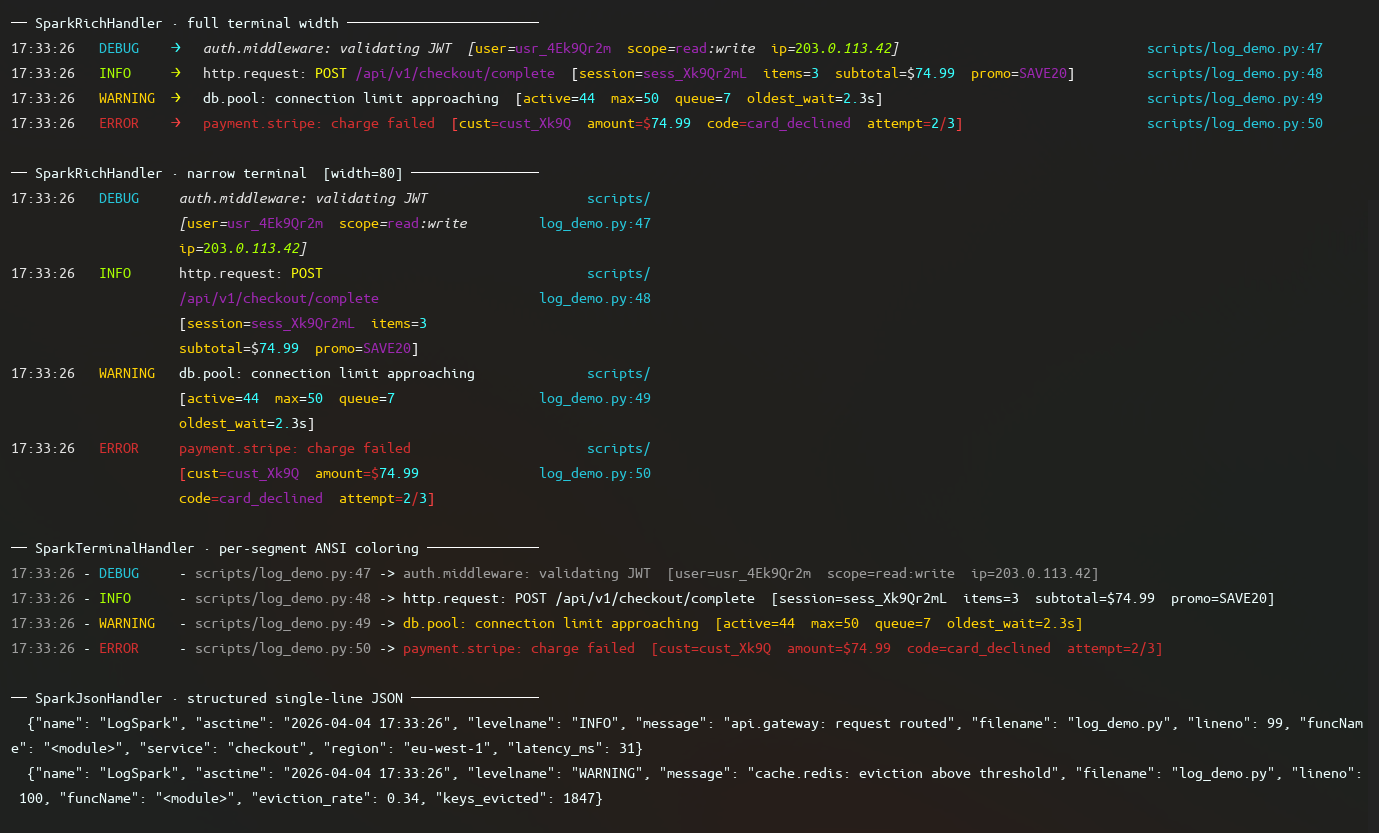
pip install logspark[color]   # Rich terminal output with layout and color
pip install logspark[json]    # Structured single-line JSON output
pip install logspark[trace]   # Datadog DDTrace correlation injection
pip install logspark[all]     # All of the above
Quick Start
Minimal setup
from logspark import logger

logger.configure()
logger.info("Application started")
configure() with no arguments gives you terminal output to stdout, INFO level and above, color if your terminal supports it, compact tracebacks, and relative file paths in log lines.
Set the log level
import logging
from logspark import logger

logger.configure(level=logging.DEBUG)
Standard stdlib level constants and string names both work.
Log exceptions
try:
    result = 1 / 0
except ZeroDivisionError:
    logger.exception("Calculation failed")
Attach structured fields
logger.info("Request completed", extra={
    "method": "GET",
    "path": "/api/users",
    "status": 200,
    "duration_ms": 42,
})
JSON output
import logging
from logspark import logger
from logspark.Handlers import SparkJsonHandler

logger.configure(level=logging.INFO, handler=SparkJsonHandler())
logger.info("Structured record", extra={"env": "production"})
Rich terminal output
import logging
from logspark import logger
from logspark.Handlers.Rich import SparkRichHandler

logger.configure(level=logging.DEBUG, handler=SparkRichHandler())
logger.debug("Rich layout with columns, color, and path resolution")
Silence or unify third-party loggers
import logging
import httpx
from logspark import logger, spark_log_manager

logger.configure()

spark_log_manager.adopt_all()
spark_log_manager.unify(
    copy_spark_logger_config=True,
    level=logging.WARNING,
    propagate=False,
)
Scoped debug level
import logging
from logspark import logger, TempLogLevel
from logspark.Handlers import SparkTerminalHandler

logger.configure(level=logging.INFO, handler=SparkTerminalHandler())

with TempLogLevel(logging.DEBUG):
    logger.debug("Visible only inside this block")
Key features
| Feature | Description |
|---|---|
| Lifecycle enforcement | configure -> freeze -> use: configuration happens once, explicitly |
| Output modes | Terminal with color or JSON, switchable via environment variable |
| Traceback control | Hide, compact, or full tracebacks per-logger |
| Scoped debugging | Temporarily lower the log level for a block without changing config |
| Third-party management | Suppress or unify noisy loggers without touching their source |
| stdlib compatibility | Every component works standalone with any logging.Logger |
Where to call configure()
At process startup, before any other module uses the logger:
# main.py
import logging
from logspark import logger

logger.configure(level=logging.INFO)

from myapp import run
run()
If a log record is emitted before configure(), LogSpark uses a minimal fallback format and emits a one-time warning. It does not silently discard records.
Documentation
- Concepts
- Lifecycle
- Output Modes
- Environment Variables
- Scoped Logging
- Third Party Loggers
- Component Reference
License
MIT — see LICENSE for details.
Project details
Verified details
These details have been verified by PyPIProject links
GitHub Statistics
Maintainers
Release history Release notifications | RSS feed


Download files
Download the file for your platform. If you're not sure which to choose, learn more about installing packages.
Source Distribution
Built Distribution
Filter files by name, interpreter, ABI, and platform.
If you're not sure about the file name format, learn more about wheel file names.
Copy a direct link to the current filters
File details
Details for the file logspark-0.11.1.tar.gz.
File metadata
- Download URL: logspark-0.11.1.tar.gz
- Upload date:
- Size: 38.4 kB
- Tags: Source
- Uploaded using Trusted Publishing? Yes
- Uploaded via: twine/6.1.0 CPython/3.13.7
File hashes
| Algorithm | Hash digest | |
|---|---|---|
| SHA256 |
abda516aac5330283927c7be1d48500ffcc2274493bd7867057763861428b134
|
|
| MD5 |
134fef7944a1e9ee81f1bbace1da2462
|
|
| BLAKE2b-256 |
257dda67eac8ad78663ab6aaae0b4bab26d5c2d804ca7d1194c0689faa7ee7d4
|
Provenance
The following attestation bundles were made for logspark-0.11.1.tar.gz:
Publisher:
ci.yml on Kydoimos97/LogSpark
-
Statement:
-
Statement type:
https://in-toto.io/Statement/v1 -
Predicate type:
https://docs.pypi.org/attestations/publish/v1 -
Subject name:
logspark-0.11.1.tar.gz -
Subject digest:
abda516aac5330283927c7be1d48500ffcc2274493bd7867057763861428b134 - Sigstore transparency entry: 1806670785
- Sigstore integration time:
-
Permalink:
Kydoimos97/LogSpark@25cf95fc95a724ec79499410ce3247b3318a7b2d -
Branch / Tag:
refs/tags/v0.11.1 - Owner: https://github.com/Kydoimos97
-
Access:
public
-
Token Issuer:
https://token.actions.githubusercontent.com -
Runner Environment:
github-hosted -
Publication workflow:
ci.yml@25cf95fc95a724ec79499410ce3247b3318a7b2d -
Trigger Event:
push
-
Statement type:
File details
Details for the file logspark-0.11.1-py3-none-any.whl.
File metadata
- Download URL: logspark-0.11.1-py3-none-any.whl
- Upload date:
- Size: 54.1 kB
- Tags: Python 3
- Uploaded using Trusted Publishing? Yes
- Uploaded via: twine/6.1.0 CPython/3.13.7
File hashes
| Algorithm | Hash digest | |
|---|---|---|
| SHA256 |
b32d69a0e4ca5e812d3169c87d87736a514f5ea37af4408ecaf6da1b3b7e7557
|
|
| MD5 |
09119e12dc0325940db572adfef09ae8
|
|
| BLAKE2b-256 |
66a7b75014269520884111ba95bda9ae1998370b67a52ead724382073c411f18
|
Provenance
The following attestation bundles were made for logspark-0.11.1-py3-none-any.whl:
Publisher:
ci.yml on Kydoimos97/LogSpark
-
Statement:
-
Statement type:
https://in-toto.io/Statement/v1 -
Predicate type:
https://docs.pypi.org/attestations/publish/v1 -
Subject name:
logspark-0.11.1-py3-none-any.whl -
Subject digest:
b32d69a0e4ca5e812d3169c87d87736a514f5ea37af4408ecaf6da1b3b7e7557 - Sigstore transparency entry: 1806670791
- Sigstore integration time:
-
Permalink:
Kydoimos97/LogSpark@25cf95fc95a724ec79499410ce3247b3318a7b2d -
Branch / Tag:
refs/tags/v0.11.1 - Owner: https://github.com/Kydoimos97
-
Access:
public
-
Token Issuer:
https://token.actions.githubusercontent.com -
Runner Environment:
github-hosted -
Publication workflow:
ci.yml@25cf95fc95a724ec79499410ce3247b3318a7b2d -
Trigger Event:
push
-
Statement type:






