



Loopcaptain is an open protocol for agent loops and a local dashboard to monitor and steer them. You run agent loops in many repositories, each built its own way. Here is the one place to see them: what each loop is for, where it stands, what every round and every reviewer found, what it cost, and what waits for you. You answer, stop and start a loop from the board: a human in the loop without a chat window.
uv tool install loopcaptain    # or put uvx in front of the two lines below
loopcaptain demo               # writes the example loop and puts it on the board
loopcaptain serve              # the board, on this machine only
Alpha: protocol 1 only grows, so a loop written today keeps working; the board may change.
It works with any loop that can write a file: a script, a Ralph loop, a
long-running session of a coding agent (Claude Code's /loop, Codex's
goal mode, for example), a loop built on an agent framework. None of
them is needed: a loop has no dependency and never imports this
repository.
An agent loop is a program that runs an agent on one task again and again, until a bar is met or a cap is reached. One pass is a round: a few steps in order, usually one that makes something and others that judge it. A reviewer is such a judging step, with its own prompt: it reads what the round made and lists what is wrong, as findings.
A loop reports by appending one line per thing that happened to a file in
its own repository, .loops/<loop-id>/events.jsonl. One round, in which a
reviewer finds a fault and the loop asks you what to do:
{"ts": "2026-11-14T21:03:00Z", "event": "round_started", "round": 1, "plan": "Draft the memo"}
{"ts": "2026-11-14T21:09:40Z", "event": "step_finished", "round": 1, "step": "build", "cost": {"usd": 0.34}}
{"ts": "2026-11-14T21:12:10Z", "event": "step_finished", "round": 1, "step": "facts", "findings": [{"id": "1", "text": "The 40 percent has no source", "severity": "material"}]}
{"ts": "2026-11-14T21:12:30Z", "event": "step_finished", "round": 1, "step": "gate", "summary": "One material finding is open"}
{"ts": "2026-11-14T21:12:31Z", "event": "question", "id": "q1", "text": "Drop the figure?", "options": [{"id": "yes", "label": "Drop it"}, {"id": "no", "label": "Find a source"}]}
{"ts": "2026-11-14T21:12:32Z", "event": "round_finished", "round": 1, "verdict": "wait"}
The board shows these lines as a round with its steps, an open finding, the cost, and a question with two buttons:
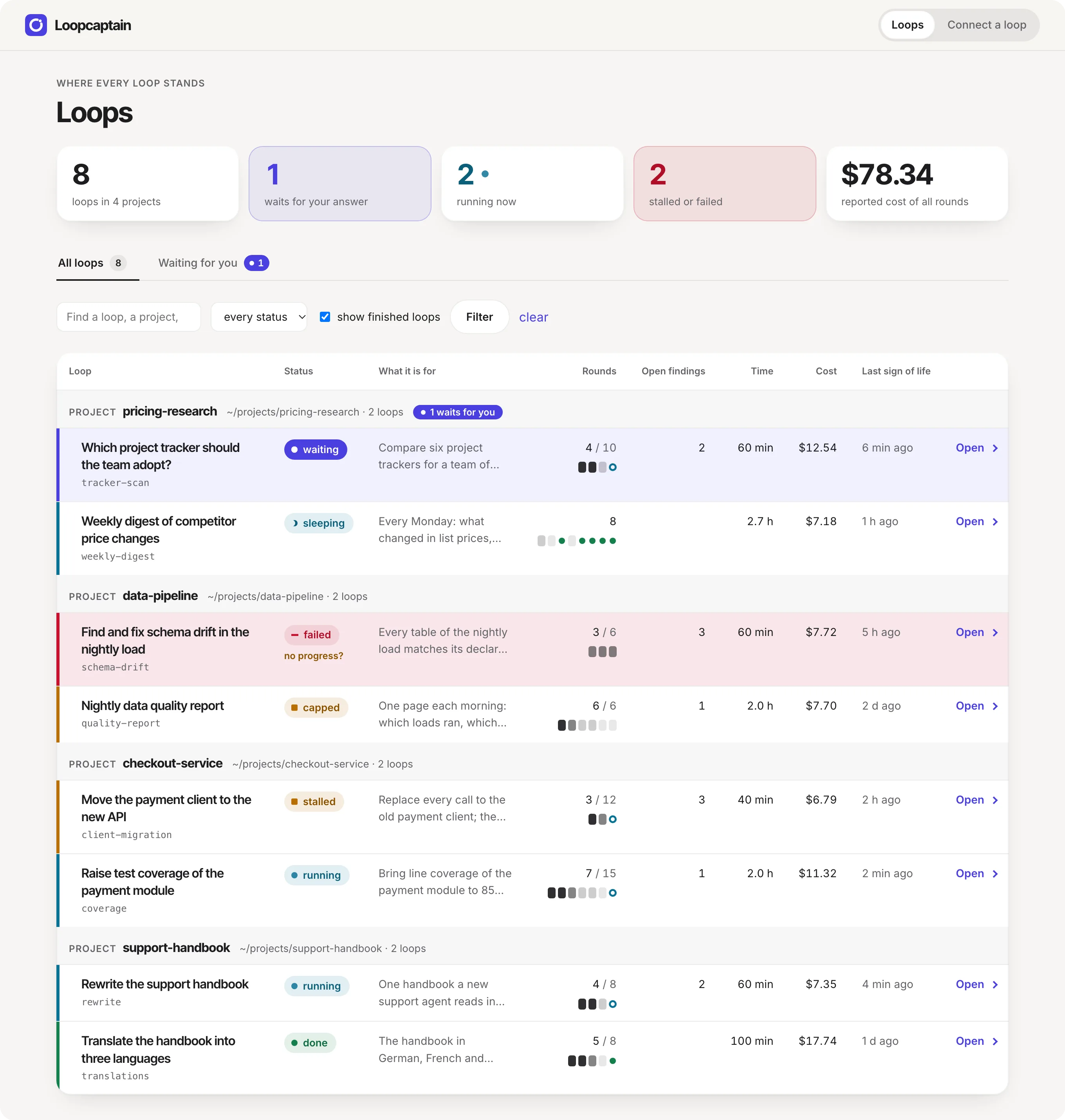
Invented loops, photographed from the board itself: make shots.
Get started
Look first. The three lines at the top run the example loop. It costs nothing: no model, no network.
Open the address serve prints in a browser: it lets that browser in.
Open the example loop, press Start, answer its
question with a button and watch it end done. It needs Python 3.12 or
later, on macOS or Linux, and uv, pipx or
pip. From a checkout: make setup && make demo && make serve.
The documentation has Installation, Get started and Setup.
Monitor the loops you already run. Paste this into your coding agent, whichever you use. It finds the loops on your machine, sets up the board and proposes the smallest change that connects each one:
Help me see and steer the agent loops on this machine with Loopcaptain.
Read https://github.com/faviens/loopcaptain/blob/v0.4.1/AGENTS.md, section A.
Find the repositories here that run agent loops, tell me which already
write a .loops/ folder and which do not, set up the board to watch them,
start it, and for each loop that is not connected propose the smallest
change that connects it. Change nothing in those repositories before I agree.
Set up a new loop that speaks the protocol. Paste this one. It asks what the loop is for, builds it in your repository and shows you one real round on the board:
Help me build an agent loop that reports to Loopcaptain.
Read https://github.com/faviens/loopcaptain/blob/v0.4.1/standard/AGENTS.md and LOOPS.md beside it.
Ask me what the loop is for, who reads the result and when it is done.
Then design the roles of one round, write the loop in this repository,
make it write .loops/<loop-id>/ as the protocol says, and show me
`loopcaptain validate .` printing ok after one real round.
The loop protocol
A loop does not import this repository. It writes a few small files into
.loops/<loop-id>/ in its own repository; the board reads them and writes
the person's answers back.
| File | Written by | Holds |
|---|---|---|
loop.json |
the loop | what it is: the brief, the steps of a round, its caps, its start command |
events.jsonl |
the loop, appending | what happened: rounds, steps, findings, cost, metrics, questions |
inbox.jsonl |
the board, signed | what you sent: answers, notes, a stop |
The whole protocol is one page, standard/LOOPS.md. A Python loop pastes a helper of under 110 lines, standard/loops.py; an agent session uses the MCP server, which every coding agent adds its own way: docs/agents.md.
Monitor an agent loop
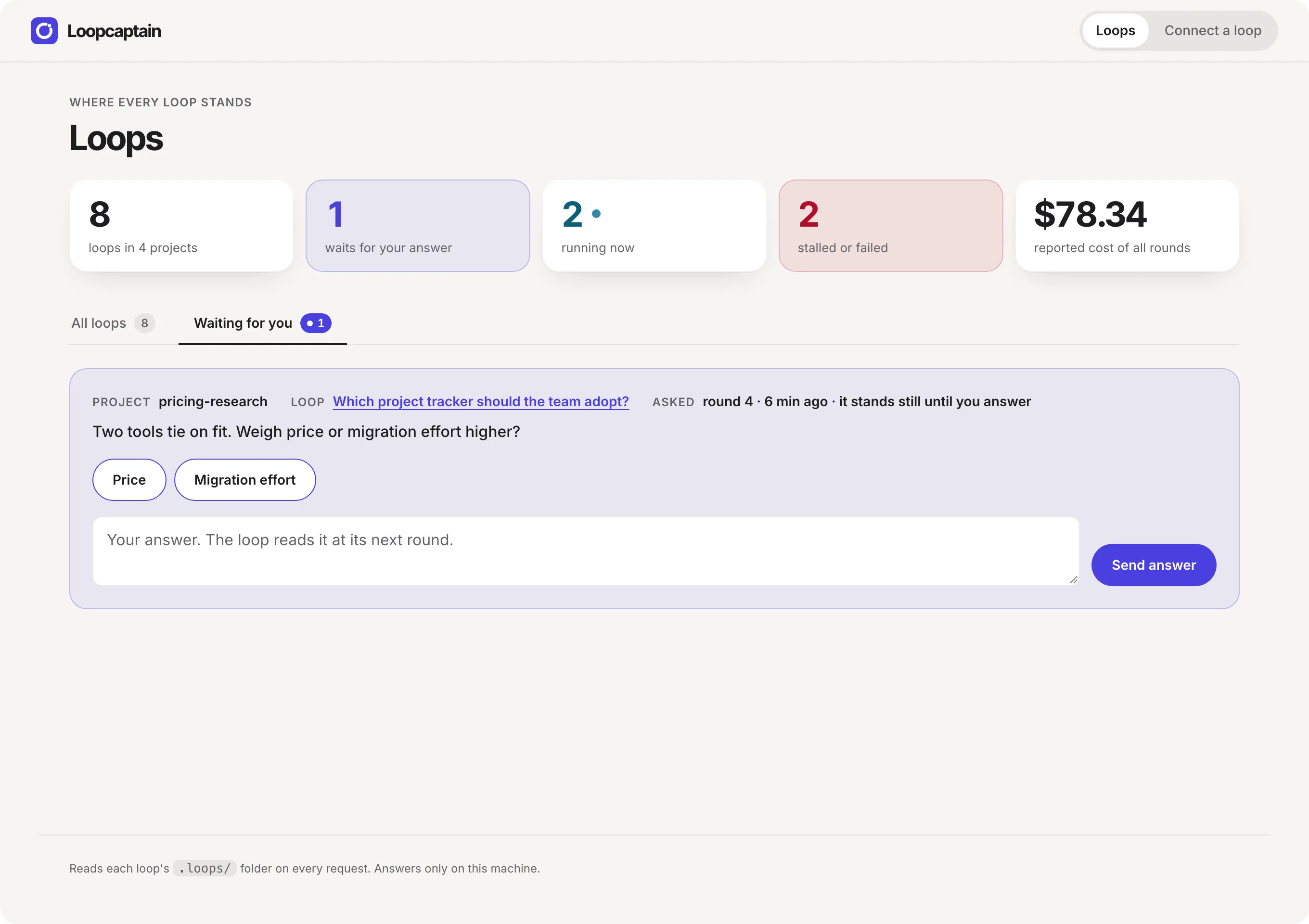
- Every loop, grouped by repository, filtered by status or text, with what waits for you on its own tab.
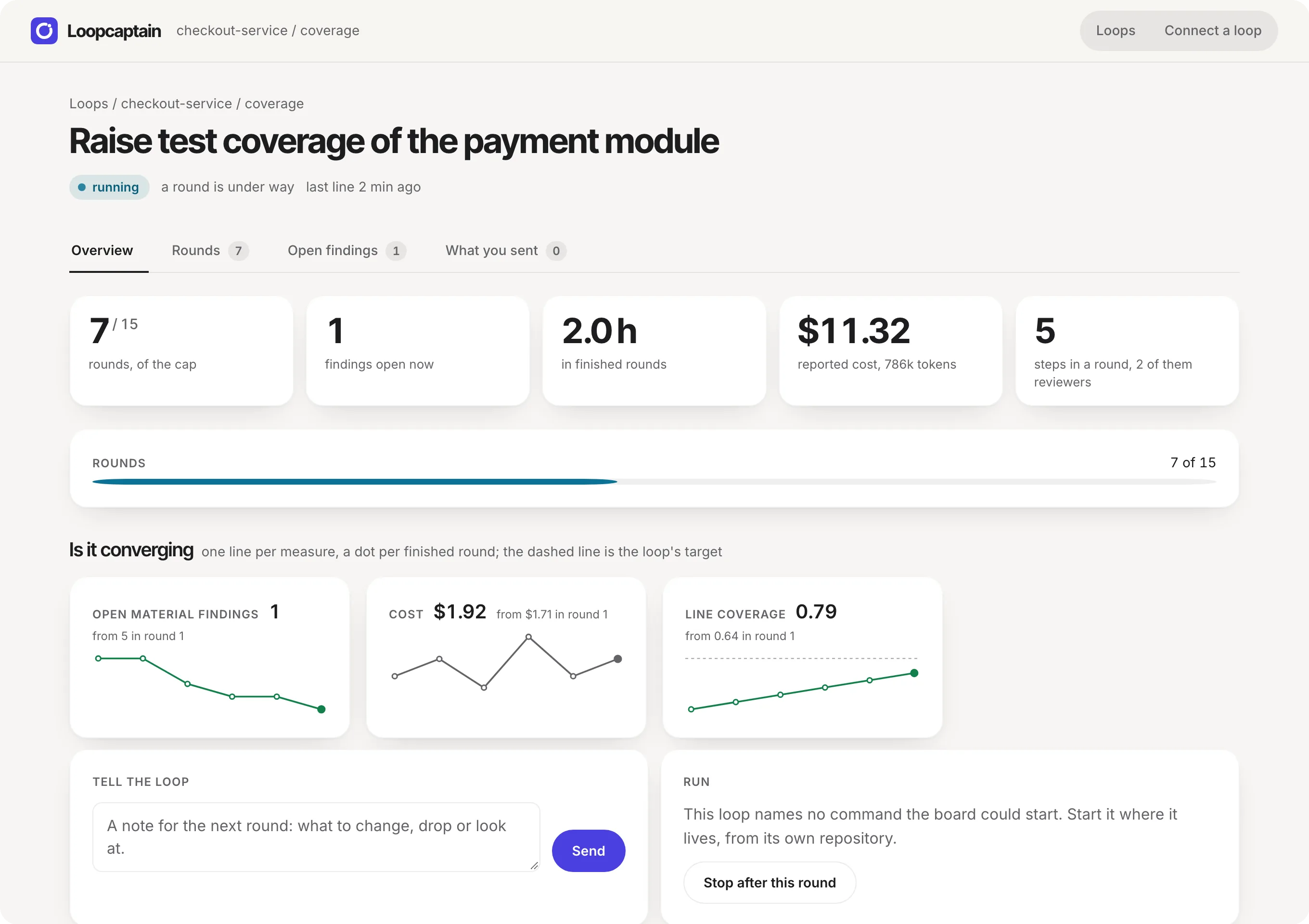
- One loop: the brief, the graph of a round, whether it converges (a line per measure against its target), bars against its caps, every round against every step, open findings, the items it evaluates, and what you sent with whether the loop took it.
- Signs before the loop sees them: a loop that stalled, one that goes round without getting closer, a step that needs you, a line it wrote that the protocol check refuses.
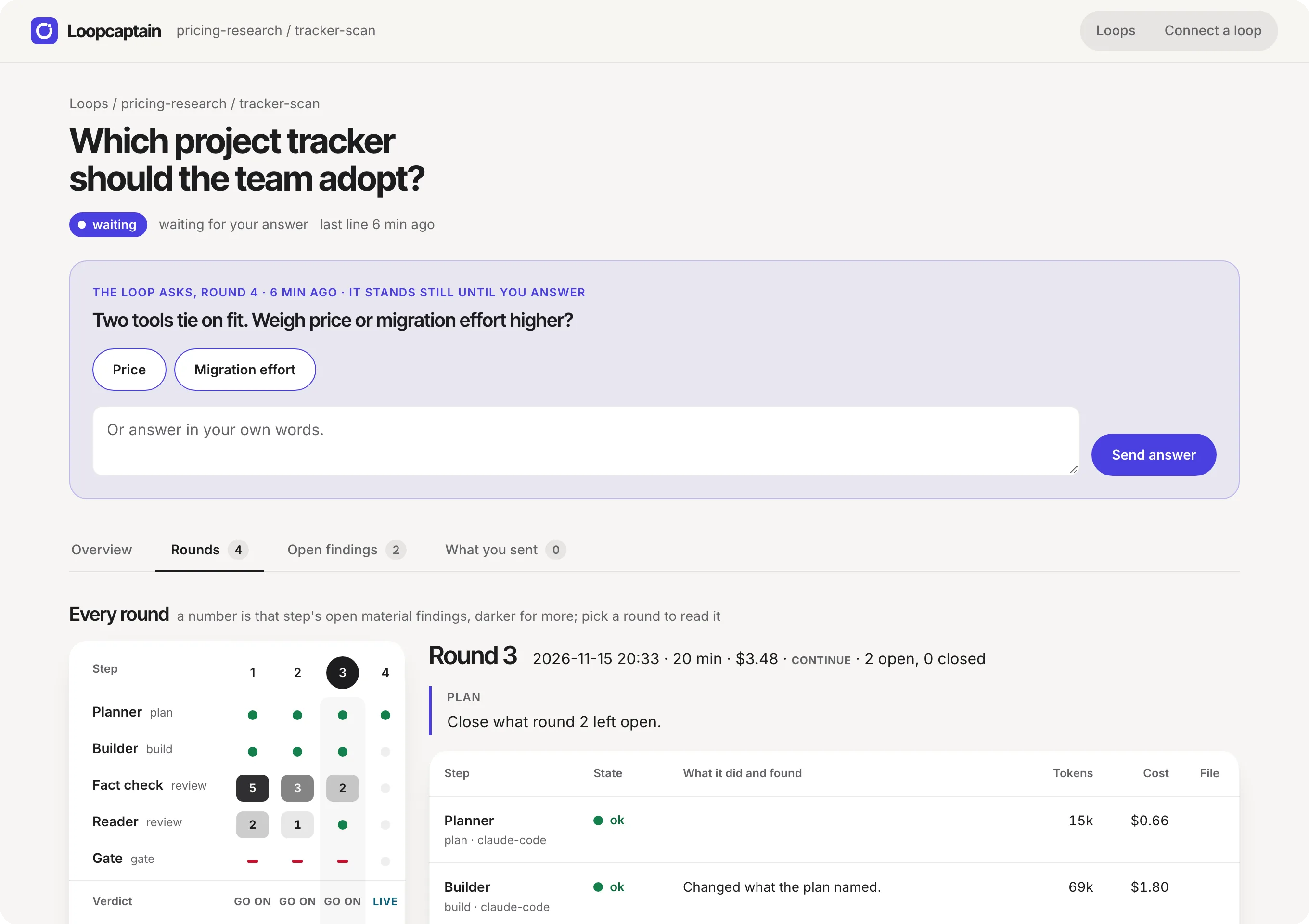
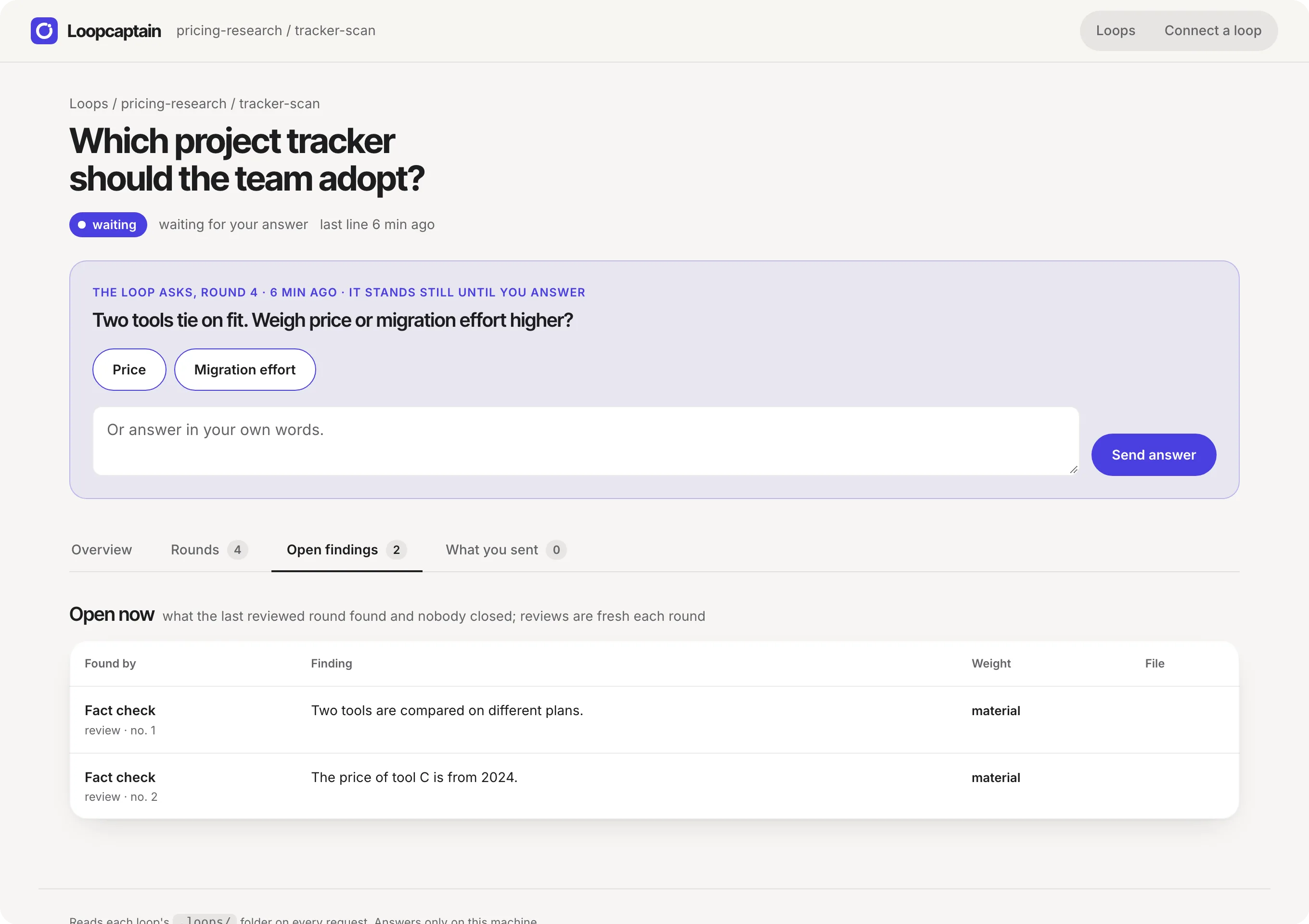
Steer a loop: answer, note, stop, start
- Answer. A loop that asks shows its question on the board, with
buttons where it offered choices. Your answer is one signed line in the
loop's
inbox.jsonl; the loop reads it at its next round. - Note. The same line without a question: a direction for the next round.
- Stop. The loop finishes the round it is in and ends.
loopcaptain doctorchecks that a loop really takes a stop. - Start. The board runs the one command the loop declared in its own
loop.json, without a shell, after you tick it once.
Connect a loop you already have
- A script (Python, shell, anything): paste the helper from standard/LOOPS.md and call it where a round and a step begin and end, or append the JSON lines yourself.
- A Ralph loop or any loop around an agent's command line: the shell
form,
loopcaptain emit <loop> <event> key=value, once per iteration. - A long-running agent session: add the MCP server
(
loopcaptain mcp-config <agent>), and the session reports its rounds through five tools.
standard/AGENTS.md walks an agent through each, and through building a loop from nothing.
Commands
loopcaptain serve                         # the board, 127.0.0.1 only
loopcaptain watch <folder> [--root]       # show a repository, or every one under a folder
loopcaptain demo                          # the example loop, written and watched
loopcaptain validate <repository>         # check a repository's .loops folders
loopcaptain doctor <repository> <loop>    # does the loop take a stop?
loopcaptain mcp-config <agent>            # how your agent adds the MCP server
loopcaptain emit <loop> <event> key=value # one event from a shell loop
From a checkout, put uv run in front, or use the make targets in
AGENTS.md.
How it differs
- A dashboard for one kind of loop watches the loops of its own runner. Loopcaptain watches any loop that writes the protocol's files.
- A session monitor shows an agent's live session and its transcript. Loopcaptain shows what sits above: rounds, steps, findings, verdicts, cost and the question that waits for you.
- A loop runner or control plane runs the loop. Loopcaptain runs none: it is a protocol and a board, and your loop stays your own.
- Agent observability traces model calls. Loopcaptain sends and takes no telemetry; docs/opentelemetry.md maps the protocol onto the GenAI conventions for those who want both.
What it is not
No agent runtime: the board runs no model and schedules nothing; it starts
only the one command a loop declares, after you tick it once. No database:
the files are the truth. No cloud and no login: it answers on 127.0.0.1
only, and to a browser that opened the address serve prints. No transcripts: a loop reports summaries and paths. See
SECURITY.md for what it trusts.
More
AGENTS.md runs the board and changes this repository. docs/ARCHITECTURE.md says why it is built this way. CHANGELOG.md says what changed.
License
Apache License 2.0: use it, change it and ship it, also commercially; keep the licence and the NOTICE, and say what you changed. It comes with a patent grant from every contributor. A contribution is taken under the same licence.
1 maintainer

Metadata
1 maintainer
Release files for loopcaptain 0.4.1
For a detailed explanation of source distributions (sdists) and built distributions (wheels), please see the package formats documentation.
Source distribution (sdist)
| File | Size | Uploaded | Provenance | Actions |
|---|---|---|---|---|
| loopcaptain-0.4.1.tar.gz | 1.8 MB | Without provenance | Details for loopcaptain-0.4.1.tar.gz |
Built distribution (wheel)
| File | Interpreter | ABI | Platform | Actions Reset |
|---|---|---|---|---|
| loopcaptain-0.4.1-py3-none-any.whl | Python 3 | none | any | Details for loopcaptain-0.4.1-py3-none-any.whl |
Total release size: 2.1 MB
Release files / loopcaptain-0.4.1.tar.gz
| Download URL | loopcaptain-0.4.1.tar.gz |
|---|---|
| Size | 1.8 MB |
| Tags | Source |
|
SHA-256 checksum How to use checksums |
52c90912d65d3a2ca2b28ca5f0f59d081411d079f0363d8820bcc3f72be37bc1
|
|
BLAKE2b-256 checksum How to use checksums |
ea14eb892e38f7e163ecc8d32a1984a0f0e57dc6139fb664e7aa204b36ca8740
|
| Upload date | |
|
Uploaded using Trusted Publishing? What is trusted publishing? |
Yes |
| Uploaded via |
uv/0.13.9 {"installer":{"name":"uv","version":"0.13.9","subcommand":["publish"]},"python":null,"implementation":{"name":null,"version":null},"distro":{"name":"Ubuntu","version":"26.04","id":"resolute","libc":null},"system":{"name":null,"release":null},"cpu":null,"openssl_version":null,"setuptools_version":null,"rustc_version":null,"ci":true}
|
Release files / loopcaptain-0.4.1-py3-none-any.whl
| Download URL | loopcaptain-0.4.1-py3-none-any.whl |
|---|---|
| Size | 223.6 kB |
| Tags | Python 3 |
|
SHA-256 checksum How to use checksums |
18b1cc08c95fdfdf5c1ed8e685951388ba006a98c83bb5172cb7939184a60e4b
|
|
BLAKE2b-256 checksum How to use checksums |
f009aa0f7ae511c52441fcecf170b68581bdeb73634d4c37b481db50df8befdd
|
| Upload date | |
|
Uploaded using Trusted Publishing? What is trusted publishing? |
Yes |
| Uploaded via |
uv/0.13.9 {"installer":{"name":"uv","version":"0.13.9","subcommand":["publish"]},"python":null,"implementation":{"name":null,"version":null},"distro":{"name":"Ubuntu","version":"26.04","id":"resolute","libc":null},"system":{"name":null,"release":null},"cpu":null,"openssl_version":null,"setuptools_version":null,"rustc_version":null,"ci":true}
|
Security for loopcaptain 0.4.1
Provenance
Provenance describes where a file came from. On PyPI, provenance is shared via attestations, which provide a verifiable record of the build or publishing details. View details, limitations and caveats.
No provenance found
None of the files in this release were uploaded with provenance metadata.
A note on package security
PyPI is a repository for distributing packages, not a service for auditing them. While third-party security researchers and our staff do their best to detect and remove malicious packages, PyPI cannot guarantee the quality, security or suitability of any given package.
To learn more about protecting yourself from malicious actors, visit our package security documentation.














