
asyncio Eventloop Blockers Detector/Analyzer.

Project description
LoopSentry
Asyncio Event Loop Blocker Detector & Analyzer
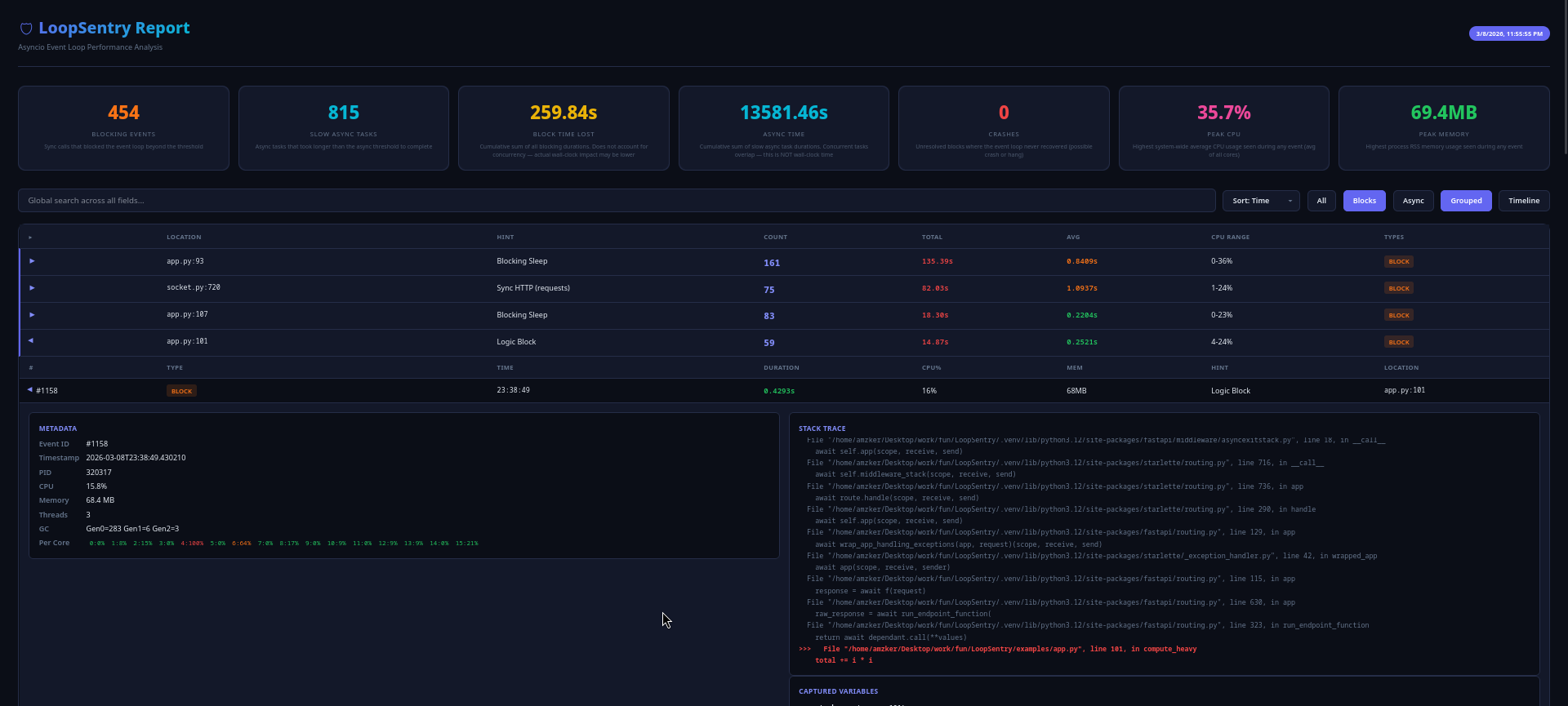
Detect blocking calls, slow async tasks, and performance bottlenecks in your asyncio applications. Captures stack traces, function arguments, CPU/memory/GC metrics. Generates standalone HTML reports and CSV exports.
HTML Report
Installation
pip install loopsentry
OR
uv add loopsentry
Quick Start
import asyncio
from loopsentry import LoopSentry

async def main():
    sentry = LoopSentry(threshold=0.1)
    sentry.start()
    # ... your application

asyncio.run(main())
Configuration
sentry = LoopSentry(
    base_dir="sentry_logs",          # log output directory
    threshold=0.1,                   # blocking detection threshold (seconds)
    async_threshold=1.0,             # slow async task threshold (seconds)
    capture_args=True,               # capture function arguments at block time
    detect_async_bottlenecks=True,   # track slow async tasks
)
| Parameter | Default | Description |
|---|---|---|
base_dir |
"sentry_logs" |
Directory for log output |
threshold |
0.1 |
Seconds before a blocking call is flagged |
async_threshold |
Same as threshold |
Separate threshold for slow async tasks |
capture_args |
False |
Capture local variables from stack frames |
detect_async_bottlenecks |
False |
Monitor async task completion times |
FastAPI / Uvicorn
from contextlib import asynccontextmanager
from fastapi import FastAPI
from loopsentry import LoopSentry

@asynccontextmanager
async def lifespan(app: FastAPI):
    sentry = LoopSentry(
        threshold=0.1,
        async_threshold=2.0,
        capture_args=True,
        detect_async_bottlenecks=True,
    )
    sentry.start()
    yield

app = FastAPI(lifespan=lifespan)
What It Detects
| Pattern | Type | Example |
|---|---|---|
| Blocking sleep | Block | time.sleep() in async context |
| Sync HTTP | Block | requests.get() instead of aiohttp/httpx |
| Sync DB calls | Block | PyMongo, sqlite3 sync operations |
| Subprocess | Block | subprocess.run() |
| CPU loops | Block | Tight loops without yielding |
| Slow coroutines | Async | Tasks exceeding async_threshold |
| Crashes | Crash | Process killed during a block |
CLI
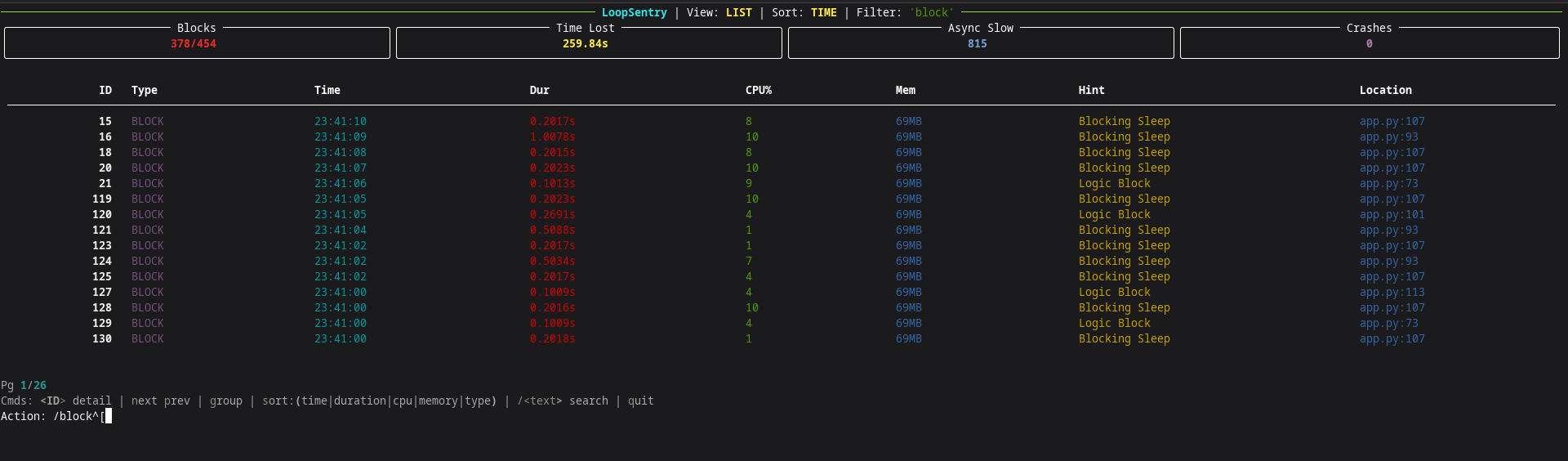
Interactive TUI
loopsentry analyze                          # auto-select latest logs
loopsentry analyze -d sentry_logs/          # specific directory
| Key | Action |
|---|---|
<ID> |
View event detail (stack trace, args, metrics) |
n / p |
Next / Previous page |
g |
Toggle group view (top offenders) |
s |
Cycle sort: time → duration → cpu → memory → type |
s:cpu |
Sort by specific column |
/text |
Search/filter events |
q |
Quit |
HTML Report
loopsentry analyze -d sentry_logs/ --html
loopsentry analyze -d sentry_logs/ --html -o report.html
Generates a standalone HTML file — no dependencies, no internet required. Open directly in any browser.
CSV Export
loopsentry analyze -d sentry_logs/ --csv
loopsentry analyze -d sentry_logs/ --csv -o data.csv
Full CLI Reference
loopsentry analyze [OPTIONS]

  -d, --dir DIR          Directory to scan
  -f, --file FILE        Specific .jsonl file to scan
  --html                 Generate standalone HTML report
  --csv                  Generate CSV report
  --sort COLUMN          Sort by: time | duration | cpu | memory | type
  -o, --output PATH      Output file path for HTML/CSV
Example
The examples/ directory contains a complete FastAPI application that deliberately triggers every type of blocking pattern LoopSentry detects.
Run the demo:
cd examples/

# Terminal 1 — start the server
uv run app.py

# Terminal 2 — fire test requests
uv run loadtest.py

# Terminal 1 — stop server (Ctrl+C), then generate report
loopsentry analyze -d example_logs/ --html
Endpoints in the demo app:
| Endpoint | What it does |
|---|---|
GET /healthy |
Clean async endpoint (no block) |
GET /users/sync |
Sync SQLite query blocking the loop |
POST /hash |
CPU-bound PBKDF2 hashing |
GET /external |
Async HTTP via httpx (clean) |
GET /external/sync |
Sync HTTP via requests (blocks loop) |
GET /sleep/{seconds} |
time.sleep() blocking the loop |
GET /compute |
CPU-bound loop (5M iterations) |
GET /mixed |
Sleep + DB + hashing in one request |
License
MIT


Download files
Download the file for your platform. If you're not sure which to choose, learn more about installing packages.
Source Distribution
Built Distribution
Filter files by name, interpreter, ABI, and platform.
If you're not sure about the file name format, learn more about wheel file names.
Copy a direct link to the current filters
File details
Details for the file loopsentry-1.0.0.tar.gz.
File metadata
- Download URL: loopsentry-1.0.0.tar.gz
- Upload date:
- Size: 269.2 kB
- Tags: Source
- Uploaded using Trusted Publishing? No
- Uploaded via: uv/0.10.0 {"installer":{"name":"uv","version":"0.10.0","subcommand":["publish"]},"python":null,"implementation":{"name":null,"version":null},"distro":{"name":"Fedora Linux","version":"43","id":"","libc":null},"system":{"name":null,"release":null},"cpu":null,"openssl_version":null,"setuptools_version":null,"rustc_version":null,"ci":null}
File hashes
| Algorithm | Hash digest | |
|---|---|---|
| SHA256 |
08c38b16793a478240e048856cace76b17279fc53624744f81d67d008fbd6464
|
|
| MD5 |
2b70dbd2591b514f654c18276646cb19
|
|
| BLAKE2b-256 |
04331fc52c0a20f96ed7e522d873fc239728b308bc68529e56e1c63e11796bb0
|
File details
Details for the file loopsentry-1.0.0-py3-none-any.whl.
File metadata
- Download URL: loopsentry-1.0.0-py3-none-any.whl
- Upload date:
- Size: 19.2 kB
- Tags: Python 3
- Uploaded using Trusted Publishing? No
- Uploaded via: uv/0.10.0 {"installer":{"name":"uv","version":"0.10.0","subcommand":["publish"]},"python":null,"implementation":{"name":null,"version":null},"distro":{"name":"Fedora Linux","version":"43","id":"","libc":null},"system":{"name":null,"release":null},"cpu":null,"openssl_version":null,"setuptools_version":null,"rustc_version":null,"ci":null}
File hashes
| Algorithm | Hash digest | |
|---|---|---|
| SHA256 |
f96ec26dae0254324515587e314e09936bd7160bd573c6e6c8da1aad2eee2ee6
|
|
| MD5 |
36789d46168503134c48bc362a89b91f
|
|
| BLAKE2b-256 |
1249cd0d44693b86335f2e209862bbb430cb8d03280498f3ce246869857468e0
|






