






Lore 🎙️
Privacy-First, Local-Only Oral History Transcription & Archiving
Lore is a desktop application designed for historians, archivists, and researchers. It provides state-of-the-art AI transcription, speaker diarization, named entity recognition, and translation—100% offline, on your own hardware.
No data leaves your computer. No cloud subscriptions. Just powerful, open-source AI packaged into a clean, intuitive PyQt6 interface.

✨ Features
- 🎧 Offline Transcription: Powered by
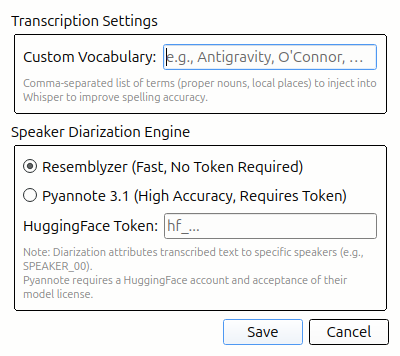
faster-whisper, optimized for CPU inference with low memory overhead (< 8GB RAM). - 🗣️ Speaker Diarization: Automatically identifies and labels different speakers using the ONNX-based pipeline (WeSpeaker embedding + KMeans clustering, using Whisper segment boundaries). No GPU, no HuggingFace token, no PyTorch required.
- 🔀 Overlapping Speech Detection: Flags when multiple speakers talk simultaneously via a lightweight ONNX segmentation model (6 MB). Overlap regions are visualised on a dedicated strip and per-segment badges in the transcript view.
- ⚡ Model Tier Selection: Choose between Fast (small), Balanced (medium), or Best Quality (large-v3-turbo) Whisper models in Settings.
- 🔍 Word-Level Confidence: Low-confidence words are visually highlighted so you can quickly spot potential hallucinations.
- 🌍 Local Translation: Translate transcripts to over 200 languages completely offline using Meta's
NLLB-200model. - 📖 Custom Vocabulary: Provide local jargon, proper nouns, and historical terms to guide Whisper's decoding graph for maximum accuracy.
- 🏷️ Named Entity Recognition: Uses
GLiNERto automatically extract people, organizations, dates, and locations. - 📦 Archival Exporting: Export your work to the OHMS XML format or create an RFC 8493 BagIt archival package with SHA-256 checksum verification.
- 🔎 Global Archive Search: A unified SQLite database (
FTS5+sqlite-vec) lets you instantly search across all your past projects using keyword or semantic/conceptual search.
🚀 Installation
Option 1: Pre-built Installers (Recommended)
Download the installer for your platform from the latest release:
| Platform | Installer |
|---|---|
| 🪟 Windows | lore-windows-x86_64.zip — Extract and run lore.exe |
| 🍎 macOS | lore-macos-arm64.tar.gz — Extract and run lore |
| 🐧 Linux | Install via PyPI (pip install lore-ai) or build from source |
Option 2: Install from PyPI
pip install lore-ai
lore
Option 3: Install from Source
Lore requires Python 3.12+ and is cross-platform (Windows, macOS, Linux).
-
Clone the repository:
git clone https://github.com/mabo-du/lore.git
cd lore
-
Set up a virtual environment:
python -m venv .venv
source .venv/bin/activate  # On Windows: .venv\Scripts\activate
-
Install the application:
pip install -e .
🎮 Usage
Start the Lore application:
lore
Or launch from your system's application menu if installed via the pre-built installer.
-
Select an Audio File: Click "Browse" to select any standard audio format (WAV, MP3, M4A, OGG, FLAC).
-
Configure Settings: Click the ⚙️ Settings icon to set your Custom Vocabulary and speaker diarization preferences.
-
Transcribe & Diarize: Click "Transcribe" on the toolbar. If recording has multiple speakers, check the "Enable Speaker Diarization" box.
-
Edit & Review: Play the audio, click on segments to edit them, and review any low-confidence words highlighted in red.
-
Translate: Select a target language from the dropdown and click "Translate" for fully offline translation.
-
Export: Fill out the Metadata panel and export to OHMS XML or an Archival BagIt Package.
For detailed instructions, see the User Guide.
🏗️ Architecture
Lore is designed with strict sequential memory management to run on older hardware.
- Models are loaded into memory one at a time (e.g., Whisper loads, transcribes, unloads → NLLB loads, translates, unloads).
- Heavy use of CTranslate2 (INT8 quantization) ensures models run blazingly fast without needing a dedicated GPU.
- The UI runs asynchronously using PyQt6's
QThreadand Signals, keeping the interface completely responsive during heavy AI workloads.
🤝 Contributing
Lore is an open-source project. We welcome pull requests, bug reports, and feature requests. Please see our User Guide for more detailed workflows and documentation on the codebase.
📜 License
This project is licensed under the MIT License - see the LICENSE file for details.
1 maintainer

Metadata
1 maintainer
Release files for lore-ai 0.1.10
For a detailed explanation of source distributions (sdists) and built distributions (wheels), please see the package formats documentation.
Source distribution (sdist)
| File | Size | Uploaded | Provenance | |
|---|---|---|---|---|
| lore_ai-0.1.10.tar.gz | 68.3 kB | With provenance | Details |
Built distribution (wheel)
| File | Interpreter | ABI | Platform | Reset |
|---|---|---|---|---|
| lore_ai-0.1.10-py3-none-any.whl | Python 3 | none | any | Details |
Total release size: 137.4 kB
Release files / lore_ai-0.1.10.tar.gz
| Download URL | lore_ai-0.1.10.tar.gz |
|---|---|
| Size | 68.3 kB |
| Tags | Source |
|
SHA-256 checksum How to use checksums |
373997156d096f016faaafeac49952f6db25b56d42e0f06c4827ce55c1754218
|
|
BLAKE2b-256 checksum How to use checksums |
da803e3cb7c4f053722dcda92cd54916d6a95bc32982aeabade218c0d687f5bf
|
| Upload date | |
|
Uploaded using Trusted Publishing? What is trusted publishing? |
Yes |
| Uploaded via |
twine/6.1.0 CPython/3.13.12
|
Provenance
Provenance describes where a file came from. On PyPI, provenance is shared via attestations, which provide a verifiable record of the build or publishing details. View details, limitations and caveats.


PyPI Publish Attestation
PyPI verified that this artifact, at this checksum, originated from the publisher listed below.
Signed by GitHub Actions, verified by PyPI on Jun 19, 2026.
Transparency logRelease files / lore_ai-0.1.10-py3-none-any.whl
| Download URL | lore_ai-0.1.10-py3-none-any.whl |
|---|---|
| Size | 69.0 kB |
| Tags | Python 3 |
|
SHA-256 checksum How to use checksums |
d5c708fc999fed1a1b330b0ca4f6fafeea77f57dde2f46e0d23777a183e16eb4
|
|
BLAKE2b-256 checksum How to use checksums |
6aa8169b06c7957ee11cd55cfd6bf30269e5bd76e3c26044a3c1d9405ceb9f06
|
| Upload date | |
|
Uploaded using Trusted Publishing? What is trusted publishing? |
Yes |
| Uploaded via |
twine/6.1.0 CPython/3.13.12
|
Provenance
Provenance describes where a file came from. On PyPI, provenance is shared via attestations, which provide a verifiable record of the build or publishing details. View details, limitations and caveats.
PyPI Publish Attestation
PyPI verified that this artifact, at this checksum, originated from the publisher listed below.
Signed by GitHub Actions, verified by PyPI on Jun 19, 2026.
Transparency logSecurity for lore-ai 0.1.10
Provenance
Provenance describes where a file came from. On PyPI, provenance is shared via attestations, which provide a verifiable record of the build or publishing details. View details, limitations and caveats.
Full provenance
All 2 files in this release have been uploaded with provenance metadata.
Attestation for lore_ai-0.1.10.tar.gz
PyPI Publish Attestation
PyPI verified that this artifact, at this checksum, originated from the publisher listed below.
Signed by GitHub Actions, verified by PyPI on Jun 19, 2026.
Transparency logA note on package security
PyPI is a repository for distributing packages, not a service for auditing them. While third-party security researchers and our staff do their best to detect and remove malicious packages, PyPI cannot guarantee the quality, security or suitability of any given package.
To learn more about protecting yourself from malicious actors, visit our package security documentation.














